
Meta title: How to Write a Product Requirements Document
Meta description: Learn how to write a product requirements document teams can build from, with clear steps for scope, requirements, edge cases, and handoff.
URL slug: how-to-write-a-product-requirements-document
Last week I watched a Product Manager realize, halfway through QA, that the feature everyone built was reasonable, polished, and wrong.
The PRD had left too much open to interpretation, so the designer filled gaps with one set of assumptions, engineering filled them with another, and QA found the mismatch only after the work was already expensive to change. A missing state in onboarding, an undefined failure path in checkout, a vague phrase like “fast” or “simple,” that's usually all it takes for a clean plan to turn into a rework loop.
A strong PRD fixes that by turning intent into a shared contract. The rest of this guide shows how to write a product requirements document that teams can build from, with a practical workflow you can reuse and a modern view of the PRD as a living artifact connected to design, tickets, QA, and product context.
Why Your Last PRD Was Too Vague
Most PRDs fail because they describe a feature idea without fully defining the decisions that implementation depends on.
The usual failure mode looks harmless at first. A Product Manager writes the user story, adds a mock, lists a few requirements, and assumes the rest can be clarified in standups. Then the team gets into the work and starts making local decisions. Should the user be able to save partial input? What happens if the API returns stale data? Does the flow resume after interruption? Who can view the result? Nobody is blocked on day one, which is why vague PRDs survive longer than they should.
I've seen this most often in “simple” features. A settings update, a new approval step, a search refinement. Those are exactly the features that attract light documentation because they look familiar. Then a hidden branch appears and the cost moves downstream, into design revisions, engineering rewrites, and bug triage.
Practical rule: If a requirement leaves two smart people room to infer different behavior, it isn't finished.
The hidden cost isn't only rework. It's trust. Once teams learn that the PRD is suggestive rather than precise, they stop treating it as the source of truth. Engineers ask in Slack. Designers keep side notes. QA writes its own interpretation. The artifact fragments.
That's why vague requirements create more than delivery friction. They create parallel realities.
A good PRD closes those gaps early. It records what matters, leaves out what doesn't, and makes trade-offs visible while change is still cheap. That's the standard worth aiming for.
What a Product Requirements Document Actually Is
A product requirements document is the working artifact that defines what the product must do, why it matters, and the conditions it must satisfy to be considered complete.
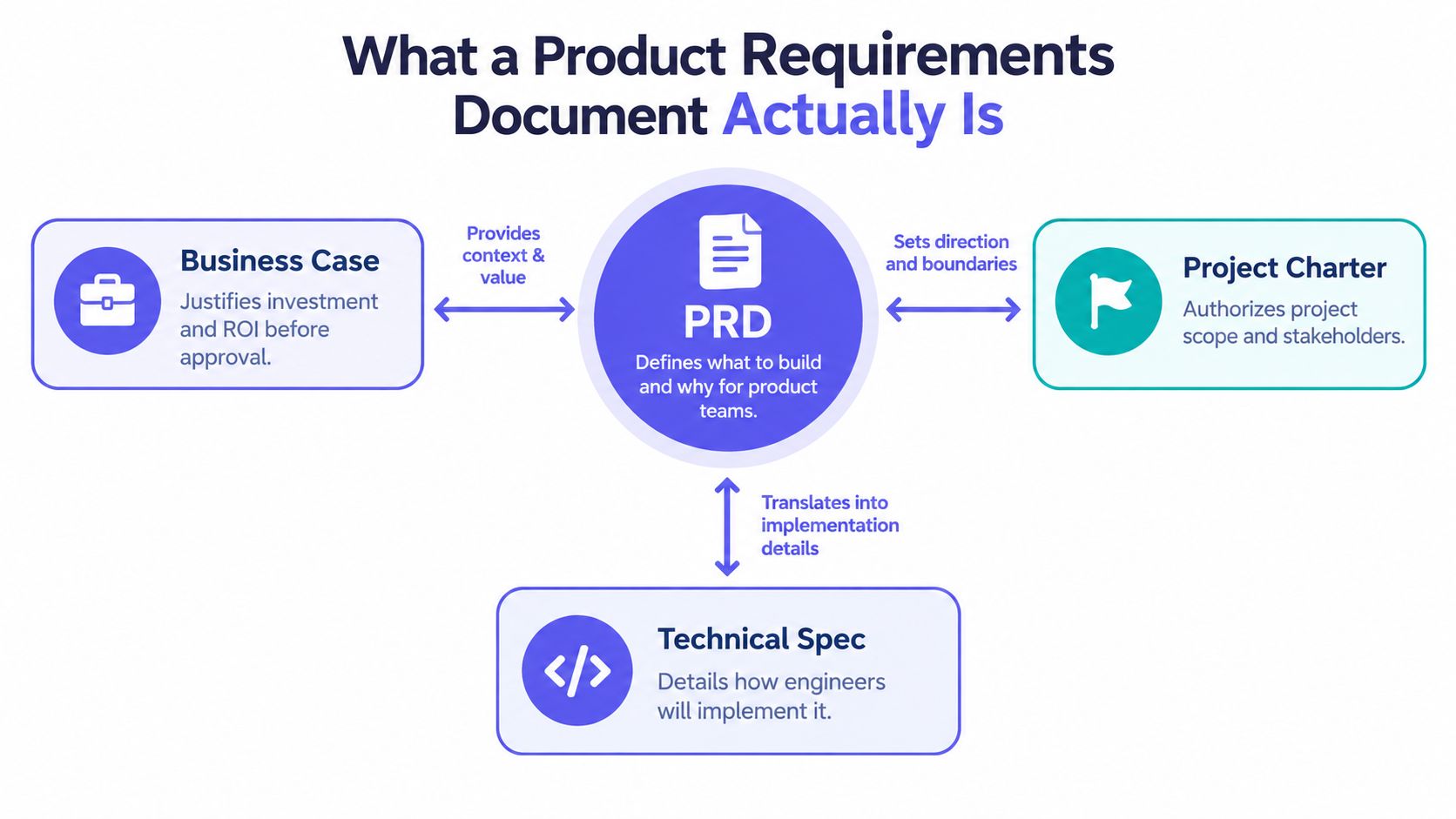
That sounds obvious, but teams often blur it with adjacent documents. A business case argues for investment. A project charter names owners and scope boundaries. A technical spec explains implementation. The PRD sits in the middle. It translates product intent into buildable requirements.
What the PRD controls
In practice, the PRD should control:
Scope decisions: What's in, what's out, and what's deferred
Assumptions: What the team is counting on being true
Stakeholder alignment: The shared version of the feature
Change management: What changed, why, and what it affects
This is the basic gist is this: if the PRD isn't the artifact that holds those decisions together, the team will recreate them somewhere else, usually in less visible places.
There's strong evidence behind that discipline. An empirical analysis of software projects found that the quality and management of requirements documentation were significant predictors of outcomes, and a separate analysis reported that the best predictor of project success was having requirements that were good and well-managed, with 93% of projects correctly predicted by those two factors alone in the study discussed by Old Dominion University's requirements research archive.
What the PRD should not do
A PRD shouldn't prescribe how engineers will build the system. That separation matters. NASA's software requirements guidance treats requirements as distinct from design and recommends unique identifiers, unambiguous “shall” statements, and requirements that are complete, correct, consistent, traceable, measurable, testable, and feasible in its software engineering handbook.
That old systems-engineering discipline still holds up. When the PRD states what must happen, and the technical spec states how it will happen, reviews get sharper and QA coverage gets cleaner.
If you're comparing formats, a PRD is closer to a software requirements specification than to a strategy memo. The difference is that the PRD stays closer to product outcomes, user behavior, and release decisions.
The PRD Sections Every Team Needs
A strong PRD needs a small set of sections that move from problem to buildable requirements without turning into a feature dump.
For a running example, use a feature like AI playlist creation inside a music app. It's familiar, but it contains enough ambiguity to expose weak documentation. Does the playlist update over time? Can a user edit the prompt after generation? What happens if the request produces low-confidence results?
According to Atlassian's guide to requirements, a strong PRD centers goals, assumptions, user stories, design context, and clear out-of-scope items. That maps well to what teams need in a modern product requirements document.
The core PRD structure
This is what I mean when I say the PRD should be concise but buildable:
Problem and goal
Define the user problem in plain language
State the product goal and the intended outcome
Evidence and context
Add the research, support tickets, analytics context, or recordings that justify the work
Note any assumptions that still need validation
Scope
List what's included in this release
Name explicit out-of-scope items so the team doesn't infer them later
User stories and flow
Describe the primary user path
Attach relevant screens, wireframes, or a user flow mapping reference
Requirements
Translate the feature into functional requirements
Add system constraints and acceptance criteria
Risks and open questions
- Record unresolved dependencies, policy questions, or technical unknowns
What this looks like in practice
For the AI playlist example, “users can create a playlist from a text prompt” is not enough. A usable product spec template would also define when generation starts, how retries work, how empty results are handled, whether editing preserves history, and what marks the action as complete.
Later, when you need examples, a detailed product requirements document example helps teams see the difference between a narrative brief and a build-ready artifact.
A short walkthrough can help make the shape concrete:
The point isn't to make the PRD longer. It's to make the decisions legible.
How to Write Testable Requirements and Acceptance Criteria
Testable requirements convert product intent into statements that engineering and QA can verify without guessing.
Most weak PRDs fail at the sentence level. They use terms like intuitive, lightweight, quick, flexible, or user-friendly. Those words feel useful because they sound directional. They aren't. They don't tell the team what to build or how to validate it.
Write the minimum needed for a correct decision
Research on requirements quality recommends the principle of minimality while still making requirements correct, unambiguous, complete, consistent, ranked by importance and stability, verifiable, modifiable, and traceable, as outlined in the iTestra paper on requirements document quality.
That principle matters because over-writing creates as much drift as under-writing. Teams start skimming. Details lose signal. The requirement gets padded, then ignored.
Vague requirements don't fail in planning. They fail in interpretation.
A simple example from Fictiv's PRD guidance on measurable language captures the point well: replace “lightweight” with a target such as “under 500g including battery.” Specific language makes the requirement testable.
A practical writing method
Use this workflow when drafting requirements for prd software development work:
Step 1. Start with one user action.
Name the trigger in plain language.
Example: user enters a prompt and taps Generate.Step 2. Define one system response.
State the expected behavior without prescribing implementation.
Example: the system returns a draft playlist based on the prompt.Step 3. Add acceptance conditions.
Write the conditions that make the behavior complete.Visible output: A playlist title and track list are shown
Editable state: The user can revise the prompt and regenerate
Saved result: The user can save the playlist to their library
Step 4. Add edge cases.
Capture the conditions most guides skip.
Empty result: The system explains that no playlist could be generated
Interrupted session: The draft remains available if the user returns
Permission issue: The save action explains required account state
A requirement pair that works
Here's a cleaner pattern for a software PRD:
Requirement: When a signed-in user submits a text prompt, the product shall generate a draft playlist and display it within the playlist creation flow.
Acceptance criteria:
Draft display: The draft includes a title and track list
Revision path: The user can edit the prompt and request a new draft
Save path: The user can save the selected draft to their library
If your team struggles to connect requirements to QA, this guide on creating test cases for product teams is the natural next step.
Adding System and Non-Functional Requirements
A PRD becomes buildable when it includes system and non-functional requirements alongside feature behavior.
Many Product Managers stop too early. They specify what the feature does, then assume engineering will infer the rest. That works until two engineers infer different latency expectations, or security constraints surface after implementation, or QA realizes nobody defined failure handling.
The constraints that belong in the PRD
Industry guidance on PRDs recommends including non-functional requirements such as performance benchmarks, security standards, scalability needs, and compliance obligations in the Perforce guide to writing PRDs. The point isn't to turn the PRD into a low-level design document. It's to define the operational contract around the feature.
For the AI playlist flow, that usually means requirements like these:
Performance expectations
Define acceptable wait behavior
State what the user sees while generation is in progress
Access control
Clarify whether guest users can generate drafts
Specify what account state is required to save or share
Failure modes
Define timeout behavior
Explain how the flow recovers from a failed response
Data and policy constraints
Note retention assumptions
Record content or moderation rules if they apply
Why this changes delivery quality
When those constraints stay implicit, engineering fills them in with local judgment. Sometimes that judgment is solid. Sometimes it collides with legal, support, or product intent at the worst possible moment.
A useful habit is to write each major feature in two layers:
Layer: Behavior requirement
What to capture: What the user can do and what the product returns.
Layer: System requirement
What to capture: Conditions around performance, permissions, resilience, and policy.
If your team needs a cleaner map of system boundaries before the PRD gets detailed, this product teams system context guide is often where alignment gets easier.
Making the PRD a Living Workflow Artifact
A modern PRD should stay connected to the workflow after drafting, not freeze at sign-off.
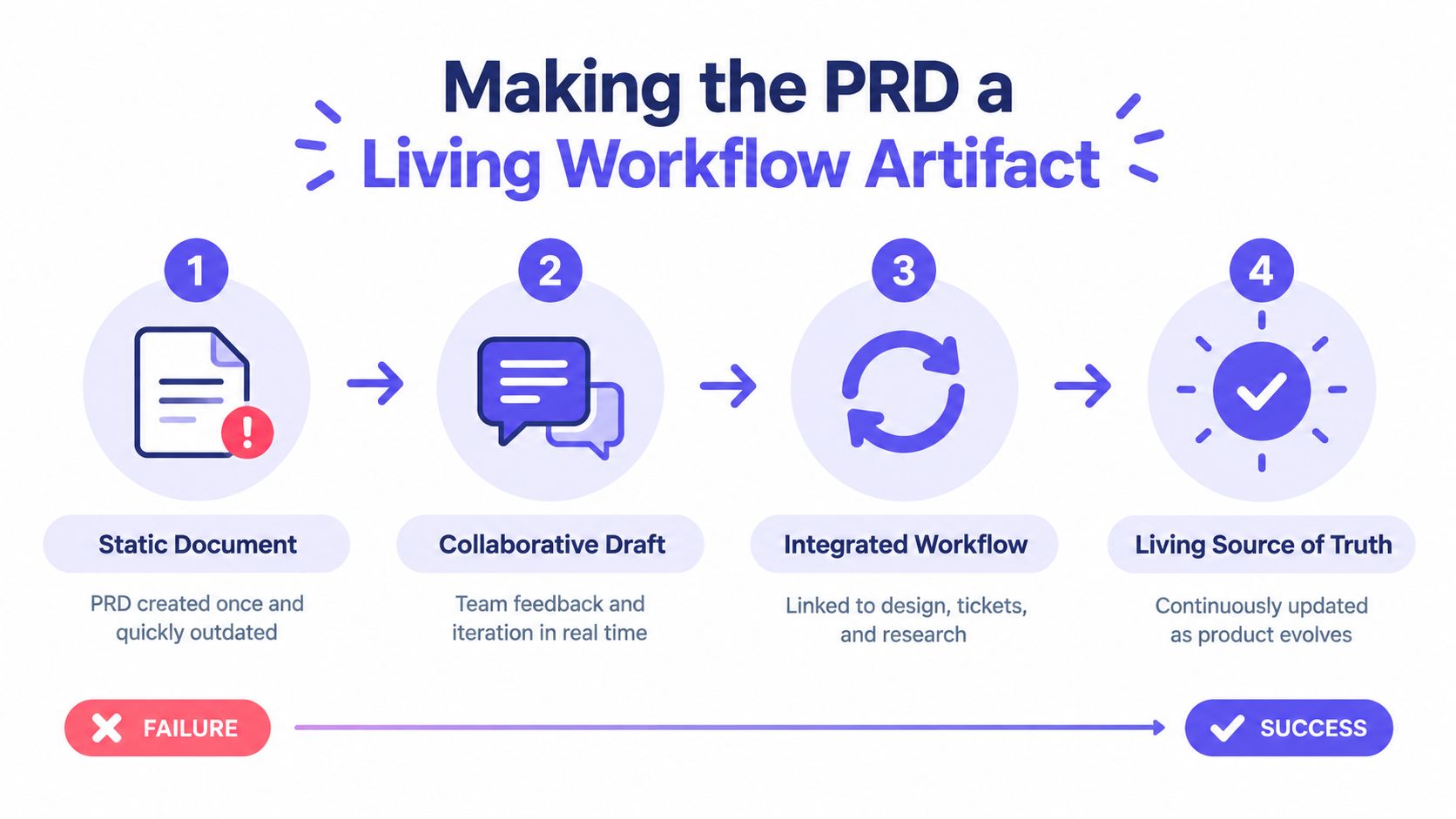
Static PRDs fail. The document is approved, sprint planning begins, and decisions move elsewhere, into Jira comments, Figma notes, standup clarifications, QA tickets, and ad hoc Slack threads. Soon the original artifact still exists, but nobody trusts it.
Recent product-management writing emphasizes that PRDs increasingly act as living, workflow-connected artifacts linked to backlogs, research, Jira, Figma, and Notion rather than documents that get signed off and shelved, as described in this discussion of what a good PRD looks like.
What changes when the PRD stays live
The difference is practical:
Design stays aligned
Screens trace back to requirements
New states get reflected in the document
QA gains coverage
Acceptance criteria become test input
Requirement changes trigger test changes
Analytics stays relevant
Success measures stay attached to the release intent
Post-launch learning feeds back into the artifact
This is also where incentives matter. At scale, teams don't lose time because they lack templates. They lose time because information decays across handoffs. A living PRD slows that decay.
How teams keep it current
The strongest setup is lightweight but connected:
Link, don't duplicate
Attach research, designs, backlog items, and decisions
Keep the PRD lean, then point outward
Version requirements deliberately
Record changed assumptions
Note impact on scope, QA, and release criteria
Use AI carefully
Summaries and draft acceptance criteria can save time
Context fidelity matters more than fast output
For teams exploring that workflow, organize product docs with AI is useful when documentation has already spread across tools, and edge case mapping for complex flows helps turn hidden states into visible requirements.
When to Keep a PRD Lightweight
A lightweight PRD is enough when the scope is narrow, the risk is low, and the team already shares deep context.
Teams waste time in two opposite ways. Some under-document complex work. Others write a full software requirements specification for a small iteration that could have fit on one page. The right depth depends on risk, ambiguity, and dependency load.
A simple decision frame
Recent guidance recommends choosing between a lightweight and fuller PRD by explicitly flagging assumptions, evidence, and invalidation criteria, with product teams increasingly favoring outcome-driven and evidence-backed requirements over feature lists in the Koji discussion of PRDs from customer research.
Use a lightweight prd template when:
The change is local
- One flow, one team, limited dependency risk
The behavior is familiar
- Existing patterns already cover most states
The blast radius is small
- Errors are easy to reverse and cheap to fix
Move to a fuller product spec template when:
Multiple teams depend on it
- Shared systems and approvals raise coordination cost
The states multiply
- Edge cases, roles, and failure paths matter
Release risk is meaningful
- The work affects revenue, trust, or compliance
Keep the document lean either way
Best-practice PRDs should stay lean and actionable while linking to supporting materials such as detailed specs, notes, and designs, as outlined in Document360's PRD guidance. That idea matters more than the template itself. The PRD should carry the decision-critical material and point to the rest.
Working rule: Add detail only when it changes build, test, or release decisions.
If you're shipping an early version, the discipline behind Figr's MVP approach can help you cut scope without cutting clarity.
How Figr Connects PRDs to Visual Context
A good PRD gets stronger when the requirements stay connected to the actual product context the team is working inside.
That's where context-aware tooling earns its place. Figr starts from existing product reality rather than isolated screens. It can work from live screens, Figma files, design systems, PRDs, research, analytics, recordings, code and component context, screenshots, and existing flows. For a Product Manager writing a PRD, that matters because the hardest part usually isn't generating prose. It's preserving context across artifacts.
The five layers that matter
Figr's Visual Context Graph maps that context across five layers:
Visual context
What the user currently sees across screens, states, and layouts.Behavioral context
The flow logic, user intent, transitions, and edge cases around actions.Design system context
Tokens, components, variants, states, usage rules, and design judgment.Product knowledge context
PRDs, research, decisions, assumptions, recordings, and linked product artifacts.Implementation context
Code and component relationships that affect feasibility and handoff.
That structure fits the way strong requirements work. A requirement rarely fails in isolation. It fails because one of those layers is missing when the team interprets it.
What that looks like in practice
If you're writing a PRD for a checkout setup redesign or an AI playlist flow, the document can stay attached to real product material rather than generic placeholders. A Product Manager can use contextual inputs to draft requirements, map states, and generate Figma-ready design direction without pretending the tool replaces Designer judgment.
For example, the Mercury runway forecasting PRD and other gallery examples are useful references because they show how product context can carry through the artifact instead of being flattened into a generic template. And if you want the next step after documentation, teams start to turn PRDs into prototypes.
The hidden gain is continuity. Requirements, states, flow logic, and handoff stop drifting apart.
A practical next move is simple. Take one active feature and rewrite only three things in its PRD today: the out-of-scope list, the edge cases, and the acceptance criteria. If those three areas get sharper, the whole document usually does too.
Then connect the PRD to the artifacts your team already uses. A linked flow, a design file, a QA case set, and a short list of open assumptions will do more for execution than another template ever will.
If you want a stronger example set before rewriting your own, compare your draft against an example of a requirements document, then review a functional specification document example to see where product requirements should stop and implementation detail should begin.
Figr helps teams turn scattered product context into working artifacts, including PRDs, user flows, edge-case maps, and Figma-ready design direction grounded in the product they already have. If you want a faster way to write requirements that stay connected to research, screens, and handoff, visit Figr.
FAQ
How detailed should a PRD be?
Detailed enough to remove ambiguity from build, test, and release decisions. If extra detail doesn't change a decision, link it elsewhere.
What's the difference between a PRD and a technical spec?
The PRD defines what the product must do and why. The technical spec explains how engineering will implement it.
Should Agile teams still write PRDs?
Yes, but the document should stay lean and iterative. The useful PRD in Agile is a living artifact, not a frozen memo.
What belongs in acceptance criteria?
Clear conditions that confirm the requirement is complete, including core behavior, visible outputs, edge cases, and failure handling.
Can AI help write a PRD?
Yes, AI can help draft and organize requirements, but it still needs product context and human review to avoid vague or generic output.