

It's 3:17 PM on a Friday. A critical bug just surfaced in production, the kind a green checkmark on the test plan was supposed to prevent.
This isn’t just a technical glitch. It's a communication breakdown, a silent chasm that opened between the product vision and what got built. That moment of expensive, stressful failure is the direct result of a vague test case. Software isn’t a conveyor belt where ideas become code: it’s a switchboard, where every connection must be deliberately plugged in.
A Test Case Is a Conversation
We often treat test cases like items on a grocery list: tedious, necessary, and something to get through. Check the box, move on. But does that really work?
A great test case isn't a checkbox; it's a shield against ambiguity. It's the moment an abstract idea becomes a concrete, verifiable instruction. The basic gist is this: you must reframe the task from a simple QA chore into a strategic product activity.
The mental model I use is to treat Test Cases as Scenarios, where each one is a miniature story about a user's journey. What are they trying to do? What happens if they succeed? More importantly, what happens when they fail, get distracted, or do something completely unexpected?
A friend at a fintech company told me about a new "freeze card" feature. The happy path was simple: the user taps "Freeze Card," and the card is frozen. Easy.
But the initial test cases stopped there. They didn't ask what happens if a transaction is already in progress. Or if the user loses their internet connection mid-tap. Or if the request times out. You can see how this simple oversight could lead to chaos. Each of those questions should have been its own documented test case, a complete story with a defined ending.
The Economic Impact of Ambiguity
This isn't just about finding bugs; it’s about economics.
A question answered during planning costs a few minutes. That same question, asked by an engineer during development, costs hours. When it surfaces as a bug after launch? It can cost days of work and your customers' trust.
Vague test cases create debt. It's a hidden tax on your roadmap, paid in late-night rework and emergency patches. According to research from Salesforce, turning existing knowledge into structured tests is a crucial step to ensuring an application performs as expected. Every undefined scenario is an assumption an engineer is forced to make. To avoid this cost and ensure your data is always accurate, you might want to check out a comprehensive guide to testing tags for flawless analytics.
By learning how to create test cases that tell a complete story, you ensure that what you envisioned is precisely what gets shipped. It’s about protecting the integrity of the user experience and, ultimately, your team’s most valuable resource: time.
Translating User Stories Into a Test Blueprint
A user story is the architect's concept sketch. It captures the soul of a feature, the core human need. But you can't build a skyscraper from a sketch.
For that, you need blueprints: detailed schematics that leave no room for interpretation.
Test cases are those blueprints. They translate the "why" of a user story into the specific "how" an engineer needs to build a stable, reliable structure. Without this translation, you aren't empowering your team; you are forcing them to guess.
From Narrative to Actionable Steps
So, how do you deconstruct a simple narrative like, "As a user, I can reset my password," into a set of instructions a machine can verify? You break it down into its fundamental parts. Every test case, no matter how complex, is built from three core components.
Think of it as a simple formula for clarity:
- Preconditions: What must be true before the user even begins? Does the user need an existing account? Must they be logged out? This sets the stage.
- User Actions: This is the sequence of steps the user takes. It’s not just "resets password," but "clicks 'Forgot Password'," "enters registered email," "opens email," "clicks reset link," and so on. Be precise.
- Success Criteria: What is the exact, observable outcome that proves the action was successful? Does the user see a "Password updated successfully" message? Are they redirected to the login screen? This is the definition of "done."
You are systematically turning a single requirement into a series of verifiable questions you can ask the software. You can see how this fits into the bigger picture by reading our guide on frameworks for product requirements documents.
The Economic Cost of the Happy Path
I once watched a product manager define a simple file upload feature. The engineering estimate was two weeks. It took six.
Why the massive discrepancy? The PM specified one user story and one happy path test case. But during development, the engineers discovered eleven other states: file too large, wrong file type, network connection lost mid-upload, duplicate filename, insufficient storage.
Each of those states was an unwritten test case.
Each one required new design decisions, new PM input, and new code. The two-week estimate assumed one blueprint; the six-week reality was building twelve. This illustrates the massive economic drag of incomplete thinking. Every undefined state is a tax on your roadmap, paid with rework and missed deadlines.
The software testing market exploded to USD 55.8 billion in 2024, driven by the high cost of exactly these kinds of failures. When development teams adopt Agile and DevOps practices, poor test cases can lead to rework rates as high as 30-50%. This isn't just an engineering problem; it’s a direct hit to product velocity and business outcomes. You can dig deeper into the forces shaping this market and why automated test coverage is becoming essential.
In short, a user story is just the starting point. Your job is to map that story onto the messy, unpredictable terrain of reality. The blueprint isn't just for the sunny day scenario; it must also show where the emergency exits and fire escapes are.
Mapping the Unhappy Path to Discover Edge Cases
The happy path is a pleasant fiction, a clean, well-lit street running through the center of town. Reality, however, lives in the tangled network of side alleys and unpaved roads where things actually break.
This is the unhappy path.
Mapping it isn't pessimism, it's realism. Learning how to create test cases for these scenarios is what separates a resilient product from a fragile one.
Thinking Like a City Planner
Your job is a lot like a city planner's. You don’t just design the main roads; you have to anticipate traffic jams, accidents, and sudden detours. What happens when a water main breaks or a bridge is unexpectedly closed? A good city has a plan. A good product does too.
For every single user action, you have to ask: "What could go wrong here?"
This systematic hunt for potential failures is where true product quality is forged. It’s about exploring scenarios that push the system to its limits, revealing weaknesses long before your users do.
Techniques for Uncovering Edge Cases
You don't just stumble upon these hidden issues by chance. You hunt them down with specific techniques.
- Boundary Analysis: This is all about testing the limits. If a user can upload a file up to 25MB, what happens at 25.1MB? What about exactly 25MB? If a username must be between 6 and 20 characters, test what happens at 5, 6, 20, and 21. These boundaries are where code often snaps.
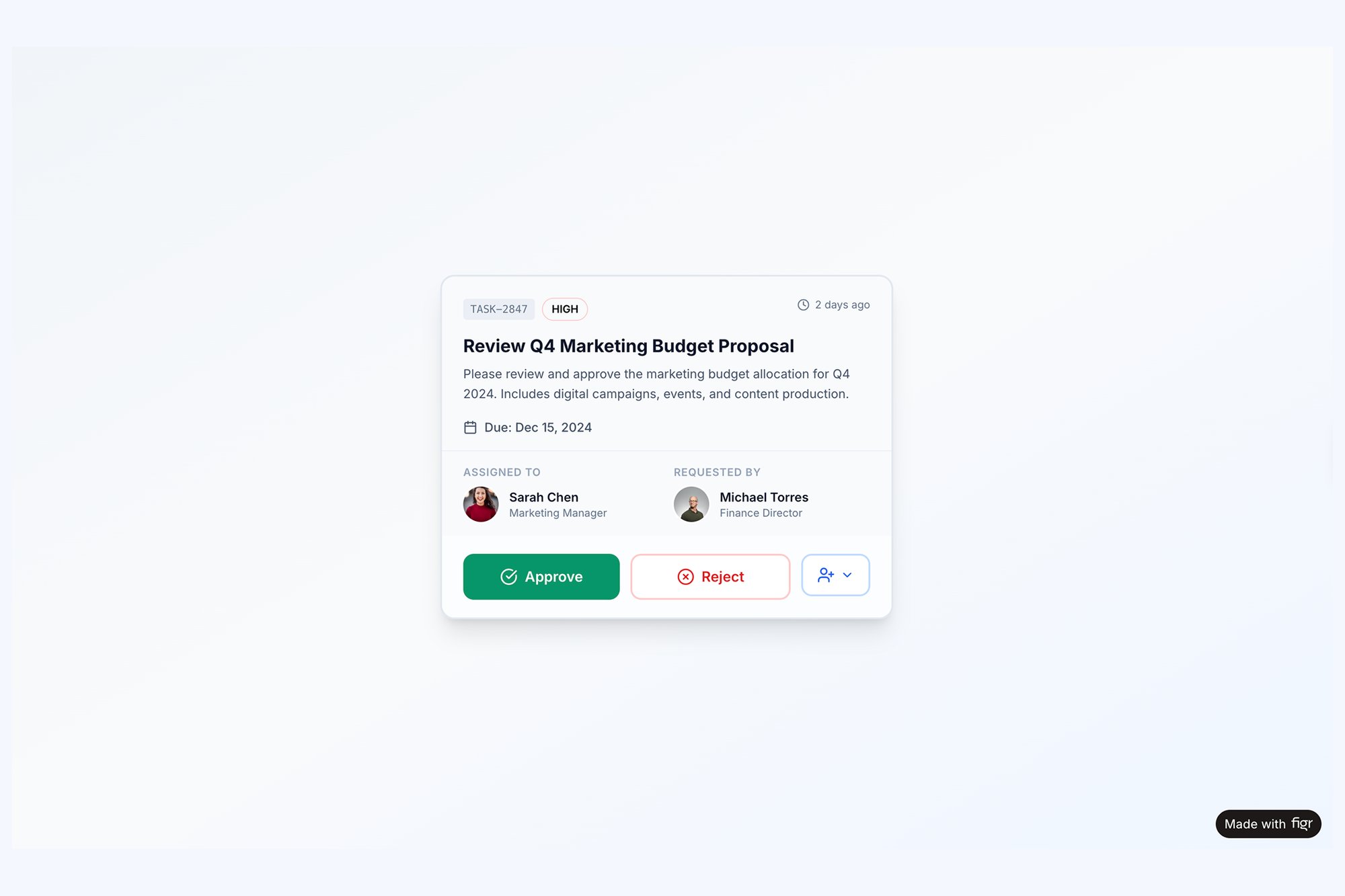
- State Transitions: Features rarely exist in a vacuum. What happens if a user loses their internet connection mid-upload? Or if they try to edit an item while someone else is deleting it? Mapping these transitions reveals complex interaction failures that are otherwise invisible. For a tangible example, look at how many states exist for something as simple as a task assignment component.
- Invalid Inputs: Users will inevitably enter the wrong data. They’ll put text in a number field, use special characters where they shouldn't, or leave required fields blank. Every one of these is a test case waiting to be written.
This kind of thinking reveals that even the simplest features are deceptively complex. A friend working on the card freeze feature for the fintech app Wise learned this firsthand. The happy path was trivial: tap a button, the card freezes.
But what about the unhappy paths? The simple act of freezing a card had dozens of potential failure points. What if a transaction was pending? What if the app was offline? What if the user’s session timed out just as they tapped the button?
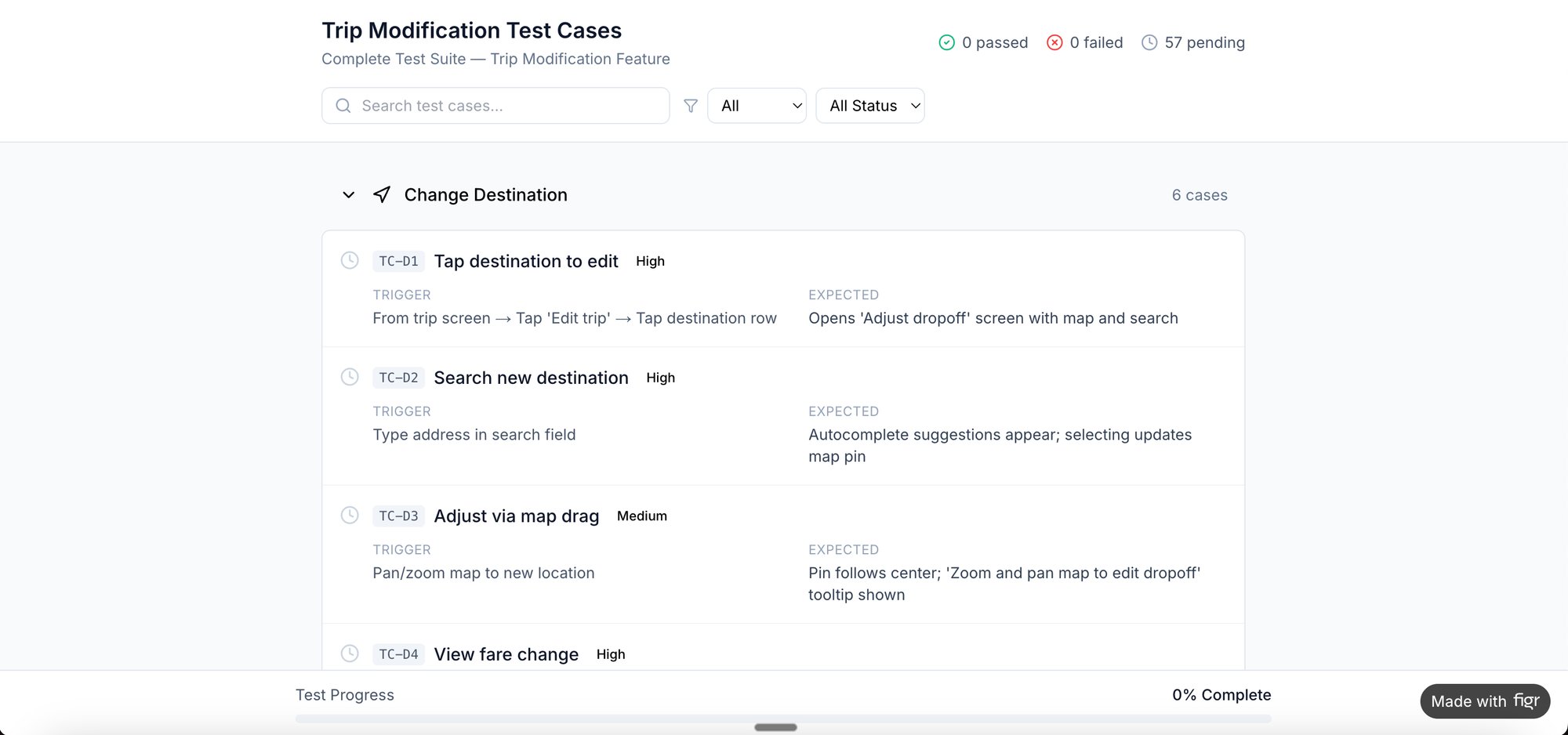
Each question became a critical test case. Seeing these scenarios laid out visually, like in this edge case simulation for the Wise card freeze flow, gives the entire team absolute clarity. For high-stakes features, it's even more complex. Check out the comprehensive test cases generated for Waymo’s mid-trip modification feature.
The Systemic Cost of Undiscovered Edges
Why does all this matter so much? Because the cost of fixing a bug multiplies exponentially the later it's found. According to the Systems Sciences Institute at IBM, a bug found in production is 100 times more expensive to fix than one caught during the design phase.
This isn’t just about code; it’s about incentives. Product teams are often rewarded for shipping features quickly, which pushes them to focus on the happy path. But the long-term cost of this approach is a mountain of technical debt and a degraded user experience. Thinking about edge cases every PM misses is a crucial skill.
Make this process a non-negotiable part of your workflow. Before any feature is handed off, take 30 minutes with your team and brainstorm every conceivable way it could fail. Document those failures as test cases.
The Power of Visual Context in Testing
A test case without a visual is like a map without landmarks. It tells an engineer what to do, but not what to see. This tiny gap is where expensive mistakes are born.
Learning how to write visually-grounded test cases isn't about writing better text. It's about providing better evidence. This simple shift changes the whole dynamic of QA from an abstract validation exercise to a concrete check against a visual source of truth.
From Textual Description to Visual Proof
This is what I mean: linking a test case directly to a Figma frame, a screenshot, or an interactive prototype kills nearly all ambiguity. It anchors every instruction in a shared reality.
Think about the difference. A text-only test case might say, "Verify the confirmation modal appears after the user submits the form."
A visually-grounded test case says, "After form submission, the modal must appear exactly as shown in this [Figma frame link]."
One is an instruction. The other is a contract. It’s the difference between saying ‘the button should be green’ and pointing to the design spec that defines the exact hex code. This shift stops the endless back-and-forth where developers build one thing and designers expected something else entirely.
The Anchor Analogy
Think of a test case as an anchor. If you just drop it overboard without a chain, it’s just a piece of metal sinking into the void. But when you chain that anchor to the ship, the visual design, it holds the entire project steady.
I recently watched a team struggle with a new scheduling feature. The test cases were perfectly written but lived in a spreadsheet, totally disconnected from the UI designs. The result? The spacing was wrong, the error message colors didn't match the design system, and a loading spinner was completely forgotten.
They had followed the instructions, but they missed the intent.
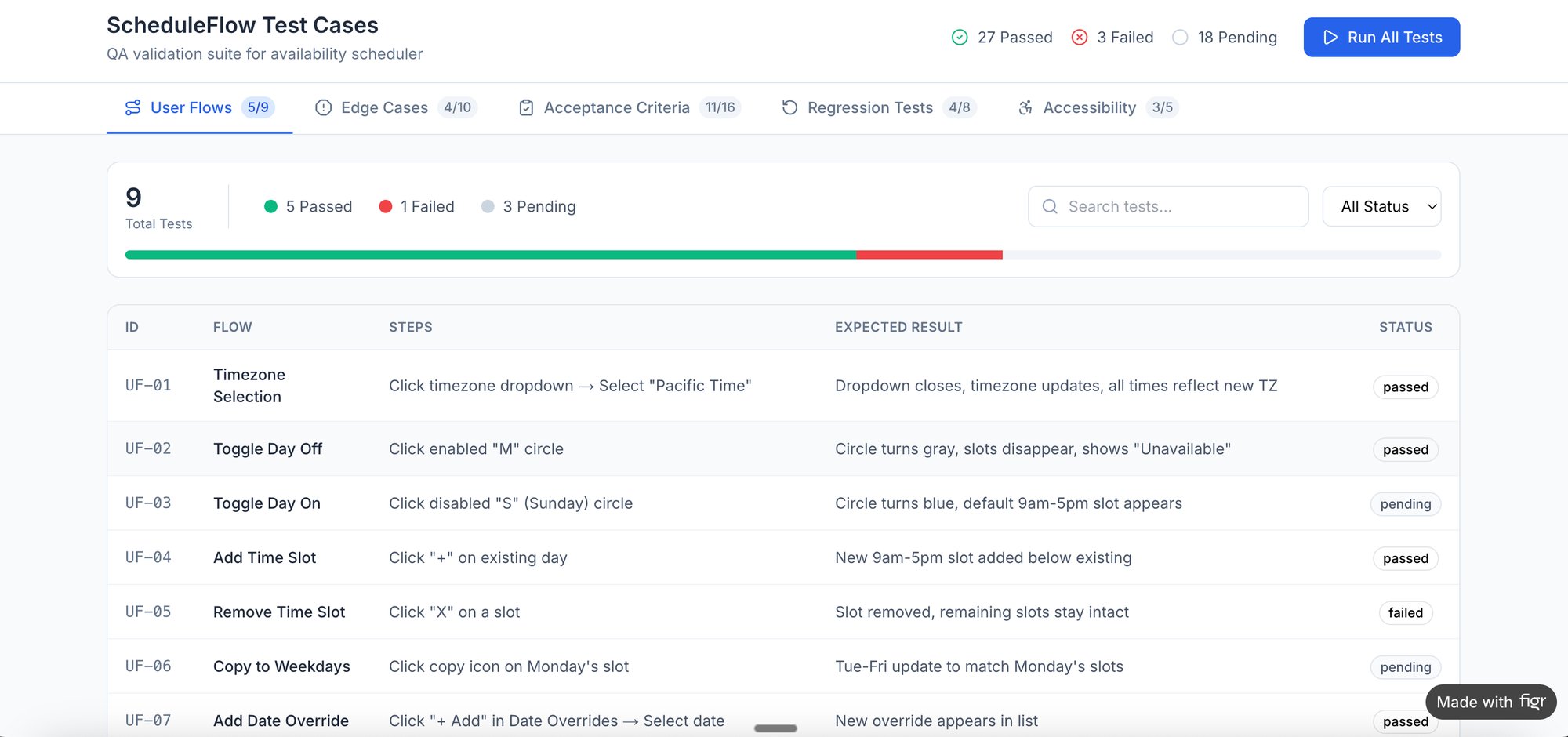
Now, contrast that with a project I saw using Figr’s analysis of Cal.com vs Calendly. That team didn't just write test cases separate from their work. They generated them directly from the visual user flow analysis. The final output was a list of test cases for the scheduling flow where every single step was inherently tied to a visual state.
That's the power of the anchor. It doesn't just hold the ship; it connects it to a specific point on the map.
Why Visual Context Matters at Scale
Why does this simple act of linking matter so much when you're working at scale? It all comes down to cognitive load and communication efficiency.
When an engineer has to switch contexts from a test plan to a Figma file, hunt for the right screen, and then mentally map the textual instruction to the visual design, you introduce friction. That friction, multiplied across hundreds of test cases and dozens of sprints, adds up to a significant drag on velocity.
A direct link from the test case to the exact UI state collapses that entire process into a single click. It cuts down ambiguity, speeds up execution, and frees up mental energy for solving harder problems than, "Which screen is this for, again?"
Your Next Action
So, what's the grounded takeaway?
Start simple. For the very next feature you define, enforce a new rule: no test case is considered "complete" unless it links directly to a specific visual artifact. It could be a frame in Figma, an interactive prototype, or even a simple annotated screenshot.
This small process change forces clarity early on. It transforms your test cases from a simple checklist into a robust, visual specification for your product. It’s how you make sure that what you see in the design file is exactly what your users will see in production.
Prioritizing Tests for Maximum Impact
You've mapped the happy path and hunted down every edge case. Your list of potential test cases is now dozens, maybe even hundreds, long. It's tempting to look at this list and think every item has an equal vote.
That's a trap.
You can't, and shouldn't, test everything with the same white-glove rigor. Engineering time is one of the most precious resources a company has. The real skill isn't just knowing how to create test cases; it's knowing which ones actually matter.
A Portfolio of Risk Mitigation
Stop thinking of your test cases as a simple to-do list. View them as a portfolio of risk mitigation tactics. Each test costs time to write, execute, and maintain. Your job is to invest that time where it delivers the highest return in quality and user confidence.
How? By moving from a flat list to a two-dimensional grid.
For every single test case, plot it against two simple axes: User Impact and Business Risk.
- High User Impact / High Business Risk: These are your non-negotiables. Think "user can't complete checkout" or "incorrect pricing is displayed." These demand meticulous manual testing and are prime candidates for your most robust automation suites. A failure here is a catastrophe.
- High User Impact / Low Business Risk: This could be a UI glitch on a core screen that looks sloppy but doesn't actually break anything. It affects a lot of users, but it won't sink the company. These are important, but they can often be covered by automated visual regression tests.
- Low User Impact / High Business Risk: A bug in an admin panel for compliance reporting is a perfect example. Very few users will ever see it, but a failure could have serious legal or financial blowback. These need thorough, targeted testing.
- Low User Impact / Low Business Risk: A typo on a rarely visited settings page fits squarely here. These are nice to fix but are the absolute lowest priority. A quick manual spot-check is usually more than enough.
This simple matrix completely changes the conversation. It gives the entire team a shared language to discuss tradeoffs and spend resources wisely. For a deeper look, our guide on AI tools that help prioritize product features explores similar data-driven frameworks.
The Economic Incentives for Automation
This prioritization framework isn't just a mental exercise; it's a direct response to some powerful economic forces at play. Manual testing can only get you so far. Historically, it caught only 20-30% of edge cases, which helps explain why a shocking 45% of production bugs slipped right through.
The automation testing market is projected to hit USD 57 billion by 2030 for a reason: automated tools can slash that costly rework by 50-70%. That's a statistic every product leader focused on ROI should know. You can discover more insights about automation testing's growth.
The high-risk, high-impact tests are where you start your automation investment. Once you've defined your test cases clearly, knowing how to automate software testing effectively will dramatically boost your team's efficiency and prevent costly product failures down the line.
Ultimately, this is how you graduate from just writing test cases to orchestrating a real quality strategy. You’re no longer just checking boxes. You’re making deliberate, strategic investments to protect your product, your users, and your team’s most valuable asset: their time.
Your Action Plan for a Better Handoff
We’ve walked through the theory and the tactics. Now, let's make it real. Your very next feature handoff is the perfect opportunity to put this all into practice.
Dropping a link to a PRD in Slack and hoping for the best is a recipe for ambiguity. It’s an invitation for things to get lost in translation. To do this right, you need to spark a better, more detailed conversation between product, design, and engineering. And that conversation starts with clarity.
Start with a Simple Checklist
The goal here isn't to create some hundred-page document that gathers digital dust. It’s about forcing the critical questions to the surface before a single line of code gets written.
For your next feature, try creating a simple checklist before you even schedule the handoff meeting:
- Does every user story have at least one happy path test case defined?
- Does it also have at least two unhappy path or edge case scenarios?
- Is every single test case linked directly to a specific design artifact?
This small act is an incredibly powerful filter. It forces you to think through the nitty-gritty details, connect requirements directly to the UI, and start anticipating where things might go wrong.
The real insight here is that prioritization isn't a one-and-done task. It's a continuous process of weighing what truly matters most to the user against the risks to the business.
This structured approach transforms the handoff from a simple transfer of documents into a collaborative alignment session. It’s a core piece of a successful delivery process, as broken down in this comprehensive developer handoff playbook.
Just start with one feature. Build one small, high-quality set of test cases using the frameworks from this article. I promise you, this single act will surface hidden assumptions and save you from the next dreaded Friday fire drill.
Common Questions About Writing Test Cases
As teams start getting more serious about how they write test cases, a few questions always pop up. Here are the ones I hear most often, with some straight-ahead, practical answers.
What’s the Right Level of Detail?
Enough detail so that an engineer can validate the feature without having to guess your intent. That’s it.
Every solid test case needs to clearly state three things:
- Precondition: What has to be true before the test even starts? (e.g., "User is logged in and has items in their cart.")
- Action: What, specifically, does the user do? (e.g., "User clicks the 'Apply Coupon' button.")
- Expected Result: What is supposed to happen after the action? (e.g., "Discount is applied to the subtotal, and a confirmation message appears.")
The goal is to eliminate ambiguity. But you’re not telling them how to write the code, you’re just defining what success looks like from the user's point of view.
Who’s Actually Responsible for Writing These?
This is a team sport, not a solo mission. Trying to silo this responsibility is a classic mistake.
Product Managers are closest to the user's intent, so they're perfectly positioned to define the primary, user-centric scenarios. They answer the question, "Does this feature do what we promised the user it would do?"
But QA engineers are the masters of finding what can go wrong. They think in terms of technical failure points, weird data inputs, and obscure edge cases that no one else sees coming.
The best process I've seen is this: the PM writes the initial user-facing "happy path" cases. Then, QA and engineering review, poke holes, and add all the gnarly edge cases. It becomes a collaboration that makes the final product so much stronger.
How Do You Keep Test Cases From Getting Stale When Features Change?
This is exactly why you have to link your test cases directly to your design artifacts and user stories. It's non-negotiable for a fast-moving team.
When a designer updates a screen in Figma or a PM revises a user story in Jira, that change should act as an immediate, automatic trigger to review the tests connected to it.
Treat your test cases like living documents. They aren’t chiseled in stone the day they’re written. Good version control and a simple process for flagging tests for review are what keep everything in sync. Otherwise, you’re just testing a ghost version of your product.
Ready to stop discovering edge cases after launch? Figr is an AI design agent that analyzes your product and generates comprehensive user flows, edge cases, and test cases automatically. Ground your decisions in real product context and ship with confidence.