

What happens when the model is unsure? How will the team catch quality drift after launch? What data shaped these outputs, and who approved its use?
That is usually the point when the title AI product manager stops sounding like a recruiting trend and starts sounding like a distinct job.
A lot of PM roles now mention AI. The hard part is that the phrase covers two very different kinds of work. One PM uses AI tools to move faster. Another owns a product whose value depends on model behavior that is probabilistic, data-dependent, and never fully fixed. Those jobs share some product fundamentals, but they break apart quickly once questions of accuracy, confidence, failure modes, and retraining enter the room.
I have seen teams underestimate this transition. They think they are shipping a feature. In practice, they are shipping a system with uncertain outputs, evaluation gaps, fallback logic, human review paths, and a model that can get worse over time if nobody watches the right signals.
The role changed the moment the product stopped being deterministic.
That shift matters because traditional product management assumes a cleaner chain between requirement, release, and result. AI products rarely behave that way. You can ship the same interface twice and get different output quality because the prompt changed, the retrieval context degraded, the training data was biased, or real user behavior drifted away from the test set. The PM owns those trade-offs even when they sit across engineering, data science, design, legal, and operations.
For readers who want the broader foundation, mastering product management is still the baseline. The AI PM role builds on that baseline, then adds a new axis: managing uncertainty as part of the product itself.
So, What Is an AI Product Manager, Really?
A team ships an AI support copilot. The demo looks strong. Two weeks later, sales loves it, support distrusts it, legal wants tighter controls, and the model starts producing weaker answers on a new category of tickets that never showed up in testing. At that point, the product problem is no longer "build the feature." It is "run a product whose core behavior is statistical, data-dependent, and unstable under real usage."
That is the AI product manager role.
An AI product manager owns products where model behavior determines whether users get value. The product may include standard software, workflows, and UI, but the hard part sits in the layer that learns from data, makes uncertain predictions, or generates outputs that can vary from one request to the next.
That distinction matters because the title gets blurred. A PM who uses AI-powered product management tools for research summaries, roadmap drafts, or backlog cleanup is still doing product work in a mostly deterministic environment. A PM who owns recommendations, fraud detection, ranking, copilots, forecasting, or generative workflows is handling a different class of product risk.
Two jobs that sound similar, but have different operating models
A PM using AI tools is optimizing personal productivity.
A PM building an AI product is deciding what level of error is acceptable, where human review belongs, how to collect feedback, which failures need fallbacks, and what happens when model quality drifts after launch. That work reaches into data pipelines, evaluation design, policy decisions, and operational monitoring. It also changes how customer promises should be written, because output quality is never guaranteed in the same way as traditional software behavior.
A useful rule is simple. If the product's value depends on model behavior, not just software behavior, you are in AI product management.
Why the role exists as a separate discipline
AI products introduce uncertainty into places product teams used to expect control. Traditional software follows explicit rules. AI systems respond to training data, retrieval quality, prompt design, changing user inputs, and shifts in the world. The PM has to connect those moving parts to user outcomes and business goals.
That makes the role more data-centric than many articles admit. The PM is not just prioritizing features. The PM is often shaping evaluation criteria, deciding which feedback loops matter, defining what "good enough" means by use case, and pushing the team to instrument the product so degradation is visible before customers lose trust.
In practice, that means spending less time debating a perfect spec and more time on questions like these: What does failure look like in production? Which errors are expensive, reversible, or dangerous? How do we separate model problems from UX problems? What data do we need to improve performance next month, not just ship this quarter?
The same mindset shows up upstream. Teams doing B2B market research for AI products cannot stop at user interviews and feature demand. They need to understand workflow variability, data availability, edge cases, and how much uncertainty a buyer will tolerate before they reject the product.
Compensation has started to reflect that added scope. As noted earlier, AI-skilled PMs often command a salary premium because the job sits at the intersection of product judgment, model constraints, and cross-functional execution under uncertainty.
The Great Divide: AI PM vs Traditional Product Manager
The sharpest way to understand AI PM vs product manager is to stop thinking about feature ownership and start thinking about system behavior.
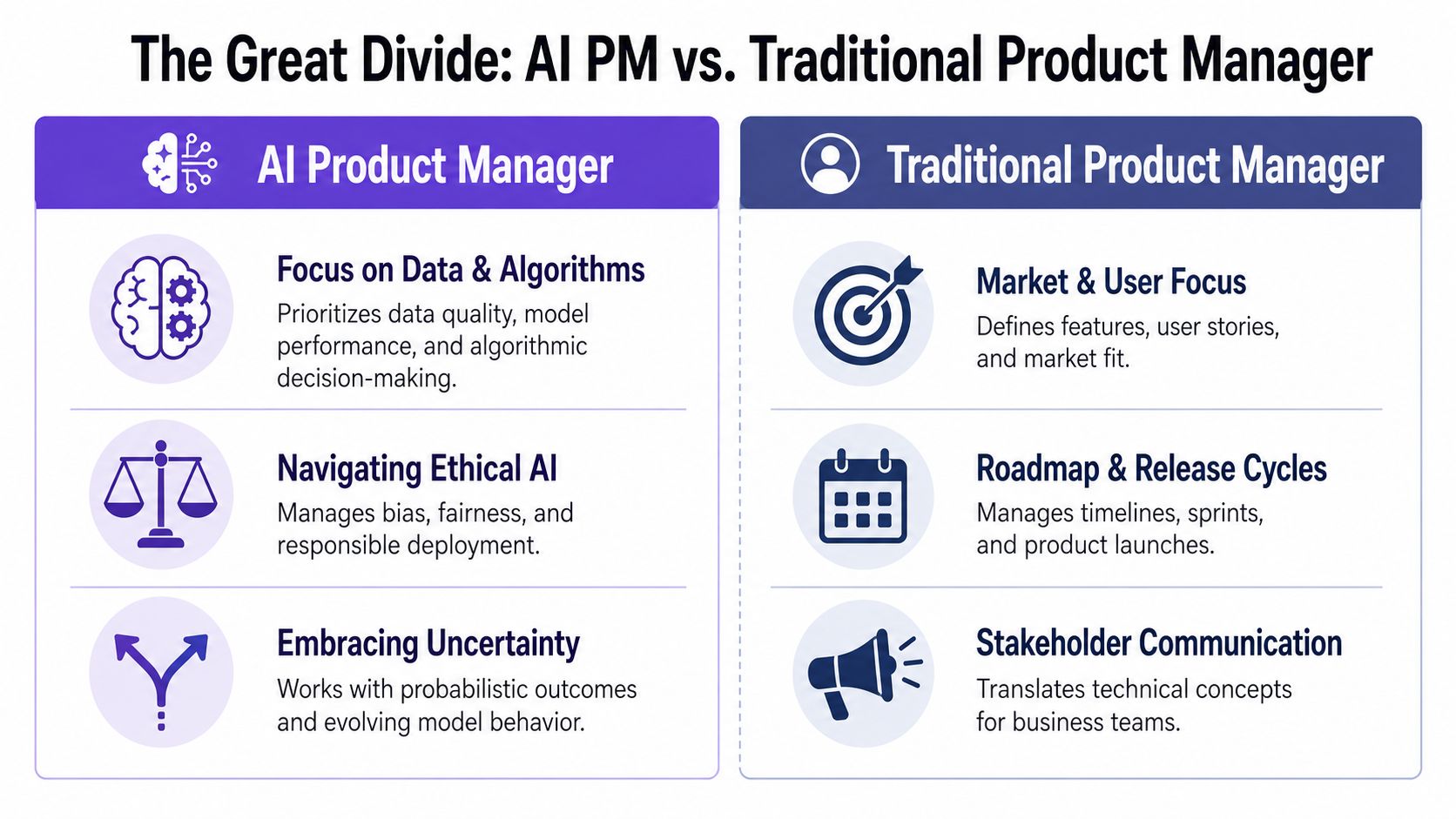
Deterministic versus probabilistic work
A traditional PM usually ships into a world where expected behavior can be described with precision. Click button, trigger flow, produce result. If something breaks, engineering traces the issue and fixes it.
An AI PM ships into a world where “working” is often a range, not a binary. The model may be mostly useful, occasionally brilliant, sometimes wrong, and rarely wrong in the exact same way twice. That changes how you plan, how you evaluate, and how you communicate.
Products built on models don't just have bugs. They have behavior.
Why this difference matters in the room
This shift affects meeting dynamics more than most articles admit. A traditional PM can often give a tight delivery estimate because the unknowns are mostly implementation unknowns. An AI PM also carries uncertainty from the model itself: whether data quality is sufficient, whether retrieval helps, whether prompts hold up across edge cases, whether user trust survives the first set of mistakes.
So the role starts to look less like feature traffic control and more like systems interpretation.
The economics behind that are straightforward. Companies want AI features because they create advantage and differentiation. They also want predictability. Those incentives conflict. The AI PM sits exactly in that tension, translating what is technically possible into what is production-safe and commercially usable.
What “normal work” looks like
For a traditional PM, “the feature got worse after launch” usually signals a bug or regression.
For an AI PM, that can be normal operating reality.
Data shifts. User behavior changes. Prompts degrade under new contexts. Retrieval quality drops. A model that looked strong in staging can lose trust in production because users expose edge cases no internal eval ever covered. That doesn't mean the team failed. It means the team is now managing a living system.
The Five Core Responsibilities of an AI Product Manager
If you strip away the hype, the AI product manager responsibilities come down to five forms of ownership that traditional PM frameworks often treat as side issues.
Frame the AI problem
The first job is deciding whether AI should be used at all.
A surprising amount of bad AI product work starts with solution appetite, not problem clarity. Teams see a model and go hunting for a use case. Good AI PMs do the opposite. They ask whether the problem has ambiguity, scale, pattern recognition, or unstructured inputs that make AI useful. If a rules engine can solve it more clearly, faster, and with less risk, use the rules engine.
That judgment is the start of the role, not an optional refinement.
A useful way to pressure-test this is to ask three questions:
- What human task are we compressing: Is the product helping users decide, create, classify, predict, or retrieve?
- What happens when the system is wrong: Is the cost annoying, expensive, or unacceptable?
- What baseline are we beating: Is AI meaningfully better than heuristics or manual workflows?
This is also where external research can sharpen the framing. For teams exploring category demand and buyer language before committing to an AI feature, B2B market research can help ground the problem in actual market signals instead of internal excitement.
Own the data strategy
Traditional PMs care about data. AI PMs have to treat data as a product asset.
That means asking where training or retrieval data comes from, how it’s labeled, whether it reflects the external environment, and what will happen as that environment changes. Teams often act like this belongs entirely to ML engineering. It doesn't. If the product learns from low-quality signals, the product itself becomes unreliable.
This is why AI PMs work differently because their products learn. Their roadmap isn’t only feature work. It also includes feedback loop design.
The strongest AI roadmaps I’ve seen included data collection decisions right next to feature decisions, because they were the same thing operationally.
A PM who ignores labeling strategy, feedback capture, and drift detection is effectively giving away part of the product.
Define probabilistic success
One of the biggest shifts in the AI product manager role is metric design.
You still care about activation, retention, conversion, and task completion. But that’s not enough. You also need model-aware measures of quality. Precision, recall, confidence calibration, fallback rate, false positive cost, human correction rate. The exact metric set depends on the product.
For example, a playlist curation system like Spotify’s AI playlist curation flow lives or dies on whether recommendations feel relevant and trustworthy, not just whether users clicked once. A forecasting workflow like Mercury runway forecasting PRD needs a different notion of “good enough,” because confidence, explanation, and override behavior matter as much as surface adoption.
A PM who only measures AI adoption will miss whether the feature is helping or creating cleanup work.
Manage the human in the loop
AI is not just a backend capability. It’s a user experience problem.
That’s why psychologically intelligent PMs are becoming essential. Existing guidance often underplays trust, perceived control, and cognitive load, yet those factors are a core strategic lever in AI product design, as discussed in this YouTube conversation on trust and psychological safety.
What does this look like in practice?
- Show uncertainty when uncertainty matters: A system like Perplexity source freshness tags helps users judge whether output is current enough to trust.
- Give users override paths: If an AI draft misses context, users need escape hatches that feel deliberate, not hidden.
- Design recovery, not just success: Consider flows like Dropbox upload edge cases, where the interesting PM work is often in the ambiguous states.
A simple example is Gmail AI draft with tone control. The useful design choice isn't only that the AI drafts text. It's that the user can shape the output and keep agency.
Here’s a useful lens from Figr's AI for product teams: the product has to support thinking through uncertainty, not just rendering a nice interface.
A quick walkthrough helps make this concrete:
Communicate uncertainty without sounding vague
Senior PM work is often translation work. In AI, that translation gets harder.
Executives want dates. Sales wants certainty. Legal wants clarity. Engineering wants room to evaluate. Data science wants the team to understand confidence bounds and failure modes. The AI PM has to hold all of that without either overpromising or sounding evasive.
Many teams encounter difficulties. They talk about the model as if it were deterministic software, then lose trust when reality shows up. Better communication sounds like this: here’s the user problem, here’s the current model behavior, here’s what we know, here’s what still needs evaluation, and here’s the launch plan that contains risk rather than pretending it doesn't exist.
Essential AI Product Manager Skills You Actually Need
The most common fear around AI product manager skills is simple: do you need to become an ML engineer first?
No.
You do need practical literacy. Enough to ask good questions, make trade-offs, and spot when a conversation is drifting into fantasy.
Technical depth without cosplay
A capable AI PM should understand the difference between supervised and unsupervised learning at a working level. Not academically, operationally. You should know what training data is, why label quality matters, what drift is, and how a confusion matrix reveals trade-offs between false positives and false negatives.
You should also know enough evaluation language to hold your own in planning. Offline evaluation, online evaluation, shadow tests, canary launches. Not because you need to run the model yourself, but because those are product decisions as much as technical ones.
For PMs trying to build stronger analytical instincts around this, I’d recommend reading about evidence-backed product decision-making. The useful overlap is not “become a data scientist.” It’s “stop making product calls without understanding the evidence shape.”
The reality-gap skill
The hardest skill is diagnosing the gap between demo potential and production readiness.
That reality gap is the central challenge of the role. Hiring managers look for PMs who can assess feasibility constraints, evaluate failure modes, and communicate realistic timelines, yet most guidance still focuses on either pure technical concepts or generic soft skills, as explained in this discussion on the AI PM reality gap.
A senior AI PM isn't the person who knows the most model jargon. It's the person who knows when the system is still too fragile to promise publicly.
That skill shows up in small moments. Someone demos a perfect prompt. You ask how it performs across noisy inputs. Someone says the assistant works well. You ask what happens when retrieval is stale. Someone wants a launch date. You ask what confidence threshold is acceptable for the first release.
What not to overlearn
You don't need to derive model architectures on a whiteboard. You don't need graduate-level math. You don't need to do your ML engineer’s job.
But you do need to work well with them. That means shared vocabulary, respect for uncertainty, and enough fluency to challenge assumptions productively. Tools can help here too. The current wave of AI assistants for product managers is useful when it strengthens judgment. It's dangerous when it replaces it.
The AI PM's Stack: Tools for a Probabilistic World
A standard PM stack assumes the product behaves the same way every time. AI products do not. The same input can produce a great result, a weak result, or something that looks convincing and is still wrong. That changes what the stack needs to do.
An AI PM needs tools that answer three different questions. Is the system good enough? Is it getting worse? Can the product experience absorb uncertainty without confusing users?
Three tool layers that matter
First is experimentation and analytics. In AI products, a metric drop rarely points to one clean cause. Lower task completion might come from bad onboarding, weaker retrieval, prompt regressions, latency, or a confidence threshold that makes users abandon the flow. The tooling has to let product, design, and ML separate those causes instead of arguing from anecdotes.
Second is evaluation and monitoring. This is the layer many teams underinvest in because it feels less visible than shipping features. It is also the layer that keeps you from managing by support ticket. Good evaluation tooling tracks quality over time, breaks failures into categories, and lets the team compare model, prompt, and retrieval changes against a stable test set.
Third is design tooling that can represent uncertain states. AI products need more than happy paths and standard error states. They need interfaces for low confidence, partial answers, fallback behavior, stale context, human review, and graceful refusal.
AI products fail at the design layer when the UX doesn't account for probabilistic outputs. Tools like Figr map every state an AI feature can produce, loading, low-confidence, fallbacks, error, so AI PMs ship designs that hold up in production, not just in demos.
That requirement changes the design conversation. A normal workflow often has two outcomes: success or failure. An AI workflow has a spectrum of outcomes, and each one needs a product decision. Show the answer, ask a clarifying question, route to a human, suppress the output, or explain the limitation.
That is why the tools AI PMs actually use day-to-day tend to span product analytics, evals, prompt testing, and state-aware design. The job is less about feature throughput and more about managing system behavior under uncertainty.
Tooling should expose edge cases, not hide them
The best AI stacks surface ambiguity early, while the team still has time to respond.
You can see the same pattern in vertical systems like AI tools for sales and support. The useful products are not the ones that automate the most steps on paper. They are the ones that make confidence, escalation paths, and failure boundaries visible enough for operators to trust the system in real work.
The same standard applies to PM workflow tools, including AI-assisted PRD generation. A generated PRD helps if it forces explicit choices about assumptions, evaluation criteria, fallbacks, and edge cases. It hurts when it produces polished text that hides unresolved risk.
If you want a practical shorthand, use essential AI product manager tools for three jobs: evaluating quality, observing drift, and designing every state users might encounter.
The Hard Parts Most Articles Conveniently Ignore
The polished version of the AI product manager story sounds great. You identify an opportunity, pick a model, ship an elegant feature, and iterate.
Real life is messier.
The model decay treadmill
Models degrade. Data changes. Usage patterns drift. A prompt that worked last month starts failing on new user phrasing. Retrieval quality slips after content changes. The core operational burden is not just building the thing. It’s knowing the thing got worse before users tell you.
Troubleshooting this isn't normal software debugging. A PM has to isolate the symptom, inspect prompt ambiguity, audit parameters, and verify data drift. Prompt fixes alone can reduce errors by 20 to 30%, and 70% of early AI products fail due to poor data feedback loops, according to AIM Asher’s write-up on the AI PM skills gap.
The demo magic gap
A friend at a Series C company told me their most painful meeting wasn't after launch. It was after a successful demo. The demo looked magical, so leadership assumed production was basically packaging work.
It wasn’t.
A stage demo lives in a curated world. Production lives in the wild, where inputs are sloppy, context is incomplete, latency matters, and user trust is fragile. In this setting, the hidden cost of generic AI outputs starts showing up. The issue isn't only quality. It's that generic output often pushes cleanup work onto users.
The stakeholder expectation trap
Stakeholders still want deterministic roadmaps. They want dates, confidence, and a fixed definition of done. AI work resists that shape.
So the core job becomes expectation design. Can you explain why a small gain in precision might take substantial iteration? Can you explain why launch criteria should include fallback safety and trust behavior, not just feature completion? Can you say “not yet” without sounding defensive?
That’s what separates surface-level AI enthusiasm from actual product leadership.
Conclusion: It's Still Product Management, Just with a New Axis
The cleanest way to think about the AI product manager role is not as a different species of PM.
It’s a PM who added probabilistic thinking to the toolkit.
The foundational skills still matter: user empathy, prioritization, systems thinking, crisp communication, judgment under pressure. What changes is the medium. Instead of managing only software behavior, you’re also managing model behavior, data quality, trust, and uncertainty.
That’s why the role feels unfamiliar at first. Not because it replaced product management, but because it exposed parts of the job that deterministic products let teams ignore for a while.
So if you’re trying to grow into this work, don’t start by chasing prestige concepts. Start smaller. Take one feature you own and ask different questions. Where does uncertainty enter the experience? What happens when the system is wrong? What data quality assumptions are hidden underneath the roadmap? Where are users being asked to trust output they can’t evaluate?
That exercise alone will tell you a lot about whether you’re already doing some AI PM work without naming it.
For the complete framework on this topic, see our guide to AI in product management.
If your team is building AI features and keeps discovering edge cases too late, Figr is worth looking at. It helps product teams turn product context into production-ready UX artifacts, including flows, edge cases, PRDs, and prototypes that reflect how AI features behave across loading, low-confidence, fallback, and error states.