

Design to dev handoff problems start before the handoff meeting. They start the moment a team treats a Figma file as the product, instead of treating it as one artifact in a larger transfer of intent.
The pattern is familiar. A designer shares polished screens. A developer builds the obvious version. Review day arrives, and the feedback sounds maddeningly vague: “This isn't quite what we meant.” The file changed hands. The reasoning behind it did not.
I use two labels for this failure because they make the root cause easier to spot.
A Context Gap is missing intent. The team lacks the why behind the UI: the user problem, the business rule, the research insight, the content constraint, the edge case that drove a decision. An Artifact Gap is missing build information. The visible design exists, but the implementation details needed to ship it do not: states, tokens, breakpoints, data assumptions, interaction rules, accessibility requirements.
Both gaps create the same outcome. Engineers fill in blanks with judgment, designers review against unstated expectations, and teams mistake rework for craftsmanship.
That is why handoff works less like a package drop and more like an air traffic control exchange. If the signal is partial, the landing gets rough. Strong teams transfer context and artifacts together, often anchored by a clear product brief or PRD writing guide, not just annotated screens.
The rest of this article uses that framework to diagnose where handoffs break down and how to close the gap before it turns into delays, QA churn, and avoidable mistrust between design and engineering.
1. Specification Ambiguity and Missing Design Details
The first breakdown is the oldest one in the book: the file looks finished, but the spec is half there.
Developers don't build intent from vibes. They build from instructions. When key details are absent, implementation turns into interpretation, and interpretation is where rework begins.
A solid frontend handoff needs more than final screens. Guidance for frontend implementation calls for a design file that includes color palettes, component states like hover, focus, and disabled, typography definitions, spacing, and responsive coverage across at least six breakpoints: xs, sm, md, lg, xl, xxl, as outlined in this frontend handoff guidance. If those details aren't present, the developer has to guess.
That guesswork is what I'd call an artifact gap. The visible artifact exists, but the buildable artifact does not.
What ambiguity usually looks like
A button appears once in a static screen, but nobody knows:
Which state is canonical: Default, hover, active, focus, disabled, loading?
Which spacing rule applies: Local adjustment or system spacing token?
Which text behavior wins: Wrap, truncate, expand container, or collapse layout?
Last week I watched a PM walk through a “small UI tweak” that became a reopening of the whole story because nobody had defined what the form should do on validation failure. The team didn't have a design problem. They had a missing-decision problem.
Practical rule: If engineering has to ask “what should happen here?” more than once, the spec isn't done.
The cleanest fix is to generate the implementation artifact, not just the design artifact. That means annotated states, responsive rules, accessibility notes, and explicit acceptance language tied to the design. If your team still writes those from scratch every time, use a repeatable template or a tool that can generate them from the source design. Figr's PRD writing guide is useful here because it pushes the team to convert visual decisions into product-ready requirements.
2. Design System Token Misalignment Between Figma and Development
A design system can reduce chaos, but a drifting design system creates a more complex kind of chaos.
This is the second big failure mode. The team says there's a single source of truth, but in practice there are two truths, sometimes three. Figma has one token set, the codebase has another, and the team chat has the unofficial translation layer everyone secretly relies on.
When the source of truth splits
This is what I mean: the issue isn't whether tokens exist. The issue is whether the tokens used in design are the same tokens engineers can ship.
Expert guidance on handoff workflows recommends a single source of truth built around documented components, variants, and usage rules, where engineers can jump from an instance to the master component and see the broader component logic. That matters because the actual object being handed off isn't the screen. It's the system behind the screen.
When token naming diverges, teams start making local fixes:
Designers rename for clarity: Better in Figma, worse in code
Developers override for speed: Faster today, drift tomorrow
PMs approve visual matches: The release passes review, but the system weakens
That's how wrong components enter production. The team doesn't consciously choose the wrong piece. They choose the nearest available piece.
What works better
I've had the most success with a simple rule: decide whether code or design is authoritative for tokens, then make the sync direction explicit.
You also need governance that feels boring, because boring governance saves launches:
Match names across tools: Component and token names should map cleanly between Figma and the codebase
Version token changes: Treat token edits like product changes, not decoration
Audit exceptions: Every override should have an owner and a reason
If your team keeps seeing subtle mismatch across releases, there's a good chance you don't have a design quality problem. You have system drift. These practices to avoid Figma drift are worth borrowing before the gap gets baked into every sprint.
3. Edge Cases and State Management Not Designed
Most handoffs are designed for sunshine and shipped into weather.
Happy paths are seductive because they demo well. They also hide the exact moments where users get confused and where developers are forced to improvise.
Missing states are one of the clearest design to dev handoff problems because they create both a context gap and an artifact gap. The context gap is why the state exists. The artifact gap is how it should behave.
The four ghosts that keep returning
The common ones show up in almost every product:
Loading: What appears while data is in motion?
Empty: What appears when there's nothing to show yet?
Error: What happens when the action fails?
Permission or constraint: What should users see when they can't proceed?
Neutral UX guidance defines handoff as transferring not just layouts, but also user flows, interaction rules, accessibility, data validations, and the “why,” as discussed in the Interaction Design Foundation's overview of design handoffs. That's important because many teams still act as if edge states are optional polish. They aren't. They are product behavior.
A friend at a Series C company once described QA as “the place where we discover the app's real personality.” Funny line, terrible operating model.
Use Edge Case Mapping before handoff
The most reliable fix I've seen is Edge Case Mapping. Before a story is handed off, map the component or flow through the failure states it can realistically encounter.
Step 1. Map the state inventory.
List default, loading, empty, error, success, and permission states
Add any domain-specific states, such as expired, archived, pending review
Step 2. Define the trigger.
Document what causes each state
Tie it to product logic, not visual preference
Step 3. Generate the artifact.
Produce acceptance criteria, QA cases, and state annotations from the map
Link them to the source design so they don't drift
That's the bridge from edge-case awareness to artifact generation. If your team needs a stronger habit here, this guide on building resilient products is a good operational starting point.
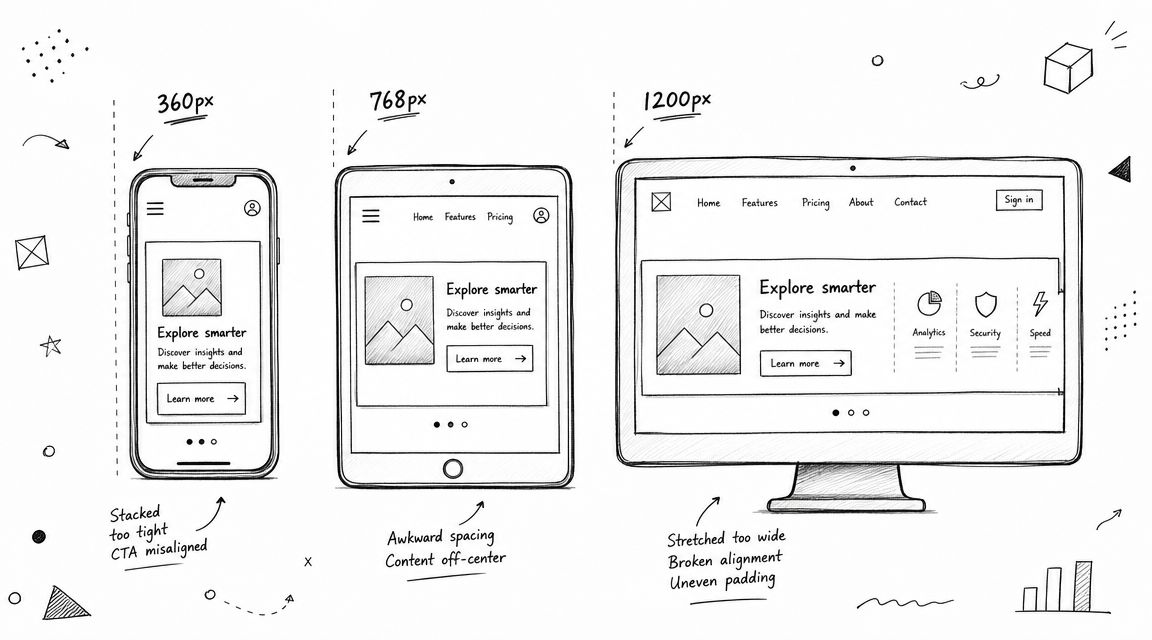
4. Responsive Design and Breakpoint Inconsistencies
A design that works on desktop and mobile can still fail everywhere in between.
That's the trap. Teams review the endpoints, then act surprised when the tablet layout feels improvised or the wide-screen version stretches like warm taffy.
Why breakpoint problems keep slipping through
Responsive ambiguity usually appears when design and engineering are using different mental models. Design may think in canvases. Engineering thinks in rules. If the rules aren't explicit, every in-between width becomes a small negotiation.
This failure often sits inside the broader specification problem, but it deserves its own spotlight because responsive behavior is where static files lose their authority. You don't just need to show layouts. You need to define how layouts adapt.
A useful handoff asks and answers:
When does the layout reflow: Which breakpoint changes the structure?
What changes and what stays fixed: Grid, typography, spacing, navigation, density?
What's the fallback behavior: Stack, scroll, truncate, collapse, hide?
A better standard for PMs
PMs can improve this quickly by refusing to accept “mobile and desktop covered” as a complete status. The basic gist is this: if the team can't describe responsive behavior in rules, the design isn't implementation-ready.
Use a breakpoint review that checks:
Named breakpoints: Shared definitions tied to the tech stack
Component behavior: How cards, tables, forms, and navigation adapt
Content resilience: Long labels, translated text, and variable data lengths
Touch behavior: Focus order, tap areas, and interaction changes on smaller screens
Teams that need a stronger baseline can use Figr's UX best practices for UIs to make responsive rules more explicit before handoff. That's often enough to stop responsive defects from showing up as “engineering bugs” later.
5. Accessibility Requirements Not Specified or Tested Pre-Handoff
Accessibility often enters the process like an auditor at the end of a construction project. By then, the walls are already up.
That creates a predictable mess. Developers inherit visual designs with no clear focus behavior, keyboard path, semantic expectations, or content guidance for assistive technologies. Then the team tries to retrofit accessibility into a UI that was never specified to support it.
Accessibility is a handoff requirement
This failure is easy to misdiagnose as an engineering omission. Usually it isn't. It's a missing artifact.
If the design doesn't communicate focus states, error treatment, interaction order, and state changes in accessible terms, developers are left to infer them. Some will infer well. Some won't. Either way, your output becomes inconsistent.
The practical move is to put accessibility in the handoff packet itself:
Focus behavior: Show visible focus for interactive elements
Form feedback: Define inline error messaging and validation behavior
Interaction model: Clarify keyboard and screen-reader expectations
Motion considerations: Note when reduced-motion alternatives are needed
Accessibility work gets expensive when it arrives as a patch instead of a requirement.
What PMs should ask before handoff
A quick review catches most avoidable misses:
Can a keyboard user complete the flow?
Are focus and disabled states visually distinct?
Does error handling explain what happened and what to do next?
Have accessibility expectations been written, not assumed?
Artifact generation proves useful once more. Instead of hoping someone remembers the accessibility layer, generate it as part of the output tied to the story. Teams don't usually fail because they oppose accessibility. They fail because it lives in nobody's default checklist.
6. Unclear Data Model and Content Assumptions
Some of the worst handoff failures arrive disguised as clean mockups.
A layout looks elegant with sample copy and tidy values, then real data hits the interface and the whole thing starts breaking at the seams. Long names overflow. Empty fields produce awkward gaps. API responses introduce conditions nobody designed for.
Designs often assume a fictional world
This is one of the most underappreciated design to dev handoff problems because the file can look completely polished while being operationally naive.
The team assumed:
Text length would stay short
Statuses would be few and clean
User-generated content would behave politely
Backend data would match the implied structure
Real systems rarely cooperate.
A PM I worked with once approved a dashboard that looked sharp in review and fell apart the first time a customer imported messy account data. Nobody had done anything careless. The team had designed for an idealized dataset instead of the product's actual one.
Bring data reality into the handoff
The fix is to treat data shape as part of product design, not a downstream technical issue.
Use handoff notes that specify:
Content constraints: Max lengths, wrapping, truncation, overflow handling
Display rules: Dates, currency, percentages, status labels, empty fields
Backend assumptions: Required fields, optional fields, loading conditions
Failure behavior: Partial data, stale data, malformed data, permission-limited data
This doesn't just reduce bugs. It preserves meaning. If the design says “recent activity” but the API may return no activity, delayed activity, or incomplete activity, the handoff needs to express those paths.
For teams that write a lot of product-facing copy into specs, this also intersects with consistency in communication. This article on consistent brand voice for tech teams is a useful reminder that content rules affect usability just as much as visual rules do.
7. Animation, Interaction, and Microinteraction Specs Lack Technical Detail
Motion is where teams confuse seeing with specifying.
A prototype can make an interaction feel obvious, but that doesn't mean it's technically defined. Developers still need to know what triggers the motion, how long it lasts, what should happen when the user interrupts it, and whether the motion is required or optional.
Prototype fidelity can create false confidence
This is a classic context gap. Everyone saw the interaction. Few people documented its behavior.
That usually leads to three bad outcomes. Engineering improvises. Motion gets simplified until it loses the intended feel. Or the team burns review cycles debating details that should have been settled before build.
The handoff needs to answer practical questions:
Trigger: Hover, tap, load, scroll, validation, state change?
Priority: Essential feedback or nice-to-have flourish?
Fallback: What happens on reduced motion or lower-performance environments?
If the only place an interaction exists is inside a prototype, it isn't specified yet.
What better motion specs look like
You don't need film-school documentation. You need enough detail for engineers to implement with confidence and enough prioritization for PMs to protect scope.
Capture:
Intent: Why the motion exists, such as orientation, feedback, continuity
Behavior: Entry, exit, interruption, and state transition logic
Constraints: Accessibility expectations and known platform limits
That last point matters more than teams admit. A product leader's job isn't to preserve every flourish. It's to preserve the interactions that carry meaning and cut the rest cleanly when needed.
8. Lack of Shared Context and User Research During Handoff
A team can hand over polished screens, tidy tickets, and annotated flows and still miss the thing engineering needs most. Context.
Handoff shifts from being a file-transfer problem to a systems problem. The breakdown usually has two parts. A Context Gap, where the team loses the reasoning behind the design. An Artifact Gap, where that reasoning never gets attached to the specs, stories, and acceptance criteria engineers use.
The result is predictable. Developers build what was drawn, then make local decisions without the user evidence that shaped the original design. A label gets shortened. A step gets merged. Validation gets relaxed. Each call seems small. Together, they can push the product away from the user problem it was supposed to solve.
I have seen this happen most often on teams that treat research as a kickoff artifact instead of an implementation input. By the time work reaches engineering, the screens survive but the insight dies.
Context gaps create weak trade-offs under pressure
Engineering does not need a full research repository attached to every ticket. It needs the minimum context required to make sound trade-offs when constraints show up, which they always do.
That context usually fits into four parts:
User problem: What friction or risk is this flow addressing?
Decision rationale: Why this pattern, and what options were rejected?
Critical moments: Which step, message, or state has the biggest effect on success?
Success criteria: What should improve if the implementation holds up in the product?
Without those inputs, teams end up debating details that were already answered by research. Or worse, they optimize for what is easiest to ship rather than what is most likely to help the user complete the job.
Artifact gaps hide the why from the people doing the build
A common mistake is assuming shared context exists because someone presented it once. A kickoff deck is not a durable artifact. A FigJam board is not a build input. If the why lives in a research folder, a recording, or one designer's head, it is absent from handoff.
Shared context becomes useful only when it is attached to the artifacts engineering and QA use every day. That means linking research findings to user stories, calling out high-risk assumptions in specs, and writing acceptance criteria that reflect user intent rather than just visual parity.
Good handoff artifacts answer questions like these before build starts:
Which user behavior or pain point justified this flow?
Which part of the UI is flexible, and which part protects comprehension or conversion?
What assumptions depend on prior research rather than visual preference?
What would count as a failed implementation, even if the screen looks correct?
Treat research as implementation guidance
Teams that want better handoffs usually do not need more research. They need better compression of research into usable artifacts.
If insight quality is weak upstream, improve how evidence is captured and summarized in the first place. These user research techniques are a useful starting point for PMs and designers who need to package the why alongside the what.
The goal is simple. Preserve enough context that engineering can make good product decisions without having to reconstruct the original thinking from scattered files and memory.
A practical handoff checklist
Checklists don't solve systemic problems on their own, but they do catch preventable misses.
Use this before any engineering handoff:
States defined: Default, loading, empty, error, success, disabled, permission
Components matched: Design instances map to actual system components
Tokens aligned: Names and values match the chosen source of truth
Responsive rules documented: Breakpoints and component behavior are explicit
Accessibility specified: Focus, keyboard behavior, and error treatment included
Data assumptions written: Edge content, overflow, null states, and formatting covered
Interactions explained: Trigger, priority, and fallback behavior are clear
Acceptance criteria present: The story can be tested without interpretation
User intent attached: The why behind key choices is visible to engineering
Artifacts generated: QA cases, specs, and implementation notes are derived from the same source
From Handoff to Handshake
Monday morning looks familiar. Design marks a feature ready. Engineering opens the file and finds polished screens, partial notes, and a dozen open questions hiding in the margins. By Thursday, the team is debating what the loading state should do, which token maps to the spacing scale, and whether that empty table was intentional or just never designed.
That pattern is not a handoff failure caused by one missed annotation. It is a system failure in how context and artifacts move through the team.
The eight problems in this article usually show up as separate defects, but they come from two root causes. Context gaps happen when rationale, constraints, edge-case logic, or user research stay in someone's head or in a separate doc nobody checks during build. Artifact gaps happen when the visible design exists, but the delivery assets are incomplete or drift from the source of truth. Screens without decision history create context gaps. Specs without token mapping, states, QA criteria, or data assumptions create artifact gaps.
More documentation alone does not fix either one. A larger pile of comments, screenshots, and tickets often gives the team more places to search without giving them a clear chain from intent to implementation. Good handoff systems reduce interpretation. They make the important decisions hard to miss and easy to verify.
There is also a real incentive problem. Teams get rewarded for visible output. A polished prototype looks finished. A ticket moved to ready looks efficient. But if engineering still has to reconstruct behavior, constraints, and rationale, the speed was cosmetic. The cost shows up later as Slack threads, rework, QA churn, and awkward compromises nobody chose on purpose.
Teams that handle this well treat handoff less like passing a baton and more like closing a loop. Context is attached to the work. Artifacts are usable by the people who need them. Review happens before implementation starts, not after code exposes the gaps.
A quick audit on the next feature will usually tell the truth:
Are all major states defined, including failure, loading, and empty states?
Can engineering identify the correct component, token, and behavior without asking for clarification?
Do acceptance criteria describe what should happen, not just what the screen looks like?
Is the user problem and decision rationale attached to the feature, or only the final mockup?
If more than one answer is no, resist the urge to fix everything at once.
Pick one feature in the next sprint. Create a simple Edge Case Map. Tie the design file, token choices, content assumptions, and acceptance criteria to that map. Review it with design, engineering, and QA before build starts. That exercise usually exposes where your process is dropping context and where your artifacts stop short of implementation.
If you want a structured model to build from, Figr's Developer Handoff Playbook is a practical resource for tools, templates, and team habits that make handoff more like a handshake. If your delivery process also runs through issue workflows, this guide on improve agency development workflows using Jira is a useful complement.
If your team keeps losing time to design to dev handoff problems, Figr is worth a look. It helps product teams turn design context into delivery artifacts such as PRDs, edge cases, test cases, and handoff documentation, so engineers are not reconstructing intent from static screens alone.