
The tool
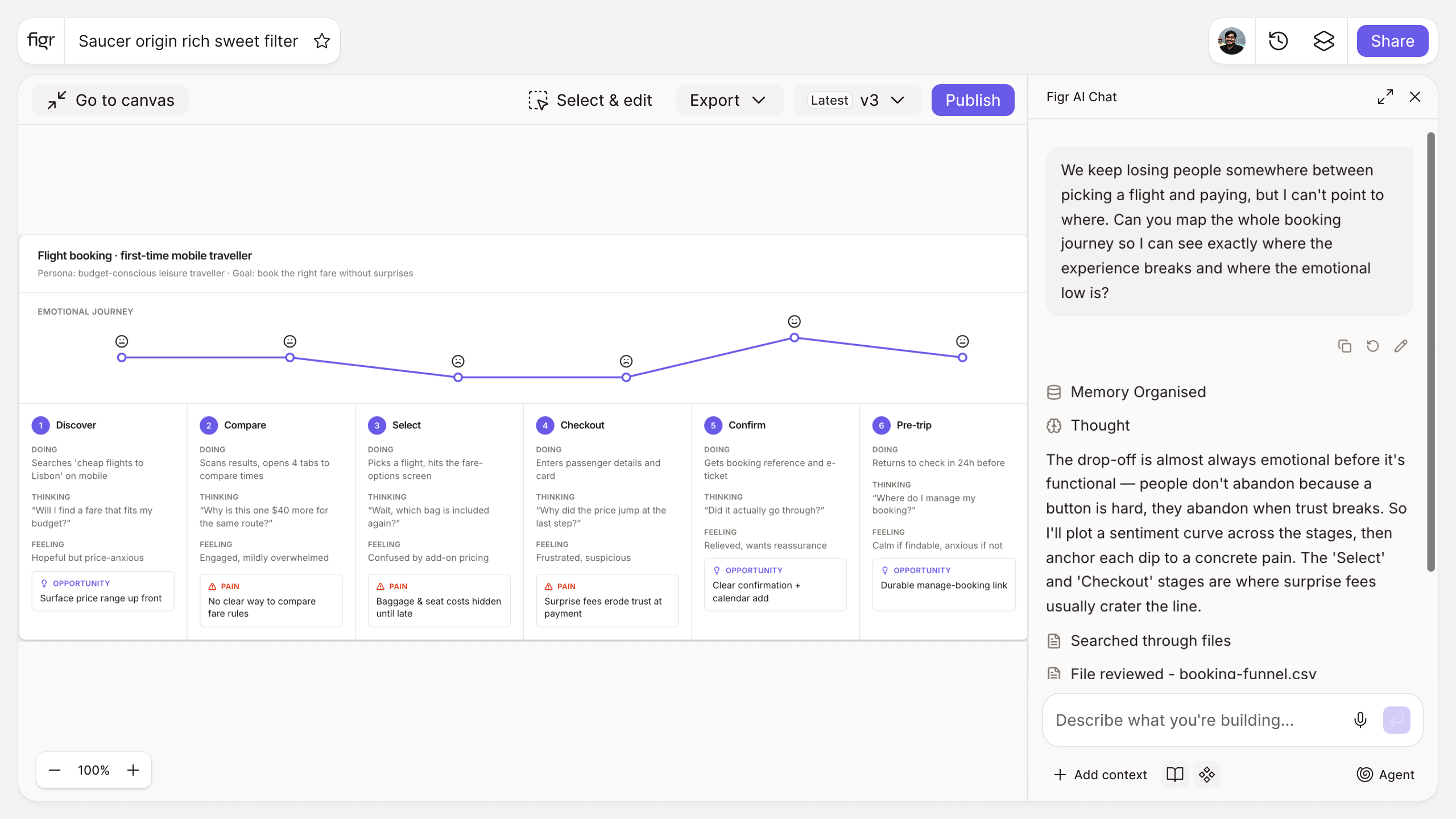
Inputs:
- Journey stages (free text, repeatable columns)
- Per stage: user actions, touchpoints, emotions, pain points, opportunities
- Persona (short text, optional)
Output: A structured journey map laid out as a grid: stages across the top, with actions, touchpoints, emotion curve, pain points, and opportunities per stage. Exportable.
Behavior: Interactive grid in-browser, no login. Editable and exportable.
Screens hide the problem the journey reveals
A product looks fine screen by screen and still fails as an experience, because the friction lives in the seams between screens. A journey map puts the whole path in one view, so the drop after signup or the dread before checkout becomes visible instead of buried. Seeing the emotion curve next to the pain points tells you where design effort actually pays off. What a user journey map is covers the fundamentals, and user journey mapping walks through building one.
How it works
1. Define the stages. Lay out the path from start to goal.
2. Fill each stage. Add actions, touchpoints, emotions, and pain points.
3. Mark opportunities. Note where the experience can improve.
4. Export and share. Bring the map to design and planning.
A worked example
You map a trial-to-paid journey: discover, sign up, first value, hit a limit, upgrade. The grid makes the gap obvious, the emotion line dips hard between "first value" and "hit a limit" because users meet a paywall before they understand the product. That single visible dip reframes the work from "redesign the pricing page" to "move first value earlier." A journey map is a planning artifact though, not a flow spec; for the screen-level paths, user flow examples and digital customer journeys go a level deeper.
From journey to design, with Figr
A journey map shows where the experience breaks. Figr helps you redesign those moments from your real product context, producing Figma-ready screens on your system. Because it reads your product through the Visual Context Graph, the redesigned moment fits the screens around it instead of standing alone. Pair this with the user persona generator to anchor the map to a real user, and the information architecture generator to check the structure underneath.
Who this is for
This helps UX designers and PMs who need to find the high-impact moment in an experience before redesigning screens.
What this tool is not
It maps the experience; it does not redesign the screens or run the research behind the emotion curve. The map is a thinking tool, only as accurate as what you put in it. It is also a free, standalone utility, not a Figr product feature.
FAQ
Is the user journey map builder free?
Yes, free and no sign-up.
What does the map include?
Stages, user actions, touchpoints, an emotion curve, pain points, and opportunities.
Can I export the map?
Yes, as a structured grid you can share.
Do I need a persona first?
It helps. You can add one, or map the journey for a general user.
How is a journey map different from a user flow?
A journey map captures the experience and emotion across stages; a user flow captures the specific screen-by-screen path. They complement each other.
How is this different from Figr the product?
This is a free mapping tool. Figr the product is an AI product designer that turns product context into UX decisions and Figma-ready design.