
The product manager doing design work no longer looks unusual. It looks like Tuesday. A PM drops a rough UI sketch in Slack, mocks a flow in Whimsical, writes just enough microcopy to make the intent obvious, then pushes the ticket into Jira before anyone with “designer” in their title has touched it.
That is not a breakdown in process.
It is the new floor of the role.
Last week I watched a PM at a fast-growing SaaS company outline a billing settings flow in a whiteboard tool, annotate error states in comments, and ask engineering one blunt question: “Can we ship this shape first and refine polish after usage?” Nobody in the room treated that as strange. They treated it as competent.
That shift is why product manager doing design work now sits right next to roadmap ownership, prioritization, and stakeholder alignment. The teams that admit this reality work better than the teams still pretending design starts only after a formal handoff.
The New Floor for Product Management
The meeting starts at 10. Engineering wants a decision on the onboarding flow before lunch. The designer is covering three squads. The PM shares a rough screen, marks the missing states, writes the primary button copy, and answers the question that matters: what should the user do next?
That is not role drift. It is the operating reality on a lot of SaaS teams.
PMs now carry part of the design load because somebody has to remove ambiguity before it reaches a sprint. Waiting for a perfect handoff sounds disciplined. In practice, it slows decisions, hides edge cases, and pushes basic UX thinking to the most expensive point in the process, after engineering has already started building.
The shift shows up in small, repeatable behaviors. PMs sketch the first pass of a workflow. They name the empty state. They decide whether a warning belongs inline or in a modal. They write enough microcopy and how to define clear acceptance criteria so engineers are not forced to design in Jira comments.
That is the new floor for product management.
Teams using artificial intelligence in product management feel this even more. Faster planning and prototyping tools do not reduce the need for judgment. They punish vague thinking faster. If a PM cannot express the structure of the experience clearly, the team just produces the wrong thing sooner.
The hard truth is simple. PMs do not need to become polished visual designers. They do need to shape the experience early enough that design debt does not become delivery debt. On modern product teams, that is part of the job, whether the job description admits it or not.
What Design Work Looks Like for PMs Today
When people hear PMs doing design, they often picture a PM trying to become a part-time visual designer in Figma. That's the wrong frame. Most of the work is not polish. It is structure.
The outputs that actually matter
A modern set of product manager design responsibilities usually includes:
- User flows: mapping the path from trigger to outcome, including dead ends, back buttons, permissions, and role-based branches.
- Low-fidelity wireframes: boxes, labels, hierarchy. Enough to show layout and intent, not enough to debate colors.
- State mapping: empty, loading, success, validation, permission denied, upgrade wall, timeout.
- Microcopy: button labels, helper text, error messages, confirmation language.
- Interaction notes: what happens after click, submit, cancel, retry, or partial completion.
That's real design work. It shapes the user experience before pixels become expensive.
What good PM-led design looks like
A strong PM design workflow starts upstream. The PM defines the job the screen needs to do. Then they make the logic visible. Then they force edge cases into the conversation before engineering has to discover them mid-sprint.
This is what I mean. If a PM hands off “users should be able to invite teammates,” that's not useful. If they hand off a flow that shows invite modal behavior, seat-limit messaging, duplicate email handling, pending state, and who sees success confirmation, engineering can move and design can refine.
Teams also get sharper when visual intent is tied to implementation clarity. If you need a practical template for that bridge, this guide on how to define clear acceptance criteria is worth using alongside your design artifacts, because too many PM sketches fail at the exact point where engineering asks, “What counts as done?”
Good PM design work reduces interpretation. Bad PM design work creates another layer of it.
If you want to improve the language around these artifacts, start with how PMs can build design vocabulary. Most PM mistakes in design are language mistakes before they become UI mistakes.
Why the PM Role Absorbed Design Tasks
Monday morning. The designer is in research for onboarding, engineering wants a decision on the billing upgrade flow by noon, and sales is pushing for a launch date because a prospect asked for seat controls in the next deal cycle. The PM either shows up with a workable flow or the team burns two days waiting on role purity.
Economic reality beats role purity
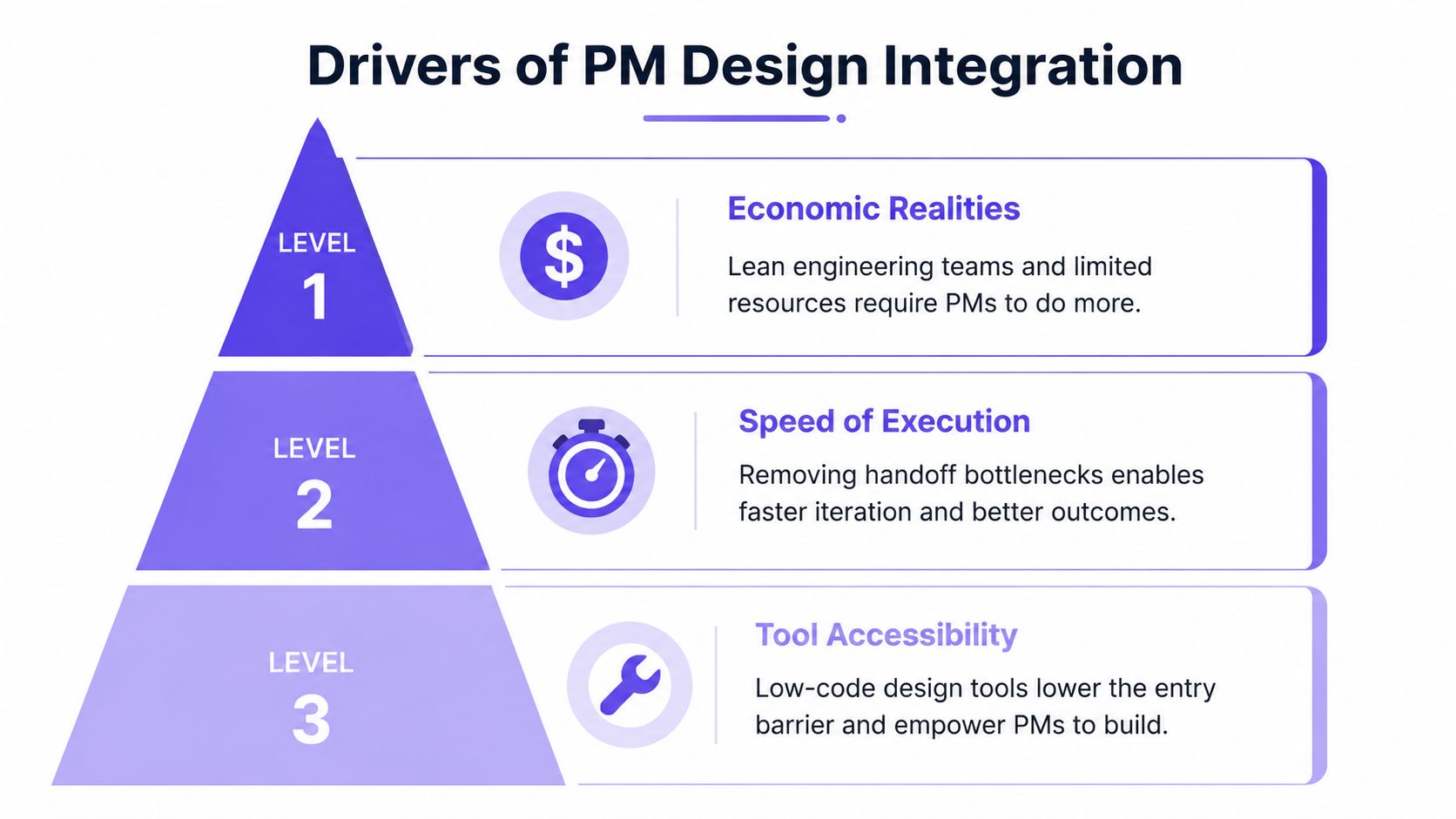
That is the fundamental reason design tasks moved into product management. Companies did not redraw the role out of theory. They did it because product teams are staffed unevenly, deadlines are actual, and unmade decisions are expensive.
At a growing SaaS company, engineering capacity is usually allocated to one team. Design capacity rarely is. One designer may cover activation, settings, billing, and two growth experiments at the same time. In that setup, the PM becomes the person who carries interaction logic far enough to keep momentum. Not because they are the best designer in the room. Because they are the only person sitting at the intersection of customer problem, business constraint, and delivery timing.
This became the operating floor. Earlier, we established that PM involvement in design is already widespread. The important point now is why it stuck. The answer is simple: it solved a staffing and speed problem.
Faster cycles expose vague product thinking
The older handoff model assumed slack in the system. PM writes requirements. Designer interprets. Engineering builds. That sequence can work on a team with stable scope, long planning windows, and enough design coverage to absorb ambiguity.
High-growth product teams do not get those conditions.
Teams ship smaller increments, test ideas faster, and revise flows mid-quarter. AI tools compress prototyping and implementation, which raises the cost of fuzzy thinking. If a PM cannot define how a user moves through a flow, where the decision points are, and what happens when things go wrong, the gap shows up immediately. Engineering blocks. Design has to reverse-engineer intent. The sprint slows down for reasons nobody will call "design," even though that is exactly what happened.
Tooling made artifact creation easier, not judgment easier
PMs can now sketch a serviceable flow in an hour. Whiteboards, wireframing tools, and AI-assisted drafting removed a lot of mechanical friction. That changed who can produce the first draft.
It did not change who pays for weak judgment.
A quick mockup with missing states still creates rework. A polished prototype that ignores existing patterns still creates design debt. PM-led design only helps when it reduces ambiguity and preserves system consistency. Otherwise the PM is not unblocking the team. They are generating cleanup work for design and engineering later.
For teams trying to define those boundaries clearly, the Figr guide for PM-designer alignment is useful because it treats overlap as an operating model question, not a territorial one.
Companies expand PM scope for one reason: waiting on perfect handoffs costs more than teaching PMs to carry design intent well.
The Design Skills PMs Actually Need
The answer is not “learn Figma until you can pass as a designer.” That wastes time and creates false confidence. PMs need design literacy, not design performance.
Literacy over mastery
A design-literate PM can spot when a flow is overloaded, when information hierarchy is unclear, when state logic is incomplete, and when a proposed interaction breaks the product's existing patterns. They don't need to polish icons. They need to recognize a weak experience before it ships.
That distinction matters because some PMs overcorrect. They start tweaking spacing, debating visual style, and trying to out-design the design team. That usually produces the worst kind of collaboration friction, the kind disguised as helpfulness.
The small set of skills worth building
A PM who is competent at design work usually has four muscles:
- Information architecture: can they structure content and actions in a way users can follow?
- Pattern recognition: do they know when to reuse a familiar interaction instead of inventing one?
- State completeness: do they think beyond the happy path?
- Design system respect: can they stay inside existing components and tokens?
There is evidence that even basic skill here matters. In this Product Coalition piece, PMs with basic design techniques like information architecture and low-fidelity wireframing are described as boosting UX metric impacts like retention by 15-22% in resource-constrained environments.
Taste is a product skill
A friend at a Series C company told me their most effective PM couldn't produce beautiful mockups. But she could look at three options and instantly say which one would confuse admins, which one would hurt onboarding, and which one respected existing navigation logic. That's the skill.
If you want to sharpen that instinct, study core UX principles. Not for theory points. For judgment.
The PM who understands interaction cost makes better roadmap decisions than the PM who only understands feature scope.
Where the PM-Led Design Model Breaks
There is a reason designers get irritated when people romanticize PM-led design. A lot of it is sloppy.
Duplication and confusion
The cleanest warning comes from Nielsen Norman Group. In their survey on UX and PM overlap, duplicative work, where PMs encroach on design tasks, led to confusion and inefficiency in 60% of cases, contributing to project delays averaging 20-30% longer timelines.
That number tracks with what teams feel in practice. The problem is not overlap by itself. The problem is unmanaged overlap. Two people solving the same layer of the problem with different assumptions is not collaboration. It is collision.
The common failure modes
Here's where ship UI without designer turns from pragmatic to reckless:
- Inconsistent patterns: a PM invents a one-off modal, form pattern, or navigation behavior that doesn't belong anywhere else in the product.
- Happy-path bias: the core flow looks fine, but error handling, permission states, and account edge cases are missing.
- Weak handoff detail: engineering gets a sketch with no interaction rules, no content logic, and no definition of exceptions.
- Feasibility blindness: the PM proposes an interaction that conflicts with current backend constraints or existing component architecture.
People misuse automation in this context too. They treat generated UI as a substitute for product reasoning. It rarely is. If you're evaluating tools in that category, read about UX design automation and product thinking. The useful question isn't whether a tool can draw a screen. It's whether it helps the team think through the actual product trade-offs behind that screen.
The red line
A PM should push design forward. A PM should not create silent design debt that someone else has to unwind later.
That line gets crossed when speed becomes an excuse for inconsistency.
A Practical PM Design Workflow
Most PMs don't need a designer for every first draft. They do need a disciplined process. Otherwise they just create messy artifacts that bounce back later.
Start with context, not screens
Before drawing anything, define the job to be done, the user role, the trigger, and the constraint. A surprising amount of bad UI starts with a PM opening a design tool before clarifying what problem the screen is solving.
This is also where product scope discipline matters. If your first draft keeps expanding, use a framework for defining your product's core scope before you touch the UI. Most PM design failures are scope failures wearing a visual costume.
Then map the flow and states
Don't draw a polished screen yet. Draw the path. Show entry points, decisions, dependencies, exits, and every state the system needs to handle. Include empty, error, success, loading, and blocked states.
PM-led artifacts can create real efficiency in this context. As described in this piece on PM-designer collaboration, PMs performing design work such as wireframing and prototyping can reduce iteration cycles by 25-40% by aligning teams faster on user flows and constraints.
Use the product you already have as the design brief
Blank-canvas generation is usually where a PM drifts into generic UI. A better approach is to design from product context. Figr is an AI product agent for UX design and product thinking. Most AI design tools generate from a prompt. Figr generates from your product. It ingests your live webapp, Figma files, screen recordings, and docs to learn your actual product before designing anything, then references 200,000+ real-world UX patterns to design from your product, not around it. If you want to see what that looks like in practice, browse the Figr Gallery or review the Mercury runway forecasting prototype.
A quick walkthrough helps here:
Pressure-test with engineering before polishing
This is the step PMs skip when they're in a hurry. Don't ask engineering, “Can you build this?” Ask, “What breaks if we build it this way first?” That question gets better answers.
A solid PM design workflow also includes:
- Constraint review: confirm data availability, permissions logic, and component availability.
- Edge-case review: ask what happens when user input is partial, stale, invalid, or duplicated.
- Ticket packaging: include flow, states, microcopy, and acceptance criteria in the same handoff.
Document the decision, not just the sketch
The artifact is not the rectangle. The artifact is the reasoning.
Put the user flow, annotated wireframe, state list, and implementation notes into the ticket. If you need to explain a complicated flow asynchronously, a short walkthrough video helps more than another paragraph. This workflow for high-performance screen recording is useful when you want engineering or stakeholders to understand the interaction logic without sitting through a live meeting.
That's how you ship UI without designer support responsibly. Not by pretending design doesn't matter, but by carrying enough of it well enough.
Making Design Your Superpower, Not Your Burden
Go back to that opening scene. The PM sketching in Slack, mapping flows in a whiteboard, and pushing a ticket before a designer joins. That can look chaotic from the outside. Done well, it is not chaos. It is operational competence under constraint.
The point is not to replace designers. The point is to stop waiting for perfect role boundaries before making the product legible. A strong product manager doing design work reduces ambiguity, protects momentum, and gives designers better material when they do engage.
Start small. On your next feature, don't open with a PRD. Open with a user flow, every state, and the exact words the user will read. Then ask engineering where the logic breaks.
That one move will teach you more than another week of abstract debate.
For the complete framework on this topic, see our guide to product management best practices.
If your team needs help turning product context into flows, prototypes, PRDs, and edge-case-aware design artifacts, take a look at Figr. It's built for product teams that need to move fast without designing from a blank canvas.