

User Research Checklist What to Do Before You Start
A feature can look clean in the review doc and still collapse the moment real people touch it. I've watched teams leave the room feeling aligned, then spend the next week explaining why the launch didn't land.
That's expensive in the boring ways that hurt most. Engineering rewrites code that never should've shipped, Designer iteration gets squeezed into a deadline that's already gone brittle, and QA keeps retesting flows that the team could have challenged before handoff. Research debt shows up later as rework, edge cases, and political debates about what “done” means.
What is user research if not a way to stop that cycle early? The basic gist is this, if you define the question well, choose the right method, recruit the right people, and turn findings into artifacts the team can use, research becomes a decision system instead of a debate.
The Feature Shipped but Users Did Not Show Up
Last week I watched a Product Manager walk through a workflow that had cleared internal review without much resistance. Two days after launch, support tickets, confused behavior, and awkward follow-up questions made the gap clear. The team had optimized for the slide deck, not for the person using the product.
That kind of miss usually comes from a fuzzy setup, a method chosen out of habit, or a participant group that does not match the decision the team needs to make.
Practical rule: if the team cannot say who the research is for and what decision it will change, the study is too vague to trust.
The fix starts before the first interview or test session. Teams waste time when they jump straight into execution without checking whether the question, the audience, and the decision are aligned. The most useful research plans start with a simple decision framework, then work backward to the kind of evidence that can shape the product.
You can see the cost of getting this wrong at scale. Fixing an error after development can be 100 times more expensive than fixing it before development, according to User Interviews' research roundup on UX statistics from the 1980s and 1990s through modern product practice (User Interviews). That is not a vanity metric. It is a reminder that product teams pay for uncertainty twice, first in build time and later in cleanup.
The fastest way to cut that waste is to treat research as a setup problem before it becomes a learning problem. The teams I trust most usually validate the premise early, before they commit to scripts, screens, or sprint promises. A useful starting point is Figr's validation approach, because it frames the work around evidence instead of enthusiasm.
User Research Is an Evidence Pipeline Not a Single Method
A good research effort starts with a decision, not a method. If the team cannot say what they need to learn, who will use the result, and what action it will inform, the work will drift into scattered notes and unusable insights.
The pipeline matters more than the label
In practice, the work moves through a sequence. Define the research question, choose the method, recruit the right participants, run the sessions, analyze what happened, and then package the findings in a form the team can use. IxDF describes user research as an evidence-generation process, and that is how stronger product teams treat it.
That framing changes how decisions get made. A survey is useful for one kind of question, an interview for another, and a usability test answers something different again. The method is only one part of the system.
Quantitative and qualitative data play different roles
Quantitative methods, like surveys, first click tests, tree tests, and A/B tests, are useful when you need signals across a broader pattern. Qualitative methods, like user interviews, focus groups, field studies, and diary studies, help explain why that pattern exists and where friction shows up. User Interviews UX Research Field Guide lays out that split clearly.
The value comes from triangulation. When analysts compare multiple sources, recurring themes become easier to separate from one-off comments, and edge cases stop getting mistaken for the main story. That matters because one vivid quote can sound persuasive while still being a weak basis for a product decision.
The teams that do this well stop treating research as a transcript collection exercise. They ask what evidence should change the next decision, then set up the work to produce that evidence. That shift affects stakeholder confidence, prioritization, and the quality of the artifacts the team carries into planning.
How to Choose the Right Research Method for Your Question
A method choice starts with the decision you need to make, the context where the behavior happens, and whether you need people's stated views or their observed actions. NN/g frames user research methods as different tools for different questions, not interchangeable steps in a process.
Match the method to the behavior
If the question is about opinions, expectations, or the words users use, attitudinal methods fit. If the question is about what people do, behavioral methods fit better. Field studies observe people in their own environment, interviews are one-on-one, and focus groups typically use 3 to 12 participants (NN/g).
Teams usually get into trouble when they reach for the method they know best instead of the one that matches the question. Interviews are easy to schedule and comfortable to run, but they will not show you how a workflow breaks in practice if the core issue is behavior.
Use method choice as a design constraint
The method you choose shapes what the team can conclude. If the question is about comprehension in context, a setup that removes context will create noise. If the question is about whether a pain point is widespread, a single person's memory can make the issue feel larger than it is.
User interviews
Participants: One-on-one.
Best for: Understanding motivations, language, expectations, and how people think about a problem or product.
Data type: Qualitative.
User interviews are most useful when you want depth. They help uncover why people behave the way they do, how they describe their problems, and what they expect from a solution.
Focus groups
Participants: Typically 3 to 12 participants.
Best for: Exploring shared reactions, comparing perspectives, and discussing early concepts.
Data type: Qualitative.
Focus groups work well when you want to see how people react to an idea in a group setting. They can surface common opinions, disagreements, and language that may not emerge in individual interviews.
Field studies
Participants: Users observed in their natural environment.
Best for: Understanding real-world behavior, context, workflows, and workarounds.
Data type: Qualitative.
Field studies help you see what users actually do rather than relying only on what they say. They are especially useful for uncovering hidden constraints, habits, and improvised solutions.
Surveys
Participants: Varies depending on the study and target audience.
Best for: Checking patterns across a larger group and measuring broad sentiment.
Data type: Quantitative.
Surveys are useful when you already have a hypothesis and want to understand how common a behavior, preference, or opinion is across a larger sample.
Usability tests
Participants: Varies by study design.
Best for: Evaluating task performance, identifying friction points, and understanding where users struggle.
Data type: Qualitative and quantitative.
Usability testing shows how people interact with a product or prototype in practice. It can reveal where users get confused, whether they complete key tasks, and which parts of the experience need improvement.
A useful reference for the broader set of UX research methods is UX research methods, because teams often default to one familiar tool and then force every question through it.
Practical rule: choose the method that keeps the decision honest, not the one that is easiest to schedule.
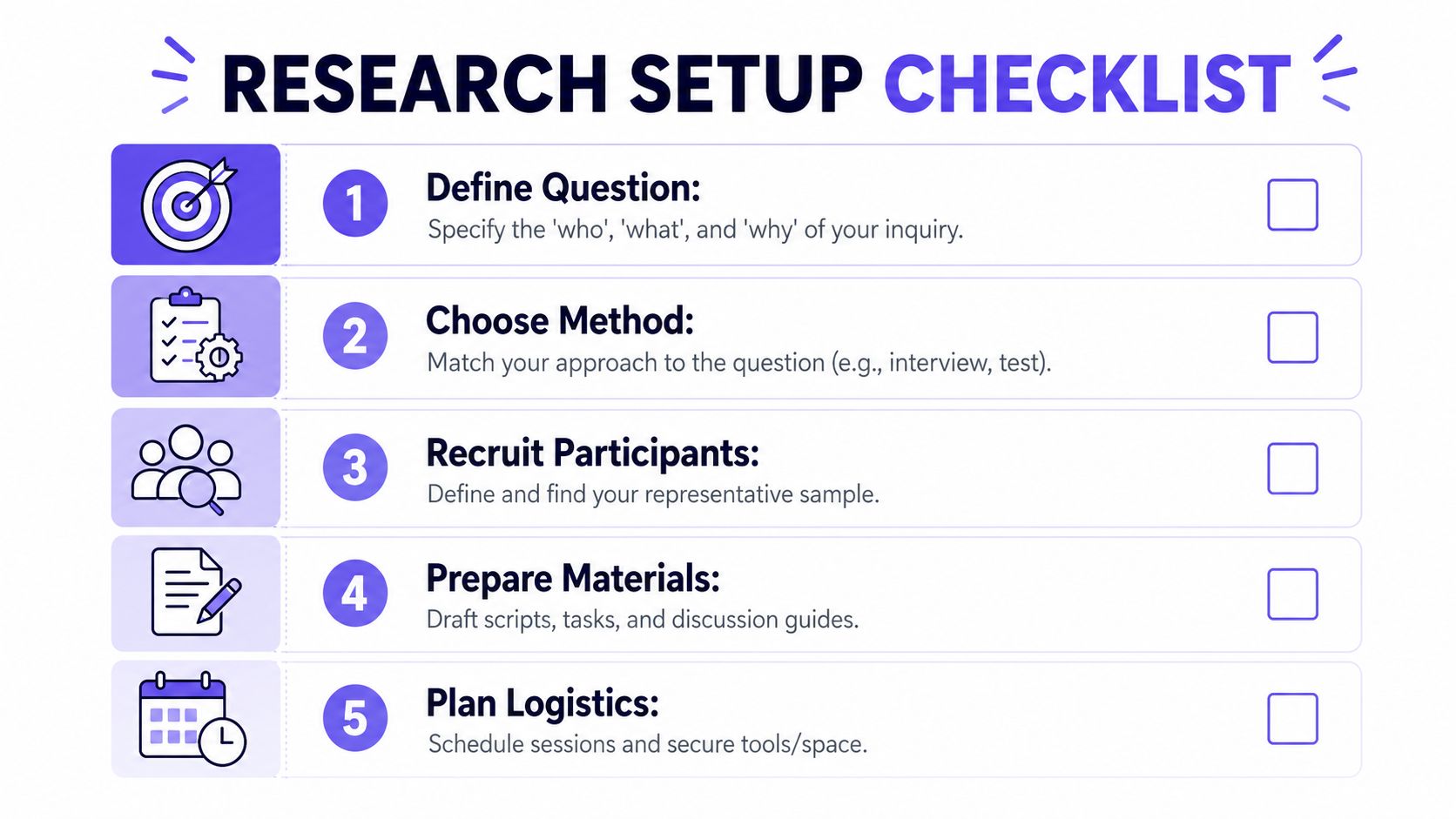
Your Pre-Research Setup Checklist
A study becomes useful before the first session begins. If the setup is sloppy, the findings will be too.
Step 1. Define the question tightly
Step 1. Define the question.
Write the decision you need to make in plain language.
Name the user, the behavior, and the product moment.
If the team can't answer “who, what, and why,” the study is too broad.
Step 2. Choose the method on purpose.
Pick the method that fits the decision, not the method everyone used last quarter.
Use the attitudinal and behavioral split from the section above.
If you need context, keep context in the design.
Step 3. Recruit the right participants
Step 3. Recruit participants intentionally.
Define the inclusion criteria before outreach begins.
Use role, experience level, environment, and task history as filters.
Avoid the trap of “whoever is available this week,” because availability is not representativeness.
Step 4. Prepare the materials
Step 4. Write the script and tasks.
Keep prompts short and neutral.
Avoid teaching the answer in the task wording.
If a moderator guide drifts into explanation, it's already biasing the room.
Step 5. Plan the logistics
Step 5. Protect the session conditions.
Test the tool, the recording setup, and the note-taking workflow before the call.
Decide who observes and who moderates.
A clean session is not glamorous, but it keeps the evidence usable.
The reason this checklist works is simple. It forces the team to make the hidden decisions explicit, so the study becomes repeatable instead of improvisational.
When Research Conditions Distort What Users Actually Do
A research session can look clean and still miss the behavior you need to understand. The setting changes how people respond, so the setup has to be part of the decision, not an afterthought.
Preserve realism where it matters
If participants are talking to an observer, reacting to a prototype, following formal tasks, or working from a tight recruitment script, they often behave differently than they do in their normal context. UXMatters has written about this validity problem directly, and the practical advice holds up, use realistic tasks, keep the setup less formal, do more field studies, and use remote research when it fits the question (UXMatters).
That does not make research unreliable. It means the method needs to match the decision. A hallway test can surface friction quickly, but it will not always show how a workflow behaves under real pressure, with interruptions, edge cases, and the constraints that shape actual use.
Watch for the illusion of certainty
A polished session can still produce weak evidence if the setting pushes people into unnatural behavior.
I have seen teams trust a prototype too quickly because the session felt smooth. The participant was polite, the notes were tidy, and the moderator guide sounded organized. Then product analytics showed a different pattern.
The fix is to check realism before the session starts, not after the team has already treated the findings like a decision. Ask whether the task, the setting, and the recruiting criteria mirror the behavior you are trying to study. That question matters for Product Managers and Designers alike, because it keeps the team from mistaking performance in a research room for evidence about the product in use.
A practical checklist helps here: define the behavior you need to observe, choose the lightest method that still preserves that behavior, and decide what distortion you can tolerate before the session is no longer useful. When the risk is high, teams usually get better results by observing people in context or by using tools such as AI tools for feedback analysis to compare session findings against broader product signals.
Turning Research Findings into Decision-Ready Artifacts
Research only matters when someone can act on it. A transcript dump does not help a product manager decide what to ship, what to fix, or what to test next.
Curate the findings before you present them
A useful readout starts with restraint. Present the small set of findings that change a decision, support each one with evidence such as metrics, quotes, or clips, and close with recommendations, risks, and open questions. UXArmy's guidance on presenting findings makes that structure explicit, and it keeps stakeholders out of the raw-notes swamp (UXArmy on presenting findings).
The strongest readouts feel like decision memos. They answer what happened, why it matters, and what should change next, without forcing the team to reverse-engineer the point from a pile of observations.
Turn observations into signals
The Goals-Signals-Metrics approach helps the team turn a set of observations into something operational. Start with the goal, name the signal that would show progress, then choose the metric that tracks it over time. Once the team uses that pattern, it becomes much easier to check whether a design change affected the behavior you care about.
It also tightens the loop between design and product operations. Instead of ending a readout with “users seemed confused,” the team leaves with a signal they can watch in the next review or test cycle, and a clear reason to keep watching it.
Raw notes still need structure before they become a readout. Grouping observations into themes is where affinity mapping earns its keep, and Figr shows affinity diagram examples in a way that is useful for that kind of clustering. The point is not prettier synthesis. It is faster alignment across Product, Design, and the people who need to make the call.
Practical rule: if a finding cannot point to a decision, it is still a note, not a finding.
The Visual Context Graph and AI-Assisted Research Workflows
Research is easier to act on when the team can tie findings back to live product context. Figr does that through its Visual Context Graph, which brings together visual context, behavioral context, design system context, product knowledge context, and implementation context.
Why context changes the research workflow
Figr ingests existing product context, including live screens, Figma files, design systems, PRDs, research, and analytics, so it understands the product before it generates design output. That matters because research findings rarely sit on their own. They sit next to implementation constraints, system rules, and product history.
The workflow is clearer when research output travels with that context. A team can move from insight to edge case mapping to a Figma-ready prototype without losing the original reasoning. That keeps the conversation grounded in the actual product, not an abstract mock.
Where AI helps, and where it shouldn't overreach
AI-assisted workflows can speed up the handoff from research to artifact generation, especially when the team needs to synthesize notes, surface patterns, or compare behavior against existing flows. Figr's AI tools for feedback analysis are useful here because they help turn messy input into something product and QA teams can work with.
The trade-off is judgment. AI can organize context and speed up drafts, but it should not replace the person deciding what matters. The best use of AI in research workflows is connective, not authoritative.
If you want to see how design context gets encoded in practice, Figr's screen recording analysis shows how teams can move from observed behavior to concrete artifacts. The same logic shows up in brainstorm research and research questions, where the goal is to keep the workflow tied to evidence.
Building a Shared Workflow Across Product and Design
A research plan fails when Product Manager, Designer, and QA all leave with different definitions of success. Alignment is the core deliverable.
Make the handoff visible
The cleanest teams don't just share a deck, they share the underlying decision trail. The question, method, recruitment criteria, session structure, and synthesis notes should all be visible enough that another person could audit the logic.
A gallery of solved flows can help. Browsing Figr gallery examples can give the team a concrete sense of how context, layout, and product logic stay linked. One useful reference point is Mercury forecasting inspiration, which shows how grounded product context keeps design thinking practical.
Keep the team close to the evidence
Research becomes fragile when it lives only in the researcher's head. It becomes operational when Product and Design can point to the same notes, the same clips, and the same decision criteria.
That is where shared workflow beats heroics. No one needs to be brilliant in isolation if the team has a repeatable way to define, run, and review studies together. That also makes it easier to spot disagreements early, before they turn into rework or late-stage compromise.
The Visual Context Graph Keeps Research Connected to the Product
The Visual Context Graph matters because it gives research a stable home inside the product system. The five layers, visual context, behavioral context, design system context, product knowledge context, and implementation context, are what keep insights from floating away from reality.
Why the layers matter together
Visual context shows what users see. Behavioral context shows what they do. Design system context shows what the product can consistently express. Product knowledge context captures the rationale behind prior decisions. Implementation context keeps the team honest about what can ship.
When those layers stay connected, research does more than inform a slide. It becomes a source of design logic that Product Managers, Designers, and engineers can revisit when new edge cases appear.
For a closer look at how that turns into product work, problem category research PRD is a useful example of how evidence can flow into structured product thinking.
Your Next Step Is to Run a Five-User Test
The most useful research move you can make this week is smaller than people expect. The widely cited benchmark in UX literature says testing with just 5 users can uncover about 85% of usability problems, which is why research stays practical even for lean teams (User Interviews).
That doesn't mean five users is always enough. It means you can start before the perfect study exists.
Use the checklist from above. Define one question, choose one method, recruit for one decision, preserve realism, and package the findings so the team can act on them. If you want a consistent usability testing framework to keep that motion repeatable, consistent usability testing framework is a good companion.
What matters most is momentum. A focused study that changes the next product decision beats a polished research plan that never leaves the draft stage.
If you're ready to connect research, product context, and design output in one workflow, Figr helps teams move from evidence to Figma-ready artifacts without losing the reasoning in between. I'd use it when the team already knows the question and needs a tighter path from insight to action. It's a practical way to keep research grounded in the product people are shipping.
FAQ
What is user research in plain terms?
It's a way to study target users so product teams can make better decisions.
The goal is evidence-based improvement, not opinion gathering.
Do I need a big sample to start?
No.
A small, well-chosen sample can still reveal meaningful issues, especially in early testing.
Should I always use interviews?
I wouldn't.
Interviews are useful for attitudes and language, but behavior often needs a different method.
How do I know if my research question is good enough?
If it names the user, the behavior, and the decision it will change, it's probably usable.
If it sounds like “learn more about users,” it's too broad.
What should I hand to stakeholders after research?
I'd share the few findings that matter most, the evidence behind them, and the next decision.
A clean readout beats a long transcript every time.