

I watched a Product Manager spend days polishing an AI-generated flow that looked right until engineering pointed out it broke the permissions model, ignored existing states, and contradicted the current design system.
That failure mode is getting more common. AI can now produce plausible screens, user stories, summaries, and prototypes fast enough that the old markers of competence, backlog hygiene, polished docs, quick mockups, no longer stand out on their own. They barely clear the bar.
What changes the game is context. When product teams work from a deep understanding of the live product, user behavior, design rules, and technical constraints, AI becomes useful instead of noisy. That's the bridge to AI-powered product management, and it's why tools that ground outputs in real product context are changing how strong Product Managers operate, as explored in AI-powered product management.
Why Good Enough Product Management No Longer Works
Good enough Product Management no longer works because AI has started absorbing the mechanical parts of the job.
For years, many teams treated the role as a coordination layer. Write the PRD. Groom the backlog. Chase approvals. Keep everyone aligned enough to ship. That work still matters, but it no longer differentiates you. AI can draft tickets, summarize calls, cluster feedback, and generate first-pass specs in minutes. So where does a Product Manager now earn trust?
The answer is in judgment.
Historically, the role became more visible as software scaled, and one industry roundup noted that compensation at major technology firms can exceed $200,000 annually, reflecting how much organizations value Product Managers who drive outcomes rather than just coordinate work, as summarized by UXCam's product management statistics. The role moved toward impactful decision-making. That shift is now accelerating.
The work that got automated first
AI is very good at first drafts and administrative lift. It can help with:
Drafting artifacts: PRDs, meeting notes, acceptance criteria, and research summaries
Pattern matching: common flows, standard UI structures, and recurring request themes
Speeding synthesis: turning scattered inputs into something a team can react to
That sounds helpful, and it is.
It also creates a trap. When everyone can produce more artifacts, the bottleneck moves to deciding which ones are grounded in reality.
Good enough outputs create expensive confidence.
A Product Manager who only operates at the output layer gets buried under plausible nonsense. A stronger one curates context, asks sharper questions, and rejects seductive but disconnected work. If you want to explore trending tools for product managers, that's useful, but the actual differentiator isn't the tool list. It's whether you can direct tools with product judgment.
The new economics of the role
This is what I mean. The market no longer rewards the person who merely keeps the machine moving. It rewards the person who makes the machine worth moving.
At scale, companies don't pay for documentation volume. They pay for fewer bad bets, faster convergence, and clearer trade-offs. That's why the strongest Product Managers are becoming something closer to context operators. They connect customer signals, system constraints, roadmap timing, and business intent into a form the team can act on.
If you're trying to figure out how to stand out as a product manager, start there. Stop treating AI as a faster intern. Treat it like a force multiplier that only works when the product context is unusually well curated.
What is a Product-Aware Artifact
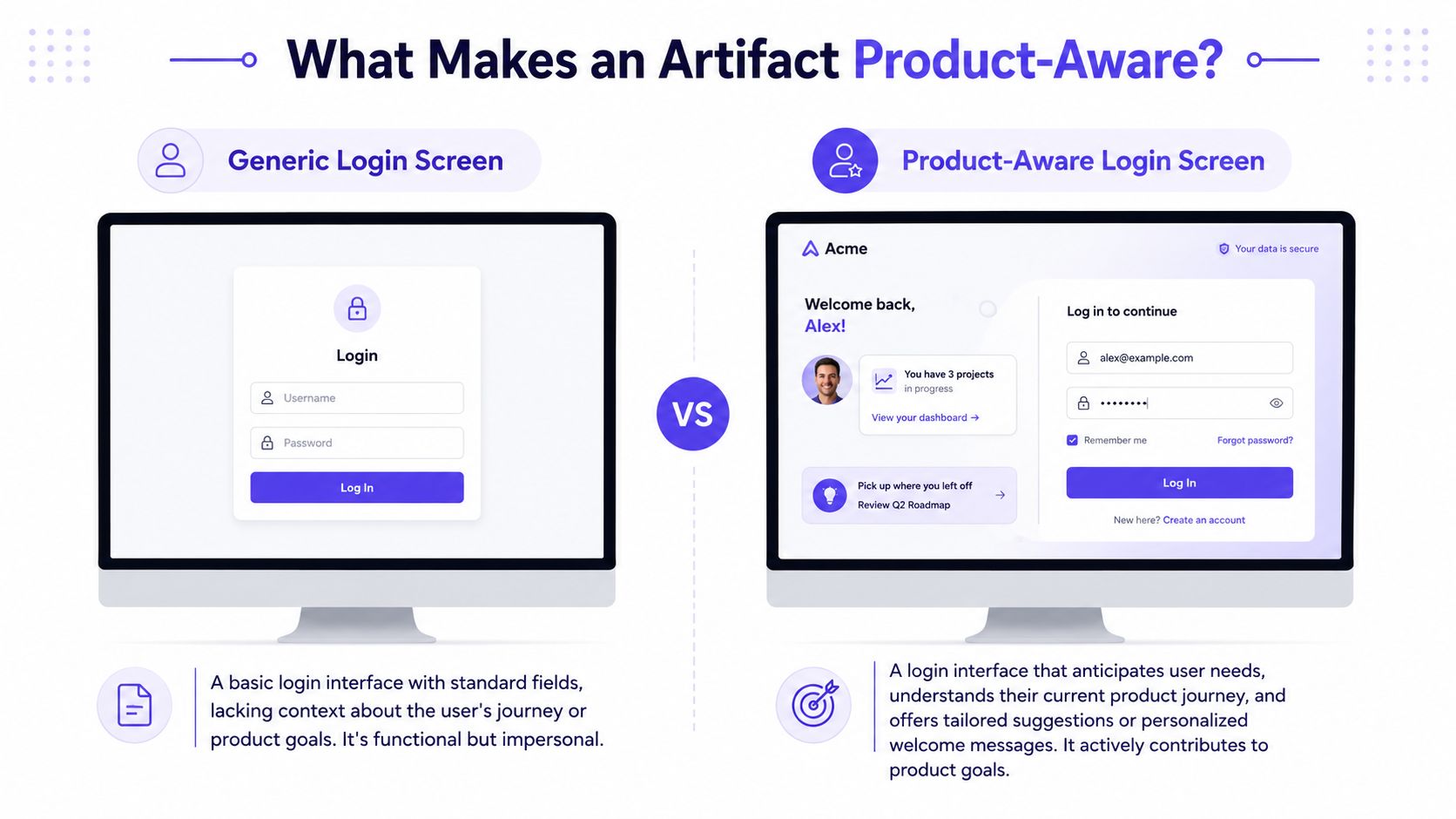
A product-aware artifact is any output that reflects how your product works, not just how a generic interface should look.
That distinction matters more than is often understood. A generic artifact can be visually polished and still be useless. It might ignore your authentication rules, skip an edge case your support team sees every week, or introduce a flow that clashes with your information architecture. It looks finished. It isn't usable.
Last week I watched a Product Manager present an AI-generated onboarding flow in a review. The screens were clean. The copy sounded confident. Then the room got quiet. Engineering flagged a permissions conflict, the Designer pointed out a mismatch with existing components, and support noted that the flow would fail for a common account state. The artifact was attractive, but it wasn't product-aware.
What generic artifacts usually miss
A generic login screen is a simple example. It might include email, password, and a forgot-password link. Fine. But many real products need much more context:
Access logic: SSO, role-based access, invited-user states, and domain restrictions
Security flow: multi-step verification, lockouts, suspicious login handling, and recovery paths
Product continuity: existing error tone, component rules, and post-login routing
Those details are where rework hides.
A product-aware artifact captures them early. It shows the likely states, the business logic, the user consequences, and the implications for design and engineering. That's also why it helps to spend time understanding AI design memory. AI only becomes meaningfully useful when it can retain and apply context across sessions instead of resetting to a blank-canvas worldview every time.
What makes an artifact worth trusting
The basic gist is this: the artifact should reduce ambiguity, not decorate it.
A strong artifact usually includes:
Known states: default, loading, empty, error, blocked, and permission-based variations
Decision rationale: why this route was chosen, what assumption it depends on, and what got rejected
Success framing: what outcome should change if this solution works
Practical rule: If an artifact can't survive review from engineering, design, and support without major reinterpretation, it isn't ready.
That's the standard now. In an AI-heavy workflow, standout Product Managers don't win by producing more artifacts. They win by producing fewer, sharper, product-aware ones.
How to Own the Messy Front End of Design
Standout Product Managers now work earlier, closer to ambiguity, before the first polished wireframe appears.
Many teams still run an old handoff pattern. Product writes a document, design interprets it, engineering later discovers missing constraints, and everyone calls the churn collaboration. It isn't. It's deferred confusion.
Owning the messy front end doesn't mean doing the Designer's job. It means capturing enough reality, current screens, broken moments, edge cases, workflow constraints, decision history, so the team starts from shared ground rather than abstraction. If you want a fuller take on that shift, it's worth reading learn about the PM design shift.
What early ownership actually looks like
The Product Manager's role at this stage is investigative. You are trying to make the problem legible before the team falls in love with a solution.
That usually means working with inputs like:
Live product behavior: current flows, navigation paths, interaction density, and state changes
Existing artifacts: prior PRDs, support tickets, research notes, and design decisions
Failure patterns: where users drop, where teams disagree, and where implementation usually breaks
A strong Product Manager turns those fragments into a shared frame. That frame can include rough flows, edge-case lists, early state maps, and a short memo that names the user problem in operational terms.
Why this creates leverage in the AI era
AI expands your ability to explore before committing. You can capture current product behavior, compare flow options, and generate draft artifacts that make hidden assumptions visible. That changes the timing of product judgment. Instead of waiting for a design review to expose flaws, you can surface them while the work is still cheap to rethink.
I've seen this shift change team dynamics fast. A Product Manager at a growth-stage SaaS company brought a rough state map into an early discussion instead of a polished requirement doc. The Designer could immediately see where the flow needed conditional paths. Engineering flagged a backend dependency before scoping had hardened. The meeting was shorter, but above all, it was real.
Ambiguity feels efficient early because it lets everyone move fast in different directions.
A better way to enter design work
Treat the front end of design as context construction.
Do this before formal solutioning:
Capture the current experience: collect live screens, actual navigation paths, and notable friction points
Map the hidden states: invited, expired, blocked, partial, empty, and error scenarios
Write the decision frame: define the user problem, the business stake, and the constraint that matters most
That package gives the Designer something much stronger than a wish list. It gives the team a common operating picture.
If you're serious about how to stand out as a product manager, this is one of the clearest shifts to make. Enter earlier. Bring context. Leave less room for interpretive chaos.
The Three Habits of Standout Product Managers Today
Standout Product Managers today practice a loop of context capture, systems thinking, and artifact-driven alignment.
That sounds simple, but very few people do it consistently. Many still rely on intuition, personal charisma, or polished updates. The stronger pattern is more operational. A high-signal way to stand out is to pair customer discovery with quantified execution by translating findings into measurable product problems, defining success metrics before solutioning, and writing concise decision memos, as described in Academy of PM's guidance on product manager skills.

Habit one is capturing reality before proposing change
Habit 1. Capture the product as it exists.
Don't start from a blank page when the product already contains the clues.
Review live screens, support transcripts, analytics exports, decision logs, and existing design patterns.
Use that material to answer three questions:
Where precisely does the user get stuck
Which states already exist, even if nobody documented them
What constraints will subtly shape any solution
A gallery example that makes this concrete is a task approval card with many operational states. The lesson isn't the visual itself. The lesson is that real products rarely have one happy path. They have approval, rejection, pending, expired, delegated, revoked, and other conditions that influence UX and implementation.
Habit two is thinking in systems, not screens
Habit 2. Map states, flows, and trade-offs before asking for polish.
Weak Product Managers discuss features as isolated objects.
Strong ones discuss workflows, dependencies, edge cases, and business consequences.
When you review a proposed flow, ask for the full system around it:
Flow logic: entry points, exits, loops, and blocked paths
State coverage: empty, loading, partial success, hard fail, and account-specific variations
Trade-offs: what gets simpler for the user, what gets harder for ops, what gets delayed for engineering
This habit is where AI becomes useful. It can help generate state diagrams, edge-case maps, and prototype directions, but only if you feed it enough product truth.
Habit three is using artifacts to drive alignment
Habit 3. Bring artifacts that let the team reason together.
A good meeting gets people talking.
A strong artifact gets people deciding.
Bring materials that create shared context, not performative polish:
Decision memos: short notes on problem framing, recommendation, and rejected options
State maps: a view of how the experience changes under different conditions
Test scenarios: what should happen, what might fail, and how the team will know
One practical way to build this loop is to anchor your routine in a small set of repeatable templates. That's the spirit behind solid product management best practices. The goal isn't more process. It's better memory.
There's also a career angle here. Plenty of Product Managers spend time on visible work but neglect visible thinking. If you care about public reputation too, a lightweight personal branding tool can help translate your operating style into clearer external signals. Still, branding without substance fades quickly. These habits create the substance.
Is Technical Depth Still a Differentiator
Technical depth is still a differentiator, but the useful version now looks more like systems judgment than coding fluency.
A lot of Product Managers ask the wrong question here. They ask whether they need to write code. Usually, that isn't the point. The better question is whether they understand enough about data, workflows, model behavior, implementation constraints, and integration risk to make credible product decisions. Can you tell when an AI-generated suggestion conflicts with system reality? Can you see why a seemingly small UX change creates backend complexity?
That capability has become more valuable, not less.
Guidance summarized from MIT and related product role frameworks argues that expert-level differentiation comes from technical depth in product analytics and roadmap judgment, including defining success metrics first, mapping workflows to find drop-offs, prioritizing by expected impact, and explaining not just what to build but why now, how it will be measured, and what trade-off was rejected, as noted in MIT Professional Education's guide to becoming a product manager.
The new shape of technical depth
Technical depth in the AI era usually shows up in four places:
Systems awareness: you understand dependencies, handoffs, and likely implementation constraints.
Data fluency: you can interpret metrics, question noisy findings, and connect numbers to product behavior.
AI literacy: you know models need context, fail on edge cases, and require verification.
Roadmap realism: you can scope trade-offs without pretending every idea is equally buildable.
A Product Manager with this depth doesn't need to out-architect engineering. They need to ask better questions sooner.
A Product Manager with this depth doesn't need to out-architect engineering. They need to ask better questions sooner.
Why it matters in practice
The difference shows up in roadmap conversations. One person says, "We should add AI here." Another says, "What context will the system need, what failure states matter, and how will we measure whether this changes user behavior?" Which one gets trusted with bigger bets?
That's also where the differences in the AI PM role become obvious. The role is moving toward supervision of intelligent systems, not just prioritization of human work. You need enough technical intuition to know what the system can do, what it can't do reliably, and what the team would have to absorb if it fails.
Technical depth now creates strategic credibility. It helps you make promises the team can keep.
How Shared Context Prevents Months of Rework
Shared context prevents rework because it exposes assumptions before they harden into plans.
Most product delays don't start as dramatic mistakes. They start as small omissions. A missing state in a flow. An unstated business rule. A Designer assuming one path while engineering implements another. By the time those gaps surface, the team has already invested attention, political capital, and implementation effort.
Rework usually begins as interpretation drift
When teams lack a shared source of truth, each function fills the gap with its own model of the product. Nobody thinks they're improvising. They think they're being efficient.
I've seen this in a planning cycle where a Product Manager brought a concise requirement doc but no evidence of current flow behavior. The Designer made a smart interpretation. Engineering made a different smart interpretation. Both were defensible. Both were incompatible. The team lost time not because anyone failed, but because the context never got centralized.
This is why product work benefits from a common memory that includes user behavior, prior decisions, current UI patterns, and operational constraints.
Why the business case is stronger than it looks
At scale, companies pay heavily for late discovery. Nielsen Norman Group has long argued that usability problems found later in development cost far more to fix than those caught early. The exact multiplier isn't the point here. The operational truth is enough: late-stage corrections force teams to revisit design, implementation, QA, and stakeholder alignment all at once. You can read that broader thinking in Nielsen Norman Group's research-backed writing on usability and product development.
Shared context doesn't make teams slower. It removes false speed.
The zoom-out matters. Organizations create incentives for local efficiency. Ship the draft. Get the meeting done. Move the ticket. But product development is a system, and local speed often creates global waste. The Product Manager who curates context acts against that waste. They make it easier for the team to converge around what the product needs.
What shared context should contain
A useful shared context layer usually includes:
Current state evidence: live flows, support pain points, analytics observations, and known friction
Decision history: what the team already tried, what was rejected, and why
Constraint visibility: technical limits, policy concerns, design rules, and edge cases
That body of context reduces preventable disagreement. It also gives AI tools something real to work from, which is where their output starts getting sharper instead of louder.
The Trap of Ambiguous Hand-offs
Ambiguous hand-offs create hidden work because every team has to reinterpret the product in motion.
A vague PRD can look complete from the writer's side. It has goals, requirements, and maybe a few user stories. Then the work begins and the gaps open up. Which states matter? What happens when the user lacks permission? Which error language is consistent with the existing product? What trade-off was intentional versus accidental? Nobody knows, so everyone fills in the blanks differently.
In short, ambiguity is one of the most expensive forms of optimism in product development.
Where hand-offs usually fail
Most weak hand-offs break in predictable places:
Missing states: empty, error, partial completion, retry, expired, blocked
Unstated assumptions: user permissions, backend availability, content ownership, timing rules
Thin rationale: no explanation of why this option was chosen or which trade-offs were accepted
The painful part is that these failures often surface late. The Designer discovers one set of gaps while exploring flows. Engineering finds another during implementation. QA uncovers more when test cases hit edge conditions. Each stage inherits uncertainty from the previous one.
What a high-clarity hand-off looks like
A standout Product Manager hands off a package, not a paragraph.
That package might include:
A decision memo: the problem, the chosen direction, and the rejected option
A flow map: entry points, branches, blocked paths, and exits
An edge-case list: unusual states with user impact and product risk
Acceptance criteria: testable conditions tied to the intended behavior
If people leave a hand-off meeting with different mental models, the hand-off failed.
The strongest teams treat hand-off as a moment of alignment, not transfer. That sounds subtle. It isn't. One creates momentum. The other creates future meetings.
If you want to know how to stand out as a product manager, get ruthless about reducing interpretive space. Clarity is one of the few forms of speed that compounds.
Product Intelligence Through a Visual Context Graph
AI starts to break down when it sees only fragments of the product. A prompt, a screenshot, or a clipped PRD can produce polished output, but polished is not the same as correct. PMs feel that gap first, because we are usually the ones who know which edge case, policy rule, or legacy constraint the model never saw.
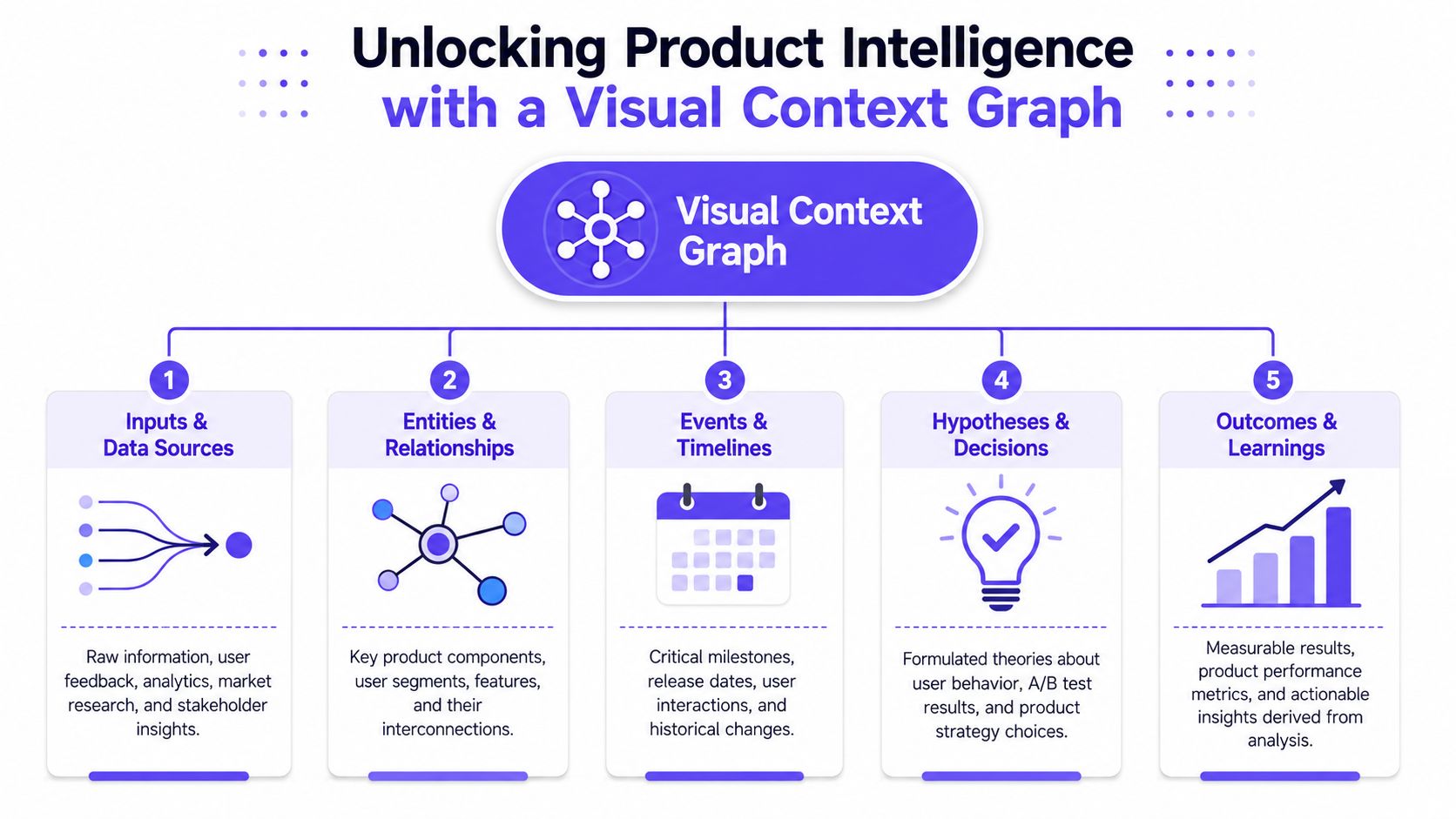
A Visual Context Graph fixes a different problem than a better prompt. It connects the product signals that usually live in separate places and gives AI access to the relationships between them. That includes how screens connect, which states exist, what the design system permits, why earlier decisions were made, and where implementation limits sit.
The five layers that matter
A useful graph usually brings together five layers:
Visual context: screens, frames, layouts, components, and page structure
Behavioral context: recordings, flows, user paths, and interaction sequences
Design System context: tokens, variants, components, and usage rules
Product Knowledge context: PRDs, research, decision history, and written rationale
Implementation context: code constraints, technical realities, and shipping limits
When those layers are connected, AI output gets harder to fool. A generated flow can reflect the product as it exists. A prototype can account for states that often get skipped. A draft solution can stay closer to the system your team has to ship.
That changes the PM job.
The standout PM is no longer the person who writes the cleanest prompt or pushes the most feature ideas into the funnel. The standout PM is the one who turns scattered product knowledge into usable context, then applies it at the right moment. That is where the new advantage sits.
In practice, that often means maintaining artifacts like:
Live product captures: to preserve current behavior and structural patterns
Decision memory: to keep research, PRDs, analytics, and prior choices connected
Editable design outputs: so generated work can be reviewed and changed by the team
State maps and exception paths: so complexity shows up before build work starts
Figr is one example of a product built around that model. It uses visual context, product memory, live product capture, design system intelligence, and artifact generation to produce flows, edge-case maps, prototypes, and other Figma-ready outputs. The practical value for PMs is simple. Less blank-canvas prompting. More grounded product reasoning.
That is the shift many PMs still underestimate. AI makes output cheap. Product context is now the scarce asset.
PMs who stand out will be the ones who can teach a system what their product is, what trade-offs the team has already accepted, and where the obvious-looking answer will fail.
FAQ
How do I stand out as a Product Manager if everyone is using AI
Standout PMs give AI better product context than everyone else.
That means bringing decision history, current-state behavior, constraints, edge cases, and clear success criteria into the work before design or engineering starts reacting to generated output. AI makes drafts faster. The PM who can supply accurate context, spot bad assumptions early, and keep the team anchored to real product trade-offs still creates the biggest advantage.
Do I need to learn to code to stay relevant as a Product Manager
You do not need to become an engineer. You do need enough technical depth to ask better questions.
Strong PMs understand how the product is put together, where the data comes from, what breaks under edge conditions, and which AI-generated suggestions will create cleanup work later. Technical fluency matters because it improves judgment, not because PMs need to write production code.
What's the biggest mistake Product Managers make with AI tools
They give the model a shallow prompt and treat the response like product thinking.
Polished output hides weak reasoning. A flow can look complete while missing exception paths, policy constraints, system dependencies, or behaviors the team already knows are fragile. PMs who stand out review AI output the same way they would review a junior teammate's draft. They check the assumptions, test the edges, and add missing context fast.
What artifacts should I create first to improve my workflow
Start with artifacts that reduce ambiguity for the team immediately: a short decision memo, a state map, and a test scenario list.
Those three usually reveal where the product logic is still fuzzy, where teams are using different definitions, and where AI-generated work is drifting from reality. If you can maintain them consistently, hand-offs get sharper and rework drops.
How can I improve cross-functional alignment without adding more meetings
Put a better artifact in front of the team.
Alignment improves when design, engineering, and stakeholders can react to the same product context instead of interpreting a summary from memory. Shared artifacts do more than save meeting time. They make disagreements visible while changes are still cheap.