
The tool
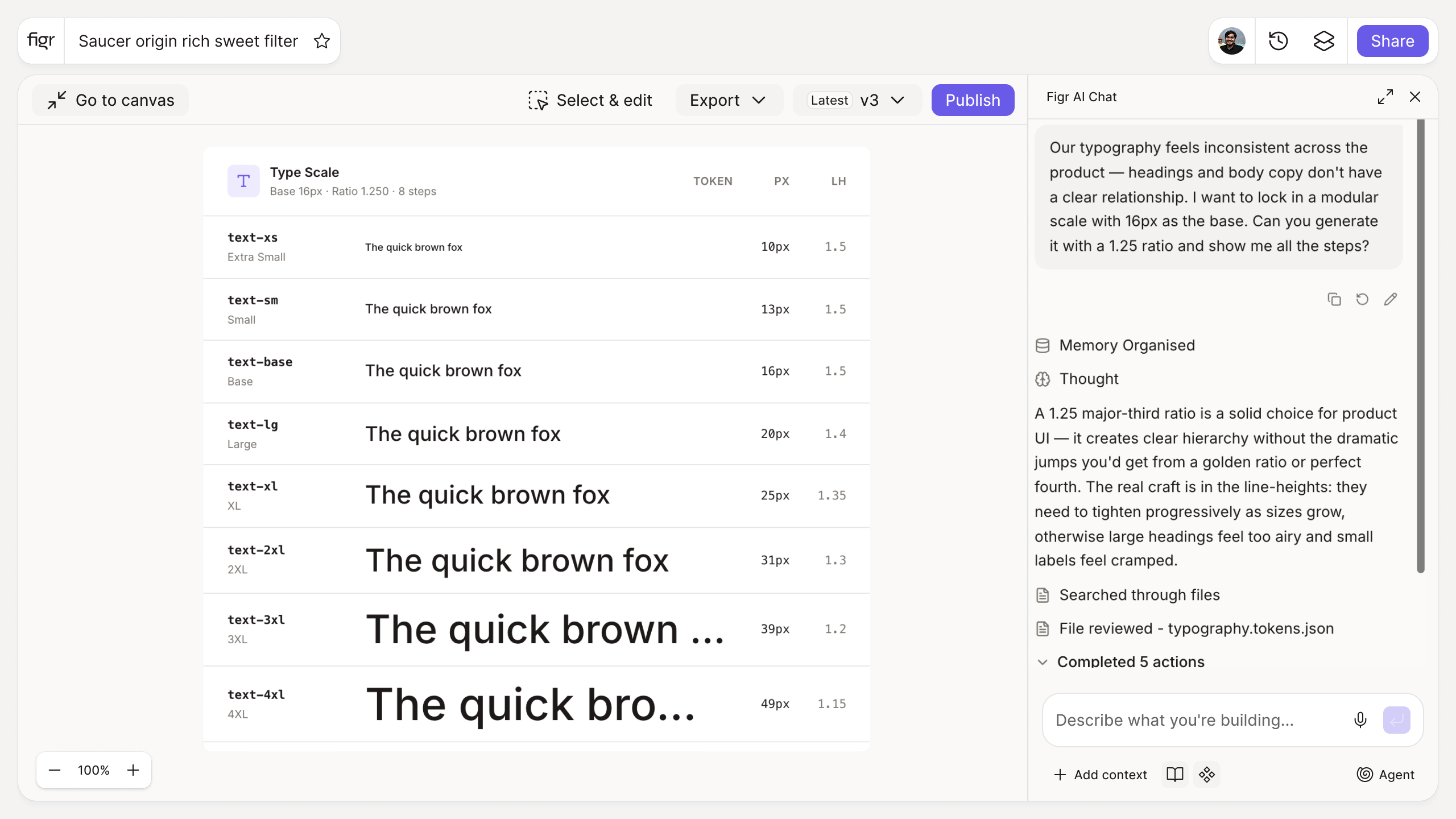
Inputs:
- Base font size (number, px or rem)
- Scale ratio (selector or custom): minor third 1.2, major third 1.25, perfect fourth 1.333, golden 1.618, custom
- Number of steps (number)
Output: A modular type scale with each step's size, a live preview of the hierarchy, and exportable CSS variables or design tokens.
Behavior: Calculates live in-browser, no login. Exportable.
Hand-picked font sizes make a muddy hierarchy
When sizes are chosen one at a time, 14, 15, 18, 22, 23, the relationships are arbitrary, and headings and body text never feel like they belong to the same system. The reader cannot tell what is more important because the steps do not follow a logic.
A modular scale fixes that by deriving every size from one base and one ratio, so the jumps are consistent and the hierarchy reads cleanly. This tool generates the scale and previews it. The thinking behind a real type system is in typography system design, and the subtle production issues in tracking design typography differences.
How it works
1. Set the base size. Usually your body text size.
2. Choose a ratio. A larger ratio creates more dramatic contrast between levels.
3. Set the steps. Generate as many sizes as your hierarchy needs.
4. Preview and export. Copy the scale as CSS variables or tokens.
A worked example
Start at 16px with a major third (1.25). The scale gives you 16, 20, 25, 31, 39, 49, a clean ladder where each heading level is visibly distinct from the next without guesswork. Switch to a minor third (1.2) and the steps tighten for a denser, more utilitarian UI. Either way the sizes relate to each other by rule, which is what makes the hierarchy feel intentional and keeps it consistent once it is written into brand guidelines and a style guide.
From scale to applied system, with Figr
A scale only helps if it actually gets used the same way everywhere. Figr is an AI product designer that applies your type tokens across everything it designs, so the hierarchy holds from screen to screen instead of drifting. Pair this with the spacing system generator for vertical rhythm and the design token naming generator to name the steps consistently.
Who this is for
This is for design leaders and designers setting up or tightening a type system for a real product.
What this tool is not
A scale gives you sizes; it does not choose typefaces, line heights, or weights, and those decisions matter just as much for readability. It is also a free, standalone utility, not a Figr product feature.
FAQ
Is the typography scale generator free?
Yes, free and no sign-up.
What ratio should I use?
Minor third (1.2) and major third (1.25) are common for UI. Larger ratios suit editorial or marketing layouts.
Can I export the scale?
Yes, as CSS variables or design tokens.
Should I use px or rem?
rem is generally preferred for accessibility, since it scales with user settings.
How is this different from Figr the product?
This is a free utility. Figr the product is an AI product designer that turns product context into UX decisions and Figma-ready design.