
The tool
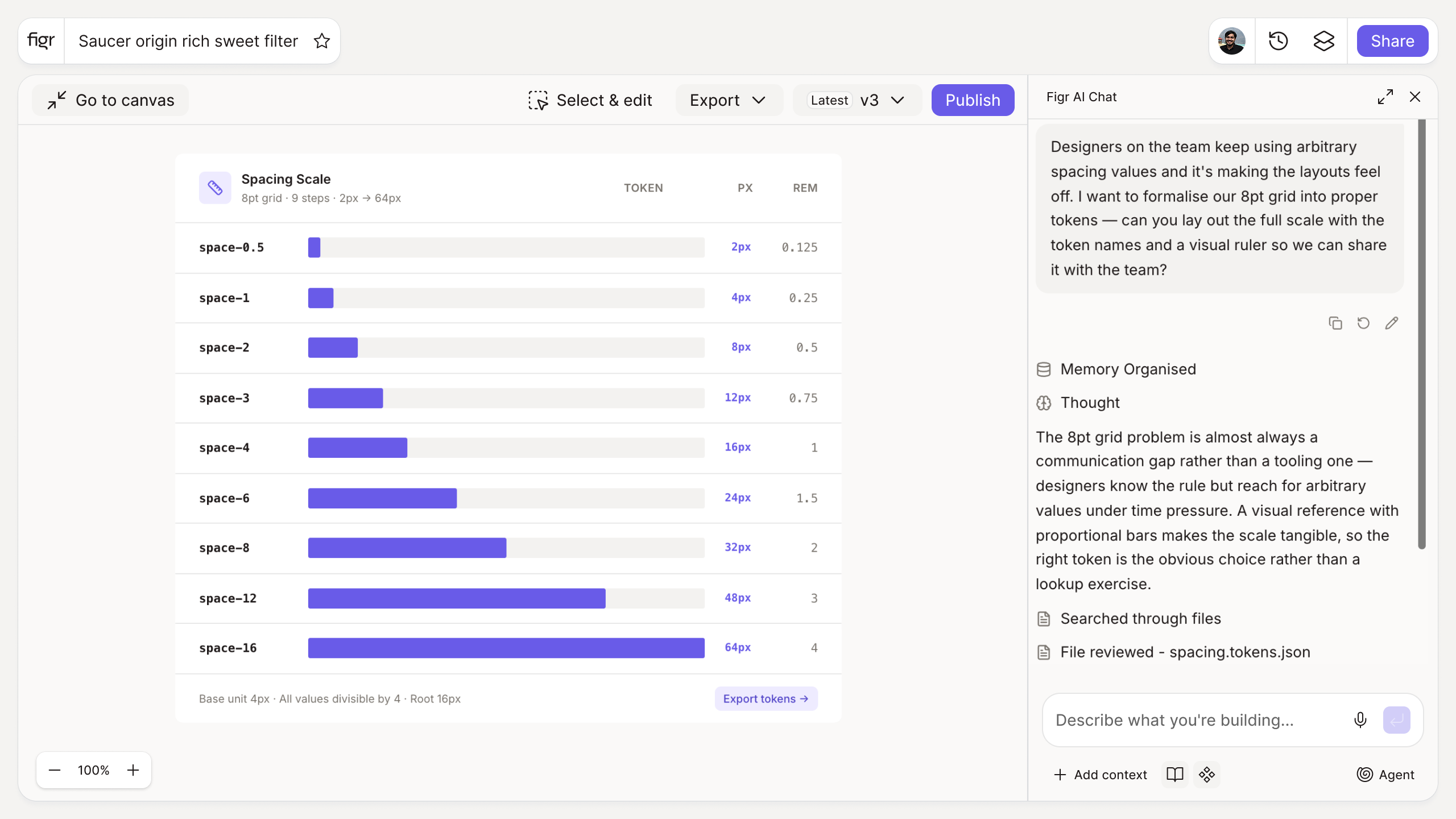
Inputs:
- Base unit (number, px): commonly 4 or 8
- Scale type (selector): linear, geometric
- Number of steps (number)
Output: A spacing scale with each step's value, a visual preview of the increments, and exportable CSS variables or design tokens.
Behavior: Calculates live in-browser, no login. Exportable.
Inconsistent spacing is what makes polished work look sloppy
A layout can have great type and color and still feel off, because the gaps are all slightly different: 12 here, 15 there, 18 somewhere else. The eye reads that inconsistency as carelessness even when it cannot name it. Spacing is the quiet system that holds everything else together.
Deriving every gap from one base unit fixes it. Padding and margins line up because they are all multiples of the same number, and the layout feels deliberate. This tool builds that scale and previews it. How spacing works with layout structure is covered in design with grids and types of grids.
How it works
1. Set the base unit. 8px is the common default; 4px gives finer control.
2. Choose the scale type. Linear steps evenly; geometric grows faster.
3. Set the steps. Cover the range your layouts need.
4. Preview and export. Copy as CSS variables or tokens.
A worked example
On an 8px base, your scale is 8, 16, 24, 32, 48, 64. Card padding becomes 16 or 24, section gaps 48 or 64, and a designer adding a new component does not invent 20 or 28, they reach for the nearest step. That constraint is the point: it removes a hundred tiny decisions and the drift they cause, especially across responsive layouts where spacing has to flex predictably.
From scale to applied system, with Figr
A spacing scale is only as good as its adoption. Figr is an AI product designer that applies your spacing tokens across everything it designs, so the rhythm stays consistent rather than approximated screen by screen. Pair this with the typography scale generator and the grid calculator to complete the layout foundation.
Who this is for
This is for design leaders and designers establishing the spacing rules a product is built on.
What this tool is not
A spacing scale gives you the values; it does not decide how to apply them in a given layout, which is still a design call. It is also a free, standalone utility, not a Figr product feature.
FAQ
Is the spacing system generator free?
Yes, free and no sign-up.
Should I use a 4px or 8px base?
8px is a common default that keeps values simple. 4px gives finer control for dense UI.
Can I export the scale?
Yes, as CSS variables or design tokens.
Linear or geometric?
Linear suits most UI spacing. Geometric is useful when you need a wide range with few steps.
How is this different from Figr the product?
This is a free utility. Figr the product is an AI product designer that turns product context into UX decisions and Figma-ready design.