
The tool
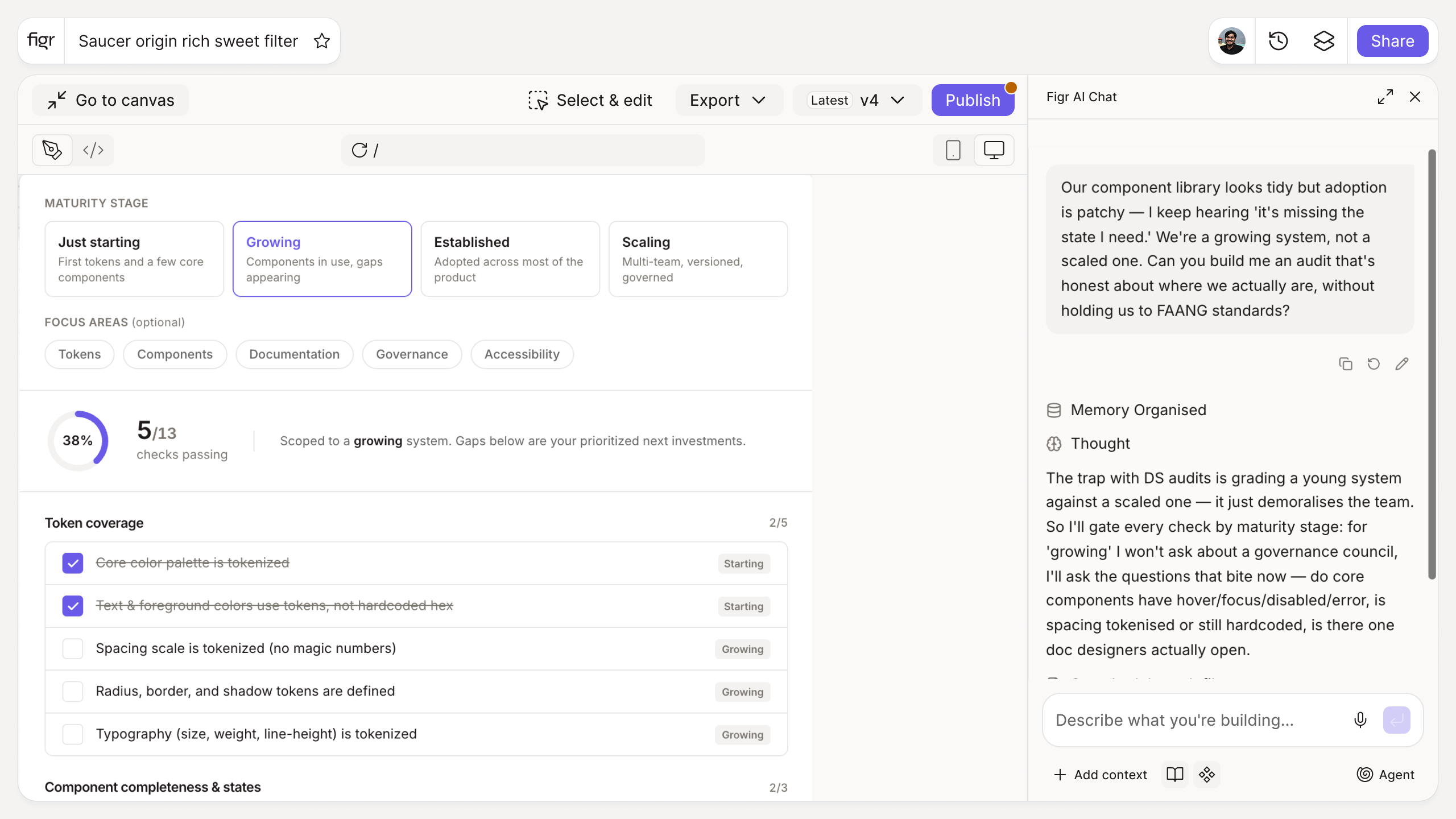
Inputs:
- Maturity stage (selector): just starting, growing, established, scaling
- Focus areas (multi-select, optional): tokens, components, documentation, governance, accessibility
Output: A tailored audit checklist grouped by token coverage, component completeness and states, documentation, and governance, with items appropriate to the stage. Exportable.
Behavior: Generates instantly in-browser, no login. Items are checkable and exportable.
Most design systems fail on adoption, not creation
Plenty of teams build a tidy component library that nobody uses, because the gaps are invisible until you go looking: components missing states, tokens covering color but not spacing, documentation that stopped six months ago. A design system that is not maintained quietly becomes a museum, and why design systems fail to get adopted is usually a story about these gaps.
An audit makes them visible. But holding a brand-new system to the standards of a scaled one is just demoralizing, so this tool matches the checklist to your maturity stage. The wider context is in the design systems guide, and proving the system earns its keep is covered in how to measure and prove the impact of your design system.
How it works
1. Choose your stage. A new system and a scaling one need different checks.
2. Pick focus areas. Narrow to what you are assessing.
3. Generate the checklist. Get grouped, stage-appropriate items.
4. Score and prioritize. Use the gaps to plan the next investment.
A worked example
For a growing system, the audit does not ask whether you have a governance council, that is a scaling concern. It asks the questions that matter now: do your core components have hover, focus, disabled, and error states, is spacing tokenized or still hardcoded, is there a single source of truth designers actually open. The gaps become a prioritized list, which turns "our design system needs work" into a concrete plan, the same way estimating design system effort turns a vague project into a scoped one. Keeping documentation current is usually near the top.
From audit to cleanup, with Figr
An audit names the drift; closing it is the work. Figr is an AI product designer that reads your system and applies your tokens and components consistently across new work, so the gaps stop widening while you fix the backlog. Pair this with the design debt calculator to size the cleanup, and the token naming and component naming generators to fix the structure.
Who this is for
This is for design leaders and design system owners assessing where a real system stands and what to invest in next.
What this tool is not
It structures an assessment; it does not score your system automatically or do the remediation. The judgment about what matters most is still yours. It is also a free, standalone tool, not a Figr product feature.
FAQ
Is the design system audit checklist generator free?
Yes, free and no sign-up.
What does the audit cover?
Token coverage, component completeness and states, documentation, and governance, tailored to your maturity stage.
How do I know my maturity stage?
The tool offers stages from just starting to scaling; pick the one that best matches your token and component coverage today.
Can I export the checklist?
Yes, as a checkable, shareable list.
How is this different from Figr the product?
This is a free checklist tool. Figr the product is an AI product designer that turns product context into UX decisions and Figma-ready design.