
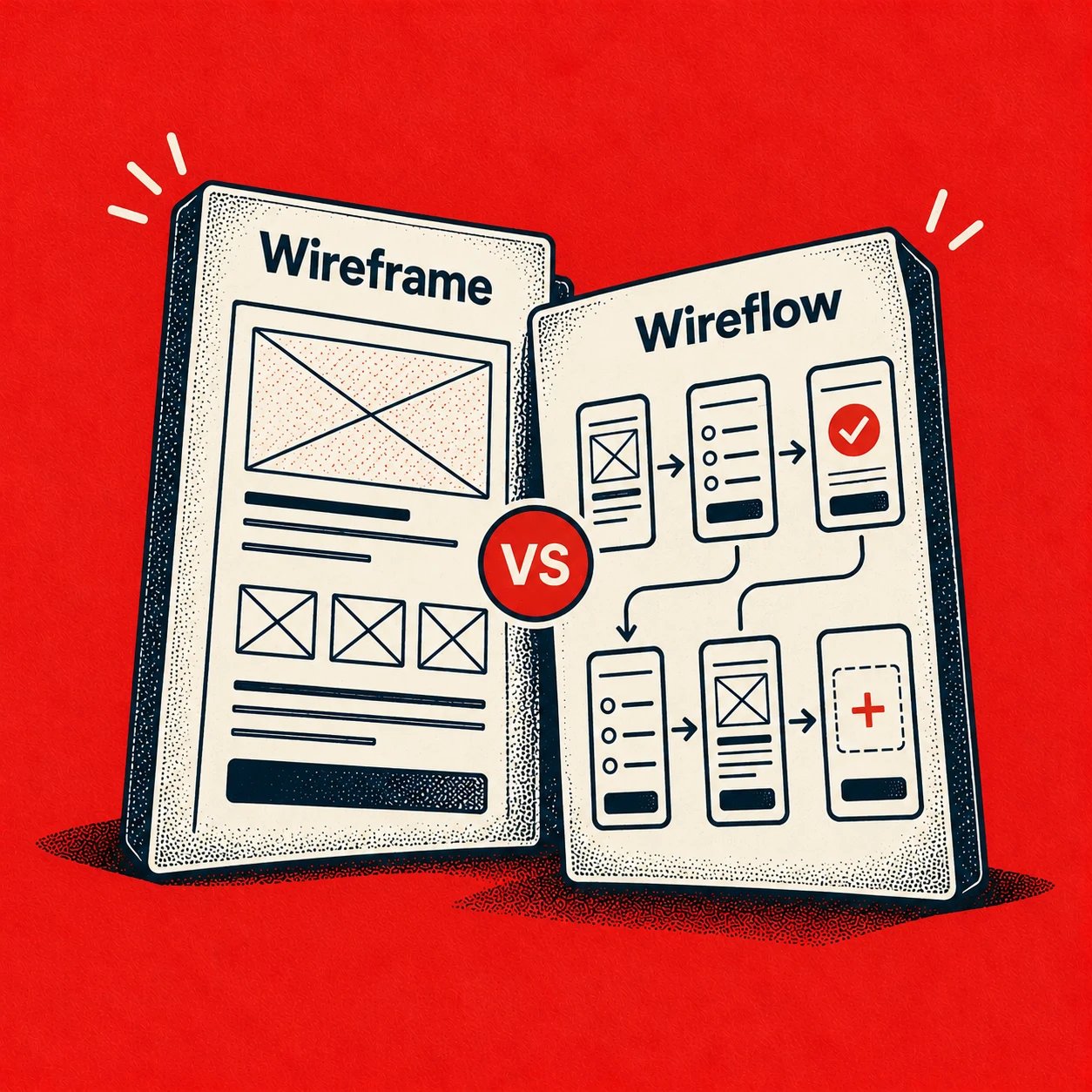
A wireframe evaluates the structure of one screen, while a wireflow evaluates how connected screen states support a task from entry to completion. In the Wireflow vs Wireframe choice, pick the artifact that matches the decision in front of you: layout and hierarchy on one surface, or sequence, branching, feedback, and recovery across several states.
When teams choose badly, they approve screens that look clear in isolation and still ship a journey nobody can finish. A user reaches a well organized form, submits it, then hits a missing confirmation, a dead end after an error, or a state that doesn't explain what changed. Does that failure sound familiar in your reviews?
Choosing by question fixes that mismatch early. You'll compare both artifacts on the same criteria, see one invitation feature in both forms, and leave with a checklist that tells you when a screen view is enough, when a connected view earns its extra effort, and when you need something else entirely.
The Practical Difference Behind Wireflow vs Wireframe
You've probably sat in this review. The designer walks through an invitation screen, everyone nods at the clean layout, and the product manager approves it on the spot. Then someone asks what happens after the invite is sent, and the room goes quiet.
That silence is the whole problem. The screen was never the risky part. The risk lived between screens, in the handoffs nobody drew.
A wireframe answers a screen question. Where does navigation sit? Which content leads? Which controls must exist, and can a user spot the primary action without hunting? Those are structural questions, and a single skeletal layout answers them cheaply and well.
A wireflow answers a journey question. Nielsen Norman Group describes the format in its definition of wireflows as wireframe layouts combined with a simplified flowchart, which makes the relationship between screens explicit. Each step appears as a screen or state, and arrows show the action that moves the user forward.
The Conditional Verdict
Neither artifact wins on its own. They operate at different levels of abstraction, so asking which one is better is like asking whether a floor plan beats a route map. Better for what?
Use a wireframe when the open decision concerns one surface. Use a wireflow when the open decision concerns movement, state change, or recovery. Use both when a journey matters enough that you first need each screen to make sense, then need the sequence to hold together.
The basic gist is this: the artifact follows the question. If you can't state the question in one sentence, you'll build the wrong deliverable and argue about polish instead. Can your team name the decision before opening the canvas?
What follows gives you a shared vocabulary first, then a side by side comparison, then the invitation example in both forms. After that come the exceptions, a repeatable build sequence, and a final selection checklist. By the end, you should be able to walk into a review and say exactly which artifact proves what, and what it leaves unproven.
Understanding the Two Design Artifacts
Clear definitions prevent most review arguments, because half of them are really vocabulary disputes in disguise.
Wireframe, defined. A wireframe is a skeletal representation of one page or screen. As the history and definition of wireframing from Infragistics puts it, wireframes emphasize layout, navigation, content hierarchy, and functional regions while intentionally omitting color, imagery, and typography styling. That omission is deliberate, since it keeps reviewers focused on structure rather than taste.
Wireflow, defined. A wireflow takes those same screen representations and connects them into a task sequence. Connectors label the user action, such as tapping a button or selecting a link, and point to the destination state. Branches, confirmations, and error states become visible instead of staying buried in meeting notes.
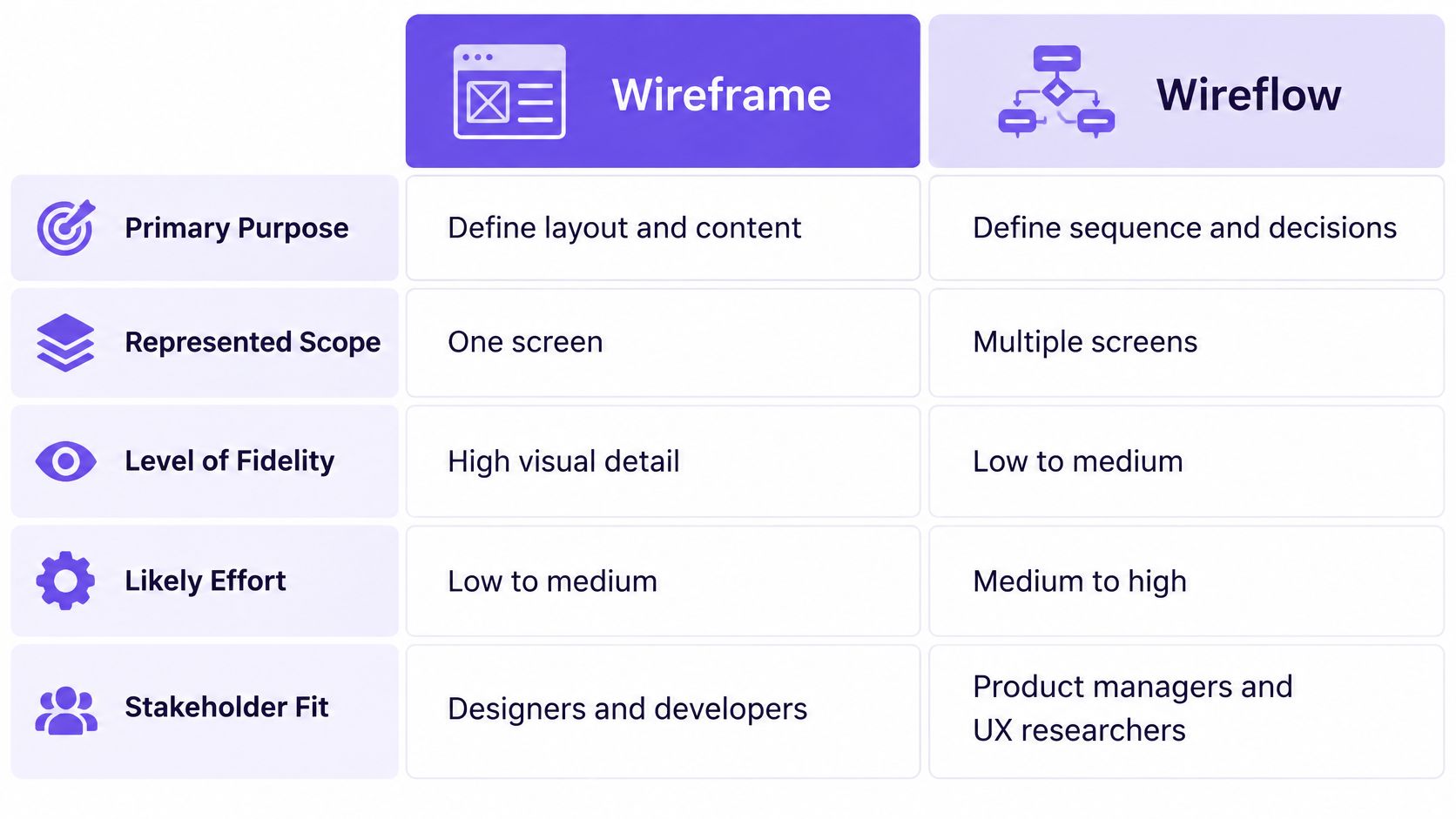
The comparison chart above summarizes the split across purpose, scope, fidelity, effort, and stakeholder fit. Read it as a quick orientation, not a verdict, because the right column depends entirely on your decision. If you want the foundational concept first, start with what a wireframe is and how teams use it before layering flow on top.
Where the Abstraction Boundary Sits
Last week I watched a PM review an invitation screen she loved. The recipient field was obvious, the role selector was tidy, and the send button was impossible to miss. Then the designer pinned the screens in sequence, and she frowned. Where did an expired invite go?
Nobody had drawn that state. The screen passed its test while the journey failed its own. Have you ever approved a screen and discovered the missing state only in QA?
That moment marks the abstraction boundary. A wireframe describes what's on a surface. A wireflow describes how surfaces relate over time. Teams hiring for this kind of judgment often browse NZ UX designer listing resources to find practitioners who think in both registers, and related framing in user flow vs journey explained helps separate path thinking from screen thinking.
A wireframe proves a screen can be understood. A wireflow proves a task can be completed. Confusing those two claims is where rework begins.
Comparing Purpose Fidelity and Effort
Comparing these artifacts on the same criteria keeps the discussion honest. Generic pros and cons lists hide the trade off, which is always about what evidence you need and what effort you're willing to spend for it.
Primary purpose. A wireframe exists to settle layout, hierarchy, and control placement on one screen. A wireflow exists to settle sequence, branching, and system response across a task. If the argument in your review is about where the permission toggle belongs, you need the first. If it's about what happens after someone toggles it, you need the second.
Represented scope. Wireframes cover a screen inventory, one surface at a time. Wireflows cover a journey slice, usually one concrete goal such as sending an invitation. Scope drives cost, because every additional state in a wireflow needs a screen, a connector, and a label.
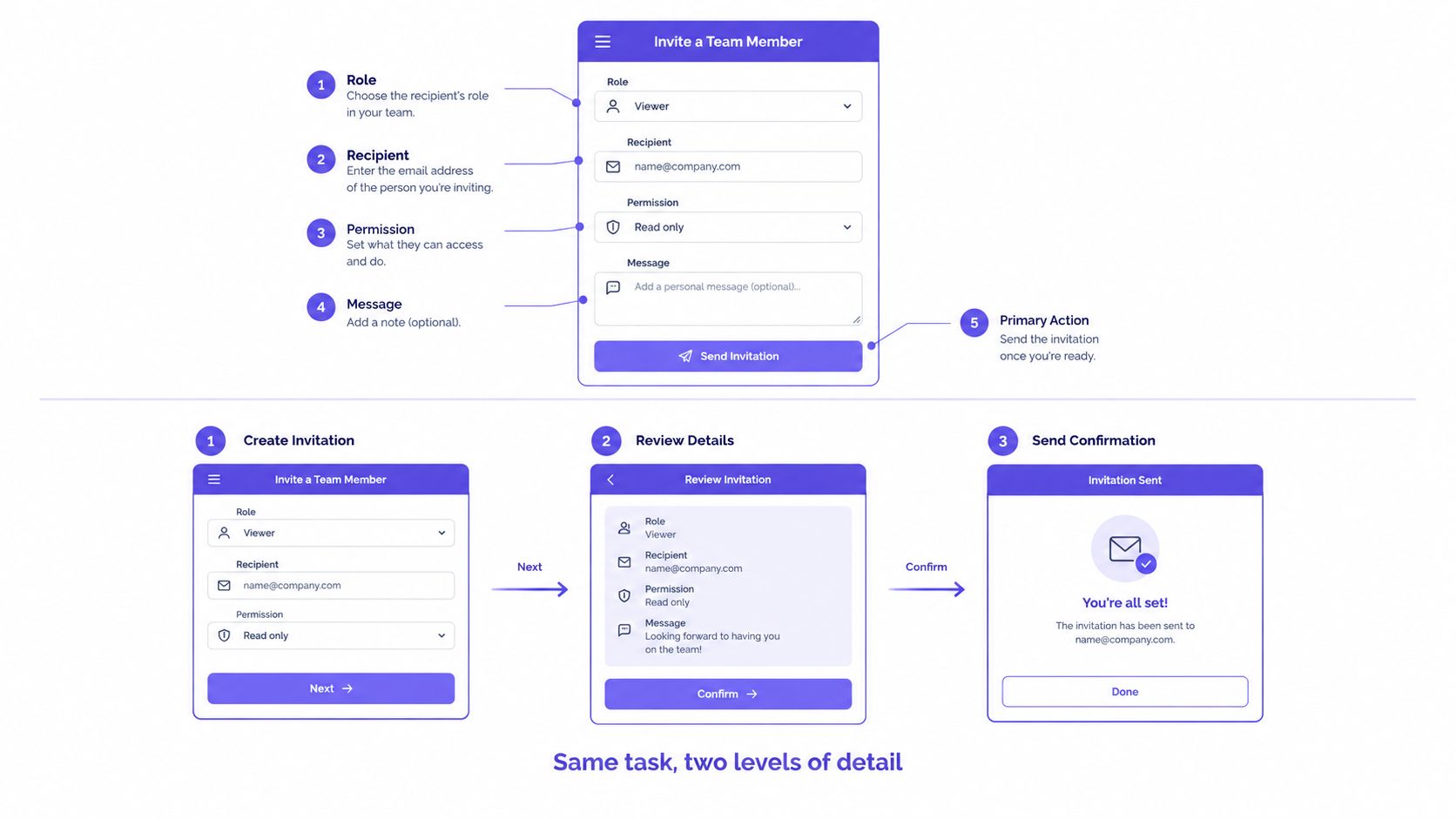
The diagram above shows the same invitation feature at two levels: one labeled screen on top, three connected screens below. Notice how the bottom version doesn't add visual polish. It adds relationships.
Fidelity and the Cost of Detail
Both artifacts usually stay low fidelity, and that's a strength. The research backed prototyping guidance on starting with the lowest useful fidelity supports beginning with the least detailed artifact that can test your assumption, then increasing fidelity as assumptions get specific. A related high fidelity vs low fidelity decision framework helps teams decide when added realism changes a decision.
Effort diverges anyway. Comparing three layout alternatives as wireframes is fast, because each variant stands alone. Building a wireflow costs more coordination, since changing one screen can break connectors, labels, and downstream states. Why pay that cost? Because transition defects are invisible until someone draws the transitions.
Wireflow and Wireframe Decision Matrix
Criterion: Purpose
Wireframe: Settle layout and hierarchy
Wireflow: Settle sequence and response
Criterion: Contents
Wireframe: Regions, controls, content order
Wireflow: Screens, actions, branches, states
Criterion: Detail
Wireframe: Low visual fidelity, one surface
Wireflow: Low visual fidelity, connected surfaces
Criterion: Effort
Wireframe: Low to medium per screen
Wireflow: Medium to high per journey
Criterion: Best evidence
Wireframe: Comprehension, primary action spotting
Wireflow: Completion, errors, backtracks, abandonment
Criterion: Strongest risk
Wireframe: Approves screens that don't connect
Wireflow: Sprawl if every path gets drawn
Stakeholder fit follows from that matrix. Designers and engineers estimating a single screen get what they need from a wireframe. Product managers, researchers, and QA partners reviewing a task need the connected view to spot missing states and write meaningful test cases. Which audience is sitting in your next review?
Handoff value differs the same way. A wireframe hands off structure. A wireflow hands off behavior, including entry points, destinations, and recovery paths. Teams that hand off only structure force engineers to invent behavior, and invented behavior rarely matches product intent.
One Invitation Feature in Two Forms
Abstract criteria get clearer on a concrete task, so consider a hypothetical invitation feature for a team workspace product. These artifacts are illustrative examples built for comparison, not observed research results or customer work. The question is simple: what does each form reveal, and what does each one hide?
The Single Wireframe
Picture one screen titled Invite teammate. At the top sits a recipient region with an email field. Below it, a role selector offers Member and Admin options, followed by a permission summary that updates with the chosen role.
Further down, an optional message field gives the sender room for context. At the bottom, a primary Send invitation action anchors the layout, with a quieter cancel option beside it. Navigation back to team settings sits in the header.
This wireframe supports sharp screen level questions. Is the role choice visible before the permission summary, so cause and effect read clearly? Can a first time user find the primary action without scanning twice? Does the optional message compete with required fields, or does hierarchy keep priorities straight?
A reviewer can answer all three in minutes. That's the wireframe doing its job well. But notice what the screen can't tell you, no matter how clean it looks. What happens when the email belongs to someone already on the team?
The Same Feature as a Wireflow
Now connect that screen into a sequence. The form leads to a validation state when the email format fails, with the error placed beside the field and the entered text preserved. A valid submission moves to a role specific confirmation, because granting Admin deserves a deliberate check before sending.
Confirming triggers a sending state, then a success state that names the recipient and offers a next step. A failed send routes to an error recovery state with a retry action, not a dead end. Separately, an expired link state explains the problem and offers a path to request a fresh invitation.
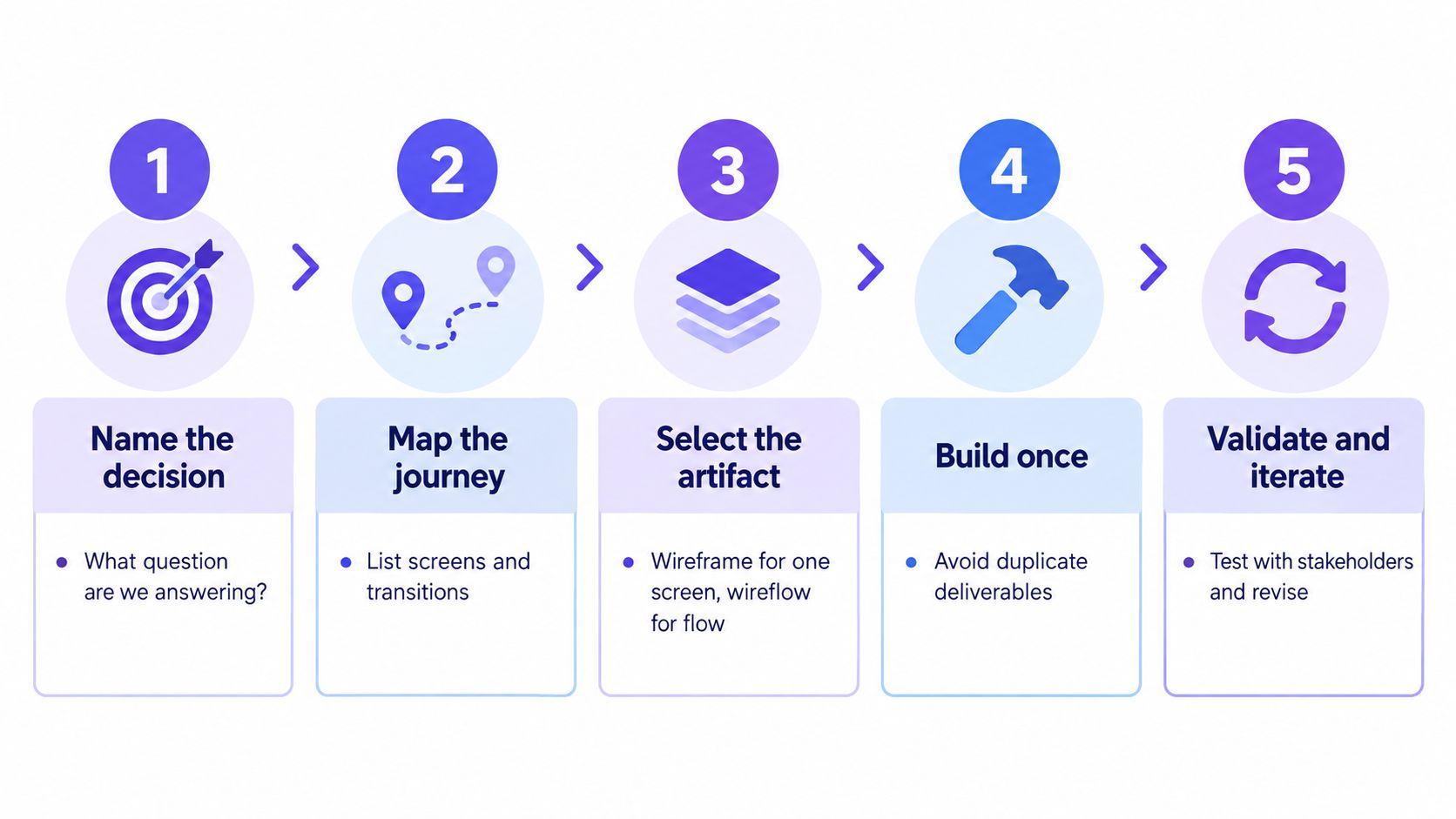
The process diagram above outlines how a team moves from naming the decision to validating the chosen artifact. Applied here, it shows why the wireflow version earns its extra drawing time. The layout didn't change at all, yet four new decisions surfaced.
Here's the hidden risk the wireflow exposes. The original screen had no recovery path for a failed send and no answer for an already invited recipient. Clear hierarchy coexisted happily with an unclear system response. Would your team have caught that from the single screen alone?
Text summary for readers skipping the visuals: the wireframe shows recipient, role, permission, message, and send regions on one screen. The wireflow adds validation, confirmation, sending, success, error recovery, and expired link states with labeled actions between them. Teams looking to design better SaaS with flow examples will recognize this pattern, since the defect moved from layout to sequence the moment the screens connected.
Choosing by Use Case and Risk
Situational judgment beats artifact loyalty. The right choice depends on where your product risk sits, and risk announces itself if you know the signals.
When a Wireframe Is Enough
Choose a wireframe for a screen inventory, where the goal is cataloging surfaces and agreeing on what exists. It's also the right tool for layout comparison, since side by side variants make hierarchy differences obvious. Information architecture reviews and focused comprehension checks belong here too.
Testing matches that scope. As the guide to prototype testing types and their measures outlines, wireframe evaluation reveals structural comprehension, while wireflow evaluation supports task level measures such as completion, time on task, errors, backtracks, and abandonment across connected screens. If your metric is whether users can identify the primary action, a wireframe test answers it without extra machinery.
When a Wireflow Earns Its Effort
Promote a journey to a wireflow when it carries real behavioral risk. The clearest signals:
- Multiple states: The same screen changes substantially after user actions.
- Conditional paths: Role, permission, or data determines what happens next.
- Irreversible actions: Sending, deleting, or paying can't be undone.
- External integrations: Email delivery or third party systems introduce failure modes.
- High funnel value: Drop off here costs activation, revenue, or trust.
Notice the invitation example hit nearly every signal. That's not coincidence. Collaboration features in existing software tend to hide their complexity in permissions and notifications, which are sequence problems wearing a screen costume. Does your riskiest feature look simple only because nobody has drawn its states?
Neighboring Artifacts and Their Boundaries
A user flow diagram describes the ideal path through a task abstractly, using boxes and labels rather than screen layouts. A wireflow attaches that path to actual screen arrangements, which makes it more concrete for critique and estimation. If stakeholders are still debating which steps should exist at all, the abstract diagram is cheaper and faster to redraw.
An interactive prototype goes further in the other direction. It suits questions about realistic interaction feel, timing, or visual presentation, and the frameworks for UX validation can help you judge when that investment is justified. Building one to answer a layout question wastes effort, just as sketching a wireframe to answer a motion question wastes everyone's time.
Match the artifact to the riskiest unknown. Structure unknowns need screens. Sequence unknowns need connections. Feel unknowns need interaction.
Build the Right Artifact Sequence
A repeatable sequence prevents duplicate deliverables and review drift. The workflow below assumes you're improving existing software, where most screens already exist and the unknowns cluster around changed behavior.
Step 1. Name the decision and the risk.
- Write the question in one sentence before drawing anything.
- State whether the risk sits in structure, sequence, or interaction feel.
Step 2. Choose the lowest sufficient fidelity.
- Start rough enough that feedback targets the concept, not the styling.
- Increase detail only when a specific assumption demands it.
Step 3. Wireframe each relevant screen.
- Cover layout, hierarchy, controls, and content priority per surface.
- Compare layout alternatives here, while changing them is still cheap.
Step 4. Promote only high risk journeys to wireflows.
- Connect screens for tasks with branching, permissions, or recovery needs.
- Leave low risk paths as wireframes to avoid documentation sprawl.
Step 5. Annotate every connection.
- Entry conditions, user action, and system response for each arrow.
- Destination state, analytics event, and any unresolved assumption.
Step 6. Check whether the question needs a different artifact.
- Abstract path debates point to a user flow diagram instead.
- Realistic interaction questions point to a prototype, as in Figr's wireframe to prototype approach.
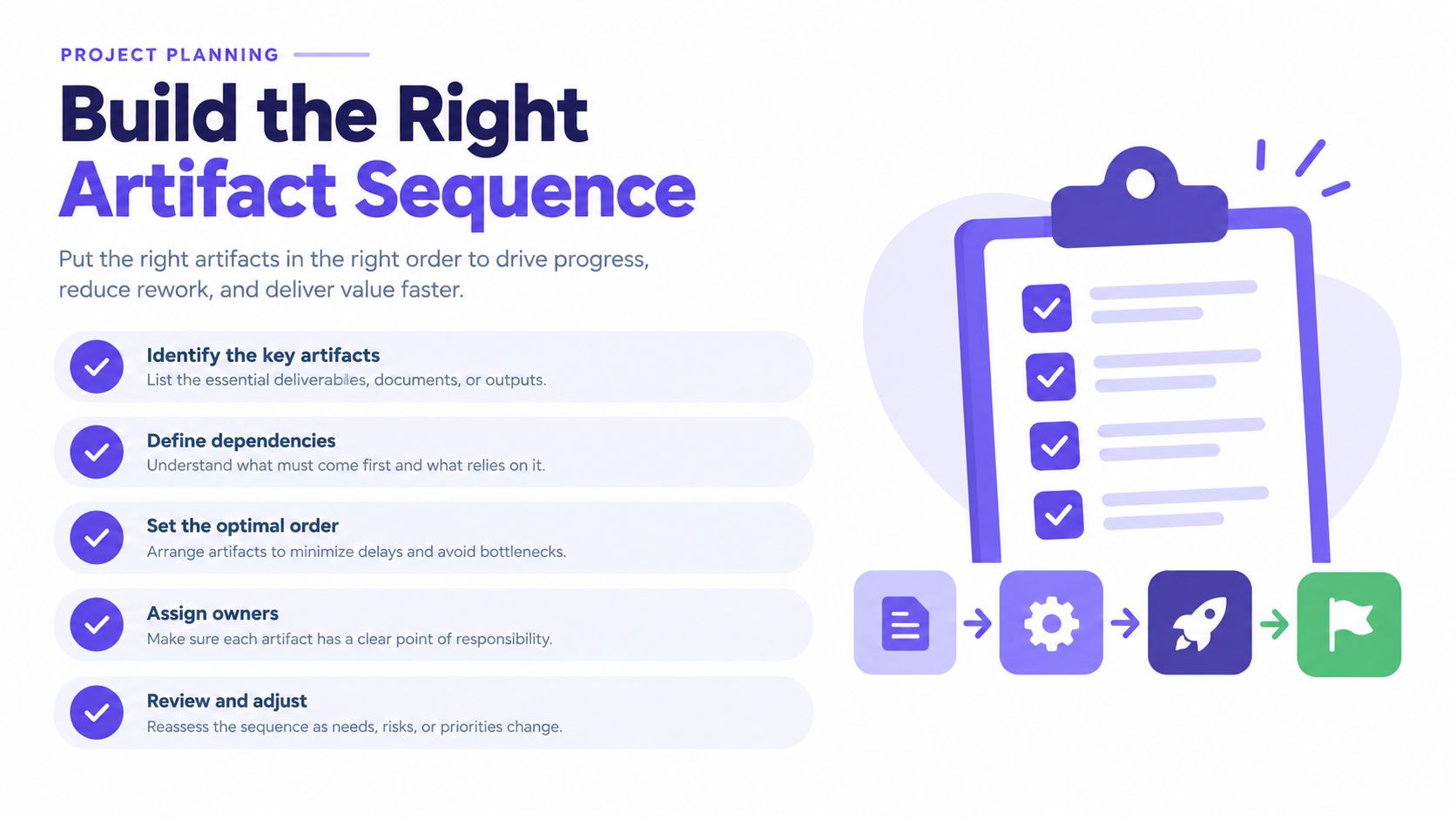
The planning visual above condenses this sequence into a checklist your team can reuse per feature. Tooling can support the middle steps without owning the judgment. Figr, for instance, lets teams bring existing product screens, design systems, requirements, and research into one place to explore connected flow alternatives and refine reviewable output. The framing, interpretation, and final call stay with the humans in the room, which is exactly where they belong.
Make the Final Artifact Decision
Run through these questions before your next feature review. The answers point to an artifact without further debate.
- One screen unclear: Do reviewers disagree about layout or hierarchy on a single surface?
- Alternatives open: Are you comparing two or three structural options for the same screen?
- Task unproven: Can anyone trace the full path from entry to completion today?
- States missing: Are error, empty, expired, or permission states still undrawn?
- Recovery vague: Does the design explain how users get back after a failure?
- Feel in question: Does the decision depend on realistic interaction rather than structure?
The first two answers call for a wireframe. The middle three call for a wireflow. The last one calls for an interactive prototype, since neither static artifact can prove how an interaction feels. Many features need the first artifact and then the second, applied in that order to the highest risk path.
There's a scale effect worth naming here. Independent screen approvals feel efficient because each review is short and decisive. But the defects that hurt users most live in the assembled behavior, and assembled behavior only appears when someone connects the screens. As Nielsen Norman Group notes in its glossary of UX maps and flow representations, a user flow can represent a task path abstractly, while a wireflow attaches that path to screen level layouts, including where validation messages, recovery actions, and navigation controls appear. That concreteness is what turns approval into actual confidence.
In short, pick the artifact that matches your riskiest question, draw only what that question requires, and promote to a connected view the moment sequence becomes the unknown. Your grounded next step: take one feature already approved as wireframes, pin its screens in task order this week, and label every arrow. The gaps you find are your real backlog.
Wireflow vs Wireframe FAQ
Is a wireflow just several wireframes placed together?
No. A wireflow connects screen layouts with labeled actions and destination states. Without those connections, a set of wireframes shows what individual screens contain but not how a task progresses.
Do I need to create wireframes before a wireflow?
Not always. Rough screen sketches can be enough to start a wireflow when sequence is the main unknown. Refine individual screens if their layout becomes a decision you need to test.
When should I use both?
Use both when you need to settle screen structure and verify a multi-step task. Review the relevant screens as wireframes, then connect the high-risk path to check branches, feedback, and recovery.
Can a wireflow replace an interactive prototype?
Not when the decision depends on timing, motion, or how an interaction feels. A wireflow can specify the intended states and transitions; a prototype lets reviewers experience them.
Bring one approved feature from your existing product and test whether its screens connect into a completable task. Figr helps product teams use their real screens, design systems, and requirements to explore flow alternatives and states, then refine reviewable, Figma ready output with human judgment in charge. Start with your riskiest journey and see what the arrows reveal.