

Last week I watched a team spend days polishing a high-fidelity checkout flow, only to scrap the whole concept in the first review because nobody had tested the underlying idea at low fidelity first.
When teams skip the fidelity decision, they confuse polish with progress. Product Managers get pressured to show something that looks real, Designers get asked to make unproven ideas feel final, and engineering inherits artifacts that answer the wrong questions. The damage shows up later as rework, vague feedback, slow handoff, and expensive debates about screens that should have died as sketches.
A better approach is to choose fidelity by decision stage, not by tool default. That's where a disciplined view of low fidelity vs high fidelity helps, especially now that AI can generate polished screens faster than teams can challenge the thinking behind them.
What Is Prototype Fidelity Really?
A prototype review goes off the rails when one person is judging visual polish, another is judging task flow, and a third is reacting to placeholder copy as if it were final. That is usually called a feedback problem. It is a fidelity problem.
Prototype fidelity is the level of realism required to answer a specific question with enough confidence to act. The mistake is treating fidelity as a single slider from rough to polished. In practice, teams choose realism across a few separate dimensions, and each one carries its own cost.
Three dimensions matter in real product work:
Visual fidelity: how close the interface looks to the shipped product, from rough blocks to finished typography, color, spacing, and brand treatment
Interaction fidelity: how closely the prototype behaves like the shipped product, including clicks, states, transitions, inputs, and system responses
Content fidelity: how believable the words, labels, data, and commands are, especially when meaning affects user behavior
Teams waste time when they raise all three at once.
A concept test for a new onboarding flow may need realistic steps and error handling, but not final UI styling. A pricing experiment may need credible copy and plan structure, but only basic layout. A mobile gesture test may need accurate interaction behavior with stripped-back visuals. The right fidelity depends on the decision in front of the team, not the capabilities of the tool.
That matters more now because AI can generate polished screens in minutes. Fast output lowers the cost of producing artifacts, but it does not lower the cost of believing the wrong artifact. Teams using one-click design tools still need judgment about what they are trying to learn. That is why the better question is not low fidelity versus high fidelity. It is which kind of realism reduces uncertainty fastest, with the least waste.
If your team is still mixing up artifact types, this guide on how AI changes UX design workflows helps clarify the operational difference between wireframes, mockups, and prototypes. If you are tightening your feedback loop, AI-powered prototype testing is a useful reference for getting evidence before teams commit design and engineering time.
Practical rule: Increase fidelity only on the dimension that helps you make the next decision.
Why Jumping to High-Fidelity Is a Silent Killer
A team spends three days polishing a prototype for an exec review. The screens look production-ready. The animations are smooth. Everyone debates spacing, copy tone, and whether the CTA should be blue or green. Two weeks later, user interviews reveal the workflow solves the wrong problem.
I have seen that pattern burn time, budget, and credibility.
High-fidelity work creates a dangerous kind of momentum. Once a concept looks finished, people treat it as if the hard thinking is behind them. Critique gets narrower. Questions get safer. Instead of asking whether the flow should exist at all, the room starts tuning details inside a concept that has not earned that effort.
Polish changes the social dynamics of product reviews. Rough artifacts invite people to challenge the model, the sequence, and the assumptions. Polished artifacts push people toward approval, especially when senior stakeholders are in the room. Product managers start planning against screens that still contain major unanswered questions. Designers feel pressure to defend decisions they only made to make the prototype coherent enough to review.
That is why high fidelity too early is expensive even before engineering writes a line of code.
The first cost is cognitive. Visual realism signals certainty. People confuse "easy to react to" with "ready to build." In the age of one-click AI design tools, that problem gets worse, not better. Faster output increases the supply of convincing artifacts. It does nothing to improve the quality of the underlying decision.
The second cost is economic. Early polish creates rework in places teams rarely count clearly: extra review cycles, cleaner-looking artifacts that hide weak logic, roadmap discussions anchored to the wrong thing, and engineering estimates based on flows that will later change. A structural mistake found in a sketch is a quick correction. The same mistake found after socialization, design refinement, and planning becomes organizational drag.
I use a simple test here: if the team is still debating the problem, the primary flow, or the decision logic, high fidelity is already too expensive.
Teams still make this mistake for understandable reasons:
Stakeholders want reassurance. A polished prototype feels safer than a rough concept.
Tools reward polish. Modern design and AI tools make finished-looking screens easier to produce than disciplined exploration.
Status meetings reward optics. High-fidelity artifacts look like progress, even when learning is shallow.
Political environments punish ambiguity. Rough work can feel vulnerable, so teams hide uncertainty under visual finish.
The fix is not to avoid high fidelity. The fix is to earn it. Use rough artifacts to kill weak ideas early, align on flow, and expose assumptions while they are still cheap to change. If your team needs a practical way to de-risk projects with wireframes, start there before anyone spends energy making an unproven idea look complete.
A prototype is efficient only when its realism matches the decision the team needs to make next.
Seasoned teams separate confidence theater from evidence. That discipline protects speed. It also protects the company from spending real money on ideas that only looked good on a screen.
How to Use Low-Fidelity Prototypes for Big Questions
Monday morning. The team has a new onboarding concept, strong opinions, and six different interpretations of what the product should do. If that conversation starts in polished screens, the wrong debate takes over fast. People argue about spacing, brand fit, and whether the button feels modern. Essential questions, the ones that decide whether the idea deserves investment, stay unresolved.
Low-fidelity prototypes exist to answer those bigger questions while change is still cheap.
I use low fidelity for decisions about logic, sequence, and scope. Can a user get from intent to outcome without confusion? Does the flow hold together once edge cases show up? Are we dealing with a real user problem or just a neat interface idea? Those are product questions first, design questions second.
That difference matters more now because AI tools can generate convincing screens in minutes. Speed is useful. False confidence is expensive. A realistic mockup can make a weak concept look settled long before the team has earned that confidence.
What low fidelity should help you learn
A rough prototype is a decision tool. Its job is to reduce uncertainty, not to impress anyone.
Use it to test questions like these:
Does the user flow make sense? Can someone predict what happens next without explanation?
Is the primary path too heavy? Are we adding steps, choices, or fields that the task does not need?
Where does the logic break? What happens when the user skips a step, enters unexpected input, or comes in with partial context?
Do stakeholders mean the same thing? A rough flow exposes hidden disagreements faster than a polished screen.
Is this concept worth further investment? Some ideas should die in boxes and arrows.
If your team needs a practical starting point, use this guide to de-risk projects with wireframes.
The right questions are broad, not cosmetic
Low fidelity works best when the team is still shaping the product, not refining the interface.
A sketch, wireflow, or clickable grayscale prototype is usually enough to test task order, information grouping, branching logic, and failure states. It is also enough to run early usability sessions if the goal is to learn whether people understand the flow. Users do not need polished visuals to reveal that a step is missing, a choice is confusing, or a concept solves the wrong problem.
I have seen rough prototypes save months of work because they forced the team to confront a simple fact. The feature was clear on a slide and broken in a flow.
Where teams get real value
Low-fidelity prototypes pay off when they create fast learning cycles.
What tends to work:
Multiple directions at once: Compare different flows before the team gets attached to one.
Deliberate incompleteness: Keep the artifact rough enough that people critique the idea, not the finish.
Cross-functional editing: Product, design, research, and engineering can all change the flow without ceremony.
Cheap failure: Kill weak paths before they pick up visuals, stakeholder approval, and delivery estimates.
What tends to fail:
Rough screens with vague thinking: If the team cannot explain the flow, the prototype is not helping.
Polish added too early: Clean UI can hide unresolved product choices.
Using low fidelity for late-stage signoff: Once developers need exact states and behavior, rough artifacts stop being efficient.
The goal is not to stay rough. The goal is to stay rough until the team has answered the expensive questions.
When to Increase Fidelity Without Wasting Time
A team has spent two weeks polishing a prototype. The screens look ready for launch. Then a usability session exposes a basic flaw in the flow, and the work goes in the bin.
That is the cost of raising fidelity before the question deserves it.
Increase fidelity when sharper detail will improve the decision in front of the team. Until then, extra polish is overhead. It adds production time, invites style debate, and creates false confidence around ideas that still have structural risk.
The shift usually happens when uncertainty changes shape. Early on, the open questions are broad: Is this the right flow? Does the concept make sense? Are we solving the right problem in the right order? Later, the questions get narrower: Does this state explain itself? Is the copy credible? Will users trust this handoff? Can engineering build this behavior without guesswork?
The clearest signals to step up
Use these as working thresholds, not ceremony:
The core path is stable: Reviews are no longer reopening the main journey.
Research stops surfacing structural issues: Feedback is about clarity and behavior, not missing steps or broken logic.
The debate has moved into specifics: The team is discussing hierarchy, states, microcopy, permissions, edge cases, or response timing.
Engineering needs precision: Developers are asking what happens in each condition, not what the product is supposed to do.
A useful progression is simple. Explore broadly in low fidelity, increase detail in the path that survives scrutiny, and reserve full fidelity for the parts where realism changes the outcome.
A progression that protects speed
Step 1. Keep exploration cheap.
Test multiple paths while the product is still fluid.
Drop weak directions before they collect visual design and stakeholder attachment.
Step 2. Add enough realism to answer harder questions.
Replace placeholder content with real labels, real actions, and believable states.
Clarify what the system does when things go right, and when they do not.
Step 3. Raise only the risky or decision-critical parts.
Increase fidelity where trust, comprehension, or implementation detail must be tested accurately.
Leave the rest at the lowest level that still supports the conversation.
This middle step matters more than teams admit. It is where good product judgment shows up. The goal is not to jump from sketch to pixel-perfect file. The goal is to spend detail where it buys learning.
For teams trying to shorten that middle phase, rapid prototyping with AI can help produce testable artifacts faster, but speed does not remove the decision. It just makes bad fidelity choices easier to make at scale.
I use a simple rule. If more realism will change the answer, increase fidelity. If it only makes the artifact look finished, keep going rough.
Mastering High-Fidelity for Validation and Handoff
A team spends two weeks polishing a prototype, runs one stakeholder review, and leaves with approval on visuals but open questions on edge cases, permissions, loading states, and what engineering is supposed to build. I have seen that movie too many times. High fidelity helps late in the process, but only when it is tied to a specific decision and a specific delivery need.
High-fidelity prototypes earn their keep in two situations. First, realism affects the quality of feedback. Second, the team needs an artifact that reduces interpretation during build. If neither condition is true, the polish is mostly theater.

High fidelity is not just a prettier prototype. It is a more expensive instrument, so it should answer more expensive questions. Use it to test whether users trust the flow, understand the wording, catch status changes, and react correctly to realistic UI behavior. Use it to show stakeholders what is being approved. Use it to give engineering enough clarity on states and interactions that fewer decisions get deferred into sprint planning.
The three jobs high fidelity should do
A good high-fidelity prototype should carry at least one of these loads well, and preferably two.
Validate nuanced usability: Test whether users understand microcopy, system states, transitions, feedback, and trust signals.
Secure meaningful sign-off: Give stakeholders a realistic enough artifact that approval reflects the shipped experience, not a vague direction.
Support clean handoff: Reduce guesswork for engineering with clearer screens, conditions, and behavior definitions.
If your team still sees friction after design approval, these developer handoff best practices usually expose the gap between what design showed and what implementation needed.
Where teams misuse high fidelity
The failure pattern is predictable. Product is still debating the workflow, design starts refining spacing and animation, and everyone mistakes detail for certainty. The prototype looks finished, so weak decisions survive longer than they should.
AI design tools make this easier to do at scale. A rough idea can become a polished screen in minutes. That speed is useful, but it also lowers the friction that used to force harder thinking. Teams can now produce convincing interfaces before they have answered whether the flow makes sense, whether the content is credible, or whether the concept deserves to exist.
High fidelity also creates false confidence when the test does not match the question. A polished prototype can make stakeholders feel aligned even when core behavior is still undefined. Users may respond to the visual finish instead of the product risk you meant to examine.
A short walkthrough helps show what high fidelity should feel like when it's used well:
What good high fidelity looks like in practice
Good high-fidelity work has edges. It covers the flow that is close to build, uses real content, includes realistic error and empty states, and shows the interaction details that could change implementation or user behavior.
That discipline matters during handoff. Engineers do better work when the prototype answers practical questions up front. What changes after submit? What happens when data is missing? Which elements are fixed, conditional, editable, delayed, or system-generated? A polished happy path without those answers still leaves the hard part unresolved.
When teams use high fidelity with that level of intent, reviews get sharper, approval means more, and build quality improves because fewer assumptions are hiding between the screens.
A Decision Framework for Choosing Your Fidelity
A team has ten days before the quarterly review. One designer opens Figma and starts polishing screens. A product manager wants a click-through flow for stakeholder buy-in. Engineering is asking what is decided and what is still exploratory. That is usually where fidelity goes wrong. The team picks a format before it names the decision.
Use a simple rule instead. Choose fidelity based on the decision at hand, the audience judging it, and the cost of being wrong.
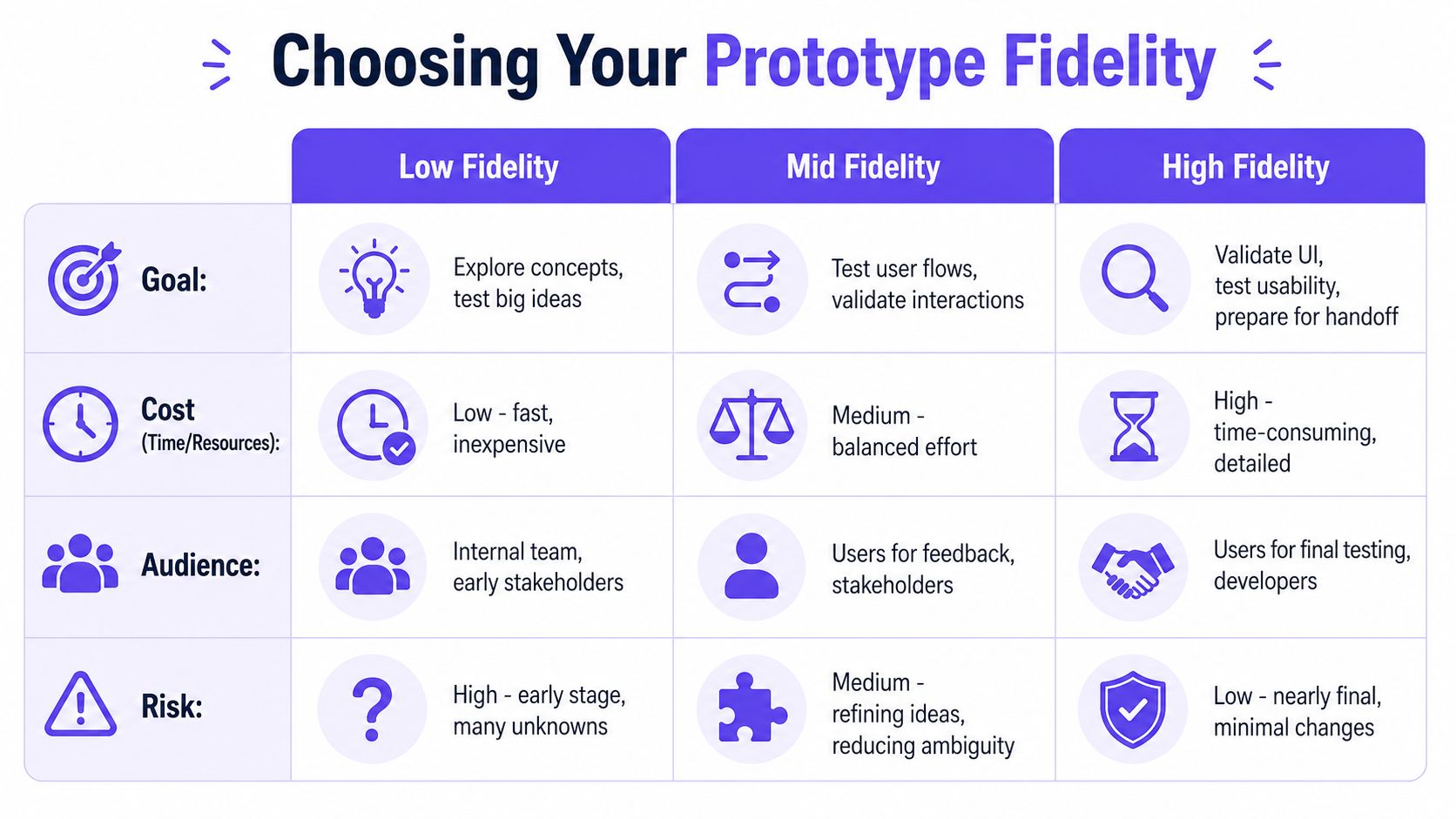
Use this model in your next planning review
Decision input: Stage
Low fidelity: Early discovery
Mid fidelity: Flow refinement
High fidelity: Final validation
Decision input: Audience
Low fidelity: Internal team, early stakeholders
Mid fidelity: Users, cross-functional review
High fidelity: Users, executives, developers
Decision input: Goal
Low fidelity: Explore concepts
Mid fidelity: Validate flows and content
High fidelity: Validate UI details and support handoff
How to read the framework in practice
Stage matters because each phase carries a different kind of risk. Early on, the expensive mistake is building the wrong thing. Near launch, the expensive mistake is building the right concept badly.
Audience matters for a different reason. Internal teams can read rough artifacts if they share context. External users usually need more realism to react to the flow, the copy, or the interaction in a way that maps to real usage. Developers need enough precision to spot ambiguity before it turns into rework.
Decision matters most.
If the question is, "Should this feature exist at all?" low fidelity is usually the right tool. If the question is, "Can people complete this flow with the right expectations?" mid fidelity often gives the best return. If the question is, "Are we ready to commit design and engineering time to this exact behavior?" high fidelity earns its cost.
That is the fundamental frame for the low fidelity vs high fidelity debate. It is not a maturity contest. It is an economics decision.
Four questions to ask before anyone opens a design tool
What decision are we trying to make?
Who needs to react to this artifact?
What misunderstanding would cost us the most right now?
What is the lowest level of realism that will expose that risk?
Teams that answer those four questions well spend less time debating taste and more time reducing uncertainty.
One distinction keeps this framework honest. Fidelity and scope are different variables. A rough prototype can cover a large service concept across many steps. A polished prototype can cover one narrow moment. Teams confuse those two all the time, especially when fast AI tools make polished output cheap. Cheap output still carries cognitive cost. People anchor on what they can see, and polished screens pull attention toward layout details even when the actual question is strategy or flow.
That is why I push teams to document the decision next to the prototype itself. One sentence is enough: what this artifact is meant to prove, and what it is not meant to settle. That small habit saves review meetings.
If your team is standardizing this across product, design, and engineering, it also helps to define where AI-generated artifacts fit in the workflow. A practical starting point is leveraging AI for product development. If a lot of the reasoning behind those choices lives in calls, demos, or voice notes, teams can also explore AI audio transcription to keep the decision context attached to the artifact.
How AI Changes the Fidelity Equation
Monday morning, a PM walks into review with six polished screens generated over the weekend. By lunch, the team is debating button placement, visual hierarchy, and microcopy. Nobody has answered the harder question: should this feature exist in the first place?
AI has changed the cost curve of prototyping. It has not changed the cost of being wrong.
That distinction matters. In the past, high-fidelity work was slow enough to create a natural pause. Designers had to invest real time, so teams were more likely to ask whether a concept deserved that investment. Now a polished flow can appear in minutes. The production cost drops, but the decision risk stays put. In many teams, it goes up because realistic-looking output creates false confidence earlier in the process.
I see the same failure pattern repeatedly. A team uses AI to generate screens from a thin prompt, reviews them as if they were grounded in the actual product, then discovers later that the proposal breaks navigation, ignores existing permissions, conflicts with the design system, or falls apart on edge cases. Speed helped them produce an artifact. It did not help them choose the right question.
That is the shift. AI compresses execution time, so fidelity can no longer be treated as a proxy for certainty.
The new fidelity trap
High fidelity used to signal effort. Now it often signals tool capability.
Those are not the same thing. A generated prototype can look production-ready while being strategically shallow. Teams anchor on what is visible, especially in stakeholder reviews. Once the room sees polished UI, the conversation drifts toward preference and away from risk. I have watched organizations spend weeks refining generated concepts that should have been killed in a whiteboard sketch.
AI also changes who can create artifacts. PMs, founders, researchers, and marketers can all produce convincing screens without waiting for a full design cycle. That is useful when it speeds up exploration. It is expensive when it bypasses the discipline that normally sits between an idea and a realistic product proposal.
If your design workflow depends on voice notes, review calls, or recorded feedback, tools that explore AI audio transcription help preserve the reasoning behind the screens. That context often determines whether generated output is a useful draft or a polished distraction.
What useful AI should actually improve
Useful AI reduces translation work between ideas, evidence, and interface decisions.
In practice, that means starting with product context, not a blank canvas. The system should account for current flows, design system rules, documented requirements, and known constraints before it produces polished output. Otherwise, teams spend their time cleaning up plausible fiction.
The best use of AI in prototyping is not automatic polish. It is faster movement between fidelity levels while keeping the logic intact. Low-fidelity concepts can become testable flows without being reinvented from scratch. Mid-fidelity flows can inherit the right components and states instead of approximating them. High-fidelity prototypes can reflect implementation reality closely enough to support validation and handoff.
That is the standard I use. If AI makes it easier to skip reasoning, it is increasing risk. If it helps the team preserve context while raising fidelity at the right moment, it is doing real product work. For a broader view, leveraging AI for product development examines how to use these tools without letting speed distort judgment.
AI did not end the low versus high fidelity decision. It made that decision more important, because the easiest artifact to generate is often the easiest one to overtrust.
Grounding Prototypes in Reality with the Visual Context Graph
A team spends two days generating polished concepts from prompts, puts them in front of stakeholders, gets approval, and then learns the flow ignores existing permissions, breaks component rules, and conflicts with how the product already works. I have seen that pattern burn weeks of design time and create false confidence fast.
The Visual Context Graph exists to prevent that failure mode. It keeps prototype work tied to the product's actual state as fidelity rises, so a realistic-looking screen is more than a good guess. Figr uses live screens, Figma files, design systems, PRDs, research inputs, and implementation signals to keep generated output grounded in what already exists.

The five layers of the Visual Context Graph
Five layers determine whether AI-generated prototypes help a team move faster or just produce prettier rework.
Visual context
Captures how the product looks across current screens and imported design artifacts.
That keeps new concepts aligned with the product customers already know.
Behavioral context
Brings in flows, usage patterns, and observed signals from research or analytics.
That keeps the prototype anchored to real behavior instead of internal assumptions.
Design system context
Understands tokens, components, variants, states, and usage rules.
Designers spend less time fixing avoidable inconsistencies later.
Product knowledge context
Pulls from PRDs, documentation, flow definitions, and prior decisions.
The output reflects intent and constraints, not just surface-level UI patterns.
Implementation context
Grounds screens in how the product is built.
That narrows the gap between an impressive prototype and something engineering can ship.
Why this changes fidelity decisions
The practical benefit is economic. Teams stop paying high-fidelity costs for low-confidence ideas.
Without context, AI makes it cheap to generate polish and expensive to trust it. With context attached, teams can raise fidelity with a clearer reason. A rough concept can inherit the right product patterns. A more detailed flow can reflect existing logic, states, and constraints without being rebuilt from scratch. That changes the low versus high fidelity decision from "how fast can we make this look real?" to "how much realism does this decision actually require?"
That distinction matters. In product teams, the biggest waste rarely comes from sketching too early. It comes from validating the wrong thing at the wrong fidelity, then discovering the prototype looked more certain than the product really was.
If your team keeps bouncing between whiteboard thinking and polished mockups without confidence in either, start with the product context you already have. Then match fidelity to the decision, not to the tool's ability to generate polished screens.
Conclusion
Teams do not lose time because they used low fidelity or high fidelity. They lose time because they used the wrong fidelity for the decision in front of them.
Low fidelity is for reducing uncertainty while change is still cheap. High fidelity is for moments when realism changes the quality of feedback, sharpens stakeholder alignment, or removes ambiguity before build. The expensive mistake is skipping that progression and treating polished screens as proof that an idea is ready.
I have seen teams spend weeks refining beautiful prototypes for concepts that should have been killed in a sketch review.
AI makes that risk easier to miss. It can generate convincing screens in minutes, which lowers production cost but does nothing to improve product judgment. If the team has not defined the question, the constraints, and the level of realism required, faster output just means faster waste.
A better operating habit is simple. Review each prototype and ask three things: what decision is this meant to support, what could we learn with less fidelity, and what would higher fidelity buy us right now? Teams that answer those questions consistently ship with more confidence and spend far less time polishing ideas that never deserved it.
FAQ
Should I start with low fidelity or high fidelity?
I'd start with low fidelity when the team is still validating concept, structure, or flow. I move to high fidelity only when the questions become specific enough to require realistic UI and interaction detail.
Is low fidelity enough for usability testing?
In my experience, yes, when you're testing structural questions. The Takayama study showed low- and high-fidelity prototypes were equally effective at uncovering usability issues in that early concept phase.
When does high fidelity become worth the effort?
It becomes worth it when the flow is stable and the remaining risk sits in interaction details, content clarity, stakeholder approval, or handoff precision.
Does AI mean teams can skip low fidelity now?
I wouldn't do that. AI makes polished output easier to generate, but that can hide weak product thinking if the concept hasn't been challenged first.
How do I know if my team chose the wrong fidelity?
I look for two signals: feedback that stays vague, or handoff that creates lots of translation work. Both usually mean the artifact's realism didn't match the decision it needed to support.