

It's 10 PM. The kickoff for your new feature is tomorrow morning. Your screen is a chaotic mess of screenshots, PRD bullet points, and half-baked ideas. Staring at the empty Figma file, you feel that familiar pressure. How do you wrestle these scattered thoughts into a coherent user flow before the first engineer asks for one?
This moment of inertia, the activation energy required to turn ideas into structure, is the single biggest bottleneck in early product design. I call it the Blank Canvas Problem.
This isn't about a lack of ideas. It is about the friction of starting. This is precisely where AI for product design changes the game. It acts as a scaffold for your thinking, not a substitute for it.
From Friction to Flow State
A friend at a fast-growing fintech company told me she once spent an entire week just mapping out the existing, convoluted flow for a feature they needed to redesign. It was a painstaking, manual process of taking screenshots, drawing arrows, and documenting every possible user action. By the end, the team was exhausted before the real creative work had even started.
That’s the old way.
Modern AI agents are built to obliterate this initial friction. The basic gist is this: you feed it the raw inputs like screenshots or screen recordings, and the AI provides the structure. It can instantly generate a detailed user flow diagram, letting you see your entire product’s logic laid out visually. You can see this in action by exploring an AI-generated map of a complex process like the LinkedIn Recruiter Flow, which turns a tedious task into an instant insight.
This shift fundamentally redefines the starting line for product teams. Instead of spending 80% of their time on manual documentation and 20% on strategy, AI flips the ratio. It automates the "what is" so teams can focus on the "what if."
The Economic Impact of a Better Starting Point
At a systems level, the blank canvas problem has huge economic consequences. A 2018 report from the Design Management Institute found that design-led companies outperformed the S&P 500 by 211%. These companies understand that speed-to-insight is a massive competitive advantage. When product teams are bogged down in the manual labor of just getting started, the cycle time from concept to customer feedback stretches out, and the cost of delay skyrockets.
AI attacks this by compressing the earliest, fuzziest parts of the design process.
It is not just a faster horse; it is a completely different way to travel. Your first step doesn't have to be a leap of faith onto a blank page. You can now begin with a tangible, AI-generated artifact that is already 70% of the way there. Your next move starts from a place of clarity, not chaos. Simply capture your most complex user flow and let an AI agent map it for you.
How AI Rewires the Product Design Workflow
It’s Tuesday morning. Your product team is in a conference room, sketching a new feature on a whiteboard. The researcher shares user interview notes, the designer draws a rough flow, and the PM tries to tie it all back to the original spec. Each step is a handoff. Each handoff is a translation from one format to another. This is the old way: a linear assembly line where insights get lost between stations.
Now, imagine a different model.
Instead of an assembly line, think of your workflow as a switchboard. Every port is connected, sharing context and routing information instantly. This is the new reality with AI for product design. It is not about swapping out one tool; it is about upgrading the entire operating system.
The financial impact is already becoming obvious. The market for AI design tools is on track to hit $18.16 billion by 2030. A PwC report even suggests AI could add over $15 trillion to the global economy, much of it from exactly these kinds of workflow optimizations. When product leaders report 40% productivity gains, it's because this integrated approach cuts out the friction baked into the old, fragmented process.
This visual shows the shift from a siloed idea to a collaborative, AI-partnered design process.
The key takeaway is that AI acts as a bridge, turning abstract ideas into structured artifacts with a fraction of the manual work. Let's look at how this plays out in the real world.
From Murky Research to Clear Requirements
The first stage of design is always the messiest: discovery. How does AI change this? By acting as a synthesis engine. Instead of a PM spending days manually tagging interview transcripts, an AI can absorb raw data and generate a structured document. It spots recurring themes and connects them to user needs. A friend at a music streaming service did this recently, turning a pile of raw feedback into a full PRD for a Spotify AI playlist feature. That used to take her team a week.
From Static Screens to Dynamic User Flows
Once requirements are defined, the next job is mapping the user journey. Traditionally, that means painstakingly drawing flowcharts in Miro or Figma, a process notorious for missing states. AI transforms this into an automated analysis. You can give it a screen recording of your app, and it will map the complete, multi-state user journey. Every click and logical branch is documented. We saw this when analyzing Zoom’s network degradation states, where the AI mapped dozens of complex scenarios a human might easily miss.
From Tedious Prototyping to Instant Mockups
Prototyping is where ideas become real, but it is often a bottleneck. Is this the right shade of blue? Does this button match the component in our live app? An AI partner grounded in your product’s reality eliminates that guesswork. By learning from your application and Figma design system, it can generate high-fidelity, interactive prototypes that are compliant from the start. You can explore a selection of the best AI tools for product design workflows in our related guide.
The AI doesn’t just build a prototype; it builds your prototype. It respects your design tokens, uses your components, and understands your established user patterns.
From Guesswork to Systematic Confidence
Finally, and this is maybe the most critical part, AI rewires the final mile of design: uncovering hidden complexity. The "happy path" is easy. But what about the dozens of error states, empty states, and edge cases that create scope creep? AI is built for this kind of systematic exploration. It can take a single flow and generate a comprehensive map of every potential failure point. Think of it as a pre-flight check for your feature. This systematic process turns a source of anxiety into a pillar of confidence, ensuring that what you ship is not just beautiful, but robust.
Grounding AI in Your Product's Reality
Generic AI tools produce generic results. It's a simple truth, but it creates endless downstream work.
When you ask a generalist model to design a checkout flow, it gives you an idea of a checkout flow, not your checkout flow. It lacks the specific DNA of your product: your colors, your component library, your established interaction patterns.
This creates what I call the Contextual Gap. It's that frustrating space between the AI’s plausible but sterile output and the living, breathing reality of your application. The tool doesn't know you, so it can’t build for you.
Last week, I watched a PM spend the better part of two days correcting an AI-generated prototype. Why? Because the AI used the wrong button styles, ignored their navigation hierarchy, and proposed a flow that, while logical in a vacuum, completely broke their existing user conventions. She was not designing; she was translating.
This is what I mean when I say context is everything.
Building a Digital Twin
The solution is not better prompting. It's better data.
The most effective AI for product design is one that learns directly from your product. The process is straightforward but powerful:
- Live App Capture: The AI ingests your live application's HTML and CSS with a single click. It sees what your users see.
- Design System Integration: It connects directly to your Figma libraries, learning your design tokens, components, and brand guidelines.
- Analytics Connection: It pulls in real user behavior data to understand where users drop off and which funnels underperform.
These inputs combine to create a digital twin of your product, a high-fidelity model that gives the AI a deep, structural understanding of your world. When it works from this foundation, its outputs are no longer generic. They are native. They belong. You can explore the hidden cost of generic AI outputs to understand why this matters so much for team velocity.
The AI stops being an outside consultant offering generic advice. It becomes an embedded team member that already knows your playbook.
From Plausible Guesses to Native Solutions
The difference this makes is stark.
Instead of a plausible but incorrect prototype, you get a high-fidelity design that feels like it was built by your own team. The components are right. The user flows make sense within your existing architecture. The suggestions for improvement are based on your actual user data, not abstract best practices.
Consider a project to redesign the Shopify checkout setup flow. Using a context-aware AI, the proposed changes were not just abstract improvements. They were tailored modifications that respected Shopify's existing design language while introducing data-backed changes to reduce friction. The resulting New Setup Flow felt like a natural evolution of the product, not a foreign object grafted onto it.
This level of contextual awareness is what separates a novelty from a professional tool. Does your AI know your product, or is it just guessing? The answer to that question will determine whether it accelerates your team or just creates more clean-up work.
To successfully ground AI in your product's reality, explore the principles of effective product management for AI. It’s a discipline that ensures the AI’s capabilities are directed toward solving real business problems within your product's specific constraints. The goal is to generate your designs, faster and with more intelligence than ever before. This requires an AI that starts with your reality.
Uncovering Hidden States to Ship with Confidence
It's 4:47 PM on a Thursday. Your VP just asked for something visual to anchor tomorrow's board discussion. You have a PRD. You have bullet points. You have 16 hours and no designer availability. The feature seems simple enough: a file upload.
But is it?
What happens if the file is too large? Or the wrong format? What if the network drops mid-upload? Suddenly, that one screen balloons into a dozen hidden states. This is the exact moment engineering scope creep is born, not in a line of code, but in an overlooked detail.
A product manager is like an architect designing a building’s grand entrance. It's the happy path. An AI design partner, on the other hand, is the automated system that maps every fire escape, emergency light, and accessibility ramp. It finds all the crucial, non-obvious requirements that make the building safe and functional for everyone, in every scenario.
Mapping the Unseen Complexity
Traditionally, digging up these edge cases has been a manual, often frustrating process. It depends entirely on the collective memory of the team during a brainstorming session. Did anyone remember to account for duplicate file name conflicts? What about when there is not enough storage space?
Each missed state becomes a future bug report. Each one is a painful delay. These oversights are expensive. In fact, we wrote a deep-dive on why the 10 edge cases every PM misses cost 50-100x more after launch.
This is exactly where AI for product design becomes a force multiplier. It excels at systematic, exhaustive analysis. Give it a simple user flow, and it will methodically map out every state you can imagine and several you cannot.
- Error States: Invalid inputs, system failures, permission denials.
- Empty States: What a user sees before they have added any data.
- Loading States: How the UI communicates that work is happening.
- Success States: Clear confirmation that an action actually worked.
For example, an AI can take a simple file upload for a tool like Dropbox and instantly map every possible failure state. It does not get tired or forget some obscure scenario. This is not just about moving faster; it is about achieving completeness.
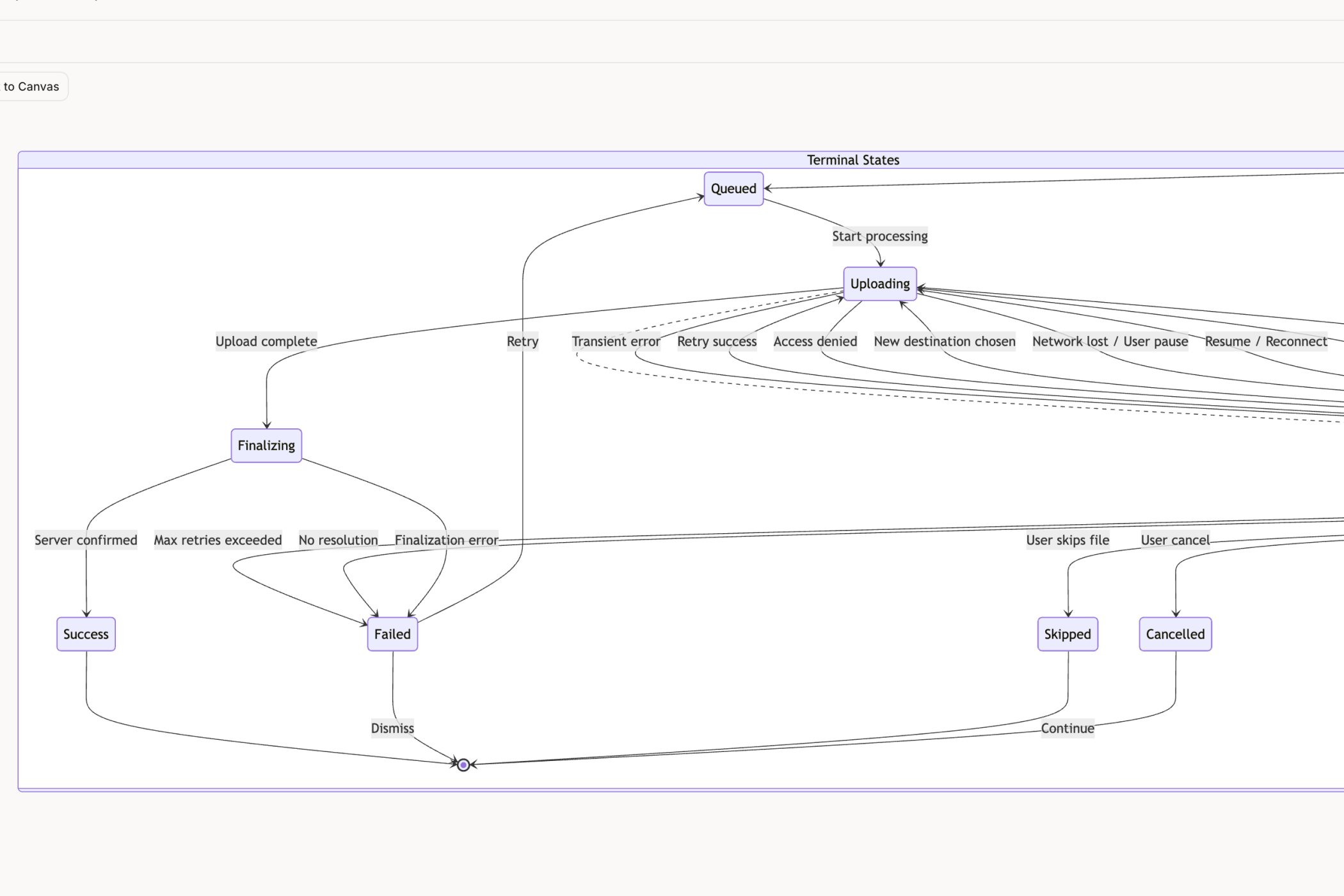
This systematic approach transforms the design handoff. Instead of giving engineering a sketch, you're giving them a comprehensive blueprint. The conversation shifts from "what should happen if..." to "we have accounted for these 17 scenarios."
From Ambiguity to Actionable Test Cases
This process also has a direct, powerful impact on quality assurance. A friend who leads a QA team told me that half her team's time is spent just trying to translate vague design specs into concrete test cases. It is a huge source of friction.
When an AI maps out every single state, it can also generate the corresponding test cases automatically. What happens when a user tries to freeze their Wise card with a poor connection? The AI can map that state and write the exact test script to validate it, like in this AI-generated test case example.
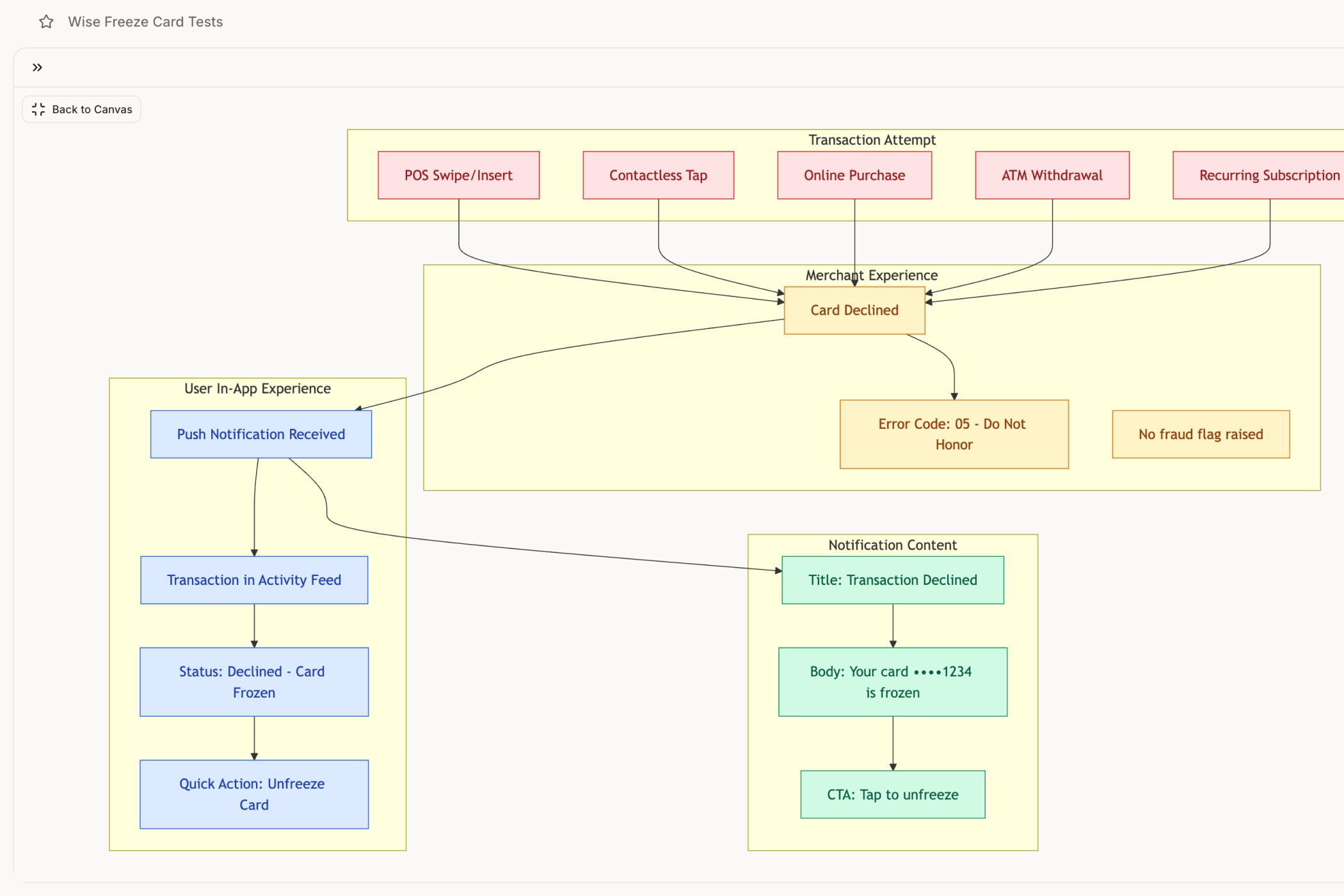
You get a direct, unbroken line from design specification all the way to QA validation. The chance for misinterpretation drops like a rock.
This jump in clarity helps explain why 72% of companies are adopting AI, with many seeing employee output climb by 40%. By automating the grunt work of finding hidden states, AI de-risks the entire development cycle. That's fueling a global market that is barreling toward $390.9 billion in 2025, as you can see in recent analyses of how AI is reshaping creative industries.
The practical takeaway is this: pick one feature that caused unexpected headaches last quarter. Use an AI agent to map its user flows and edge cases. The resulting clarity will show you exactly where the hidden complexity was hiding all along.
How to Choose Your AI Design Partner
It is the end of the quarter. Your inbox is flooded with outreach from AI vendors, each promising to accelerate your roadmap. They all show you slick demos. They all use the same words. But how do you separate a powerful partner from a clever novelty?
Choosing an AI design partner is not a simple feature comparison. It is an investment in your team’s operating system. Our roundup of the best AI design tools compares the top options side-by-side. The wrong choice introduces friction, risk, and mountains of rework.
In short, the decision is less about what the AI can create and more about what it understands.
Look for Context Over Commands
A friend at a Series C company recently tested a popular AI tool to generate a new user onboarding flow. In minutes, the AI produced a visually clean, logical sequence. The problem? It looked nothing like their actual product.
The button styles were wrong, the copy was off-brand, and the flow completely ignored their existing navigation. Her team spent more time correcting the output than it would have taken to build it from scratch.
This is the critical failure of generic AI. An effective partner has to be grounded in your product’s reality. You need to ask potential vendors these questions:
- How does your tool learn our existing design system and components from Figma?
- Can it ingest our live application to understand our current UI and user flows?
- Does it integrate with our product analytics to find real user friction points?
A tool that cannot answer these questions is just a glorified template generator. A true partner acts like a team member who has already done their homework. It should be able to produce a nuanced prototype for a Mercury runway forecasting feature with the same fidelity as a simple component.
Scrutinize the Security Model
Here is the zoom-out moment. The economic incentives behind many AI tools are built on a dangerous tradeoff. Many platforms subsidize their costs by using your inputs to train their models. Every design you upload, every flow you map, every piece of strategic thinking you share becomes part of their intellectual property, not yours.
As a report in the Harvard Business Review warns, this practice introduces profound IP and security risks. For any serious business, this is a non-starter.
Enterprise-grade readiness is not a feature; it is a foundation. Your evaluation must include a non-negotiable security checklist:
- Zero Data Retention: Does the vendor have a strict policy against storing your data or using it for model training?
- SOC 2 Compliance: Have they undergone a rigorous, independent audit of their security controls?
- SSO Integration: Can the tool integrate with your company’s single sign-on for secure access management?
If a vendor hesitates on any of these points, they are not an enterprise partner. They are a liability.
The takeaway is simple. Do not be distracted by impressive demos of AI generating isolated screens. Your next step is to evaluate potential partners on two fronts: their ability to understand your product's unique context and their commitment to protecting your intellectual property. The right partner accelerates your work without compromising it.
Your First Step into AI-Powered Design
Theory is great, but action is what gets you somewhere. We can talk all day about the potential of AI for product design, but you will only really get it when you see it work on your own product, solving your own problems. A vague call to "embrace AI" is not a strategy. It's a platitude.
Let’s make this real.
I want you to try one simple, low-stakes experiment. This is not about overhauling your entire workflow or begging for a new budget. This is a ten-minute exercise that will deliver an immediate, tangible insight and make the value of this technology click.
The Ten-Minute Clarity Test
Here is the plan: pick one small, frustratingly complex user flow in your current product. It does not have to be the most important one. In fact, it's better if you choose something that has been a quiet source of annoyance for the team.
Maybe it is that clunky settings page nobody wants to touch. Or the multi-step data export that always confuses new users. Or the checkout process with a dozen payment variations.
Got one? Good. Now, use an AI design tool to capture that flow.
Once it is captured, you have a simple assignment. Just ask the AI to do three things.
- Map the complete user flow. Ask for a visual diagram of every screen, every choice, and every branch. Forget the happy path for a minute; you want to see the entire system laid bare.
- Find three hidden edge cases. Prompt it to find potential failure points you and your team might have missed. What if an API call fails mid-process? What does the user see if they have no saved data?
- Generate test cases for QA. Finally, ask it to create a specific set of test cases based on the flow it just mapped out. These should be real, actionable instructions your QA team can use immediately.
From Debate to Doing
This single exercise will take less time than your daily stand-up, but it will likely provide more clarity than hours of whiteboard sessions. This is not a hypothetical demo. It’s your product, your complexity, made visible and understandable in minutes.
You are turning a source of ambiguity into a set of actionable artifacts. You can even see this in action by exploring a set of AI-generated test cases for a Waymo trip modification flow.
The shift to AI is not some distant event. The worldwide AI market is projected to hit nearly $3.5 trillion by 2033, with 63% of organizations planning to adopt it within three years. As usage rates climb past 77%, the leaders who act now are building a serious competitive advantage. Explore the latest AI statistics and trends to see just how fast this is all moving.
This little experiment is your first step.
Stop debating and start doing. Pick your flow, run the test, and see for yourself. The insight is waiting.
Frequently Asked Questions
Will AI Replace Product Designers
No. This is the wrong question. It is like asking if a calculator replaced mathematicians.
AI is not coming for your job; it is coming for the tedious parts of it. Think about the hours spent manually mapping user flows, hunting for obscure edge cases, or policing design system consistency. AI automates that grind.
The role is shifting. It is less about being a creator of pixels and more about being a conductor of systems. AI is just a new, incredibly powerful instrument in the orchestra.
How Does AI Handle Our Company Data and IP
This is a critical point, and you are right to be cautious. Consumer-grade AI tools often use your inputs to train their public models. That is a massive IP risk.
But enterprise-ready AI for product design platforms are built differently. Security is not an afterthought; it is the foundation.
Look for vendors with SOC 2 compliance, options for Single Sign-On (SSO), and a strict zero data retention policy. This is your guarantee that your designs, user flows, and product strategy stay yours. They are never, ever used for model training.
What Is the Best Way to Introduce AI Tools to a Skeptical Team
Start small. Find a pain point everyone on the team feels. Do not frame it as a top-down AI mandate; frame it as an experiment to solve that specific, annoying problem.
Pick a well-defined but complex task. A great example? Mapping out every possible state for a new task assignment component. It’s a deceptively complex job that nobody wants to do manually.
When you use an AI tool to instantly generate all the states and catch three edge cases the team missed, you do not need a mandate. The value is obvious. Adoption grows organically from that moment of relief, not from a forced directive. People will start pulling the tool into their workflow because it makes their lives easier.
Ready to stop debating and start doing? With Figr, you can capture your most complex user flow and get a complete map of its hidden states in minutes. See how our AI design agent can help your team ship with confidence. Start your first project with Figr today.