

It’s 4:47 PM on Thursday. Your VP just asked for something visual to anchor tomorrow's board discussion on the new feature. You have a PRD. You have bullet points. You have 16 hours and no designer availability. You stare at the screen. That familiar dread of the blank canvas settles in, the pressure to pull something meaningful out of thin air.
This is the moment where the AI for UX conversation gets stuck on a simple, flawed idea: "generating a screen." But the real value isn't a magic button that spits out a finished product. Asking AI for an instant final design is like asking a musician to compose a symphony with a single note. It misses the point entirely.
AI for UX design is the master chef’s sous-chef.
The sous-chef doesn’t invent the recipe, that’s the creative work of the head chef. But they do all the prep. They chop the vegetables, sharpen the knives, and organize the workstation. They remove the friction so the chef can focus purely on the art of cooking. AI in UX does the same.
This is the core idea behind a context-aware design agent. Unlike generic tools that produce sterile wireframes, these agents understand your product’s logic, your design system, and your existing flows. They don't start from an empty artboard, they start from your reality.
A friend at a fintech startup recently told me she spent a week documenting every possible failure state for a new card-freezing feature. With an AI agent, she could have generated a comprehensive set of test cases and an interactive simulation of those edge cases in a single afternoon. You can explore a similar card freeze flow built for Wise to get a sense of this in practice.
The basic gist is this: these agents learn your application to generate artifacts that are immediately relevant. You're not getting a picture of a screen. You're getting a fully mapped user flow, a set of critical edge cases, or a prototype that already speaks your product's design language. As you'll discover when you learn more about the hidden costs of generic AI outputs, context is everything.
This shift fundamentally changes the starting line, moving it from zero to seventy percent complete.
How AI Actually Accelerates UX Workflows
It’s Tuesday morning. Your team is staring down transcripts from the latest user interviews. The gold is in there, but it’s buried under hours of conversation. The old way feels like panning for gold in a river of text: slow, manual, and entirely dependent on one person’s knack for spotting patterns.
This is where AI for UX design stops being a concept and starts becoming a tangible advantage.
AI's true power is a series of targeted boosts applied at the most draining points in your workflow. Think of it less as a creative director and more as a tireless research assistant, an expert cartographer, and a meticulous QA engineer, all rolled into one.
The process shifts from staring at a blank page to working with structured, intelligent materials from the get-go.
This flow shows the journey from abstract ideas on an empty canvas to a state where an AI partner provides the building blocks for focused, creative work.
From Raw Input to Structured Insight
One of the biggest wins is in research synthesis. Instead of spending days coding transcripts, an AI agent can tear through raw data—interview notes, survey responses, support tickets—and pull out the actionable insights. It can generate data-backed user personas or map complex customer journeys, turning qualitative noise into a clear signal.
The exchange is simple: you provide the raw material, and the AI provides the initial structure.
This idea gets powerful when you apply it to an existing product. Imagine you take a screen recording of your app's signup process. An AI agent can watch that video and instantly generate a complete user flow diagram, automatically flagging every step, decision point, and potential snag, like in this analysis of LinkedIn's job posting flow.
This isn’t just documentation. It’s about seeing your own product with fresh, analytical eyes.
Prototyping and De-Risking at Speed
Once you understand the flow, the next bottleneck is getting something tangible for feedback. This is where AI excels. By learning your design system, it can generate multiple high-fidelity variations of a screen that are already on-brand. Need three versions of a pricing page for an A/B test? An AI can generate them in minutes.
But the most significant value comes from exploring what could go wrong. AI is uniquely good at systematically finding the "unhappy paths" that we humans often miss in the rush to ship.
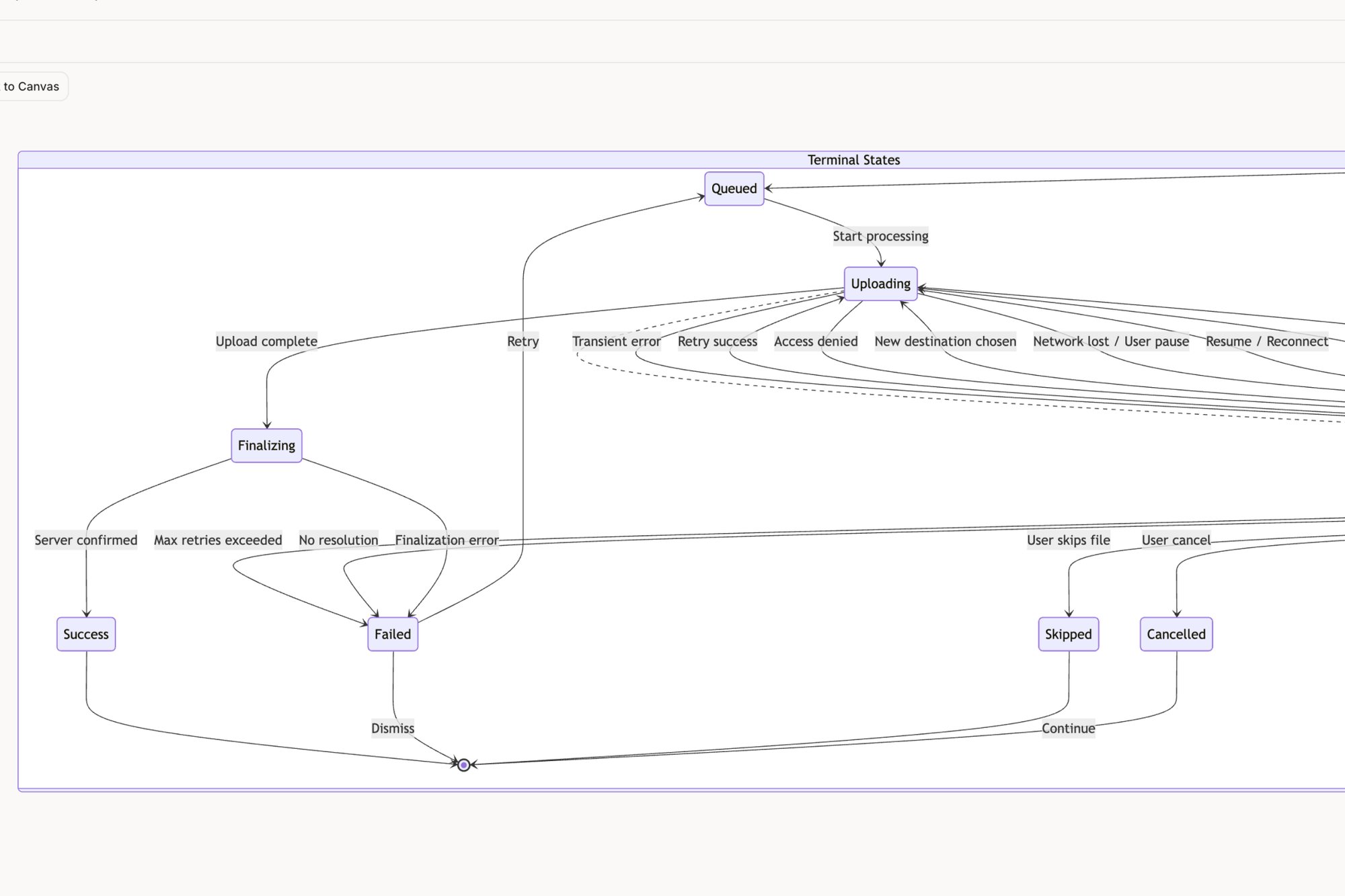
A friend at a SaaS company told me his team spent two weeks brainstorming all the ways a simple file upload could fail. An AI agent can map out every conceivable edge case in minutes: network drops, file size limits, name conflicts, permission errors. You can see this in action by exploring the deep dive on Dropbox's upload failure states.
This is how you de-risk a feature before writing a single line of code. You surface problems early and prevent those painful, late-stage surprises. To see what’s possible, it’s worth exploring some of the most impactful AI tools for designers available now.
Accelerating UX isn't about skipping steps. It’s about executing them with more speed, depth, and foresight. You can learn more about how this changes team dynamics and see how others are cutting design review cycles by 70% with an AI-first approach.
Designing Dynamic Systems, Not Static Screens
Modern UX has very little to do with drawing pretty rectangles. It's about defining logic. A user interface isn't a static picture, it's a living system of choices, states, and responses. Time isn't a conveyor belt, it's a switchboard, constantly rerouting based on user action and system behavior.
So how do we manage that complexity without letting critical details fall through the cracks?
This is where AI for UX design fundamentally changes the game. It helps teams graduate from designing screens to designing entire, resilient systems.
The best way to think about this is with a state machine diagram: a map of every possible condition a feature can exist in. The problem is, mapping these by hand is tedious and almost always incomplete. Just last week, I watched a product manager struggle to explain all the possible states for a simple task assignment card. What happens if the assignee rejects it? What if the original request just times out?
With a context-aware AI agent, they could have generated a complete, interactive prototype showing every single one of those states, from pending to rejected. An AI can map this out visually, as shown in this interactive component states map. It's this systemic thinking that acts as the antidote to scope creep.
Mapping the Logic, Not Just the Layout
This is what I mean: AI helps you design the entire logical system, not just the "happy path" screen that looks good in a presentation. When you define a feature, an intelligent agent can reason about all its potential states and automatically chart them for you.
This is how you prevent the classic scenario where a two-week engineering estimate quietly balloons into six. The initial estimate was for one screen. The six-week reality was for the twelve different states engineering discovered during development.
AI acts as a system architect, forcing clarity on complex interactions early. It asks the "what if" questions for you, making sure every edge case is considered before handoff.
This is a fundamental shift. Instead of creating static pictures of a UI, we are defining the rules that govern how that UI behaves.
The Rise of Generative UI and the Trust Hurdle
As AI evolves from assistant to partner, a new challenge emerges: trust. A recent Nielsen Norman Group report highlights the risk of 'AI fatigue,' where professionals are skeptical after being burned by past tech flops.
The report nails it: building trust requires AI that is customized and informed by real research. AI tools can now handle complex tasks like designing entire user flows, which shifts the UX discipline toward 'Generative UI'. Our job becomes less about pushing pixels and more about defining the goals and guardrails for the AI to operate within.
And when you're designing dynamic systems that interact with people, you need a deep understanding of natural dialogue flow. For more on crafting effective AI interactions, it's worth exploring the principles of conversation design.
Your Takeaway: Designing for Reality
The single most important action for any product team is to stop thinking in screens. Today. Pick one complex component in your app. Instead of just mocking it up, try to list every single possible state it can be in.
That exercise reveals the true, hidden complexity of your product.
An AI partner makes this process faster and far more thorough, ensuring the logic is as solid as the layout. You can learn more about how AI tools can adjust UI in real-time based on user behavior in our related guide. This systemic view is how you build intuitive products that feel rock-solid.
Grounding Design Decisions in Data and Patterns
It’s 3:15 PM on a Wednesday. You’re in a design review, defending a change to the onboarding flow. A stakeholder asks the inevitable question: “How do we know this will actually work?” You present your user research, but it feels like you're winning a debate based on opinion. The conversation stalls.
Good design isn’t subjective, it’s effective. The challenge has always been proving that effectiveness before you ship. This is where AI brings the missing analytical horsepower, grounding creative choices in cold, hard data.
This isn't about letting a machine make creative decisions. It’s about giving designers a quantitative partner. Think of AI as an analytics translator, one that can look at a sea of numbers and see a human story of frustration and success.
From Assumptions to Evidence
The most powerful AI agents can connect directly to your product’s analytics. They can ingest raw data from tools like Mixpanel or Amplitude and identify precisely where users are dropping off. Instead of guessing where the friction is, you know.
The basic gist is this: AI finds the problem, then helps you find the solution.
Once it identifies a drop-off point, an intelligent agent can suggest design improvements based on proven patterns. By analyzing hundreds of successful apps, it learns what works. It might recommend a clearer call-to-action or a simplified form field, justifying each suggestion with data.
A friend at an e-commerce company struggled to optimize their Shopify checkout setup flow. By connecting their engagement data to an AI agent, they pinpointed the exact step where merchants were abandoning the process. The AI then generated a complete redesign of the setup experience, which the team could immediately test.
This moves the entire process from assumption-based to evidence-based.
Connecting Design Choices to Business Economics
This is the zoom-out moment where design decisions connect directly to the health of the business. Every point of friction an AI helps you remove is a tangible win. Reducing drop-off in a signup flow directly impacts user acquisition costs. Simplifying a core feature improves retention.
This data-driven approach is critical. With the global UX services market projected to hit $32.95 billion by 2030, the pressure to deliver flawless experiences is immense. Product leaders cannot afford to ignore AI, especially when 88% of consumers will abandon a site after just one poor experience. You can find more details on these and other important UX statistics to guide your strategy.
In short, AI provides the analytical firepower to justify design decisions with data, not just well-reasoned opinions. It changes the conversation from "I think this is better" to "The data shows this pattern increases conversion by 15%."
This creates alignment and confidence across the organization. It makes the value of UX visible and measurable.
Your next step is to ground your work in reality. Take one of your product’s core funnels and look at the data. Where are people getting stuck? Now, imagine having a partner that could not only pinpoint that friction but also provide a dozen battle-tested design patterns to fix it. That's the power of an analytical AI partner.
Integrating an AI Partner Into Your Team
So, how do you drop a powerful new tool into a team’s established rhythm without creating chaos?
The typical playbook is a top-down mandate. The announcement lands in Slack, another tool gets pinned, and you can almost hear the collective groan. It's the kind of move that creates more friction than it solves.
This approach fails because it treats process like a flowchart, not a collection of human habits and pressures. The right way to bring an AI partner into the fold isn't about rewriting your playbook overnight.
It’s about finding the single biggest point of pain in your current process and aiming the AI squarely at it.
Start With the Most Annoying Task
Think of adopting AI for UX design like adding a new player to a sports team. You don’t change the entire game plan at once. You find the one spot on the field where their specific skills will make the biggest difference.
Where is your team bleeding the most time on low-value, repetitive work?
Is it the final handoff to engineering? The long hours spent squinting at research notes? Or is it the soul-crushing task of writing out every single test case for a new feature?
Start there.
A friend at a Series C company told me their QA team spent an entire sprint just documenting test scenarios for a new payment flow. That's a perfect entry point for AI. By automating just that one tedious job, you show immediate, undeniable value. You give people back their time. You build trust.
Successful adoption isn't a revolution. It's a series of small wins that build momentum.
A Phased Playbook for Adoption
To make this feel natural rather than forced, you need a phased approach. This respects existing workflows while slowly revealing what the AI can do. The main hurdle for AI adoption isn't capability, it's about trust. A gradual rollout hits this problem head-on.
Here’s a simple, three-step plan:
- Automate One Tedious Task
Find a process that’s necessary but universally disliked. Generating a full suite of test cases from a finished design is a perfect candidate. The AI can look at a flow and instantly spit out dozens of scenarios. We saw this with these test cases for a Waymo trip modification feature. The win is immediate: you’ve saved dozens of hours and cut down on human error. - Augment One Creative Process
Once the team sees the value, introduce AI as a creative partner. The goal isn't to replace brainstorming but to supercharge it. Use the AI to generate A/B test variations for a new landing page or suggest different user flow options. You could even have the AI simulate different user personas to critique a design, surfacing accessibility gaps. - Integrate Into the Core Workflow
With trust established, you can embed the AI into your core product loop. This is where you connect it to your PRD. An AI agent can ingest that PRD and generate the initial user flows and high-fidelity wireframes, like this new setup flow for Shopify, knocking out the first 70% of the work. The tool goes from being a helpful utility to a fundamental part of how you build. For more on this, check out our guide on PM and designer collaboration in the AI era.
This slow-burn approach turns skeptics into champions because it proves its worth with real results.
Forget about redesigning your whole product from scratch. Your next step is much smaller.
Pinpoint a Single Point of Friction
Think about one user flow in your product that’s a known headache. Which one clogs up the support queue? Is it that messy onboarding? The settings page that looks like a cockpit? Or the checkout process where half your users vanish?
Every team has one.
This is exactly where you should start.
Map the Territory Before You Draw the Treasure Map
Once you've picked your target, grab a tool like Figr and capture the existing flow with a screen recording. This next part is critical: do not try to fix it. Don't even start spitballing solutions.
Just ask the AI to do two simple things:
- Map the current user flow, step by step.
- Identify all the potential edge cases and failure states.
That's it. This one move is your first step into context-aware design. You're not asking the AI to be creative. You're asking it to be brutally analytical.
You’re using AI as a diagnostic tool, not a generative one. It’s the MRI that reveals the hidden fractures in your user experience before you start prescribing solutions.
This tiny investment of time delivers immediate clarity. It turns that vague feeling of "this flow is confusing" into a concrete, actionable list of blind spots. A clear map of failure states, for instance, can de-risk a project by handing engineers a precise checklist of scenarios to build for.
Last quarter, a PM I know used this exact technique on a file upload feature. Engineering had scoped it as a two-week job. The AI-generated map uncovered 11 distinct failure states the team hadn't considered. Finding this out before a single line of code was written saved them from a painful mid-sprint fire drill.
Your first step isn’t some big leap of faith into AI. It’s a grounded, tactical move to see your own work more clearly. Give it a shot this week.
Common Questions About AI in UX Design
The conversation around AI in UX is a mix of excitement and, let's be honest, a little anxiety. It feels like a tidal shift. It's natural to wonder where your team, your role, and your skills fit.
Are these tools here to empower us, or will they make our core skills obsolete? Let's tackle the most pressing questions.
Will AI Replace UX Designers?
No. At least, not the good ones. AI isn't coming for the strategic, empathetic, and creative parts of your job.
Think of AI as a fast and diligent intern, not a creative director. Its strength is chewing through tedious, analytical tasks that eat up our time: mapping user flows, generating test cases, or finding obscure edge cases.
This frees you up to focus on what humans do best: deep user research, wrestling with complex problems, and defining creative strategy. The role is shifting from being a 'doer' of every single task to a 'director' of an AI-assisted process. You guide the tool, make the critical judgments, and ensure the output is actually useful.
How Can Our Team Start Without a Large Budget?
You don't need a massive, top-down mandate. In fact, that's probably the worst way to do it. The smart approach is to start small and prove the value.
Pinpoint the single most time-consuming, low-creativity task in your workflow. For many teams, this is documenting user flows or writing test cases after a design is locked. It’s necessary work, but it’s a grind.
Many specialized AI tools, including Figr, offer free trials or starter plans. Use one to target that single pain point. Run a small experiment and get a specific, measurable win. Show your stakeholders you saved 20 hours in a single sprint by automating flow mapping for one feature. That kind of hard data builds a much stronger case for more investment than any slide deck ever could. You can compare options in our roundup of the best AI design tools for product teams.
How Is Context-Aware AI Different?
Most general-purpose AI design tools operate from a blank slate. You give them a text prompt, and they generate something generic based on patterns from the public web. The results often feel disconnected, like stock photos. They look vaguely right but have nothing to do with your product.
Context-aware AI is a completely different beast. It plugs directly into your world.
- It learns from your live application's UI.
- It ingests your Figma design system and tokens.
- It can even analyze your specific user data.
The result isn’t a generic wireframe, it’s a high-fidelity artifact that looks, feels, and behaves like it belongs in your product. The outputs are immediately usable because they’re grounded in your reality. It's the difference between asking for a random map and getting a live satellite view of your own neighborhood.
Ready to see how a context-aware AI partner can accelerate your team's workflow? Explore Figr to turn your product thinking into production-ready artifacts and ship UX with confidence and speed. Learn more at https://figr.design.