

When “done” still means different things, teams ship ambiguity instead of product behavior.
A Product Manager marks signup ready, Engineering builds the form, QA tests the happy path, and then someone notices the user can enter an email, never confirm it, and still reach paid features. Payment succeeds but retry behavior is undefined. Collaboration works until two people edit the same record. Last week I watched a Designer walk a team through a polished flow that everyone approved, then the room stalled on a basic question: what exactly proves this story is complete? This is what I mean, the expensive gap usually isn't effort, it's interpretation.
The fix is simple in concept and hard in practice: pair each user story with observable acceptance criteria that describe user outcomes, edge states, and evidence of completion. The seven examples below follow the funnel from acquisition to referral, so Product Managers, BAs, Engineering, and QA can align on what users need, what the system must show, and what should happen when reality gets messy. When teams need shared context across PRDs, research, analytics, existing flows, and edge cases, tools like Figr help keep that conversation grounded instead of speculative.
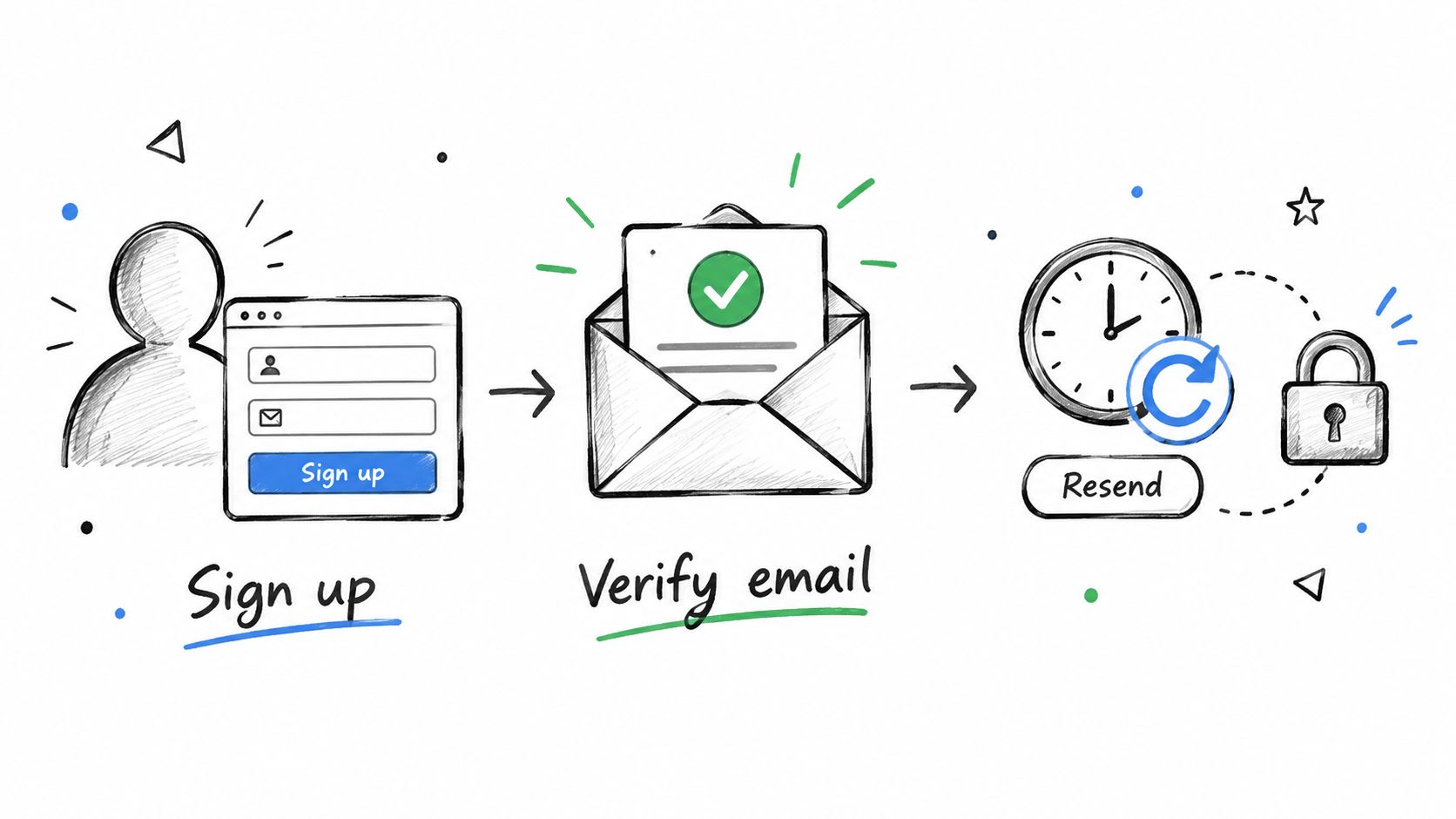
1. User Account Registration with Email Verification
Registration fails when verification is treated as optional. The record exists, the user can sign in, and nobody can answer a basic release question: should this person reach protected areas before confirming their email?
That ambiguity usually surfaces late. QA tests the happy path, Engineering has already wired auth, and Product realizes "account created" and "account activated" were never separated. For an acquisition story, that gap affects fraud risk, trial quality, and the first-run experience.
A complete example
User story
As a new user, I want to create an account and verify my email so that I can securely access the product.
Acceptance criteria
- Given a new user enters a valid email and valid password, when they submit the registration form, then the account is created in an unverified state
- Given the account is unverified, when registration succeeds, then the user sees a message telling them to verify their email before full access
- Given a verification email has been sent, when the user opens the valid link, then the account is marked verified
- Given the account is not verified, when the user tries to access protected product areas, then access is blocked and verification guidance is shown
- Given the user enters an invalid email format, when they submit the form, then an inline error is shown
- Given the user enters a password that fails policy rules, when they submit the form, then the rule violation is shown before account creation
These criteria work because each one describes something a tester can observe. They also define the state transition that matters for handoff: anonymous user, registered but unverified user, then verified user with access. If the team cannot point to those states, the story is still underspecified.
Failure modes teams miss
The expensive bugs are usually in the boundaries, not the form fields.
A few examples show up often:
- users click an expired or reused verification link
- a second signup attempt uses the same email before verification is complete
- the email sends successfully, but the UI never explains what to do next
- protected screens block access, but pricing, workspace invites, or trial start events still fire for unverified users
Those are not edge cases in practice. They shape activation quality. If verification is part of your first-run journey, the surrounding copy, timing, and blocked-state behavior matter as much as the form itself. Teams working on activation often need the wider onboarding flow to reduce churn mapped alongside the story so everyone sees where verification sits in the funnel.
Role-specific handoff notes
Product should define the access boundary clearly. "Verify email before full access" is too loose unless the story names which areas stay available and which do not.
Engineering should break out token expiry, resend behavior, and duplicate-email handling as implementation tasks or sub-stories if they affect release scope.
QA should ask for observable evidence, not internal steps. "Store user in database" and "call verification service" belong in technical tasks. Acceptance criteria should stay at the level of visible behavior and system response.
For teams that check address quality before sending mail, tools such as Email Validation API can sit behind the flow. Keep that as a dependency choice, not part of the user story unless the user can see its outcome.
Funnel-stage question for this pattern
At the acquisition stage, ask one question before development starts: what exact event marks a user as activated, registration submitted or email verified?
That answer changes analytics, entitlement rules, lifecycle messaging, and QA scope.
2. Why search and filter stories often collapse in review
A shopper searches for "running shoes," taps Women's, sets a price range, sorts by lowest price, and gets a grid that still shows out-of-stock items from the wrong category. Review stalls right there. Product says the controls exist, Engineering says the query worked as built, and QA asks what the result set was supposed to do.
Search and filter stories break down because teams specify UI controls instead of result behavior. Acceptance criteria need to define what changes in the list, which state persists, and what the shopper sees when filters conflict. Atlassian's guidance on acceptance criteria is useful here because it keeps the team focused on observable completion, not implementation details.
A complete example
User story
As a shopper, I want to filter and sort products so that I can find relevant items faster.
Acceptance criteria
- Given the shopper is viewing search results, when they apply a category filter, then only products in that category are shown
- Given results are visible, when the shopper applies a price range filter, then only products within that range remain
- Given multiple filters are active, when the shopper adds an availability filter, then results update to items that match all selected filters
- Given sorting options are available, when the shopper selects price low to high, then matching results reorder accordingly
- Given active filters remove all matches, when results refresh, then a no-results message is shown with a way to clear filters
- Given filters are active, when the shopper removes one filter, then the result set updates immediately
The strongest version of this pattern adds visible constraints that QA can verify without reading code. Results should show the fields the shopper uses to decide, such as product name, image, price, and stock status. If performance matters, name the threshold in the story only when the team agrees it affects release readiness and has a practical way to test it.
The hidden complexity is filter state
Single-filter stories usually pass review. Combined state is where they fail.
The expensive rework shows up in ordinary moments. A shopper opens a product, goes back, and loses selected filters. A search term stays active but the filter chips do not. Counts update on desktop but not on mobile. None of these defects come from a missing sidebar. They come from a story that never defined how state should behave across the session.
A refinement matrix helps expose that risk early:
- Common combinations: category plus price, search term plus availability, brand plus sort
- State decisions: selected chips, clear-all behavior, back-navigation behavior, URL persistence
- Failure modes: zero matches, delayed refresh, stale counts, conflicting filters
- Role handoffs: Product defines which combinations matter, Engineering flags query or caching constraints, QA turns each state decision into an observable test
This pattern usually sits between acquisition and revenue. The funnel question is simple: is this story meant to increase product discovery, reduce drop-off on listing pages, or improve conversion from search sessions? The answer changes which criteria deserve precision first. If the team cares about conversion, include stock visibility and no-results recovery. If the team cares about discovery, focus harder on relevance, state persistence, and quick filter changes.
3. Task Assignment and Notification Workflow
Assignment stories need criteria across roles, not just screens.
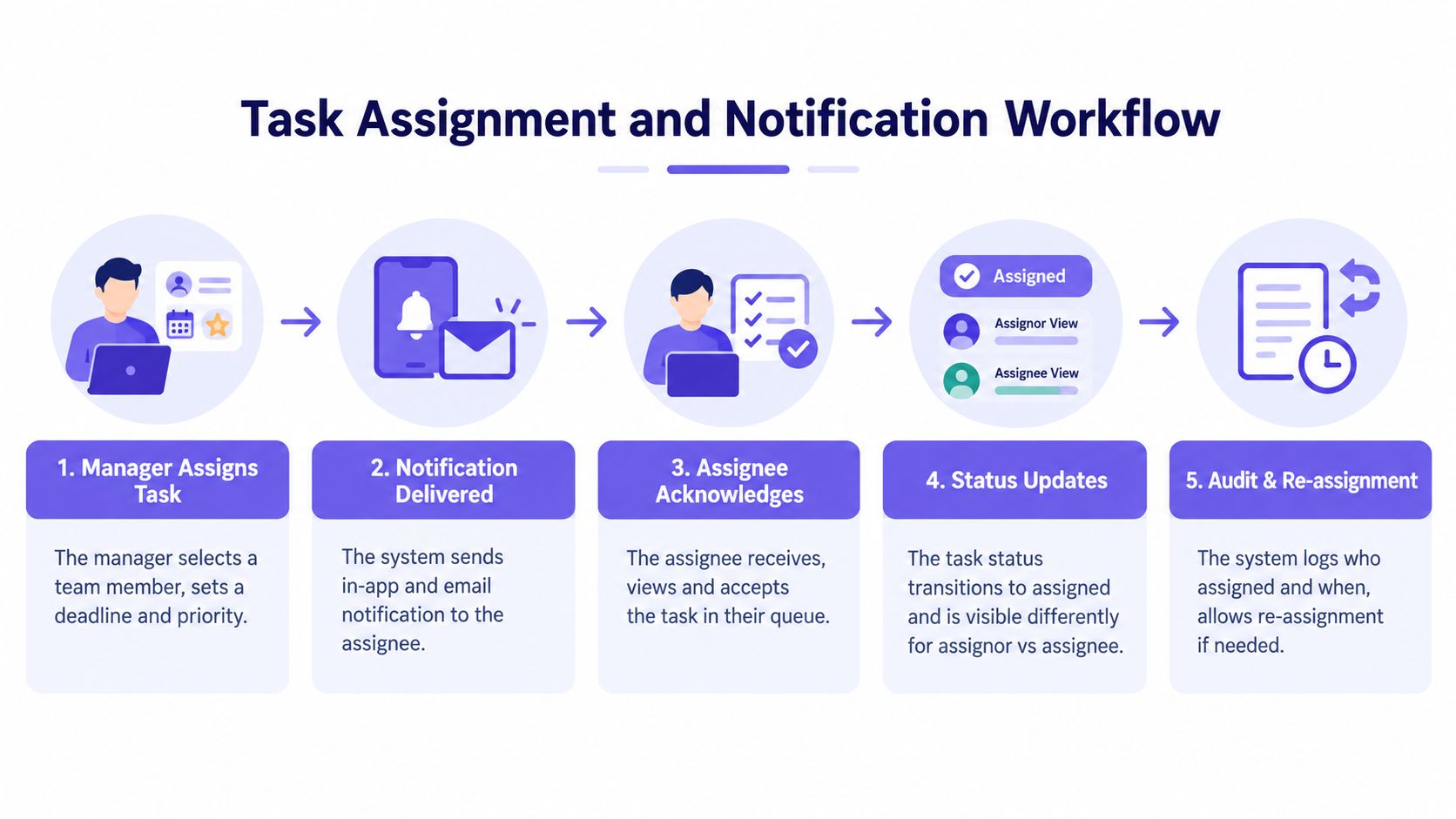
Collaboration products get messy. A manager assigns work. The assignee receives a notification later. Status changes after acknowledgment. If the story only says "send a notification," Product, Engineering, and QA will each imagine a different finish line.
A complete example
User story
As a team lead, I want to assign a task to a teammate so that ownership is clear and the assignee can act on it.
Acceptance criteria
- Given a task is unassigned, when the team lead assigns it to an eligible teammate, then the task shows the new assignee
- Given a task has been assigned, when the assignment is saved, then the assignee receives a notification
- Given the assignee opens the task, when they acknowledge the assignment, then the task status reflects that acknowledgment
- Given the assignor changes the assignee before acknowledgment, when the update is saved, then the original assignee no longer sees the task as assigned to them
- Given a user is not the assignee, when they view their personal task queue, then this assigned task does not appear there
- Given the assignee has access to the task, when they open it from the notification, then they land on the correct task detail view
Linear, Gmail shared tasks, and Slack workflows each show a version of this pattern. The detail that matters isn't the toast or the email. It's the state transition between unassigned, assigned, seen, and acknowledged.
Teams often confuse delivery with comprehension. A notification can be sent and still fail the user story.
Handoff advice by role
- Product Manager: define who must know what changed
- Business Analyst: document role-based visibility and reassignment rules
- Engineering: separate assignment persistence from notification delivery
- QA: test stale notifications, reassignment, and unauthorized visibility
If your team struggles with the language of alerts and status messages, examples of designing better UI notifications can sharpen the criteria without overprescribing the interface.
4. How to write payment criteria when failure matters most
Payment stories need decline behavior, retry logic, and transaction evidence, not just a success path.
Happy-path writing becomes expensive. A checkout that only defines success creates rework in support, finance, and QA. Stronger agile guidance explicitly warns that acceptance criteria should include error states, offline behavior, and failure conditions, because simple examples often stop too early in this user story template guidance.
A complete example
User story
As a buyer, I want to complete payment or recover from a failed payment so that I can finish my purchase without confusion.
Acceptance criteria
- Given a valid payment method and valid order, when the buyer confirms payment, then the payment result is shown and the order status updates accordingly
- Given the card is declined, when the payment attempt fails, then the buyer sees a decline message and can retry
- Given the card is expired, when the payment is submitted, then the buyer sees that the card details must be updated
- Given the payment attempt fails for a recoverable reason, when the buyer returns to payment, then previously entered order details remain available
- Given a payment attempt is processed, when the result is returned, then the system records the payment attempt outcome for later review
- Given the buyer retries payment, when the next attempt succeeds, then only the successful payment is reflected in the order state
What good criteria avoid
You don't need to dictate gateways, tokenization, or fraud infrastructure in the acceptance criteria. You do need to define user-visible recovery paths and business evidence. Stripe and Razorpay both make this obvious in practice: specific decline reasons create better recovery than a generic "something went wrong."
A friend at a Series C company once described payment review as "where vague stories become accounting work." That's the zoom-out moment. At scale, every undefined edge case turns into manual support, reconciliations, and angry users.
For teams shaping these paths visually, error state design patterns help expose where message clarity and retry options belong.
5. Multi-step Form with Progress Tracking and Autosave
Multi-step form stories break when progression, validation, and persistence are bundled into one vague requirement.
Teams say "user can complete setup later," then discover nobody agreed on when a step counts as complete, what autosaves, or where the user resumes. The field has become more structured over time. Research by Lucassen and colleagues identified 13 quality criteria for user stories, and later guidance pushed acceptance criteria toward singular testability, unambiguity, and ties to a unique story ID in the Quality User Story framework paper.
A complete example
User story
As a new customer, I want to complete a multi-step setup form over time so that I can finish onboarding without losing progress.
Acceptance criteria
- Given the user completes all required fields on the current step, when they select continue, then they move to the next step
- Given required fields are incomplete or invalid, when the user tries to continue, then they remain on the current step and see field-level errors
- Given the user enters information on a step, when they pause, then their progress is autosaved
- Given the user signs out after progress has been saved, when they sign back in, then they return to the last incomplete step
- Given the user returns to a previous step and edits an answer, when they save changes, then later steps retain compatible saved responses or prompt for updates where needed
- Given the form shows progress, when the user completes a step, then the progress indicator updates
A refinement habit that helps
Split the work before sprint planning:
- Validation story: what blocks progression
- Autosave story: what saves and when
- Resume story: where the user returns
- Progress story: what the indicator means
That split reduces fake certainty. If your team wants a better source artifact before refinement, a clear product requirements document guide helps surface the state rules early.
6. What concurrent editing stories need before engineering starts
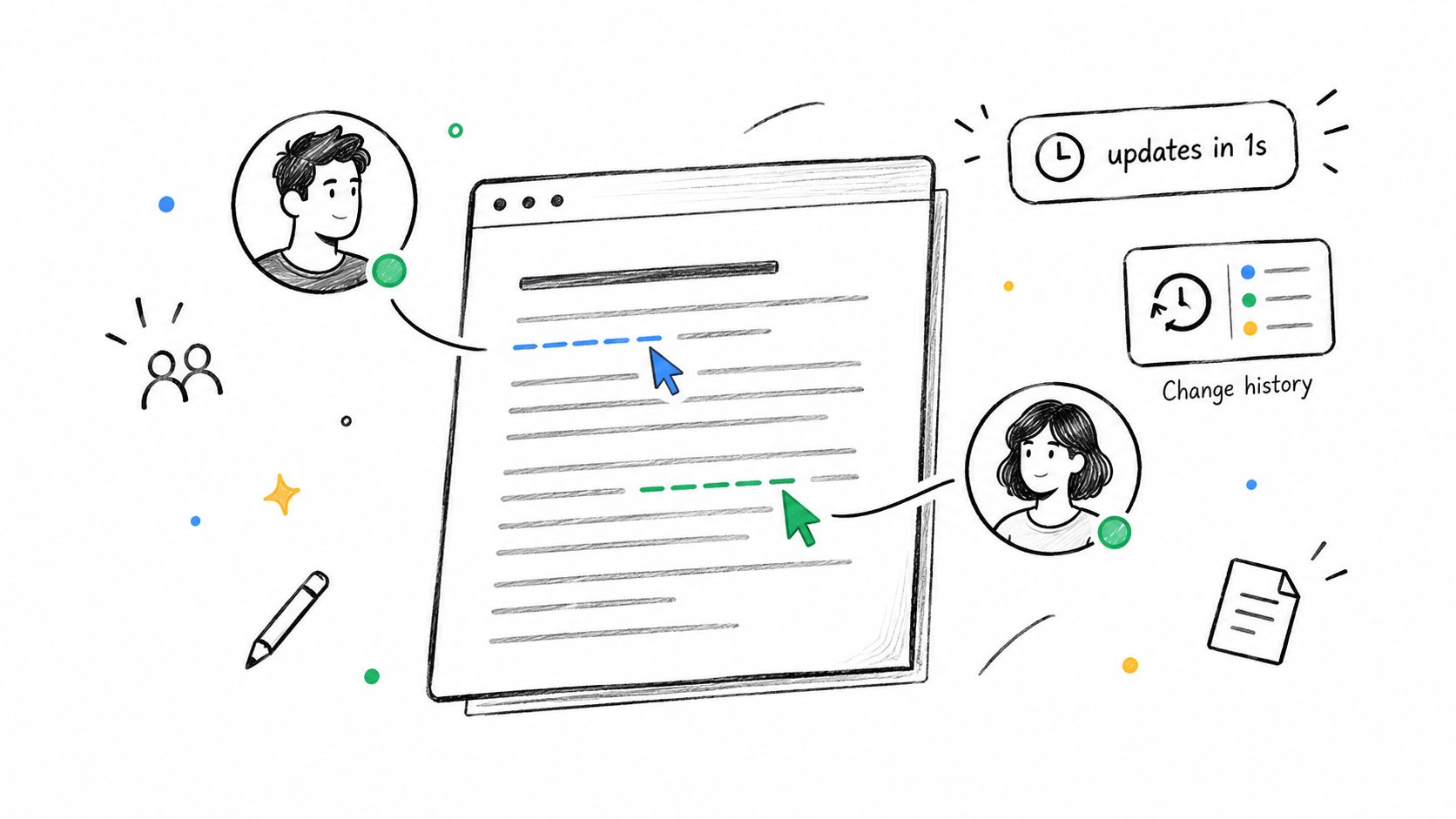
Real-time collaboration stories need explicit rules for presence, update visibility, conflict handling, and offline recovery.
"Users can edit together" sounds complete until two people change the same field, one loses connectivity, or permissions change mid-edit. This category rewards teams that write scenarios instead of slogans.
A complete example
User story
As a collaborator, I want to edit shared content with others at the same time so that we can work without overwriting each other.
Acceptance criteria
- Given two authorized users are viewing the same document, when one user begins editing, then the other user can see that collaborator is present
- Given one user makes a change, when the edit is accepted by the system, then other active viewers see the updated content
- Given two users edit the same content in conflicting ways, when the conflict occurs, then the system preserves user input and shows the conflict state
- Given a user loses write access while editing, when they attempt to save further changes, then the save is rejected and the permission change is shown
- Given a user goes offline while editing, when connectivity returns, then their pending changes attempt to sync and any conflict is surfaced
- Given a user is only a viewer, when they open the shared content, then editing controls are not available
A 2022 case study assessed stories against IEEE 830 qualities such as completeness, correctness, verifiability, and traceability, and found story quality improved when teams evaluated them using testable acceptance-criteria attributes rather than informal wording in the Software 2022 study. Collaboration stories show why. Informal wording collapses the moment concurrency appears.
The role handoff that prevents pain
- Product Manager: define what users should understand during conflict
- Designer: show presence, conflict, and recovery states
- Engineering: clarify sync model assumptions before commitment
- QA: test simultaneous edits, reconnect, and permission changes
For a visible example of edge-heavy product work, the Figr gallery includes patterns like task assignment states and trip-change test cases that mirror this kind of complexity.
7. Dynamic Pricing and Discount Application in Cart Checkout
Pricing stories need observable calculation outcomes and promotion rules, not vague promises that discounts apply correctly.
Revenue-stage stories expose whether a team can describe business logic in user-facing terms. Buyers don't care how the pricing engine works. They care whether the total is understandable, fair, and updated when cart conditions change.
A complete example
User story
As a buyer, I want valid discounts applied correctly at checkout so that I understand what I'm paying and what I've saved.
Acceptance criteria
- Given the cart contains eligible items, when the buyer applies a valid coupon, then the discount is reflected in the order summary
- Given a coupon is expired or invalid, when the buyer applies it, then the cart total remains unchanged and the buyer sees why the coupon was rejected
- Given taxes or fees apply, when the checkout summary is shown, then the buyer sees an itemized breakdown before payment
- Given multiple promotions could apply, when checkout recalculates, then the system applies the promotion rule defined for that cart and shows the resulting savings
- Given the buyer removes an item after a discount is applied, when the cart updates, then the total and savings are recalculated immediately
- Given the buyer proceeds to payment, when the final review is displayed, then the amount to be charged matches the checkout summary
What separates usable criteria from noisy criteria
The best pricing criteria answer three questions:
- What changed: subtotal, discount, fees, taxes, final total
- Why it changed: valid code, ineligible item, promotion conflict
- When it changes: on apply, on remove, on quantity update
Clear pricing criteria reduce revenue leakage and support overhead because users can verify the math themselves.
Commerce teams often pair this with testing artifacts. If you're moving from story to QA, this guide on how to create test cases is a practical next step. For broader conversion thinking around checkout, Quikly's checkout optimization advice is useful as a workflow reference.
7 User Stories with Acceptance Criteria Comparison
Who should write acceptance criteria and how much detail is enough
The product owner should usually write acceptance criteria, but the team should shape them together.
That nuance gets lost in template-heavy content. One established agile source says the product owner should write the criteria because they are the one who accepts or rejects the backlog item, and the criteria can be rules, examples, tests, or brief notes rather than only Given, When, Then statements in Mike Cohn's guidance. That flexibility matters.
The basic gist is this: use the format that creates shared understanding fastest. Given, When, Then is great when state and triggers matter. Rule lists are fine when constraints are simple. Short examples are often better than abstract rules.
A practical review loop looks like this:
- Product Manager writes the first pass: user outcome, business rule, visible finish line
- Business Analyst sharpens conditions: role logic, exceptions, terms
- Engineering challenges ambiguity: impossible combinations, missing states, dependencies
- QA turns criteria into tests: pass, fail, and edge scenarios
If your backlog keeps producing surprise work in sprint, the issue usually isn't effort estimation. It's that the story never became a shared test. For teams that want a narrower definition-focused companion, Figr's glossary on what acceptance criteria are is useful alongside these examples.
How Figr helps teams move from vague stories to testable handoff
Figr helps when your acceptance criteria depend on product context scattered across artifacts.
Most weak stories aren't written by careless people. They're written by busy teams pulling from memory. The PRD says one thing, research calls out another, analytics show a drop-off, and the existing flow has edge states no one remembered in refinement. That's where context changes story quality.
A 2025 experimental study on AI-generated test cases from user stories reported 98.67% average acceptance-criteria coverage, with a 93–100% range across stories, showing that acceptance criteria can serve as a traceable QA target rather than a narrative artifact in Thoughtworks' experimental research. The important takeaway isn't blind automation. It's traceability.
A practical workflow
Step 1. Load the product context.
- Bring in PRDs, research, screens, and existing flows
- Include analytics or recordings when drop-offs or confusion matter
- Use Figr's docs, PRDs, and research context workflow when the source material is fragmented
Step 2. Turn the story into observable scenarios.
- Write who wants what and why
- Add visible outcomes for success, failure, and recovery
- Keep implementation details in tasks, not acceptance criteria
Step 3. Map missing states before handoff.
- Check empty, invalid, expired, unauthorized, offline, and conflict states
- Compare the story against existing flows
- Use edge case mapping for product flows when the main path looks deceptively clean
Step 4. Hand Engineering and QA the same finish line.
- Convert criteria into reviewable scenarios
- Generate design direction or QA artifacts where needed
- Connect stories to PRD to UX flow translation when requirements and interface behavior drift apart
The Visual Context Graph makes stronger stories possible
Figr's Visual Context Graph matters because good acceptance criteria depend on more than text.
The five layers are a useful lens for story quality:
- Visual context: the current screens, states, and flow patterns the user sees
- Behavioral context: what users do, where they hesitate, and which branches matter in the journey
- Design system context: tokens, components, variants, and state rules that shape what is feasible and consistent
- Product knowledge context: PRDs, research, prior decisions, terminology, and business logic behind the story
- Implementation context: existing components, technical constraints, and handoff realities that affect what can ship cleanly
Acceptance criteria aren't written in a vacuum. A registration story improves when visual context reveals the blocked-access state. A collaboration story improves when behavioral context surfaces concurrent edits. A checkout story improves when product knowledge context captures promotion rules. Engineering handoff gets cleaner when implementation context shows existing patterns that QA can test against.
For teams trying to catch complexity earlier, examples of edge cases in software products often trigger the missing conversations before sprint commitment.
Turn the Story Into a Shared Test
Strong user stories examples with acceptance criteria all follow the same pattern: user outcome first, observable behavior next, edge states included, and evidence of completion visible to everyone in the handoff. That's true whether you're working on signup, filtering, assignments, payments, collaboration, or checkout logic.
The teams that avoid expensive rework don't write longer stories. They write clearer confirmation. Atlassian's framing of acceptance criteria as the measurable gate for done, and the older Card, Conversation, Confirmation model behind user stories, both point to the same discipline: a story isn't ready when it's eloquent, it's ready when Product, Engineering, and QA can test the same reality in Atlassian's user story guide.
Start small. Pick one backlog item already heading toward refinement. Rewrite its criteria as observable scenarios. Then map the missing states before the meeting starts: invalid input, empty state, conflict, retry, expired condition, blocked access, offline behavior. That single exercise usually reveals whether the story is small enough, clear enough, and testable enough to move.
If you want help grounding that work in your actual product context, Figr is one practical option. It can connect the story to existing flows, design system states, PRDs, research, and handoff artifacts so the criteria reflect real product behavior instead of generic templates. When you're ready, try Figr.
FAQ
What is the best acceptance criteria format
Use the format that makes behavior easiest to verify. Given, When, Then works well for state changes. Rule lists work well for straightforward constraints.
What are user story acceptance criteria
They are the conditions a story must satisfy to be considered complete. They define observable outcomes, not implementation tasks.
How should Jira acceptance criteria be written
Write them as testable statements inside the story, using scenarios or concise rules. The key is clarity, not the Jira field itself.
What is the difference between an epic and a user story
An epic is a larger body of work that must be split into smaller stories. A user story should describe a specific user outcome small enough to hand off and finish.
What belongs in an acceptance criteria checklist
Include success behavior, failure states, edge cases, role permissions, data or input rules, and the visible evidence that proves the story is done.
Figr is built for teams that need stories and acceptance criteria tied to real product context, not blank-page templates. It brings together screens, PRDs, research, analytics, design systems, and edge cases so Product, Design, Engineering, and QA can work from the same evidence. If that sounds useful for your next refinement cycle, visit Figr.