

An edge case is a condition at a boundary or outside a product’s usual path. It can involve valid or invalid input, missing data, a timing problem, a permission change or a system dependency failing at exactly the wrong moment.
Edge cases matter because the happy path is only one state of a product. The real experience also includes loading, empty, error, retry, partial success, expired sessions, permission limits and recovery. Loading and empty states can be routine; the edge-case review asks what happens at their boundaries or when conditions change unexpectedly.
Below are 20 practical edge case examples product, design, engineering and QA teams can use as a review checklist.
Quick take: use the examples below as prompts, then test them against one real product flow. If you want to map those states against your own product context, see Figr’s edge-case mapping workflow.
Have a SaaS flow ready to review? Bring your PRD or product screenshots and map the missing states in your product flow with Figr.
20 edge case examples in software
1. Empty required input
A user submits a form with a required field blank or filled only with spaces. The product should prevent submission and explain exactly what needs to be fixed.
2. Maximum-length input
A name, title or description is much longer than the team used in mockups. Check validation, truncation, wrapping and how the value behaves elsewhere in the product.
3. Unexpected characters
Users enter emoji, non-Latin characters, punctuation or pasted formatting. The system should store and display valid input safely without breaking layout or data handling.
4. Duplicate action
A user double-clicks Submit or retries an action after a slow response. The product should avoid creating duplicate orders, invites, payments or records.
5. Network drops during save
The user changes important data and connectivity disappears before the request completes. Show whether the change is saved, queued, retryable or lost.
Recovery and acceptance check: a lost response does not prove the save failed. Preserve the draft where appropriate, check the server’s recorded outcome after reconnecting, and make retry safe to repeat. Verify that one user action creates at most one record and the UI reports the confirmed result.
6. Slow API response
A dependency takes much longer than usual. The interface needs a loading state, timeout behavior and a recovery path rather than an indefinite spinner.
7. Partial success
A multi-step request succeeds in one service and fails in another. For example, an account is created but the welcome email fails. The product should communicate the actual state and avoid repeating completed work.
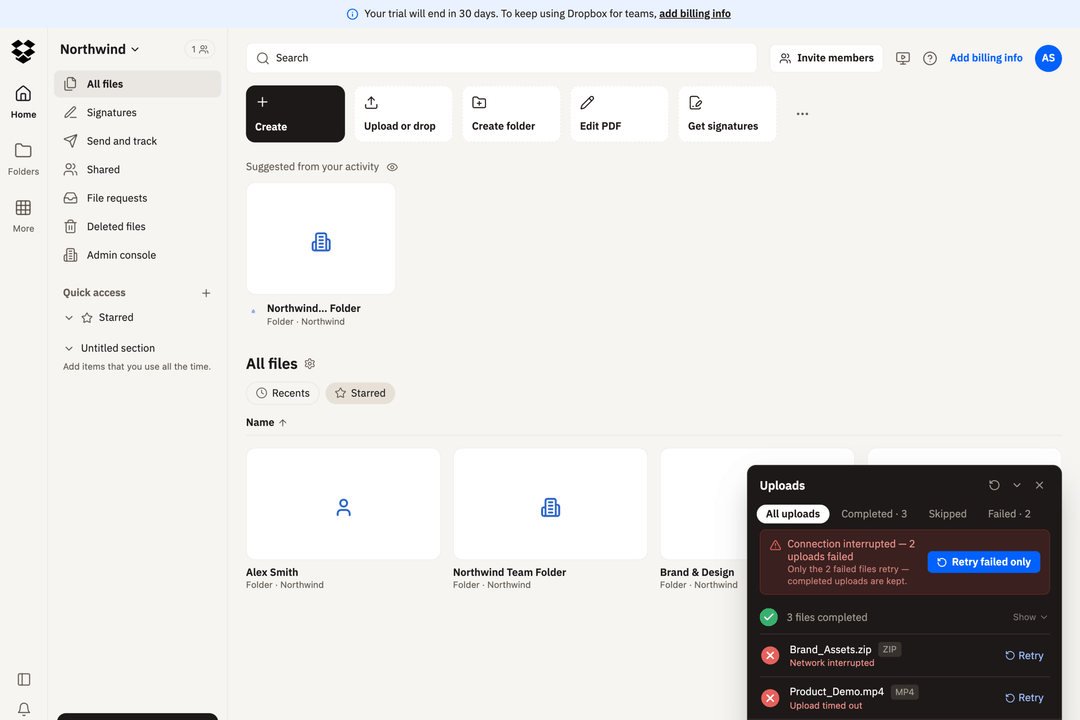
Recovery and acceptance check: in a five-file upload, three files may succeed while two fail. Show the status of each file and offer retry for failed items. Verify that retry leaves the three completed files intact and updates each failed file’s status separately.
See the partial-success pattern: this Figr-created Dropbox upload concept shows three completed files, two failed files and a “Retry failed only” action. The gallery example includes the recovery flow and prototype. It illustrates a design approach; it is not evidence of a shipped Dropbox feature or customer outcome.
Reviewing uploads, bulk actions or onboarding? Map recovery states for your own product in Figr, then review the proposed behavior with engineering and QA.
8. User goes offline
The product is opened or used without connectivity. Decide what remains readable, what is disabled and what happens when the connection returns.
9. Session expires during a task
A user leaves a long form open, returns later and clicks Save after authentication has expired. Preserve their work where possible and guide them through re-authentication.
Recovery and acceptance check: after login, confirm the same account and workspace still have permission to save. If identity or access has changed, stop the save and explain why. Retain drafts only within the product’s data-handling policy; do not expose them to another account.
10. Account changes in another tab
The user signs out, switches workspace or changes account in a second tab. The first tab should not continue behaving as though the old permissions or identity are still valid.
11. Back button after a one-time action
A user completes checkout, payment or submission, then navigates backward. Make sure the UI does not allow an unsafe repeat of an already-completed operation.
12. Permission is revoked mid-session
A user is viewing or editing an object when an administrator removes access. The next action should reflect the new permission rather than relying on stale client state.
Recovery and acceptance check: remove unavailable controls and check authorization on the server for every request. Verify that a stale tab cannot read or change restricted data, the rejected action leaves the resource unchanged, and the UI explains how to request access.
13. Role changes while the page is open
An admin becomes a viewer, or a member is promoted. Check which controls disappear, whether cached data remains visible and how the product communicates the change.
14. Expired invitation or magic link
A user opens an old invite, password-reset link or verification email. Give them a clear explanation and an obvious way to request a fresh link.
15. Zero-data state
A new account, workspace or report has no data. The empty state should help the user understand why it is empty and what action creates the first useful result.
16. Extremely large dataset
A table that looks fine with 20 rows may behave differently with 20,000. Check performance, pagination, filters, exports and bulk actions.
17. Time-zone boundary
An event crosses midnight or daylight-saving changes between creation and execution. Store and display time deliberately so users understand which timezone applies.
18. Leap day or invalid calendar date
Date logic should handle February 29, month-length differences and recurring schedules without silently shifting dates.
19. Concurrent editing
Two people update the same object at nearly the same time. Decide whether the product merges changes, warns about a conflict or uses last-write-wins behavior.
20. Resource limit reached
The user hits a seat, storage, API, project or usage limit in the middle of a workflow. Explain what is blocked, what remains safe, and what the user can do next.
Recovery and acceptance check: show the applicable limit and a permitted next step, such as freeing capacity or asking an admin. Verify that the blocked action does not create an incomplete record, existing data stays intact, and retry works after capacity becomes available.
A simple framework for finding edge cases
When reviewing a product flow, walk through these categories:
- Input: empty, invalid, very large, duplicated, pasted or unusual data.
- State: loading, empty, partial, stale, completed or conflicting.
- Permissions: no access, changed role, revoked access or different workspace.
- Network: offline, slow, timed out or dependency failure.
- Time: expired, delayed, timezone, recurring dates and calendar boundaries.
- Scale: zero records, thousands of records, maximum usage or rate limits.
- Concurrency: two tabs, two users or repeated actions.
- Recovery: what the user can do after something fails.
Use the categories as prompts, not as a guarantee that every possible edge case has been found. The product’s domain will introduce its own risks.
Which edge cases should you prioritize?
Consider user impact, likelihood in your product and difficulty of recovery. A rare data-loss or unauthorized-access failure deserves attention before a cosmetic issue. Use support tickets, incident reports and product usage to judge frequency.
- Review first: duplicate payments, lost work, incorrect permissions and actions that cannot be safely undone.
- Then cover blocked workflows: partial uploads, expired sessions and limits that leave users without a next step.
- Schedule lower-impact polish: minor wrapping or truncation issues when the content and next action remain clear.
Record the owner and release decision for each scenario. These are review priorities, not universal severity ratings.
How to add edge cases to a PRD
Do not bury edge cases in a generic “error handling” sentence. For each important scenario, document:
- the trigger or condition;
- what the user sees;
- what happens to their data;
- what actions remain available;
- how they recover;
- what engineering or QA should verify.
For a fuller requirements structure, see our requirements document example or AI PRD generator guide.
How to turn edge cases into test cases
An edge case becomes useful to QA when it is observable. Convert the scenario into a test with a clear setup, action and expected outcome.
Example:
- Setup: user has an unsaved form and an expired session.
- Action: user clicks Save.
- Expected: the product requests re-authentication and preserves entered data only where its data-handling policy allows. Before saving, it confirms the same account, workspace and current permission. If those checks fail, it blocks the save and explains the next step.
Successful login establishes identity; it does not automatically grant access to a resource. OWASP recommends validating permissions on every request.
Boundary-value testing example
If a field accepts whole-number quantities from 1 to 10, a useful starting set is 0, 1, 2, 9, 10 and 11: reject 0 and 11, and accept the others. This checks values just below, at and just above the allowed limits. Also test blank, non-numeric and fractional input separately. See ISTQB’s boundary-value analysis guidance for systematic coverage; one small input set does not cover the entire flow.
Copyable edge-case test template
Copy this worked example into your PRD or test plan, then replace the scenario, expected behavior and owner with your product’s requirements.
| Field | Worked example: partial upload |
|---|---|
| Trigger and setup | Five files are uploading; interrupt connectivity after three complete. |
| Expected UI | Show three completed files and two failed files with useful failure messages. |
| Data behavior | Keep completed uploads; do not create duplicate files on retry. |
| Recovery action | Reconnect and choose Retry failed only. |
| Acceptance criteria | Only the two failed files retry. Confirm each outcome and show five completed files when both succeed. |
| Owner and status | Assign a named product or engineering owner and a QA reviewer; record the release decision and test result. |
See how to create test cases for a deeper workflow.
Using AI to review product edge cases
AI can help teams generate questions around a flow, especially when it has enough context about the product, users and rules. It is most useful as a review partner: provide the actual flow and ask what states, permissions, failures and recovery paths are not represented.
Figr can help product teams reason across product context, flows and screen states before implementation. The output should still be reviewed by the people who understand the domain, system constraints and real user behavior.
Prompt to start with:
Review this [product flow] using the attached PRD or screenshots. Identify missing input, network, permission, session, time, scale and concurrency states. For each scenario, propose the trigger, expected UI, data behavior, recovery action and testable acceptance criteria. Flag assumptions and questions for engineering. Prioritize by user impact and recovery difficulty; do not invent usage frequency.
Map the edge cases in your own flow or try Figr free with your product context.
Edge case review checklist
- What if required data is missing?
- What if the request is repeated?
- What if the network is slow or offline?
- What if only part of the action succeeds?
- What if the user’s session or permission changes?
- What if there is no data?
- What if there is far more data than expected?
- What if two users edit at the same time?
- What if a date, invite or token expires?
- What does recovery look like after failure?
FAQ
What is an edge case in software?
An edge case is a condition at a boundary or outside the usual path, involving input, state, timing, permissions, connectivity or scale. It can include valid unusual behavior or invalid input that the product must handle predictably.
What is the difference between an edge case and an error?
An edge case is the condition. An error is one possible result if the product does not handle that condition correctly. A well-designed product can support an edge case without producing an error.
What are edge cases in testing?
They are conditions that challenge a system beyond its usual successful flow, such as submitting a maximum-length value, retrying after a timeout or saving after permissions change. An edge-case test specifies the setup, action and expected result, including how data is protected and how the user recovers.
Who should identify edge cases?
Product, design, engineering and QA should all contribute. Each function sees a different class of risk, which is why edge-case review is most effective before implementation rather than at the end of testing.
Is there a free version of Figr?
Yes. Figr offers a free plan with monthly credit and canvas limits. Create an account to explore edge-case and flow-mapping workflows; the work you can complete depends on your available credits. See current plans and limits.
Pick one important flow this week and review it against the checklist above. The goal is not to predict every unusual behavior. It is to make the highest-impact hidden states visible while they are still inexpensive to change.