

It’s 4:47 PM on Thursday. Your VP just asked for something visual to anchor tomorrow’s board discussion on the checkout drop-off problem. You have a PRD. You have bullet points from user research. You have 16 hours and no designer availability.
You present a clean user flow diagram. It’s logical, it’s elegant, and it shows a user gliding effortlessly from A to B. Then, a voice from the back of the room asks the killer question: “What happens behind the scenes when the payment gateway in step three times out?”
Silence.
Your user flow is just the actor's lines, the visible part of a stage play. A service blueprint is the entire production plan: the backstage crew, the lighting cues, the props department, and the contingency plan for when an actor forgets their line. It exposes the hidden machinery that makes the on-stage magic possible. This is the Operational Blind Spot, and it’s where most products break.
Last week, I watched a friend at a Series C company map their “simple” file upload feature. They quickly discovered it required coordinating three different APIs, a database write, an email service provider, and a manual support step if any part of that chain failed. To truly understand the customer's perspective and the unseen processes, it's helpful to first grasp customer journey mapping. This article moves beyond that. We will dissect eight distinct service blueprinting examples, treating each as a tour through a different theater of operations. You won't just see diagrams; you'll learn to diagnose the hidden complexities in your own products.
1. The E-Commerce Checkout: Mapping Money and Merchandise
An e-commerce checkout isn't a single action; it's a high-stakes relay race. Each handoff, from the cart to the payment gateway, fraud detection, and finally to shipping logistics, is a potential point of failure. A service blueprint for this process is essential because it visualizes the critical "line of visibility." It shows exactly how a simple customer click on "Pay Now" triggers a complex cascade of backend processes they never see.
Strategic Analysis
The power of blueprinting the checkout flow is that it forces you to map dependencies that are invisible to the user but catastrophic when they fail. What happens when a payment gateway times out, inventory syncs incorrectly, or an address fails validation? A robust e-commerce checkout blueprint must also account for complex backend logic, such as strategies for effectively blocking non-compliant orders before checkout to mitigate legal and financial risks.
By mapping every front-end action to its corresponding backend support process and third-party integration, you can proactively design clear error recovery paths. This is what I mean: exploring a complete Shopify checkout setup flow on a Figr canvas can pinpoint exactly where merchants abandon the process, connecting engagement data directly to specific UI components and backend configurations.
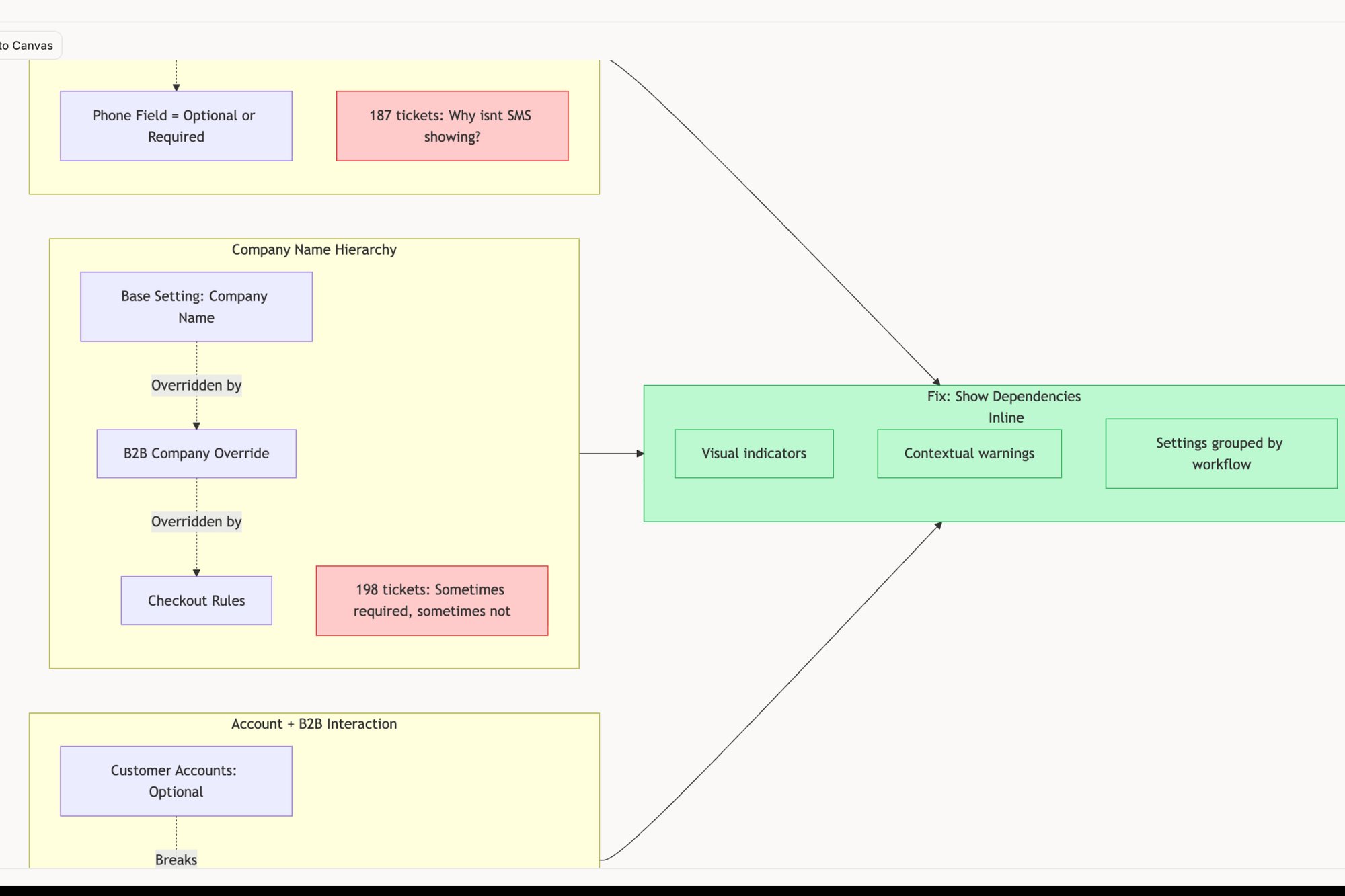
A customer doesn't care about your third-party integrations; they only care that their payment failed. The blueprint forces you to design for their reality, not your system architecture.
Actionable Takeaways
- Map Every Handoff: Identify every point where data is passed between systems (e.g., your cart -> Stripe -> your inventory management). These are your primary points of risk.
- Design for Failure: For each handoff, design a specific, user-friendly recovery path. What happens if the payment gateway times out? Don't just show a generic "error" message.
- Connect Analytics to the Blueprint: Overlay conversion data onto your blueprint. Use tools that help you visualize where users drop off, turning abstract metrics into a clear, actionable roadmap for optimization.
2. E-Commerce Platform Checkout Flow Service Blueprint
A checkout flow isn't a simple form, it's a fragile handshake between a customer's trust and your technical infrastructure. A service blueprint for this process exposes the complex choreography hidden behind a single "Buy Now" click. It maps the visible customer journey, from cart to confirmation, against the invisible backend systems: inventory checks, payment processing, fraud detection, and shipping logistics.
Strategic Analysis
The strategic value of blueprinting a checkout flow is in making dependencies explicit. It reveals how front-end user actions trigger a cascade of backend and third-party API calls, any of which can become a single point of failure. A payment gateway timeout, a stock level mismatch, or a failed address validation can instantly kill a sale and erode customer confidence. Blueprints force teams to confront these failure points head-on.
Shopify's success with one-click checkouts, for example, stems from obsessively blueprinting and optimizing this flow to remove friction. By mapping every single interaction, you can identify where to introduce critical optimizations. Similarly, our analysis of the Shopify checkout setup revealed key drop-off points for merchants, linking UI complexity directly to backend configuration hurdles. You can find more insights on this in our guide to prototyping tools for e-commerce UX optimization.
The customer doesn't see your system's architecture; they only see a broken promise. A blueprint forces you to design for the customer's reality, not your own.
Actionable Takeaways
- Separate the Paths: Blueprint guest checkout and registered user checkout as distinct flows. They have different dependencies and friction points.
- Map All Integrations: Clearly document every API call to external systems like payment processors (Stripe, PayPal) or shipping calculators. These are your most common points of failure.
- Design for Edge Cases: Create specific blueprint branches for error scenarios like payment declines, inventory unavailability mid-purchase, or session timeouts. Plan the recovery, not just the error message.
3. Healthcare Patient Onboarding Service Blueprint
In regulated industries like healthcare, onboarding isn't just about a good first impression, it's a minefield of legal compliance, data security, and human trust. A patient signs up for a telehealth service, and what they see is a simple form. What they don't see is the intricate, high-stakes choreography happening behind the scenes: insurance verification, provider credential checks, HIPAA compliance protocols, and secure data handoffs. This is where a healthcare patient onboarding service blueprint is not just useful, it is non-negotiable.
Strategic Analysis
Blueprinting this process reveals the tension between a seamless user experience and the rigid demands of regulation. A telehealth provider like Teladoc Health must make signing up feel effortless while simultaneously performing rigorous backend identity and insurance verifications. A failure in the user-facing flow leads to abandonment, but a failure in the backend compliance checks can lead to lawsuits and loss of licensure. The blueprint makes this delicate balance visible.
It maps every patient action to corresponding system processes and the necessary human interventions, like a clinician reviewing a medical history form. It exposes the critical junctures where digital systems must securely hand off sensitive data to staff. A last-minute insurance rejection or a failed identity check can derail the entire journey, making the design of clear, empathetic recovery paths paramount. The entire UX design process must account for these stages from the very beginning.
A patient views filling out a form as a chore. Your system must view it as a sacred act of data stewardship governed by law. The blueprint connects these two realities.
Actionable Takeaways
- Co-create with Compliance: Involve legal and compliance teams from day one. Their requirements are not edge cases, they are core features of the service.
- Blueprint Both Paths: Map the ideal "happy path" for a fully insured, easily verified patient alongside the more complex flows for verification failures or out-of-network scenarios.
- Prioritize Accessibility: Document and design for all patient demographics, including those with disabilities. Accessibility in healthcare is a legal and ethical imperative, not an option.
- Design Human Escalation Routes: When a digital verification fails, what is the exact handoff to a human support agent? Define the protocol, script the communication, and ensure the agent has the right information.
4. SaaS Subscription Management Service Blueprint
A SaaS subscription isn't a single purchase; it's an ongoing relationship. This relationship has key inflection points: the excitement of a free trial, the commitment of converting to paid, the routine of monthly billing, and the critical moments of upgrade, downgrade, or potential churn. A service blueprint for the subscription lifecycle is vital for visualizing how customer-facing actions connect to the invisible machinery of billing engines, entitlement systems, and revenue operations.
Strategic Analysis
The value of blueprinting the subscription lifecycle is that it exposes the moments that truly define customer retention. What happens when a credit card fails? It’s not just a billing issue; it's a potential churn event. The blueprint connects the user-facing error message, the dunning email sequence from marketing automation, the payment retry logic in Stripe, and the notification to the customer success team. It makes the entire cross-functional response visible.
For example, Atlassian's success relies on seamless team and seat management. Blueprinting their upgrade flow would reveal exactly how adding a new team member triggers changes in billing, feature access, and administrative dashboards simultaneously. It forces alignment between product, finance, and support to ensure that growth feels effortless for the customer. Analyzing different SaaS subscription management user flows can reveal best practices for reducing friction at these critical conversion and expansion points.
A customer doesn't think about your dunning strategy or feature entitlement logic. They just know their service stopped working or they can't access a feature they believe they paid for. The blueprint centers the design on their experience of value.
Actionable Takeaways
- Blueprint the Full Lifecycle: Map distinct blueprints for the trial-to-paid journey, the ongoing billing and usage experience, and the cancellation/retention flow. Each has unique actors and failure points.
- Document Every Billing Scenario: Go beyond the "happy path." What is the precise, cross-departmental process for a failed payment, a chargeback dispute, or a request for an annual invoice?
- Connect Usage to Upgrades: Overlay product analytics on your blueprint. Identify the user behaviors that correlate with upgrades and design specific, contextual prompts that guide users toward higher-value plans at the right moment.
5. The Mobile Banking App: Balancing Fort Knox Security with Front Door Access
Mobile banking authentication is a tightrope walk over a canyon. On one side is impenetrable security, demanded by regulators and customer trust. On the other is effortless access, demanded by users who just want to check their balance. A service blueprint for this process visualizes this tension, mapping every tap of a thumbprint or face scan to the invisible fortress of backend security checks, fraud detection engines, and session management protocols.
Strategic Analysis
The critical value of blueprinting authentication is that it forces a single, unified view of a process that is dangerously fragmented. Product teams see friction, security teams see risk, and compliance teams see regulation. The blueprint puts all three perspectives onto the same map. It reveals how a seemingly simple biometric login, like on the Chase Mobile app, isn't just about convenience. It's a choreographed dance between the device's secure enclave, the app's client-side logic, and the bank's server-side validation and adaptive authentication systems that decide if that login is trustworthy.
In short, by mapping every step, you can pinpoint where security measures create unnecessary friction and where convenience introduces unacceptable risk. It also highlights the importance of account recovery flows, which are often a backdoor for security failures. Seeing the entire system, from happy path login to a forgotten password reset, allows you to design a holistic experience that is both secure and humane.
A user locked out of their account doesn't distinguish between a security protocol and a broken app. The blueprint forces you to design an experience that respects their anxiety while protecting their assets.
Actionable Takeaways
- Map Every Security Layer: For each user action (e.g., entering a PIN, scanning a fingerprint), document the corresponding backend process: API call, fraud check, session token generation, and regulatory logging.
- Blueprint the "Unhappy Paths": Dedicate as much detail to account recovery, locked account, and failed biometric flows as you do to the successful login. These are the moments that define a user's trust.
- Incorporate Physical and Digital Steps: The blueprint should include actions outside the app, like receiving a one-time password via SMS or an email for a password reset, showing the full omnichannel journey.
6. B2B SaaS Onboarding and Training Service Blueprint
Selling a complex B2B SaaS product is only the first step; the real challenge is activation. The journey from a signed contract to a fully adopted tool is a delicate handoff between automated systems and human expertise. A service blueprint for this process reveals the choreography between customer-facing wizards, guided tours, and the invisible work of customer success managers, implementation specialists, and support engineers.
Strategic Analysis
The critical value of blueprinting B2B onboarding is that it visualizes the entire adoption lifecycle, not just the first login. It connects the dots between a user clicking through a setup wizard, the automated email that triggers a customer success check-in, and the internal support ticket created when a data import fails. Without this map, teams operate in silos, leading to disjointed customer experiences where a user gets stuck and no one knows who should help.
Mapping this journey exposes the fragile handoffs between technology and people. For instance, Salesforce systematized its complex enterprise deployments by blueprinting every stage, from technical setup to user training, ensuring a consistent process. By defining clear roles for automated onboarding versus high-touch implementation, you can serve different customer segments, like SMBs and enterprises, effectively. The blueprint becomes the single source of truth for coordinating these parallel efforts.
The customer doesn't see your sales, success, and support teams. They see one company, and a broken onboarding experience feels like a broken promise from all of them.
Actionable Takeaways
- Map Handoffs Between People and Systems: Identify every point where a customer moves from an automated flow (e.g., a setup checklist) to human interaction (a call with a success manager) and back again. These are common points of friction.
- Blueprint by Role: Create distinct but connected flows for different user types. An admin’s setup journey is very different from an end-user’s training path or a manager’s enablement.
- Integrate Success Metrics: Overlay key activation milestones onto the blueprint. Track metrics like "time to first value" or "feature adoption rate" and connect them to specific steps in the onboarding process to see what’s working and what isn’t.
7. Content Streaming Platform Discovery and Recommendation Service Blueprint
A streaming platform's home screen is not a static menu: it's a dynamic, personalized conversation. Every recommendation, search result, and curated row is a move in that conversation, designed to answer the silent question, "What should I watch next?" A service blueprint for content discovery makes this invisible dialogue visible, mapping how a user's click connects to machine learning engines, metadata databases, and A/B testing frameworks that they never see.
Strategic Analysis
The core challenge of content discovery is balancing algorithmic precision with the potential for serendipity. A blueprint reveals the complex interplay between systems designed for engagement (like YouTube's recommendation algorithm) and the need for human curation and content diversity. It separates the "cold start" problem for new users from the refined experience of a mature user whose tastes are well-documented.
Mapping this flow exposes the critical feedback loops. How does a user's decision to skip a song or thumbs-down a movie feed back into the recommendation engine? The blueprint visualizes this, connecting front-end UI for feedback with the backend model training processes. For example, a PM could analyze a screen recording of the Spotify AI playlist creation journey to pinpoint exactly where user intent and algorithmic suggestions diverge, leading to a frustrating experience.
A user doesn't see your recommendation engine; they see a home screen that either "gets them" or doesn't. The blueprint forces you to design for their perception of relevance, not your model's accuracy score.
Actionable Takeaways
- Map Separate User States: Create distinct blueprints for a "cold start" new user and a mature user. Their paths, data inputs, and system responses are fundamentally different.
- Visualize Feedback Loops: Explicitly draw the connections from user actions (play, skip, rate, share) back to the backend systems that refine personalization. This is where the magic, or frustration, happens.
- Integrate Curation and Algorithms: Show where human-curated playlists or content rows intersect with purely algorithmic recommendations. Define the business rules that govern this balance.
8. Cloud Infrastructure Provider Account Management and Billing Service Blueprint
Managing a cloud service like AWS or Azure is like conducting a symphony with two orchestras playing in different rooms. One orchestra is the development team, spinning up resources. The other is the finance team, watching the bill. A service blueprint for account management and billing is the conductor's score that shows how a developer's single click to provision a server translates into a specific line item on a CFO’s invoice.
Strategic Analysis
The core challenge for cloud providers is serving radically different user personas: the developer who needs friction-free access to resources and the finance manager who needs granular control over spending. These needs are often in direct opposition. A blueprint reveals the hidden connections between a developer-facing action (like launching a new database) and its corresponding backend processes: resource tagging, usage metering, rate application, and finally, invoice generation.
Platforms like Azure use this blueprinting approach to create features like budget alerts. They map the real-time resource usage data (a backend process) to a user-facing notification system that a finance persona can configure. This bridges the gap between the two orchestras. Similarly, AWS's Cost Explorer is a direct result of blueprinting the journey of a user trying to understand their bill, connecting complex billing data to an intuitive visualization layer.
A developer sees a server; a finance lead sees a recurring monthly expense. The blueprint is the translation layer between the product's function and its financial impact.
Actionable Takeaways
- Map by Persona, Not Just by Feature: Create separate but interconnected blueprints for your key personas (developer, finance, compliance). What does each one need to see, do, and approve at each stage?
- Trace the Money: Follow a single resource from provisioning to its final invoice line. Document every system it touches: usage tracking, billing calculation, regional pricing adjustments, and cost optimization recommendations.
- Design for Proactive Control: Use the blueprint to identify opportunities for proactive financial controls, not just reactive reporting. Where can you insert budget approval workflows or automated cost-saving alerts before an overspend occurs?
Stop Drawing Lines, Start Connecting Systems
The service blueprinting examples we have explored share a common thread. They are not just diagrams: they are x-rays of your business. They reveal the hidden architecture of promises you make to your customers. A user flow chart shows what a customer does. A service blueprint shows what your entire organization does to make that action possible.
The basic gist is this: a user flow follows a person; a service blueprint follows a promise. That promise, whether it is "your file will be there when you need it" or "your payment will be processed securely," is fulfilled by an intricate network of APIs, databases, support agents, and automated emails. The blueprint’s primary value is not the finished artifact itself, but the cross-functional conversations required to create it. It forces the backend engineer, the UX designer, and the customer support lead into the same room to confront the same reality.
When you trace a single user action back through your internal systems, you will inevitably find the gaps. You will find the manual processes everyone assumed were automated. You will find the legacy database calls that cause intermittent failures. This is the zoom-out moment: blueprints are not just a design tool, they are an organizational diagnostic tool. As documented by researchers like G. Lynn Shostack in her foundational Harvard Business Review article, "Designing Services That Deliver," the act of mapping exposes operational weaknesses that are otherwise invisible.
By moving from tracking individual user paths to mapping the entire delivery system, you stop managing features and start managing outcomes. You begin to see your product not as a collection of screens, but as a complex, living system. The goal is to make that system resilient, efficient, and transparent enough to keep the promises you make. The real work is not just drawing lines between boxes on a diagram, it is forging stronger connections between the people and systems those boxes represent.
So, where do you begin?
Pick one critical user flow in your product that broke last quarter. This week, book a one-hour meeting with one engineer and one support agent who dealt with it. Using a simple whiteboard, trace the user's actions above a line, and map the system and human actions below it. You have just started your first service blueprint. You will be surprised by what you find.
Tired of manual mapping and static diagrams that are outdated the moment they are finished? Figr accelerates this entire process. Capture live user flows directly from your browser, let AI help you identify the backstage processes and edge cases, and create dynamic, data-informed blueprints in a fraction of the time. Start connecting your systems with Figr today.