
User acceptance testing is the final validation step where representative users confirm that a feature meets business needs before release. It complements internal QA checks, which establish technical correctness.
A subscription flow can pass every happy-path test and still fail when a workspace member lacks permission, a payment is declined, or an upload stops halfway through. Those failures create support work, blocked business processes, and distrust after launch.
Structured UAT connects written requirements to real user journeys before release. Figr can support earlier preparation by using existing product context to explore flows, states, and edge cases, while formal UAT still requires functioning software and representative users.
TL;DR: Key Takeaways
UAT validates business use: Representative users confirm that software supports intended workflows and acceptance criteria before release.
QA and UAT serve different purposes: QA checks technical behavior, while UAT checks whether the product works for the people and processes that depend on it.
Product Managers coordinate the evidence: They define scope, prioritize journeys, recruit appropriate participants, and own the release recommendation.
Run UAT before production: Start planning during discovery and execute against a stable, production-like build before deployment.
Use realistic scenarios: Include permissions, incomplete data, failures, recovery, boundary conditions, and non-functional requirements that affect the workflow.
Record every decision: Link requirements to test cases, outcomes, defects, retests, and documented sign-off.
Prepare earlier with context: Figr can help explore flows, states, and acceptance scenarios from product documents, screens, recordings, designs, and analytics, but it doesn't replace formal UAT.
Introduction - When Shipped Features Fail Users
A feature can satisfy every written requirement and still fail users because the requirement describes behavior, while acceptance depends on the complete workflow.
Consider a SaaS team shipping a subscription upgrade flow. QA confirms that an account owner can select a plan, enter payment details, and receive confirmation. After launch, a workspace admin sees a permission error, a declined card leaves the page without a recovery path, and a user who abandons checkout can't tell whether the upgrade succeeded. The nominal path works. The product experience doesn't.
The Product Manager needs a bridge between implementation correctness and user acceptance. Formal UAT provides that bridge by testing business-critical journeys with representative users, while early prototype review helps the team explore likely states before engineering builds them. That distinction matters when rework has a number, because late discoveries are harder to interpret and more expensive to route through design, engineering, support, and release operations.
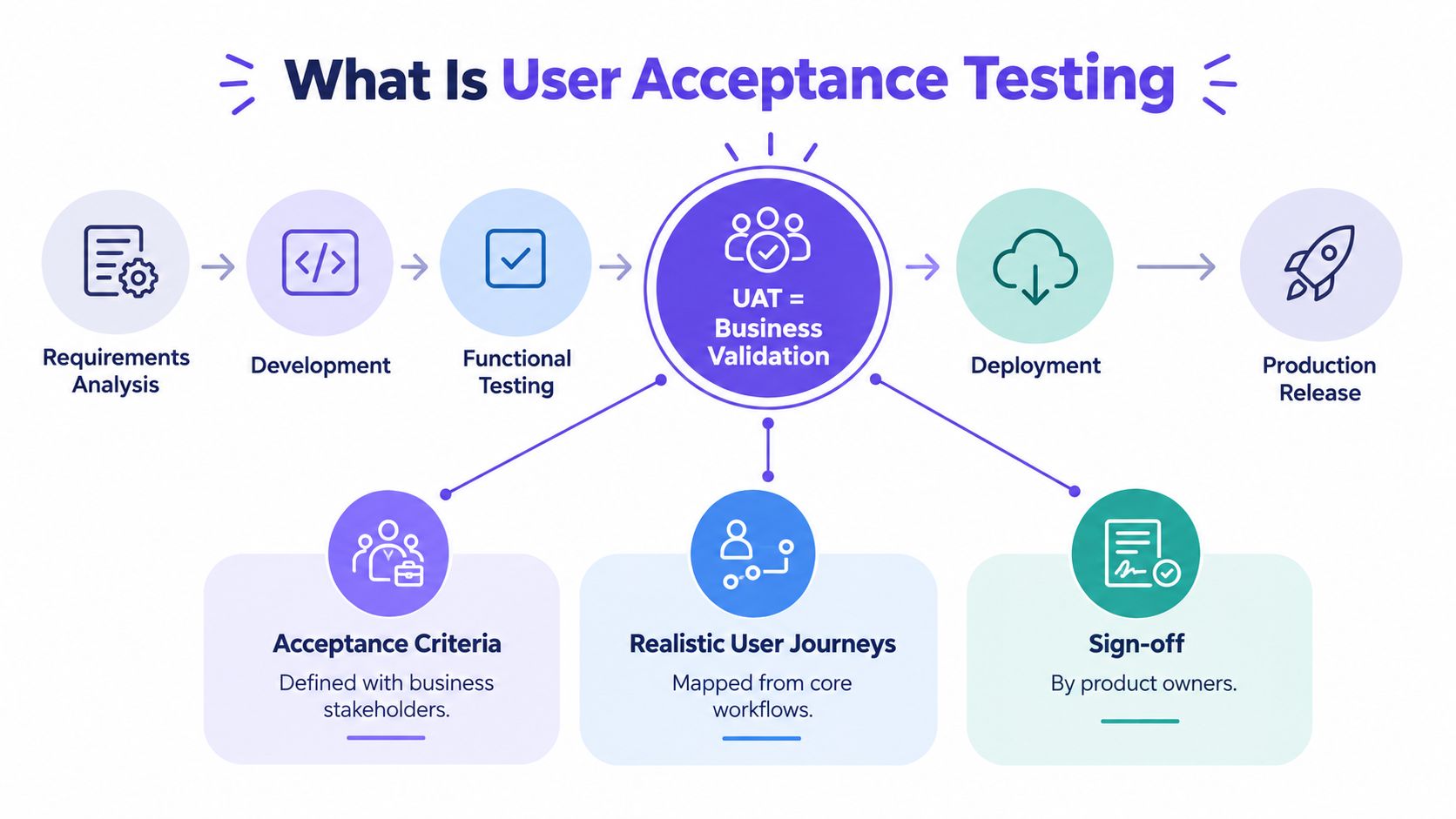
What Is User Acceptance Testing
User acceptance testing, or UAT, is a structured validation phase in which representative users or business stakeholders confirm that functioning software supports intended needs, workflows, and requirements before release. It sits after technical verification and before the production decision, although effective teams begin planning it much earlier.
UAT asks a practical question: can the people who depend on this feature complete the right task under realistic conditions? That includes the primary flow, but also the permissions, data, error handling, recovery, and operational constraints that shape whether the feature is usable in practice.
ISTQB guidance frames acceptance testing around requirements validation. Requirements should be decomposed into atomic, measurable acceptance criteria that can be assessed as true or false, then translated into test cases. A Product Manager can use a requirement-to-test matrix to connect the user story, acceptance criterion, scenario, evidence, defect, and final decision.
What UAT validates
UAT validates whether a product supports real business outcomes, not merely whether individual functions return technically correct results. Scenarios should reflect representative roles, permissions, environments, data conditions, and end-to-end journeys.
A good UAT run can validate:
Workflow completion: Can a user finish the task without a hidden blocker?
Business rules: Does the product enforce the rules users and stakeholders agreed to?
Data integrity: Are records, totals, statuses, and confirmations accurate?
Role behavior: Does each user see the actions and information appropriate to their permissions?
Failure recovery: Can a user understand what happened and continue safely?
Relevant quality attributes: Do usability, performance efficiency, security, or regulatory obligations affect acceptance?
UAT doesn't duplicate unit, integration, system, or functional QA testing. Those activities provide technical evidence that components and integrations behave as designed. UAT uses that stable foundation to judge whether the assembled product is fit for a real business context.
In a 2023 market survey, 88% of respondents considered UAT important for software-quality objectives, while only about 5% of UAT execution used some form of automation and 85% reported unscripted manual testing based largely on tester knowledge rather than formal cases. The findings show why preparation matters, especially when teams rely on memory to represent complicated workflows. The UAT market research report also found that 75% of organizations ran multiple UAT cycles, with 57% of those respondents attributing repeated cycles to poor software quality.
Why acceptance evidence matters
A passed test supplies evidence for a release decision. A vague statement such as “the stakeholders liked the demo” doesn't identify which requirement was validated, under which data conditions, or with what limitation.
I once watched a Product Manager realize late in a release cycle that the team had reviewed screens but hadn't asked the people who handled the workflow to complete it. The interface looked finished. The missing approval state only appeared when a real operator tried to recover from an interrupted task.
That distinction is the heart of UAT. A feature may be bug-free according to its technical checks and still fail because it omits a business state, confuses a role, or makes a valid user goal impossible to complete.
UAT vs QA vs Usability Testing
QA checks whether the system works technically, usability testing examines how people interact with it, and UAT confirms that representative users can achieve the intended business outcome. These activities inform one another, but their evidence isn't interchangeable.
| Testing Type | Primary Objective | Who Performs It | When It Happens | What It Validates | Example | Success Criteria |
|---|---|---|---|---|---|---|
| QA | Verify technical correctness and identify defects | QA Engineers, testers, and automation teams | Throughout development and before release | Functions, integrations, regressions, and technical behavior | An API returns the correct subscription status after payment | Defined technical checks pass and defects meet agreed severity thresholds |
| Usability Testing | Understand interaction quality, learnability, and user confusion | Researchers, representative participants, or Designers | During discovery, design, and before implementation or release | Whether people understand and navigate an interaction | A participant finds the invite action and explains what happens next | Observed tasks reveal acceptable comprehension and interaction issues are addressed |
| UAT | Confirm business fit and release readiness | Business users, process owners, Product Managers, analysts, and representative users | After the relevant build is stable and before production release | End-to-end workflows, business rules, role behavior, and acceptance criteria | A workspace owner upgrades a plan, assigns access, and verifies billing state | Priority scenarios pass, critical defects are resolved or explicitly dispositioned, and an authorized stakeholder signs off |
The distinction becomes useful when a team chooses the wrong evidence. A usability session on a prototype can reveal that an invitation flow is confusing, but it can't prove that the functioning product sends the correct invitation under every relevant permission state. A QA run can prove that the permission service returns a response, but it can't establish that a team administrator understands why an action is unavailable.
Teams that need a broader operating view can also review this practical guide to quality assurance for Omaha businesses, especially when QA responsibilities span process, documentation, and release controls.
For early interaction feedback, a fresh eyes product review is useful. Prototype review belongs before implementation or alongside development. It reduces ambiguity and exposes interaction risks, but it isn't formal UAT on functioning software.
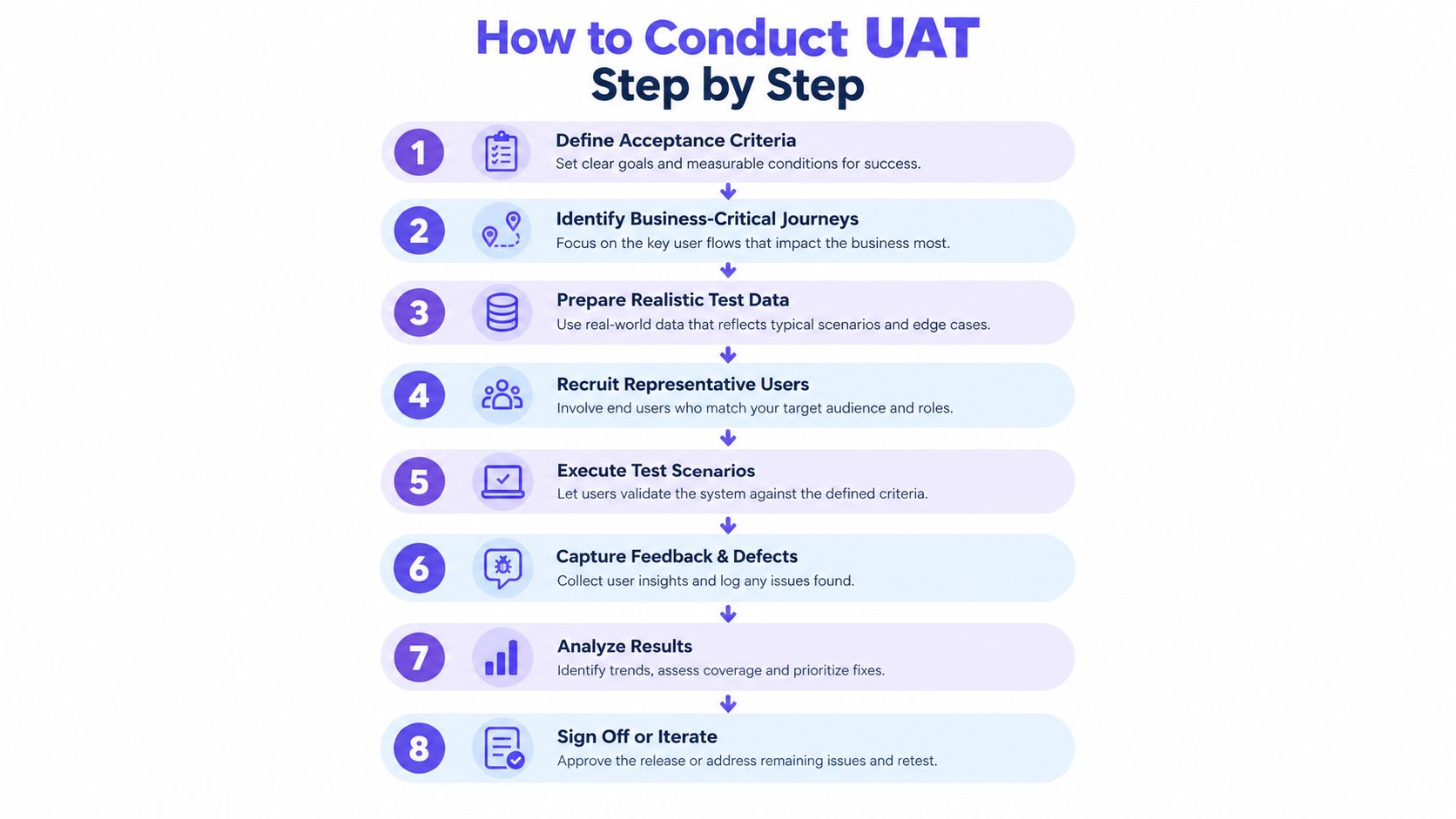
How to Conduct UAT Step by Step
A reliable UAT process turns business intent into traceable evidence, then uses risk-based judgment for the release decision. The following workflow keeps preparation, execution, and sign-off connected.
Step 1. Define acceptance criteria.
Rewrite vague requirements as observable conditions.
State what must be true, including negative, boundary, and exception paths.
Include usability, security, performance efficiency, or regulatory conditions when they affect the business process.
Step 2. Identify business-critical user journeys.
Rank workflows by business impact and user frequency.
Map each journey to roles, permissions, devices, regions, and dependencies.
Protect the paths where failure would block revenue, service delivery, customer records, or compliance work.
Step 3. Prepare realistic test scenarios.
Use representative data and end-to-end actions.
Include successful completion, invalid input, cancellation, timeout, duplicate action, and recovery.
Write scenarios in the user's language rather than describing internal implementation.
Step 4. Set up the UAT environment and test data.
Match production configuration, integrations, permissions, and meaningful data conditions.
Record the build, environment, data state, and requirement version for every run.
Decide how sensitive data will be masked or replaced before access is granted.
Step 5. Assign users, owners, and responsibilities.
Recruit people who reflect the roles and access needs of actual users.
Name a Product Manager or UAT coordinator for scope and decision ownership.
Give testers a short orientation, escalation route, test schedule, and defect template.
Step 6. Execute tests and document outcomes.
Record pass, fail, blocked, or not-run status for each case.
Capture reproducible steps, expected and actual behavior, impact, severity, environment, and evidence.
Ask testers to describe the business consequence, not only the visible symptom.
Step 7. Triage defects and validate fixes.
Separate technical severity from business priority.
Retest changed scenarios and any connected workflow that could have regressed.
Keep deferred issues visible with an owner, workaround, target date, and approval.
Step 8. Review exit criteria and decide.
Check critical workflow coverage, unresolved defects, evidence quality, and stakeholder approval.
Record a go, no-go, or conditional decision with explicit exceptions.
Preserve the decision with the build and requirement version that was tested.
A release checklist should also cover operational dependencies, support handoff, training implications, and rollback responsibility. A broader website redesign checklist can help when the UAT scope includes navigation, content, forms, or cross-page behavior.
For teams formalizing their documentation, this test case creation guide is a useful companion to the workflow above.
UAT Examples for SaaS Products
The strongest UAT testing examples start with a user goal and expose the states that a happy-path demo hides. The following scenarios are hypothetical and designed for a SaaS product team.
Hypothetical subscription upgrade
User goal: An account owner upgrades a workspace and understands the resulting billing state.
Preconditions: The user has owner permissions, an active payment method, and a plan eligible for upgrade.
Test scenario: Select a higher plan, review the price and effective date, submit payment, and return to the workspace.
Steps: Open billing, choose the plan, inspect the summary, confirm payment, refresh the workspace, and open the invoice.
Expected outcome: The new plan, charge, entitlement, confirmation, and invoice agree with the accepted business rules.
Failure or edge case: The payment is declined, the account has a pending invoice, or the user double-clicks confirmation.
Acceptance criteria: The product prevents duplicate submission, explains the payment outcome, preserves safe recovery, and displays the correct entitlement.
Hypothetical team invitation and permissions
User goal: A workspace administrator invites a colleague with the right access level.
Preconditions: The administrator can manage members, the email is available, and the workspace has an applicable seat policy.
Test scenario: Invite a new member as a limited collaborator, then verify what that member can view and change.
Steps: Open members, enter the address, choose the role, send the invitation, accept it as the invitee, and attempt permitted and restricted actions.
Expected outcome: The invitee receives clear instructions and sees only the capabilities assigned to the role.
Failure or edge case: The invite has expired, the address already belongs to a member, or the administrator lacks permission.
Acceptance criteria: The system explains each failure, avoids duplicate membership, and applies the selected role consistently across the workflow.
Hypothetical file upload and recovery
User goal: A user uploads a file and can recover when the transfer fails.
Preconditions: The user has upload access, the file meets supported conditions, and the workspace has available storage.
Test scenario: Upload a large file, interrupt the connection, restore it, and inspect the resulting file state.
Steps: Start the upload, interrupt the network, read the status, restore connectivity, retry or resume, and open the completed file.
Expected outcome: The interface identifies the failure, preserves useful progress where supported, and prevents an incomplete file from appearing as ready.
Failure or edge case: The file is too large, storage becomes unavailable, or the session expires during recovery.
Acceptance criteria: Each condition produces actionable messaging, safe retry behavior, accurate status, and no misleading completion signal.
These scenarios reveal why gallery examples from Figr should be treated as workflow demonstrations rather than customer proof. A card-freeze flow, upload failure states, or a task approval card with multiple product states can inspire scenario coverage, but the running product and its users still determine acceptance.
Writing UAT Test Cases and Acceptance Criteria
A UAT test case should describe a user decision and its expected business result, not merely a sequence of interface clicks. Start with the user story, identify the observable outcome, then add the conditions that could change that outcome.
A useful acceptance criterion is atomic. “The owner can upgrade the workspace” is incomplete because it doesn't define payment failure, permissions, duplicate submission, billing status, or confirmation. A stronger criterion states the expected result for one condition and can be evaluated as true or false.
Use this traceable structure:
| Test ID | User scenario | Preconditions | Test steps | Expected result | Actual result | Status |
|---|
Three filled examples show the difference between positive, negative, and edge-case coverage:
| Test ID | User scenario | Preconditions | Test steps | Expected result | Actual result | Status |
|---|---|---|---|---|---|---|
| UAT-01 | Owner upgrades a workspace | Owner has a valid payment method | Select plan, review summary, confirm payment | Plan, invoice, confirmation, and entitlements update consistently | Record during execution | Not run |
| UAT-02 | Contributor attempts to invite a member | Contributor lacks member-management permission | Open members and attempt invitation | Action is unavailable or denied with understandable guidance | Record during execution | Not run |
| UAT-03 | Upload recovers after connection loss | User has upload access and a supported file | Start upload, interrupt connection, restore it, retry | Status explains the interruption and the final file state is accurate | Record during execution | Not run |
Make criteria testable
Write each criterion around an actor, condition, action, and observable result. Avoid terms such as “easy,” “fast,” or “works correctly” unless the team has defined how the tester will evaluate them.
Include three scenario types:
Positive: The expected workflow completes under valid conditions.
Negative: An invalid action produces a safe, understandable response.
Edge case: A boundary, interruption, permission variation, or unusual state remains recoverable.
ISO/IEC TR 29119-6 defines acceptance criteria as conditions a user story must satisfy to be considered done, and describes acceptance test-driven development as creating acceptance tests before the code intended to pass them. The standard's acceptance testing sample supports a useful product habit: define the evidence before implementation narrows the team's view of the problem.
For more patterns, see these examples of acceptance criteria for stories. Keep the final criteria tied to your own product rules, roles, and data.
Common UAT Pitfalls and Metrics
UAT fails when teams measure activity instead of risk. A high pass rate can hide a blocked payment journey, a broken administrator permission, or an unresolved compliance path.
Common failure patterns
Vague criteria: Testers interpret “ready” differently, so sign-off becomes a negotiation.
Narrow representation: Internal staff validate familiar workflows while missing regional, accessibility, device, or role-specific needs.
Unrealistic data: Empty workspaces and clean records conceal volume, history, duplicates, and permission interactions.
Unstable environments: Teams log environment defects as product defects, then repeat tests without preserving the original conditions.
Untriaged feedback: Minor suggestions and release-blocking failures enter one queue with no business priority distinction.
Late recruitment: Users are invited after the schedule is fixed, leaving little time for meaningful participation.
A 2023 UAT survey found that 74% of respondents tested web applications, 64% tested enterprise applications, and 51% tested mobile applications. The same survey reported 86% using manual functional testing compared with 34% using automated functional testing, which reinforces the need to design evidence that human participants can execute consistently. TestMonitor's UAT survey results also reported that UAT purposes included building the best product for the audience, gathering end-user feedback, and supporting compliance.
Track execution status, first-time pass rate, defect severity, business priority, time to completion, retest duration, blocked scenarios, and stakeholder confidence. Treat those as signals, not a single score.
One granular exit model requires 100% of critical scenarios to pass and at least 95% of major scenarios to pass, with any remaining major cases explicitly accepted by the business owner. A separate framework describes a first-time pass threshold typically at 95% or higher, alongside resolution and retesting of critical and high-severity defects. Use thresholds agreed before execution, and document exceptions rather than secretly lowering them.
How Figr Can Streamline UAT Preparation
Figr supports UAT preparation by helping Product Managers explore product context, scenarios, states, and acceptance evidence before formal execution begins. It doesn't execute UAT against production applications, replace QA or automation, or substitute for representative users.
The preparation problem is usually fragmented context. A PRD may describe the intended journey, a live product may contain existing navigation patterns, analytics may reveal a funnel drop-off, and a recording may expose a workaround that no document mentions. Reviewing those sources separately makes it easy to miss the relationship between a screen, a user intent, a permission state, and a recovery path.
Figr's Visual Context Graph connects five layers:
Visual context: Existing screens and frames.
Behavioral context: Recordings, flows, cursor movement, and user intent.
Design System context: Tokens, components, variants, and usage rules.
Product Knowledge context: PRDs, research, decisions, and requirements.
Implementation context: Code constraints and product limitations.
That context can support scenario exploration and artifact generation. A Product Manager can import Figma files, capture existing product layouts with the Chrome extension, analyze screen recordings, and provide analytics exports or written research. Figr can then assist with UX reviews, flows, edge-case maps, acceptance criteria, test scenarios, prototype directions, and Figma-ready screens.
Use preparation to improve formal testing
The strongest use of a context-aware design tool is earlier risk discovery. Before engineering handoff, a Product Manager can ask which states are missing from a flow, which roles should see different actions, and what happens after interruption. A generated prototype can help the team discuss those states with Designers and stakeholders.
That prototype remains an exploration artifact. It doesn't prove that the implemented feature works, that data is correct, or that users accept the production workflow.
The operational pressure is real. A 2025 global survey of more than 2,100 software development and testing professionals found that insufficient time for pre-release testing was the top challenge, with 36.8% rating it very or extremely challenging. The same source reported that 58% viewed UAT as their biggest challenge and 52% relied on manual, in-house testing. See the 2025 State of Digital Quality functional testing report for the survey context.
Context changes the economics of preparation. Product teams spend less time reconstructing what a flow is supposed to do and more time deciding which user evidence is necessary. Figr's workflow for turning PRDs into prototypes can sit before implementation and formal UAT, helping expose ambiguity while changes are still easier to discuss.
Practical rule: Use AI to widen the question set, then use people and functioning software to establish acceptance.
The broader pattern is adaptive UAT governance. When requirements or environments change, preserve the requirement version, build, data state, and approver for every result. Retest the affected risk paths instead of repeating everything automatically, and never let an attractive prototype become a substitute for evidence from the actual product.
Figr helps Product Managers connect existing screens, PRDs, recordings, analytics, and design systems to UX flows, edge cases, acceptance criteria, test scenarios, and Figma-ready prototypes. Visit Figr to prepare stronger UAT evidence before your next feature reaches engineering and release review.