

Acceptance criteria fail when they describe intent instead of observable behavior, and that's where handoffs start to fray for Product Managers, business analysts, Engineering, and QA. A story says “users can log in easily,” everyone nods, and four people still imagine four different products.
When that ambiguity survives refinement, it shows up later as churn. The login works for valid credentials but says nothing about locked accounts, the payment flow applies a discount but rounds the total wrong, the search page returns results but has no empty state, and QA ends up writing clarifying comments where the story should have been precise. Teams then call it rework, but the issue started much earlier in the artifact.
This guide fixes that gap with a reusable library of acceptance criteria examples that teams can adapt across common product areas. The patterns separate scenario-oriented Given/When/Then from rule-oriented checklists, include negative paths and non-functional thresholds many articles skip, and stay grounded in the kind of shared artifact quality that makes design-to-dev handoff best practices stick.
Introduction Why Vague Criteria Break Handoffs
A password reset story looks harmless in refinement until the room starts filling in blanks.
I have seen the same pattern across login, checkout, search, and permissions work. The ticket says, “User can reset password from login.” Engineering asks whether the token expires. QA asks what happens when the email is not registered. Design asks whether the confirmation message should reveal account existence. Security asks whether an old link still works after a successful reset. The story sounded ready because the sentence was short. It was not ready because the behavior was still undefined.
That is how weak acceptance criteria break handoffs. They create surface-level agreement, then shift real product decisions into design review, implementation, and test execution. By then, each function has already made a reasonable assumption, and those assumptions rarely match.
The cost shows up in familiar ways. Engineers build the happy path first because the edge cases are missing. QA writes clarification comments instead of test cases. Product reopens the story after seeing behavior that was never explicitly ruled in or out. The team calls it rework, but the failure started in the handoff artifact.
What weak criteria look like on an actual story
Vague criteria usually fail in one of five ways:
Subjective wording: “fast,” “intuitive,” “secure,” “user-friendly”
Bundled outcomes: one line tries to cover validation, redirect, notification, and tracking
Missing negative paths: invalid input, expired state, timeout, duplicate action, permission denial
No non-functional threshold: no stated expectation for response time, accessibility behavior, or accuracy
Implementation detail instead of observable behavior: instructions on how to build, with no pass/fail outcome
A good example is search. “Use debounce on search” may be a valid engineering choice, but it is not acceptance criteria. QA cannot verify a coding technique from the outside. “After a user enters a query, matching results appear within the agreed response threshold, and a no-results state appears when nothing matches” gives the team something testable.
That distinction matters in every design-to-dev handoff best practices conversation. The handoff gets smoother when criteria describe what must be true, not which implementation a developer should pick.
Acceptance criteria are a contract, not story decoration
The strongest teams treat acceptance criteria as a release gate. NIST's software acceptance guidance frames acceptance around quantifiable measures of system requirements and the collection and analysis of evaluation data, which is a useful standard for product delivery work too NIST software acceptance guidance. If the team cannot point to evidence that a condition passed or failed, the criterion is still too soft.
NASA's software engineering guidance makes the same point from a governance angle. Projects are expected to define and document the conditions software must satisfy before acceptance NASA SWE-034 acceptance criteria guidance. Product stories are smaller than formal acceptance gates, but the logic holds. A story needs clear conditions, clear evidence, and clear boundaries.
That is the standard behind this article's approach. The goal is not more words in Jira. It is a reusable library of 20 testable patterns that separates scenario-oriented Given/When/Then criteria from rule-oriented checklists, while also covering negative paths and non-functional thresholds that many teams skip until they become defects.
What Makes Acceptance Criteria Testable
A story reaches QA. Engineering says the feature works. QA says the story never defined what "works" means. The ticket had criteria like "user can reset password" and "show helpful error." Nobody is blocked by effort. They are blocked by interpretation.
Testable acceptance criteria remove that gap. Each line should give a reviewer enough information to verify behavior without chasing the author for intent. In practice, that means the criterion names the condition, the user or system action, and the expected result in observable terms. If a tester cannot turn the line into a check, the criterion is still draft quality.
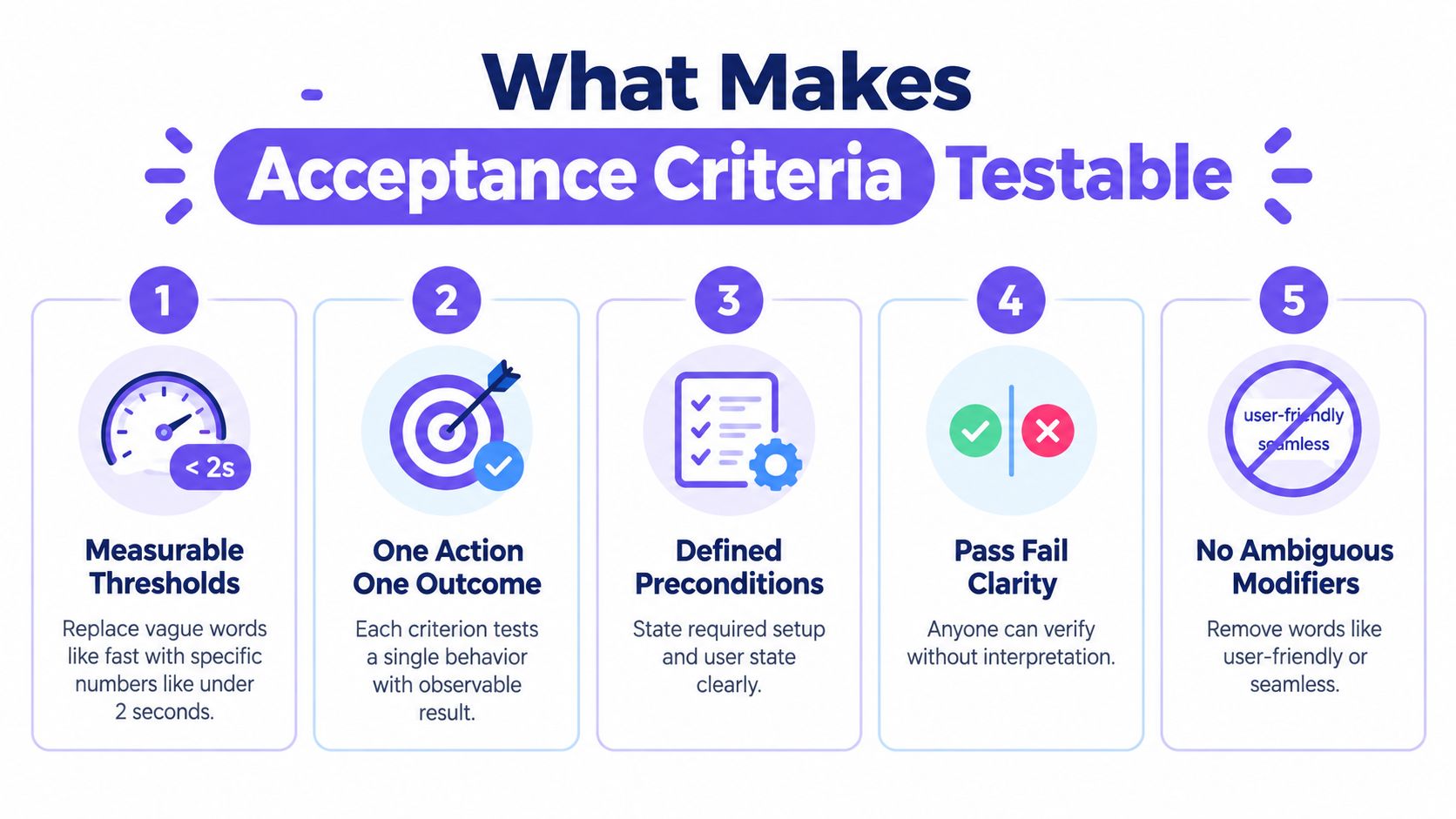
Five rules that make criteria hold up in delivery
Teams get better results when they write criteria against a small set of repeatable patterns. That is the point of this article's library approach. Some lines should describe a scenario. Others should state a rule. Both formats still need the same testable properties.
Use measurable terms. Replace soft wording with thresholds, counts, ranges, or explicit states. "Shows results within 2 seconds" is testable. "Fast search" is not. Password rules, timeout windows, field limits, and status labels should all be specific enough to verify.
Keep one behavior per criterion. A single line that covers form validation, account creation, email delivery, and audit logging creates messy failures. Split those into separate checks so engineering and QA can see exactly what passed and what failed.
State the precondition when it changes behavior. Logged out users, expired links, suspended accounts, and empty carts do not follow the same path. If the starting state matters, name it.
Write outcomes as pass or fail. "User sees an error message" is weak unless the condition that triggers it is clear and the result is observable. "When the reset token is expired, the user sees 'Link expired' and cannot submit a new password" can be tested.
Cut subjective language. Words like "intuitive," "clean," and "easy" belong in design critique, not in acceptance criteria. Translate them into behavior, such as keyboard access, readable labels, or reduced steps.
Negative paths belong here too. Teams often cover the happy path and leave invalid input, permission failures, and timeout behavior for QA to infer. Those gaps create churn late in the sprint.
Good criteria are small, but they cover the edges that matter
A useful story usually has a short set of criteria, not a wall of bullets. Once the list starts reading like a mini spec, the team is probably mixing multiple behaviors into one story or documenting implementation details that belong elsewhere.
I use a simple check in refinement. If the story cannot cover the primary scenario, the key failure path, and any relevant non-functional threshold without sprawling, the scope is probably off. That matters because this article's 20 reusable patterns are meant to be applied selectively. A checkout story may need a scenario for payment failure and a checklist rule for tax rounding. An account settings story may need no scenario at all, just rules for validation, permissions, and save states.
Non-functional thresholds deserve more attention than they usually get. If performance, accessibility, precision, or auditability affects acceptance, say so in the criteria. "Search returns results" is incomplete when the release risk is that results appear too slowly on a typical query or cannot be reached by keyboard.
A fast self-check before you save the story
Use this checklist during refinement or before handoff:
Can QA write a test directly from each criterion? If not, rewrite it.
Does the line describe behavior instead of implementation? "Store token in Redis" is a design choice, not acceptance criteria.
Have you covered at least one failure state? Invalid input, denied access, expired state, duplicate action, or network interruption often changes the outcome.
Have you added a non-functional check where it affects release quality? Response time, accessibility, formatting precision, and event logging are common examples.
Can each criterion stand on its own? If one line depends on three others to make sense, split or rewrite it.
A good way to pressure-test your wording is to compare it against the tests someone would write. That is why a solid test case creation guide is useful during story writing, not only after development starts.
A quick walkthrough helps if you want to see how teams translate these ideas into examples:
Choosing the Right Acceptance Criteria Format
A team picks the wrong format, and the handoff gets expensive fast. Engineering builds to a checklist when the behavior depends on state. QA writes a scenario when the requirement is a standing rule that should apply everywhere. The result is predictable. Gaps in edge cases, duplicated criteria, and stories that look detailed but still leave room for interpretation.
The practical split is simple. Use scenario-oriented criteria for behavior that changes based on sequence, actor, or system state. Use rule-oriented criteria for constraints that must hold true no matter how the user arrived there. Teams that apply this consistently write shorter stories and catch more defects before development starts.
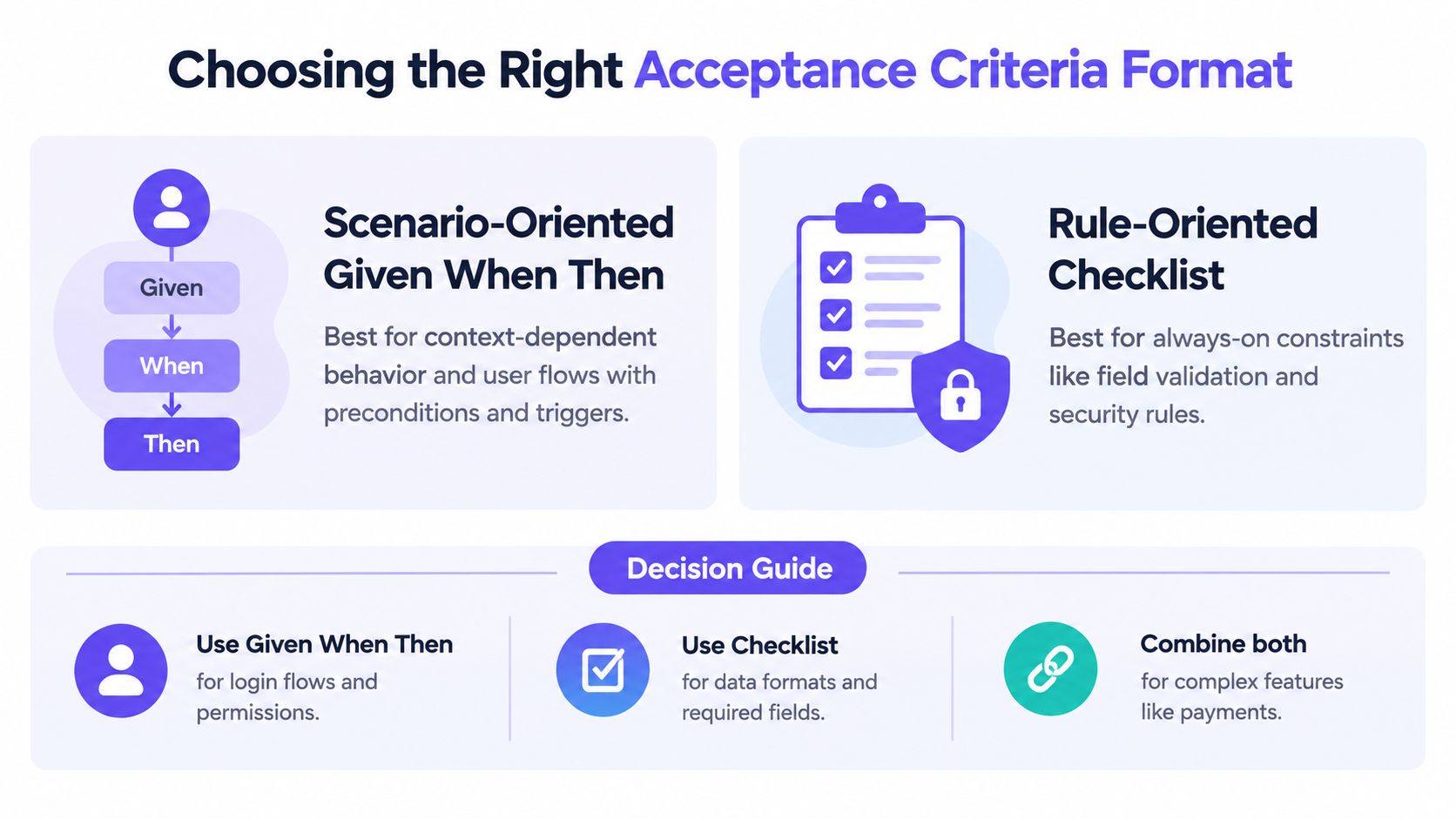
Scenario-oriented criteria
Scenario-oriented criteria use Given / When / Then to describe a starting condition, an action, and an observable outcome. This format works best when the order of events matters, or when the result changes based on who is acting and what state the system is already in.
Use it for:
Authentication flows: login, password reset, MFA
Permission branches: admin versus viewer behavior
Decision-heavy paths: checkout, onboarding, moderation
State transitions: active to frozen, draft to published
Example:
Given a registered user is on the login page
When the user enters valid credentials and submits
Then the user is redirected to the dashboard within 2 seconds
That timing threshold matters because it gives QA something concrete to verify. It also keeps product, engineering, and QA aligned on whether speed is part of acceptance or only an implementation detail.
Scenario format is also the better choice when you need to cover negative paths explicitly. Failed login, expired reset link, blocked payment, duplicate submission. These are not side notes. They are often where release risk sits.
Rule-oriented criteria
Rule-oriented criteria use a checklist. They fit requirements that should remain true across screens, entry points, and user paths. I use this format for constraints that can be tested independently from a specific flow, especially when the same rule shows up in multiple stories.
A practical reference on this distinction is the scenario-versus-rule framing in scenario versus rule-oriented guidance.
Use checklists for:
Validation rules: required fields, password complexity
Formatting constraints: currency, dates, phone numbers
Universal limits: max file size, filename restrictions
Standing requirements: design system rules, security restrictions
Example:
Password rules: minimum 8+ characters, at least 1 uppercase, at least 1 number
Field validation: email field accepts valid email format only
Character set: search query rejects unsupported special characters
“User-friendly” and “simple” feel expressive and test terribly. A checklist forces specificity. Either a password without a number is rejected or it is not. Either the currency rounds correctly in every checkout view or it does not.
Decision guide
Login redirect after valid credentials
Best format: Scenario-oriented
Validation: Execute the flow and observe the redirect and timing.
Locked account behavior
Best format: Scenario-oriented
Validation: Trigger the failure path and verify the message and restriction.
Password complexity
Best format: Rule-oriented
Validation: Test valid and invalid values against the checklist.
Currency formatting in checkout
Best format: Rule-oriented
Validation: Verify value formatting across screens.
Discount applies under specific cart state
Best format: Combined
Validation: Run the scenario, then verify the standing rules.
File upload size and type
Best format: Combined
Validation: Validate the rules, then run upload outcomes.
The combined cases are where teams usually over-write. A payment story does not need three near-identical scenarios to restate the same tax formatting rule. Put the cart-state behavior in Given/When/Then. Put the always-on math, formatting, and validation constraints in a short checklist. Separate flow from rules, and the story stays readable.
That split also sets up the pattern library that follows. Some of the 20 reusable examples are best written as scenarios. Others are better as checklists. The stronger ones use both, especially when negative paths and non-functional thresholds need to be explicit.
20 Reusable Acceptance Criteria Examples by Product Area
A story says, “Add discount support.” Engineering builds percentage math. QA tests one happy path. Support later finds the coupon applied to excluded items, rounded differently between cart and checkout, and disappeared after a payment retry.
That handoff fails because the criteria described intent, not behavior.
The examples below are meant to be reused. They separate scenario-oriented Given/When/Then flows from rule-oriented checklists, and they include failure cases and operational thresholds that teams often skip. I use this split because it keeps stories readable while still giving Engineering and QA something they can implement and verify without guesswork.
Login and authentication
Pattern 1. Valid login success
Scenario-orientedGiven a registered user is on the login page
When the user enters valid credentials and submits
Then the user is redirected to the dashboard within 2 seconds
Pattern 2. Invalid password stays contained
Scenario-oriented
Given a registered user is on the login page
When the user enters a valid email and an incorrect password
Then the user remains on the login page
And the UI shows a generic error message that does not reveal whether the email or password was incorrect
Pattern 3. Locked account behavior
Scenario-oriented
Given a user account is locked
When the user attempts to log in
Then authentication is blocked
And the UI explains that the account is locked
And the next recovery action is available from the same screen
Pattern 4. Password reset timing
Combined
When a registered user requests a password reset
Then the system sends a reset link within 2 minutes
And the link expires after 24 hours
As noted in timing-based acceptance criteria examples, time limits become testable when the trigger and expiry rule are both explicit.
Permissions and roles
Permission stories break in production when teams test the visible UI but forget direct access and scope boundaries.
Pattern 5. Viewer role restriction
Rule-orientedA user with viewer permissions cannot access edit actions
A user with viewer permissions cannot access delete actions
Restricted actions are hidden or disabled on the project detail page
Server-side authorization also blocks restricted actions if called directly
Pattern 6. Admin role action
Rule-oriented
A user with admin permissions can create records within the workspace scope
A user with admin permissions can edit records within the workspace scope
A user with admin permissions can delete records within the workspace scope
Actions outside the workspace scope remain blocked
Pattern 7. Direct URL access denial
Scenario-oriented
Given a user lacks permission for a resource
When the user opens the direct URL
Then the system blocks access
And the UI shows the correct unauthorized state
And no restricted resource data is rendered before redirect or denial
Payments and discounts
Payment criteria need both flow coverage and standing rules. Teams usually under-specify tax, rounding, retry behavior, and eligibility.
Pattern 8. Deterministic discount math
Rule-orientedGiven a cart total is $100
When a 20% discount is applied
Then the discounted subtotal is $80
And the same discounted subtotal is shown consistently in cart, checkout, and order summary
Pattern 9. Discount eligibility rule
Rule-oriented
The discount applies only to eligible items listed in the promotion definition
Ineligible items remain at full price
The order summary shows the discount amount separately from taxes and fees
If no items are eligible, the UI explains why the code did not apply
Pattern 10. Payment failure preservation
Scenario-oriented
Given a user submits payment and the transaction fails
When the checkout page returns an error state
Then billing and shipping details already entered remain populated
And the cart contents remain unchanged
And the user can retry payment without re-entering preserved fields
File uploads
File upload stories often miss the recovery path. The upload fails, and the user loses everything else on the form.
Pattern 11. File type rule
Rule-orientedAllowed file formats are listed on the story
Unsupported file types are rejected before upload completes
The user sees a file-type error message tied to the selected file
Other valid files in the same submission remain unaffected
Pattern 12. File size threshold
Rule-oriented
Files above the maximum size are rejected
The error message names the file size limit
Other form fields remain intact after the failure
The user can replace the rejected file without refreshing the page
Pattern 13. Upload completion visibility
Scenario-oriented
Given a valid file is uploaded successfully
When processing completes
Then the uploaded file appears in the document list within the defined UI refresh window
And the file status changes from processing to available without requiring a manual refresh, if auto-refresh is part of the feature
Onboarding
Pattern 14. Step completion gating
Scenario-orientedGiven a user is in onboarding
When a required step is incomplete
Then the user cannot continue to the next step
And validation errors identify the missing or invalid fields on that step
Pattern 15. Skip path persistence
Scenario-oriented
Given an onboarding step is optional
When the user chooses Skip
Then the system records that choice
And the step does not reappear in the same session unless the user returns to it intentionally
Search and filtering
Search stories are a frequent source of regressions because edge cases get treated as QA cleanup instead of product behavior. Many of the failures show up in the same set of common edge cases in software.
Pattern 16. Search success threshold
Scenario-orientedGiven a user enters a valid query
When the search is submitted
Then results are returned within 2 seconds, when a response-time threshold is part of the requirement
Pattern 17. Empty state behavior
Scenario-oriented
Given a query returns no matches
When the results page loads
Then the UI shows an empty state
And the original query remains visible
And the user has a clear recovery action, such as clearing filters or editing the query
Pattern 18. Filter persistence
Scenario-oriented
Given a user has applied filters to a results list
When the user opens a result detail page and returns to the list
Then the previously selected filters remain applied
And the user returns to the prior results context
AI features
AI criteria fail when they describe desired quality in abstract terms instead of observable behavior. Good AI acceptance criteria define fallback, labeling, and user control.
Pattern 19. AI suggestion fallback
Scenario-orientedGiven an AI-generated suggestion fails or times out
When the user requests output
Then the interface shows a fallback state
And the user can retry without losing their input
And the failure state does not present partial output as final content
Pattern 20. AI output traceability
Rule-oriented
AI-generated content is visually distinct from user-entered content
The user can review generated content before finalizing it
The system preserves the user's approved final version
Audit history identifies whether the final content originated from AI, the user, or both, if audit history is in scope
What these examples have in common
Each pattern names the condition, the action, and the expected result in a way QA can test and Engineering can implement. The stronger patterns also call out what should happen on failure, not just on success.
They also separate two jobs clearly. Scenarios describe state changes through a user flow. Checklists capture standing rules such as authorization, formatting, eligibility, expiration, and data preservation. That distinction keeps one story from turning into five near-duplicate scenarios.
Atlassian makes a similar point in its acceptance criteria guidance: teams increasingly need criteria that cover performance, accessibility, security, and design-system behavior alongside functional outcomes. In practice, that means a reusable library should cover more than happy-path clicks. It should also cover negative paths, thresholds, and invariants that stay true across screens and retries.
How to Write and Validate Criteria in Jira Without Overloading Stories
A story reaches sprint planning. The title is clear, the design looks settled, and everyone thinks it is ready. Then Engineering asks what should happen on timeout, QA asks how to verify the success state, and Product starts answering in comments. At that point, the story is already overloaded. The acceptance criteria were carrying unresolved scope.
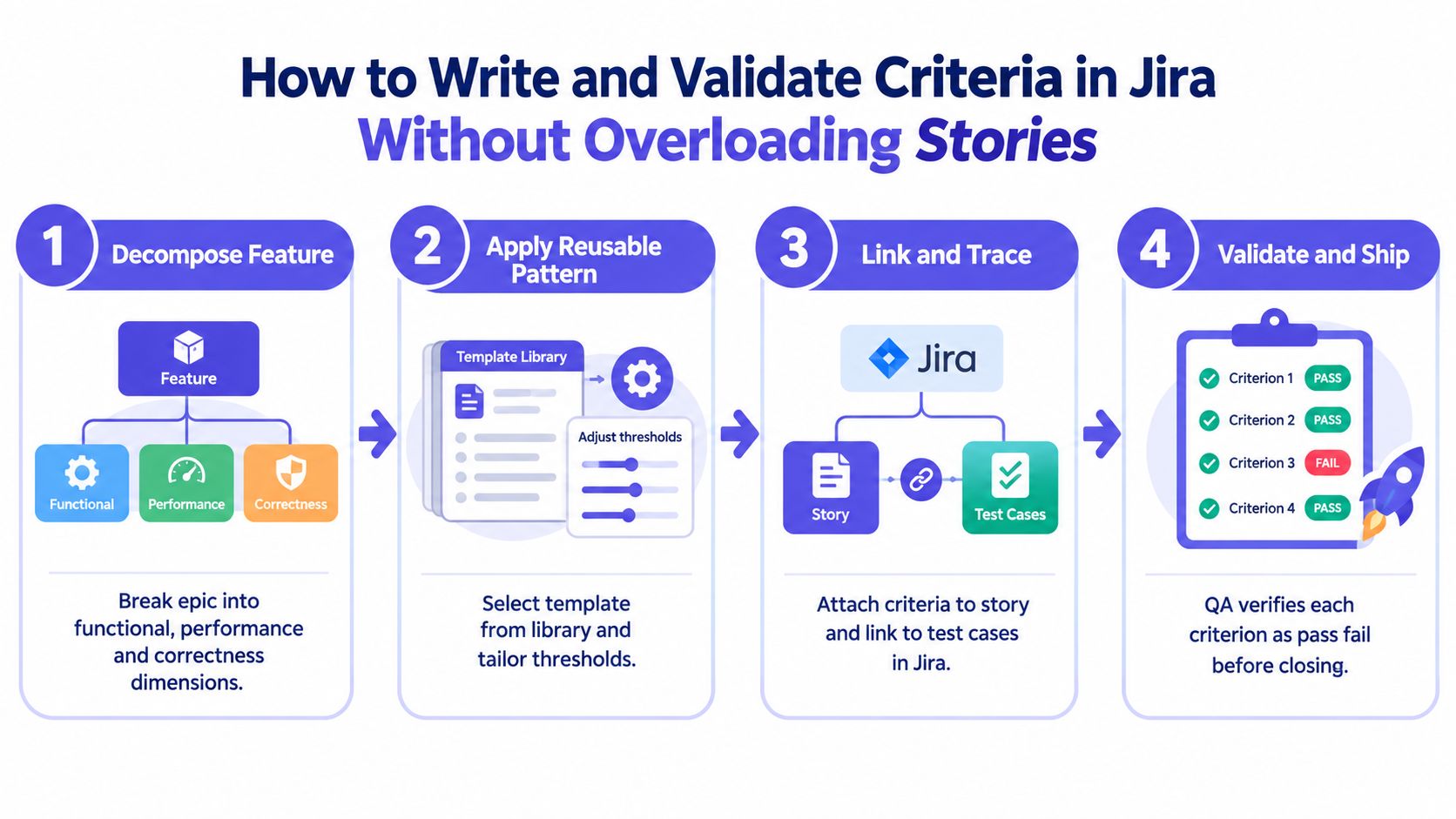
Decompose the story before you write the criteria
In Jira, strong acceptance criteria start with story shape, not sentence polish. If one ticket mixes a user flow, a permission rule, a performance target, and a reporting requirement, the writing gets bloated because the scope is bloated.
I use four checks before drafting criteria:
Functional: what the user or system does
Rule-based: what must always be true, regardless of flow
Negative-path: what happens on failure, rejection, timeout, or invalid input
Validation: how QA or the team will confirm the behavior
That framing keeps the criteria tied to testable behavior instead of turning the ticket into a mini PRD. It also lines up with the reusable library approach from earlier in this article. Scenario-oriented Given/When/Then fits state changes. Rule-oriented checklists fit standing constraints. Trying to force both into one format usually creates noise.
A lightweight workflow for Jira-ready stories
Use a short workflow that the team can repeat without debate.
Step 1. Split the story at the behavior boundary.
If the ticket contains multiple user outcomes that can ship independently, separate them.
If one branch needs a different reviewer, dependency, or test setup, that is often a separate story too.
Step 2. Choose the format on purpose.
Use Given/When/Then for flows, transitions, retries, and branching outcomes.
Use a rule checklist for permissions, formatting, thresholds, eligibility, retention, and audit requirements.
Step 3. Keep only story-level criteria in the ticket.
Shared standards such as analytics naming, global accessibility rules, or design-system invariants usually belong in a reusable checklist, linked reference, or definition of done.
Story criteria should explain what must be true for this slice to ship.
Step 4. Add a validation method for each line.
Automated test
Manual QA check
Product or design review
Demo-able outcome in staging
A simple pressure test helps. If QA cannot point to a screen state, API result, log entry, or measurable threshold, the criterion is still too abstract.
What stays in the story, and what moves out
Many Jira tickets get heavy. Teams keep adding bullets because they are compensating for missing structure.
Keep these in the story:
User-visible state changes
Business rules unique to that behavior
Negative paths specific to that flow
Measurable non-functional thresholds when they affect acceptance for that slice
Move these out:
Repeated platform rules that apply to many stories
Engineering implementation choices
Background rationale better suited to the description or linked PRD
Large test matrices better handled in QA assets
For example, a password reset story may need one scenario for valid email submission, one negative path for expired token, and a short rules list for token validity and error handling. It does not need every auth rule the platform already enforces elsewhere.
What to avoid in Jira
A few patterns consistently create confusion:
Implementation leakage: “Use endpoint X” or “add debounce”
Stacked bullets: one line hides several conditions and outcomes
Undefined adjectives: “fast,” “secure,” “intuitive,” “relevant”
Comment-driven acceptance: rules finalized in Jira comments after development starts
Happy-path-only criteria: success is specified, but failure behavior is missing
I read stories with a handoff mindset. If a new engineer or QA analyst joined the team tomorrow, could they tell the difference between intended behavior, out-of-scope work, and a defect? If not, the ticket needs another pass.
Where tools help, and where judgment still matters
Tools help most with structure and traceability. They can turn raw inputs into cleaner ticket scaffolds, preserve links to designs and requirements, and reduce the copy-paste work that makes stories inconsistent. component-mapped Jira automation is useful for that kind of setup when teams want requirements connected to the actual components and states they are shipping.
Judgment still decides what belongs in the story. Product has to choose whether a point is a scenario, a rule, or shared delivery hygiene. Engineering has to flag criteria that hide extra scope. QA has to challenge lines that cannot be tested directly.
The same discipline matters across artifacts. Mapping requirements across product, design, and QA is much easier when the team can trace the path from a PRD to UX flow and review the states that matter before the ticket lands in sprint planning.
How Figr Grounds Acceptance Criteria in Your Visual Context Graph
A designer marks a button disabled in Figma. The Jira story says “user can submit form.” Engineering enables the button after the first valid field. QA tests only the success path. The bug is not in the code. It started in the missing context between the screen, the state model, and the rule the team meant to ship.
Figr helps teams write acceptance criteria against that missing context. Instead of drafting from memory or copying generic story templates, teams can tie criteria to a Visual Context Graph that keeps the screen, flow, component state, and known constraint in one place. That matters when you are building a reusable library of criteria patterns. Scenario-oriented Given/When/Then needs the right state transitions. Rule-oriented checklists need the right constraints and thresholds.
The Visual Context Graph is useful because acceptance criteria usually fail in specific ways. A scenario gets written without the precondition that triggers it. A rule gets added without the screen state where it applies. A negative path gets skipped because nobody surfaced the empty state, permission branch, or rate limit early enough.
Figr organizes the source context across five layers:
Visual context
Current screens, layouts, visible states, and on-screen copy
Useful for criteria tied to what the user can see, such as disabled controls, inline validation, or empty states
Behavioral context
Flows, transitions, retries, branches, and state changes
Useful for Given/When/Then scenarios where sequence matters, such as sign-in recovery, checkout failure, or card-freeze actions
Design system context
Components, variants, tokens, interaction states, and usage rules
Useful for checklist-style criteria that should inherit shared behavior instead of restating the same component logic in every story
Product knowledge context
PRDs, research notes, prior decisions, and rationale
Useful when a rule exists for a business reason that is not obvious from the UI alone, such as fraud controls or permission boundaries
Implementation context
Component boundaries, integration constraints, and known technical limits
Useful for criteria that need realistic non-functional thresholds or validation rules the team can test
In practice, this changes how criteria get written. A PM can separate one story into the right pattern set: scenarios for primary and failure flows, checklist rules for persistent constraints, and a small set of non-functional thresholds where speed, accessibility, or auditability affect release quality. That is the gap many teams miss. They write the happy path, then leave QA and engineering to infer the rest from comments and screenshots.
The payoff is less ambiguity at handoff. Criteria grounded in the graph are easier to review because each line can be traced back to a screen, a state, a component rule, or a delivery constraint. That makes scope disputes easier to resolve too. If a criterion cannot be tied to one of those sources, it probably belongs in another story, or it is still too vague to test.
If your broader problem is losing product context across AI-assisted workflows, this guide to AI design memory explains the same failure mode from the design and delivery side.
Conclusion A Testable Criteria System You Can Reuse
A story reaches handoff. Product reads the criteria one way, engineering builds another, and QA finds the gap only after implementation starts. Clear acceptance criteria prevent that drift because they define behavior in terms the whole team can verify.
The reusable system is straightforward. Use Given/When/Then for scenario-based behavior. Use rule-based checklists for persistent constraints. Add explicit negative paths and non-functional thresholds when release quality depends on them. That mix gives teams something better than a generic template. It gives them a repeatable way to write criteria that fit the job.
The 20 examples in this article matter because they separate patterns that often get blended together. A sign-up flow, a permission rule, an error state, and a performance threshold should not all be written in the same format. Teams that make that distinction early usually spend less time arguing about intent during QA and less time reopening stories after demo feedback.
A useful test on the next ticket is simple. Keep the happy path, then add one failure case and one measurable quality threshold. If the team cannot agree on how to test those two lines, the story is still underspecified.
Figr helps teams turn existing product context into delivery-ready artifacts like flows, edge-case maps, and acceptance criteria that match the screens, states, and constraints they ship. If you want criteria grounded in actual product behavior instead of generic templates, visit Figr.
FAQ
What is a good acceptance criteria format?
A good acceptance criteria format matches the requirement type. Use Given/When/Then for flow-based behavior and a checklist for always-on rules like validation or formatting.
How many acceptance criteria should a user story have?
A practical range is 3 to 8 acceptance criteria per story for the main path, edge cases, and relevant non-functional needs guidance on story sizing.
What's the difference between a user story and acceptance criteria?
A user story describes the user need and goal. Acceptance criteria define the conditions that prove the story works and can be accepted.
Should Jira acceptance criteria include edge cases?
Yes. Stories that only describe the happy path leave QA and Engineering to guess failure behavior, which is where many defects and rework loops begin.
Do acceptance criteria include non-functional requirements?
They should when relevant. Performance thresholds, security-related behavior, accessibility-related interaction, and precision rules often belong in the criteria set.