

Bad acceptance criteria create expensive confusion. A ticket says “improve checkout” or “make search better,” engineering starts building, QA starts guessing, and everyone discovers too late that they were solving different problems.
When teams skip testable criteria, churn shows up in familiar places: a login flow that works on the happy path but breaks on session expiry, a payment retry that risks duplicate charges, an upload flow that fails halfway through, a search experience that returns results but not the right ones. I watched a Product Manager last week rewrite a nearly finished story because “handle edge cases” meant one thing to design and another to QA. That kind of rewrite is avoidable.
A practical library of acceptance criteria examples fixes that by giving teams reusable patterns, shared language, and testable boundaries before code starts moving. The patterns below are built for the surfaces where product teams spend most of their time, and where tools grounded in product context, including what are acceptance criteria in Figr's glossary, can help turn rough intent into criteria people can ship against.
The Reusable Pattern Library
A reusable library of acceptance criteria examples gives teams a starting shape for common product work, so they don't reinvent quality from scratch on every ticket.
The failure mode is easy to recognize. A Jira ticket is titled “Improve checkout.” The criteria say “should feel faster” and “handle edge cases.” Two weeks later, the churn loop begins. QA flags the wrong latency pain point, engineering optimized a screen users rarely saw, and product is suddenly writing acceptance criteria after implementation has already drifted.
That's the hidden tax of vague stories.
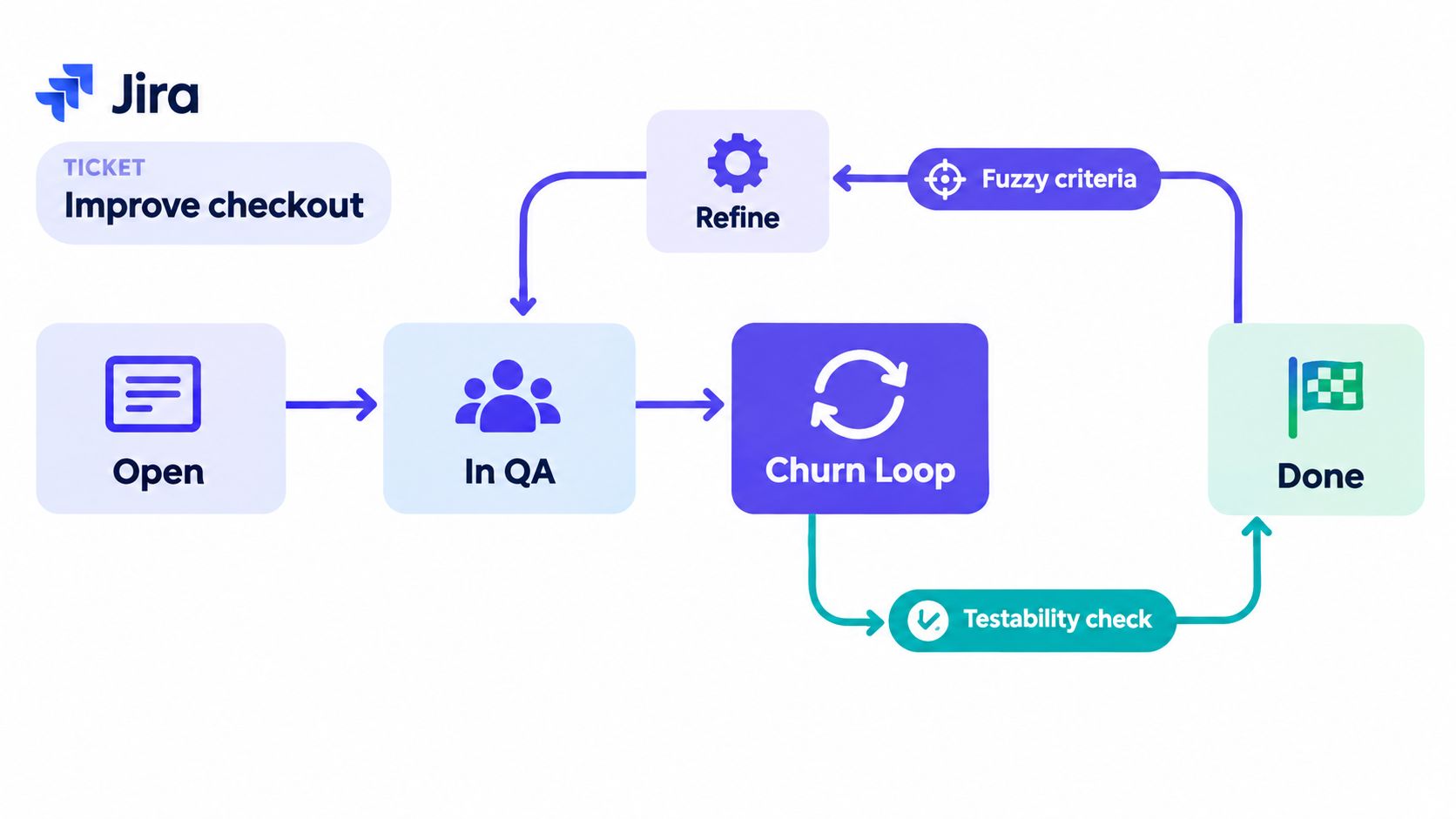
Why pattern libraries work
The basic gist is this: most feature work lands on a small set of recurring surfaces.
Login and permissions: identity, roles, session state, recovery flows
Payments: authorization, retries, confirmations, reversals
Uploads: limits, interruptions, validation, resume behavior
Onboarding: first-run guidance, completion state, persistence
Search and discovery: queries, ranking, empty states, filters
AI features: confidence thresholds, refusal logic, fallback paths
Error states: timeouts, API failures, partial success, retries
When you organize examples by surface, criteria become easier to write and easier to review. Product can scope the story faster. Engineering can estimate with fewer assumptions. QA can derive tests without inventing requirements on the fly.
Practical rule: If a criterion can't be turned into a pass or fail check, it isn't finished yet.
That pass or fail framing matters. Independent guidance on acceptance criteria consistently treats them as specific, testable conditions for story completion, often expressed as observable checks or in Given/When/Then form, with examples like lockout rules, timeout windows, and explicit performance thresholds from Agile Academy's acceptance criteria guide.
A pattern is a template, not a script
Strong teams don't copy acceptance criteria blindly. They reuse a structure.
Each pattern in this article follows the same core shape:
Actor or starting state: who is involved, or what must already be true
Trigger: the user action or system event
Expected behavior: what the product must do
Boundary or threshold: the measurable limit, if one exists
Failure prevented: the bug or ambiguity this criterion is designed to block
That last part is underrated. Naming the failure mode makes criteria sharper. “Session expires” is useful. “Prevents users from losing unsaved payment details during re-authentication” is better because it tells the team why the behavior matters.
I also treat these libraries as design-system-adjacent assets. The same way teams build a design system with figr to stop redesigning common UI decisions, they should build an acceptance-criteria library to stop relitigating common product behaviors.
Historical discipline, not just agile habit
Acceptance criteria aren't a trendy backlog ritual. They sit inside formal engineering practice. NASA's software engineering handbook states that the project manager shall define and document acceptance criteria for software, and archived material shows that requirement was retained across revisions, including revision C and revision D of SWE-034. It also notes that acceptance activities begin during the Formulation phase, which means criteria get defined early, not after implementation starts, as summarized in this review of NASA acceptance-criteria practice.
That matters for product teams because it reframes the work. Criteria writing isn't admin. It's governance.
What Makes a Criterion Actually Testable
A testable criterion names observable behavior, the trigger that causes it, and an outcome a team can verify without debate.
Most weak criteria fail for one reason: they sound reasonable in planning and collapse in QA. “User can log in easily” feels harmless until someone asks what “easily” means. Is that successful authentication, field validation, response time, lockout behavior, or password reset recovery?
The anatomy that holds up
A widely used format is Given/When/Then, where Given defines the starting state, When names the action, and Then states the observable outcome, as described in this agile guide to Given/When/Then. Another useful split is rule-based vs scenario-based criteria, where flat constraints fit field rules and Given/When/Then fits context-dependent behavior, as explained in this breakdown of acceptance criteria types.
This is what I mean:
Vague prose
Example: User can log in easily.
Testability score: Low
Checklist
Example: Valid credentials allow login; invalid credentials show an error.
Testability score: Medium
Given / When / Then
Example: Given a registered user is on the login page, when they enter valid credentials and submit, then they are redirected to the dashboard.
Testability score: High
Four checks every criterion should pass
Before a story leaves refinement, I run four tests against each criterion:
Observable behavior: Can a person or test suite see what happened?
Trigger condition: Is there a clear event that starts the behavior?
Quantified threshold: Is any time limit, count limit, or boundary explicitly stated?
Measurable outcome: Can QA mark it pass or fail without interpretation?
A simple rule-based example:
- Email format validation: The email field accepts addresses in valid format and shows a field-level error for invalid format before form submission.
A scenario-based example:
- Password reset flow: Given a signed-out user requests a password reset, when they open a valid reset link and submit a new password, then the system updates the password and returns them to the login flow.
Why this format survives handoffs
Given/When/Then works because it mirrors how teams reason. Product thinks in intent, engineering thinks in state transitions, QA thinks in assertions. One structure serves all three.
A short table can reveal whether your story is ready for how to create test cases or still needs work:
Trigger
Weak wording: User updates profile
Better wording: When the user taps Save after editing their name.
Outcome
Weak wording: Profile updates correctly
Better wording: Then the updated name appears on the profile page.
Boundary
Weak wording: Upload works
Better wording: File uploads succeed up to the stated size limit.
Error handling
Weak wording: Invalid input shows feedback
Better wording: Then the field shows an inline error message.
What usually breaks? Teams write one criterion that tries to carry five ideas. Split it. One behavior per criterion keeps ownership clear and tests clean.
Login, Permissions, and Account Access Patterns
A login story can look finished in grooming and still fail the first time a user hits a stale session, an expired reset link, or a route they were never meant to see. Access bugs rarely stay isolated. They spill into billing, saved work, support tickets, and audit risk.
That is why this part of the pattern library focuses on account access as a set of testable states, not a single happy path. Good criteria name the trigger, the system response, and the visible outcome QA can verify.
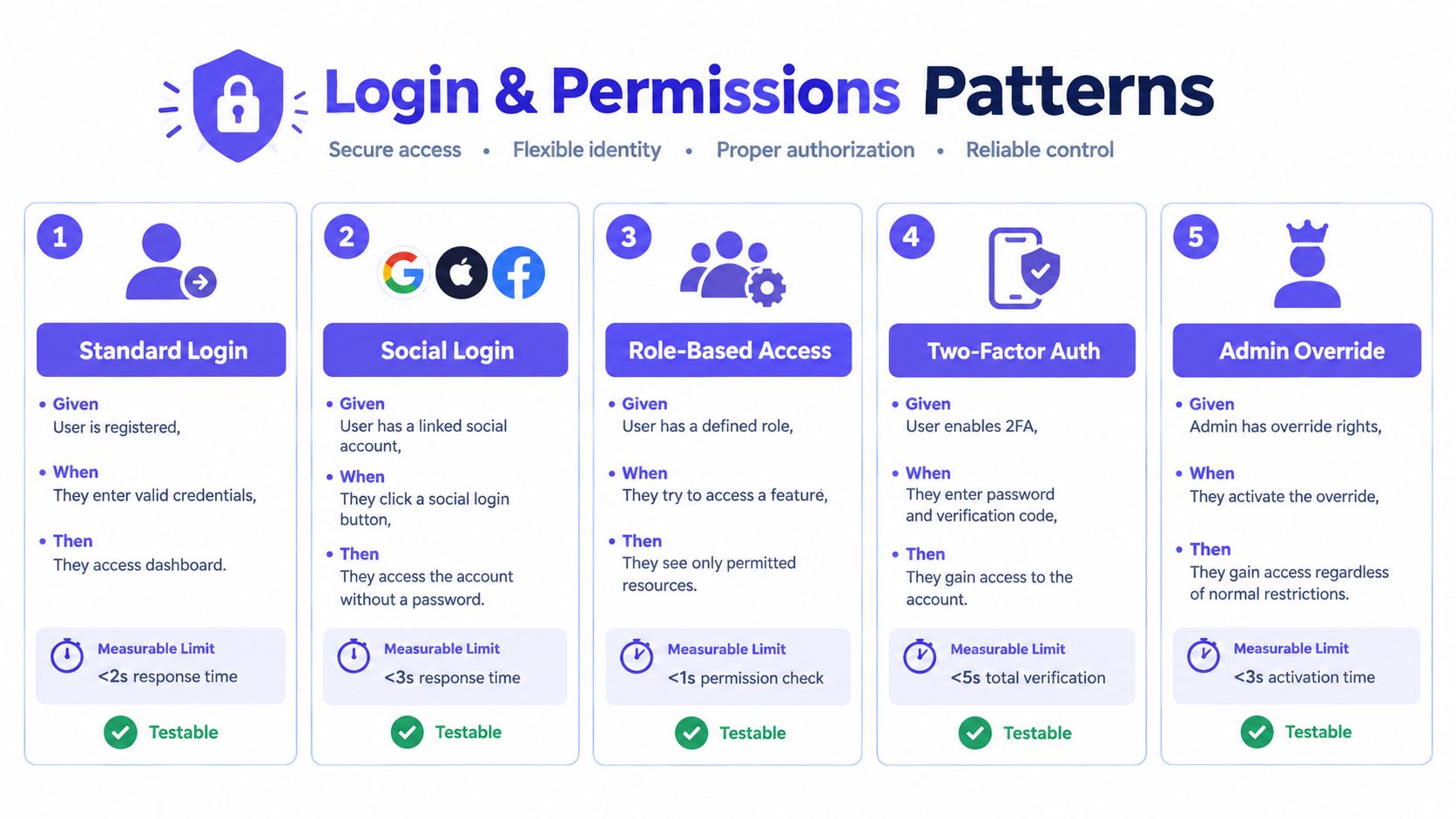
Five high-impact patterns
Standard login success.
Given a registered user is on the login page, when they enter valid credentials and submit, then they are redirected to the dashboard.
Testability check: The destination is named, and QA can confirm it from the URL or page title.Invalid password lockout.
Given a registered user enters an incorrect password repeatedly, when the failed-attempt threshold is reached, then the account is locked and the user sees the lockout message.
Testability check: The threshold, lockout state, and user-facing message are all specified.
Failure prevented: Security intent gets translated into a pass or fail result instead of a vague “protect against brute force” note.Expired OAuth state handling.
Given a user returns from an OAuth provider with an expired or invalid state, when the callback is processed, then the system rejects the login attempt and sends the user back to the login entry point with a visible error state.
Testability check: The invalid callback path is explicit, including where the user lands and what they see.Role-based access denial.
Given a signed-in user lacks permission to access an admin route, when they open that route directly, then the system blocks access and redirects them to an allowed destination with an explanatory message.
Testability check: The restricted route, fallback destination, and expected message are all observable.
Failure prevented: Silent role escalation and confusing dead-end pages.Session timeout with re-authentication.
Given a signed-in user has been inactive for the defined timeout window, when they attempt a protected action, then the system prompts for re-authentication before completing that action.
Testability check: The timeout window and the protected action are named in the ticket.
Failure prevented: Old sessions can't perform sensitive actions without fresh verification.
Teams usually miss the state after authentication. A criterion that says “user logs in successfully” does not answer where they land, whether an interrupted flow resumes, or whether a blocked route returns them to the original destination after re-auth.
I've seen access stories pass QA and still create production issues because nobody wrote criteria for deep links, role changes, or expired auth between steps. Those are the cases that turn “works on my machine” into a support queue. Review edge cases in time zones and permissions before marking an account access story done.
The pattern also benefits from visual review. This short video is useful if your team wants a shared language for scenario writing during refinement.
One detail teams miss
Login criteria often stop at “authenticated” and skip recovery paths. Account access work is stronger when the ticket also covers expired invitations, first-login password setup, suspended accounts, and return behavior after a forced sign-in.
Those details decide whether the story is testable.
Payments, Uploads, and Data Integrity Patterns
Payments and uploads need criteria that describe retries, limits, and rollback paths because silent corruption is harder to detect than visible failure.
A vague story like “user can pay and upload receipt” sounds small. In practice, it hides duplicate submissions, interrupted uploads, data mismatches, and support tickets nobody budgeted for.
Five reusable patterns
Edge-Case Acceptance Criteria
Duplicate payment attempt
Sample criterion: Given a user submits payment and retries before the first response resolves, when the second request reaches the gateway, then the system treats it as the same transaction according to the ticket's idempotency rule.
Failure prevented: Double charge on flaky connection.
Partial upload handling
Sample criterion: Given an upload is interrupted before completion, when the user returns to the flow, then the system shows upload status and the next valid action.
Failure prevented: Silent loss of file state.
Currency rounding
Sample criterion: Given an order total includes fractional currency calculations, when the final amount is displayed and charged, then the values match across UI, backend record, and receipt.
Failure prevented: Mismatched totals.
File size enforcement
Sample criterion: Given a user selects a file above the allowed limit, when they attempt upload, then the system blocks the upload and shows a file-size error without clearing other form inputs.
Failure prevented: Confusing retry loop.
Idempotent retry after network error
Sample criterion: Given the gateway times out after request submission, when the user retries, then the system resolves the transaction to one final charge outcome.
Failure prevented: Duplicate financial state.
Criteria that teams can actually validate
For uploads, the best criteria name the artifact and the failure path. If the browser closes halfway through, does the team expect resumable upload, failed upload state, or forced restart? If your engineers are implementing client-side hashing or upload integrity checks, a practical reference is this upload flow guide from Blocsys Technologies, especially because it helps teams think about file identity before they write acceptance criteria.
For payment work, I also want criteria tied to the underlying data model. The UI may say “payment succeeded,” but the acceptance question is whether authorization, charge record, receipt state, and retry key line up. That's where it helps to build an ERD with Figr or any equivalent artifact before finalizing criteria for payment state transitions.
If the rollback path isn't written down, someone on the team is assuming it.
The trade-off
Over-specifying payments can trap engineering in implementation detail. Under-specifying them pushes ambiguity into production. The middle path is simple: define observable states and data outcomes, leave room for technical design.
Onboarding, Search, and Discovery Patterns
A new user lands on a search page, types a reasonable query, gets zero results, closes the onboarding tip, comes back tomorrow, and sees the same tip again. The team shipped every visible component. The experience still failed because nobody wrote down the rules that connect onboarding, search behavior, and recovery paths.
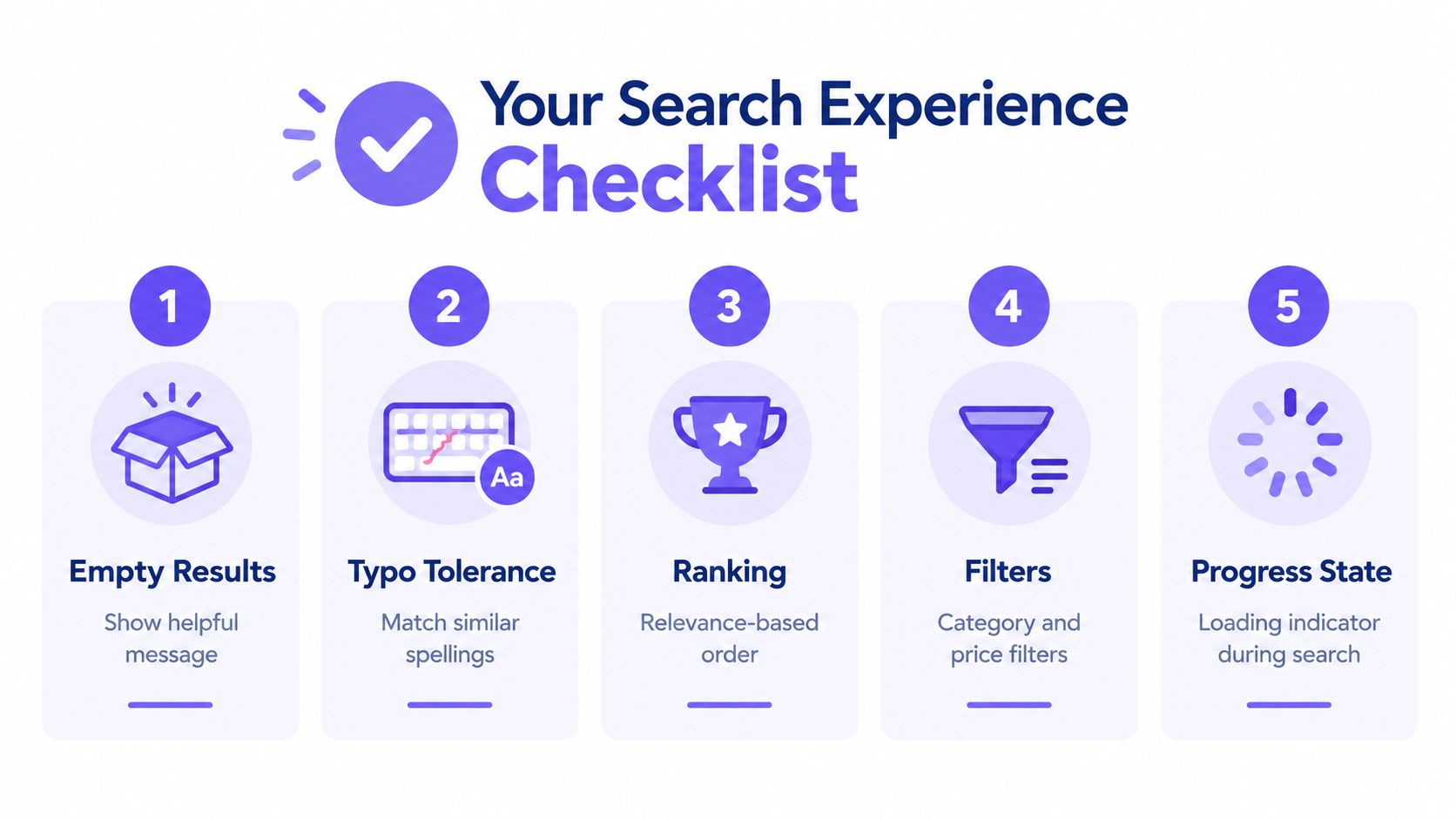
Discovery work gets vague fast. Stories like “users can find what they need quickly” sound reasonable in grooming, but they break apart as soon as design, engineering, and QA try to test them. “Find” could mean relevance, typo handling, filter behavior, recent history, onboarding prompts, or what happens when there are no results.
For this part of the pattern library, I want criteria tied to surfaces a team can verify. That means observable inputs, explicit system behavior, and a result QA can reproduce without debating intent.
Five reusable patterns for onboarding and discovery
A single story in this area usually needs several criteria, each attached to one behavior:
First-run tooltip persistence: Given a first-time user dismisses an onboarding tooltip, when they return to the same surface on a later session, then that tooltip remains hidden until the reset condition defined in settings or support tools is triggered.
Empty state with next action: Given a search returns no matches, when the results page loads, then the interface shows empty-state copy that explains the outcome and presents one next step such as clearing filters, changing the query, or creating a new item.
Deterministic ranking on a test set: Given a fixed test dataset and a defined ranking rule, when the same query runs repeatedly under the same conditions, then the result order stays consistent.
Recent searches retention: Given a user performs more searches than the allowed history limit, when they reopen the search surface, then only the most recent allowed entries appear and older entries are removed in the expected order.
Filter persistence rule: Given a user changes the primary query after applying filters, when new results load, then filters either persist or reset according to the rule stated in the story.
These patterns cover different surfaces, but they follow the same testability standard. Each one names the trigger, the system response, and the boundary condition.
What teams miss in search stories
Search failures rarely come from the obvious happy path. They come from interaction rules around the query.
A filter sticks when it should clear. A typo produces an empty page with no recovery option. Recent searches expose more history than the product intended. Onboarding prompts reappear because dismissal state was stored locally, but the user switched devices. I have seen teams call search “done” after validating relevance on three sample queries, then spend the next sprint fixing state behavior they never wrote into the criteria.
That trade-off matters. If you try to specify the ranking algorithm in acceptance criteria, you trap the team in implementation detail. If you skip ranking expectations entirely, every result set becomes arguable. The useful middle ground is to define a fixed dataset, expected ordering rules for that dataset, and any fallback behavior the user should see when the system cannot produce a strong match.
Functional behavior is only half the job
Onboarding and discovery criteria also need a quality check built into the story. Earlier sections covered this principle in other contexts. It applies here just as much.
For search, quality usually means at least one of these is explicit:
loading feedback appears before results are ready
keyboard focus moves predictably between query, filters, and results
empty states offer a visible recovery path
ranking is reproducible on a known dataset
onboarding dismissal persists across the scope the product promises
The practical test is simple. If QA can only ask “does it feel good?” the criterion is still fuzzy. If QA can run the query, inspect the state, and confirm the expected behavior, the criterion is ready.
AI Features and Confidence-Based Patterns
AI features need acceptance criteria that define confidence bands, fallback behavior, and refusal rules, because “good answers” cannot be tested.
Many otherwise disciplined teams get fuzzy again. They write strong criteria for login and payments, then switch to vibes for AI. “The assistant should be helpful.” “The summary should be accurate.” “It should feel smart.” Helpful according to whom? Accurate against what?
The criteria shape that works for AI
An AI story becomes testable when you define three things up front:
What signal the system uses to decide behavior
What the system does in each confidence band
What happens when the model fails, refuses, or times out
Here's a comparison structure teams can use:
Confidence Bands
High confidence
Required behavior: System may present the response directly.
Test signal: Response includes the expected output structure and, where required, source reference.
Middle confidence
Required behavior: System routes to user review or human confirmation.
Test signal: Review state is triggered consistently for the defined band.
Low confidence
Required behavior: System declines to auto-respond and offers a fallback action.
Test signal: Fallback state appears with a visible next step.
Five reusable AI patterns
Grounded response pattern
Given an AI answer depends on product or policy knowledge, when the system returns a response, then the response must cite a retrievable source or show the supporting context used to generate it.
This matters anytime the product is supposed to answer from known material rather than free-form generation. If the source can't be traced, QA has nothing stable to validate.
Deterministic output pattern
Given the same input and the same fixed generation settings, when the request is evaluated in test mode, then the output remains stable enough for regression testing.
Would you ship an AI feature without a regression-friendly mode? Many teams do by accident.
Refusal behavior pattern
Given a user request violates the feature's policy boundary, when the AI receives that input, then the system refuses the request and presents the defined safe alternative or explanation.
A refusal is part of the feature, not an exception outside the feature.
Timeout and fallback pattern
Given the AI response does not return within the feature's allowed wait state, when the timeout threshold is reached, then the system exits the loading state and offers a visible fallback action.
This criterion prevents the dead-spinner problem that makes AI feel broken even when the underlying system is just slow.
Human-in-the-loop escalation pattern
Given the confidence signal sits in the review band, when the system evaluates the response, then it sends the output to review instead of auto-applying it.
That one line often saves a team from pretending probabilistic output is deterministic product behavior.
Error and edge-state checklist for AI stories
A common pitfall is to underwrite the model behavior and ignore the surrounding product states. That's where bugs surface. A copy-paste checklist helps:
API failure response: Given the inference call fails, when the error returns, then the user sees a retry path and any unsaved input remains available.
Validation rejection: Given the prompt or uploaded content violates an input rule, when the user submits, then the related field shows a clear error message.
Empty result state: Given the system has no answer or no relevant context, when the request completes, then the user sees a useful empty state with a next action.
Slow network indicator: Given the request is still processing, when the visible wait threshold is reached, then the loading state changes to indicate delay.
Session expiry mid-flow: Given the user's session expires during generation, when they attempt to continue, then the system requests re-authentication and preserves recoverable draft state where defined.
Pagination exhaustion: Given a result list reaches its end, when the user requests more, then the system shows that no more results are available.
Why numeric discipline matters here
For higher-risk contexts, acceptance criteria become stronger when they include explicit thresholds, sample rules, and confidence behavior. In regulated quality settings, one framework paired an AQL of 0.25% with a 95% probability of lot acceptance at or below that defect level, and a UQL of 2% with a 90% probability of lot rejection at or above that level, as shown in a PQRI statistical acceptance framework. Another quality-by-design example paired a 95–105% specification with 95% confidence bounds and a standard deviation rule on a sample of 30 units, showing why a single numeric limit without an assurance metric can mislead decisions, as detailed in this QbD acceptance-criteria presentation.
Product teams don't need to mimic pharmaceutical sampling plans. They should borrow the discipline. If an AI feature relies on confidence, write the threshold, the action tied to that threshold, and the verification method. That's the transferable lesson.
A lot of current practice in artificial intelligence in product management still treats AI acceptance as subjective review. That doesn't scale. Once teams have more than one AI surface, they need nightly checks, fixed eval sets, explicit fallback criteria, and visible refusal behavior.
The zoom-out most teams miss
At small scale, vague AI criteria create awkward demos. At larger scale, they create operational cost. Support teams get ambiguous outputs. QA invents judgment calls. Engineering spends cycles chasing “quality” without a stable target. The behavior looks like a product issue, but it's really a requirement issue.
That's why AI stories should be held to a stricter bar, not a looser one.
How the Visual Context Graph Surfaces Criteria
Shared product context surfaces better acceptance criteria because each layer exposes a different class of testable condition.
A story rarely fails because the team lacked words. It fails because the team lacked context. The Designer had screen intent. Engineering had API assumptions. QA had edge cases. Product had the user outcome. Those views stayed separate, so the ticket stayed fuzzy.
The five layers that reveal hidden criteria
Figr's Visual Context Graph is useful here because it frames the product as connected evidence rather than isolated artifacts. For acceptance criteria, each of its five layers tends to expose a different set of checks:
Visual context: layout rules, visible states, copy, labels, modal behavior, empty-state content
Behavioral context: flow transitions, triggers, loading states, retries, recovery paths
Design system context: component variants, tokens, field states, interactive rules, consistency constraints
Product knowledge context: business logic, PRD intent, research findings, policy boundaries, definitions
Implementation context: payload structure, backend dependencies, permission checks, event timing, integration constraints
That model matters because a criterion written from only one layer is usually incomplete. A login modal may look correct in visual context and still fail in implementation context if role resolution is wrong. A search result may satisfy product knowledge context and still fail behavioral context if filters persist incorrectly after query change.
One story across five layers
Take a simple story: a user can freeze a payment card temporarily.
The first draft often sounds fine. “User can freeze card from settings.” But once you inspect it layer by layer, the hidden criteria appear.
Visual context: The freeze control must show the current card state and a confirmation step before applying the change.
Behavioral context: If the user freezes the card, the visible state must update after the action resolves, and retry behavior must be defined if the request fails.
Design system context: Disabled, loading, success, and error states must use the approved component states.
Product knowledge context: The story must clarify whether scheduled payments, refunds, or recurring charges behave differently while the card is frozen.
Implementation context: The freeze event must persist correctly and return an updated state that other screens can consume.
That's why gallery examples are valuable as working references. Figr's product gallery examples include examples such as Wise card-freeze edge cases, task assignment states, Waymo trip-change test cases, and a Mercury PRD, all of which are helpful because they show how one feature splinters into multiple testable conditions once context is visible.
A quick reference teams can paste into story templates
Use this review sequence before any story moves into development.
Pre-write the actor, trigger, and success state.
Keep it short.Who is acting?
What starts the behavior?
What does success look like on screen or in system state?
Draft criteria in pass or fail language.
Use one condition per line.Given the starting state
When the action happens
Then the observable outcome occurs
Add boundaries and negative cases.
This catches the expensive gaps.Error states
Permission rules
Empty states
Retry or timeout behavior
Verify independent testability.
Each criterion should survive handoff on its own.Can QA assert it directly?
Is the outcome deterministic?
Is at least one concrete example attached?
Why this changes refinement quality
Last month I sat in on a refinement where everyone agreed the story was “clear enough.” It wasn't. Once the team walked through live screens, previous flow states, component behavior, and supporting docs, they found three missing criteria in under ten minutes. Nobody on that call was careless. They just needed shared context.
For teams working from PRDs and existing flows, it also helps to connect story criteria back to upstream artifacts like this PRD to UX flow workflow and the broader docs, PRDs, and research context workflow. When criteria come from live product evidence instead of memory, they get tighter.
The same is true for edge conditions. A visible edge-case review process, such as edge-case mapping for product teams, turns “handle edge cases” from a vague promise into concrete story lines QA can verify.
One more useful distinction: if a team is still debating whether a criterion belongs to the story at all, that usually means the story boundary is wrong. Split it earlier. Acceptance criteria are often the first artifact that reveals a story is carrying too much scope.
The grounded takeaway
The next step is simple. Pick one active story in login, search, payments, uploads, onboarding, AI, or error handling. Rewrite it with one actor, one trigger, one visible outcome, one negative case, and one boundary condition. Then ask QA whether they can test it without another meeting.
That single exercise usually exposes more ambiguity than a week of status updates.
Figr helps teams turn live product context, existing flows, PRDs, and component behavior into clearer artifacts, including acceptance criteria that map to real screens and edge cases instead of generic templates. If your stories keep getting rewritten in QA or refinement, visit Figr and see how product context can make criteria sharper before build starts.
FAQ
How many acceptance criteria should one story have?
Enough to define completion clearly, but not so many that the story hides multiple features. If criteria sprawl, the story probably needs to be split.
When should teams write acceptance criteria?
Before development starts. Formal engineering practice also places acceptance definition early, not after implementation is underway.
Should every criterion use Given/When/Then?
No. Use rule-based criteria for simple constraints and Given/When/Then for behavior that depends on context or sequence.
What's the difference between acceptance criteria and Definition of Done?
Acceptance criteria are story-specific. Definition of Done applies to all work items across the team.
What's the fastest way to improve weak criteria?
Replace vague words with observable outcomes, explicit triggers, and at least one negative or edge-case scenario.