
The tool
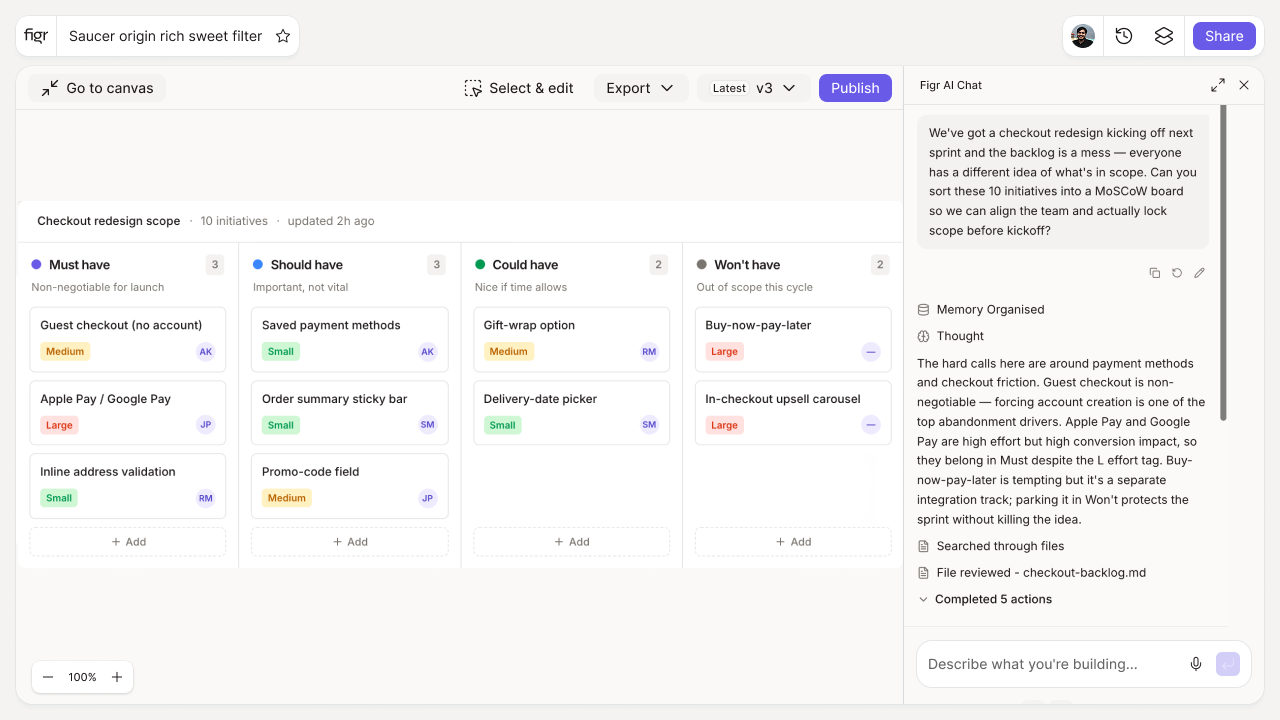
Inputs:
- Feature list (free text, one per line, or add rows)
- Four category columns: Must have, Should have, Could have, Won't have (this time)
Output: A four-quadrant board with features sorted into categories by drag-and-drop. Exportable as a table or list.
Behavior: Interactive drag-and-drop in-browser, no login. Add, move, and remove features freely.
Scope creep starts when everything is a Must
The fastest way to blow a release is to treat every requirement as essential. When the Must column holds twenty items, the team has no signal about what to protect when time runs short, so quality gets cut at random instead of by plan. MoSCoW forces the harder conversation: what is genuinely required for this release, and what can wait.
The hardest and most useful column is Won't have, because naming what you are not doing is what actually protects the timeline. This tool makes the sorting fast and visible; the deeper discipline is covered in the guides on how to prevent scope creep and how to prioritize a product backlog.
How it works
1. Add your features. Paste a list or add them one by one.
2. Sort into four buckets. Drag each into Must, Should, Could, or Won't have.
3. Pressure-test the Musts. If everything is a Must, nothing is. Keep that column honest.
4. Export and share. Bring the agreed scope to planning.
A worked example
You are scoping a checkout redesign. "Accept the existing payment methods" is a Must, the release is meaningless without it. "Add a saved-cards feature" feels essential until you ask whether the launch fails without it; it is really a Should. "Apple Pay" is a Could, genuinely valuable, fine to follow later. And "multi-currency support" goes in Won't have this time, named explicitly so it stops eating into the timeline through the back door. That last move, deciding what is out, is where MoSCoW earns its place. For ranking inside the Must and Should buckets by value per effort, the action priority matrix helps.
From scope to design, with Figr
Once scope is set, Figr helps you design what made the cut. Figr is an AI product designer that reads your product context and produces Figma-ready design on your design system, so the agreed scope turns into real screens that fit the product. For value-per-effort ranking inside the buckets, pair this with the RICE calculator, and document the scoped release with the PRD template generator.
Who this is for
This is for product managers setting release scope on a real product with real constraints and stakeholders.
What this tool is not
MoSCoW sorts; it does not decide for you, and a board where everything lands in Must is just a to-do list with extra steps. The value is in the discipline you bring to it. This is also a free, standalone tool, not a Figr product feature.
FAQ
Is the MoSCoW matrix free?
Yes, free and no sign-up.
What do the four categories mean?
Must have is required for release. Should have is important but not vital. Could have is desirable if time allows. Won't have is out of scope this time.
Can I export the board?
Yes. Export the sorted features as a table or list.
When should I use MoSCoW versus RICE?
Use MoSCoW to set scope for a release. Use RICE to rank value per effort across candidates.
How is this different from Figr the product?
This is a free planning tool. Figr the product is an AI product designer that turns product context into UX decisions and Figma-ready design.