
It's 4:47 PM on Thursday. Your VP just asked for something visual to anchor tomorrow's board discussion. You have a PRD. You have bullet points. You have 16 hours and no designer availability. That feeling of the clock ticking faster than your brain can connect the dots? That’s the reality of modern product development.
Your backlog isn't a conveyor belt where tasks patiently wait their turn.
It's a switchboard. Every plug is a potential connection between a user need and a business goal. Your job isn't to process the queue: it's to be the operator who knows which connections to make right now to keep the whole system from overloading.
The Unspoken Chaos of a Growing Backlog
It’s 8:17 AM on Monday. Your backlog has 743 items. Three different VPs just dropped their pet projects into Slack, all flagged as "urgent." The sheer weight of that list feels less like a set of opportunities and more like a debt you can never repay.
If you’ve felt this, you’re not alone. This state of being overwhelmed by a list that only seems to grow has a name. Let's call it Priority Paralysis.
It’s that quiet dread that settles in when every request feels important, and the pressure to choose perfectly freezes all forward motion. The common advice to just "rank order the work" feels hollow, doesn't it? It completely misses a fundamental truth about how backlogs actually operate in the wild.
From Static Queue to Living Ecosystem
A product backlog isn't a neat queue where tickets wait patiently for their turn. It's a dynamic, living ecosystem.
Every item, a feature, a bug, a piece of tech debt, is an organism competing for the same limited resources: your team's time, attention, and capital. Your job isn’t just to line them up. It’s to cultivate an environment where the strongest, most valuable ideas thrive and the weak ones are allowed to die off.
Thinking like an ecologist, rather than a list-maker, changes the entire game. You stop asking, "What's next?" and start asking much better questions.
- Which of these items creates the most energy (value) for our system?
- Which ones are invasive species, consuming resources without adding real value?
- What external conditions are forcing our ecosystem to adapt right now?
That last question is particularly potent. Just last week, I watched a product manager at a B2B SaaS company completely reshuffle her quarterly plan. A competitor had launched a game-changing integration, and her backlog, which was focused on UX improvements, suddenly felt out of touch with the market.
Her situation isn't unique. The market can shift in a single quarter, forcing a complete rethink of what "priority" even means. According to ProductPlan's 2023 survey, 41% of product managers state that their priorities are dictated by changing customer needs, highlighting this external pressure.
You can explore more data on how market shifts impact backlogs and find other insights on prioritization. This is what I mean: your backlog doesn't exist in a vacuum. It responds to predators, climate change, and new food sources.
The Path to Clarity
Breaking free from Priority Paralysis requires a new lens. It demands a system for evaluating the health of your backlog ecosystem, not just the order of the list. The goal is to move from a reactive state of firefighting to a proactive state of strategic cultivation.
The basic gist is this: you need a framework that helps you see the forest, not just the individual trees. You need a way to filter the noise from the signal, turning that sprawling list of 743 items into a clear, defensible plan of action.
Establishing Your Prioritization Compass
Before you touch a single ticket, you need a true north.
Too many teams try to prioritize by staring directly at the waves, the endless churn of feature requests, bug reports, and stakeholder demands. That's a losing game. You can’t chart a course by looking at the chaos right in front of you.
You need fixed stars.
What I mean by this is a Prioritization Compass: a small, clear set of principles tied directly to your company’s most important objectives. Think of it as the critical translation layer between a high-level business goal and the daily decisions your team makes about what to build next. It turns abstract strategy into a concrete filter.
Without one, every prioritization meeting devolves into a battle of opinions. With a compass, you have a shared language for defining what "value" actually means this quarter.
From Vague Goals to Tangible Criteria
So, how do you actually build this thing? You start with the most important objective your team has been given and break it down with relentless specificity.
Let’s say your company OKR is to “Increase Q3 User Engagement by 15%.” That’s a great start, but it’s completely useless for prioritizing a backlog. Is all engagement equal? Does a "like" have the same value as a user inviting a teammate to their workspace? Of course not.
Your job is to translate that vague goal into tangible product criteria.
For that OKR, your compass principles might look like this:
- Deepens Collaboration: Does this feature get users working together inside the product? Think commenting, sharing, or real-time editing.
- Increases Session Depth: Does this feature give a user a compelling reason to perform one more key action before they leave?
- Reduces Time-to-Value for New Users: Does this feature remove a point of friction in the first-run experience, helping new users feel the product's magic faster?
Now, when a new request comes in, the conversation is entirely different. Instead of asking, "Is this a good idea?" you ask, "How well does this serve our principle of deepening collaboration?" The debate is no longer about personal preference; it's about alignment with an agreed-upon direction.
For a deeper look into aligning stakeholders before these debates start, check out our guide on handling competing priorities as a product manager.
The Compass in Action
Last quarter, I watched a PM at a B2B startup use this exact approach. Her team was getting immense pressure from sales to build a niche, one-off integration for a single large client. The request was loud, urgent, and backed by a significant contract, the classic "big deal" feature.
In the prioritization meeting, instead of arguing about the feature's merits, she simply pulled up their team’s compass on the screen. Their #1 principle for the quarter was “Drive Product-Led Growth.”
She asked just one question: “How does building a custom integration for one enterprise client help us drive self-serve, product-led growth?”
The room went quiet.
The conversation wasn’t confrontational; it was clarifying. The compass reframed the debate from "should we do this?" to "does this align with our stated mission?" It depersonalized the "no" and anchored the decision in shared strategy, not her individual authority.
That’s the real power of a well-defined compass. It provides the political cover to make difficult trade-offs and the clarity to defend them.
Your first step isn’t to score your backlog. It's to define the rubric. Before you even look at the list, agree on the lens through which you will view it. Build your compass first, and navigating the waves becomes infinitely easier.
The Three Lenses of Prioritization: Value, Effort, and Risk
Once you have a compass, you stop guessing. But a compass only gives you a direction; it doesn't describe the terrain ahead. To really understand the landscape of your backlog, you need to look at each potential item not as a single point, but as a gemstone. You have to turn it over in your hands, examining it from different angles, to truly understand its worth.
This is where most prioritization frameworks fall short. They try to flatten a complex, multi-dimensional decision into a single score.
Instead of a formula, what you need are lenses. Three, to be exact: Value, Effort, and Risk. This isn’t a rigid calculation, but a structured way of thinking that forces a more honest conversation about what you’re really committing to when you say “yes” to a feature.
This process flow visualizes how to build the foundation for this kind of evaluation, your Prioritization Compass, by connecting company objectives to tangible criteria and principles.
The visualization shows that a strong evaluation process starts with clear OKRs, which then inform the specific criteria you use to judge every item in your backlog. For a quick effort-vs-impact triage, the action priority matrix is one of the simplest frameworks to apply.
The First Lens: Value
Value is the most misunderstood of the three lenses. We often default to thinking about revenue, but that’s like describing a symphony by only its loudest note. The spectrum of value is much richer.
When evaluating an item for value, you should be asking questions that probe its full impact:
- Strategic Value: How directly does this support our current company OKR or Prioritization Compass principle? Is it a cornerstone of our quarterly mission or a tangential "nice-to-have"?
- User Value: Does this solve a real, painful problem for a meaningful segment of our users? Will it remove friction, or better yet, create a moment of genuine delight?
- Knowledge Value: Will building this teach us something critical about our users, our market, or our technology? Sometimes the primary value of a feature is the data it will generate for the next feature.
A friend at an early-stage fintech company recently prioritized a seemingly low-impact feature: a simple CSV data export. On paper, it had zero direct revenue impact. But through the lens of knowledge value, it was priceless. It allowed their first power users to analyze their own data, and in doing so, show my friend exactly what they found most valuable about the product, informing the entire next six months of the roadmap.
The Second Lens: Effort
Effort, like value, is rarely just one number. It's the total cost of delivery, and engineering hours are only the beginning of the invoice. A true accounting of effort must be holistic.
Think beyond the coding. Consider these hidden costs:
- Design and UX Cycles: How many screens need to be designed? Are we using established patterns from our design system, or does this require novel exploration and user testing?
- QA and Testing Load: What is the surface area for bugs here? A simple UI change might be a low engineering lift but a massive testing burden.
- Cognitive Load on the Team: Does this feature introduce significant new complexity to the codebase, making future work slower and more difficult?
Forgetting these factors is why a two-week estimate can easily balloon into a six-week slog. A project like mapping out the LinkedIn Recruiter Flow might seem straightforward, but a detailed artifact reveals the true scope of work across multiple teams. You can explore how AI tools can help prioritize features based on user data to get a clearer picture of these hidden aspects.
The Third Lens: Risk
The final lens is risk, the ghost in the machine of every product plan. Risk is the measure of uncertainty. The higher the uncertainty, the more likely your value and effort estimates are pure fiction.
"Most product organizations... are churning out features and products that fail to deliver any value." – Marty Cagan, Inspired
As Marty Cagan points out, most ideas simply don't work out as planned. Acknowledging this reality is the first step. The next is to categorize the uncertainty.
We can break risk down into a few key types:
- Technical Risk: Are we using a new technology or integration for the first time? Is there a dependency on another team whose priorities might not align with ours?
- Adoption Risk: Do we have evidence that users will actually want this and be able to figure it out? Have we tested the core assumption behind this feature?
- Market Risk: Could a competitor’s move or a shift in the market make this feature irrelevant by the time we ship it?
By explicitly discussing these risks, you can often find ways to mitigate them. A high-adoption-risk feature might be de-risked with a simple prototype test, such as simulating an improved project UI for AI tools before a single line of code is written. A high-technical-risk item might warrant a small technical spike before full commitment.
Looking through these three lenses, Value, Effort, and Risk, transforms prioritization from a simple ranking exercise into a strategic diagnostic. It forces the nuanced, critical conversations that lead to building products that don't just get shipped, but actually succeed.
From an Abstract Score to a Tangible Roadmap
So you’ve done the hard work. You’ve run your backlog items through the lenses of value, effort, and risk, and now you have a scored, ranked list. It feels clean, logical, maybe even a little bit elegant.
But a prioritized list isn't a plan. It's just an inventory.
Handing that raw list to your team is like giving a chef a pile of perfectly sourced ingredients and expecting them to taste the final dish. A list doesn't tell a story. It doesn’t inspire. Most importantly, it fails to explain how all those disconnected pieces will eventually assemble into a coherent customer experience.
The real work starts now: turning those abstract scores into a tangible, story-driven roadmap.
This is the moment you shift from being an analyst to being a storyteller. A list answers "what," but a powerful story answers "why."
Composing the Menu Instead of Listing Ingredients
Think about how a great chef builds a new menu. They don’t just list their available ingredients: tomatoes, flour, basil, cheese. They compose dishes. They group ingredients into courses that flow together to create a satisfying meal.
Your job as a product manager is exactly the same. Don't just present the features. You need to group your top-priority items into strategic themes or quarterly missions.
A theme is more than just a label; it’s a narrative frame. For example, instead of just listing these three high-priority items:
- Implement SSO login
- Redesign the team invitation flow
- Add user permission levels
You frame them as a single, focused mission: "Make Team Onboarding Effortless."
That small change in framing has a massive impact. It immediately elevates the conversation from arguing over individual features to understanding the customer benefit. It gives your engineering team a shared purpose beyond just closing tickets. And it tells stakeholders exactly what problem you’re solving this quarter, not just what you’re building.
The Power of a Visual Artifact
Nothing communicates this story better than a visual artifact. A simple user flow diagram or a lo-fi prototype can stop a debate in its tracks. Why? Because it forces everyone, engineers, stakeholders, designers, to see the product through the user’s eyes.
Last year, a PM I know was struggling to get alignment on a complex initiative to overhaul their merchant checkout setup. The backlog was packed with small but important tickets, and stakeholders just couldn't see how they all connected. The debate was going in circles for weeks.
Frustrated, she spent a few hours mapping the entire proposed journey into a single visual flow. She created something a lot like this new Shopify checkout setup flow from a Figr canvas. When she presented it in the next meeting, the entire dynamic in the room shifted.
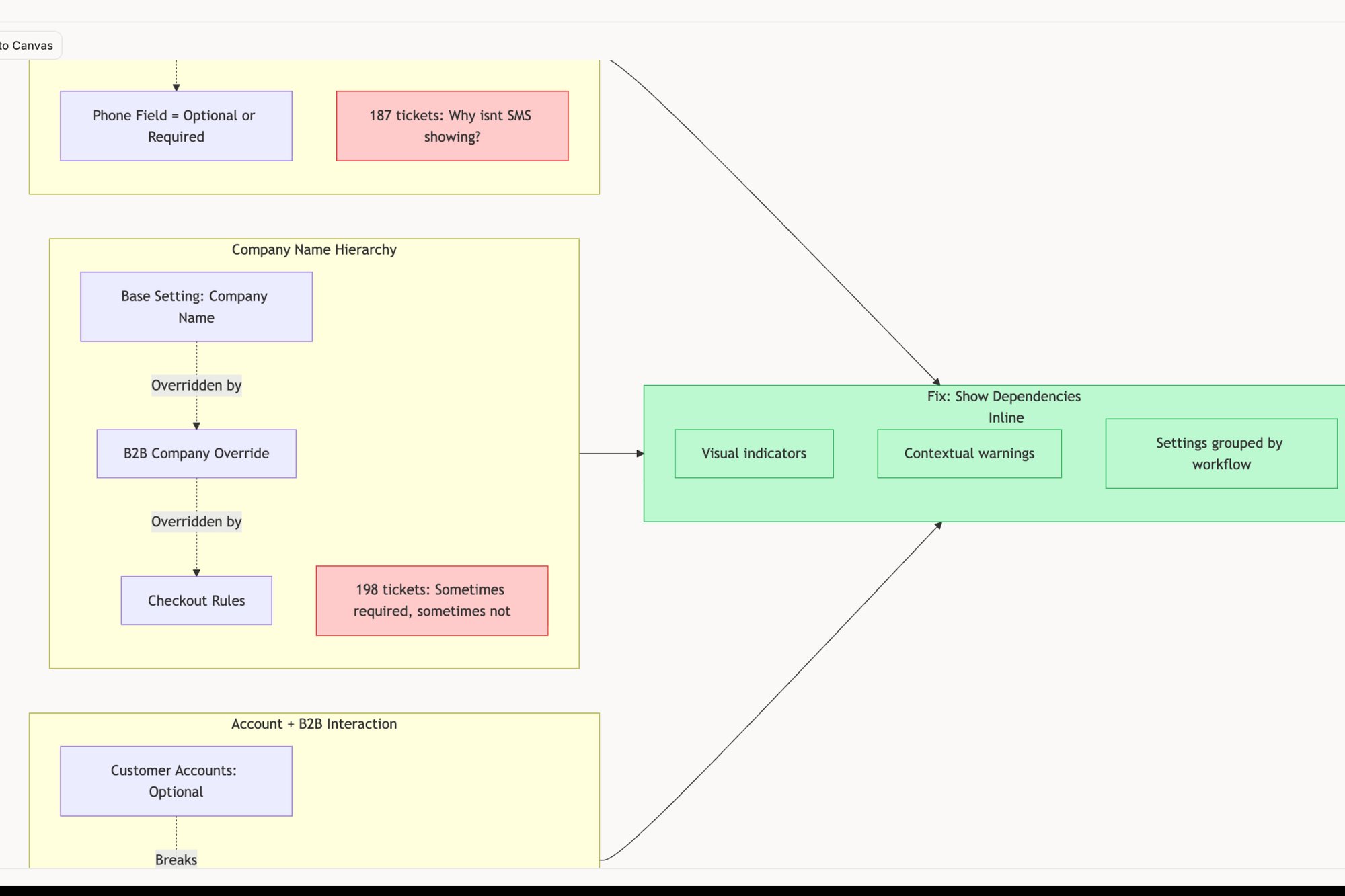
For the first time, everyone saw the complete picture. They finally understood how "Update API endpoint" and "Redesign button style" connected to create a single, vastly improved experience. The visual story did what a hundred Jira tickets could not: it created a shared understanding.
A roadmap is a statement of intent and direction. It’s a communication tool that helps you articulate your strategy and get everyone moving in the same direction.
This is the key. Your roadmap isn't a release plan; it's a strategic communication document. It’s your most powerful tool for managing expectations and aligning your entire organization. To get better at turning raw ideas into these kinds of artifacts, you might find value in learning about AI tools that turn user feedback into product roadmaps.
The Economics of a Good Story
Let's zoom out for a moment. Why is this storytelling so critical? It all comes down to incentives.
Your stakeholders are under constant pressure to deliver specific outcomes for their departments. The VP of Sales needs to hit a revenue number. The Head of Support needs to reduce ticket volume. Their feature requests are perfectly rational attempts to meet their goals using your team's limited resources.
When you just present a list of features, you invite them to negotiate for their specific item. The conversation immediately becomes a zero-sum game.
But when you present a compelling, user-centered story like "Make Team Onboarding Effortless," you completely change the frame. You force them to evaluate their request against the mission. The question is no longer, "Is my feature important?" It becomes, "Does my feature contribute to this quarter's story?"
In short, a narrative-driven roadmap is a tool for economic alignment. It aligns departmental incentives with the customer’s journey, which is the only sustainable way to build a great product.
Your final step in prioritization isn't to finalize a list. It's to build a story around it. Group your items into missions, visualize the user’s journey, and communicate the "why." This is how you transform your backlog from a source of contention into a source of clarity.
The Art of Backlog Maintenance and Culling
Your product backlog is not a warehouse for every idea ever uttered. Treating it like one is a silent killer of productivity. That ever-growing list becomes a digital graveyard where good ideas go to be forgotten, buried under hundreds of outdated requests and duplicates.
The most effective teams I've worked with understand a simple truth: a backlog should be treated like a garden.
It requires regular, intentional weeding.
This isn’t about just flipping through tickets in a weekly meeting. It’s a fundamental mindset shift from accumulation to curation. The goal is to keep your backlog a source of crisp, actionable clarity, not a sprawling archive of clutter. Without this discipline, your list becomes a source of friction, slowing down the very progress it was meant to enable.
Embracing Strategic Culling
A healthy backlog is one where items are allowed to die. The first step is to establish clear rules for this process, removing the emotion and guesswork from cleanup.
Here are a few tactics to put into practice:
- Set Expiration Dates: Any user story or feature request that has sat untouched for more than six months without being prioritized should be automatically archived. If it's truly important, it will come back with fresh urgency and context.
- Create an Idea Parking Lot: Not every suggestion is a backlog item. Create a separate, unstructured space (like a simple doc or a Miro board) for new ideas. This keeps your active backlog focused only on items that have been vetted against your product compass.
- Merge and Purge with Clustering: Duplicates are the weeds that choke out clarity. Actively hunt for them.
A friend at a Series C company recently felt they were drowning in requests to "improve the dashboard." It’s a common challenge, vague feedback leads to dozens of disconnected tickets. Instead of sorting them manually, they used an AI tool to analyze the user stories. It found hundreds of redundant or overlapping tickets, allowing them to consolidate the work into a single, focused epic.
The Power of Algorithmic Tidying
Using technology to find patterns isn’t just a neat trick; it's a powerful lever for efficiency. Academic research into software repositories has shown that automated techniques can effectively identify and group near-duplicate issue reports, with some methods achieving over 90% precision. For teams managing thousands of items, this kind of automated cleanup can be an enormous gain in focus.
As you get better at backlog maintenance, understanding the entire Mastering the Software Bug Life Cycle also becomes invaluable. It helps you manage and resolve one of the most common types of backlog items far more effectively.
A well-maintained backlog is a leading indicator of a high-functioning product team. It shows discipline, strategic alignment, and a ruthless focus on what truly matters.
Ultimately, backlog maintenance isn't a chore to be dreaded. It's a strategic activity that protects your team's most valuable resource: its focus. For a more integrated approach, you might be interested in our guide on how to manage product backlogs and design tasks in a unified system.
The grounded takeaway is this: schedule time on your calendar this month specifically for culling. Don’t just review and reprioritize. Actively archive, merge, and delete. Treat it like tending a garden, and you’ll find that the things you choose to grow will have a much better chance of thriving.
Alright, you've got the concepts down. You see your backlog as a living system, you've built your strategic compass, and you're ready to look at every task through the lens of value, effort, and risk. The urge to just dive in and start re-prioritizing everything is strong.
Resist that urge.
Trying to reorganize your entire backlog at once is like trying to fix a car by taking the whole engine apart on your garage floor. You'll just end up with a mess.
Your next move isn't a massive, sweeping overhaul. It's a quick, sharp diagnostic. The only way to get a handle on a complex system is to first get brutally honest about its current state. It's time for a Prioritization Audit.
This isn't another meeting to schedule or a workshop to plan. It's a 15-minute exercise you do by yourself. The goal is simple: get a clear, unflinching snapshot of your backlog’s real health. Stop trying to organize the chaos for a moment and just understand it.
The Five-Question Audit
Open up your backlog, grab a notepad, and answer these five questions. And be honest. No one's looking over your shoulder.
- What percentage of our backlog is over a year old? This gives you your Backlog Stagnation Rate. If it's a high number, your backlog isn't a dynamic roadmap; it's a museum of dead ideas. It's a clear signal that ruthless culling isn't just good housekeeping, it's essential for survival.
- Can I trace the top 10 items directly back to a company-level objective? Look at what's supposedly most important. For each one, is there a straight, obvious line connecting it to a current OKR or strategic goal? If you have to squint to see the connection, your compass is either broken or sitting in a drawer.
- Does our engineering lead agree with the effort scores on our highest-priority items? This is a simple gut check on your team's alignment. A quick "yes" means your planning is connected to reality. A "no" or, worse, an "I have no idea" points to a major disconnect between product and engineering. A seemingly simple UI element can hide a world of complexity, as the state map for this task assignment component reveals.
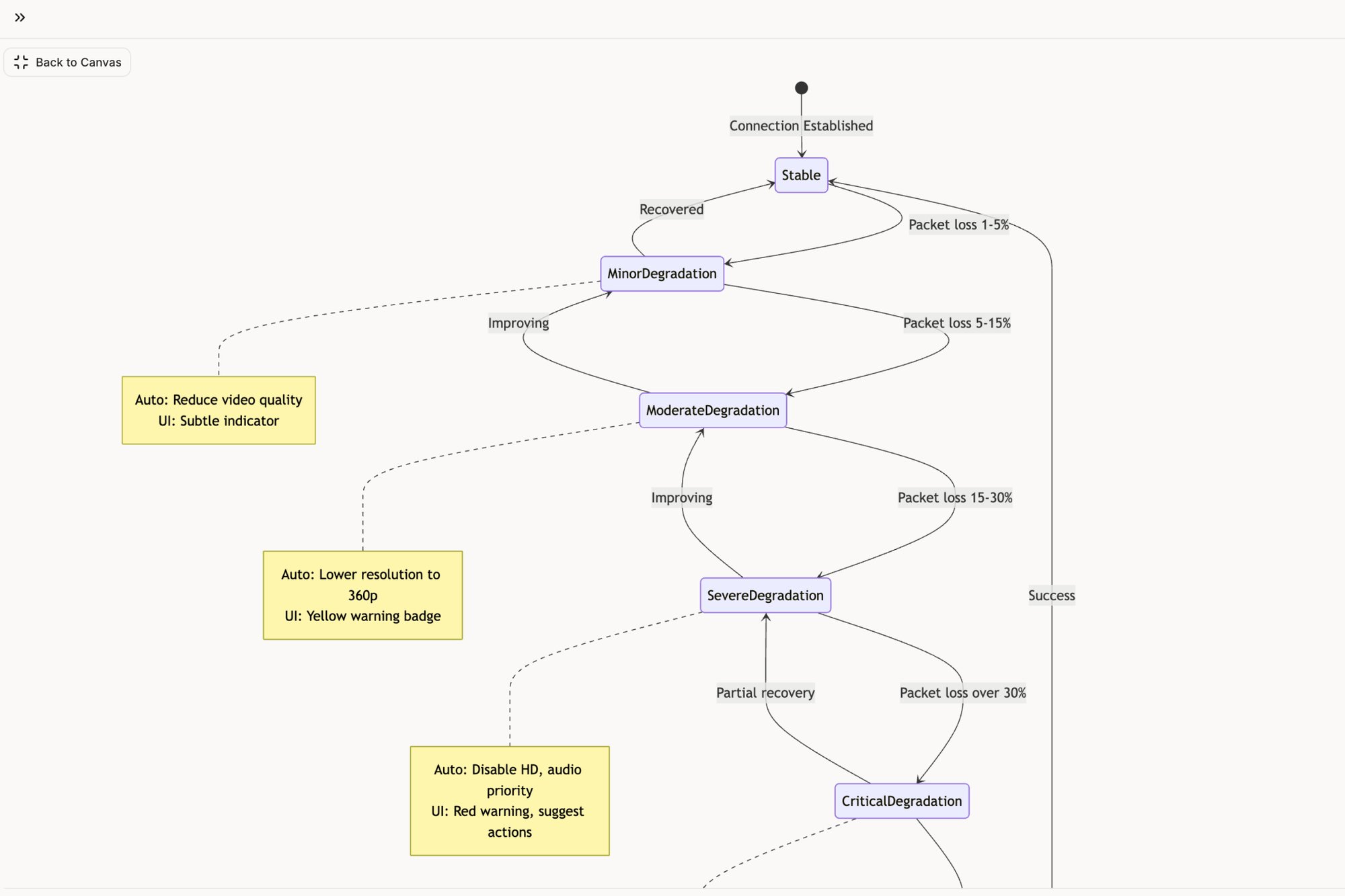
- How many of our top 20 items have undefined user-facing states? Scan your high-priority tickets. Are they all "happy paths"? Do they forget what happens when there's an error, a loading delay, or an empty screen? Every one of those missing states is a future fire drill. Mapping them out early, like we did in this analysis of Zoom’s network degradation states, is what separates proactive teams from reactive ones.
- When was the last time we removed more items than we added in a single week? This question gets to the heart of your team's culture. Are you curators or hoarders? A healthy backlog has to breathe, it needs an outbox as well as an inbox. If yours only ever gets bigger, it's slowly turning into a liability.
From Diagnosis to Action
These answers are your starting point. You're no longer just "feeling overwhelmed" by the backlog. Now you have specific, tangible evidence to make a case for a new approach.
You have a diagnosis. Your stagnation rate is 35%. Your strategic alignment is weak. Your effort estimates are pure fiction.
This little audit is your first real step toward taking back control. It transforms abstract principles into an immediate, concrete action you can take right now. It's the flashlight you needed to finally see what's been lurking in the dark corners of your backlog.
Your Top Questions About Backlog Prioritization, Answered
Let's tackle some of the common questions that pop up when teams start getting serious about their backlog prioritization process.
How Often Should a Product Backlog Be Prioritized?
Prioritization isn't a one-and-done event; it's a constant rhythm. Most agile teams will tell you they revisit and tweak priorities right before each sprint planning session. That usually means every one to two weeks. This cadence keeps the work tightly aligned with immediate goals and the realities on the ground.
But there's another, bigger loop. You should be doing a more strategic, zoomed-out reprioritization about once a quarter. This is your moment to step back and make sure the backlog still serves the company's bigger picture and reflects any major shifts in the market or your strategy.
Who Is Ultimately Responsible for Prioritizing the Backlog?
The Product Owner or Product Manager is the single owner of the backlog and its prioritization. The buck stops with them; they hold the final decision-making authority.
That said, great prioritization is never a solo performance. It's deeply collaborative. The best PMs act more like conductors, pulling in essential input from everyone:
- Engineering on effort and technical risk.
- Design on user experience and feasibility.
- Stakeholders on business value and market needs.
They synthesize all these inputs, but in the end, they have to make the final, decisive call.
What Is the Biggest Mistake Teams Make When Prioritizing?
By far, the most common and damaging mistake is falling into the HiPPO trap. This is when the Highest Paid Person's Opinion dictates what gets built next. It's a classic for a reason. This approach systematically bulldozes data, ignores user research, and tanks team morale by replacing objective analysis with sheer authority.
The best defense against the HiPPO is a good offense. Establishing a clear, shared framework, like the "Three Lenses" model we discussed, forces the conversation to center on objective criteria like value, effort, and risk. It makes it much, much harder for an opinion alone to win the day.
How Do You Handle Urgent Bugs Versus Planned Features?
You handle them by creating a clear, pre-defined policy before the emergency strikes. Don't try to figure this out in the middle of a crisis.
A common and effective approach is to establish a "fast lane." This lane is reserved exclusively for things like P0 or critical, production-breaking bugs that can, and should, interrupt an active sprint. The entry criteria for this lane have to be incredibly strict.
For less severe bugs? They don't get a free pass. They go straight into the backlog and have to compete against new features using the exact same prioritization criteria. This system is crucial. It prevents every single bug from becoming a fire drill that derails strategic work, ensuring you maintain a healthy balance between keeping the lights on and building the future. Backlog prioritization feeds directly into your roadmap. For the full process, see our product roadmap guide. Once prioritized, connect your backlog to the user's journey using a user story mapping template to ensure each release is coherent.
Your backlog is a living document, but managing it shouldn't feel like a constant battle. At Figr, we built an AI design agent that grounds your product decisions in your actual product context. It learns your design system, analyzes your live app, and generates production-ready artifacts like user flows, prototypes, and test cases that reflect your reality, not generic templates. Stop organizing chaos and start shipping with clarity.
Explore how Figr can streamline your product workflow today.