
The tool
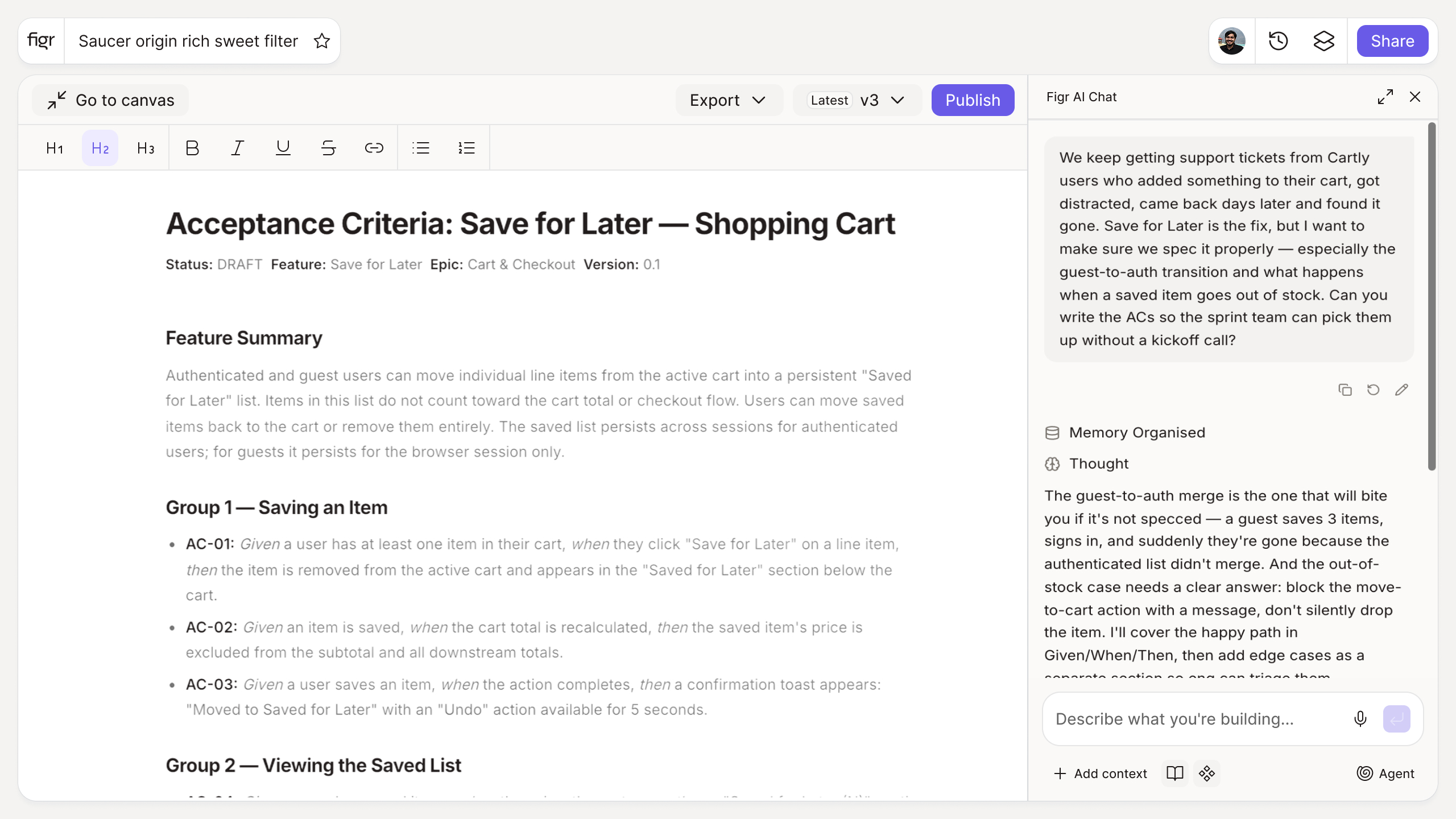
Inputs:
- User story or feature description (free text)
- Edge cases to include (selector, optional): empty, error, permission, loading
Output: A set of acceptance criteria in Given/When/Then format, covering the main path and common edge cases. Copyable as Markdown or Gherkin.
Behavior: Generates instantly in-browser, no login. Editable inline.
"Done" means different things to different people
Most design-to-dev friction is not disagreement, it is ambiguity. The PM thinks "done" includes the error state; the engineer ships the happy path; QA finds the gap in staging. Acceptance criteria close that gap by writing "done" down in a form everyone reads the same way.
Given/When/Then keeps each rule testable: a starting condition, an action, an expected result. It reads like plain English and converts cleanly into test cases, which is why it survives the handoff from product to engineering to QA. For the larger document this sits inside, see the functional specification document example.
How it works
1. Paste the story. Drop in a user story or describe the feature.
2. Choose edge cases. Optionally include empty, error, and permission states.
3. Generate. The tool returns structured Given/When/Then criteria.
4. Edit and attach. Refine, then add to the story in your backlog.
A worked example
Story: "As a user, I can reset my password." The happy-path criterion is easy: given a valid email, when I request a reset, then I receive a link. The criteria that prevent bugs are the rest, and the generator prompts them: given an email not in the system, given an expired link, given a weak new password, given too many attempts. Each becomes a testable rule rather than an assumption someone has to remember. Mapping those states is the same discipline as documenting edge cases before development, and it is what separates a feature that works from one that mostly works.
Where this tool ends and Figr begins
Acceptance criteria describe behavior across states, and every one of those states is a screen someone has to design. "Given an expired link, show an error" is a real screen with real copy, the kind that gets skipped under deadline and becomes a support ticket.
Figr is built for that. It is an AI product designer that reads your product context and reasons through the states a feature needs, then produces Figma-ready design for them on your system, not just the happy path. So the criteria you write here have designed screens to land in. Pair this with the user story generator upstream, the edge case generator to find the states, and the design QA checklist to verify them after the build.
Who this is for
This is for product managers and the engineers and QA they work with, on real products where unstated behavior turns into rework.
What this tool is not
It will not catch every edge case for a complex feature, and it is not a replacement for a conversation with engineering about the tricky ones. It gives you a strong, testable first pass. This is also a free, standalone writing tool, not a Figr product feature.
FAQ
Is the acceptance criteria generator free?
Yes, free and no sign-up.
What format is the output?
Given/When/Then, the standard testable format. You can copy it as Markdown or Gherkin.
Does it cover edge cases?
Yes. You can include empty, error, permission, and loading states alongside the main path.
Can I edit the criteria?
Yes. The output is a starting point. Edit inline, then attach to your story.
How is this different from Figr the product?
This is a free writing tool. Figr the product is an AI product designer that turns product context into UX decisions and Figma-ready design.