

You finished a review where the clickable concept looked finished, and a designer still has to rebuild every frame in the shared file. That is the Uizard vs Figma choice: one tool gets a direction on screen fast, and the other is where the team keeps that direction alive.
Leave that gap, and the saved afternoon returns as messy layers, missing states, and a handoff engineers can't inspect. Stakeholders leave thinking the flow is agreed. QA finds the empty cart, the expired coupon, and the permission error after engineering has already started.
Score both tools by rework after the first concept, then price the seats your actual roles need. You'll leave with a comparison you can rerun, a two-week pilot you can time, and a rule for when the faster mockup is the more expensive path.
Uizard and Figma Side by Side
Uizard turns a prompt, a sketch, or a screenshot into screens before the team has agreed on states. Figma is the file those screens have to survive in: components, review, and the version engineering will read.
The first mockup is the cheap part. Rework is the bill. A concept that cannot become a shared component, a named state, or an inspectable spec gets drawn twice, once for the meeting and once for the system of record.
Uizard grew from a machine-learning project tied to pix2code in 2017, became a company in 2018, and left beta in February 2021, as VentureBeat's Series A account records. By Miro's 2024 acquisition, Uizard said it had more than 3 million professionals and about $3.5 million in annual recurring revenue, per Sofarbot's acquisition write-up.
TechPilot's comparison treats Autodesigner, Screenshot Scanner, and Wireframe Scanner as the fast path from a prompt, a photo, or an existing interface into editable screens. Figma's control layer is components, auto layout, variables, libraries, history, branching, and Dev Mode. Teams hiring for graphic design work from Latin America still share one production file. The listing fills a seat. Tool choice stays separate from that hire.
| Criterion | Uizard | Figma |
|---|---|---|
| Primary strength | Fast concept generation from text, sketches, and screenshots | Production control after the concept, scored by how little gets redrawn |
| Idea inputs | Text prompts, screenshot scanning, and photographed sketches | Manual design on a canvas, with existing Figma files as the starting point |
| Design systems | Limited component architecture, so early screens often sit outside the library | Components, variables, team libraries, and organization-wide design systems on higher plans |
| Collaboration | Real-time multiplayer editing, comments, and shareable links | Real-time multiplayer, version history, and branching and merging on higher plans |
| AI features | Autodesigner, Screenshot Scanner, and Wireframe Scanner | Generation and edits that count only once they live in the shared component file |
| Developer handoff | React and CSS code export on the paid plan | Dev Mode with property inspection, generated code, asset download, and change comparison |
| Round trip to a production Figma file | No native bidirectional .fig export, so SVG transfer or a manual rebuild | Native home for production files, so the first concept does not need a second file |
Read the round-trip row before the speed row. If the paid Uizard seat exports React and CSS but a designer still rebuilds frames in Figma, that screen carries a concept seat and a production seat. Figma's higher-plan branching is the cost of keeping the same screen in one history. Uizard's lower rework holds when the job ends at the walkthrough.
Prototyping Depth Before Engineering Starts
A click-through prototype shows a path. A working prototype shows what happens when that path branches.
Uizard supports click-through flows, browser and mobile preview, comments, and sharing. That is enough for a stakeholder walkthrough. Reviews of the same workflow say it doesn't offer state management, conditional logic, or realistic behavior simulation. Figma's official plan comparison lists variables, expressions, and conditional logic in prototypes on Professional, Organization, and Enterprise, plus video in prototypes. Basic prototypes are on the Starter plan. Branching and merging, and organization-wide design systems, are listed for Organization and Enterprise.
A coupon field makes the split obvious
Imagine a checkout with one coupon box. This example is hypothetical.
In Uizard, the team links a happy path from cart to confirmation. The review shows the discount working. Nobody clicks an expired code.
In Figma, one variable switches that field among valid, expired, and invalid. The prototype routes each state to a different result. The same file can also hold the empty cart.
A polished demo can hide the empty state or the permission error that engineers find later.
Choose Uizard when the prototype must show direction within a week, especially if you're deciding when to use low-fidelity prototypes. Choose Figma when the prototype must prove a branch, a permission, or a validation rule before handoff.
Run this test before you commit:
- Empty. No items, no saved address, no prior order.
- Loading. The price is still calculating.
- Error. The coupon is expired or the payment fails.
- Permission denied. The shopper can't use that offer.
- Success. The order confirms with the right total.
If the tool models all five, the prototype is doing product work. If it models only success, you're still looking at a tour.
Design Systems, Team Scale, and Where Uizard Concepts Break Down
The expensive moment is the month after approval, when several people keep the same screens honest. A fast first concept scores poorly if the second edit of a shared color, modal, or component has to be done by hand on every file.
Figma gives reusable components, auto layout, variables and variable modes, team libraries, and version history, plus branching and merging on higher plans. Organization-wide design systems sit on Organization and Enterprise. Uizard gives comments and sharing, which is enough for a fast review, and a thinner component model. Hedrick's comparison is direct about the risk: Uizard can preview, comment, share, and export limited code, and it doesn't match Figma's component libraries, interaction model, or handoff. Its Figma connection mainly brings Figma work in. There is no native bidirectional .fig export, so an AI concept often returns as SVG or a manual rebuild.
One brand color, two maintenance bills
Three designers change a brand color.
In Figma, they change the variable. Every screen that uses it updates. The library is the system of record, which is the point of a design system guide for 2026. One edit covers the set. The rework is the review of that change, not a hunt through copies.
In Uizard, each concept can live in its own project. The team edits each copy by hand. The free plan also caps work at two projects, so a third concept already needs a paid seat or a deleted file. Headcount then shows up as duplicated files, not as a shared library.
Uizard helps a team decide what to build, while Figma helps a team keep many screens consistent after the decision.
Where the file starts to strain
A Capterra review, summarized in that same comparison, reports slow behavior in large Uizard files with many vectors or nested components.
Treat growth as a workflow checkpoint, not a measured ceiling. When a concept set is large enough that it must feed engineering directly, move it into Figma. Split Uizard projects by feature. Archive finished concepts. Keep tokens, components, and history in Figma, where a later change still has one place to land.
Coordination cost rises with contributors and files. A fast tool that emits disconnected concepts moves the work into reconciliation. Someone still has to notice that Tuesday's modal and Thursday's modal no longer match. That gap is the score that matters: hours spent making later screens agree with the first, after the first mockup is already approved.
Test contrast, focus order, and labels by hand on the screens you plan to keep. Don't treat a generated layout as an audit.
Developer Handoff and the Round Trip to Figma
Handoff is a workspace, not a screenshot with measurements scribbled on it.
Figma's Dev Mode guide describes a dedicated place where developers inspect properties, view generated code, download assets, compare changes, and manage handoff. Advanced access needs a paid Full or Dev seat. A Dev seat includes view and comment access in Design files, so an engineer doesn't need a design seat to read the file. Uizard's $12 plan advertises React and CSS handoff. That export is narrower than a workspace that also tracks what changed.
The handoff loop looks like this:
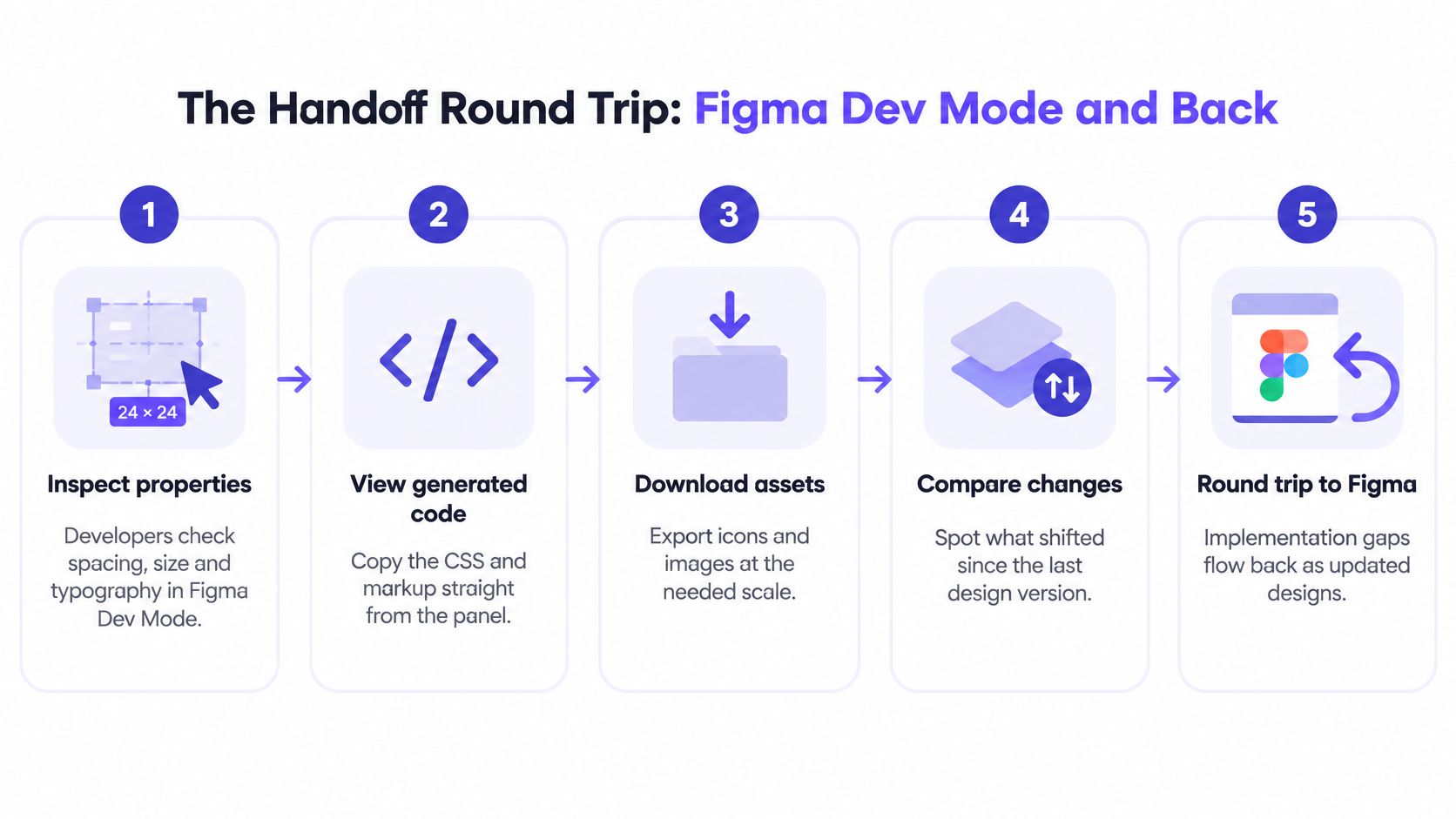
What the return trip actually costs
Uizard has no native bidirectional .fig export. Teams often send SVGs. G2's Figma and Uizard comparison is where reviewers describe those files: messy layers, missing auto layout, and no meaningful component linkage. A designer then rebuilds the hierarchy.
Here is an illustrative case, not a timed study. A designer generates twelve screens in Uizard in one afternoon. Rebuilding auto layout and tokens in Figma takes two days. Generation saved an afternoon. The rebuild spent two days. Net, the team is behind.
If you want a shared method for that rebuild, start from developer handoff best practices and measure the round trip on one feature:
- Time from generated concept to an approved, token-compliant Figma file. Start the clock at export and stop it when a designer would hand the file to engineering.
- Share of elements recreated by hand. Count frames and components you had to redraw, then divide by the count you exported.
- Share of required states and branches the prototype models. List the states engineering must build, and mark which ones the prototype routes.
If rebuild time exceeds the time the concept saved, Figma should lead from the start. A quick tour of how teams inspect and return changes sits here:
What Each Tool Costs a Mixed Team
Two designers, four developers, and six stakeholders do not share one sticker price. Seat type and role set the invoice. The useful score is what you still spend on rework after the first concept lands.
Uizard's pricing page allows two projects and three AI generations a month on the free plan. The $12 plan raises that to 100 projects and 500 AI generations, and adds private projects plus React and CSS handoff. Subframe's 2025 comparison lists that Pro price as $12 per editor per month billed annually. One page reads as a monthly plan price, the other as annual billing, so confirm the invoice before you budget.
Figma sells seats, not a shared editor login. A Full seat reaches Figma Design. A Dev seat adds Dev Mode with view and comment access to design files. A Collab seat covers collaboration products and basic inspection. Figma's pricing materials list example Organization prices of $55 for Full, $25 for Dev, and $5 for Collab. Plan and billing terms set the final amount. Multiply Full seats by the Full price, Dev seats by the Dev price, and stakeholder seats by the Collab rate. Then rerun the same sum with your headcount.
| Team mix | Uizard (calculated) | Figma (calculated) |
|---|---|---|
| Solo PM, three concepts a month, no handoff | $0 on the free plan within 2 projects and 3 AI generations | One Full seat at Figma's $55 example price is $55; check Figma's plan page for Starter pricing |
| Two designers, four developers, six stakeholders | $24, from 2 × $12, if only the two designers hold editor seats | $240, from (2 × $55) + (4 × $25) + (6 × $5) |
| Ten designers and PMs, no developers | $120, from 10 × $12 | $550, from 10 × $55, if each person needs a Full seat |
These totals are calculated from example list prices, not quotes. Uizard's pricing page lists no separate developer or viewer price, so the middle row counts only editor seats. On Figma, six stakeholders are priced as Collab seats. If they only need free view access, drop 6 × $5 and the total falls to $210.
A lower first-concept bill still loses when the following week goes to rebuilding hierarchy, tokens, and missing states. Set the $240 mixed-team figure, or the $550 all-Full figure, against those hours. That is how seat cost relates to faster design-to-dev handoffs for product teams.
Choosing the Right Tool and Running a Pilot
Start from the job, then verify the plan can do it.
Uizard fits a team that needs stakeholder alignment within days, has few or no designers, and wants several directions without learning a production tool. Figma fits a shared system, several contributors, developer handoff, and prototypes that model logic. Many mixed teams explore in Uizard, then check the chosen direction in Figma against tokens, responsive states, and handoff. Figr works around the Figma workflow and doesn't replace Figma, so the system of record stays put while earlier thinking gets sharper.
| Situation | Start with | Verify before committing |
|---|---|---|
| Stakeholder alignment within days, few or no designers | Uizard | Concepts stay within project and generation limits |
| Shared design system with several contributors | Figma | The plan includes organization-wide design systems |
| Prototype must prove branches, permissions, or validation rules | Figma | The plan includes variables and conditional logic |
| Engineers need inspection and code from designs | Figma with Dev seats | Count developers who need Full or Dev seats |
| Exploration first, production validation second | Uizard, then Figma | Measure rebuild time before handoff |
The only next action that settles it
For the next two weeks, pick one real feature with five required states. Build the concept in Uizard and the same flow in Figma. Time both. Count elements you had to rebuild. Choose the tool with lower rework, not the faster first mockup.
Watch for fixing inconsistent AI prototyping output while you run it. If the generated screens drift from your components, that drift is part of the rework score, not a separate taste debate. Let the timesheet settle the argument. Novelty shouldn't.
Frequently Asked Questions
Is Uizard free to use?
Yes, with hard limits. The free plan allows two projects and three AI generations per month. The $12 plan raises that to 100 projects and 500 AI generations, and it adds private projects plus React and CSS handoff. Occasional exploration fits the free tier. A team that spins many alternatives will hit the ceiling quickly, and each discarded generation still leaves the rebuild for later.
Can I move a Uizard concept into Figma without rebuilding it?
Usually not fully. There is no native bidirectional .fig export. SVG transfers can arrive with messy layers, missing auto layout, and no component linkage, so a designer rebuilds the hierarchy. Count that rebuild in the rework score. The export is a reference. The production file still gets built in Figma.
Does Uizard replace Figma for professional design?
Uizard stays outside the shared system of record. Comparisons describe it as easier to learn and faster for mockups, and Figma as the stronger platform for structured professional work. Use Uizard to choose a direction. Keep components, history, and handoff in Figma, where the team reviews and finishes the file.
Which Figma plans support conditional prototypes and branching?
Variables, expressions, and conditional logic are on Professional, Organization, and Enterprise. Branching and merging, and organization-wide design systems, are on Organization and Enterprise. Basic prototypes exist on Starter. Match the seat to the job before you promise a branching prototype: a designer on Starter cannot deliver the same logic as someone on Organization.
Does Figma have AI features worth comparing?
Figma's AI features change often, so check its current documentation for what each plan includes before you decide whether AI matters for your team. Score only what your seats include, not a demo you have not checked against the plan.
Figr uses your screens, specs, and design system to map flows and edge cases, then generates Figma-ready starting points instead of a blank canvas. You still review and finish in Figma. The gain is fewer states to reconstruct after the first concept. See how that works at Figr.