
A test scenario describes the situation and behavior to examine, while a test case specifies how to check one particular condition, with inputs, expected results and postconditions. Confuse the two in a sprint doc and your team can't tell what's planned from what's proven. Product writes a journey, QA reads a script, and both think they're talking about the same artifact.
When that confusion stands, coverage starts to look finished before any check runs. A board shows password reset as covered because someone named the journey, yet no one tested an expired link, an unknown email or a weak password. The defect arrives later as a support ticket, a blocked user or a release decision nobody can defend.
The fix is a simple chain you can inspect. A requirement points to a scenario, the scenario points to concrete cases, and each case points to a result. Build that chain for the test case vs test scenario decision and gaps become obvious before handoff, not after launch.
How a Test Scenario and a Test Case Differ
A user clicks forgot password, waits, and the reset link never arrives. That's the kind of situation a scenario names. It doesn't yet tell a tester what email to enter, what message should appear, or what state to check afterward. Can you see why naming the journey isn't the same as testing it?
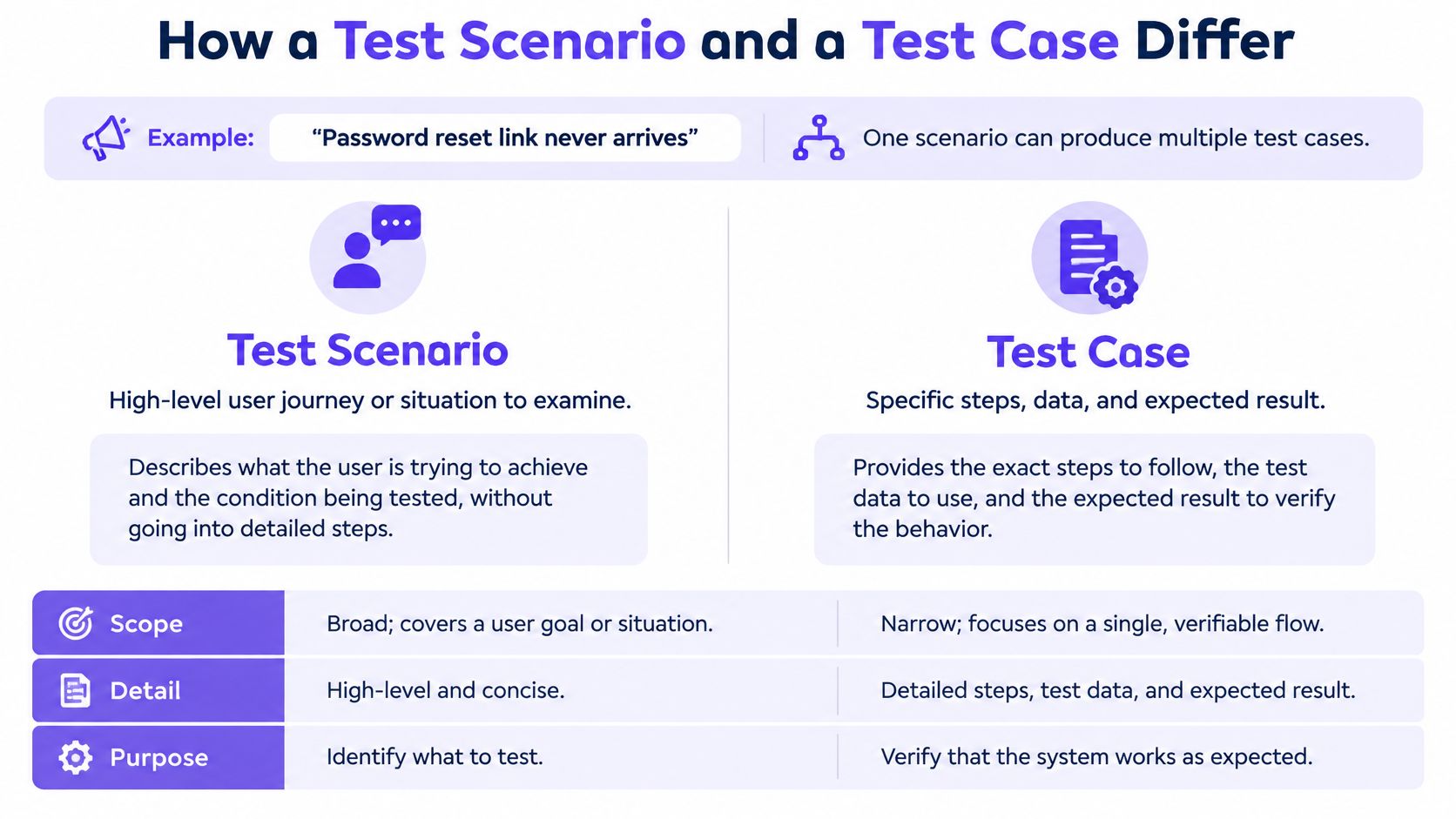
A test scenario is a high-level situation or user journey that says what behavior must be examined, usually drawn from a requirement, user story or product risk. A test case is the executable specification for checking one particular condition, with preconditions, inputs, expected results and postconditions. If you're still shaping the journey itself, it's worth learning how to write stronger user scenarios before you derive cases from them.
The ISTQB Line
The ISTQB materials describe a scenario as an explicitly defined use case or user story, whereas a test case contains concrete inputs, execution preconditions, expected results and postconditions. That detail is what lets another tester, or an automated system, reproduce the same check and reach the same verdict. One scenario about resetting a forgotten password can therefore produce cases for a valid reset, an expired link, an unknown email, a weak password and repeated requests.
Test scenario vs test case at a glance
Attribute: Level of detail
Test scenario: High-level situation or user journey
Test case: Executable, step-level specification
Attribute: Typical source
Test scenario: Requirement, user story or product risk
Test case: Test condition derived from a scenario
Attribute: Who writes it first
Test scenario: Product manager or analyst during test analysis
Test case: QA engineer after the scenario is reviewed
Attribute: Quantity per feature
Test scenario: One per critical user journey
Test case: Several per scenario, covering valid, invalid, boundary and failure paths
Attribute: Best used for
Test scenario: Coverage planning and exploratory discussion
Test case: Repeatable execution, pass or fail evidence and automation
Attribute: Reported as
Test scenario: Share of critical journeys with a scenario
Test case: Case pass rate and requirement-level coverage
Working line: A scenario guides planning and discussion. A case can be assigned, repeated and marked pass or fail.
Think of it as a map and its checkpoints. The scenario maps the journey worth taking. Each case is a checkpoint with coordinates, evidence and a defined arrival condition. Don't let one bloated case try to cover several journeys at once. Decompose the journey first, then verify each outcome, boundary and failure path on its own terms. A feature needs both layers before anyone can credibly claim it works.
Why Teams Keep Mixing Up the Two Terms
When a PM writes "checkout works" on a planning board and calls it a scenario, the QA lead often reads the same line as a script missing its steps. At sprint review the board can still say full coverage, even though no negative checkout path has run. The journey was named. Nothing in the chain proved it.
That single phrase was doing two jobs. Product meant a business flow: a shopper pays and leaves with an order. QA expected an executable script, with preconditions, inputs, actions, and a result you can mark pass or fail. The gap is a documentation conflict, and it is a common way the test case vs test scenario mix-up hides unfinished work. A label sits on the board. No case hangs off that label, so the coverage report describes a name, not a traced path.
Why the Vocabulary Allows It
The terms are not consistently standardized. A review of test scenario terminology notes that the ISTQB glossary defines a test case through preconditions, inputs, actions, expected results and postconditions, while describing a scenario only as an informal sequence of actions. The same review places scenario nearer to a test condition than to a core standardized term. One artifact gets a precise definition. The other gets loose language. Unless the team closes that gap locally, every planning board invents its own meaning for the same words.
Three agreements, written where everyone can find them, are enough.
Define the words locally. Put scenario, condition and case on one shared glossary page, with a one-line example of each from your own product. For checkout, the scenario might read "a returning shopper pays with a saved card." A condition might be "card declined." A case is the steps plus the message the shopper should see.
Name what needs traceability. List which artifacts must link to a requirement, and which can stay lightweight planning notes. A scenario that never points at a requirement, and never receives a case, is a note. It is not evidence that the journey works.
State when covered means covered. A scenario counts as covered only when its high-risk paths have at least one case with an explicit expected result. Skip that rule and journeys get marked done at the naming stage. Unrun negative paths stay invisible, while the report still looks complete.
Ownership closes the loop. Product owns the scenario wording because product owns the journey and the risk it represents. QA owns the case wording because QA owns repeatability and evidence. Both sign the link between them, so neither artifact drifts without the other side noticing. That shared signature turns a vocabulary argument into a decision the team made once, on purpose.
Breaking One Scenario Into Its Test Cases
Take the password reset scenario and break it down. The journey sounds simple until you ask what must be proven. Each case below is a separate condition with its own expected result, because each one can fail in a different way.
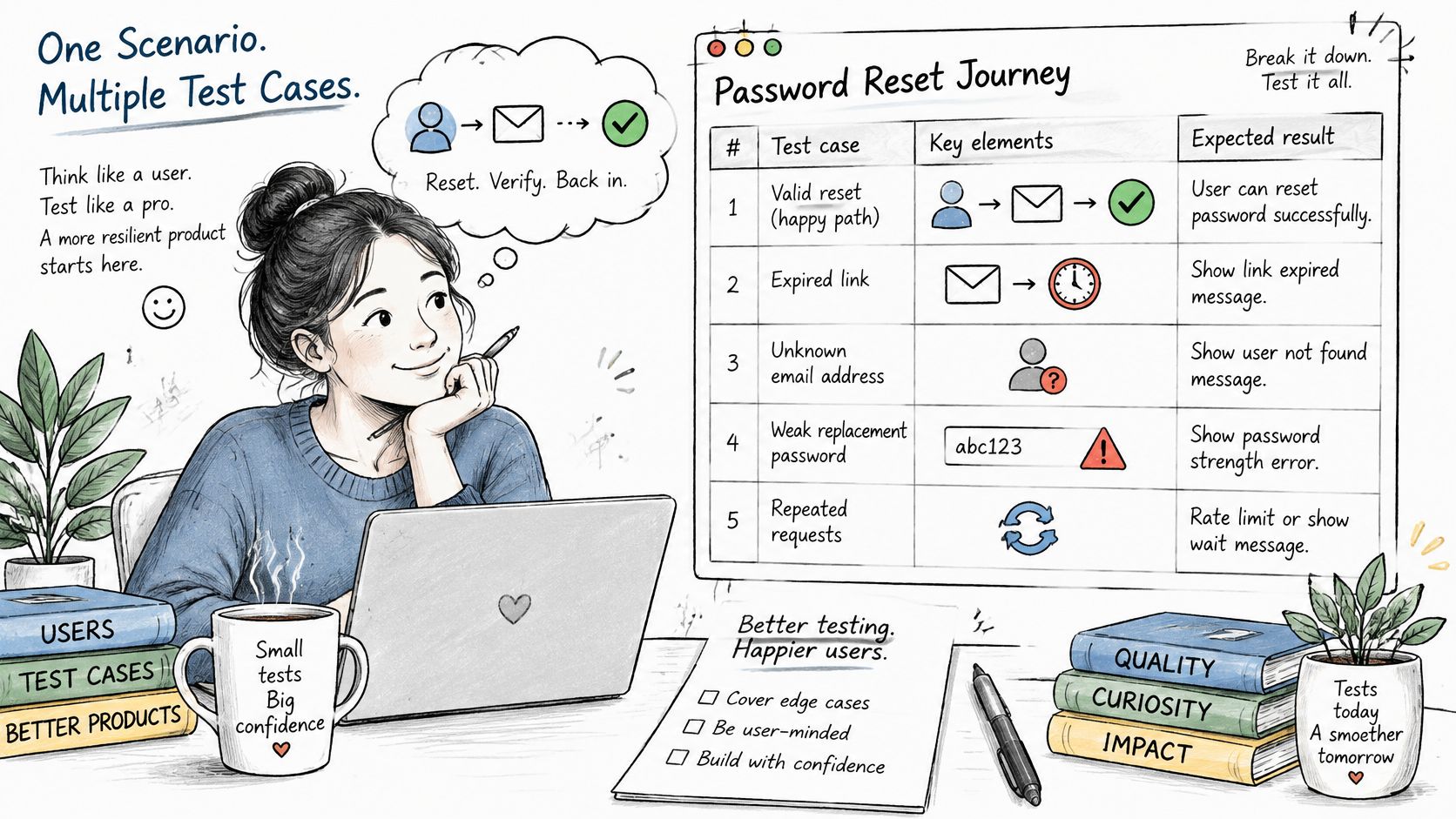
Test cases derived from the password reset scenario
Test case: Valid reset
Condition checked: Link sent to a registered email and used once within its window
Expected result: Password changed and old password rejected
Test case: Expired link
Condition checked: Link used after its validity window
Expected result: Error message shown and no password change
Test case: Unknown email
Condition checked: Reset requested for an address with no account
Expected result: Same confirmation message shown, no account revealed
Test case: Weak replacement password
Condition checked: New password below the policy minimum
Expected result: Rejected with the specific policy reason
Test case: Repeated requests
Condition checked: Several reset links requested in a row
Expected result: Only the most recent link works
Look closely at the unknown email case. Why must the confirmation message match the valid case exactly? Because a different message would tell an attacker which accounts exist. That security requirement only becomes testable once it's written as an expected result in a case. The weak password case does similar work, and it's where methodical checks like testing age and password field boundaries sharpen what below the minimum means.
The Traceability Chain
Now link the pieces. The requirement points to the scenario. The scenario points to each case. Each case points to its execution result. The NIST quality-assurance guidance identifies traceability as a core element of test design, alongside objectives, coverage, boundary tests, constraints, inputs, expected outputs and evaluation criteria. NIST describes requirements tracing as a way to verify that software addresses every system requirement with adequate testing.
That chain exposes what a coverage percentage hides. A scenario can sit marked as covered with no executable negative case beneath it, pretty in a report and empty in practice. A case can also test behavior no approved requirement justifies, which matters when you need impact analysis after a requirement changes.
A scenario shows a capability deserves attention. Traceable cases show what was actually proven, and what remains unproven.
To find missing states before QA does, run any feature against a simple scan. We built our map edge cases feature to find loading, empty, error, validation, permission, quota, retry, recovery and enterprise exception states, and that same list works as a manual checklist on any screen. Does your reset flow have a case for retry after a failed send? What about recovery when the session expires mid-flow? Finish with this check on your own feature: every requirement points to a scenario, and every high-risk scenario points to at least one case with an explicit expected result.
Template Fields for Scenarios and Cases
Templates look like paperwork until a new tester picks up your case cold. Can someone who never saw the feature run it and reach a clear pass or fail? If not, a field is missing, and that gap is a decision your team hasn't made yet. The scenario template stays short and outcome-focused because its readers are planning. The case template stays strict because its readers are executing.
Template fields for each artifact
Field: Title
In the scenario: Journey and objective in one line
In the test case: The specific condition under test
Field: Preconditions
In the scenario: Business and account context
In the test case: Exact data, state and environment set-up
Field: Inputs and actions
In the scenario: Described as a user flow
In the test case: Exact values and ordered actions
Field: Expected result
In the scenario: Outcome the journey must reach
In the test case: Observable result for each step
Field: Postconditions
In the scenario: Optional system state after the flow
In the test case: Required state the tester verifies afterwards
Field: Traceability
In the scenario: Linked requirement or user story
In the test case: Linked scenario, requirement ID and result
What the Same Field Means at Each Level
The title comparison shows the whole distinction in miniature. A scenario title reads like a journey: customer resets a forgotten password. A case title reads like a condition: reset link used after its validity window is rejected. The first tells a product manager what's covered. The second tells a tester exactly what to break.
Preconditions follow the same pattern. At scenario level, a registered customer with access to their inbox is enough context to plan. At case level, the tester needs the exact account, the exact link age and the environment that issues the link. Without that precision, two testers run two different tests and file conflicting results. If you want the mechanics of writing effective test cases step by step, that depth belongs at this layer, not in the scenario.
Three fields get left blank most often, and each one costs you later.
- Exact test data: A valid email is a wish. A named test account with a known state is data a tester can use.
- Environment: Links, quotas and feature flags behave differently across staging and production, so say where the case runs.
- Postcondition: The state afterward, such as the old password being rejected, is often where defects hide.
Copy this field set into your test management tool or a plain spreadsheet. Then treat any blank field as a missing decision rather than a missing detail. Someone still has to decide what correct looks like. Better that it's you, before execution, than a tester guessing during a regression run.
Choosing Between a Scenario, a Case or Both
There isn't one rule for the test case vs test scenario choice. There's a decision by situation, and the situation is mostly about risk and stability. Ask how settled the journey is, and what a failure would cost. Those two answers point to the right artifact.
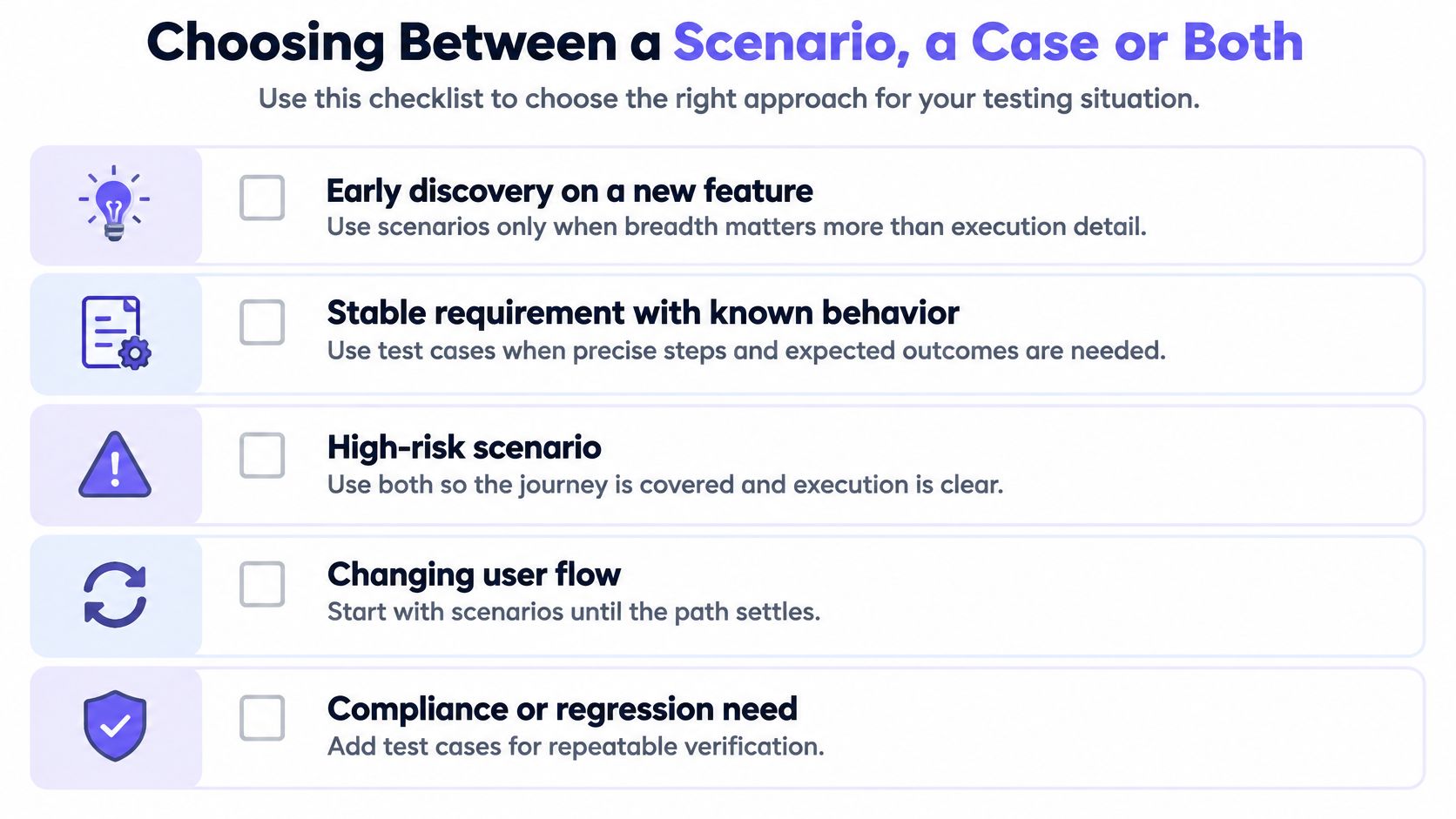
Decide by Situation
Early discovery on a new feature calls for scenarios only. The journey is still changing, so breadth matters more than execution detail, and case-level precision would be rewritten within days. Scenarios survive that churn because they describe the goal, not the screens.
Payments, permissions, regulated data and audited releases call for executable cases with traceability. Someone may later ask which requirement each test proves, and a scenario list can't answer that. Cases with explicit expected results can. This is also where defining acceptance criteria for UAT helps you set the bar each case must clear.
Accessibility work calls for both, every time. A broad scenario isn't covered just because its happy path passes for a mouse user. Keyboard use, screen reader output, captions, focus order and error recovery each need specific, human-verified cases. The Applause accessibility report found that 79% of surveyed organizations use AI to improve digital accessibility, yet 89.3% still validate AI-detected results with human testers. Doesn't that tell you broad coverage claims need human-checked cases underneath?
A higher count of generated cases doesn't prove coverage. Volume is easy to manufacture. Evidence tied to a journey and a risk is harder.
Run your current feature through four quick questions.
- Is the journey still changing? If yes, stay at scenario level until the path settles.
- Must you prove a specific requirement? If yes, write cases with traceability now.
- Does failure carry money, safety or compliance cost? If yes, use both layers and prioritize the high-risk paths.
- Will this run in regression? If yes, it needs executable cases, because scenarios can't be rerun.
In short, default to scenarios for planning and cases for release evidence. That split keeps stakeholder conversations readable while giving engineering something it can execute, triage and defend.
How to Hand Off Scenarios and Cases to QA
A handoff fails without warning. QA receives a folder of scenarios, assumes cases exist somewhere, and discovers the gap during regression. Turn it into a procedure instead. Six steps, each with a reason and a common slip, will carry a team through. The same discipline behind a solid developer handoff guide applies here: hand over decisions and links, not just files.
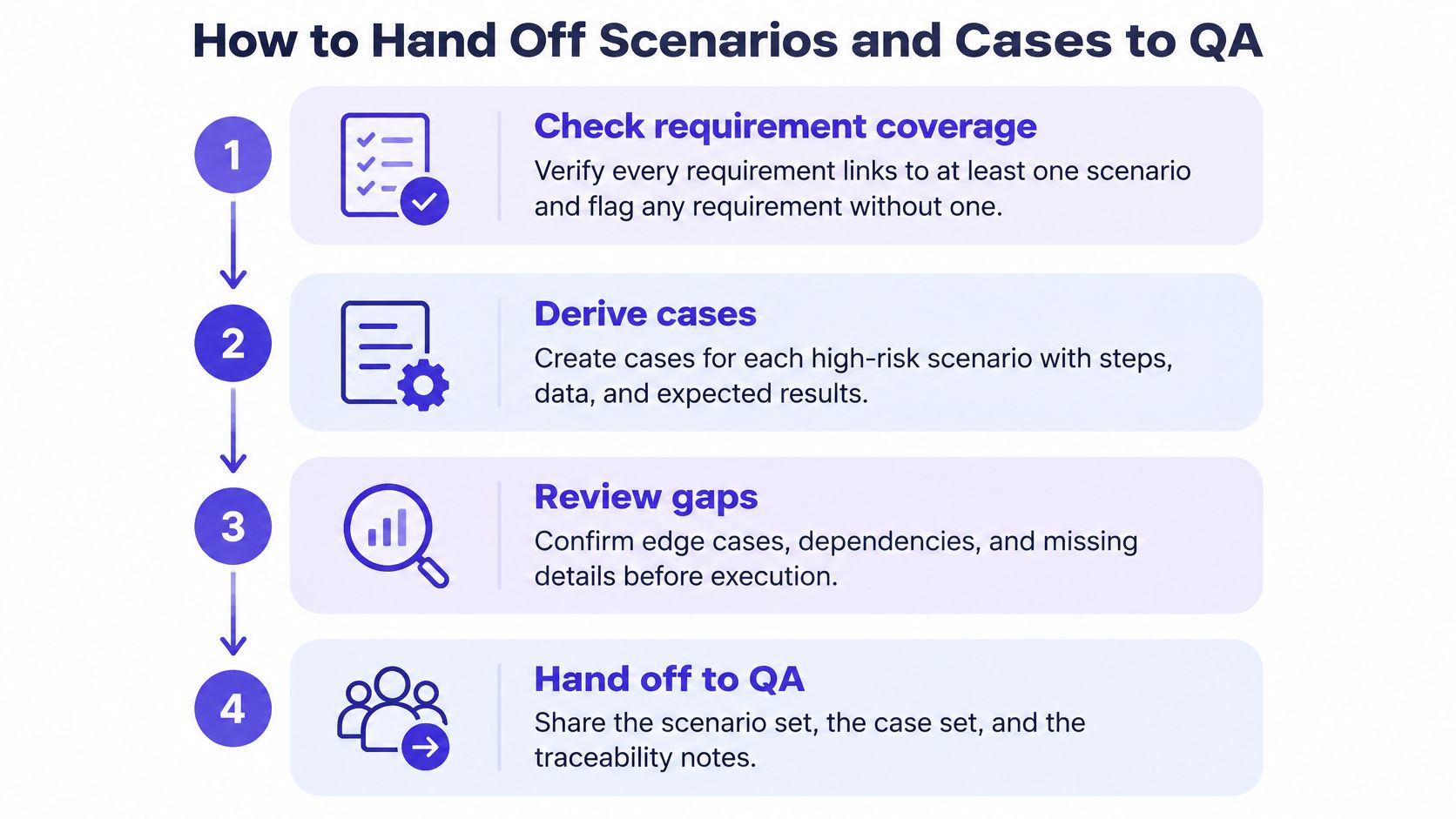
Step 1. Check every requirement has a scenario.
- Flag any requirement without one before QA starts deriving cases.
- The common slip: discovering orphan requirements during execution, when fixes are expensive.
Step 2. Derive cases for each high-risk scenario.
- Give each case explicit expected results and named test data.
- The common slip: writing cases only for the valid path and leaving failure paths as tribal knowledge.
Step 3. Tag each case with risk signals.
- Mark changed requirements, complex code, large modules and tightly connected dependencies.
- The common slip: treating every case as equally urgent, which wastes early feedback.
Step 4. Order execution by risk, not by habit.
- Run the highest-risk cases first when time or environments are limited, without deleting low-risk cases.
- The common slip: running the suite in creation order because that's how it's always run.
Step 5. Agree which coverage number the release uses.
- Report scenario coverage as the share of critical journeys with a linked scenario, and case coverage as the share of requirements with at least one executed case.
- The common slip: reporting scenario coverage as if it were case coverage, which inflates readiness.
Step 6. Attach traceability links to every case.
- Each failure should trace back to the requirement it threatens without detective work.
- The common slip: pasting results into a chat thread where the link to the requirement dies.
Why order by risk at all? A peer-reviewed study on risk-based test-case prioritization reported an 80% fault-detection rate after executing 150 prioritized test cases, compared with 66.67% for one comparison method and 60% for another. Prioritization doesn't delete low-risk cases. It surfaces consequential faults earlier, while you still have time to act on them.
Step back for a second and consider the economics. Teams reward visible output, so case counts grow, while ordering and linking stay invisible until a release goes wrong. Risk tags and traceability make that invisible work reviewable, which is why they survive schedule pressure. The proof your handoff worked is simple: a QA engineer can trace any failing case back to its requirement without asking the author a single question.
Map One Live Feature Before Your Next Handoff
Don't try to fix your whole suite this week. Pick one live feature in the current sprint and map it properly. One feature, done well, teaches your team the pattern faster than a cleanup project nobody finishes.
Start by listing its critical user journeys as scenarios. Give each one a title and the outcome it must reach, in language a stakeholder could challenge. If a journey can't be stated in one line, you probably have two journeys tangled together. Separate them now, while it's cheap.
Then pick the scenario with the highest business risk and derive its cases. Cover a valid path, a boundary, an error path and a recovery path. Those four shapes catch most of what breaks in production, and they force the expected results into the open. Which of the four does your current suite skip most often?
To draft a first pass faster, use an AI assistant or a design tool to propose scenarios and cases. We can draft PRDs and test scenarios for product managers, which makes a useful starting list when the blank page is the bottleneck. Review every generated line against your requirements, though. A generated list is a starting point, never proof of coverage.
Finish by marking the gaps in both directions. Flag any scenario with no matching requirement, since it may be testing work nobody approved. Flag any requirement with no scenario, since that's coverage you only think you have.
You'll know you're done when your team can point to one requirement, one scenario and a set of cases beneath it. Better still, they can say which case would fail first and why. That's the moment the test case vs test scenario distinction stops being vocabulary and starts being release evidence you can stand behind.
Map your next feature this way with Figr, which can draft PRDs and test scenarios from your live product context and surface the edge cases your journeys imply. Start with one high-risk scenario, derive its cases, and bring a traceability chain to your next QA handoff instead of a coverage claim.