

How to Create a Stakeholder Map for Your Product
I've watched a polished product review collapse because one stakeholder in the corner had veto power no one had mapped. The deck was tight, the design was ready, and the room still wasn't aligned.
That's what happens when stakeholder mapping is treated like decoration instead of structure. The team loses time, design queues stall, scope creeps in through the back door, and the loudest voice starts rewriting the product after the work is already done.
A good stakeholder map gives the team a shared picture of influence, interest, and relationships before opinions start colliding. It turns a messy room into a usable operating model for shipping software.
Why Your Last Product Review Derailed
The review usually fails before anyone says no. Someone was missing from the map.
Last week I watched a Product Manager walk into a final review with clean mocks, a neat PRD, and every anticipated objection handled. A senior compliance partner joined late, spotted a dependency nobody had documented, and the conversation shifted from shipping to rework within minutes. Everyone in the room could feel the same thing, the work wasn't wrong, the map was incomplete.
Stakeholder mapping is the visual and relational exercise of identifying who has influence, who has interest, and how those parties connect. Stakeholder analysis evaluates priorities and power. Mapping gives you the structure, analysis tells you what to do with it.
Practical rule: If a stakeholder can change the decision, they belong on the map before the review.
That distinction matters in product work because software ships through handoffs. Design, research, QA, legal, operations, and leadership all need different slices of the truth. A map that only captures names becomes a polite list. A real map shows who needs close management, who needs a lighter touch, and who only needs monitoring.
The UK Government Analysis Function uses power and interest as the core variables for this kind of prioritization, and it explicitly instructs teams to average each stakeholder's scores for power and interest before creating the map, which shows how standardized the method has become in public-sector work UK Government Analysis Function stakeholder mapping guidance. The same logic appears in the EU CAP Network's guidance on classifying stakeholders by whether they can affect or be affected by a program and its evaluation. The dimensions stay the same, power and interest. When you apply that thinking to product teams, the map stops being a soft-skills exercise and starts acting like a decision filter.
A Product Manager does not need more meetings. They need a cleaner decision path.
For a practical companion on the messy middle of reviews, curb chaotic design meetings pairs well with this topic, because the failure mode is often the same, too many voices, too little structure. The stakeholder awareness exercise is useful here too, because a map only helps if the team surfaces who matters before the room fills up with opinions.
The Frameworks That Work for Product Teams
The framework that holds up in product teams is the one that separates influence from detail.
The oldest mistake is treating every stakeholder as if they need the same kind of engagement. They don't. A senior leader who can block a launch needs a different cadence than a research participant who can explain a workflow gap. A compliance partner, an engineering lead, and an end-user advocate may all sit near the same initiative, but they rarely need the same artifact, the same tone, or the same amount of context.
Start with power and interest
The power-interest matrix stays useful because it is simple enough to run in a workshop and sharp enough to shape action. The UK Government Analysis Function describes the core move clearly, average each stakeholder's power and interest scores before plotting them UK Government Analysis Function stakeholder mapping guidance. That gives the team a repeatable way to distinguish who needs close management from who can be monitored more lightly.
The value is not the grid itself. It is the engagement strategy that falls out of it.
High power, high interest: These people need direct attention and early visibility.
High power, low interest: These people need concise updates and low-friction escalation paths.
Low power, high interest: These people need consistent information and a way to raise issues.
Low power, low interest: These people usually need monitoring, not constant involvement.
A useful product example is simple. An engineering lead may have high power over technical feasibility, while a compliance officer may have high power over release approval. End-user representatives often have high interest but lower formal power. If you collapse those differences, the map stops helping and starts flattening reality.
Add category, interest, and decision role
BetterEvaluation adds another useful layer by classifying stakeholders by category, interest in results, and role in decision-making or data provision BetterEvaluation stakeholder mapping and analysis. That matters because not every stakeholder influences the product in the same way. One person supplies data, another makes judgments, and another benefits from the change. Those are different mechanisms of influence.
Product teams often cut a lot of rework with that extra context. A stakeholder who supplies evidence needs traceability. A stakeholder who makes a judgment needs crisp trade-offs. A stakeholder who benefits from the change needs clarity on rollout and adoption. One map, several communication patterns.
A map that cannot drive an action plan is just documentation with nicer shapes.
For teams that keep living in Miro or Figma during workshops, Figr's product thinking approach is a useful parallel read because it frames product decisions around context, not just output. The same principle applies here. The map should reflect how the work moves through the organization, not how the org chart looks on paper.

The practical payoff is fewer artifacts with fewer surprises. Design gets the right reviewers. Research knows who needs evidence. QA knows who cares about edge cases. Leadership gets the level of detail they use. That is what makes stakeholder mapping useful as a living product operating system, not a one-time workshop output.
How to Run a Stakeholder Mapping Workshop
A stakeholder workshop works best when it behaves like a controlled discovery session, not a free-for-all on a whiteboard.
Teams usually enter the room with a short list of people they already expect to matter. The point of the workshop is to surface the missed dependencies, the quiet blockers, and the people who sit outside the meeting but still shape the decision. That requires structure. Without it, the loudest names win and the map looks tidy while hiding the true work.
Step 1. Set the product decision in scope
Define the decision the map needs to support.
Write the product change in one sentence.
State the moment the map has to help with, discovery, review, launch, or rollback.
Bring only the context that changes the decision.
Use existing context instead of starting from scratch.
Pull the PRD, design notes, and any open risks into the room.
Keep the workshop anchored in the actual product artifact.
If the team needs a faster way to gather that context, an online collaborative whiteboard tool can help, as long as it keeps the discussion tied to the product rather than drifting into loose brainstorming.
Watch for the first trap.
Senior voices will name the obvious people first.
The quieter blocker is usually a gatekeeper, not a sponsor.
Record names now, rank them later.
The UK Government's guide keeps this grounded by asking teams to spend 30 minutes listing stakeholders across site, regional, and national levels UK Government stakeholder mapping guide. That matters because teams often overtalk the visible names and undercount the people who affect the outcome indirectly.
Step 2. List stakeholders broadly
Brainstorm the full perimeter of influence.
Include internal teams, external partners, and decision-makers.
Add anyone who can block, accelerate, use, support, or challenge the change.
Capture people by role when names aren't known yet.
Separate the obvious from the structural.
Obvious, the Product Manager, design lead, engineering manager.
Structural, legal, security, procurement, operations, data owners.
Hidden, informal influencers and long-tenured managers with social weight.
Write down relationships as you hear them.
Who checks with whom before giving approval?
Who gets pulled in only when a risk appears?
Who will want a heads-up before the room hears the news?
The WHO stakeholder mapping toolkit separates identification from relationship mapping, which is the right instinct. A name list on its own does not show how the decision moves.
Step 3. Classify by power and interest
Score each stakeholder with the team in the room.
Ask who can stop the work.
Ask who cares enough to spend time on it.
Ask who gets blamed if it fails.
Plot the map, then challenge the assumptions.
Put the people with clear decision rights on the high-power side.
Move only after the team agrees on evidence.
Revisit anyone the group is overprotecting because of title alone.
Use a simple rule for dispute resolution.
If the score feels political, ask what action that person can take.
If the answer is “approval,” “funding,” or “blockage,” the power is real.
If the answer is “commentary,” the power is lower than the title suggests.
For hands-on facilitation, the stakeholder awareness exercise is useful when the room needs to slow down and notice the full set of actors before sorting them.
Step 4. Map the relationships
Draw the network, not just the grid.
Mark who influences whom.
Show who needs to be consulted before a decision.
Note where information has to pass through a gatekeeper.
Use edges to reveal hidden pressure.
A product lead may not hold formal power but may shape the narrative.
A security reviewer may not care about feature design but may veto launch timing.
A regional operator may depend on a change that the core team barely sees.
Keep the map readable.
Cluster similar roles together.
Avoid turning it into a directory.
Keep the focus on decision paths, not organizational trivia.
For a simple visual collaboration setup, the stakeholder analysis article fits naturally here, because analysis comes after structure. If mapping tells you who matters, analysis tells you how to engage them.

Step 5. Assign next actions
Turn the map into an engagement plan.
Set the communication format for each stakeholder group.
Assign an owner for each relationship.
Decide what gets reviewed live, what gets sent async, and what gets monitored.
Keep the plan narrow and practical.
Stakeholders do not need every artifact.
They need the right artifact at the right time.
If the plan cannot fit into a sprint cycle, it is too heavy.
A workshop on an online post it note board works well for distributed teams when the group is split across functions and time zones. The board is not the outcome. The outcome is a decision-ready map that the team can use immediately.
That same discipline matters when the workshop is remote and people are adding context from research, design, engineering, and operations at the same time. A good facilitation setup keeps those inputs visible without letting the session drift into a pile of sticky notes that nobody owns. The goal is a living operating system for the product, one that gets updated as dependencies change, not a one-time artifact that ages the moment the meeting ends.
Mapping Non-Human Stakeholders in AI-Driven Products
AI products bring in stakeholders that do not sit in the room, and they change the map.
A launch can stall because a model governance board, a platform policy, a security gate, or an analytics vendor has more effective power than the person signing the release note. If you draw stakeholder mapping as if only humans matter, you miss the actual blockers. The product ships through dependency chains, not just org charts.
The bigger shift is structural, not cosmetic. AI adoption has moved far enough that dependency mapping now matters in day-to-day product work. As noted earlier, the scale of AI use shows how quickly it has moved from special project to operating reality. Those conditions make it harder to rely on a static stakeholder list.
Identifying non-human stakeholders in AI products
Treat the system, policy, or workflow as a stakeholder when it can change the outcome.
AI models affect data access and output constraints.
Compliance workflows affect launch timing and approval paths.
App-store rules affect distribution.
Analytics vendors affect what you can observe.
Model-risk controls affect what you are allowed to ship.
Map the dependency, not just the label.
Who owns the model?
Who approves the policy exception?
Who can change the security review gate?
Who can revoke access to the data stream?
That is why the map works like a product operating system. It is not only about people with titles. It is about the forces that shape the product whether the room notices them or not.
Practical rule: If a workflow can veto a release, give it a place on the map.
Why product teams miss these dependencies
The failure usually starts with false symmetry. A Product Director looks powerful, so the team assumes the decision sits there. In AI-heavy products, a governance board or platform policy can override that authority without much warning. The launch still belongs to the Product Team, but the approval path belongs somewhere else.
AI types for product teams helps separate those dependency patterns. Different AI setups create different control points, and the map should reflect that instead of collapsing everything into “AI feature.”
How to extend the map
Add the control points.
Data access.
Model governance.
Security review.
Vendor dependency.
Observability and analytics.
Assign each control point a real owner.
Name the function.
Name the person where possible.
Note the condition that changes the decision.
Track edge cases early.
What happens when the model confidence is low?
What happens when a policy changes mid-sprint?
What happens when the external vendor changes terms?
The practical win is fewer late-stage blockers. The team stops treating compliance as a surprise and starts treating it as part of the system. That shift matters at scale because product incentives favor speed, while governance incentives favor control. The map is where those incentives meet.
Keeping Your Stakeholder Map Current Across Product Cycles
A stakeholder map that never changes is a historical artifact, not a product tool.
The first version often looks clean because it was built during discovery, before delivery exposed the pressure points. Then development starts, priorities shift, a compliance review surfaces a new risk, and the people who can slow or shape the release are no longer the same people who mattered at kickoff. That is normal. A useful map has to move with the product, the org, and the decision path.
Make the map part of governance
Tie map reviews to existing product rituals.
Revisit it during sprint planning when scope changes.
Recheck it before major reviews and release gates.
Update it after org changes or policy shifts.
Give ownership to one role.
The Product Manager usually keeps the map current.
The owner should update names, relationships, and engagement notes.
The team should know where the latest version lives.
Document disagreements, don't hide them.
If two stakeholders disagree on priority, record both views.
If a relationship changed after a decision, update the edge.
If a gatekeeper gained power, move them immediately.
The Wharton discussion of stakeholder mapping points to a bigger truth about modern product work: teams are operating in environments where tasks and skills keep shifting. The same pressure shows up in AI-heavy products, where model risk, governance, vendor dependencies, and approval layers can alter the decision path faster than the org chart does. A map that only captures human titles misses half the system, which is why the sales prospect identification playbook style of contact tracking falls short for product delivery.
Treat conflict as map data
A lot of teams try to resolve stakeholder disagreement by averaging it out. That usually hides the useful signal.
If two groups disagree on a product decision, the map should show the disagreement, not erase it.
The team can then decide whether the conflict is about timing, evidence, risk tolerance, or decision rights. That distinction matters because product politics often looks like opinion, when it is really a mismatch in authority or incentive.
A living map also changes the economics of shipping. Every avoided rework cycle saves review time, design churn, and context switching. In one workshop I ran for a cross-functional feature launch, the first map looked polished, but it missed a security reviewer and a platform owner who only entered the process after implementation started. The second version was less pretty and far more useful because it reflected the actual path to approval, not the org chart on the day of the workshop.
The same discipline applies to AI-enabled work. Review the map whenever a model changes, a policy updates, or a vendor relationship shifts, because those changes alter who needs to be consulted and who can block progress. That is also where a reference like Wharton stakeholder mapping discussion still helps, since the core idea is not a one-time exercise, but a way to keep decision context visible as the product evolves.
A living map is not a prettier workshop artifact. It is the operating system for stakeholder context, and it works best when the team updates it as part of real product cycles, not after the fact.
How Figr Accelerates Stakeholder Context Through the Visual Context Graph
A stakeholder map becomes easier to maintain when the product context underneath it stays current.
Figr's Visual Context Graph is built around five connected layers, visual context, behavioral context, design system context, product knowledge context, and implementation context. Together, those layers give a Product Manager a stable picture of the product environment instead of a stack of disconnected files. That matters because stakeholder alignment breaks fastest when different people are looking at different truths.
The five layers and why they matter
Visual context
Captures live screens, current patterns, and the actual interface stakeholders react to.
Reduces the “that's not what I saw” problem in review meetings.
Behavioral context
Pulls in analytics and user flows.
Shows what people do, not just what they say they do.
Design system context
Keeps tokens, components, variants, and usage rules visible.
Helps reviewers stay inside the product's actual design language.
Product knowledge context
Ingests PRDs, research, and docs.
Makes stakeholder requirements traceable instead of implicit.
Implementation context
Surfaces constraints, edge cases, and technical trade-offs.
Prevents the map from drifting away from what engineering can ship.
A lot of teams feel the pain. The map says one thing, the PRD says another, and the review deck says a third. The review becomes a debate about version control rather than product quality.
Why context graphs change the workflow
The practical benefit is consistency across stakeholders. The same underlying product truth can feed planning, design review, edge case mapping, and artifact generation without forcing the team to rebuild context each time. That keeps the stakeholder map connected to the product itself instead of to one workshop snapshot.
For teams looking at an AI design tool for product teams, the relevant value is not visual polish. It is the ability to keep product context, decision history, and stakeholder-facing artifacts aligned as the product changes.
What this avoids in real work
Review notes that contradict the PRD.
Handoffs that miss edge cases.
Design changes that drift from the system.
Stakeholder meetings that reopen settled decisions.
For teams that like examples, the gallery shows how structured product context supports coherent output without turning every artifact into a blank template exercise. That's useful when you're trying to keep multiple stakeholders aligned without rewriting the same rationale over and over.
The reason this scales is simple. People trust what stays consistent. When the context is fragmented, every stakeholder builds their own version of the truth.
Your Stakeholder Mapping Checklist and Next Steps
A stakeholder map only earns its keep if it changes the next review. If the workshop feels tidy but the product conversation still drifts, the map is just decoration.
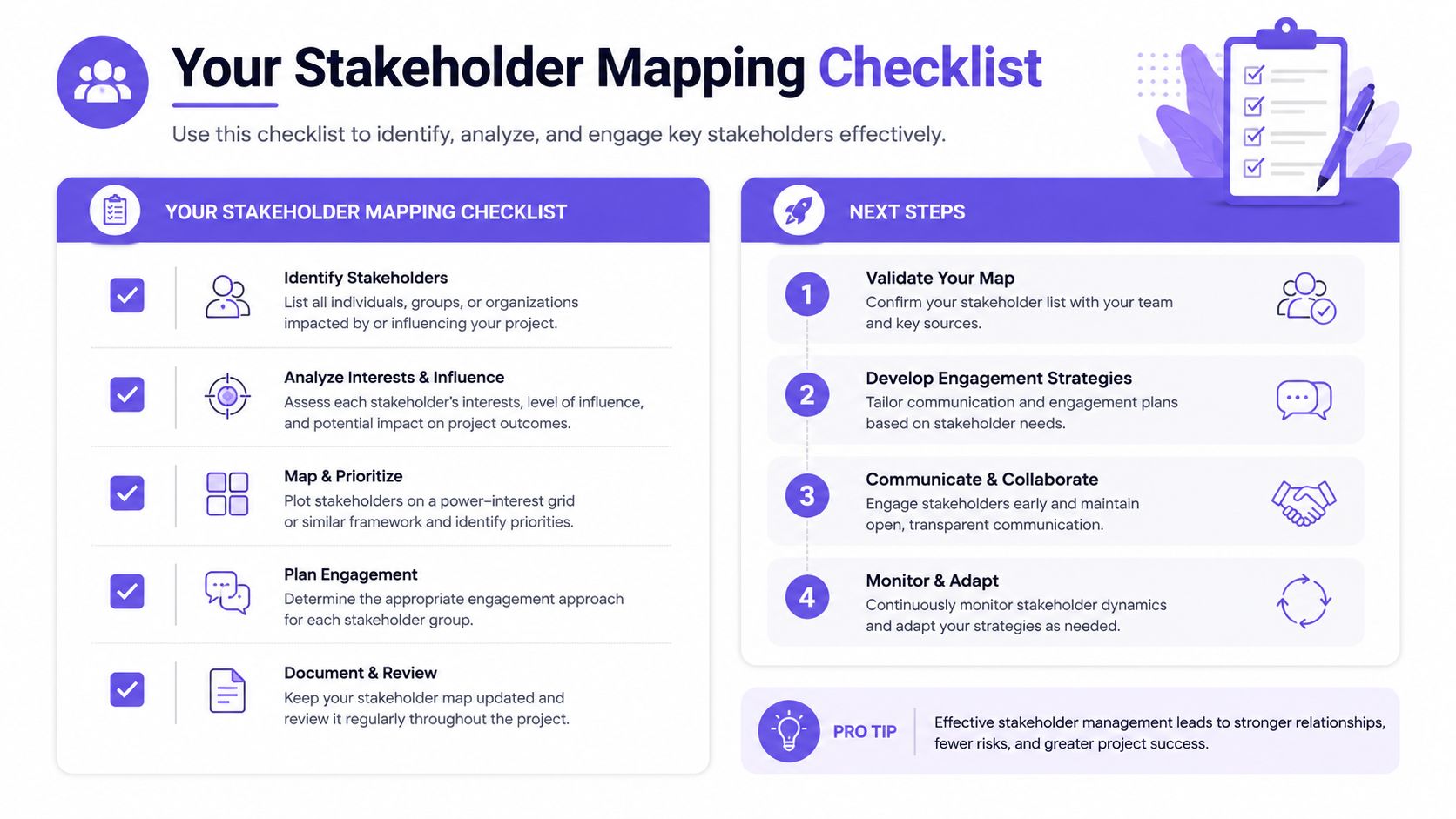
Use this checklist after the article
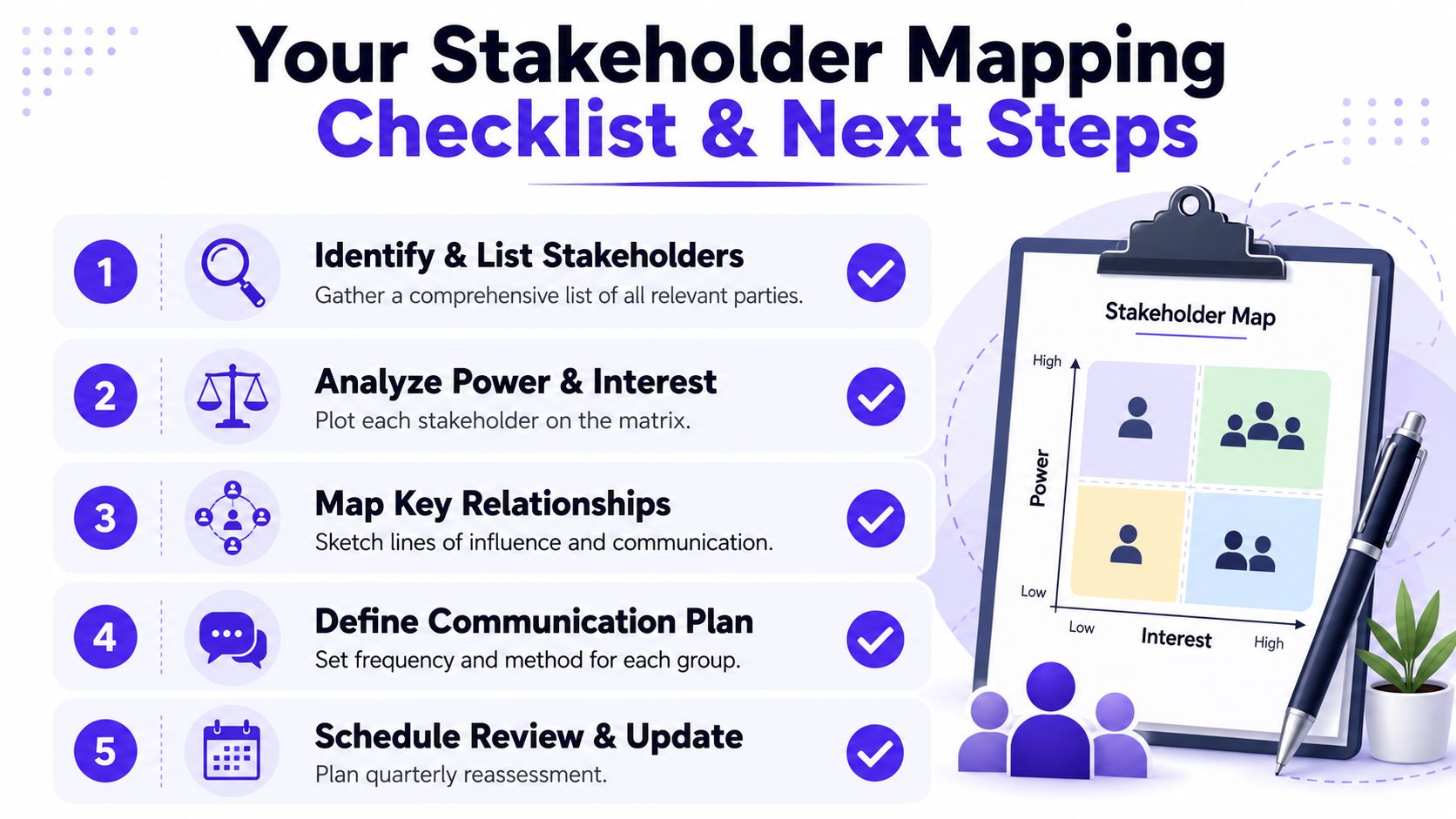
Run one workshop for the next live decision. Pick a product change with a real deadline and a visible trade-off.
List stakeholders broadly, then trim by evidence. Start wide, then remove names that cannot affect the decision or absorb the impact.
Classify each person by power and interest. Keep the scoring simple enough that another PM can repeat it without reinterpretation.
Draw the relationship lines that change the outcome. Include gatekeepers, approvers, and hidden veto points, not only sponsors.
Write the engagement plan beside the map. Put the next touchpoint, owner, and purpose in the same artifact.
Schedule a review before the map goes stale. Tie the update to sprint planning, release readiness, or another recurring product cadence.
Capture non-human dependencies. If compliance, policy, security review, or a model board can block the launch, they belong on the map too.
If you map buyers or internal champions in a commercial setting, a sales prospect identification playbook is a useful parallel. The work is similar: identify the key decision-makers first, then trace the route to them.
For teams that want a tighter operating model, product management best practices helps place stakeholder mapping in the broader Product Manager toolkit. The map should sit inside that system, not live as a one-off workshop output.
If you need a more practical way to turn stakeholder context into sharper PRDs, faster reviews, and fewer handoff errors, try Figr. It keeps context attached to the work, which helps teams reduce review time and avoid the friction that shows up when alignment gets lost between the workshop and launch.
FAQ
What is stakeholder mapping in product work?
I use it to show who can influence a product decision, who cares about it, and how those people connect. It's the structure behind the engagement plan.
How is stakeholder mapping different from stakeholder analysis?
I treat mapping as the visual and relational layer. Analysis comes after, when I'm assessing priorities, power, and what each person needs from the team.
When should a Product Manager run a stakeholder map?
I'd run one before discovery ends, before major reviews, and again whenever the decision path changes. If the map is older than the product reality, it's already stale.
What usually breaks a stakeholder workshop?
Senior voices dominate, hidden gatekeepers stay unnamed, and the group stops at a list instead of drawing relationships. That's when the map becomes theater.
Can stakeholder mapping help with AI products?
Yes. I map model governance, compliance gates, security review, platform policy, and data access the same way I map people. Those controls often have more practical power than the titles in the room.