

It’s 4:47 PM on Thursday. Your VP just asked for something visual to anchor tomorrow's board discussion. You have a PRD. You have bullet points. You have 16 hours and no designer availability.
What you really have is a digital pile-up: a chaotic collage of duplicate ideas, vague notes, and thoughts that trail off into nowhere.
This isn't collaboration. It's digital noise. The raw material is there, but the structure is missing. An online post-it note board isn't a canvas for brainstorming, it's a switchboard for connecting ideas to outcomes. But only if you use it right.
The Unspoken Chaos of Digital Brainstorming
The team is scattered across three time zones, staring at a blank digital canvas. The goal was simple: map out a new user flow. But the session quickly becomes a digital free-for-all.
This is where remote workshops fall apart. The fatal assumption is that you can just take what you did with paper stickies and do the same thing on a screen. When you treat the board like a digital wall, its potential evaporates. Instead of a launchpad for great ideas, it becomes a graveyard for good intentions.
Beyond the Digital Wall
The humble physical sticky note has been an office staple since its invention. It’s so ingrained that even today, many office workers use physical notes alongside their digital tools. Moving this habit to a digital board feels natural, but it comes with a catch: it only works if you stop thinking of it as just a digital wall for notes.
It's a structured thinking environment.
This is what I mean:
Unstructured boards are where ideas go to die. They collect thoughts without context, which leads to long meetings where you try to make sense of the mess. All momentum is lost.
Structured boards guide the conversation. They’re designed to push the team toward a specific outcome, making the next steps obvious before the session even ends.
A friend at a SaaS company once described their early remote workshops as "idea volcanos," they would erupt with creativity but leave a mess that was impossible to clean up. They ended up with lists, not plans. It’s a classic symptom of the team communication and alignment problems that plague so many product teams.
From Chaos to Clarity
The most effective teams I've worked with don't just open a blank canvas and say, "Okay, go." They design the canvas first. They create specific zones for problems, another for potential solutions, and others for user personas or critical assumptions.
For instance, if you're brainstorming a new scheduling feature, you can organize the board to capture key user pain points first. Then you can directly translate those into actionable user flows right next to them, like we did when exploring a new Shopify checkout setup.
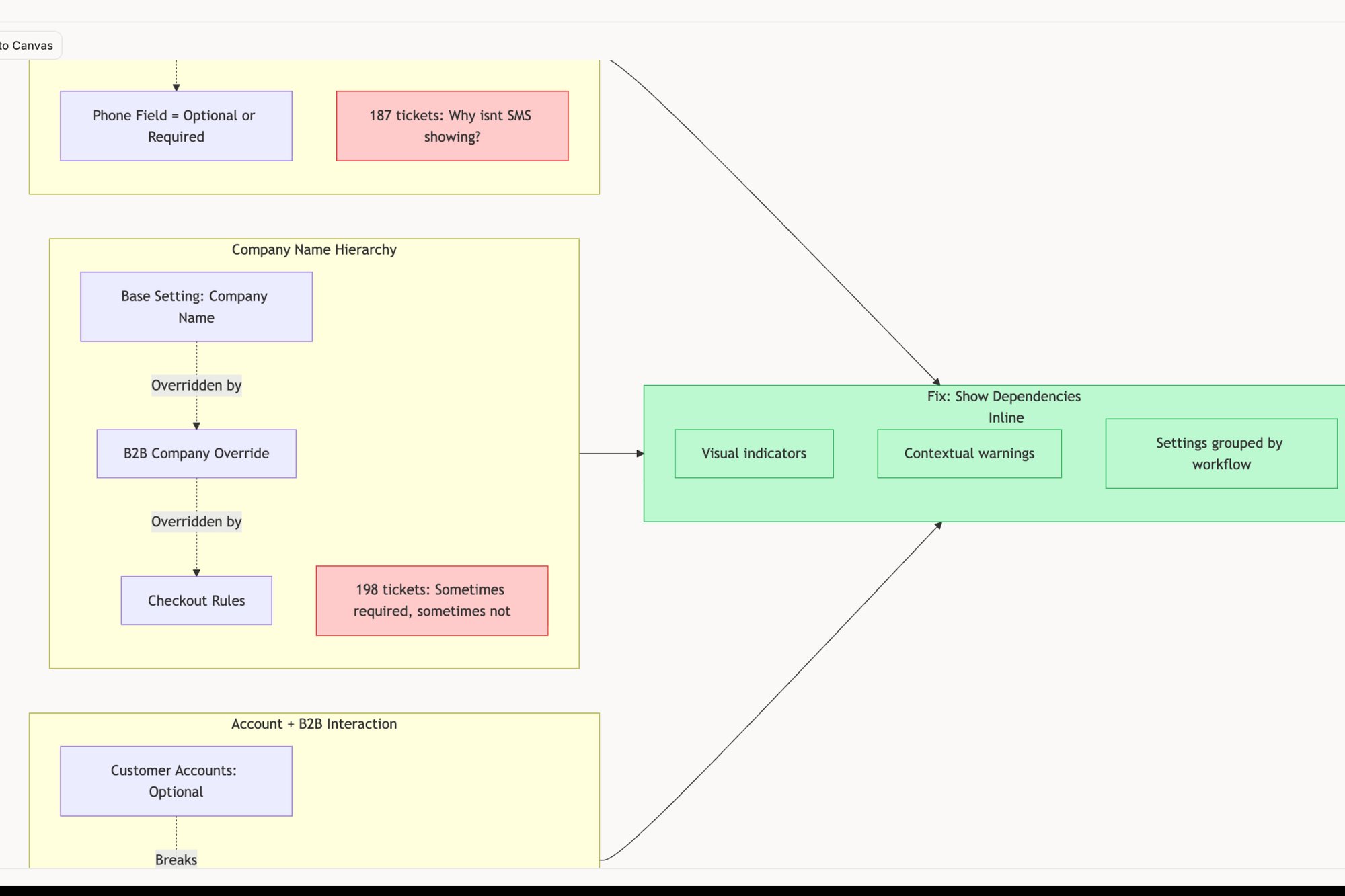
This simple act transforms the board from a passive bucket for ideas into an active participant in the process. It forces the team to connect their ideas to a bigger purpose. The goal isn't just to collect stickies: it's to build a system that turns the potential for chaos into a repeatable process for creating something tangible.
The shift is subtle but profound. It’s the difference between asking "any ideas?" and asking "what problem are we solving for this specific user?" One creates noise. The other creates focus.
Structuring Your Board for Action, Not Just Ideas
A great online post-it note board is less like a blank wall and more like a well-designed circuit board. Every component has a specific place and a clear purpose. To get real value from a session, you have to design this circuit before the first note is ever placed.
This means moving beyond simple columns like ‘To Do’ or ‘Done’. Those are for tracking, not for thinking. The goal here is to build a structure that guides the conversation toward a specific outcome, whether it's mapping a user story or conducting a competitive teardown.
A friend at a Series C company told me they use a simple but powerful ‘Problem-Solution-Metric’ framework on their boards. This small constraint forces every idea to be explicitly tied to a customer problem and a measurable outcome. No note gets a pass.
It’s a deceptively effective way to ensure you’re not just admiring problems.
Building Your Action Zones
The most effective boards I've seen create dedicated "zones" that serve different functions during the workshop. Think of them as rooms in a house, each designed for a different activity. This structure prevents cognitive clutter and keeps the team from chasing squirrels.
Here are a few essential zones to consider for your next session:
The Core Framework: This is your main event space. It could be a simple grid for a SWOT analysis, a journey map for user flows, or a more complex canvas for competitive analysis.
Assumptions to Test: This is where you isolate the riskiest beliefs behind your ideas. Every significant idea carries underlying assumptions, and giving them a dedicated space forces the team to acknowledge them so they can be validated later.
The Parking Lot: This is the designated spot for good ideas that are off-topic right now. It respects the contribution without derailing the current conversation, which is key for maintaining focus.
Action Items: This is the most crucial zone. Every discussion should conclude here. To make this work, it's critical to understand how to write meeting notes with action items that actually get things done. Each item needs a clear owner and a deadline. No exceptions.
This deliberate structure turns a chaotic brainstorm into a focused working session. You can learn more about managing these outputs by creating a unified system for product backlogs and design tasks.
A Concrete Example: The Opportunity Solution Tree
One of my favorite frameworks for structuring a board is the Opportunity Solution Tree. Instead of a flat list of feature ideas, you build a hierarchy that forces strategic thinking.
Start with a desired business outcome at the top. Branch down to the customer problems or opportunities that block that outcome. Then, for each opportunity, brainstorm multiple solutions. This visual structure ensures every idea is directly linked back to business value.
This isn’t just about organizing notes. It’s about designing a space that makes the next step obvious for everyone involved. When the structure is clear, the path forward becomes clear, too. Your board transforms from a record of what was said into a map of what to do next.
Facilitating Engagement Beyond Adding Stickies
So, you've got everyone on the board. How do you stop your workshop from becoming a silent ritual of just adding notes to a screen? A well-structured board is the venue, but great facilitation is the event itself. It’s the difference between a team simply showing up and a team that’s truly engaged.
You’re the conductor, not just a timekeeper. You’re bringing in the team's diverse ideas at just the right moment to create a coherent plan.
The move from physical to digital sticky notes is part of a much bigger story. Digital collaboration tools are now a core part of how work gets done. For product leaders, this means we have to move beyond simple digital canvases. We need integrated tools that are secure and connect our ideas directly to product context and analytics.
From Generation to Evaluation
The default mode for any online post-it note session is just generating ideas. But volume is not value. A facilitator’s real job is to gently nudge the team from divergence to convergence: from a brainstorm to a critical thinking session.
This is where targeted prompts become your secret weapon. Instead of just asking "what else?", you can introduce specific questions that force a deeper level of analysis.
Here are a few phrases I use to shift the energy in the room:
"What's the core assumption hiding behind that note?"
"If we pursued this, how would we measure its success in the next 90 days?"
"Who on our team would be the biggest skeptic of this idea, and why?"
Questions like these elevate the conversation from a simple collection of thoughts to a rigorous evaluation of their merit.
Orchestrating Different Voices
In any group, you'll have the loud talkers and the quiet observers. A great facilitator makes sure the board reflects the entire team's intelligence, not just the loudest person's opinion.
One of the most effective ways to do this is with a round of silent brainstorming. Set a timer for five or ten minutes and have everyone add their notes to the board without any discussion. This simple act levels the playing field. It gives introverts and more methodical thinkers the space to contribute without being interrupted, preventing groupthink before it even starts. If you want to maximize this kind of interaction, look for platforms with strong real-time collaboration features.
After the silent round, it's time for thematic clustering. This is where you, as the facilitator, guide the team to find the hidden patterns by grouping similar notes. Once you have your clusters, use dot voting: where everyone gets a limited number of votes: to prioritize. It’s a quick, democratic way to see where the consensus lies and decide where to focus next. For those looking to really nail these skills, our guide on how to use tutorials and training resources to ramp up your team is a great place to start.
Ultimately, facilitation is the active process of turning a collection of individual stickies into a shared understanding. It’s the art of asking the right question at exactly the right time.
From Sticky Notes To Production-Ready Artifacts
A workshop's value dies if its output remains trapped on the board. The screen is filled with colorful notes, clustered and prioritized, but they are just pixels. This is the critical handoff moment, where potential energy either converts into real work or simply evaporates.
The basic gist is this: your online post-it note board should be a starting point, not a final destination. The real value is created when you turn those raw ideas into actionable product artifacts. It’s the bridge between conversation and code.
Just last week, I watched a product manager spend hours manually transcribing workshop notes into Jira tickets. Each copy-and-paste was a tiny loss of context, a small tear in the fabric of the original idea. There is a much better way.
This diagram shows the classic workshop flow: brainstorm, cluster, then prioritize. It's a solid foundation.
But the process can't end there. To be effective, it must connect directly to the next phase of work.
From Maps to Blueprints
Modern tools are built for exactly this. Imagine a team spending an hour mapping out every conceivable failure state for a new feature on a digital board. In a traditional workflow, that map becomes a static image attached to a ticket, quickly forgotten.
Now, that same map can be the direct input for a robust user flow diagram. For instance, a workshop session can become a detailed canvas exploring all the edge cases for a Dropbox file upload. This artifact isn't just a record of a meeting, it becomes an active part of the development lifecycle.
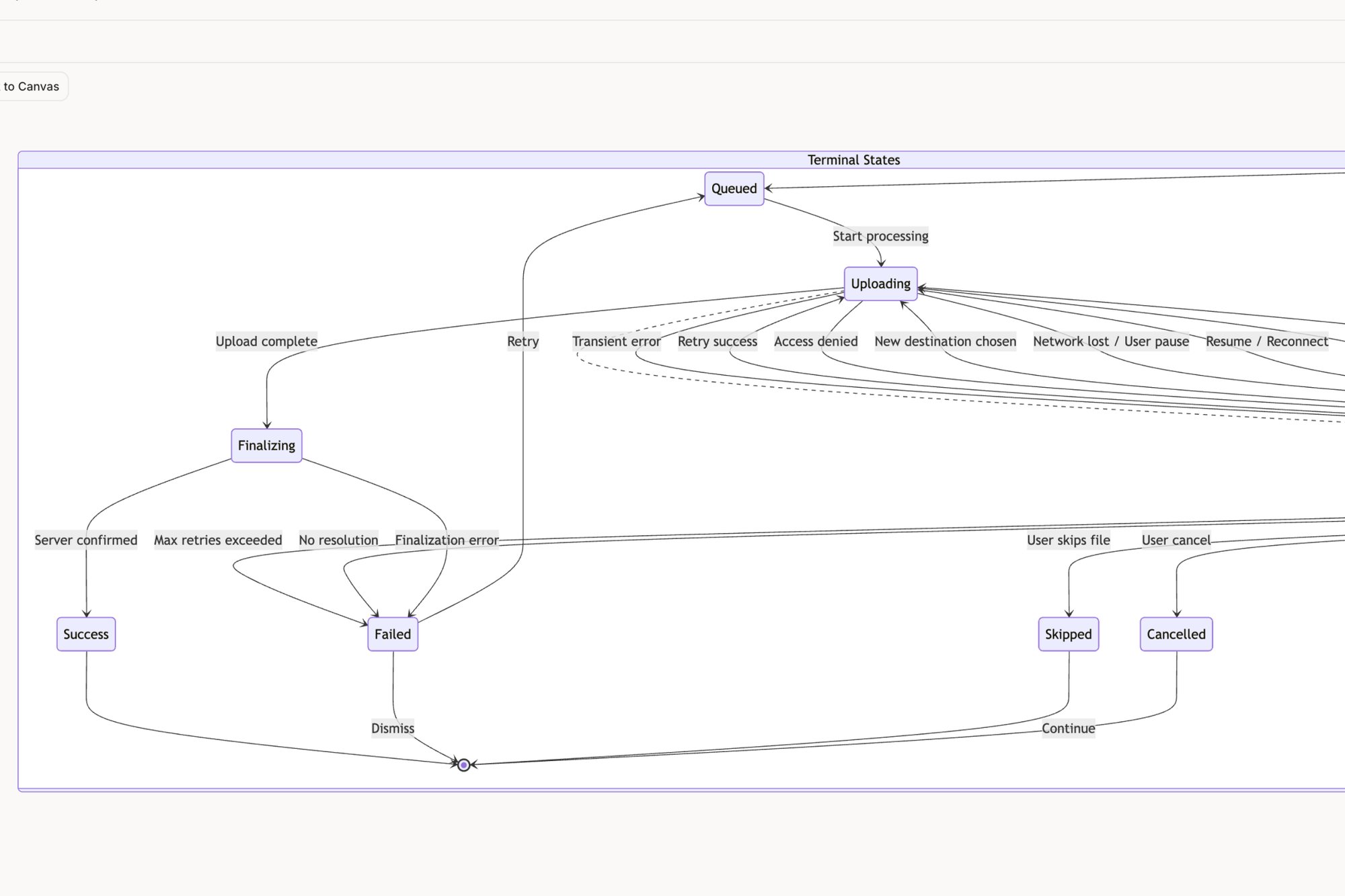
This is the central shift. The online board becomes less of a scrapbook and more of a factory assembly line, where raw materials (ideas) are processed and refined into something tangible.
The goal is to shrink the distance between an idea and its first real-world implementation. Every manual step in that process introduces the risk of misinterpretation, delay, and lost momentum. Automation here isn't about replacing thought: it's about preserving it.
When you can transform clustered notes into documented test cases, or a user journey map into a high-fidelity prototype with just a few clicks, you change the nature of the workshop itself. The team starts thinking differently. They know their ideas aren't just going onto a board: they’re going into the product backlog with real momentum. You can learn more about how to automate the designer-to-developer handoff to close this gap even further.
The Grounded Takeaway
The next time you finish a workshop, resist the urge to simply export a PDF. Ask this question instead: "What is the very next artifact this board needs to become?"
Is it a product requirements document? A set of user flows? A list of test cases for QA?
Your task is to find the most direct path from the notes on your screen to that next artifact. The shorter that path, the higher the probability that the insights from your session will actually make it into the final product. That’s how you ensure every sticky note is a step toward production.
Shifting From Idea Dumps To Integrated Workflows
Let's zoom out. Why do so many digital whiteboarding sessions feel like they go nowhere, even when the energy on the call is fantastic? You hang up with a board plastered in colorful notes, but a week later, nothing has changed.
This isn’t a failure of creativity: it’s a failure of incentives. The unspoken rule in most workshops is to contribute, which usually just means adding a sticky note. But the real work isn't just adding notes. It's about synthesis, commitment, and action.
Without a clear path forward, the board becomes a beautiful island of forgotten ideas, completely disconnected from the mainland where the actual product gets built.
The Network Effect of Integrated Ideas
What happens when your online post-it note board stops being an island and becomes the first link in a connected chain? This is the critical shift from a disconnected idea dump to a truly integrated workflow. The entire team's behavior changes the moment they realize their digital notes have real, downstream consequences.
A friend working at a fintech company nailed this concept. Their team used to brainstorm feature ideas, ending up with vague notes like "improve onboarding." Now, knowing their board connects directly to their QA process, the notes are fundamentally different. A note today looks more like: "When a user enters an invalid credit card number, the error message must specify if the number is wrong or if the expiration date is incorrect."
What sparked the change?
When your team knows their notes will automatically generate test cases, the quality of the initial ideas sharpens instantly. They become more specific, more concrete, and immediately more valuable. Check out how a brainstorming session on trip modifications was directly translated into structured test cases for a Waymo concept.
Amplifying Your Team's Collective Intelligence
This isn't just a minor workflow tweak: it’s a powerful way to amplify your team’s effectiveness. Research by Thomas W. Malone at the MIT Center for Collective Intelligence shows that a group's success isn't really tied to the IQ of its individual members. Instead, it correlates with things like social perceptiveness and equal participation: exactly the kinds of behaviors an integrated digital tool can encourage.
An integrated online board creates a form of shared memory for the team. It ensures the context from a brainstorming session isn't lost in translation but is carried forward into design, development, and testing.
When the board feeds directly into user flows, component states, or QA tickets, it stops being a dusty record of a meeting that happened last Tuesday.
It becomes the living start of your product's story.
This is exactly what I mean by an integrated workflow. Your board is no longer a temporary parking lot for fleeting ideas. It becomes the genesis block of your product development chain, creating a verifiable link from a stray thought to a shipped feature. The incentive shifts from just showing up and participating to actually building something real, together.
Questions We Hear All the Time
It's one thing to talk about frameworks and templates, but what happens when the digital markers hit the board? Once a team actually starts using an online post-it note board, the same practical questions pop up again and again.
Moving from theory to execution is where the real learning begins. Knowing the common pitfalls ahead of time makes the transition a whole lot smoother.
What Is the Biggest Mistake Teams Make?
The classic mistake is treating the digital board as a direct, one-to-one replacement for a physical wall. This mindset completely misses the unique advantages of a digital space and almost always devolves into a chaotic "idea dump."
Trying to make sense of that digital pile-up later is a nightmare.
In short, the solution is to design the board with clear zones and frameworks before the session ever starts. This simple act of preparation turns the space from a passive container into an active guide, steering the conversation toward tangible outcomes instead of just a messy list of notes.
How Do You Ensure the Output Is Actually Used?
This is critical. A workshop's output has to plug directly into your team's existing workflow. If insights require someone to manually transcribe them from the board into your project management or design tools, they’re as good as gone. Momentum dies with every copy and paste.
Use tools that bridge the gap between your board and your development lifecycle. For example, a discussion about task management can become an interactive prototype that maps out all the component states in a clear, visual way.
When your board can generate a PRD or a user flow diagram, it becomes an indispensable part of the process, not just another meeting artifact.
How Do You Manage Dominant Voices?
To keep a few loud voices from steering the entire session, you need to lean on structured facilitation techniques.
Here are two of my favorites:
Implement "silent brainstorming." Give everyone five to ten minutes to add their notes to the board individually before any discussion starts. This carves out protected space for quieter, more methodical thinkers to contribute without being interrupted.
Use anonymous dot voting for prioritization. This simple tactic is incredibly effective at removing personal bias and groupthink from the decision-making process. The best ideas win on their own merit.
As a facilitator, you can then be intentional. Actively call on less vocal members for their thoughts on specific note clusters. It creates a clear, direct opening for them to share their valuable input.
An online post-it note board is more than a tool: it's a system for turning conversations into production-ready artifacts. Figr helps you bridge that gap, transforming your team’s ideas into user flows, prototypes, and test cases grounded in your actual product context. Ship UX faster with Figr.