

A mobile app wireframe is the skeleton of your application, the structural blueprint before the first line of code is written. Think of it as an architectural plan: it's not about the color of the paint, but whether the walls connect and the doors lead somewhere useful. It’s the foundational sketch that aligns product managers, designers, and engineers.
It’s about defining what the app does, long before you decide what it looks like.
The Blueprint Before The Build
Ever seen a team build a house without a blueprint? It’s a chaotic dance of misplaced walls, surprise plumbing, and a foundation poured in the wrong county. That’s what skipping the mobile app wireframe feels like. It’s the skeleton of your user's experience, and building without it is a guaranteed path to costly rework.
This is what I mean: a wireframe maps out core functions, information hierarchy, and user flows when the cost of change is nearly zero. It’s the critical conversation starter that ensures everyone is building the same house.
From Simple Task to Strategic Tool
A product leader once told me that wireframing is "the meeting that prevents a dozen future meetings." He was right. People who see wireframing as just another design task are missing the point.
It’s a strategic tool for killing risk.
The business case is getting harder to ignore. The market for wireframing tools is exploding because a great app is no longer a luxury. In fact, some enterprises report that wireframing can slash development cycles by as much as 30% simply by forcing teams to clarify requirements upfront.
The purpose of a wireframe isn't to be pixel-perfect; it’s to make thinking visible. It forces you to confront structural problems when they are just lines on a screen, not thousands of lines of code.
When you put the app's structure down, you create a shared artifact. The conversation immediately shifts from vague ideas to concrete scenarios. Instead of talking about a single screen, you can map an entire journey, like the redesigned checkout setup for Shopify merchants, showing exactly how someone moves through a complex process.
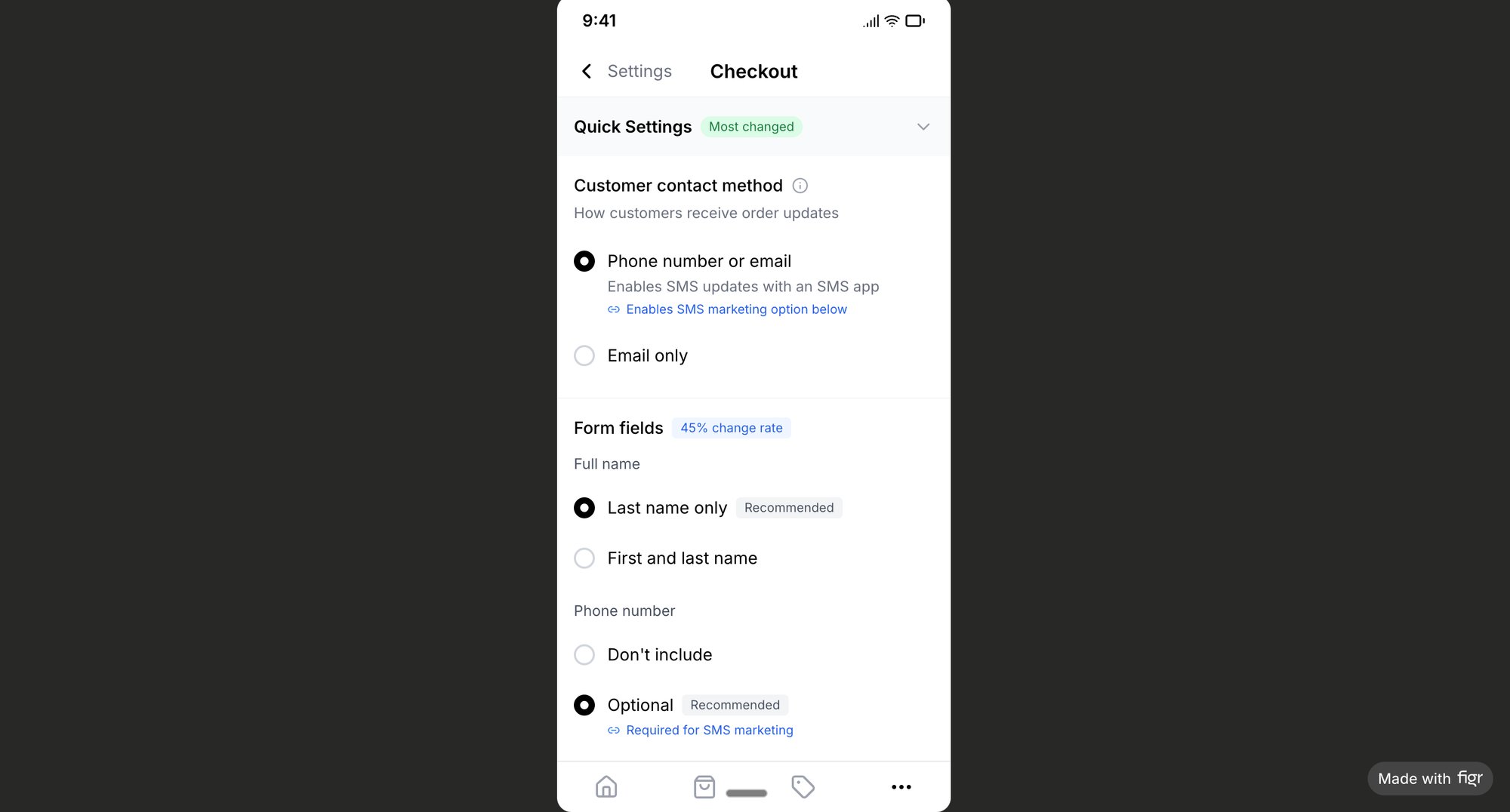
Ultimately, this is one of the highest-leverage activities in the product development lifecycle. You’re trading a few hours of focused planning for weeks of saved engineering time. That simple sketch just became your most powerful tool for team alignment.
Map The User’s Journey First
Before you draw a single box, stop. Where is the user coming from? What job are they trying to get done right now? A wireframe without a user flow is a map with destinations but no roads.
It’s functionally useless.
I saw a product team spend weeks designing the most beautiful settings page. They polished every micro-interaction. The problem? They only realized later its entry point was buried three levels deep, making it invisible to anyone not actively hunting for it.
All that beautiful work was completely wasted.
This isn’t just about avoiding rework. It’s about connecting an idea to the final product in a way that actually makes sense.
The wireframe isn't an isolated step. It's the critical bridge between an abstract concept and a tangible, usable structure. It’s where the logic of your product is born.
From Static Screens To Dynamic Sequences
The basic gist is this: stop thinking in static layouts and start thinking in sequences. A flow chart forces this discipline. It’s the core job of a great user experience designer to stitch individual screens into a coherent journey.
Does the user need to log in first? What happens if they forget their password, because they will. Where do they go after completing the one thing they came here to do? These are questions of sequence, and they define the real user experience far more than the color of a button ever will.
Mapping the flow is a test of your product’s logic. If the path from A to B is convoluted or has dead ends, you’ve discovered a critical flaw before writing a single line of code.
This is where you turn a vague requirement like "Users should be able to freeze their card" into a series of concrete steps and decisions. Think about all the questions that pop up. What happens to pending transactions? What does the screen look like while it's frozen? How do they unfreeze it? Exploring these questions can reveal an entire map of edge cases you hadn't considered.
Visualizing this forces you to confront the messy reality before you open a design tool. It ensures every screen has a reason to exist.
This simple act of drawing boxes and arrows is the true beginning of a successful app. Don't worry about aesthetics. Just map the journey. If you want a deeper look at this foundational step, check out our guide on how to build a user journey map.
From Napkin Sketch To Digital Wireframe
The napkin sketch is pure momentum. It's the exciting, unconstrained moment an idea takes form. But something often breaks when that sketch hits a digital tool. The grid, the components, the endless temptation to nudge pixels, it all introduces friction, and the initial spark gets lost.
Don't think of it as an assembly line. Think of it as a sculptor's studio. You start with a rough block of stone (the idea), hack away big chunks to find the basic shape (the low-fi sketch), and only then do you pick up the finer tools to refine the form (the digital wireframe).
This keeps the creative, divergent thinking safe while adding structure right when you need it. The whole point is to move from exploring many ideas to refining one.
The Sketching Phase: Speed and Disposal
Your first move should always be the fastest and most disposable. Get on a whiteboard or grab a notebook. Your only job is to explore concepts. How many different ways could a user get this done? What are the absolute, must-have elements on this screen?
This stage is meant to be messy. You’re generating ideas, not creating artifacts for the board.
Create lots of sketches. Be ready to throw most of them away. This isn't wasted work; it's the price you pay to find the right path early. Sketching forces you to solve layout and usability problems when they're still cheap to fix.
Transitioning to a Digital Wireframe
Once a solid direction emerges from the mess, it's time to go digital. But a blank canvas in a design tool can be a huge time sink. This is where modern tools can act as a bridge, not a barrier.
A designer I know was working on a project management app. Instead of drawing a "task card" from memory, she instantly pulled up every existing state for that component directly from their live product. You can see how this plays out in this interactive component states map, which moves far beyond a single static image.
Your first digital wireframe should feel like a more organized version of your sketch, not a polished final design. Its job is to formalize the structure, define the information hierarchy, and clarify the interactions you roughed out on paper.
Tools that are connected to your design system are a massive shortcut. Why recreate buttons and modals from scratch? Using established components gives you a high-fidelity starting point that's already tied to your real product.
The workflow is simple: use sketches for speed and exploration, then use context-aware digital tools to add structure efficiently. Many teams are also starting to generate concepts directly from their rough drawings. If you want to dig into that, check out our guide on AI tools that generate prototypes from rough drawings.
Once your digital wireframe feels solid, you can explore various rapid prototyping methods to get it in front of users and developers even faster.
Designing For Reality, Not Just The Happy Path
Every product team has a favorite fantasy: the happy path. It’s a clean, linear journey where the network is perfect, the user never makes a mistake, and errors simply don't exist. The problem is, reality is messy.
A friend at a Series C fintech learned this the hard way. He scoped a new file upload feature for a two-week sprint. It ballooned into a six-week fire drill. Why? The team’s wireframes only showed a single screen: the successful upload.
The engineers started asking questions. What happens when the connection drops? If the file is too large? If the network is offline? They quickly identified eleven other states that needed a design. The two-week timeline was for one screen, but the six-week reality was for twelve.
This is a classic trap. And it's where your wireframing process has to evolve.
From Designing Screens To Mapping States
You’re not just designing screens; you're mapping a system of states. Think of a state machine: it's just a diagram of every possible condition a feature can be in and how the user moves between them. Adopting this mindset is the single biggest unlock for building resilient, real-world apps.
The method is simple. For every primary action a user takes, ask yourself: "What could go wrong here?"
- User Errors: What if they enter the wrong format or leave a required field blank?
- System Errors: What if the server is down or a critical API call fails?
- Network Conditions: How does this work on a spotty 3G connection versus stable Wi-Fi?
Mapping these failure modes isn't pessimistic. It's professional. It transforms your wireframe from a static picture into a dynamic plan.
The Economic Cost of Ignoring Reality
Let’s be clear: ignoring edge cases in your wireframes isn’t a design problem, it’s an economic one. According to research cited by the Project Management Institute, scope creep is a primary reason that only 55% of projects are completed on budget. Every un-wireframed state is a seed of scope creep just waiting to sprout.
When an engineer asks, "What should happen when...?", it’s a signal that the wireframe was incomplete. Every one of those questions in the middle of a sprint is a tax on your team's velocity.
The true cost of a shallow wireframe is paid in developer rework, delayed timelines, and a brittle user experience that breaks under the slightest pressure. A user doesn't know you forgot to design the "offline" state; they just know your app is broken.
The next step is to make this thinking tangible. Instead of designing just the success screen, build a canvas that maps out every potential path. For a feature like file uploads, a map like this Dropbox File Upload Pathfinder becomes your blueprint for reality. It’s the difference between hoping for the best and planning for what will actually happen.
Wireframing For A Multi-Device World
A user's journey doesn't live on one screen anymore. It’s a fluid path: a task started on a phone during the morning commute is finished on a desktop at the office. A mobile wireframe that acts like it lives on an island is a relic.
The basic gist is this: responsive design isn't just about shrinking a layout. It’s about rethinking the job-to-be-done for different contexts. A user glancing at their phone needs quick, digestible information. That same user, sitting at a 27-inch monitor, is ready for deep analysis. Are you designing for the context, or just for the container?
A System, Not a Series of Screens
Last week, I watched a product team present a new analytics feature. The mobile wireframe was just a vertically stacked version of the desktop one. It was technically "responsive," but practically useless. You couldn't compare data, the charts were illegible, and the feature's core value was lost.
They designed screens, not a system.
A systems-first approach starts early, right at the wireframe stage. This is where you begin defining your design tokens, the subatomic particles of your UI. These aren't just colors and fonts. They are concrete decisions: spacing, corner radii, and elevation shadows that create a consistent visual language. By noting spacing-small or shadow-medium in your wireframes, you’re creating rules that scale.
Your wireframe shouldn’t just show what a screen looks like. It should hint at the underlying rules that govern how it adapts. This shifts the conversation from, "Does this look right?" to, "Does this system work everywhere?"
This mindset isn't just academic; it has massive economic implications. As mobile devices claimed 51.4% of global online spending, the expectation for cohesive experiences soared. Yet, the median mobile homepage weight has bloated by an astonishing 202% since 2015, according to these web design statistics on Figma.com. Lightweight, responsive wireframes are a competitive necessity.
Practical Steps for Responsive Wireframing
Thinking in systems can sound abstract, but the actions are concrete. Here’s how to put it into practice while you're still in the low-fidelity stage.
- Define Breakpoint Logic Early: Don't wait for hi-fi mockups. In your wireframe, use annotations to explain how layouts should reflow. "At tablet size, this sidebar collapses into a top navigation menu."
- Prioritize Content by Context: For each screen, ask: "What is the single most important piece of information for a mobile user in motion?" That element gets top billing on the smallest screen.
- Use a Responsive Grid: Lay out your wireframes on a simple grid (a 4 or 12-column system is a great start). This instantly gives you a structural foundation for how elements will rearrange.
The goal is to design a single, intelligent experience that adapts gracefully to wherever the user is. Respect their context, not just their screen size. If you want to dive deeper, we have a whole guide on responsive design best practices.
The Handoff Is a Myth
The classic designer-to-developer handoff is a broken ritual. We’ve all been there. The design team spends weeks polishing every pixel, then ceremoniously throws a Figma link "over the wall." What lands on the other side? A set of static pictures that leaves developers guessing about a dozen different states and interactions.
It’s a recipe for ambiguity. It guarantees rework.
A modern mobile app wireframe isn’t a final deliverable. It’s a living document. It should be the anchor for every conversation that happens from project kick-off until launch.
Your Wireframe’s Real Job: A Source of Truth
The value of a wireframe has nothing to do with how pretty it is. Its real value is measured by its utility. Can a developer build from it without asking you what a button does? Can a QA engineer write test cases directly from your flows? Does it answer questions before they are even asked?
In short, your wireframe should be the single source of truth for user stories, technical requirements, and test plans.
When a wireframe maps out a user journey, that journey should translate directly into acceptance criteria. Look at the detailed test cases for the Waymo Modify Trip flow. They are a direct reflection of the wireframed journey, making sure what was designed is exactly what gets built and tested. No guesswork.
This shift is bigger than just one team's process. As this Harvard Business Review article shows, the entire industry is moving toward small, autonomous teams that own a project from start to finish. That model falls apart if key artifacts, like wireframes, are siloed instead of treated as shared context.
This collaborative approach isn't just better for the product; it's better for the bottom line. The market for wireframe tools is expected to jump from USD 398.6 million in 2024 to USD 825.7 million by 2032, according to market trends on Verified Market Research. Why? Because tools that enable this kind of collaboration slash iteration time and reduce costly mistakes.
Putting It Into Practice
The next time you "finish" a wireframe, don't just share it. Use it.
- For User Stories: Stop writing vague stories. Attach specific wireframe screens to every ticket. The screen is the primary requirement.
- For Technical Specs: Annotate your wireframes directly. Mark up interactions, define component states, and specify data requirements right on the screen where they appear.
- For QA Plans: Walk through your flows screen-by-screen with your QA team. They can build their test cases directly from the paths you've designed.
This is how a wireframe stops being a forgotten artifact and becomes the living, breathing heart of your project. If you want to go deeper, we've put together a full guide on how to make this work for your team in our developer handoff playbook.
Frequently Asked Questions About Mobile App Wireframing
A few questions about mobile app wireframing pop up on almost every project. Let's clear them up.
Wireframe vs. Mockup vs. Prototype: What's the Real Difference?
Think of it like building a house.
A wireframe is the blueprint. It’s a low-fidelity sketch focused purely on structure and flow. Where does the door go? How many rooms? It’s all boxes and lines, zero paint.
A mockup is the interior designer’s mood board. It’s a static, high-fidelity image that shows what the app will look like. It’s where you see the colors, the typography, the branding. You can see the living room, but you can’t walk through it.
A prototype is the open house. It’s a high-fidelity, clickable simulation. You can walk from the kitchen to the bedroom, open closets, and get a feel for the space. It connects the screens and lets people experience the user flow before a single line of code is written.
For the complete breakdown, see our guide on what is a wireframe.
How Much Detail Is Enough?
The right level of detail depends entirely on what question you’re trying to answer.
Early on, keep it brutally simple. Low-fidelity wireframes are for validating the core user journey and information architecture. Their job is to answer, “Does this flow make sense?” not “Is this the right font?”
Once you have confidence in the structure, you can start layering in more detail. This is where you graduate to higher-fidelity wireframes that specify component states, include near-final copy, and add the annotations your developers will need.
Can You Just Skip Straight To High-Fidelity Design?
You can, but it’s a famously bad idea.
Going straight to polished mockups without wireframing is like pouring a building’s foundation without checking the architectural plans. It feels faster for a minute, then it gets expensive. Really expensive.
Why? It’s far cheaper to find a broken user flow when it’s just a few boxes and lines on a screen. Once you’ve sunk hours into a pixel-perfect design, the emotional and time commitment makes it incredibly hard to pivot. People get attached.
Skipping a mobile app wireframe doesn’t save time. It just pushes the inevitable problem-solving to a much more costly phase of the project.
Instead of starting with a blank canvas, what if you could ground every design decision in your real product context? Figr learns your app's DNA, generating flows, edge cases, and high-fidelity prototypes that mirror your existing UI. Ship faster and with more confidence. Get started with Figr. For the full breakdown of wireframe types and when to use each, read what is a wireframe.