
Preference testing is a forced choice research method that asks users which of two or more design alternatives they prefer and why. It captures stated preference, distinct from usability testing, which measures task success, and A/B testing, which measures behavior at scale in a live product.
When teams treat a preference win as proof of usability, they ship confidently and learn slowly. The chosen screen may look cleaner, yet users still hesitate, miss labels, or fail with assistive technology. A vote has answered an opinion question while the product decision needed behavioral evidence.
Used well, preference testing becomes an early directional screen. It helps you reject weak directions, surface disagreement, and decide what deserves task based validation next. That's a narrower job than teams assign it, and it's the job the method can do.
Why Preference Testing Rarely Answers the Decision Teams Need
Preference testing records which option people say they choose under forced comparison. It does not show whether they can finish the job, recover from an error, or reach the control with a keyboard. That difference is easy to state in a research plan and easy to lose once a percentage enters a stakeholder review.
A PM presents a clean preference result for a redesigned dashboard. The room relaxes. Someone asks when engineering can build it, and nobody asks whether users find the primary action faster, whether screen reader users can reach it, or whether the winning margin survives a wider sample. The study did its job. The interpretation outran the evidence.
The Winner Trap
A forced choice always yields an ordering, even when participants barely separate the options, dislike both, or change their answer after one task. Product teams convert that ordering into consensus because the format looks decisive. The study still has not measured comprehension, errors, completion time, or exposure to assistive technology.
A plurality tells you which option finished first in that comparison. It says nothing by itself about usability, inclusion, or commercial effect.
The winner trap is mechanical: the method guarantees a leader, so the room assumes a decision has been made. The better signal can sit in the split. A near tie can mean the concepts appeal to different roles, the difference is too subtle to matter, the sample skewed toward existing users, or the confidence interval is too wide to support a claim.
A Screen, Then a Test
Treat preference as a screen before stronger evidence. If one direction earns consistent preference for reasons tied to the work, move it into task based research. If responses split by role, accessibility need, or prior exposure, keep both candidates alive and repair the stimuli. If choices follow novelty or familiarity alone, you have learned about first impression, not workflow quality.
Early preference work often sits next to concept validation, so separate opinion about a direction from evidence that the direction works. A concept testing guide for product managers helps when the unresolved question concerns the idea rather than a visual alternative.
The contrarian value sits here. Preference testing earns its keep when it prevents premature consensus: it lets a team say the evidence is directional, the margin is weak, the sample is not representative enough, and the next question belongs to usability or behavioral testing.
Where Preference Testing Came From and Why Pairwise Choices Still Work
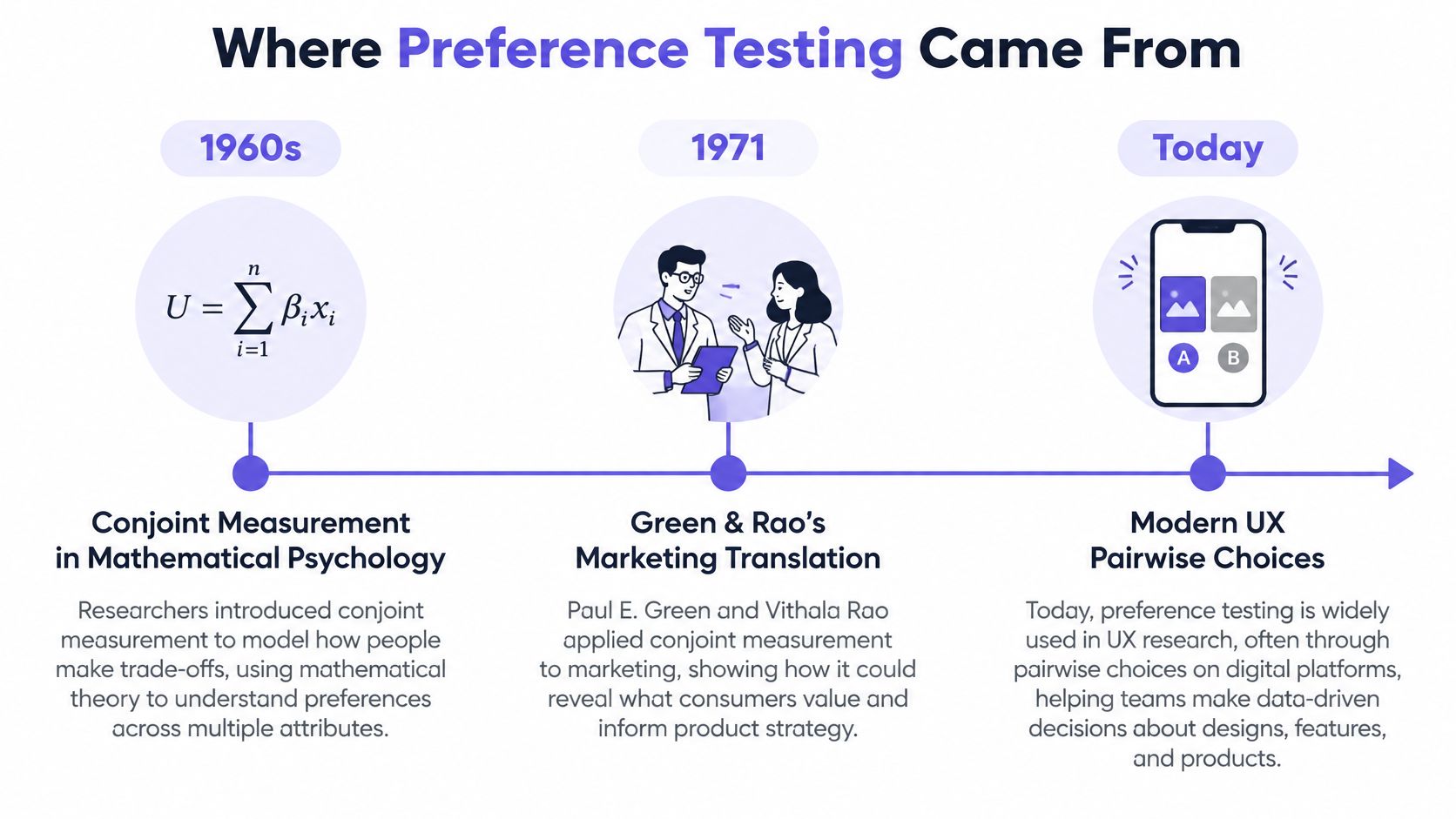
Preference testing has roots in mathematical psychology, where Duncan Luce and John Tukey developed conjoint measurement in the 1960s, and their foundational 1964 work proposed measuring underlying value indirectly through judgments about complete multi attribute objects, as traced in a review of conjoint analysis history. People compared realistic alternatives instead of rating each feature alone. Their choices revealed trade offs among attributes such as price, functionality, brand, or usability.
Paul Green and Vithala Rao brought the approach into marketing research in the early 1970s. Their 1971 article translated psychometric theory into a practical method for understanding consumer decisions. The lesson for product teams still holds: users judge wholes, then researchers infer what drove the judgment.
Why Pairwise Choice Beats Isolated Ratings
In a pairwise design, respondents evaluate two profiles and indicate which they prefer, sometimes also reporting strength of preference, and each choice reveals information about a trade off, as described in research on pairwise comparison from Harvard. Choose a faster workflow at a higher price, and you've told researchers something about the combined value of speed and cost. A rating scale rarely forces that trade off into view.
Conjoint analysis extends the logic by decomposing whole product judgments into part worth utilities, estimated values for individual attributes. Early factorial designs varied attributes systematically so researchers could separate competing effects. Modern UX studies are usually simpler, but the discipline remains valuable. Define alternatives carefully, balance exposure, collect enough comparisons, and analyze choices with a model that fits the design.
Does your test present realistic alternatives, or polished fragments? That question matters outside research too. Small teams making website decisions face similar trade offs between control, cost, and expertise, a practical tension explored in Olivetree Marketing's guide to website design. In short, pairwise choice works because it mirrors real selection. People rarely rate every attribute in isolation before choosing software. They compare complete options and accept compromises.
Practical rule: If the alternatives wouldn't be credible shipping candidates, the preference data won't support a shipping decision.
Preference Testing Versus Usability and A/B Testing
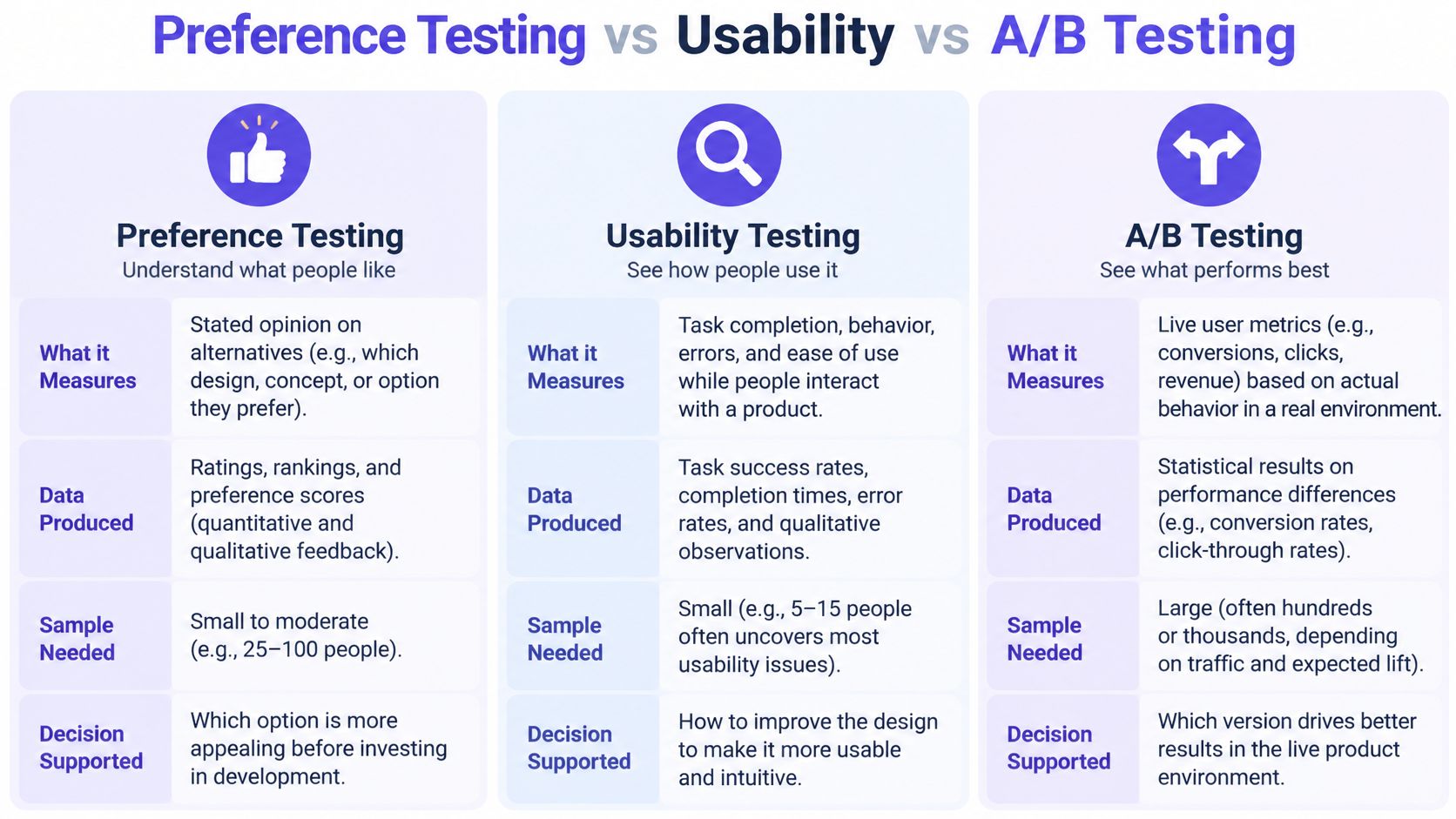
Each method answers a different question, produces different data, and supports a different decision. Confusing them creates expensive confidence. A team may learn that users like a screen, then act as if it has learned that users can use it or will convert through it.
Labeled Comparison
Preference testing
- Question asked: Which alternative do you prefer, and why?
- Data produced: Stated choice, rankings, reasons, perceptions of clarity or trust
- Decision supported: Which direction deserves deeper validation
Usability testing
- Question asked: Can you complete this task, and where do you struggle?
- Data produced: Task success, errors, hesitations, recovery behavior, observed confusion
- Decision supported: What to fix so people can use the design effectively
A/B testing
- Question asked: Which live variant changes real behavior against a control?
- Data produced: Behavioral outcomes from actual product use at scale
- Decision supported: Which variant should receive live traffic
Why stack these methods in the wrong order? Preference evidence is cheapest when options are still static and revisable. Usability testing then exposes whether the favored direction supports real tasks. A/B testing belongs later, when the product can expose variants to live traffic and measure behavior with enough volume.
The sequence also protects interpretation. Preference testing can explain perceived trust or visual clarity, while usability research shows whether people understand labels and recover from mistakes. An A/B test can reveal what users do, although it may not explain why they did it. Each result fills a gap the others leave open.
If your goal is to turn visitors into customers, stated liking is only an early signal on the path to measurable behavior. Before running a live experiment, use an A/B testing guide to clarify control conditions, metrics, and decision rules. Teams planning the task based stage should also follow a structured usability testing process rather than asking preference participants to imagine completing work.
Choose the method from the decision you need to make, then choose the sample and stimuli that decision requires.
How to Run a Preference Test That Holds Up
A credible preference test starts before participants see a screen. You need a decision, controlled alternatives, the right audience, and a rule for interpreting uncertainty. Without those pieces, you're collecting opinions with extra formatting.
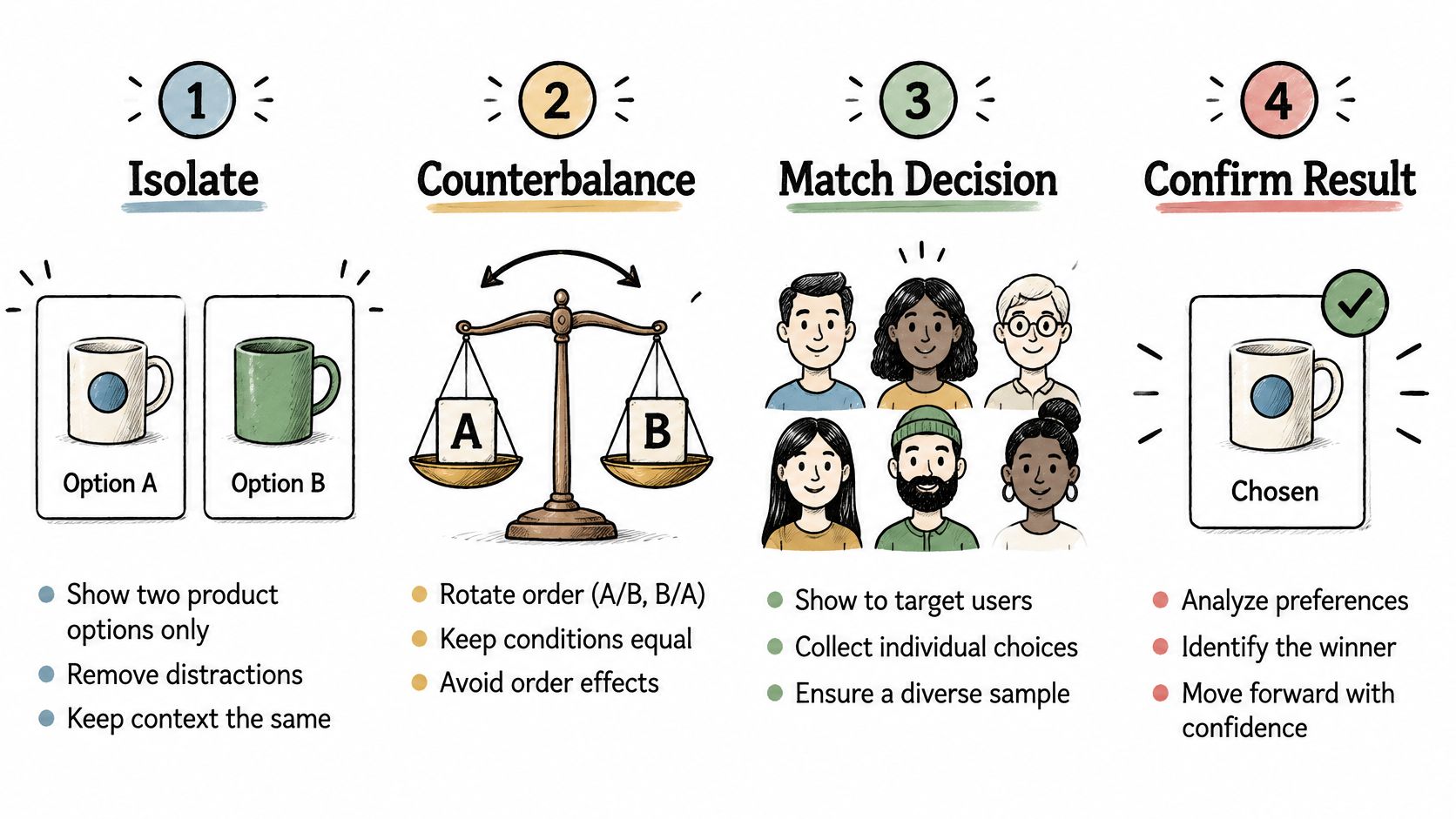
Nielsen Norman Group recommends showing two or three design variations, changing only a limited set of elements, keeping other variables constant, and counterbalancing or randomizing presentation order to reduce order effects, in its guidance on testing visual design. Call this the visibility and isolation rule: make the tested difference obvious to a non designer, and isolate it from unrelated changes.
Step 1. Define the decision.
- Write the choice the result could influence.
- State what happens if there's no clear preference.
- Name the follow up validation method before launch.
Step 2. Isolate the variable.
- Compare layouts while holding imagery, colors, copy, and icons steady.
- Keep fidelity and surrounding context equivalent.
- Remove brand marks or labels that could cue the expected winner.
Step 3. Recruit for the decision.
- Prioritize audience fit over raw volume.
- Sample size guidance recommends at least 20 participants as a starting point and 30 or more for multiple variations or more reliable results, according to Maze guidance on preference testing sample size.
- Segment distinct roles, plans, markets, or expertise levels when those groups may judge differently.
Step 4. Randomize and ask neutrally.
- Counterbalance which option appears first.
- Ask which version participants prefer, without praising either design.
- Follow with one open question about the reason for the choice.
Step 5. Prepare comparable alternatives.
- Give participants enough realistic context to judge the screen.
- Document every intentional difference between variants.
- Figr can help teams prepare comparable alternatives from product screens, design systems, and supplied findings, then iterate reviewable Figma ready output. It doesn't recruit participants or run the study.
Step 6. Report uncertainty, then validate.
- Report vote share, sample composition, subgroup differences, and qualitative reasons together.
- Carry the leading candidate into task based testing before shipping.
- Place the study within broader UX research methods so preference evidence has a defined next step.
Would you trust the result if the less polished option won? If not, the stimuli probably weren't comparable yet.
A Worked Example Comparing Two Navigation Patterns
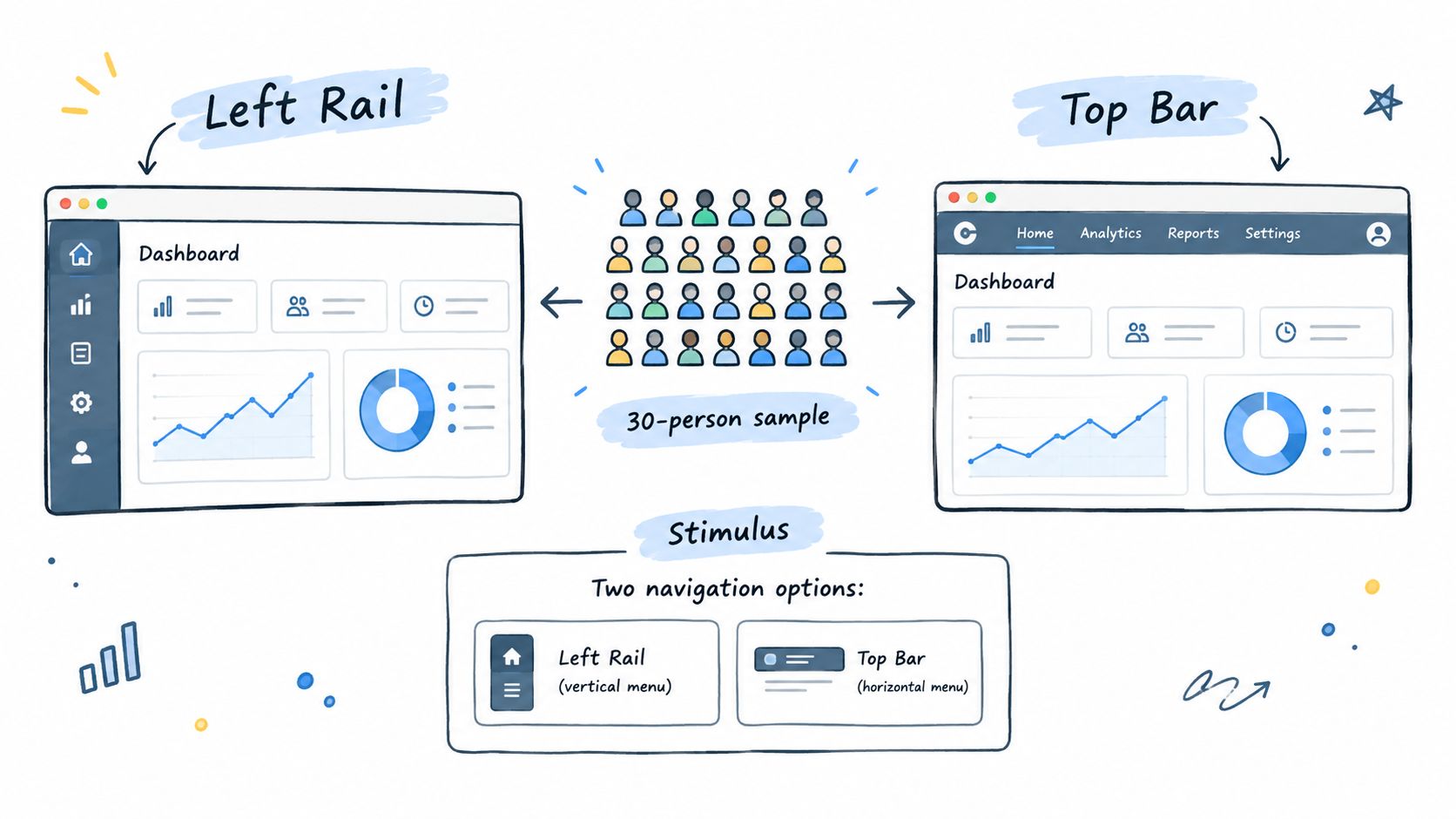
Consider a hypothetical SaaS team choosing between a left rail and a top bar for an existing dashboard. Both screens use identical page content, labels, icons, colors, account data, and calls to action. Only navigation placement changes, so participants can see the difference immediately and researchers can attribute reactions more cleanly.
The Hypothetical Setup
The researcher recruits current dashboard users across admin and day to day operator roles. Half see the left rail first, and half see the top bar first. Each participant answers one neutral preference question, then explains the choice in their own words. The team also records role based splits because frequent operators may value persistent navigation differently from occasional admins.
Suppose the result lands near 60/40 for the left rail. Should the team ship it? Not yet. Available guidance indicates a 60/40 split generally requires roughly 50 participants to reach 95% statistical significance, as summarized in UXtweak guidance on preference testing. A smaller study could show direction, but it wouldn't justify treating the margin as settled.
Reading Two Different Results
Stronger directional signal
- Pattern: The left rail leads across both roles.
- Reasons: Participants cite visible sections and easier scanning.
- Next move: Test findability and task completion with an interactive prototype. You could also compare first click testing tools when the next question concerns where users begin.
No clear winner
- Pattern: The split approaches an even divide.
- Reasons: Admins favor persistent labels, while operators favor more horizontal workspace.
- Next move: Preserve both patterns, examine segment needs, and run task based validation.
The basic gist is this: the percentage starts the interpretation, and the reasons plus uncertainty finish it. If qualitative responses reveal that users chose the left rail because it looks familiar, the team has learned something different from a choice based on clearer labels. Familiarity may fade. Label clarity can be tested through tasks.
What if the preferred pattern slows the first click or creates keyboard traps? Then preference has pointed to a candidate, while usability evidence can still reject it. That's the system working properly.
Common Pitfalls That Mislead Product Teams
Weak preference studies rarely fail at the question. They fail at the interpretation, where a thin margin, a skewed sample, or a missing context gets flattened into a winner. The damage is quiet: the summary slide looks clean, and the caveats that should have blocked the decision never reach the roadmap.
Small Samples and Invented Certainty
Closer outcomes demand much larger samples. A 55/45 split may require 200 or more participants before the margin is meaningful, so a narrow lead from a small group should not become a product mandate. Composition matters as much as size: a large panel of the wrong users tells you less than a smaller panel drawn from the segment the decision affects.
Match the analysis to the design. A binomial confidence interval evaluates the most selected option while accounting for sampling error, and a chi square goodness of fit test compares an observed distribution against the expected one across multiple choices, as explained in the User Interviews field guide to preference testing. Set the method and the confidence standard before results arrive. That is the decision threshold principle, and it exists to protect an outcome teams often resist: an inconclusive split still counts as evidence, because it means the options are so close together.
Static Screens and Invisible Users
Participants cannot meaningfully interact with static designs, familiarity biases them toward conventional options, and stated preference can diverge from actual behavior, as covered in Useberry guidance on preference testing limits. A visual vote says nothing about performance with assistive technology, keyboard navigation, low vision, cognitive load, localization, or realistic task constraints.
Segmentation warning: A majority preference can conceal barriers for a smaller group with legal, commercial, or operational weight.
So measure what the screenshot cannot show. Recruit accessibility and market segments separately, put both designs into realistic task contexts, and collect a usability measure for each option. Accessibility findings can reverse which design is preferable once comprehension and task success enter the evidence. A preference result that skips these users is measuring the majority's convenience.
Plurality Treated as Permission
One research guide treats 80/20 as a strong indication of preference and 52/48 as no clear winner because the gap can fall inside statistical noise, according to CleverX guidance on interpreting preference tests. The same guidance recommends roughly 50 participants per option, or 100 total, for enough power to detect an obvious 60/40 result at conventional confidence levels. Apply the margin of decision rule: a plurality ranks the options, while the decision itself still needs evidence.
Why do weak margins keep getting upgraded into certainty? Because organizations reward closure. Open questions slow planning, hiring, and delivery, and a winner percentage gives everyone a clean artifact to build on. The most valuable output a preference test produces is often a blocked premature consensus rather than a crowned winner, since the wrong consensus costs a redesign, a re-launch, and credibility with the users the majority vote ignored.
A Pre-Flight Checklist Before You Ship a Preference Test
Run this check before recruitment begins. It takes minutes. It prevents the common result nobody can interpret.
Decision and stimuli
- Decision named: You know what this result can and cannot change.
- One difference isolated: Content, fidelity, and context stay constant.
- Two or three variants: Participants can compare without overload.
Audience and interpretation
- Right users recruited: Roles and segments match the product decision.
- Sample sized to margin: Guidance estimates 69 respondents for two designs, 89 for three, 98 for four, 108 for five, and 116 for six under a stated significance framework, using the Maze sample size table for preference testing.
- Order counterbalanced: No variant always appears first.
- No clear winner allowed: The team has pre committed to that outcome.
- Follow up planned: Reasons, usability evidence, and behavioral validation come next.
Use the checklist beside your framework for shipping better products so the preference result feeds a validation plan rather than ending the conversation.
Preference Testing FAQ
What is preference testing in UX?
Preference testing asks people to choose between two or more design alternatives and explain why. It captures what they say they prefer, not whether they can complete a task with the design.
How many participants do you need for a preference test?
It depends on the decision, the number of alternatives, and how close the results are. The sample guidance above offers a starting point, but a narrow split needs more evidence than a clear lead. Recruit people who match the audience affected by the decision, and do not treat a small sample as proof of a winner.
Can preference testing replace usability testing?
No. Preference testing helps identify a direction worth investigating. Usability testing shows whether people can understand and use it to complete realistic tasks. A preferred design may still cause errors or create accessibility barriers.
What should you do if there is no clear winner?
Report the split rather than forcing a decision. Look at participants' reasons and any differences between audience segments, then test the unresolved questions with realistic tasks. A close result can be useful evidence that preference alone should not decide the design.
When you're comparing directions for existing software, prepare two or three controlled alternatives, recruit the users affected by the decision, and pre commit to how you'll handle a tie. Figr helps product teams explore and refine comparable, Figma ready alternatives from their product context and supplied findings while human researchers keep ownership of recruitment, testing, and interpretation. Start your next comparison with cleaner stimuli by visiting Figr.