

A planning meeting starts with a customer problem and ends with a feature in the sprint. Somewhere in between, the team skips the hard part: proving which customer need matters most and what evidence would justify building one solution instead of another.
That is the gap an opportunity solution tree is meant to close. Instead of treating a feature as both diagnosis and treatment, the tree connects a desired outcome to customer opportunities, competing solutions, and the assumption tests that shape a real product decision.
In this guide, you will see practical opportunity solution tree examples, how to separate opportunities from feature ideas, how to prune weak branches, and how Figr can help teams turn selected branches into realistic, testable designs.
What is an Opportunity Solution Tree?
An opportunity solution tree is a product discovery framework created by Teresa Torres to help teams connect outcomes to customer needs, solution ideas, and the tests required to make confident decisions. Torres presents the method as a way to visualize multiple paths to a desired outcome, instead of locking onto the first promising feature idea. Her original framework is explained in Teresa Torres' explanation of Opportunity Solution Trees.
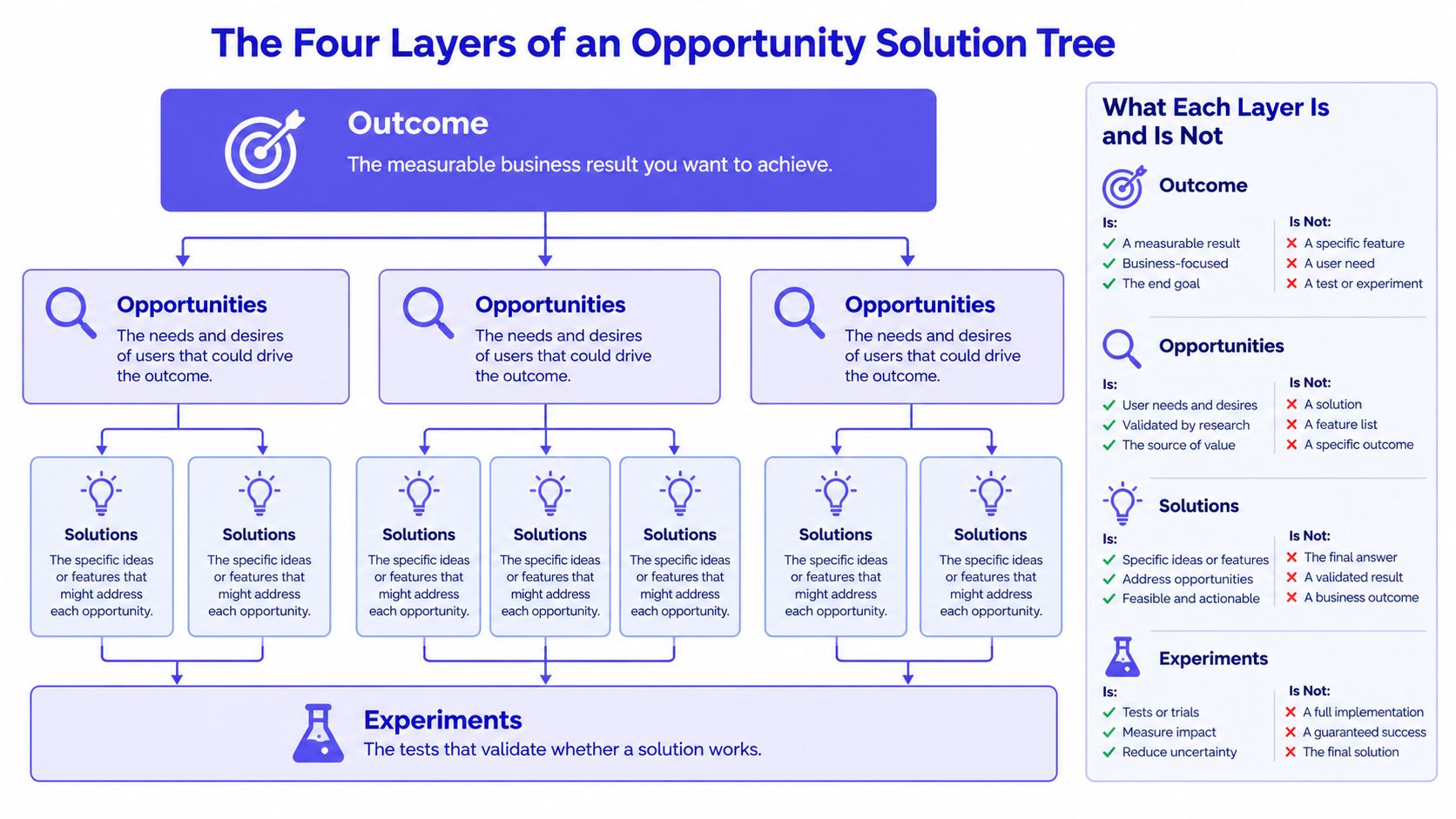
At its core, the opportunity solution tree framework has four levels:
- Desired outcome: the measurable result the team wants to improve.
- Opportunities: customer needs, pain points, or desires that could affect that outcome.
- Solutions: possible product responses to each opportunity.
- Assumption tests: the smallest honest tests that help the team decide whether a solution branch deserves more investment.
This matters because many discovery conversations skip the second level. A team says activation is low, then jumps to, "We need a setup wizard." But a setup wizard is not an opportunity. It is one possible response to a customer problem. The opportunity might be that users do not know where to start, do not trust the integration, or cannot tell whether setup is worth the effort.
That distinction is what makes opportunity mapping useful. If the opportunity layer is full of feature requests, the team is already solving before it has understood the problem. A strong tree keeps customer problems separate from solution ideas so teams can compare multiple responses and test the assumptions behind each one.
Here is a simple diagram of the four-level structure:
A quick wording check helps keep the layers clean:
- A desired outcome should be measurable.
- An opportunity should still make sense even if no product feature existed.
- A solution should be one possible response among alternatives.
- An assumption test should make clear what the team will observe and how that evidence could change the decision.
For teams practicing continuous discovery, this structure is especially useful because it creates a living link between customer conversations and delivery choices. Teresa Torres develops that broader operating model in Continuous Discovery Habits, and the Product Talk resources remain the best primary source for the method's intent and mechanics.
5 Opportunity Solution Tree examples for product teams
The best opportunity solution tree examples do not stop at naming a problem and suggesting a feature. They show how a team frames the desired outcome, identifies plausible opportunities, compares solutions, and chooses the next assumption test without pretending that hypothetical examples are published case studies.
The five examples below are worked scenarios for product teams. They are illustrative, not reported company results. They are designed to show how the tree works in practice and how teams can move from discovery to a branch that is concrete enough to design and test.
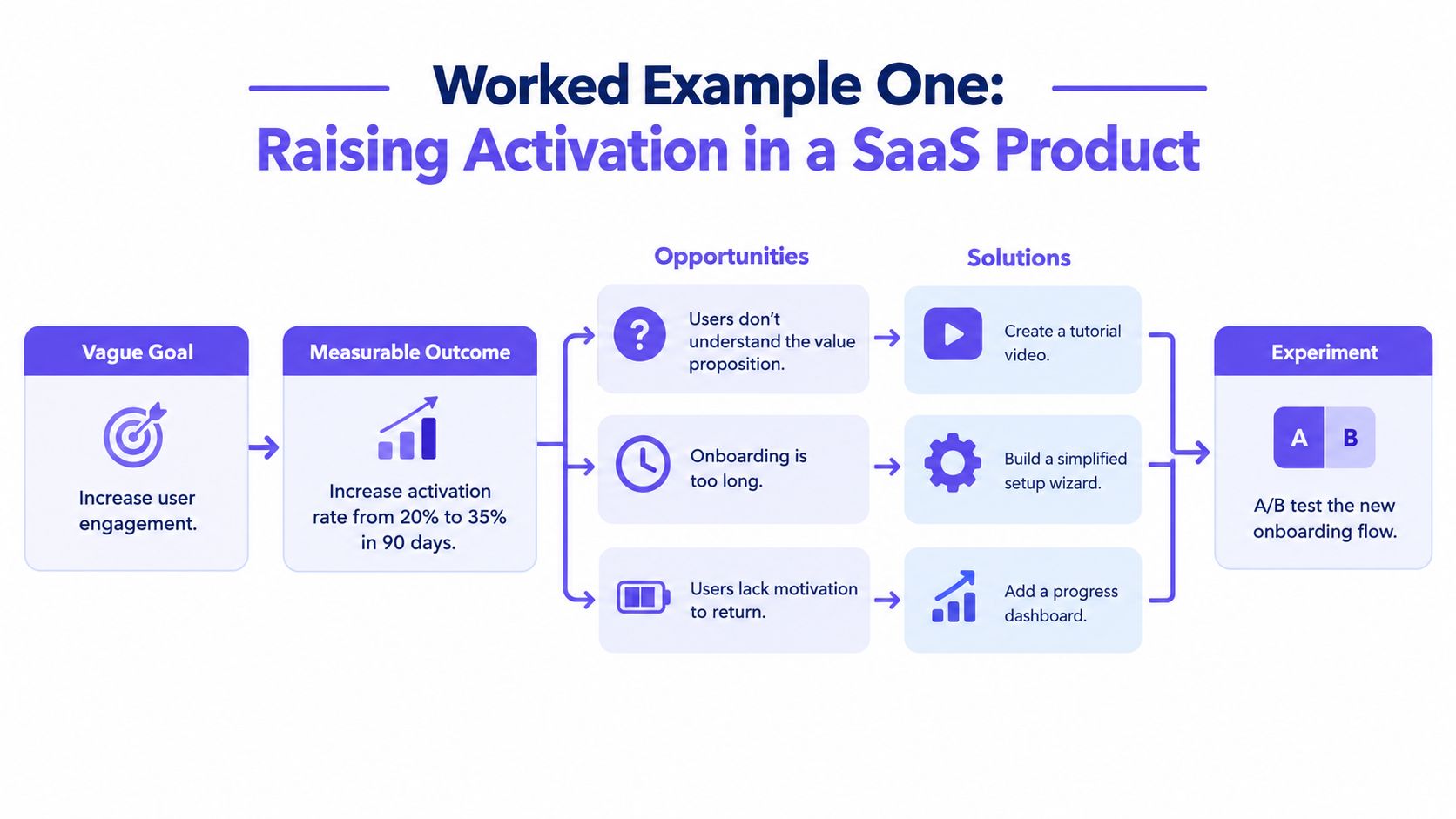
1. SaaS onboarding, improve activation
A SaaS team notices that many new accounts never reach first value. Stakeholders suggest adding a guided onboarding flow. That may be a good solution, but it is still too early to commit. The tree starts by clarifying the desired outcome.
Desired outcome: Increase the percentage of new accounts that complete the first key setup action within a defined onboarding window.
A good activation outcome needs a clear behavioral definition. "Increase engagement" is too vague. "Increase the share of new users who connect their first data source and view the first dashboard within 24 hours" is more useful because the team can measure it and investigate where customers get stuck.
Possible opportunities might include:
- Users do not understand the first step in setup.
- Users encounter integration failures when connecting tools.
- Users are not convinced the setup effort will lead to value.
- Users see instructions, but the instructions do not match their context.
Notice that none of these are features. They are customer problems or unmet needs that could explain poor activation.
A basic tree for this scenario might look like this:
- Solution: Guided setup checklist
- Solution: Contextual empty-state examples
- Solution: Role-based onboarding paths
- Assumption tests: Prototype task-completion test, first-click test, concept interview
- Solution: Integration diagnostics
- Solution: Pre-check before connection
- Solution: Import fallback flow
- Assumption tests: Error review, prototype comprehension test, limited release
- Solution: Sample workspace
- Solution: Personalized setup recommendations
- Solution: Faster preview after import
- Assumption tests: Concept test, activation funnel review, usability session
The tree becomes more useful when the team compares assumptions instead of defaulting to the most familiar solution.
| Opportunity | Candidate solution | Core assumption to test |
|---|---|---|
| Users do not know where to start | Guided checklist | A clearer first task will reduce hesitation |
| Users do not know where to start | Better empty state | Users will notice and follow the suggested next step |
| Users hit integration failures | Connection pre-check | Preventing errors is more valuable than explaining them later |
| Users do not see value early | Sample workspace | Seeing a realistic outcome will motivate setup completion |
The most important move is not choosing the prettiest solution. It is choosing the branch with the riskiest and most decision-changing assumption. If interviews and support tickets already suggest that integration errors are the main blocker, the team may learn more from testing a pre-check flow than from polishing onboarding copy.
This is where Figr fits naturally. Once a team selects a promising branch, Figr can help turn it into realistic test assets using actual product context. Figr's AI product design agent is built to explore directions using research, PRDs, analytics, existing screens, Figma files, and design-system context. Its product overview explains how teams can branch on canvas, map edge cases, create multi-state prototypes, and move toward Figma-ready designs without treating generic mockups as a substitute for real product constraints.
2. Team collaboration, improve invitation completion
Collaboration products often depend on one user successfully inviting teammates. When invitation completion is low, teams are tempted to redesign the invite modal immediately. An OST helps separate the outcome from the assumption that the modal is the problem.
Desired outcome: Increase the percentage of invited teammates who successfully accept an invitation and enter the shared workspace.
Likely opportunities may include:
- Inviters do not understand the difference between roles and permissions.
- Invitees do not trust or recognize the invitation email.
- Invitations expire before the recipient is ready to accept.
- The invite flow creates confusion across devices or identity providers.
These opportunities suggest very different solution spaces.
For the permissions issue, candidate solutions might include simplified role language, better permission previews, or recommended defaults. For trust issues, the team might explore improved sender identity, clearer workspace context in the email, or an in-product follow-up reminder for inviters. For expiration problems, the branch could include longer validity windows, reminders before expiration, or a way to resend without restarting the process.
A worked opportunity solution tree template for this example could look like this:
- Solution: Plain-language role descriptions
- Solution: Side-by-side permission comparison
- Solution: Default recommended role
- Assumption tests: Comprehension test, invite-flow usability test
- Solution: Branded email with workspace context
- Solution: Preview of who invited them and why
- Solution: In-product reminder to inviter
- Assumption tests: Email comprehension test, fake-door click test
- Solution: Longer invite validity
- Solution: Reminder before expiration
- Solution: One-click resend flow
- Assumption tests: Funnel analysis, controlled rollout
The team now has a more useful question than, "Should we redesign invites?" It can ask, "Which customer obstacle is most likely depressing invite completion, and what is the smallest test that could change our delivery decision?"
For example, if users hesitate when assigning roles, a simple clickable prototype may reveal whether plain-language descriptions resolve confusion. If that test reduces hesitation but still leaves completion low, the team may learn that permissions language was not the dominant barrier. That is exactly the kind of learning a good tree should surface.
Figr can help at this stage by generating multiple invite-flow directions from the team's existing UI and design system, then mapping permission states, empty states, and error conditions that often get missed in low-fidelity discovery artifacts. This is especially useful when a branch depends on nuanced interaction details rather than a single screen.
3. Product analytics, improve feature adoption
Feature adoption is one of the most common use cases for product discovery examples, and one of the easiest places for teams to confuse symptoms with causes. A dashboard may show that a valuable capability exists, but usage is low. The immediate response is often to make the feature more visible. That may help, but low adoption can also come from unclear value, workflow friction, or weak timing.
Desired outcome: Increase adoption of a strategically important feature among the user segment that would benefit most from it.
Possible opportunities:
- Users do not discover the feature at the right moment.
- Users discover it but do not understand why it matters.
- The workflow to use the feature feels too demanding.
- The feature is relevant only after another step that many users never complete.
Those opportunities lead to very different branches.
convert new users into loyal customers
For discoverability, a team might test contextual prompts, navigation changes, or workflow-triggered surfacing. For unclear value, it might test better examples, comparison views, or in-product explanations tied to user goals. For workflow friction, it could explore reducing setup steps, creating defaults, or preserving progress across sessions.
Here is a compact tree structure:
- Solution: Contextual in-flow prompt
- Solution: Navigation placement update
- Solution: Role-based home-card recommendation
- Assumption tests: First-click test, path analysis, concept test
- Solution: Show before-and-after examples
- Solution: Add outcome-oriented explanation
- Solution: Use-case selector before entry
- Assumption tests: Message comprehension test, moderated interview
- Solution: Reduce required setup
- Solution: Save progress between sessions
- Solution: Pre-filled defaults
- Assumption tests: Usability test, prototype walkthrough, limited beta
The key is to avoid treating feature adoption as a marketing problem by default. Sometimes discoverability is the issue. Sometimes users can find the feature just fine and still choose not to use it because the workflow feels expensive relative to the payoff.
A team that practices continuous discovery can validate these branches by combining product analytics with direct customer evidence. Analytics can show where users drop off. Interviews and usability sessions can explain why. Figr's product discovery guide is useful here because it reflects the practical reality that teams need both evidence and concrete design exploration, not just a diagram or a list of insights.
When a branch is selected, Figr can help product teams explore multiple solution directions in context, not just a single polished variant. That matters in an OST workflow because the point is comparison. Teams need to see how different solution ideas would behave within existing flows, screens, design-system components, and implementation constraints.
4. E-commerce checkout, improve checkout completion
Checkout problems are often treated as conversion emergencies, which makes solution lock-in especially likely. A team sees abandonment and decides to shorten the form, add more payment methods, or surface urgency messaging. Sometimes those ideas work. Sometimes they optimize the wrong branch.
Desired outcome: Increase checkout completion for qualified shoppers who begin the purchase flow.
Potential opportunities might include:
- Payment failures stop otherwise motivated customers.
- Unexpected costs appear too late in the flow.
- The form asks for too much effort or repeats known information.
- Buyers lose confidence because policies, delivery expectations, or trust signals are unclear.
Each branch suggests different solutions and assumption tests.
For payment failures, possible solutions include clearer error states, alternative payment methods, or retry flows that preserve entered information. For unexpected costs, the team might test earlier shipping estimation, clearer tax explanations, or cart summaries that update before checkout begins. For form friction, branches could include address autocompletion, wallet-based checkout, or progressive disclosure.
A simplified opportunity solution tree template could be written like this:
| Desired outcome | Opportunity | Example solutions | Assumption tests |
|---|---|---|---|
| Improve checkout completion | Payment failures | Better error handling, saved cart after failure, alternate payment method | Error-state usability test, payment retry prototype |
| Improve checkout completion | Unexpected costs | Earlier total cost estimate, delivery calculator, clearer tax explanation | Comprehension test, cart-to-checkout behavior analysis |
| Improve checkout completion | Form friction | Autofill, fewer required fields, express checkout | Task-completion test, session review |
| Improve checkout completion | Low trust | Policy clarity, trust marks, delivery promise copy | Message test, moderated purchase walkthrough |
This example is helpful even for B2B SaaS teams because the underlying logic is the same: define the result, identify customer obstacles, compare responses, and test the riskiest assumptions first.
A common mistake is treating a local metric lift as proof that the right opportunity was solved. If checkout completion rises after adding a forceful prompt, but refunds, support contacts, or confusion also rise, the branch may not be healthy. The tree needs guardrails around the outcome so the team does not confuse short-term movement with a good product decision.
Figr is not a checkout optimization engine, but its design workflow is relevant here. A branch like "reduce form friction" almost always touches multiple screens, states, validation moments, and responsive layouts. Figr's ability to create multiple design directions, map user flows, and account for edge cases makes it useful when a chosen branch needs to become a realistic prototype for evaluation instead of a static mockup.
5. Customer retention, improve repeat usage
Retention work often suffers from vague framing. Teams say churn is rising or repeat usage is weak, then jump into reminder campaigns or engagement features. An OST helps narrow the decision by showing which customer opportunities actually connect to repeat use.
Desired outcome: Increase repeat usage among existing customers in a meaningful post-onboarding period.
Possible opportunities include:
- Users leave important workflows unfinished.
- Users forget to return because the product does not create timely re-entry points.
- Relevant features remain hard to discover after onboarding.
- The product does not help users maintain momentum between sessions.
which trial features to highlight
These branches are related, but they are not identical.
If unfinished workflows are the issue, the team might test progress saving, resume prompts, or clearer completion states. If reminder timing is weak, it could test event-triggered notifications, digest summaries, or role-based nudges. If feature discoverability is limiting repeat usage, it may need contextual recommendations, better navigation structure, or workspace-level prompts.
A worked tree might look like this:
- Solution: Auto-save progress
- Solution: Resume where you left off banner
- Solution: Progress tracker
- Assumption tests: Session replay review, prototype test, beta rollout
- Solution: Triggered reminder based on incomplete task
- Solution: Weekly summary email
- Solution: Team-level reminder center
- Assumption tests: Message relevance test, small audience rollout
- Solution: Contextual feature suggestions
- Solution: Role-specific home experience
- Solution: In-workflow recommendation card
- Assumption tests: First-click test, adoption funnel review
Retention is also where weak trees often become catch-all maps of everything the team wishes users would do. A better approach is to keep the opportunity layer tied to evidence about real barriers to repeat value. "Users need more engagement" is too broad to guide a useful branch decision. "Users leave complex workflows unfinished and do not know how to resume later" is specific enough to investigate and test.
This is a strong use case for Figr because retention branches often depend on preserving product continuity across states and sessions. A team may need to prototype reminders, resume states, progress markers, empty states, and desktop or mobile variants together. Figr's context-driven design workflow helps teams explore those details with the existing product environment in mind.
How to choose the right branch in an opportunity solution tree
An OST becomes valuable when it helps a team decide where to invest next. Many teams can generate branches. Fewer teams can explain why one branch deserves more attention than another.
A practical branch-selection approach uses four questions:
Which opportunity has the strongest evidence?
Use interviews, usability observations, funnel data, support signals, or session evidence to assess whether the problem is real and meaningful.Which branch is most connected to the desired outcome?
Some customer problems are real but only loosely related to the metric the team is trying to move.Which solution has the riskiest unanswered assumption?
If a branch contains a major assumption that could invalidate the investment, test that first.What is the smallest test that could change the decision?
The goal of assumption tests is not activity. It is learning that affects whether the branch should continue, change, or stop.
This is why the tree should not end with solution ideas. It should continue into explicit assumption tests. In Teresa Torres' method, the tree is not just a brainstorming canvas. It is a structured way to connect evidence and decisions.
How to validate assumptions without pretending certainty
Good opportunity solution tree examples do not fake precision. If a team has not run a test, it should not write like the outcome is proven. If the evidence is hypothetical, it should be labeled as such.
A useful assumption test can target different types of risk:
- Value risk: Will customers care enough to use this?
- Usability risk: Can customers understand and complete the flow?
- Feasibility risk: Can the team build it within constraints?
- Viability risk: Does it support business and operational realities?
For example, a guided onboarding branch may carry a usability risk if users still cannot tell where to begin. An integration pre-check branch may carry feasibility risk if data sources differ too much. A pricing clarity branch may carry viability risk if a simpler explanation omits important terms.
Small tests should match the risk. Concept interviews can test whether users understand a value proposition. Clickable prototypes can test comprehension and task completion. Limited rollouts can test behavior under real product conditions. None of these tests proves everything. They simply reduce uncertainty enough to support the next decision.
How to reject weak solutions and prune the tree
One of the most important habits in continuous discovery is pruning. A tree that only grows becomes a parking lot for ideas. Teams need a visible way to retire branches that no longer deserve attention.
A branch may need to be pruned when:
Startups.com's account of the cadence
- New evidence weakens the underlying opportunity.
- The tested solution does not address the opportunity well enough.
- Another branch now has stronger evidence and greater impact potential.
- The solution introduces unacceptable costs, confusion, or operational burden.
Pruning does not mean the team failed. It means the team learned before overcommitting. That is the real advantage of an OST over feature-first planning.
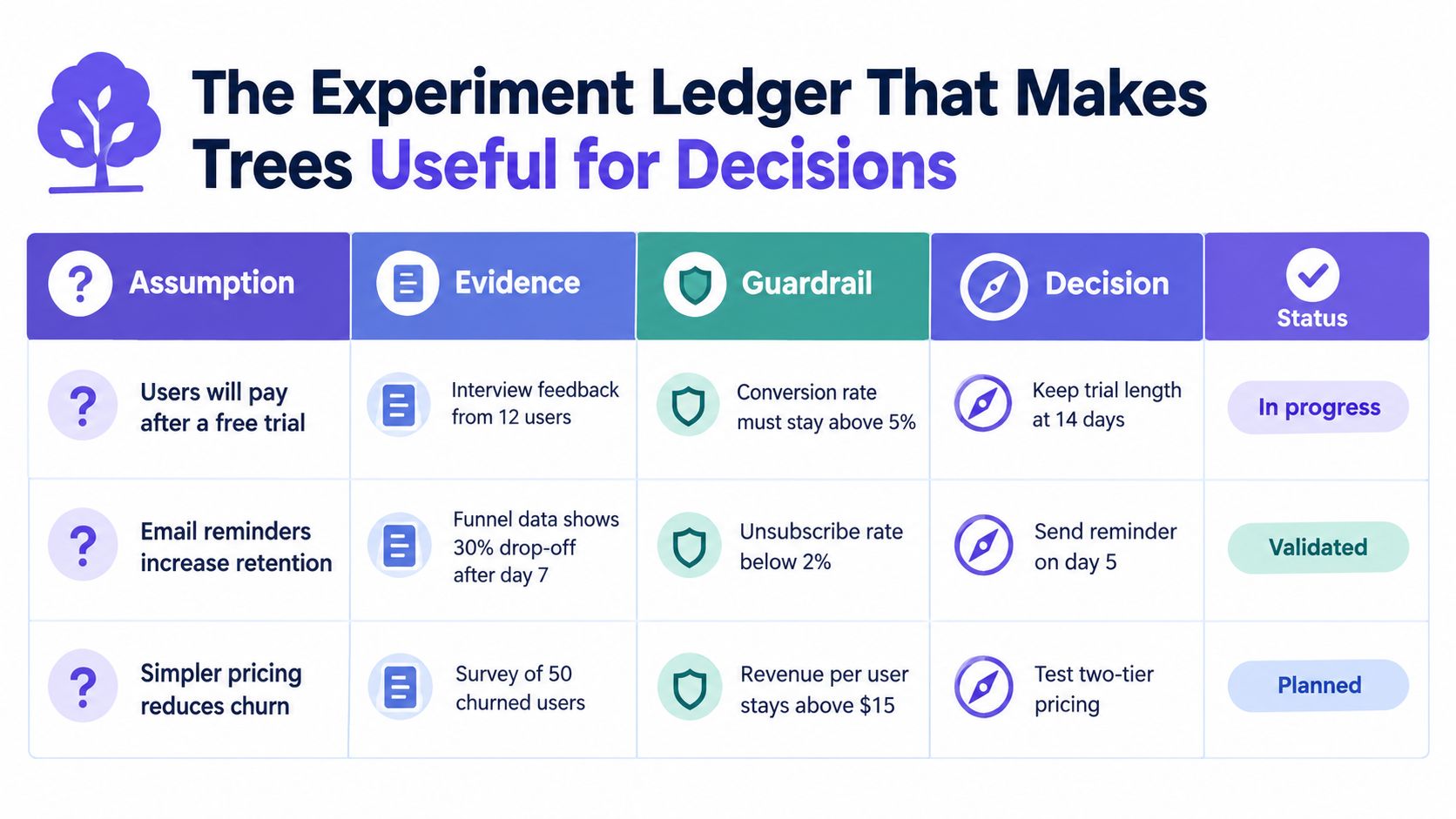
One simple way to make pruning easier is to attach a lightweight decision ledger to the tree. For each active branch, record:
- The opportunity being addressed
- The leading solution ideas
- The core assumption being tested
- The evidence gathered so far
- The guardrails that must not worsen
- The next decision: continue, revise, or stop
This small addition closes the gap between a discovery artifact and a delivery decision.
Turning a selected branch into shippable design with Figr
An OST helps a team decide what to explore. It does not automatically produce the detailed product design work needed to test and ship the chosen branch. That is where Figr can play a practical role.
Figr is an AI product design agent for teams working on real products, not blank-canvas mockups. It uses product and design context, including customer research, PRDs, analytics, existing screens, Figma files, recordings, and design-system constraints, to help teams explore realistic directions. Figr describes this context model through its Visual Context Graph, which spans visual screens, behavioral flows, design-system layers, product knowledge, and implementation constraints.
In OST terms, Figr is most useful after a team has chosen a branch worth exploring. It can help with:
- Generating multiple solution directions for a selected opportunity
- Branching alternatives on canvas for comparison
- Mapping flows and edge cases that affect test quality
- Creating multi-state prototypes for assumption tests
- Editing within the team's design system and existing product structure
- Moving concepts toward Figma-ready outputs through Figma Sync and direct editing
That positioning matters. Figr should not be framed as a tool that proves opportunities, performs customer interviews, or guarantees outcomes. The product's value is in helping teams turn selected branches into realistic, constrained design exploration that is closer to what they could actually ship.
For teams evaluating how the product is evolving, the Figr changelog gives the best current view of shipped capabilities and updates.
A simple opportunity solution tree template for your team
If your team is new to the method, start with a compact opportunity solution tree template like this:
Desired outcome
What measurable result are we trying to improve?
Opportunities
What customer needs, pains, or desires could influence that result?
Solutions
What are at least two or three plausible responses for each important opportunity?
Assumption tests
What is the smallest test that could change our decision about each branch?
Decision notes
What evidence would make us continue, revise, or prune the branch?
You can use this structure in a whiteboard, a doc, or a product discovery workspace. The critical part is not the software. It is keeping the four levels distinct and updating the tree as new evidence comes in.
Common mistakes teams make with opportunity mapping
Even experienced product teams misuse the method. The most common failure modes are:
- Writing features where opportunities should be
- Using vague outcomes that cannot guide tradeoffs
- Treating one interview quote as proof of an opportunity
- Running tests without clarifying what decision the result should affect
- Keeping every branch alive forever
- Confusing local metric movement with a good product outcome
The fix is usually simple but demanding: sharpen the outcome, rewrite opportunities as customer problems, compare multiple solutions, and define the test in terms of the decision it should influence.
FAQ
What is an opportunity solution tree?
An opportunity solution tree is a product discovery framework created by Teresa Torres. It helps teams connect a measurable outcome to customer opportunities, possible solutions, and the assumption tests needed to make a better product decision. The method is designed to keep teams from jumping straight from a problem to a feature.
What makes a good opportunity in an OST?
A good opportunity describes a real customer need, pain point, or desire that could influence the outcome. It is not a feature idea. If the statement still makes sense even when no product feature is mentioned, it is usually a stronger opportunity.
What is the difference between an opportunity and a solution?
An opportunity is the customer problem or unmet need. A solution is one possible response to that problem. For example, "users do not know where to start" is an opportunity, while "guided setup checklist" is a solution.
How many solutions should each opportunity have?
There is no fixed rule, but most teams should generate at least two or three plausible solutions for an important opportunity. The point of the tree is to compare options, not to justify the first idea that surfaced.
What are assumption tests in an opportunity solution tree?
Assumption tests are small experiments or research activities that reduce uncertainty in a branch. They can include concept tests, clickable prototype sessions, funnel analysis, limited rollouts, or usability studies. The goal is to gather evidence that could change the team’s decision.
When should a team prune a branch?
A team should prune a branch when new evidence weakens the opportunity, the solution fails to address the problem well enough, or another branch has stronger evidence and better outcome potential. Pruning is part of good discovery because it prevents teams from overinvesting in weak ideas.
Can opportunity solution trees work for existing SaaS products?
Yes. OSTs are especially useful for existing SaaS products because teams usually have access to interviews, analytics, support signals, and workflow evidence. That makes it easier to identify stronger opportunities and turn promising branches into realistic design work.
How does Figr fit into an OST workflow?
Figr fits after a team has selected a promising branch. It helps product and design teams explore multiple solution directions, map flows and edge cases, and create realistic prototypes using existing product context, research, design-system constraints, and Figma assets.
Final takeaway
The value of an opportunity solution tree is not that it produces a neat diagram. Its value is that it helps product teams connect evidence to decisions before they commit to a feature branch.
The strongest opportunity solution tree examples are practical. They show how to move from a measurable outcome, to customer opportunities, to competing solutions, to assumption tests that can change what the team builds next. They also show that pruning weak branches is part of good discovery, not a sign that the process failed.
If your team already has an existing product, the method becomes even more powerful when paired with tools that can turn selected branches into realistic prototypes and flows. That is where Figr can support the process, helping teams move from discovery insight to testable, shippable design grounded in the product they already have.
If you are building a stronger discovery workflow and want help turning promising branches into concrete product directions, visit Figr to see how its AI product design agent supports exploration, iteration, and design work that reflects real product context.