

A design brief usually fails before design starts, because the room thinks it has alignment when it only has overlapping assumptions. You've probably seen the meeting already: the PM says “clean it up,” design hears a usability pass, engineering hears low-risk polish, and leadership expects a visible business win. That gap is where projects start drifting, long before anyone opens Figma.
When that drift goes unchecked, revision cycles multiply, handoffs get tense, and teams waste time arguing over decisions that should have been settled upfront. The brief becomes a polite fiction, a document nobody trusts because it never defined the problem, the boundaries, or the measure of success. If you care about effective problem statements for product success, you already know the pattern: vague inputs produce expensive outputs.
The fix is to treat the brief as an Alignment Artifact. It's a working agreement that turns intent into decisions, exposes ambiguity early, and gives the team a shared reference when pressure rises. That's how to write a design brief that helps people build.
Introduction
The fastest way to lose a product team is to hand them a brief that sounds clear and means five different things.
I've watched kickoff meetings where everyone nodded, nobody asked hard questions, and the project still slid into confusion by the next morning. Design started exploring concepts. Engineering flagged missing constraints. Someone from leadership added a new priority in Slack. Suddenly the document that was supposed to create clarity had become a permission slip for interpretation.
A useful brief fixes that by turning scattered intent into a decision-ready plan. It names the problem, anchors the outcome, defines what's inside the work, and protects the team from vague requests disguised as strategy.
The Anatomy of an Actionable Brief
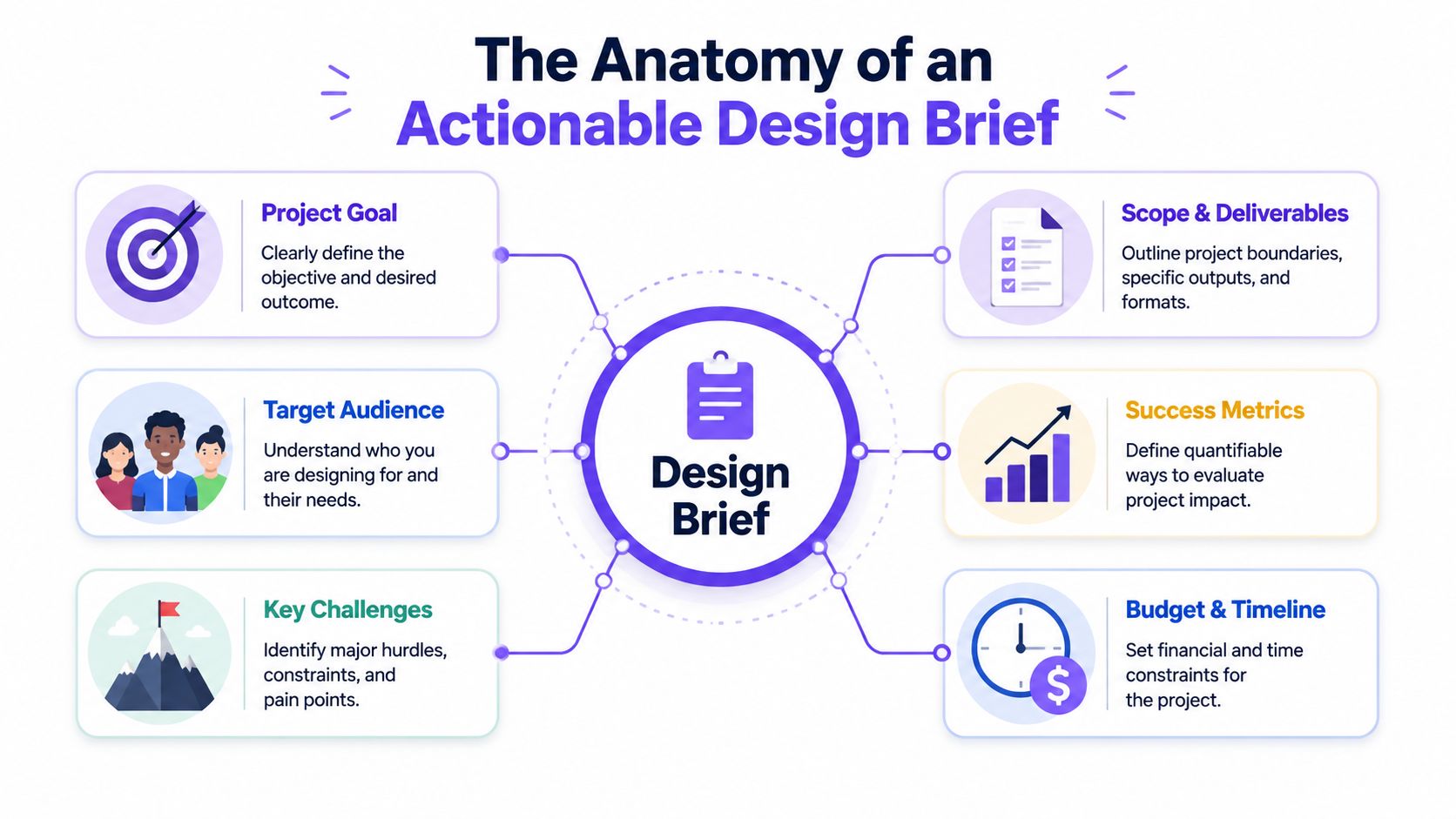
A strong brief isn't a form to complete. It's a Project Constitution, the document that defines what the team is solving, how it will judge trade-offs, and where the edges are.
Historically, that's why design briefs became standard. As design expanded from isolated visual tasks into cross-functional product work, the brief evolved into a shared planning document. Figma describes it as a document that outlines project specs across work such as web redesigns or logo creation, and includes project overview, goals, target audience, budget, timeline, deliverables, and competitors in some cases, all before production begins in a structured workflow of ownership, drafting, collaboration, and finalization in Figma's guide to creating a design brief.
The Compass
The brief needs one central objective. Not a pile of aspirations. One decision-driving outcome.
That objective should answer a brutal question: what should improve if this project works? If the answer is fuzzy, the project will be too. In such cases, teams that reduce rework with product specs usually outperform teams that rely on a lightweight request doc. They pin the work to an outcome, not a vibe.
Practical rule: If two stakeholders can read the goal and imagine different wins, the goal isn't written yet.
The Audience and the Friction
Good briefs describe who the work serves and what gets in their way. That sounds obvious, but many briefs stop at “our users” and never define the actual behavior, context, or pain point behind the request.
The audience section should help the team answer questions like:
Who is affected: New users, power users, admins, buyers, or internal operators
What's hard today: Confusion, delay, drop-off, inconsistency, or trust issues
What context matters: Existing flow, device constraints, accessibility needs, or approval steps
The Guardrails and the Edges
This is what most briefs underwrite badly. Teams list what they want, then skip what limits the work. Scope gets blurry. Constraints emerge late. The team pays for both.
A useful brief should state:
What's in scope: Screens, flows, states, journeys, or components being changed
What's out of scope: Adjacent requests, future phases, unrelated cleanup
What constrains the work: Timeline, budget, design system rules, technical dependencies, legal requirements, or accessibility standards
What will be delivered: Specific files, prototypes, specs, and review expectations
A brief earns trust when it answers questions before people ask them.
A Step-by-Step Guide to Drafting Your Brief
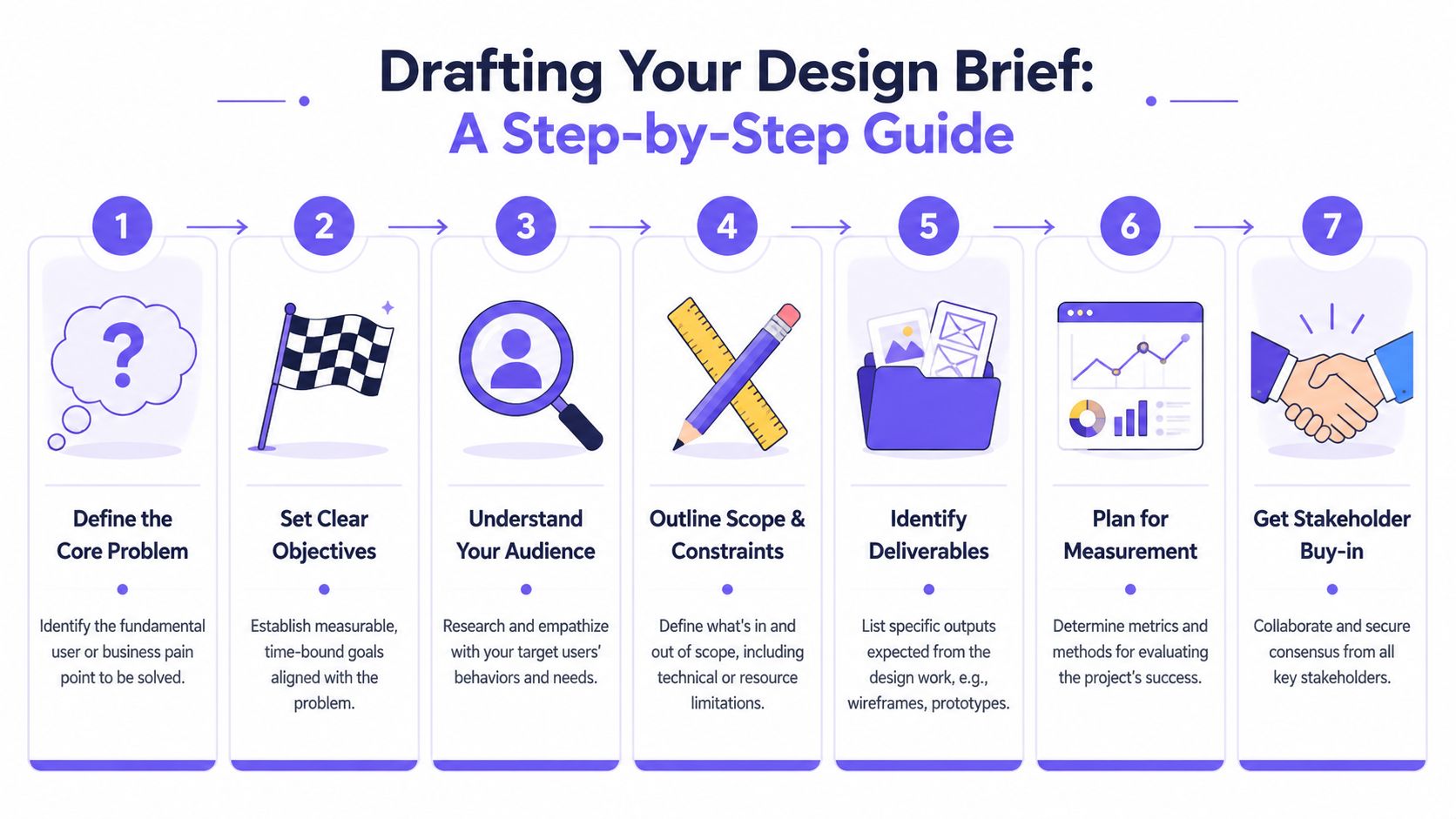
The basic gist is this: write the brief in the order the team needs to think, not the order a template presents boxes.
Start with the decision the project is trying to force. Then layer in proof, boundaries, and ownership. The Interaction Design Foundation notes that strong briefs should be specific enough to define goals, audience, scope, timeline, budget, and deliverables, but concise enough to stay focused because too much detail can dilute the main objective in its guidance on design briefs.
The drafting workflow
Step 1. Name the core problem.
Write the problem in plain language.What's broken: Describe the user or business friction
Why now: State why this issue matters at this moment
Why this project exists: Connect the work to a real decision, not generic improvement
Step 2. Define the user and context.
Don't describe a demographic sketch when the team needs behavioral clarity.
Which users matter most: Primary audience first
Where they experience the issue: Specific flow, screen, or task
What context surrounds the task: Existing product logic, permissions, device state, support burden
Step 3. Turn goals into measurable requirements.
This step determines whether many briefs become serious or stay decorative. Practitioner guidance recommends translating vague aims into measurable targets and specifying deliverables at format level, including details like file type, dimensions, output count, deadlines, and revision limits in Studio Red's design brief guidance.
Define success: Use a measurable outcome where possible
Use examples carefully: A target might look like reducing task time by 30% or reaching a 4.5-star satisfaction rating, both examples cited in the verified guidance above
Avoid vanity language: “Modernize” and “make it better” don't help teams choose
A short visual walkthrough can help if your team needs a shared mental model before drafting further.
What to include before anyone starts designing
Step 4. Draw the scope line.
Scope should be stated with enough precision that people can spot drift quickly.Include the surface area: Which screens, flows, or touchpoints change
Name exclusions: What will not be addressed in this round
Flag dependencies: Engineering readiness, research inputs, content, or compliance review
Step 5. Specify deliverables in operational terms.
Most frustration comes from unstated output expectations.
Artifact type: Wireframes, prototypes, final UI, annotated flows, handoff notes
Level of fidelity: Early exploration or implementation-ready
Review pattern: Revision limits, feedback rounds, and approval owner
A brief gets stronger when a designer can read it and know what to make, and an engineer can read it and know what must stay true.
Step 6. Record the constraints.
Every project has constraints. Healthy teams document them before they become excuses.Time constraints: Deadlines, launch windows, dependency timing
Technical constraints: Existing architecture, platform rules, component availability
Business constraints: Budget, internal approvals, legal or brand obligations
Step 7. Assign ownership and approval.
If nobody owns the decision, the project will keep reopening it.
Project owner: One accountable person
Contributors: People who shape the brief
Approvers: People whose sign-off is essential
If your team already works from proposal docs, Figr's guide to project proposals can help align the commercial case with the execution brief.
Grounding Your Brief in Product Reality
Most advice on how to write a design brief assumes you're starting with a blank canvas. Product teams almost never are.
You already have a live app, a backlog of prior decisions, analytics, edge cases, and a design system that may or may not be consistently used. Yet many briefs still read like a student exercise: project overview, target audience, aspirational goals, done. Canny Creative highlights that gap clearly in its discussion of how to write a design brief, especially for teams working inside an existing product environment.
The blank-page trap
Last week I watched a PM prepare a redesign brief for an onboarding flow. The template looked tidy. It had goals, users, timeline, and deliverables. It said nothing about the current drop-off points, nothing about which states were already supported, and nothing about the design system components engineering had already standardized.
That's the trap. The brief looked complete because the boxes were filled in. It was incomplete where execution lives.

What grounded briefs include
This is what I mean when I say a brief should be grounded in product reality. It should pull in the operational truth the team already has.
A grounded brief usually includes:
Current flow evidence: Captured screens, path logic, states, and handoff points
Existing component references: What already exists in the design system and what doesn't
Known behavior data: Funnel friction, support themes, prior user feedback, unresolved assumptions
Decision history: What the team already tried, rejected, or deferred
Approval mechanics: Who can change scope, approve copy, or block release
One way teams do this is by using tools that capture live product context rather than starting from an empty document. For example, effective product idea validation gets easier when the brief includes the existing journey, not just a rewritten aspiration. Figr is one option here. It can capture a live app through Chrome, import design systems and tokens, and generate product artifacts based on existing context, which makes it easier to draft from the product you have rather than the one people vaguely remember.
Grounded briefs don't ask the team to imagine the current experience. They show it.
That single shift changes the conversation. Instead of debating abstractions, teams review the actual flow, note what must remain stable, and make deliberate choices about where change belongs.
Securing Stakeholder Alignment and Sign-Off
A brief isn't approved when people say “looks good.” It's approved when they accept the trade-offs inside it.
That distinction matters because stakeholders rarely disagree on the headline goal. They disagree on what gets protected when tension shows up. One leader wants speed. Another wants lower implementation risk. Another wants a visible customer-facing improvement. If the brief doesn't surface those priorities early, the conflict arrives later wearing the mask of feedback.
The review meeting that actually works
Run the review around decisions, not slides. Put the brief in front of people early enough that they can think, then use the meeting to resolve open issues.
A strong review usually covers:
Success definition: What outcome matters most
Scope boundary: What's excluded from this phase
Constraints: What cannot move
Approval path: Who decides when feedback conflicts
Teams that use structured product design reviews tend to avoid the familiar mess where everyone comments and nobody owns the call.
The systems view
At scale, misalignment isn't a communication problem alone. It's an incentive problem.
Marketing may want broader messaging flexibility. Product may want cleaner conversion behavior. Engineering may want component reuse and predictable delivery. Each group is rational from its own seat. The brief works when it becomes a neutral object all sides can inspect together, instead of a design artifact one function is expected to defend.
Ask every approver one question: “What decision in this brief would you challenge after work begins?” If they hesitate, you've found the real review.
When sign-off is explicit about trade-offs, teams move faster later because they're no longer relitigating first principles mid-project.
Common Pitfalls That Derail Projects
Most broken projects don't start with reckless people. They start with a brief that left too much room for interpretation.
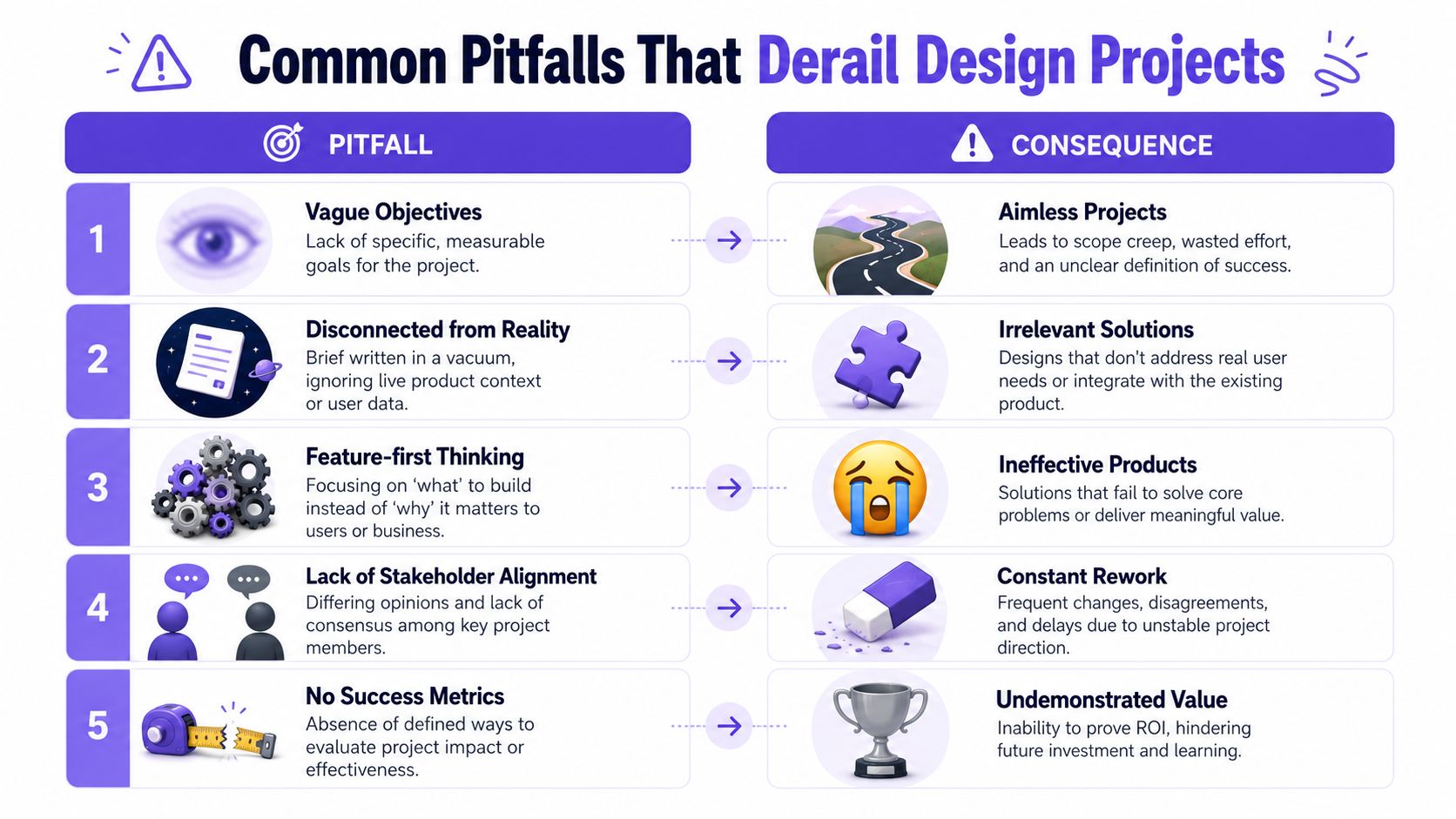
That's why I like running a pre-mortem before design begins. If this project goes sideways, where is the failure most likely to start? The answer is usually sitting in the language of the brief itself.
The failure patterns to watch
The Mirage of Agreement. Warning sign: everyone nods, but key terms mean different things to different people. Instead, define the outcome, constraints, and approvals in plain language.
The Vague Mandate. Warning sign: phrases like "refresh," "streamline," or "improve UX" appear without measurable intent. Instead, rewrite goals as observable results or decision criteria.
The Scope Creep Invitation. Warning sign: the brief lists ambitions but no exclusions. Instead, add an out-of-scope section before review.
The Constraint Illusion. Warning sign: technical, legal, accessibility, or timing realities show up after design starts. Instead, document non-negotiables in the brief itself.
The Orphaned Deliverable. Warning sign: the team doesn't know what artifact is expected or when it's done. Instead, specify output type, fidelity, revision rules, and owner.
Why ambiguity gets expensive fast
This is the business case people feel but rarely quantify. According to the Standish Group's CHAOS research, requirements-related defects cost 50-100x more to fix after launch than during the design phase in the CHAOS Report sample research. Ambiguous briefs are a direct route into that category of defect because they allow unresolved assumptions to survive until build or release.
That economic pattern shows up everywhere. Teams rush the brief because documentation feels slow. Then they burn far more time in redesigns, engineering churn, and approval loops. The local incentive is speed. The actual outcome is delay.
The pre-mortem question set
Before approval, ask:
What phrase in this brief could two smart people interpret differently?
What request would stakeholders try to add once work starts?
What constraint are we assuming someone else knows?
How will we know the work succeeded?
If those answers aren't visible in the document, the brief isn't done.
Conclusion Your Next Actionable Step
In short, a design brief is an act of leadership. It gives the team a shared definition of the problem, a clear boundary for the work, and a way to judge decisions when pressure rises.
Take your last completed brief and audit one thing today: does it define success with a measurable requirement or a clear decision criterion? If it doesn't, rewrite that section first. That one change usually reveals every other weakness hiding in the document.
If your team wants to draft briefs from real product context instead of a blank page, Figr is worth a look. It helps product teams capture live app flows, work from existing design systems, and turn product thinking into execution-ready artifacts.