
A friend at a B2B SaaS company once showed me a feature flow that had been “almost ready” for two weeks. The screens looked polished. The problem was that half the flow ignored how the product operated.
That's the hidden tax in design work. Teams burn days collecting context from Figma files, Slack threads, old PRDs, analytics exports, and engineer memory, then still end up redrawing the same flow after review. Deadlines slip, handoff turns into negotiation, and confidence drops because nobody can tell whether the slowness comes from careful thinking or from work that should never have happened.
Adaptive's story matters because it shows a cleaner path. Using an AI design tool for product teams, the team shifted from manual context gathering to context-aware generation, grounding design in real product inputs instead of assumptions. That change is what made a two-week workflow compress into minutes, and it's the core focus of this Figr Design Time Case Study.
Introduction
Adaptive's old workflow was slow because design started before context was fully assembled. Product Managers wrote the brief, Designers opened Figma, engineers joined later, and everyone spent too much time reconciling what the product should do with what the product could support.
When that gap stays open, the waste compounds in ordinary ways. A Designer draws a clean happy path, then learns the API returns a strange state. An engineer flags that the component doesn't exist in the current library. A Product Manager reopens the requirements because analytics suggest the user problem was framed too broadly. None of that looks dramatic in isolation. Together, it turns two weeks into a blur of revisions.
Adaptive found relief by changing the order of work. Instead of drawing first and validating later, the team pulled live screens, design system rules, written context, and behavioral clues into one working layer before exploring solutions. That's the bridge this Figr Design Time Case Study makes clear: speed followed context, not the other way around.
What Did Two Weeks of Design Work Look Like at Adaptive
Adaptive's two-week cycle looked productive from the outside and messy from the inside. The calendar filled up, files multiplied, and people stayed busy, but much of that effort was spent reconstructing product context that already existed somewhere else.
Where the time actually went
A typical feature started with a kickoff. The brief was directionally useful, but it rarely contained every edge case, component constraint, or implementation detail. So the actual work began with scavenging.
The Designer looked through prior files. The Product Manager searched Slack for old decisions. Someone asked engineering whether an existing component could stretch to handle the new state. Another person pulled screenshots from staging because the current source of truth was spread across too many places.
Then came the first draft, which usually looked plausible and still needed correction.
I've seen this pattern enough times to know it doesn't feel like wasted effort while it's happening. It feels responsible. People are trying to be thorough. The trouble is that the effort is fragmented, and fragmented effort hides how much rework is already baked in.
The shape of exploratory waste
Adaptive's team was spending hours on work that resembled progress but didn't hold up under review. That's why I use the term exploratory waste. It's the time spent exploring design directions without enough grounding in product reality.
A short vignette captures it. Last week I watched a Product Manager walk a Designer through a new B2B settings flow. By late afternoon, the screens looked clean. By the next morning, engineering had pointed out that the permission model made one branch invalid, and customer success had flagged a setup step that power users constantly skipped. A full day disappeared.
That kind of waste is hard to measure unless you have a framework for rework measurement. Many such groups do not. They just absorb it as “normal product work.”
Practical rule: If a team keeps redesigning after review, the problem usually started before the first screen was drawn.
Why the old process felt heavier every quarter
Adaptive's product was growing, which made the old method worse over time. More screens meant more patterns to remember. More customers meant more exceptions. More contributors meant more context lived in conversation instead of in a reusable system.
That's why the two-week cycle wasn't just about drawing speed. The delay came from context retrieval, alignment work, clarification loops, and predictable handoff friction. The actual design craft was only one slice of the timeline.
Would a faster drawing tool have fixed that? No. The bottleneck wasn't visual output. The bottleneck was the gap between product memory and design execution.
Why This Manual Process Created So Much Waste
Manual design processes create waste when teams treat context like a meeting artifact instead of a working input. Adaptive wasn't slow because the team lacked talent. The team was slow because the product's memory was scattered across too many surfaces.
Fragmented inputs produce confident mistakes
Here's what usually happens. A Product Manager has the PRD. A Designer has the latest Figma file. Engineering knows which components are fragile. Research has a call recording with the actual user objection. Analytics shows a drop-off in the current flow. None of those signals are wrong. They're just disconnected.
So the team invents a temporary mental model and starts designing from that.
This is what I mean: the first version often solves the problem as the room currently remembers it, not as the product behaves. That difference is where waste hides.
A useful outside lens on this comes from Don Norman's The Design of Everyday Things, which argues that good design depends on understanding both user needs and system constraints. That principle sounds obvious until you watch a team ignore one side because gathering both takes too long.
The first real shift was pattern grounding
Adaptive's turning point came when the team saw a different way to start. Instead of asking an AI to generate generic screens, they used a system that could surface proven interface patterns from over 200,000 screens and had already reduced rework for 500+ teams, according to Figr's Product Hunt profile on design research and prototyping.
That matters because generic inspiration rarely helps in complex B2B workflows. Teams don't need prettier guesses. They need outputs that resemble the product they already have to ship.
A separate but related lesson shows up in this guide on improving product data flow. When information moves badly across systems, people compensate with meetings, manual translation, and duplicate work. Product design behaves the same way.
Why human memory was the wrong infrastructure
Adaptive had smart people doing heroic context stitching. That's a bad operating model.
Human memory is good at judgment. It's bad at reliably recalling token rules, prior exceptions, old rationale, and implementation caveats across dozens of active initiatives. When teams rely on memory as infrastructure, every new feature starts with rediscovery.
You can't build predictable speed on top of scattered recall.
That's why the waste felt so stubborn. The issue wasn't motivation. The issue was architecture. Once Adaptive recognized that, the solution stopped looking like “move faster” and started looking like “stop beginning from partial context.”
How Adaptive Discovered a New Path Forward with Figr
Adaptive found a better path when the team stopped looking for a faster wireframing tool and started looking for a context engine. The aha moment came from seeing that design could begin with the product as it exists, not with a blank canvas and a pile of references.
The shift in mindset
The Product Manager who pushed this change wasn't trying to automate judgment. They wanted to remove the repetitive setup work that kept delaying real product decisions. That distinction matters.
I've heard the same frustration in other teams. They don't mind hard trade-offs. They mind wasting half the week assembling materials before the trade-offs even become visible. The same pattern shows up outside product design too, which is why I liked this piece on optimizing social media marketing workflows. Different function, same disease: fragmented context makes even competent teams look slow.
The new setup in practice
The basic gist is this:
Step 1. Capture the live product context.
Adaptive started from the current application, not from memory.
Existing screens, navigation patterns, and visible states became the foundation for new work.
Step 2. Load written thinking into the working memory.
The team brought in briefs, decision notes, and research inputs.
That gave the design process access to product intent, not just interface shape.
Step 3. Pull in design system constraints.
Tokens, components, and usage patterns were treated as active rules.
That cut down the classic review note: “Looks good, but we can't build it like this.”
Step 4. Generate grounded directions, then refine.
Instead of drafting from scratch, the team reviewed options grounded in the existing product.
The Designer focused on judgment and refinement.
Step 5. Move the output into the team's existing design workflow.
The handoff stayed editable and practical.
Adaptive used the same operating logic described in this Figma workflow guide.
Why skepticism faded quickly
Teams are right to be skeptical of AI in design. Most tools can generate something that looks convincing for five minutes. The true test is what survives review.
Adaptive's skepticism eased when the outputs reflected the product's own structure instead of generic visual trends. That changed the conversation from “Can this make screens?” to “Can this save us from rebuilding the same understanding every sprint?”
That was the new path forward.
The 15-Minute Workflow A Step-by-Step Breakdown
The 15 minutes did not come from faster drawing. It came from removing the dead time before good design work can start.
At Adaptive, the old pattern was familiar. A request came in, then someone had to reconstruct the product reality around it. Which flow does this touch. What states already exist. Which component rules matter. Where did the last decision live. That context hunt was the expensive part, and it repeated every sprint.
The new workflow compresses that exploratory waste into a short setup window, then pushes the team straight into evaluation and refinement.
The workflow they use now
Step 1. Start with the product question.
The team loads the feature brief, supporting notes, and any relevant business constraints into a shared working context.
That gives the system the goal, the reason behind the request, and the boundaries that matter.
Step 2. Pull in the current product state.
Relevant live screens and existing flows are added early.
The working context now includes layout, hierarchy, navigation patterns, and visible states from the app.
Step 3. Apply design system rules from the start.
Components, tokens, and usage guidance come in as active constraints, not as cleanup criteria after the concept is approved.
This is the shift that cuts rework. The team spends less time exploring directions that engineering will reject later.
Step 4. Generate directions that reflect real product conditions.
Adaptive reviews options with edge cases, branching logic, and expected states already in view.
That changes the designer's job. Time goes into judging trade-offs instead of recreating baseline context.
Step 5. Refine the best route.
One direction gets pushed forward.
The team sharpens flow, hierarchy, and interaction details instead of redrawing multiple disconnected concepts.
Step 6. Keep handoff attached to the reasoning.
Specs, states, and rationale stay close to the artifact while decisions are still fresh.
The same operating model shows up in this guide to rapid prototyping for product teams.
Why this compressed the cycle
The practical change was not that AI made design choices for the team. It handled the context assembly that used to sit between the request and the first serious review.
That matters because exploratory waste rarely looks dramatic in a calendar. It shows up as small, repeated costs. A designer redraws a screen because an older pattern was missed. A PM re-explains a workflow constraint that lived in a doc no one reopened. An engineer points out, late in review, that the proposed state does not fit the component model. None of that is hard work in the strategic sense. It is recovery work.
Adaptive reduced that recovery work by treating product memory as an input, not as something each person had to reconstruct manually.
What changed technically
The strongest technical gain was coherence. Screens stayed closer to the existing component logic, token rules, and flow structure, so refinement happened inside realistic boundaries.
That changed the quality of review. Instead of spending the first pass correcting avoidable mismatches, the team could discuss sequencing, clarity, and risk. In practice, that is the difference between producing more screens and producing decisions the product team can ship.
Design judgment still carried the project. Product managers still had to frame the problem clearly. Designers still had to choose among imperfect options. Engineers still had to validate implementation details.
The difference was simpler. The team stopped paying the same context tax every time a new design task started.
What Changed Besides the Clock
The more interesting shift at Adaptive was not speed. It was confidence.
Before Figr, design review often served as the first serious context check. Teams came in expecting to find avoidable misses, a state the flow forgot, a pattern that did not match the system, a handoff that looked clean in Figma but created work in code. That expectation shapes behavior. Designers present more defensively. Engineers review with more skepticism. PMs spend time translating decisions that should have been clear in the artifact itself.
Once context gathering moved upstream, the tone changed.
Buildability improved without forcing safer ideas
Designs started closer to the product's actual constraints, so feasibility stopped dominating the conversation. Engineers could react to the intent of a workflow instead of auditing it for basic mismatches. Designers had more room to explore because they were not starting from a blank canvas or rebuilding product memory by hand.
That trade-off matters. Good teams do not want AI to flatten judgment or push everyone toward the same obvious answer. They want a faster first draft that already respects components, states, and system logic. That is a very different outcome from generic generation, and it is why the collaboration held up under real product work.
Teams evaluating that shift can see the broader pattern in Figr on enterprise AI design benefits.
Review cycles became decision forums
The meetings changed shape.
Earlier, reviews were used to catch missing context. Later, they were used to make product choices. The discussion moved toward questions like these:
Should this step ask for commitment now, or defer it until the user has more context
Which failure state needs the clearest recovery path
Where is the main user risk, and where can the team keep the solution simple
What needs tighter copy or stronger guidance before engineering begins
That is a better use of senior time because it focuses the room on judgment, not cleanup.
Trust showed up in small ways first
One pattern stood out in Adaptive's workflow. Engineers started engaging with designs earlier because the artifact was more likely to reflect real implementation boundaries. Designers spent less energy defending choices that were going to be discarded anyway. PMs no longer had to replay the same background in every handoff just to keep the work grounded.
Those are not soft benefits. They reduce friction in places where B2B SaaS teams usually lose momentum, especially on complex flows with edge cases, permissions, and dependency-heavy setup steps.
A team can ship faster and still feel worse if speed comes from cutting thought. That was not the change here. Adaptive reduced exploratory waste by giving the team a better starting point, one grounded in product context from the beginning.
Better collaboration starts when the design artifact already reflects the product it has to live inside.
Quantifying the Staggering Return on Investment
Adaptive's ROI showed up when design stopped acting like a context-reconstruction function. Before Figr, a meaningful share of design time went into rebuilding product understanding from docs, tickets, screenshots, and stakeholder memory. After Figr, that context was available at the start of the workflow, so the team spent less time producing options that would later be corrected or discarded.
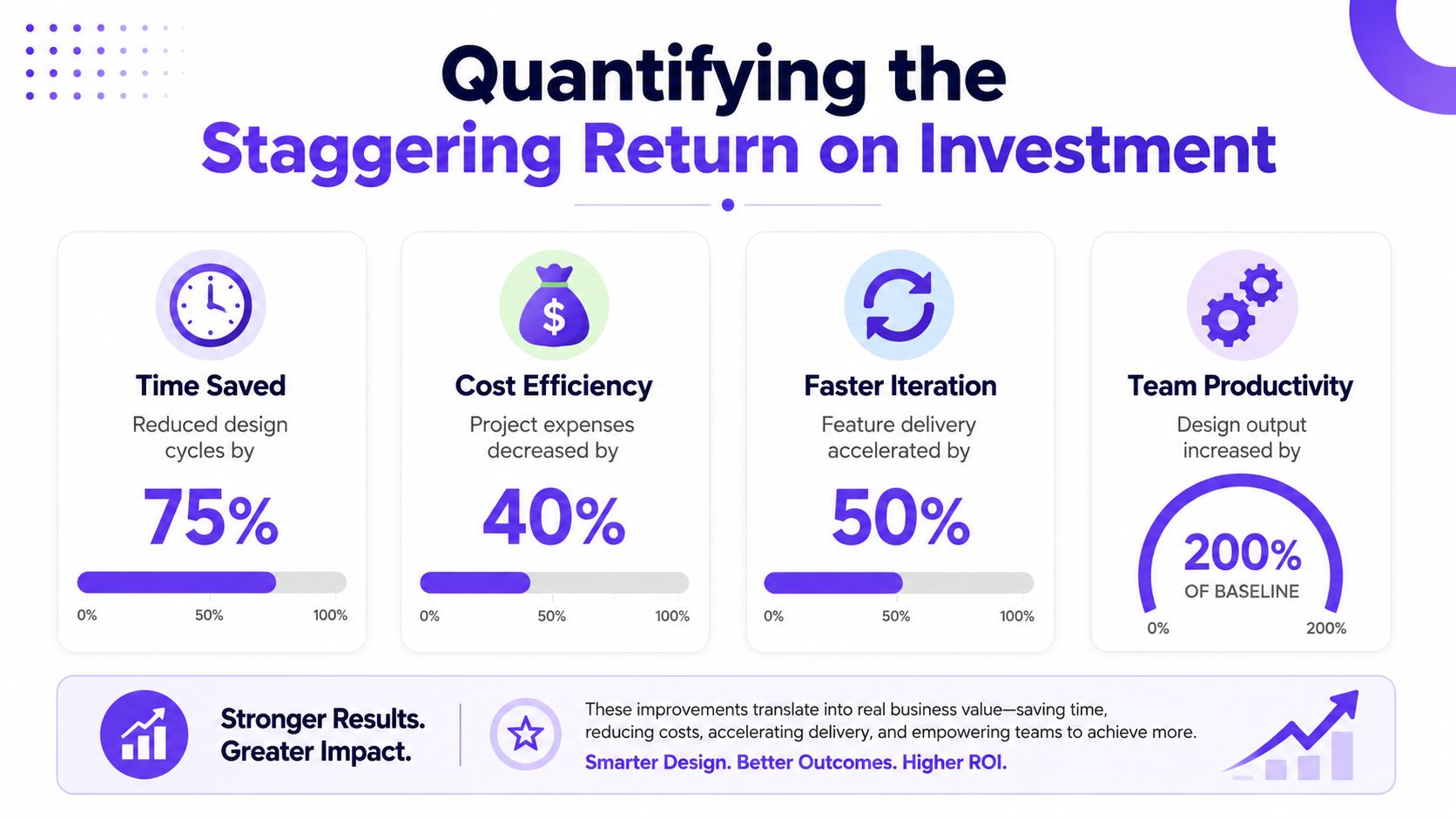
That distinction matters because speed on its own is easy to misread. A team can generate screens faster and still waste time if those screens are weak fits for the actual product constraints. Adaptive improved the economics of design by cutting exploratory waste first.
The ROI case is strongest when the metrics connect
As noted earlier, Figr reports four core outcomes from its B2B SaaS case study: 3x design velocity, 70% less rework, 40% faster time-to-market, and 18% higher feature adoption. Taken together, those numbers describe more than output. They show a workflow with less thrash between discovery, design, and implementation.
3x design velocity. More product questions get resolved in the same planning window.
70% less rework. Fewer concepts die late because the initial design already reflects product reality.
40% faster time-to-market. Teams reach build-ready decisions sooner, which reduces idle waiting across functions.
18% higher feature adoption. Shipped work is better aligned to user needs and product context.
The important trade-off is this. Adaptive did not get these gains by lowering review quality or skipping hard decisions. The team got them by shifting effort away from context gathering and redraw cycles, then using that time on judgment calls that affect product outcomes.
Why that translates into real financial return
Design waste rarely sits only inside the design budget. It spreads into engineering handoffs, PM review cycles, and roadmap timing. A screen that misses a dependency or permission rule often triggers another round of edits, another review, and another delay before engineering can commit.
That is why rework is such an expensive metric. It is not just designer time lost. It is compounded coordination cost across the whole team.
For leaders evaluating the broader operating impact, Figr on enterprise AI design benefits frames the same issue well. The return comes from making product context reusable, not from treating AI as a faster wireframing assistant.
The engineering side matters too. When upstream artifacts arrive with fewer false assumptions, developers spend less time clarifying intent, re-estimating work, or waiting on revised specs. That pattern aligns with the broader principles in CloudCops' developer productivity guide, where throughput improves when teams remove coordination drag, not just when individuals work faster.
A more credible way to read the ROI
The headline number is not that a two-week cycle became a 15-minute button click. The credible interpretation is narrower and more useful. Adaptive compressed the manual part of exploratory design by replacing fragmented context collection with system-generated product intelligence, then kept human review focused on trade-offs, sequencing, and risk.
That is what makes the return believable. The team did not automate product judgment. It reduced the amount of expensive human time spent rediscovering facts the system could assemble earlier.
What Does a Product Team Do with 95% More Design Capacity
The interesting question is not how many screens Adaptive could produce after the workflow changed. The useful question is where that recovered time went, and whether it improved product decisions.
In practice, the biggest gain was a reduction in exploratory waste. Designers no longer had to spend days reconstructing product context before they could test an idea. Product managers and designers could put rough directions in front of engineering, support, and commercial teams earlier, while the cost of changing course was still low.
That changes the shape of the work.
Instead of burning a sprint on first-pass concepts that were missing key constraints, the team could spend more of its time on sequence, clarity, and risk. That is where B2B SaaS products usually win or lose. A flow can look polished and still fail because it asks for commitment too early, hides important setup logic, or creates support debt in edge cases.
The extra capacity is most valuable when teams reinvest it in a few places that were previously rushed:
Problem framing
Pressure-test whether the workflow addresses a real user need, not just a requested feature.
Cut weak concepts before design detail makes them feel more credible than they are.
Failure-state design
Review empty states, permission issues, loading conditions, and recovery paths with the same care as the happy path.
Reduce downstream churn from support tickets and engineering clarifications.
Cross-functional review
Get reactions from engineering, support, and go-to-market earlier, while the artifact is still easy to revise.
Surface implementation constraints and rollout concerns before they become rework.
I have seen the same pattern outside design. CloudCops' developer productivity guide makes a similar point from the engineering side. Throughput improves when teams remove setup friction and protect focused decision time.
There is also a cultural shift that matters. Teams with more effective design capacity stop treating mockups as the output. They use them as instruments for faster learning. Conversations get sharper because the artifact is grounded enough to debate real trade-offs, but cheap enough to change.
One product leader described the shift well: the team finally had time to debate whether a flow should exist before arguing about how it should look. That is a better use of senior attention.
More capacity does not automatically create better products. It creates the option to spend scarce time on the decisions that move adoption, trust, and implementation quality. Adaptive's advantage came from using AI-generated context to remove the dead time before those decisions could happen.
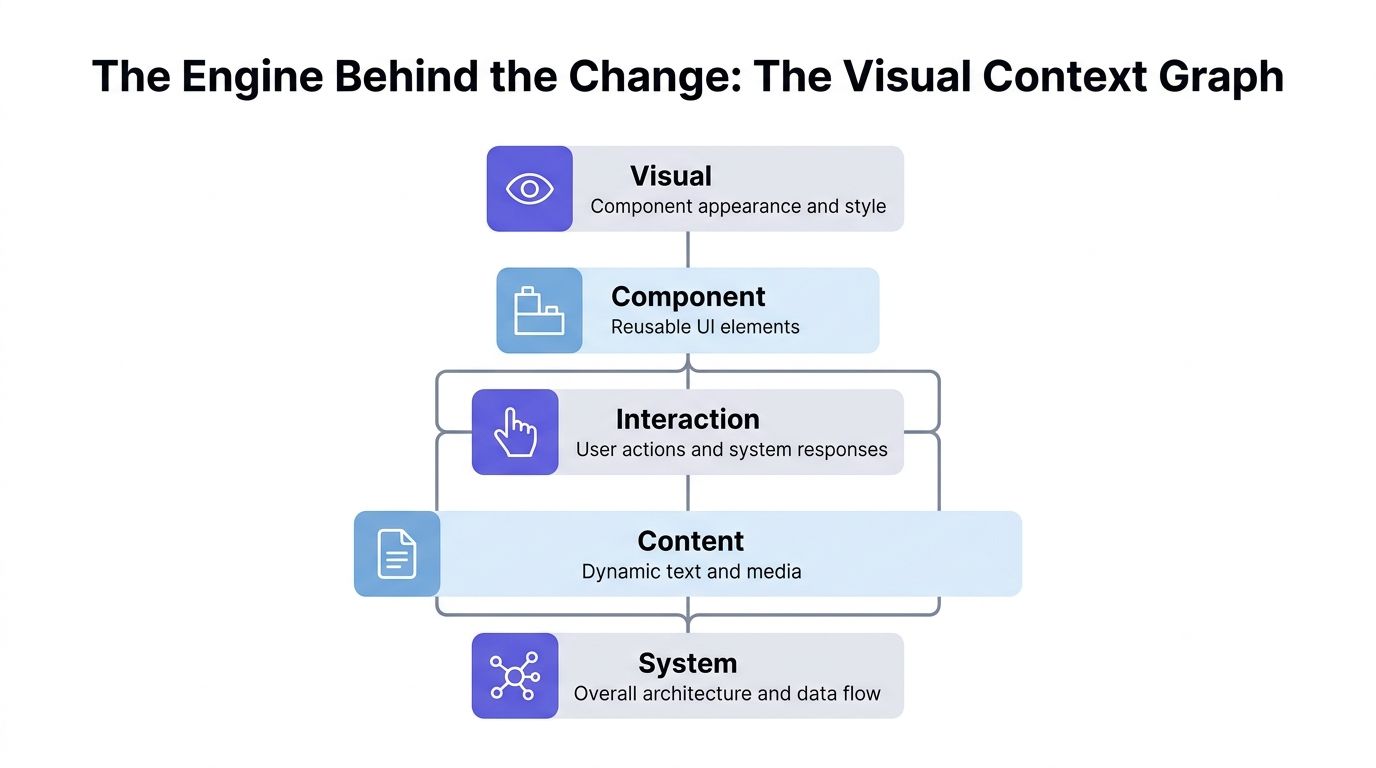
The Engine Behind the Change The Visual Context Graph
The core engine in this Figr Design Time Case Study is the Visual Context Graph. It works because design generation becomes useful only when the system can reason across the same layers human teams usually piece together manually.
The five layers that matter
The Visual Context Graph has five connected layers:
Visual context
- Screens, frames, layouts, hierarchy, visible states
Behavioral context
- Recordings, flows, interaction sequences, user paths
Design System context
- Tokens, components, variants, usage rules
Product Knowledge context
- PRDs, research, decisions, briefs, rationale
Implementation context
- Code constraints, routing logic, existing component realities
This is why the system can produce work that feels grounded instead of generic. It isn't reading only a prompt. It's reasoning across product evidence.
Why this architecture matters more than raw generation speed
Teams evaluating AI for design ask the wrong first question. They ask whether the tool can produce high-fidelity screens quickly. A better question is whether the output understands the product well enough to survive handoff.
That's where the best AI prototyping tools conversation gets more interesting. Fidelity alone is cheap. Context is expensive. The moat isn't drawing pixels. The moat is preserving the relationship between interface shape, user behavior, design rules, business logic, and implementation reality.
Teams don't need faster guesses. They need faster understanding.
Why the market is paying attention
Figr secured $2.25 million in seed funding, backed by Antler, to expand its AI-powered design platform, according to Antler's investment note on Figr. Funding alone doesn't prove product value, but it does signal that investors see a real market need around turning product thinking into production-ready artifacts.
That makes sense to me. The old workflow asks humans to act as the integration layer between design, product, and engineering. The Visual Context Graph reduces that burden by turning scattered context into a usable system.
Conclusion
Adaptive's result looks dramatic on the surface: a workflow that once stretched across two weeks collapsed into minutes. The deeper lesson is less flashy and more useful. The team stopped spending so much time designing without context.
That's the pattern I'd carry forward from this Figr Design Time Case Study. Exploratory waste happens when teams sketch before the product's rules, decisions, and constraints are active in the workflow. Once those inputs become part of the starting point, speed follows naturally.
In short, the true win isn't faster mockups. It's fewer avoidable loops, calmer handoffs, and more time spent on actual product judgment.
If your team keeps rebuilding shared understanding before every feature, the next step is simple: pick one live workflow, load the actual context first, and see how much of the cycle was never necessary. Then try Figr.
Frequently Asked Questions
Does Figr replace designers
I wouldn't use it that way. Designers still make the judgment calls, refine flows, and resolve trade-offs. The value is in reducing context gathering and preventable rework.
How much setup does it take to get useful output
In my experience, usefulness depends on the quality of context you bring in. The more real product inputs you load, like live screens, design systems, and briefs, the faster the output becomes credible.
Can it work for complex B2B SaaS products
Yes, that's where context matters most. Complex products usually suffer from scattered rules, hidden states, and implementation caveats, so grounding the workflow becomes more valuable.
What kind of context can it use
It can work from live product screens, design systems, written docs, research, analytics inputs, and related product artifacts. That's what makes the output feel product-specific.
Is the output actually usable in a team workflow
Yes, if the team already works in Figma and structured product docs. The practical test is whether engineers can recognize the components and whether Designers can keep editing the result without friction.
If your team is tired of spending days reconstructing product context before real design work begins, Figr is worth trying. Start with one messy workflow, feed it the product reality you already have, and see what disappears when exploratory waste does.