

You type “black boots,” scan a crowded page, add “waterproof,” then try “waterproof black boots size 9.” The results still feel wrong, and the tab closes.
Each extra attempt costs attention. In a software product, the same friction can leave someone without a setting, an answer in the help center, or the next step in a workflow.
Good search UX gives people a way to inspect, refine, and recover at every turn. The job isn't finished when the system returns results; it's finished when the user can act on one.
Why Search Is a Loop, Not a Search Box
A shopper searching for black boots might first see hundreds of options. Adding “waterproof” narrows the field to a handful, but a size filter or an unclear result set can trigger another query: “waterproof black boots size 9.” If the next page still doesn't resolve the choice, the shopper leaves.
That pattern is a search loop: query, inspect, revise, recover. The person submits a query, judges what came back, then decides whether to open a result, adjust the wording, apply a filter, or try again. Each step depends on what the interface reveals. A system can retrieve relevant products and still lose the user if suggestions are confusing or errors offer no route forward.
Baymard Institute's research tested users aged 21–56 completing tasks on 19 leading e-commerce sites across eight retail verticals. Researchers recorded more than 700 search-specific usability issues and distilled them into 31 search-usability guidelines. More than half of those guidelines concerned direct interaction patterns, including the search field, autocomplete, and results pages, rather than backend search logic, as described in Baymard Institute's e-commerce search research.
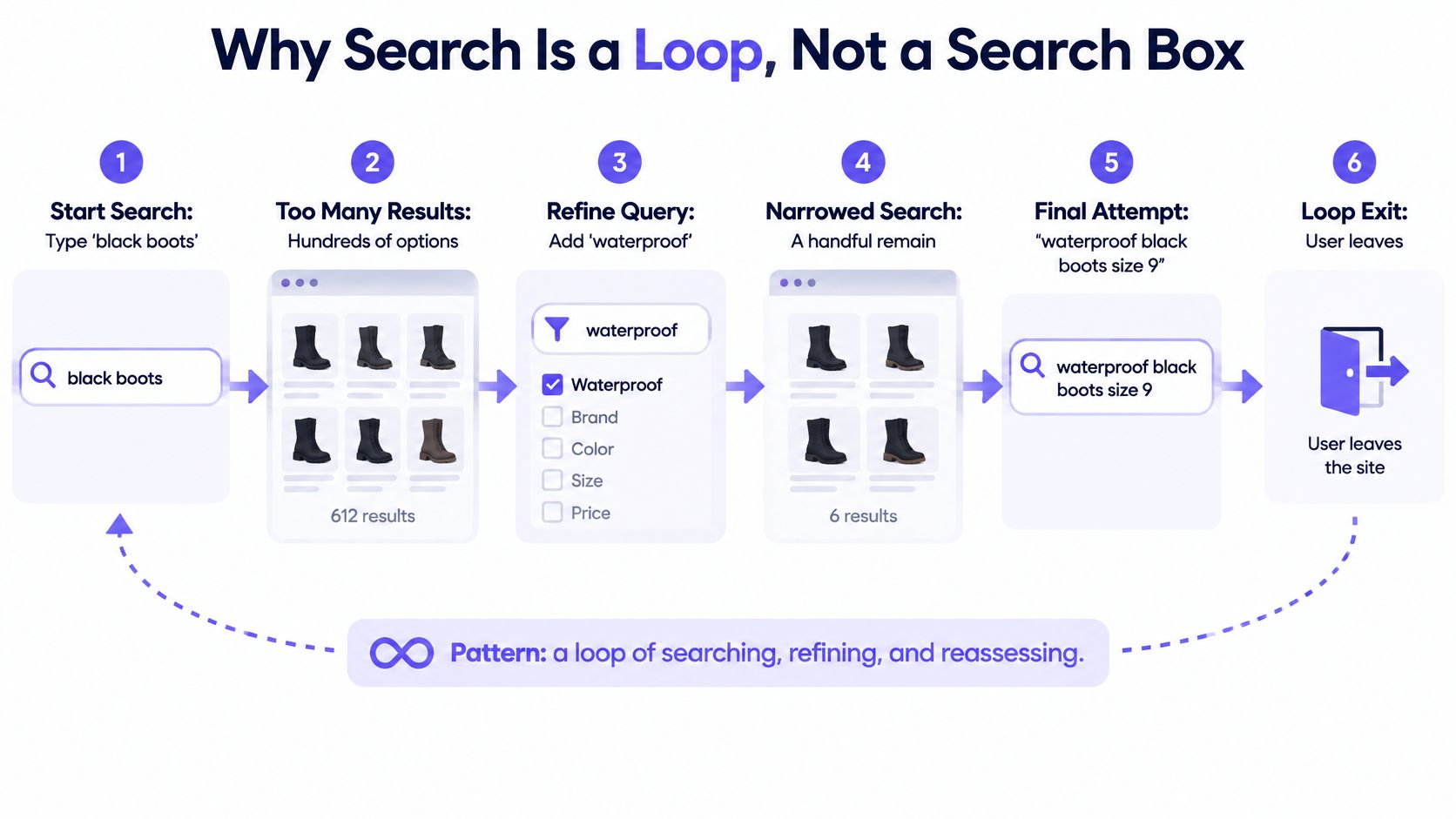
This is what I mean by a recovery surface: the place where the loop either continues or dies. It might be an editable query, a useful suggestion, an explanation for zero results, or a filter the user can remove. A strong recovery surface preserves the user's context and gives them a clear next move.
The same pattern appears in SaaS. A person searching a help center, settings page, dashboard, or command palette is trying to complete a task, not only retrieve a string. Search quality therefore belongs to the whole experience, including how someone enters a query and understands the results.
Pull the last ten failed sessions or support tickets that mention finding something. Mark where each person changed course, then name the missing recovery surface at that moment.
The Seven Components of Search UX
In Baymard's e-commerce search testing, users couldn't find the desired item or became frustrated enough to abandon in 31% of search tasks. They needed more than one attempt 65% of the time, and three to four query iterations were common even for ordinary products, according to Baymard's analysis of e-commerce search query types.
Those figures point to a practical diagnosis: a search page can load successfully while the user's task fails. The useful question is where the loop breaks. Is the person struggling to express the query, interpret suggestions, narrow results, recover from a miss, or confirm that a result is relevant?
| Component | Job for the user | Typical failure | Metric to watch |
|---|---|---|---|
| Query input | Let users type a rough idea and keep it visible | Query clears after submission, or typos aren't tolerated | Query reformulation rate |
| Autocomplete | Expose vocabulary before submission | Suggestions lead to empty or misleading results | Suggestion acceptance and zero-result rate |
| Results relevance | Put the best match where the eye lands first | Top results match words but miss intent | Click position and downstream action rate |
| Filters and scope | Narrow results without starting over | Filters reset the query or hide the active scope | Filter usage and refinement count |
| Empty states | Recover when nothing matches | Dead end with no next move | Zero-result recovery rate |
| Accessibility | Let every user complete the search | Suggestions are unreachable by keyboard or silent to screen readers | Keyboard-only completion rate |
| Measurement | Show whether search finished the task | Clicks are counted as success | Time to first relevant result |
The components connect, but they fail in different places. Query input, autocomplete, and results help a person express and judge intent. Filters and empty states support recovery when that first attempt misses. Accessibility affects whether the interaction works across those surfaces, while measurement tells the team whether the whole task finished.
A team that starts with the most visible element can easily fix the wrong problem. A redesigned search field won't repair poor result ranking. Better ranking won't help someone whose query disappears when they try to refine it. For a wider foundation on designing these connected decisions, see core UX principles.
Pick your last failed search and identify the exact component where the person changed course. Then score each component from one to three for your product, using one for a clear failure and three for a dependable experience.
Query Input, Autocomplete and Accessible Steering
A useful search field keeps the user's work in place. Someone searching “dresses” may inspect the results and revise the query to “red dresses.” Baymard's testing found that participants revised queries an average of 2.2 times across multiple search rounds, yet 33% of desktop sites and 42% of mobile sites clear the search term after submission, according to Baymard's findings on persisted search queries. Clearing the text makes a routine refinement feel like starting over.
Autocomplete helps users steer before they commit. It can expose the terms a catalog understands, but a list of suggestions is useful only when those suggestions lead somewhere viable. Baymard reports that autocomplete appears on 80% of e-commerce sites, while only 19% earn its highest performance rating. The same research finds that 69% of sites risk misleading users about the product catalog because autocomplete handles misspellings poorly, as reported in Baymard's on-site search research.
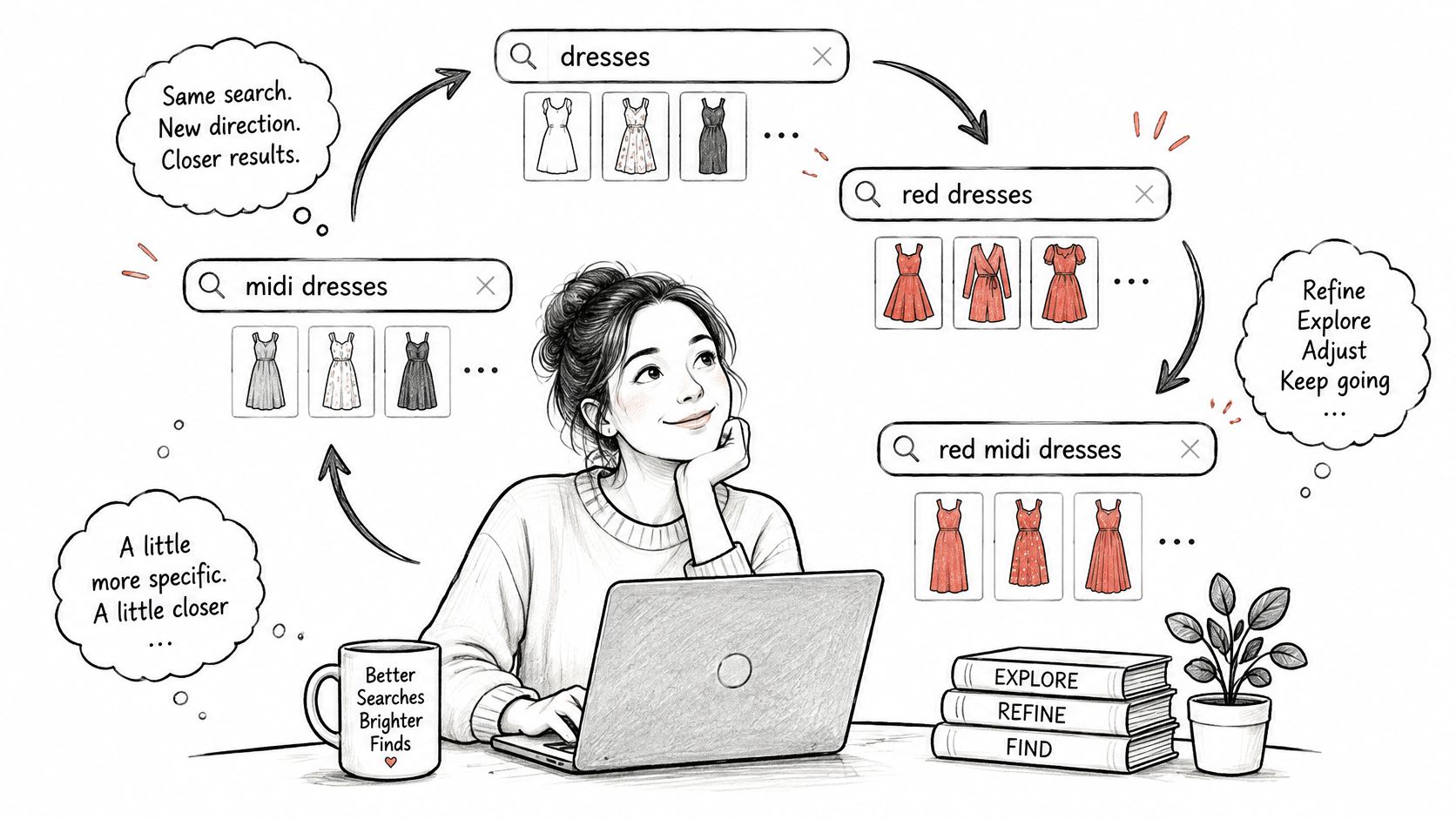
A suggestion list should help users form a better query, not funnel them into an unhelpful result. Use these rules as a practical design check:
- Tolerate common misspellings. If someone types “sofa cushon,” offer “sofa cushion” rather than making them reach a zero-result page.
- Show suggestions that return results. A technically valid phrase isn't useful if the catalog has nothing relevant to show.
- Display result counts beside suggestions. Counts help users compare options before choosing a narrower interpretation.
- Keep suggestions keyboard navigable and announced to screen readers. People should be able to reach, understand, and select suggestions without a pointer.
- Update predictably. Changes in the list should follow the typed query in a way users can track.
- Don't force a selection before submission. The user may want to search the phrase as typed.
- Keep the typed text intact. Preserve it after submission so someone can refine rather than reconstruct the query.
The W3C cognitive-accessibility pattern for search connects these choices to specific user needs. Autocomplete exposes vocabulary before submission and reduces recall demands; spell-checking prevents avoidable empty states; meaningful result groups reduce scanning across different kinds of content; and search history supports repeated or multi-session tasks. Correct semantic metadata on form fields also helps browsers determine input purposes and reuse user-preferred values.
Voice introduces another input mode, but it doesn't remove the need to inspect and correct a query. Teams weighing spoken input can use these voice interface insights from Wonderment Apps to think through how a spoken phrase becomes an editable search. The field still needs to preserve the user's intent when recognition gets a word wrong. For the surrounding mechanics, start with usable form fields and validation.
Export the fifty most common zero-result queries and check whether a suggestion could have caught each one.
Results Pages Users Can Scan and Trust
Users judge relevance on the first screen. They're trying to answer a simple question: did the system understand what I meant? A ranked list can contain a technically close match and still feel wrong if the most useful result is buried, the result type is unclear, or the title uses unfamiliar language.
Group heterogeneous results under headings that name what people are looking at. In a help center, headings such as “Articles,” “Settings,” and “People” let someone scan one kind of result at a time. The W3C's cognitive-accessibility pattern recommends meaningful grouping because it makes related content easier to discover. For product teams, the practical test is whether users can tell which result type fits their task without inspecting every item.
Default ranking should match the most frequent intent behind a query. A search for a product name should put the likely product match ahead of loosely related content; a support query should prioritize a useful answer over a page that merely repeats the same words. Search results also need enough context to support a choice. A product card might show its distinguishing attributes, while a help result might include a concise excerpt that explains what the page answers.
Sorting is useful when users want a different view of an already relevant set. Changing the order shouldn't reset the query or clear applied filters. Otherwise, a control meant to help comparison destroys the context the user has already built.
Pagination or load more
Pagination presents separate result pages connected by links such as next, previous, and page numbers. A “load more” control extends the current list after a user action. Google's guidance on pagination and incremental page loading explains these different mechanics and recommends sequential links and correctly formed URLs for crawlable paginated content.
The user-facing trade-off is direct. Load more keeps results in one continuous list, but can obscure position and push the footer farther away. Pagination gives people a referenceable position they can revisit or share, but requires a deliberate transition between pages. Choose the pattern that suits how users compare items and return to earlier results.
For crawlable paginated pages, keep the URL structure understandable and sequential. Avoid indexing filtered or alternative-sort URLs that duplicate the same result set. Search interfaces need to serve the person scanning results and keep the page architecture clear to search engines.
Take twenty real queries and rate each of the top three results as relevant or not. Review the misses before changing the ranking rules.
Filters and Scope That Narrow Without Trapping
A broad query often needs a boundary before it needs more results. Someone searching “jacket” in a store that also sells tools and pet supplies needs a way to say “apparel.” A scope suggestion in the search field can cut the noise in one tap, before the user has to inspect a mixed list.
Baymard's benchmark of the 50 top-grossing US e-commerce sites found that 32% offered category or scope suggestions inside autocomplete, while 62% failed to provide scope suggestions there, despite autocomplete being an ideal placement. The benchmark identifies five ways to offer scope, each suited to a different query and interface, as described in Baymard's research on search scope.
| Scope pattern | Where it appears | Best used when |
|---|---|---|
| Scope suggestion in autocomplete | Inside the search field as the user types | A broad term maps clearly to one category |
| Manual scope selector | Dropdown beside the search field | Users already know where the item lives |
| Near-perfect scope on results | Header of the results page | A broad search returns mixed categories |
| Automatic redirect to scope | Jumps to a category page | The query matches one category with high confidence |
| Scope within sorting controls | Sort menu on the results page | Users are comparing within an already narrowed set |
The best pattern depends on how predictable the query's category is. A clear match can support an autocomplete suggestion or automatic redirect. A broad or ambiguous term calls for a visible choice, not a hidden assumption. Manual selectors suit people who already know the department, while a scope on the results page lets users resolve ambiguity after seeing what the query returned.
Filters then narrow the current set. Keep applied filters visible and removable, and show updated counts before users commit when the interface supports it. Changing a filter shouldn't clear the query. Search and filters should preserve one another's context so users can make a small adjustment without rebuilding the task.
Two failure patterns deserve particular attention. A filter can remove results, leaving the person unsure whether the catalog lacks an item or the filter is too strict. A scope can also narrow the search so tightly that it produces an empty state. In both cases, explain what changed and offer an easy way to remove the constraint.
Test whether changing a filter clears the query in your product. Fix the interaction that does.
Empty States and Zero-Result Recovery
A failed query rarely teaches users how to write a better one. Nielsen Norman Group reports that typical users are poor at query reformulation: when the first search fails, later attempts rarely improve, and users often abandon the task. That's why an empty state needs to help someone recover, as emphasized in Nielsen Norman Group's guidance on visible and simple search.
A useful empty state answers three questions: what happened, why it may have happened, and what to try next. “No results” reports the outcome but gives no route forward. A clearer message might say that the query didn't match, suggest a corrected term, and offer a way to broaden the search or reach relevant help content.
Put recovery controls on the page where the failure occurs. Offer a “did you mean” spelling correction, related queries, or a visible alternative term. When the query is overly narrow, let the user remove a term that may be too restrictive. If the content isn't available, say so plainly and point to the most relevant help or contact path.
Automatic query rewriting can help, but users should be able to inspect and reverse it. An explicit suggestion lets someone decide whether the proposed term reflects their intent; a hidden rewrite can send them to the wrong results. Search teams should track zero-result rate, reformulation rate, search exits, filter use, and successful downstream actions, rather than treating clicks alone as evidence of recovery.
Match the fix to the failure
A zero-result page can follow from several different causes. The intervention should fit the cause, not just the shared symptom.
| Failure class | Example query | Intervention | Metric to track |
|---|---|---|---|
| Spelling error | sofa cusion | Spell correction with a “did you mean” line | Zero-result rate |
| Missing synonym | couch, when the catalog says sofa | Synonym expansion and related queries | Reformulation rate |
| Overly broad query | shoes | Scope suggestion or filters that narrow the set | Filter usage and refinements |
| Overly narrow query | red linen dress size 6 petite | Relax the least important term and show the count | Zero-result rate |
| Absent content | return policy for gift cards | Route to help content with a clear no-match message | Exit rate after zero results |
Each failure class calls for a different response. A spelling correction can address “sofa cusion”; it can't create a missing gift-card policy. Treating both cases as a generic “try another search” wastes the moment when the user needs a specific next step.
For a broader library of recovery cases, see error state design patterns. Then label the last hundred zero-result queries with one of the five classes in the table and count how many fall into each.
Recovering From AI Interpreted Queries
A product manager asks an AI assistant why churn rose, and the answer cites a survey the team never ran. The search problem has changed shape: the system may return a fluent answer while misunderstanding the question or presenting unsupported evidence.
Traditional search guidance often centers on keywords, autocomplete, filters, and ranked results. Product teams also need patterns for natural-language questions, ambiguous intent, generated queries, and answer interfaces. The user needs to see how the system interpreted the request, what evidence supports the answer, and how to correct the interpretation before trusting it.
That makes the recovery surface an AI interaction problem as well. Show the interpreted intent in language the user can inspect. Make evidence provenance visible, communicate uncertainty when support is incomplete, and provide a route to reformulate the question or switch to conventional results. Clarification prompts can help when the system can't tell which meaning the user intends, but they should reduce ambiguity rather than add friction.
A 2025 survey of 800 product professionals found that 58% reported improved team efficiency and 57% faster research turnaround from AI, while 74% were already using AI to analyze research data, according to Maze's 2025 user research report. Those findings make the interaction question timely: the answer interface needs controls for correction and evidence, not only a polished response.
Track correction rate after misunderstood intent, successful completion after a clarification prompt, abandonment after an unsupported answer, and user trust when evidence is incomplete. These are proposed measures for a product team to define and test, not established industry standards. For a wider view of AI design for product teams, keep the focus on what users can verify and change.
Pick one AI answer in your product and list which interpreted intent is visible before the answer appears.
Measure Search Performance and Pick Your First Fix
A click is an ambiguous endpoint. The user may have found the right result, or opened a dead end, returned, and tried a second query. Treat the click as one event inside a recovery loop: attempt, inspect, correct, repeat. The metric set has to show where the loop broke and whether the next attempt repaired it.
Track zero-result rate and reformulation rate to find queries that miss; search exits to spot abandonment; filter use to see which facet narrows the set; and downstream actions to check whether a result helped someone finish the next step. Add time to first relevant result so speed is measured to usefulness rather than to any interaction. For answer-style search, measure whether the interpreted intent is visible, whether a correction changes the answer, and whether users can still reach conventional results when evidence is thin.

Choose the first fix by user cost
Start with the failure classes already visible in search logs and support evidence: dead-end queries, filters that remove the item people wanted, missing states such as loading or permission errors, and AI answers that cannot be corrected. Estimate the share of sessions each class touches, then weigh the value of the task it blocks. A frequent failure on a high-value journey outranks a rare cosmetic defect.
Evidence can start outside an analytics dashboard. Funnel notes, product behavior signals, analytics exports, research, and support context explain where people drop and what they may have expected instead. The useful next step is turning those signals into testable questions: which state deserves review, what evidence is missing, and which change would let the user recover without starting over.
Figr can use analytics files, funnel notes, product behavior signals, and supporting context as inputs for UX reasoning. It frames those inputs as questions about why users drop, what they may misunderstand, which states need review, and what product evidence is missing. For choosing and interpreting measures, see Figr's guide to UX metrics.
Pick one failure class, one component, and one metric this week. Ship a single change within two weeks, compare the metric with its baseline, and keep the fix only if recovery improves.
Search UX FAQ
What is search UX?
Search UX is the experience of entering a query, interpreting results, narrowing choices, and recovering when the first attempt fails. It covers the search field, suggestions, results, filters, empty states, and accessibility, not just the search algorithm.
What makes a search experience effective?
An effective search experience keeps the query editable, suggests useful terms, puts relevant results where users can find them, and lets people adjust filters without losing their work. When nothing matches, it explains the problem and offers a specific next step.
How do you improve a zero-result page?
First, identify why the search failed. A typo may need a spelling suggestion; a missing synonym may need a related term; an overly narrow query may need a removable constraint. If the content doesn't exist, say so and offer the most relevant help path.
Which metrics show whether search UX works?
Start with zero-result rate, query reformulation, search exits, and downstream actions after a result click. Time to first relevant result helps distinguish a useful find from a quick but unhelpful click. Review these measures alongside real queries and failed sessions.
How should AI search handle a misunderstood question?
Show how the question was interpreted, make supporting evidence visible, and let users correct the interpretation or switch to conventional results. A fluent answer alone doesn't show that the system understood the task.
Use Figr to turn search analytics, funnel notes, and product context into testable UX questions, reviewed flows, and recovery states. Bring one search failure to your next design review and use it to decide what to fix first.