
A design sprint fails when a cross-functional team spends a week together but never reaches a sharp decision, a believable prototype, or usable evidence. I watched that happen recently with a SaaS team that had plenty of talent and almost no shared operating model.
When teams don't solve this, they burn senior attention, reopen the same product debate in the next roadmap meeting, and hand engineering a concept that still hasn't met a user. The cost isn't abstract. Designers redo flows, Product Managers negotiate scope in circles, and leadership mistakes motion for progress.
A good sprint fixes that by compressing ambiguity into a clear week of decisions, prototyping, and user learning, and modern tools help by grounding the team in real product context instead of blank-canvas optimism. Figr fits that shift well because its Visual Context Graph connects live screens, design systems, product docs, behavior, and implementation constraints before the team starts drawing.
What Exactly Is a Design Sprint?
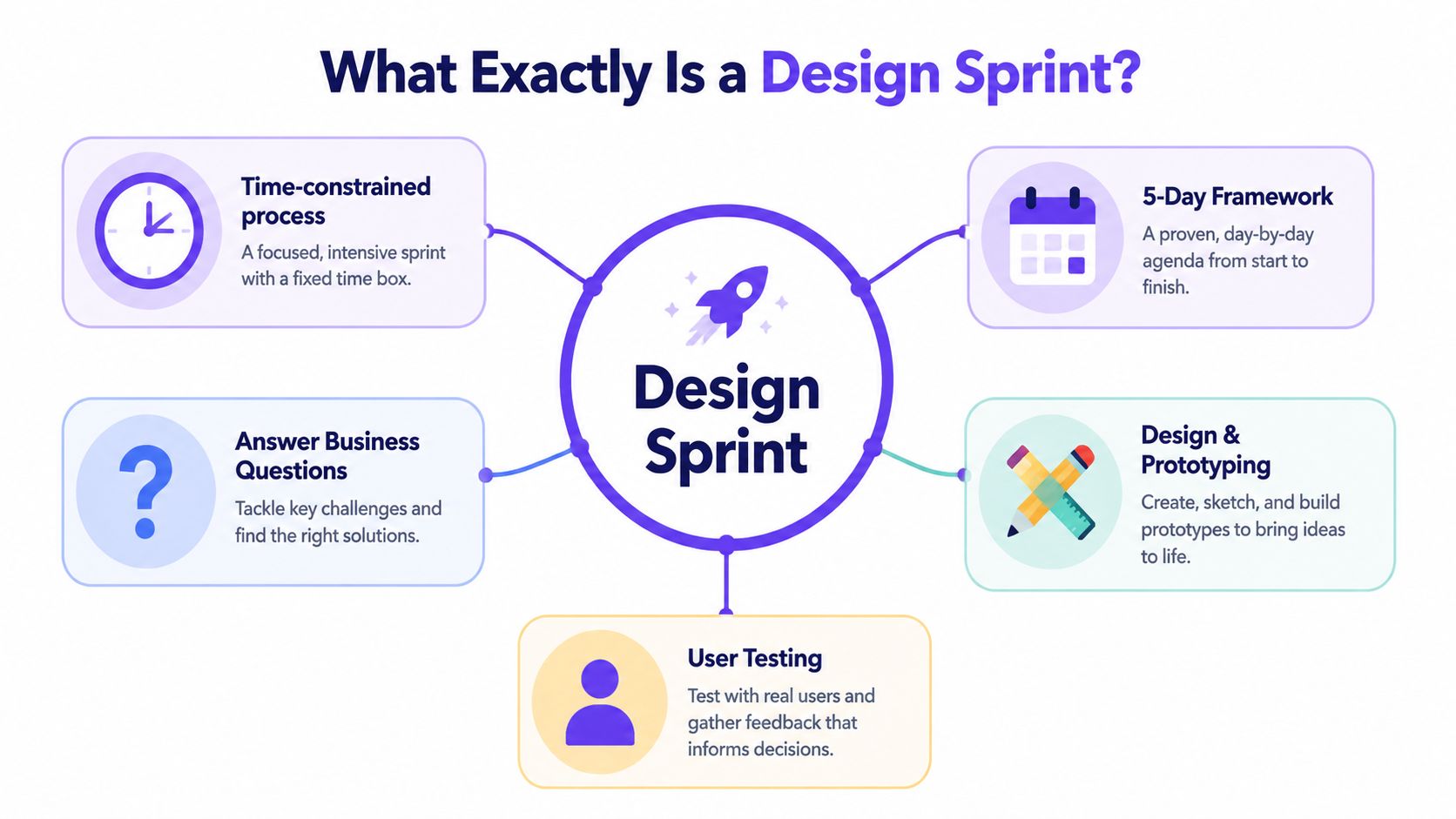
A design sprint is a five-day, time-boxed process for answering a critical product question through mapping, ideation, decision-making, prototyping, and user testing. The point isn't to host a clever workshop. The point is to reduce risk before a team commits real build effort.
Google Ventures made the format popular because it gave product teams a hard edge to work against. The original sprint runs Monday through Friday, with each day tied to a specific phase, and Atlassian describes it as a way to compress a longer discovery cycle into one work week for a small, focused team of about 7–8 people (Atlassian's design sprint guide). That structure is why the method still holds up.
Why the format matters
Most product debates drift because nobody is forced to convert opinions into an artifact. A sprint changes that. By the end of the week, the team should have a prototype people can react to and evidence from user sessions, not just a prettier backlog.
That sounds obvious, but it changes behavior. Product, design, and engineering stop arguing from memory and start reacting to something concrete. If you care about the importance of design thinking, these concrete reactions make it operational rather than aspirational.
A sprint gives uncertainty a deadline.
What a sprint is really doing
The basic gist is this: a design sprint is a decision architecture for high-stakes questions.
It works best when the team needs to answer questions like:
New direction: Should we pursue this workflow, feature concept, or market entry path?
Complex journey: Can users understand and complete a messy flow with real constraints?
Risk check: Are we about to build the wrong thing for the wrong reason?
That framing matters because plenty of teams still treat the sprint as an ideation event. That's too loose. Good sprints are structured to narrow possibility, force trade-offs, and test a point of view while there's still time to change it.
When to Run a Design Sprint and When Not To
You should run a design sprint when the cost of being wrong is higher than the cost of spending a focused week to learn. That usually means a product decision with broad downstream consequences, not a small local tweak.
I've seen teams call a sprint for almost anything that feels urgent. That's usually a sign that the team wants the ceremony of decisiveness without the discipline. A sprint is expensive in attention. You are taking strong people off their normal work for a fixed block of time. That choice should pay for itself in avoided confusion.
Good sprint candidates
Some problems are made for this format because they combine uncertainty, cross-functional dependency, and meaningful product risk.
Use a sprint when you're dealing with:
A new product or major capability: The team needs to validate the direction before engineering gets pulled into architecture and scope debates.
A broken multi-step flow: Onboarding, approvals, checkout, settings migration, permissions, and similar flows often hide product logic that no single function sees alone.
A new audience or use case: The existing product may work for current users but fail once a different mental model enters the room.
A strategic fork in the road: Two plausible directions exist, and the team needs evidence, not louder opinions.
Bad sprint candidates
Some work looks important but doesn't need a sprint.
Skip the sprint when the issue is:
A narrow UI refinement: You already know the problem and only need to improve clarity, layout, or copy.
A bug or performance issue: These belong in diagnosis and execution, not a sprint.
A policy or compliance requirement with fixed constraints: You still need design thinking, but not a full sprint.
A decision that was already made: If leadership has preselected the answer, don't pretend the week is exploratory.
Practical rule: If the team can't name the core question in one sentence, don't start the sprint yet.
The economics underneath
At scale, this is an opportunity cost problem. Product teams lose momentum when they carry ambiguous initiatives across planning cycles. A one-week sprint can collapse weeks of drift into a decision with evidence attached. But if the question is already narrow and well understood, the sprint becomes theater.
That is why mature Product Managers treat design sprints as a selective instrument. You don't run one because the method is popular. You run one because the decision is expensive, tangled, and still open.
Assembling Your Cross-Functional Sprint Team
The quality of a design sprint is heavily determined by who is in the room and whether they can decide. A team with the wrong composition will look busy all week and still stall on Wednesday.
Last week I watched a Product Manager try to salvage a sprint where the so-called decider kept saying, "I need to check with leadership." That single sentence poisoned the room. People stopped taking trade-offs seriously because they knew the actual decision wasn't present.
Keep the team small
Figma recommends running sprints with a small cross-functional team of about five to seven people because larger groups increase coordination costs and decision latency (Figma's guide to running a design sprint). In practice, that advice is dead right.
Once the room gets too crowded, three things happen:
Discussion widens: More opinions enter than the process can responsibly absorb.
Decision quality drops: People optimize for social consensus, not signal.
Energy diffuses: The sprint starts feeling like a workshop audience, not a working team.
Who should be there
You need enough range to see the problem clearly and enough authority to make calls.
A solid sprint team usually includes:
A decider: Someone with real authority over scope and direction.
A facilitator: The person protecting pace, structure, and participation.
A Product Manager: The person carrying the problem statement, business context, and downstream execution reality.
A designer: The person shaping the user journey, fidelity, and prototype.
An engineer: Someone who can surface technical constraints before fantasy hardens into a plan.
A domain expert: This might be support, operations, security, growth, or research, depending on the problem.
What works and what fails
The best teams bring tension without politics. People challenge assumptions, but they don't posture. They can disagree in the morning and still help build the prototype in the afternoon.
What fails?
Proxy authority: Nobody in the room can make the final call.
Status-heavy dynamics: Junior voices go quiet early.
People without context: They contribute opinions, not informed judgment.
Spectators: If someone doesn't need to shape the decision, they don't need a seat.
This is what I mean when I say cross-functional does not mean broadly inclusive. It means the smallest possible group that can understand the problem end to end and decide what to test.
The Classic 5-Day Design Sprint Process
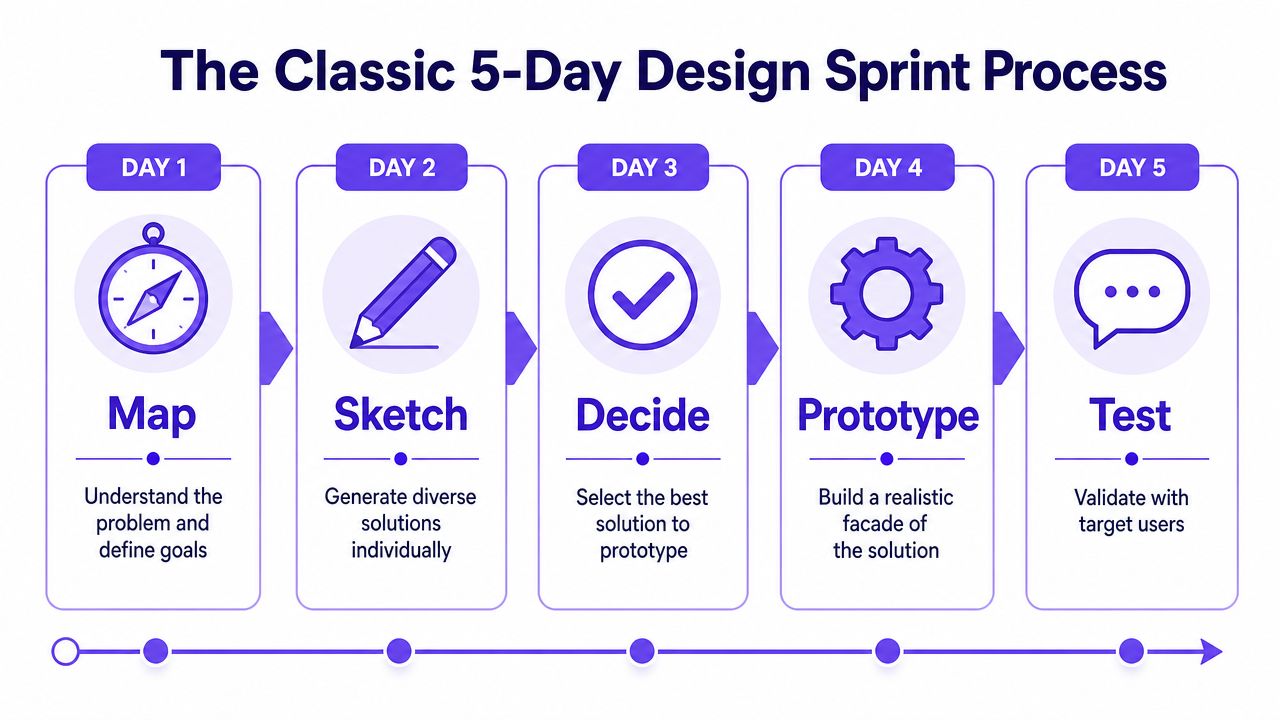
The classic design sprint process works because each day narrows uncertainty in a specific way. Google Ventures and later guides all center the same five-day cadence, moving from problem framing to validation with real users in one week (GV Sprint).
A lot of teams ask how to run a design sprint as if the answer is mostly about facilitation tricks. It isn't. The main job is to protect the sequence. Skip phases, and the week collapses into opinion or speed for its own sake.
The five-day flow
Step 1. Map the problem on Monday.
Define the challenge, long-term goal, and the risky assumptions underneath it.
Build a simple journey map of the user path you're testing.
Bring existing research, product constraints, and known tensions into the room early.
Step 2. Sketch solutions on Tuesday.
Have people work individually before discussing as a group.
Generate multiple directions, including unconventional ones.
Use AI carefully here to expand variation, especially when the team is stuck in familiar patterns.
Step 3. Decide and storyboard on Wednesday.
Review solution sketches individually first, then critique.
Let the decider choose the direction to prototype.
Turn that direction into a storyboard detailed enough to build against.
Before moving on, it helps to ground the team in what good sprint prototyping looks like for software teams. This guide on prototyping for product teams is useful because it keeps the prototype focused on learning rather than polish.
Step 4. Prototype on Thursday.
Build a believable facade, not a production-ready system.
Focus on the moments that carry the main product risk.
AI can help generate high-fidelity screens faster, but only if it has enough context to respect your product logic and design patterns.
Step 5. Test on Friday.
Put the prototype in front of real target users.
Observe where people hesitate, misread, or recover.
Capture what changes the build decision.
What Day 5 changes
Lyssna recommends testing with at least five users on Day 5, and that threshold is what turns the sprint from internal speculation into validated learning (Lyssna's design sprint guide). That's the moment teams stop saying, "I think users would..." and start responding to observed behavior.
Where AI actually helps
AI is most useful in a sprint when it reduces drag without removing judgment.
It helps most in three places:
Context synthesis: turning scattered docs, research notes, and screens into a usable brief
Divergent exploration: producing multiple solution directions fast enough to widen Tuesday without slowing the room
Product-aware prototyping: creating realistic screens with states, edge cases, and design-system consistency
It helps least when teams use it as a substitute for choosing what matters.
What Happens When You Only Have 3 Days?
A three-day sprint can work, but only if you accept that compression requires sharper choices and better prep. Teams that try to squeeze the full five-day process into three calendar blocks usually end up cutting the wrong things.
The common assumption is that if you don't have five days, you shouldn't sprint at all. I don't buy that. The issue isn't purity. The issue is whether you can preserve the logic of the sprint while removing ceremony.
What you can compress
You can merge some activities if the problem is already well framed and the team has context before Day 1 begins.
A compressed version often looks like this:
Day 1 focuses on map and sketch. Protect a clear challenge, risky assumptions, and individual idea generation.
Day 2 focuses on decide and prototype. Protect a real decision, a detailed storyboard, and fast production.
Day 3 focuses on test and synthesize. Protect user sessions, pattern capture, and next-step decisions.
That works best when pre-work is strong. The room already has research, screenshots, analytics observations, and constraints. Nobody should spend half a day discovering basics they could have reviewed earlier.
What you cannot cut
Some activities look optional when you're rushed. They aren't.
Do not cut:
Individual ideation: group brainstorming alone narrows too early
A real decision moment: endless "we'll combine these ideas later" kills momentum
User testing: without this, you ran a workshop, not a sprint
If time is short, cut polish before you cut validation.
Why modern tools matter more here
Compressed sprints expose the slowest parts of the process. The bottlenecks are almost always context loading and prototype production. That's where AI changes the economics.
If a tool can pull in live product context, past decisions, and design-system patterns before the sprint starts, Day 1 moves faster. If it can produce a Figma-ready prototype with realistic states on Day 2, a three-day sprint stays credible. That's also why teams experimenting with fast prototyping methods tend to fare better under schedule pressure.
A short sprint isn't inferior by default. It just punishes vagueness more aggressively.
The Artifacts That Actually Matter
The most valuable sprint outputs are the ones that survive the week and change what the team does next. A wall full of sticky notes may help the room think, but it won't carry a decision into planning, handoff, or follow-up research.
Too many teams leave a sprint with one shiny prototype and no durable record of why that prototype exists. A week later, people remember different versions of the same decision. Then the team reopens debates it thought it settled.
Keep these three
If you only preserve a few things, preserve these:
The tested prototype: This is the clearest expression of the chosen idea.
The decision log: Capture what the team chose, what it rejected, and why.
The next-step plan: Spell out whether the team should build, iterate, research further, or stop.
Supporting artifacts that earn their keep
Some outputs are supporting cast, but they matter when the initiative moves into delivery.
Useful artifacts include:
A journey or flow map: especially for complex states and branching logic
An edge-case list: where users fail, pause, retry, cancel, or need recovery paths
Test notes: observations, quotes paraphrased from sessions, and recurring breakdown points
A brief or draft PRD: enough structure to move into planning without rewriting the whole story from memory
If someone on your team still needs grounding in wireframe basics, that's worth reviewing before the sprint starts, not after. It keeps fidelity conversations from getting fuzzy.
The handoff standard
A sprint artifact is good when a Product Manager, designer, and engineer can all use it without a translation meeting. That's the standard.
The prototype shows the intent.
The log shows the reasoning.
The action plan shows the path forward.
Everything else is optional unless it helps those three survive first contact with reality.
Common Pitfalls and How to Avoid Them
Most sprint failures are visible by the end of the first day if you know what to look for. The problem is that teams often interpret those signals as normal messiness instead of structural failure.
I've seen the same breakdowns repeat across startups and larger product orgs. The details change. The pattern doesn't.
Pitfall one, the room falls in love too early
Teams often jump into solution mode before they have a stable understanding of the problem. The symptom is easy to spot. People start defending UI ideas while the core user question is still fuzzy.
Fix it by forcing a sharper brief before sketching begins:
Write the sprint question clearly: one sentence, no jargon
List the risky assumptions: what must be true for this idea to work
Bring prior research in: don't spend sprint time rediscovering known facts
Pitfall two, hierarchy crushes signal
Group settings are vulnerable to bias, especially when senior voices speak too early. Nielsen Norman Group has written extensively about group dynamics and research bias in product work, and the implication for sprints is practical: structure matters because unstructured discussion distorts what people are willing to say.
Use silent review, private note-taking, and individual sketching before open debate. Those mechanics aren't ceremony. They're protection.
People reveal better ideas when they don't have to pitch them against hierarchy in real time.
Pitfall three, the decider isn't really a decider
This one kills momentum fast. If every meaningful choice has to travel upward after the session, the sprint loses its center.
Watch for phrases like:
"Let's socialise this later"
"We'll need leadership to bless it"
"Can we prototype both?"
Those phrases usually mean the team is avoiding commitment. Fix it before the sprint starts by defining decision rights in plain language.
Pitfall four, the prototype is the wrong fidelity
Some teams build something too rough for users to take seriously. Others overbuild and waste the day polishing details unrelated to the question.
Aim for believable, focused fidelity:
Real enough to prompt genuine reactions
Narrow enough to build fast
Detailed enough around the risky moments
Pitfall five, Friday becomes a demo day
A sprint fails subtly when Friday turns into stakeholder playback instead of user testing. The team may still learn something, but it won't be the thing that matters most.
Protect Friday for target users. Internal reactions are useful, but they are not validation.
Supercharge Your Sprint with an AI Design Agent
Modern design sprints work better when the team starts with product context already assembled. The old model assumed a whiteboard, sticky notes, and human recall were enough to rebuild the truth of a product in one room.
For many SaaS teams, that assumption no longer holds. The product is too stateful, the design system is too layered, and the behavior data lives in too many places. Teams need help carrying context into the sprint without spending the first half of the week rebuilding shared memory.
Where an AI design agent actually helps
An AI design agent can be useful. One example is AI-powered design tools that ingest screens, files, docs, and usage context before the sprint begins, then support exploration and prototyping against that material instead of against generic prompts.
For this workflow, Figr is relevant because it is built around a Visual Context Graph with five connected layers:
Visual context: live screens and frames
Behavioral context: recordings, flows, and interaction patterns
Design System context: tokens, components, variants, and usage rules
Product Knowledge context: PRDs, research, and prior decisions
Implementation context: code constraints and build realities
Why that changes the sprint
When those layers are connected, the sprint stops depending on who remembers what. The team can enter Tuesday with richer inputs for divergent thinking and reach Thursday with prototypes that are more product-aware, including states and edge conditions that often get skipped in a rush.
That matters even more if you're working on flows like approvals, checkout, billing, or admin settings, where the visible screen is only a small part of the product reality. A generic prototype may look convincing while overlooking the logic that will break it in implementation.
A strong AI workflow also changes the prototype itself. Instead of producing a visually plausible mock, the team can generate a more realistic, Figma-ready prototype shaped by existing product context. That doesn't replace designer judgment. It gives the room a faster path to something worth judging.
The practical shift
The shift is simple. Traditional sprints begin from memory. Better sprints begin from context.
That reduces wasted debate on Day 1, gives Tuesday more range, and makes Thursday less of a late-night scramble. If you're trying to learn how to run a design sprint in a modern SaaS environment, that's the upgrade worth paying attention to.
If your team wants to run a sprint without rebuilding product context from scratch, try Figr.
A good design sprint still operates on the same core principles. You bring the right people together, frame a hard question, force a decision, build a believable prototype, and test it with users before the roadmap hardens around assumptions.
What has changed is the operating environment. Products are denser, flows are more conditional, and teams are overloaded. That makes context quality and prototype speed far more important than they were when the sprint format first spread.
If you remember one thing, remember this: protect the logic of the week. Keep the team small, keep the question sharp, and don't sacrifice Friday user testing to save time earlier in the process.
The next move is practical. Pick one product question that has real risk attached, reserve the room, define the decider, gather the existing context, and try Figr.
FAQ
How do I know if my team should run a design sprint?
Run a sprint when the question carries real product risk and the answer still depends on judgment. I use one for problems like pricing flow changes, onboarding redesigns, new expansion paths, or workflow bets that touch product, design, engineering, and go-to-market.
Skip it when the team already knows the fix, the scope is narrow, or the work is mostly execution. A sprint is expensive attention. Use it on decisions that deserve that level of focus.
How many people should I invite?
Keep the room small enough to decide. A decider, Product Manager, designer, engineer, and one or two specialists is usually enough.
Bigger groups sound inclusive and fail in predictable ways. Discussion gets slower, ownership gets fuzzy, and critique turns political. If more people need input, collect it before the sprint or bring them into the Friday readout.
Can I run a sprint remotely?
Yes. I have done strong remote sprints, but they require tighter facilitation than in-person ones.
The calendar needs more structure. Pre-work has to be clearer. Breaks matter more than people expect. I also cut open discussion time and rely more on written input, timed exercises, and pre-recorded context so the team does not spend half the day talking in circles.
Do I need a high-fidelity prototype?
You need a prototype users will believe. That is the standard.
If it looks too rough, participants start reviewing the prototype instead of reacting to the idea. If it is polished beyond what the question requires, the team burns Thursday on details that do not change the learning. The right level is credible enough to trigger honest behavior.
Where does AI help most in a sprint?
AI helps before and during the sprint. The biggest gains usually come from synthesizing existing research, pulling product context together, generating multiple directions quickly, and producing a realistic first-pass prototype the team can react to.
It should speed up thinking, not replace it. The team still has to frame the question, make trade-offs, and judge what is worth testing. In a modern SaaS sprint, that balance matters a lot. AI shortens the path to a useful artifact, but the sprint still succeeds or fails on decision quality.