
Your meeting ends. The whiteboard still looks smart. Boxes, arrows, a note in the corner that says “try onboarding shortcut?”
Then the room empties, and the significant delay begins.
A PM opens a blank file. A designer asks which flow matters most. Engineering wants edge cases before they react. By tomorrow, the idea already feels older than it is. A good concept starts to rot in handoff.
That’s why fast prototyping matters.
Not because teams need prettier mocks. Because they need a faster path from “we think this could work” to “users reacted like this.” Teams using rapid iteration can get 12-13 learning cycles per year with feedback every 2-3 weeks, instead of only two cycles every 6 months in slower, perfectionist approaches, according to Treetown Tech’s write-up on why speed matters more than perfection in early development.
That difference changes how products get built.
It changes which ideas survive.
It changes who gets evidence first.
The Agony of the Blank Canvas
The blank canvas is rarely the core problem.
The problem is what the blank canvas represents: uncertainty, serial dependency, and a quiet drift back toward debate instead of evidence. A feature idea leaves a meeting with energy, then stalls in the gap between concept and something clickable.
I’ve watched this happen to strong teams with good instincts. Last week, a PM at a growth-stage SaaS company walked out of a planning session with a clear hypothesis about reducing friction in a setup flow. By the next afternoon, the conversation had already slipped from “should we test this?” to “should we wait until design has more time?” That’s how momentum dies. Not with a bad decision, but with a slow one.
Delay creates fake certainty
When teams can’t produce a quick interactive model, they compensate with opinions.
People start defending the version in their heads. Stakeholders ask for more polish before feedback. Designers feel pressure to resolve visual details that don’t matter yet. Engineers push for tighter requirements because ambiguity is expensive once code starts.
None of that is irrational.
It’s just expensive in a different way.
This is what I mean: the absence of a prototype doesn’t create neutrality. It creates a vacuum, and the loudest assumption usually fills it.
Practical rule: If a team has argued about a flow for more than one meeting, it probably needs a prototype more than another discussion.
Fast prototyping is the discipline of collapsing that gap. It doesn’t mean rushing blindly. It means reducing the time between an idea and a reaction from users, teammates, or stakeholders.
A lot of teams think their problem is execution speed. Often, it’s startup friction. They lose hours deciding where to begin, what fidelity is “enough,” and whether a rough concept is worth showing. That’s also why AI for UX design is not about the blank canvas is such a useful framing. The bottleneck usually isn’t drawing screens. It’s creating enough context to test a thought without rebuilding the world first.
Fast is not careless
The strongest teams don’t prototype quickly because they care less.
They prototype quickly because they respect uncertainty.
They know the first version is there to expose weak assumptions, awkward transitions, and missing states. They know a rough demo in front of five relevant people beats a polished concept blessed by fifteen internal opinions.
That’s where quick prototyping starts to pay off. Not at launch. Much earlier, when the cost of being wrong is still low and the cost of waiting is already rising.
Defining the Goal of Fast Prototyping
A prototype should answer a question.
That sounds obvious, but it’s where projects often drift.
The artifact is not the outcome
A friend at a Series C company spent three weeks refining a beautiful prototype for a feature that got killed after one user interview. The visuals were polished. The transitions were smooth. The logic behind the idea was weak.
That’s a common failure mode. Teams confuse fidelity with progress.
The basic gist is this: fast prototyping is not about making a miniature final product. It’s about finding the cheapest, fastest interactive thing that can answer the most important open question.
Sometimes that question is behavioral.
Will users notice this entry point?
Sometimes it’s structural.
Does this new step clarify the flow, or just add friction?
Sometimes it’s strategic.
Is this a real product move, or a meeting-generated mirage?
If you want a useful companion read, What Is Rapid Prototyping? lays out the broader concept well. For software teams specifically, the sharper distinction is between a prototype that looks finished and a prototype that is useful.
Ask one question, not seven
The fastest way to ruin a prototype is to overload it.
A single demo shouldn’t try to validate messaging, navigation, onboarding, pricing logic, permissions, analytics behavior, and visual hierarchy all at once. When everything is being tested, nothing is being learned clearly.
A better approach is to define the question in a sentence:
- Behavioral question: Will users understand what to do next?
- Decision question: Does this path beat the current flow?
- Risk question: Which state is most likely to break trust or create confusion?
That’s where teams practicing rapid prototyping for product teams usually improve fastest. They stop treating prototypes like deliverables and start treating them like instruments.
A rough prototype with a sharp question is more valuable than a polished prototype with vague intent.
Fidelity should follow uncertainty
Early concepts can stay ugly.
That’s not laziness. It’s discipline.
A low-detail interactive flow is often enough when the primary uncertainty is around order, logic, or user intent. Higher fidelity becomes worthwhile when visual credibility affects the test, when stakeholders need to react to something closer to the actual product, or when handoff clarity matters.
Often, many rapid prototyping methods get misused. Teams pick the method based on what feels impressive rather than what resolves uncertainty fastest. If the question is “can users complete this flow,” a clickable skeleton often beats a detailed screen set. If the question is “does this feel trustworthy enough to buy,” then visual quality starts to matter more.
The prototype’s job is simple: reduce ignorance.
If it does that quickly, it’s working.
A Practical Workflow for Quick Prototyping
Many teams don’t need more ideation time.
They need a clock.
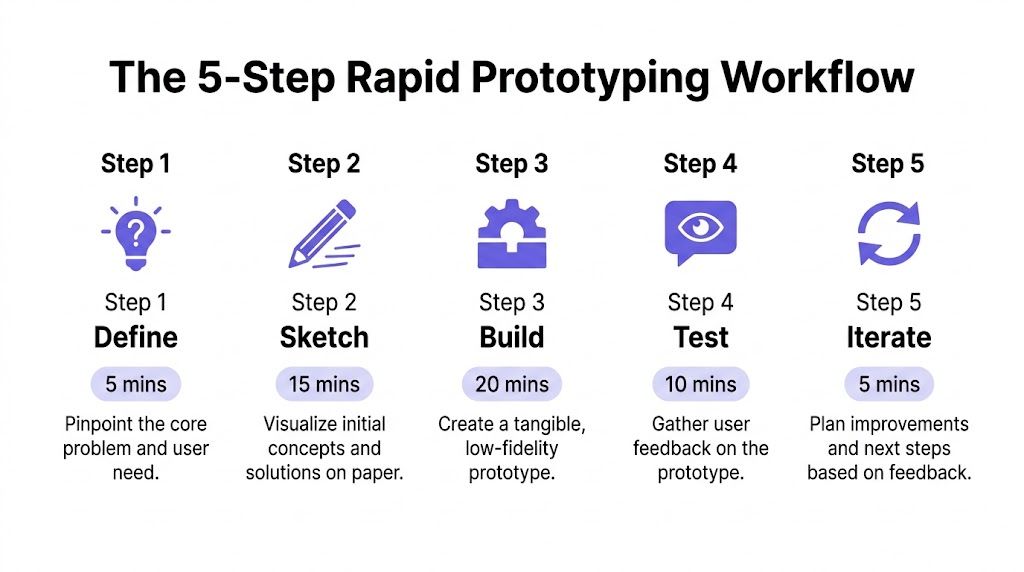
When a prototype drags, it’s usually because nobody time-boxed the work. The team says they want speed, then slips into polish, branching discussion, and “while we’re here” additions. If you want to go from idea to interactive demo in under an hour, your workflow has to protect learning speed from your own instincts.
Step 1, frame the question
Start with one sentence.
Not a roadmap theme. Not a product vision statement. One testable question.
Examples:
- Onboarding: Can a new user complete setup with one fewer decision?
- Activation: Does adding guided defaults reduce hesitation?
- Expansion: Will admins understand this control without documentation?
If the sentence contains “and,” split it.
This first step should feel almost too narrow. That’s good. Narrow scope is what makes fast prototype creation possible.
Step 2, gather only the context that changes the answer
In this context, teams overwork.
You do not need every requirement doc, every prior mock, and every stakeholder note. You need enough context to avoid building fantasy UI.
Pull only what affects realism:
- Current product patterns: Existing navigation, forms, cards, modals
- Design constraints: Tokens, spacing rules, key components
- User context: The screen before this one, and the screen after
- Known friction: Drop-off points, recurring support questions, places users get stuck
If you’re working from an existing product, context-aware generation matters more than raw speed. That’s why from PRD to prototype in 2 hours, the workflow that changed how I ship resonates with so many PMs. The time savings don’t come from skipping thinking. They come from reducing reconstruction.
Step 3, generate the first draft fast
Fast prototyping tools earn their keep.
You can sketch in Figma, stitch screens manually, use component libraries, or generate a clickable flow from existing inputs. The right choice depends on whether you’re exploring structure, behavior, or presentation.
Figr is built for fast prototyping. Feed it your product context via Chrome extension, screenshot, or Figma file, and it generates interactive prototypes that match your design system in minutes, not days. One Product Lead said concept development went from 2 weeks to half a day.
That kind of workflow is useful because it starts from reality. Existing app patterns, design systems, and product context cut a lot of waste out of the process.
Still, the core rule is tool-agnostic: don’t handcraft details before the flow works.
Working heuristic: Build the minimum number of screens needed to trigger a real reaction.
If the idea is a revised checkout path, prototype the decision moments, not every possible account state. If it’s a booking flow, focus on where users hesitate, commit, or back out.
For concrete inspiration, look at this Shopify checkout flow and this Cal.com bookings example. Both are useful reminders that a demo gets stronger when the interactions are coherent, not when every surface is overdesigned.
Step 4, refine the flow, not the pixels
Once the first draft exists, teams often make the wrong edits.
They tweak button styles, polish empty states, or realign typography. But if the prototype is meant to answer a behavioral question, those edits are usually a form of avoidance.
Refinement should focus on:
- Order of steps: Does the sequence reduce confusion?
- Choice load: Are there too many decisions at one moment?
- State clarity: Is it obvious what changed after an action?
- Exit paths: Can users recover from hesitation or mistakes?
- Edge cases: What happens when the “happy path” breaks?
Modular thinking proves valuable. Fresh Consulting notes that the principle of modular design decomposes complex systems into independent subsystems, enabling parallel development and testing, which compresses timelines from linear months to concurrent weeks in product development work, as explained in its piece on rapid prototyping methods, strategy, and best practices. The same logic applies to software flows. Break the experience into parts, test the risky section first, and avoid rebuilding the whole journey just to learn one thing.
Step 5, share before it feels ready
This is the part perfectionists hate.
Good.
A prototype shown too late becomes a presentation. A prototype shown early becomes a learning tool.
Send it to three people who can react usefully. That might be a designer, an engineer, a support lead, or a target user. Ask pointed questions, not “what do you think?”
Try prompts like:
- Comprehension: What do you think happens next?
- Confidence: Where would you hesitate here?
- Comparison: Which version feels easier to complete?
- Trust: Is there any moment that feels risky or unclear?
If you need references for shaping the sequence itself, these user flow examples are helpful, and this deeper guide to user experience flows is useful when the problem is less about screens and more about movement through the product.
What works, and what usually fails
The teams that speed up prototyping tend to do a few things consistently.
- They time-box the first draft: A hard stop prevents polish from masquerading as rigor.
- They prototype the riskiest moment first: Not the easiest screen.
- They use existing patterns: Reinvention burns time and introduces noise.
- They gather feedback with intent: They don’t ask for broad opinions when they need evidence on one decision.
The teams that struggle usually fall into another pattern.
- They start with aesthetics: Which feels productive, but delays learning.
- They widen scope midstream: A small experiment turns into a mini-project.
- They wait for internal consensus: Which defeats the whole point.
- They test too late: By then, people are reacting to execution quality instead of product logic.
If your current process can’t produce a believable interactive flow inside an hour, that doesn’t mean your team is weak. It usually means your defaults were built for certainty, not discovery.
Matching Prototyping Methods to Your Product Stage
A napkin sketch and a mature SaaS workflow should not be prototyped the same way.
That’s where many teams lose time. They use the same process for concept exploration, redesign work, and flow optimization, then wonder why the prototype either feels flimsy or takes too long.
When you're starting from almost nothing
If the idea lives in a whiteboard photo, rough drawing, or scattered notes, your job is to externalize it quickly.
In that stage, lower-fidelity rapid prototyping methods are usually enough. You’re trying to expose structure, not prove finish. Here, AI tools that generate prototypes from sketches can help turn a vague concept into something testable without a full design pass.
A good reference point also helps. If you’re exploring mobile concepts and want to calibrate what “just enough detail” looks like, these mobile app wireframe examples are useful for comparing rough structure against more polished direction.
When you're iterating on an existing feature
This is a different job.
You already have live patterns, user expectations, and design constraints. The prototype needs to feel close enough to the actual product that feedback isn’t polluted by obvious inconsistencies.
That’s why context-rich tools and component-based workflows tend to work better here. You’re not inventing a new visual language. You’re modifying an existing one without breaking trust.
The interesting trade-off is speed versus realism. If the team goes too rough, stakeholders fixate on missing polish. If the team goes too polished, they waste time validating a minor change. Good fast prototype creation sits in the middle. Familiar enough to feel real. Light enough to change fast.
When the company stage changes the right answer
Early-stage teams and larger product orgs often need different prototyping behavior.
A small startup can move with lighter process. It may rely on fast loops between a PM, designer, and founder. A more established company usually needs stronger artifacts because more people influence the decision, and handoffs carry more cost.
That’s why AI prototyping for startups is a different conversation from prototyping inside a scaled product organization. Startups often need speed to sharpen the idea. Larger teams need speed without losing alignment.
The method should match the coordination burden.
Here’s a quick visual walkthrough that’s useful if you want to see how practitioners talk through prototype choices in context.
A simple way to choose
If you’re unsure which path fits, use this filter:
- If the idea is raw, choose the fastest method that makes the flow discussable.
- If the feature already exists, choose the method that preserves product context.
- If the audience is internal, optimize for speed and clarity.
- If the audience is external or executive, raise fidelity only enough to keep the feedback on-track.
Teams typically don’t have a tooling problem.
They have a stage-matching problem.
The Compounding ROI of Rapid Iteration
A prototype is not just a design artifact.
It is a way to buy information earlier.
That matters at team scale, but it matters even more at company scale. When a product org learns faster, it doesn’t merely save a few cycles. It changes how often the business places informed bets, how early weak ideas get filtered out, and how confidently engineering time gets allocated.
The economics behind the practice
This is where the conversation gets bigger than UX.
The global rapid prototyping materials market was valued at USD 885.94 million in 2025 and is projected to reach USD 3,921.75 million by 2034, growing at a 17.2% CAGR from 2026 to 2034, according to Fortune Business Insights’ report on the rapid prototyping materials market. North America held a 36% market share in 2025. That doesn’t describe a niche habit. It reflects a broader economic shift toward earlier validation and shorter development loops.
Software teams should pay attention to that.
Even though the report focuses on materials and manufacturing, the underlying incentive is familiar. Waiting to discover mistakes is costly. Discovering them earlier improves decision quality and reduces downstream waste.
Fast feedback compounds
One isolated prototype can save a team from building the wrong thing.
A system of fast prototypes does more than that. It changes behavior.
Teams come to meetings with evidence instead of slides. Designers spend less time polishing ideas that were never viable. Engineers get clearer flows and fewer late surprises. Product leaders stop confusing roadmap motion with learning progress.
That compounding effect is why rework is such an important hidden cost. If you want a useful lens on that, rework has a number most teams just never calculate it is worth reading.
The real ROI of rapid iteration is not just making work faster. It is making bad bets shorter.
What this reveals about organizations
Most product delays are not caused by laziness.
They come from incentives.
People protect their reputations by polishing before exposing. Teams seek certainty before sharing. Leaders ask for confidence while saying they want experimentation. So work gets buffered. The artifact arrives late, looking mature, and everyone treats it as more settled than it should be.
Fast prototyping interrupts that pattern. It gives teams permission to make uncertainty visible while it is still cheap.
That is a strategic capability, not a design preference.
Common Pitfalls in Fast Prototyping
Fast prototyping sounds simple until a team tries to operationalize it.
Then the traps show up.
Some are obvious, like polishing too early. Others are quieter, like building a prototype that looks interactive but doesn’t isolate the core decision. The point isn’t to avoid every mistake. It’s to recognize the patterns before they turn a one-hour exercise into another slow-moving project.
The prototype answers too many questions
This one shows up constantly.
A team sets out to test one flow, then starts layering in messaging revisions, permission logic, dashboard changes, and a half-finished reporting concept. The result is a crowded artifact that produces muddy feedback.
When feedback gets muddy, people default to taste.
Keep the scope brutally narrow. If the uncertainty is about progression through a flow, don’t use the same prototype to test brand voice. If the uncertainty is about trust, don’t bury it under five unrelated screen changes.
The team confuses visual polish with validity
A slick prototype can create false confidence.
Stakeholders see something that feels “real” and start reacting as if the concept has already been validated. That can be useful in some settings, but dangerous in others. A polished UI doesn’t rescue a weak interaction model.
This is especially true when the core problem is journey logic. If the flow is broken, making the cards cleaner won’t help. That’s why it helps to study broader digital customer journeys instead of getting trapped at the surface layer of individual screens.
Reality check: Users rarely fail a flow because a button radius was wrong. They fail because the sequence made poor sense.
The team can't measure the software-specific return
This is the awkward part most articles skip.
A major gap in current content is how to measure the ROI of fast prototyping in SaaS. Hardware examples often focus on tooling savings, but software PMs still lack shared KPIs for rework reduction or faster time-to-market. A 2025 Johns Hopkins study noted prototyping cuts design costs by 60%, but the write-up also notes it omitted SaaS-specific KPIs such as conversion lifts from A/B tested prototypes or reduced QA cycles, as summarized in this article on rapid prototyping breakthroughs in manufacturing.
That doesn’t mean the return isn’t real.
It means product teams need better internal measurement habits. Track revisions avoided. Track bugs prevented by early flow review. Track how often prototypes changed a requirement before engineering committed. If you don’t measure those, the value stays intuitive instead of operational.
The workflow breaks because adoption is uneven
One PM prototypes constantly. Another never does. Design uses one process, product uses another, engineering sees artifacts too late, and suddenly the team thinks the method failed.
Usually the method didn’t fail.
The workflow did.
That’s why process friction matters as much as tool choice. If your team keeps running into handoff confusion, duplicated effort, or unclear ownership, common challenges when adopting AI in prototyping workflows and how to overcome them is a practical read.
Fast prototyping works best when it is routine, not heroic.
Integrating Fast Prototyping into Your Workflow Today
Many teams don’t need permission to move faster.
They need a smaller first move.
If you wait until the team agrees on the perfect workflow, the old workflow wins. The better path is to make fast prototyping normal in one narrow place, one recurring decision type, one weekly loop where speed-to-feedback clearly beats polish.
Start with a repeatable moment
Pick a high-friction product conversation you already have.
Maybe it’s onboarding tweaks. Maybe it’s upgrade prompts. Maybe it’s settings flows that always trigger debate. Turn that into a standard prototype-first practice. One question. One hour. One review loop.
In short, speed is not the goal by itself. Speed to learning is.
That mindset shift changes how teams scope, review, and decide.
Make the next experiment obvious
The easiest way to fail is to leave this article with agreement and no action.
So do this this week:
- Choose one live product question that has stalled in discussion.
- Block one hour on the calendar with a designer or engineer.
- Build only the risky slice of the flow.
- Show it to three relevant people before the day ends.
- Write down what changed because the prototype existed.
That last step matters. Teams build conviction by seeing evidence accumulate.
For the complete framework on this topic, see our guide to best AI prototyping tools.
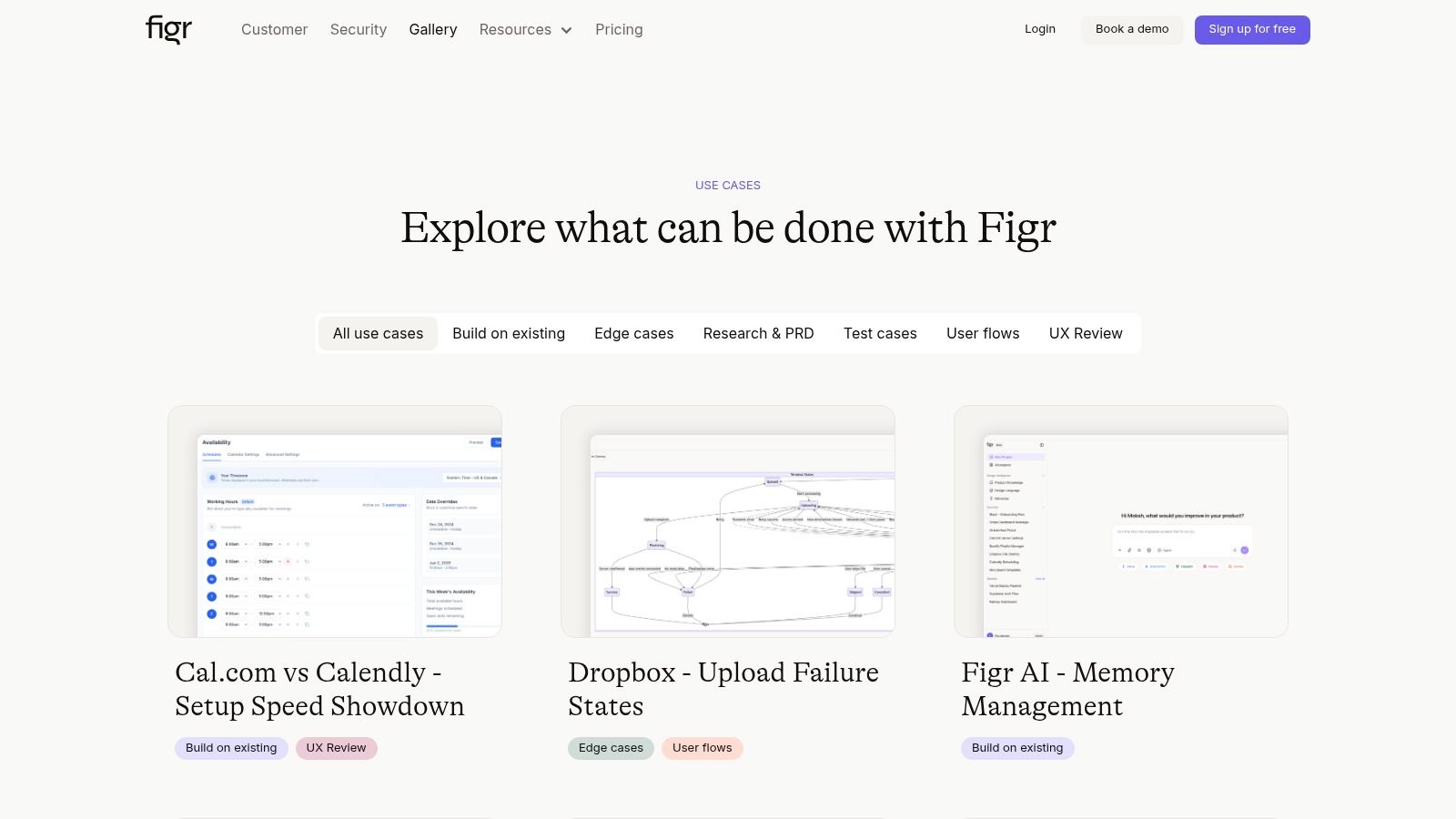
If you want examples of what a more context-rich workflow can produce, browse the Figr gallery.
If your team is stuck between a promising idea and the long road to something testable, Figr is built to reduce that gap. It helps product teams generate interactive prototypes from real product context, including screenshots, Chrome capture, and Figma inputs, so the work starts closer to reality and reaches feedback faster.