
It is 4:47 PM on Thursday. Your VP just asked for "something visual" to anchor tomorrow's board discussion on the analytics feature. You have a PRD. You have bullet points. You have 16 hours and no designer availability. (Is the PRD enough? It is the start, and the bullet points are the rest of the shape.)
I have been in this exact position more times than I want to admit. The old workflow was brutal: write PRD, wait for design queue, get wireframes, give feedback, wait again. By the time I had something presentable, the window had closed. (Is this the part that hurts? Yes, the waiting, then the waiting again.)
Then I discovered a workflow that compresses two weeks into two hours. Not by cutting corners. By eliminating the translation losses that eat up most of the time. (What do I mean by translation losses? The fidelity you lose at every handoff.)
The Old Workflow Was Broken
Here is what a typical feature looked like before:
Day 1-2: Write PRD (4 hours actual work). Day 3-5: Wait for designer bandwidth. Day 6-7: Receive wireframes, give feedback. Day 8-10: Wait for revisions. Day 11-14: More rounds until alignment. (Do the dates matter, or the pattern? The pattern matters, the dates just make it obvious.)
According to Nielsen Norman Group research, 60% of project time is waiting, not working. (Which Nielsen Norman Group research is this from? I do not have the exact link in this draft yet.) The feature took two weeks. The actual productive hours totaled maybe 12.
The problem was not speed. It was the translation tax at every handoff. Words become wireframes. Wireframes become feedback. Feedback becomes revisions. Each translation loses fidelity. (Is this about people being "wrong"? No, it is about the channel being lossy.)
When I wrote "clean analytics dashboard," the designer heard something different from what I meant. Neither of us was wrong. The communication channel was lossy.
The New Workflow: What Actually Changed
Now I do this differently.
Hour 1: Context Loading. I parse my product via Chrome extension. Figr captures the design system automatically: typography, spacing, colors, component patterns. Not from my description. From the actual product. (What is "context loading" here? Parsing the product, then feeding the docs and visuals.)
Then I feed my PRD, competitor research, and a screen recording of the current experience. The more context, the better the output. (How much context is "enough"? As much as you already have, without overthinking it.)
Hour 2: Generation and Refinement. Figr explores before generating. It asks clarifying questions: What edge cases matter? What states should we consider? What have competitors tried? (What counts as an edge case? The states and scenarios that change the UI.)
Then it produces a prototype in my product's exact visual language. I refine. Adjust labels. Request the empty state. Add the mobile view. By hour two, I have something stakeholder-ready. (Do I still get to steer it? Yes, the refinement is the steering.)
Dashboard prototype showing analytics feature in the product's exact design language: same typography, same card styling, same data visualization patterns as the existing product.
Caption: A prototype that looks native because Figr parsed the actual product, not a description of it.
Why This Works
The shift is not about AI being faster at drawing. It is about eliminating translation loss.
When I describe a feature in words, every reader interprets differently. "Clean dashboard with key metrics" means something different to me, my designer, and my stakeholder. We all have different mental models. We all imagine different implementations. (Why not just write a clearer PRD? Because the interpretation still forks.)
When I show a prototype, we see the same thing. Feedback becomes specific: "Can we move this chart to the left?" instead of "Make it feel more balanced." Alignment happens in minutes instead of days. (Is this really about speed? Yes, but it shows up as clarity.)
The Mercury runway forecasting feature demonstrates this. The PM fed Mercury's interface via Chrome extension, described the need, and had a complete prototype with scenario modeling and alert configuration before lunch. No interpretation required. No revision cycles. (What is the key variable here? A prototype everyone can react to.)
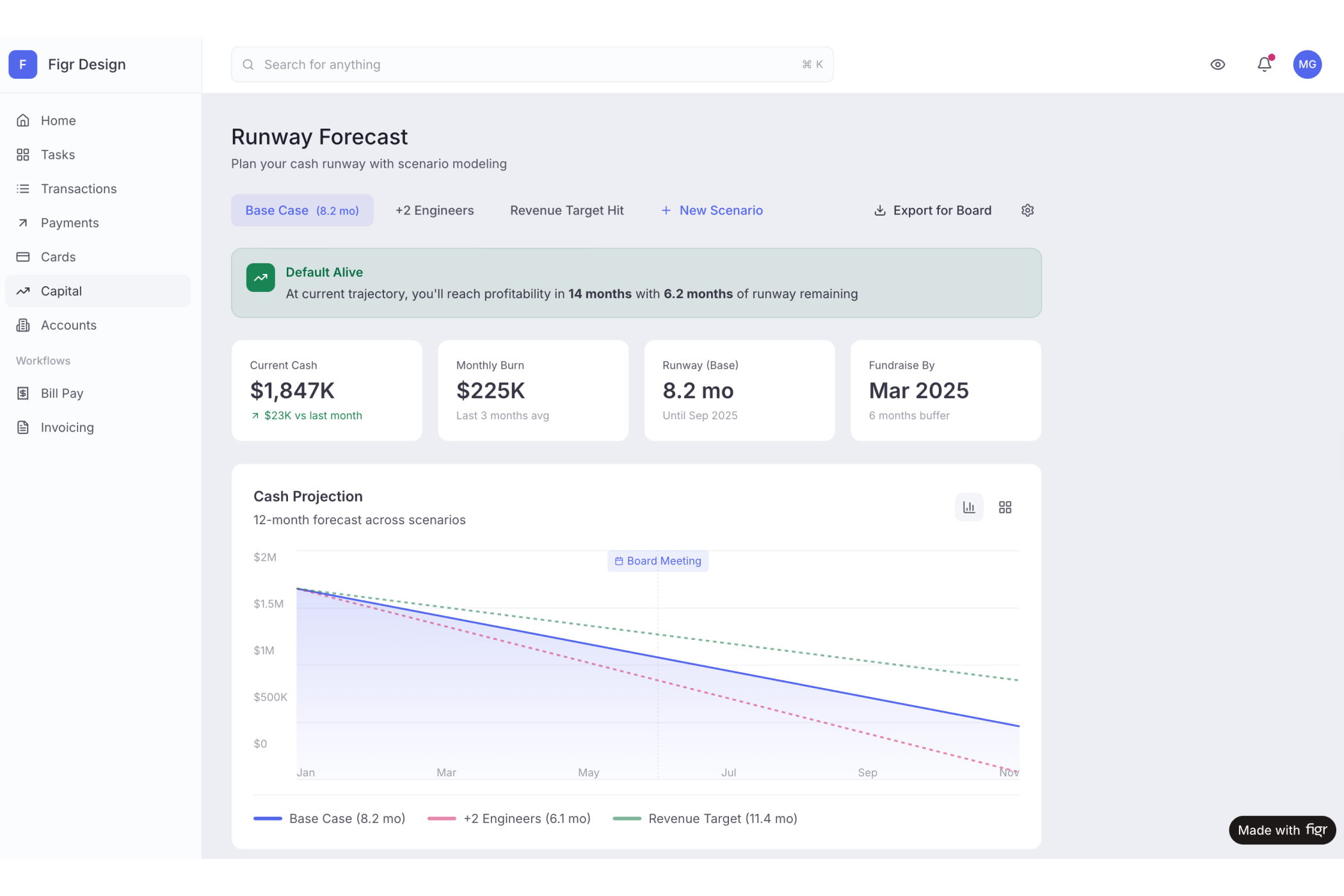
→ See the Mercury forecasting prototype, notice how it matches Mercury's exact visual patterns
The Framework: CEDR
I use this mental model for every feature now:
C - Context: Parse your product. Feed relevant documents. Show, do not describe. The more context you provide upfront, the less fixing you do later. (What is the fastest win? Parsing your product first.)
E - Explore: Let Figr ask questions before generating. What edge cases? What states? What alternatives? This exploration prevents wrong-direction solutions. (Do I answer every question? Yes, the ones that change the UI.)
D - Diverge: Generate multiple approaches. Do not settle for the first output. See three variations. Understand trade-offs. Pick the one that resonates. (Why three? Enough to compare without getting lost.)
R - Refine: Adjust based on your judgment. Request missing states. Polish details. Make it stakeholder-ready. (When do I stop refining? When it is stakeholder-ready.)
The Intercom analytics dashboard followed this pattern. Context from parsing Intercom's interface. Exploration of what support teams actually need. Three divergent approaches compared. Refinement into a stakeholder-ready prototype that looked like Intercom built it internally.
The Economics
A PM earning $140K spends roughly $70/hour when fully loaded. Two weeks of traditional workflow costs approximately $1,400 in PM time alone. Add designer time. Add opportunity cost of delayed decisions. The real cost is much higher. (Is this exact math? No, it is directional, and the point holds.)
Two hours of the new workflow costs $140. The savings compound across features.
In short, more importantly than time savings: features get validated before engineering commits. The stakeholder sees something real, reacts, and decides. No more "interesting, let's think about it."
The Takeaway
The PRD does not need to wait in the design queue. The prototype does not need to look generic. The stakeholder review does not need to be abstract.
Your next feature can have a stakeholder-ready prototype by end of day. Not a wireframe. Not a rough sketch. A prototype in your product's actual design language with edge cases considered. (Want a simple test? Pick one PRD and try it end to end.)
→ Try Figr on your next feature, see what two hours produces