

Your team is watching the funnel drop at the address step, but without formative usability testing, nobody can explain why people leave.
The designer proposes shorter fields, the PM asks for autofill, and engineering starts estimating both. Nobody knows whether users misunderstand the address requirement, hit a validation error, or don't have the information ready. The team risks rebuilding the wrong part of the flow.
A useful testing round turns that uncertainty into a decision, a design change, and a scheduled retest. This approach gives you a practical way to scope sessions, record evidence, rank findings, and check whether the changes helped.
What Formative Usability Testing Is For
Formative usability testing is an iterative evaluation during development that helps teams improve the next version of a product. The National Institute of Standards and Technology's usability guidance frames it around representative users performing representative tasks on a representative product, with findings used to guide later iterations.
Each part matters. Representative users bring the knowledge and constraints your customers have. Representative tasks reflect their work. A representative product exposes enough of the interaction to reveal meaningful problems, even when the implementation isn't finished.
Treat each round as a decision loop
A useful round starts with a decision the team can still change. For example, should billing access be assigned when an administrator invites someone, or after that person joins?
Keep these working principles visible:
- Iterative means fixes and a retest. End each round with changes someone owns and a date to evaluate them.
- Qualitative first means explaining behavior. Record causes, expectations, and recovery paths before compressing sessions into scores.
- Design input means bounded conclusions. A successful task helps you assess that interaction under those conditions. It doesn't certify the finished product.
Among different user research methods, formative testing is especially useful when you need to observe an attempted interaction rather than collect opinions about a concept.
In short, choose formative testing to improve a design and summative testing to evaluate whether it meets a defined bar.
Formative and summative usability testing side by side
| Dimension | Formative | Summative |
|---|---|---|
| Timing | During development, before design decisions lock | Near the end, on a finished or near-finished product |
| Purpose | Guide improvements to the next iteration | Validate against criteria, targets, or a standard |
| Question it answers | Why and where do users struggle? | Did we meet the bar? |
| Sample | Small and qualitative, often five per distinct user group as a planning heuristic | Larger and planned around the metric |
| Evidence | Observed behavior, errors, expectations said aloud | Task success, time on task, error rate, System Usability Scale scores |
| Output | A ranked list of design changes and a retest plan | A verdict, score, or compliance report |
| Common failure | Treated as a verdict and stopped after one round | Run so late that findings cannot change the design |
I call the common late-stage mistake the final-sprint discovery trap: a team books sessions just before release, finds problems, and has no capacity to respond.
The practical output should be smaller than a research archive: a round plan, an observation log, a ranked decision list, and a retest date.
How Many Participants Each Round Needs
Start with five participants per distinct user group per round, as a planning heuristic rather than a statistical guarantee. Nielsen Norman Group's sample-size guidance estimates that five users can uncover about 85% of discoverable usability problems under its model's assumptions, and recommends fixing findings before conducting another small study.
That estimate isn't a promise about your interface. It relies on assumptions about how likely participants are to encounter problems. A buried permissions error and an obvious navigation failure won't necessarily have the same discovery probability.
Count user groups before sessions
Split recruitment when people bring materially different goals, knowledge, or access:
- Administrators and end users work with different permissions and consequences.
- First-time and expert users may interpret the same labels through different mental models.
- Different access needs can expose interaction failures that a convenience sample won't encounter.
- Different environments matter when mobile use, shared devices, or restricted networks change the task.
Illustrative planning arithmetic: three distinct groups at five participants each means 3 × 5 = 15 sessions, not five sessions divided across everyone. That's a budgeting example, not a requirement for every product.
Increase coverage when tasks are hard to discover, the interface is complex, or rare failures carry serious consequences. A small qualitative sample can reveal a dangerous failure, but it can't establish how rarely that failure occurs.
Spend the next session where it changes a decision
Adding participants to an unchanged design can deepen your understanding. It can also produce repeated evidence for a problem the team already knows how to fix.
Practical rule: Once you have enough evidence to make the next design decision, consider fixing and retesting rather than buying more confirmation.
A fresh round can expose a different class of problem: the side effect of your fix. Moving a control might improve discovery while separating it from the information needed to use it correctly.
Define a qualifying participant through role, experience, permissions, and environment. Job title alone isn't enough. Someone who approves invoices but never configures billing isn't automatically representative of the administrator who owns setup.
Choosing Between Moderated and Unmoderated Rounds
A participant stares at a permissions screen for forty seconds, picks the wrong option, and says nothing. In an unmoderated session that recording is a data point you interpret alone. In a moderated session you can ask what she thought the option meant, and the answer usually changes the fix.
Match the format to the kind of evidence you need. A moderator can probe an unexpected path, separate prototype limitations from interface problems, and watch context a recording never captures. That makes moderated sessions the better starting point for confusing mental models, complex or unreleased prototypes, and interactions whose accessibility is uncertain. Unmoderated rounds earn their keep once the task is narrow, the instructions are unambiguous, and the open question is whether a problem you already understand still appears.
Compare the real costs
The JMIR Formative Research article on remote usability methods is a starting point for examining remote-method trade-offs. Do not assume asynchronous testing produces equivalent evidence just because it produces recordings faster.
Moderated, unmoderated and hybrid rounds compared
| Format | Best suited to | Main cost or risk | Typical round size |
|---|---|---|---|
| Moderated, in person | Confusing mental models, physical context, accessibility needs | Travel and scheduling constrain recruitment | Five per distinct group as a planning starting point |
| Moderated, remote | Complex or unreleased prototypes requiring follow-up | Setup failures and weaker visibility into context | Five per distinct group as a planning starting point |
| Unmoderated, remote | Narrow tasks after the main usability risks are understood | Missed explanations, participant errors, and filtering needs | Recruit enough qualifying sessions to replace unusable recordings |
| Hybrid sequence | Discovering failure modes, then checking recurrence across markets and devices | Separate discovery and checking cycles | A moderated round followed by a targeted unmoderated check |
An expert review UX for product teams can surface likely problems before recruitment begins. Keep those predictions separate from observed participant behavior.
Use a sequence, not a format preference
Start moderated when you do not understand the failure. Once a fix ships, use a later unmoderated check to see whether the same problem recurs across devices, markets, or relevant profiles. Set that retest date before the first round ends, or the check will slip behind the next feature request.
Remote-only recruitment can miss people without suitable devices, reliable access, or confidence using research software. Offer assisted setup, accessible participation options, or in-person recruitment where those people carry the risk you are testing.
Define exclusion rules before reviewing outcomes. An incomplete recording may be unusable evidence; a participant abandoning a task may be the finding. Investigate suspiciously fast completions, missing interaction footage, and repeated instruction misunderstandings. Speed has compromised validity when the team can't explain what a recorded outcome means.
How to Plan and Run the Sessions
Write the session plan around a product decision, not a feature tour. The FDA's human-factors guidance explains that formative evaluations can differ in formality and sample size according to complexity, user variability, information needs, and conditions of use, including worst cases.
Its warning about employee participants applies beyond medical devices: product knowledge and reluctance to criticize can make their evidence misleading. Use colleagues to check logistics, not to stand in for customers.
The following is an illustrative session plan. Its timings are working allocations, not published requirements.
Build a script that leaves room for behavior
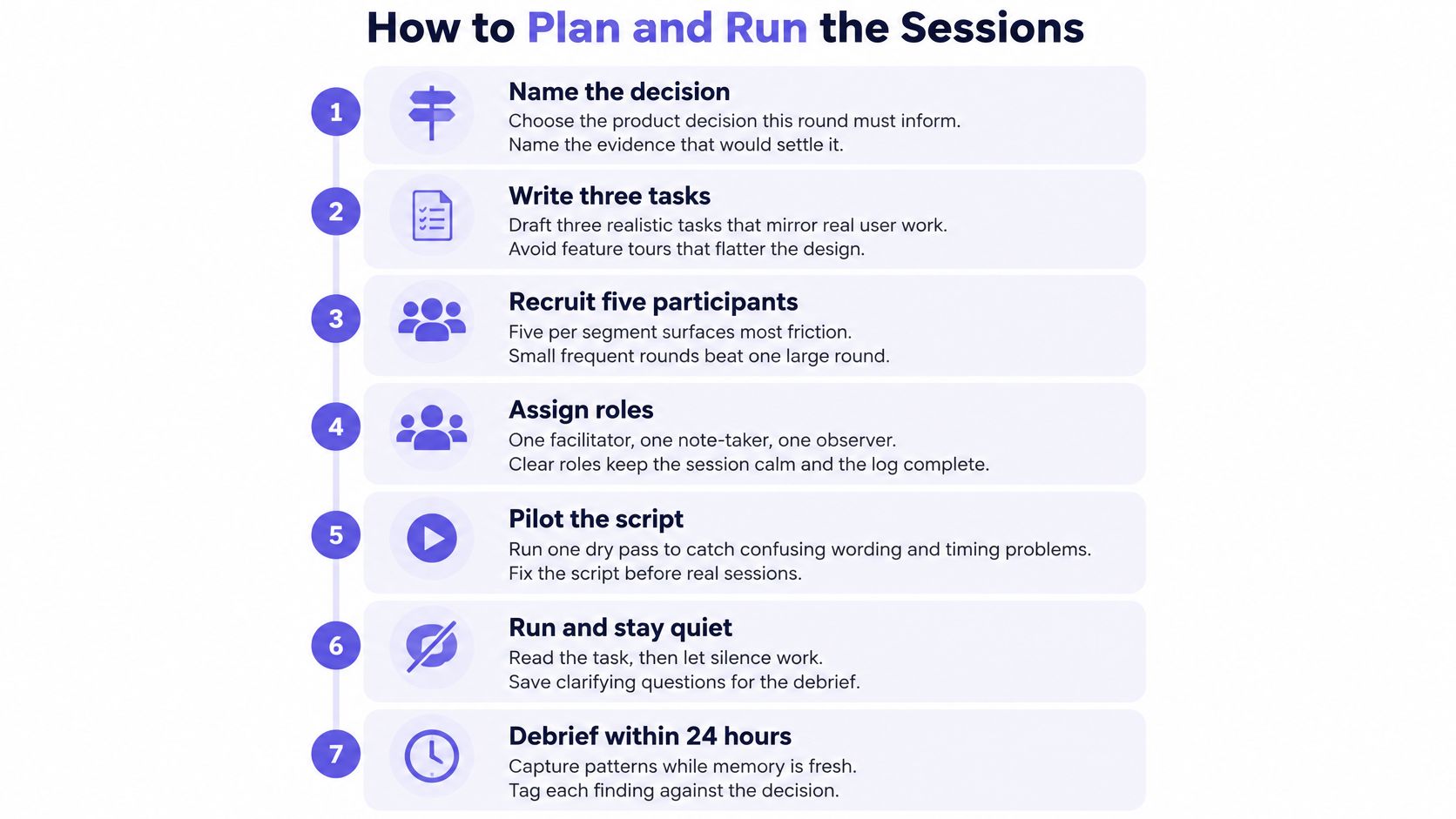
Step 1. Name the decision.
Write what the team must decide after the round.
State what observable evidence would support changing the current design.Step 2. Write three to five outcome-based tasks.
Ask someone to invite a teammate who needs billing access.
Don't tell them to open Settings, select Members, and choose a permission.Step 3. Recruit the intended users.
Screen for role, experience, permissions, and working environment.
Check that participants perform the work rather than merely recognize its terminology.Step 4. Shape a 60-minute session.
Provisionally allocate five minutes to warm-up, forty to tasks, and fifteen to debrief.
Ask participants to explain what they're thinking without requiring constant narration.Step 5. Pilot outside the team.
Run the script with one person who doesn't know the design.
Rewrite tasks that require explanation, and check links, accounts, and recovery states.Step 6. Assign clear roles.
Use one moderator and one notetaker; keep observers silent and off camera.
Give observers a private channel that doesn't interrupt the participant.Step 7. Keep a neutral prompt bank.
Ask what the participant expected or what they would do next.
Avoid naming the missing control or rewarding the intended path.
Keep requirements separate from task wording
Requirements should shape what you test without revealing the intended solution. For example, a billing-access requirement belongs in the researcher's checklist, while the participant receives a realistic work scenario.
If your project includes CEF compliance requirements, CEFCore's resource on documenting CEF compliance requirements can support requirements preparation. A usability session still needs its own behavioral evidence; a completed requirements document doesn't establish that people can use the flow.
Preserve the struggle long enough to understand it. If you provide help, record exactly when and how.
Before recruitment closes, prepare consent language, a schedule, the script, and a shared log template. Include recording permissions, data handling, prototype access, and a fallback plan for technical failures. That preparation lets the moderator watch the participant instead of troubleshooting the study.
What to Record While You Watch
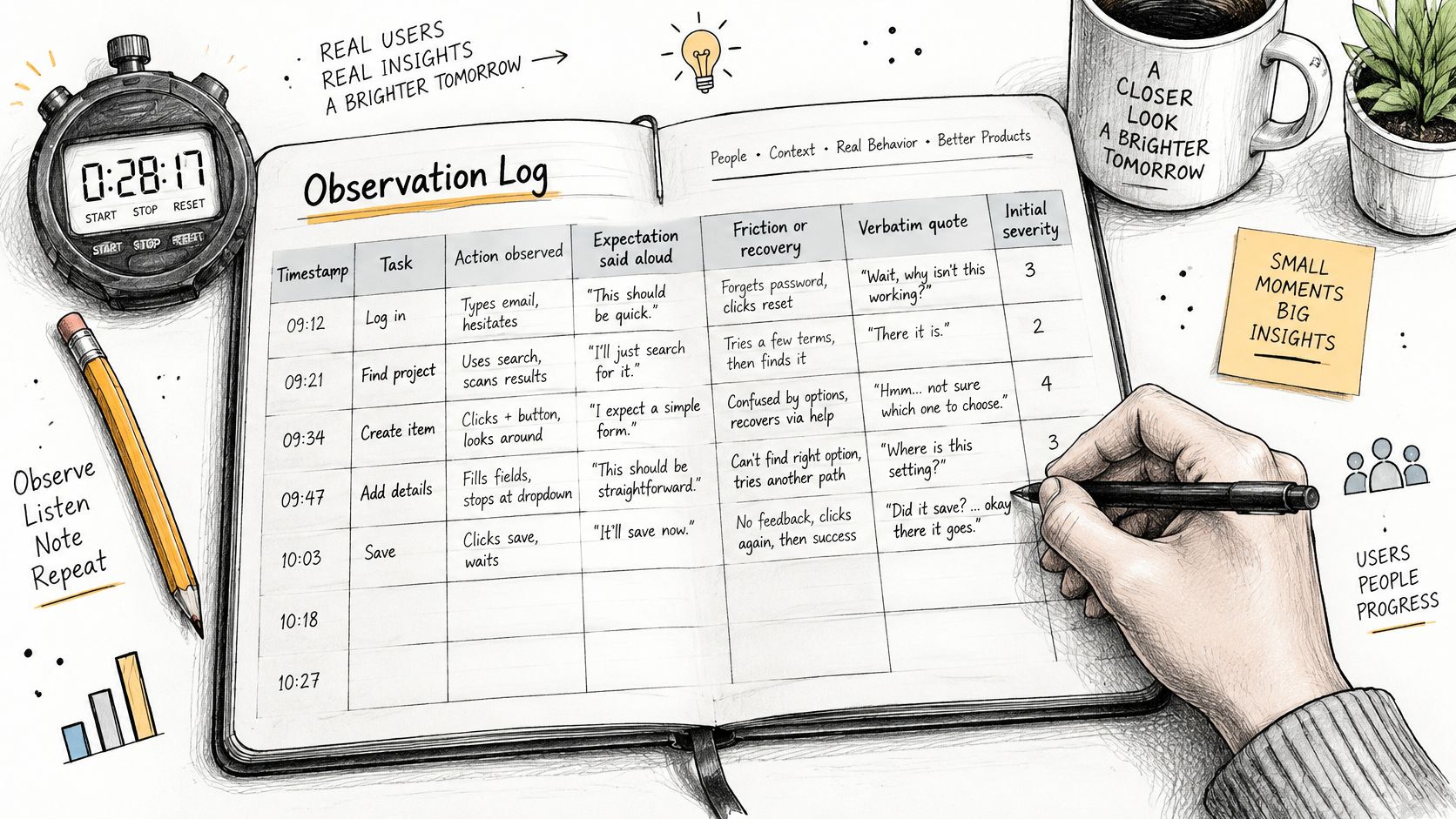
Use a shared observation log that separates what happened from what you think it means. A recording preserves the session, but the log makes findings comparable across tasks and participants.
Capture evidence before interpretation
Use these columns: timestamp, task, action observed, expectation said aloud, friction or recovery, verbatim quote, and initial severity. Add participant profile and prototype version to the session header.
| Log field | Useful entry | Interpretation to keep separate |
|---|---|---|
| Action observed | Reopened the filter repeatedly, then stopped | The filter's purpose may be unclear |
| Recovery | Returned to the previous screen and used search | Search may be the preferred fallback |
| Outcome | Completed only after the moderator named the menu | Independent completion wasn't demonstrated |
Record failure location, help-seeking, recovery, and the expectation expressed at the moment of friction. Distinguish a slip, such as selecting the adjacent control, from a wrong mental model, such as believing that saving also publishes.
Keep lightweight measures: task completion, critical errors, moderator assists, and a post-task ease question. Use time on task only when you have a meaningful baseline and comparable conditions. Think-aloud discussion itself can affect timing.
To improve SaaS navigation with click data, connect the first action to the participant's stated expectation. A wrong click shows where they went; the session can help explain why.
Extend the log for AI features
UserEvaluation's coverage of AI in UX research discusses AI-supported research and synthetic users. Treat generated hypotheses as preparation for human research, not evidence that real users will behave as predicted.
For an AI-assisted product, preserve the model version, system instructions, data state, prompt, and interaction history. Keep sensitive configuration in controlled storage rather than a broadly shared spreadsheet.
Recruit participants with different domain expertise. Watch whether they recognize uncertainty, verify consequential answers, and recover after an incorrect output. Include ambiguous prompts, multilingual inputs, low-literacy wording, and privacy-sensitive situations where relevant.
A completed task can still involve a confidently wrong answer. Record output correctness and user calibration, meaning whether confidence matches the answer's reliability, separately from apparent ease.
Turning Observations into Design Decisions
A finding becomes actionable when it connects evidence to a change and a retest condition. Organize synthesis around tasks and failure patterns, not a participant-by-participant recap.
For a fuller approach to coding and clustering notes, use qualitative research insights from Figr. Keep the original observation attached to every interpretation so reviewers can challenge the reasoning.
Rank consistently, with an explicit risk override
Use these moves to create the decision list:
Cluster by task and failure.
Group observations such as missing the role selector or misunderstanding save behavior.
Keep different causes separate even when they produce the same failed outcome.Write a design hypothesis.
Describe what users appear to misunderstand and why the interface may contribute.
Mark uncertainty instead of presenting the suspected cause as established fact.Rank severity and frequency.
Record the scoring weights and denominator in the log.
Apply a separate override for safety, accessibility exclusion, or wrong-data risk.Assign an owner and retest date.
Name who will change the design and what behavior would demonstrate improvement.
Put the check on the calendar before closing the finding.
Here's an illustrative scoring convention, not a validated measurement scale:
- Blocker, weight 3: the participant can't finish or risks wrong data.
- Friction, weight 2: the participant finishes with hesitation or a detour.
- Cosmetic, weight 1: the issue doesn't affect task success.
Frequency is the share of observed sessions where the issue appeared. In an illustrative five-session round, four affected sessions means 4 ÷ 5 = 80%. The corresponding blocker score is 3 × 0.8 = 2.4.
Multiplication alone has a limit: a blocker seen once scores 0.6, below a cosmetic issue seen everywhere at 1.0. Therefore, consequential blockers override the numerical ordering. Without that rule, the score can prioritize polish over risk.
How severity and frequency set the response
All counts below are illustrative.
| Finding | Evidence in the log | Response | Retest |
|---|---|---|---|
| Blocker seen in most sessions | Four of five participants couldn't complete the task | Fix before the next round; treat as a release blocker | Repeat with fresh participants |
| Blocker seen once | One participant failed in a way that risks wrong data | Investigate the cause and add a recruiting screen | Include that profile |
| Friction seen everywhere | Every participant hesitated at the same label | Batch into a copy and layout pass | Check whether hesitation disappears |
| Friction seen once | One hesitation, cosmetic in impact, no task failure | Log and defer | Revisit after release |
| Stated preference with no behavior | Participant requests a different layout | Treat as a hypothesis | Seek behavioral evidence |
Make the handoff testable
A durable finding contains problem, evidence, proposed change, and success condition. Quote only words captured in the session. Stated preference belongs in a hypothesis field unless behavior supports it.
Illustrative worked example: In a five-participant admin-invite round, four people miss the role selector. The team moves role assignment into the invitation step and changes the permission-set label to role. In a retest, five fresh administrators complete the task without help.
A boundary case deserves a different response. If a participant's failure involves an accessibility need, investigate the interaction and recruit that profile deliberately; don't infer the cause or redesign blindly from the failure alone.
Shipping a change proves implementation. Retesting supplies evidence about whether it addressed the observed problem.
Questions Teams Ask Before and After Their First Round
When should a team stop running rounds?
Stop for the current scope when the retest passes and no unresolved blocker or frequent friction remains. Document deferred cosmetic issues and any untested conditions. This is a release decision with stated limits, not a claim that the product has no usability problems.
What if the prototype isn't built yet?
Test clickable prototypes or annotated screens when they support realistic tasks. Record which version each participant saw and where the moderator simulated behavior. Don't treat successful navigation through a simplified prototype as evidence that loading, validation, permissions, or recovery states work.
For an illustrative music-selling product, OohYeah's answers about selling music commission-free could inform realistic seller questions. Those answers wouldn't establish whether your own prototype makes the terms understandable.
Does a formative round need statistical significance?
No, not when the decision rests on observed causes and design hypotheses rather than a population estimate. Report participant outcomes as observations from the round. Use a study designed for measurement when the business needs a pass rate with quantified uncertainty.
How long does a round take end to end?
Budget sessions, buffers, synthesis, and a decision meeting separately. Illustrative estimate: five 60-minute sessions require five session hours; a 30-minute buffer after each adds 2.5 hours. Allowing five analysis hours gives 12.5 hours before recruitment, preparation, and the decision meeting. Complexity can change that allocation substantially.
How soon should the retest run?
Schedule the retest before the fix ships, ideally within the same sprint or the next. Recruit fresh participants who match the relevant profile. Keep the core task comparable, preserve the new version, and specify what would count as unresolved behavior before watching the sessions.
Your Next Step
By the end of this week, choose a flow with a consequential unanswered question. Draft an illustrative plan for five representative participants, 60-minute sessions next week, and three outcome-based tasks. Set the retest date before the first session runs.
The basic gist is this: a misunderstood mental model rarely stays on a single screen. As teams reuse the same concepts across more surfaces, they can reproduce the same confusion and generate more support work. A short ranked decision list helps designers, engineers, and QA coordinate a response.
For preparing realistic interactions, consider these prototype testing methods for SaaS features.
According to its product description, Figr lets teams review existing UX and test flows before launch. Uploaded screens or a recorded walkthrough can surface unclear flows, missing states, accessibility concerns, and redesign opportunities. Its UX review evaluates an existing flow; UX reasoning helps shape new flows, requirements, edge cases, and design decisions.
Book the five participants and set the retest date today.
Visit Figr to review the flow you're preparing to test and identify states or assumptions worth investigating. Bring your screens or a product walkthrough, then use the review to sharpen tasks for real participants and prepare a focused retest.