
B2B SaaS teams keep shipping avoidable UX flaws because the complete product story gets lost between idea, design, and handoff. I see this most in teams that are moving fast and doing their best, yet still relying on scattered screenshots, half-updated Figma files, Slack threads, and someone's memory of what changed last sprint.
When that context breaks, the cost shows up everywhere. Engineers build against partial intent, Designers patch states after QA finds them, and Product Managers become human routers for missing information. A 2025 McKinsey report on software delivery indicates that 40% of product development time is spent on rework due to ambiguous requirements, which is the cleanest description I've seen of post-launch chaos in SaaS. The morale hit matters too. Teams stop designing proactively and start living in cleanup mode.
The fix is a workflow, not another isolated tool. The useful shift comes when an AI design tool for product teams works from live screens, design systems, docs, analytics, and prior decisions together, then turns that context into prototypes, edge case maps, and handoff artifacts. That's where Figr fits for B2B SaaS teams. It helps teams move from reactive design-then-fix loops to a context-aware operating model.
Introduction
Post-launch chaos usually starts long before launch.
I've watched smart teams miss obvious states, not because they lacked skill, but because the product's context existed in fragments. A Product Manager had the goal in a PRD. A Designer had the latest visual direction in Figma. Engineering had implementation constraints in tickets and code comments. Nobody had the whole picture in one working memory.
That fragmentation creates a pattern I'd call context evaporation. Every handoff removes a little intent, a little rationale, a little edge case awareness. By the time the work reaches QA or customers, the missing pieces surface as bugs, churn risk, and expensive rework. For B2B SaaS teams, that's more than a craft problem. It's an operating problem tied to growth, retention, and how fast the roadmap can move.
Why Your Current Design Handoff Is Broken
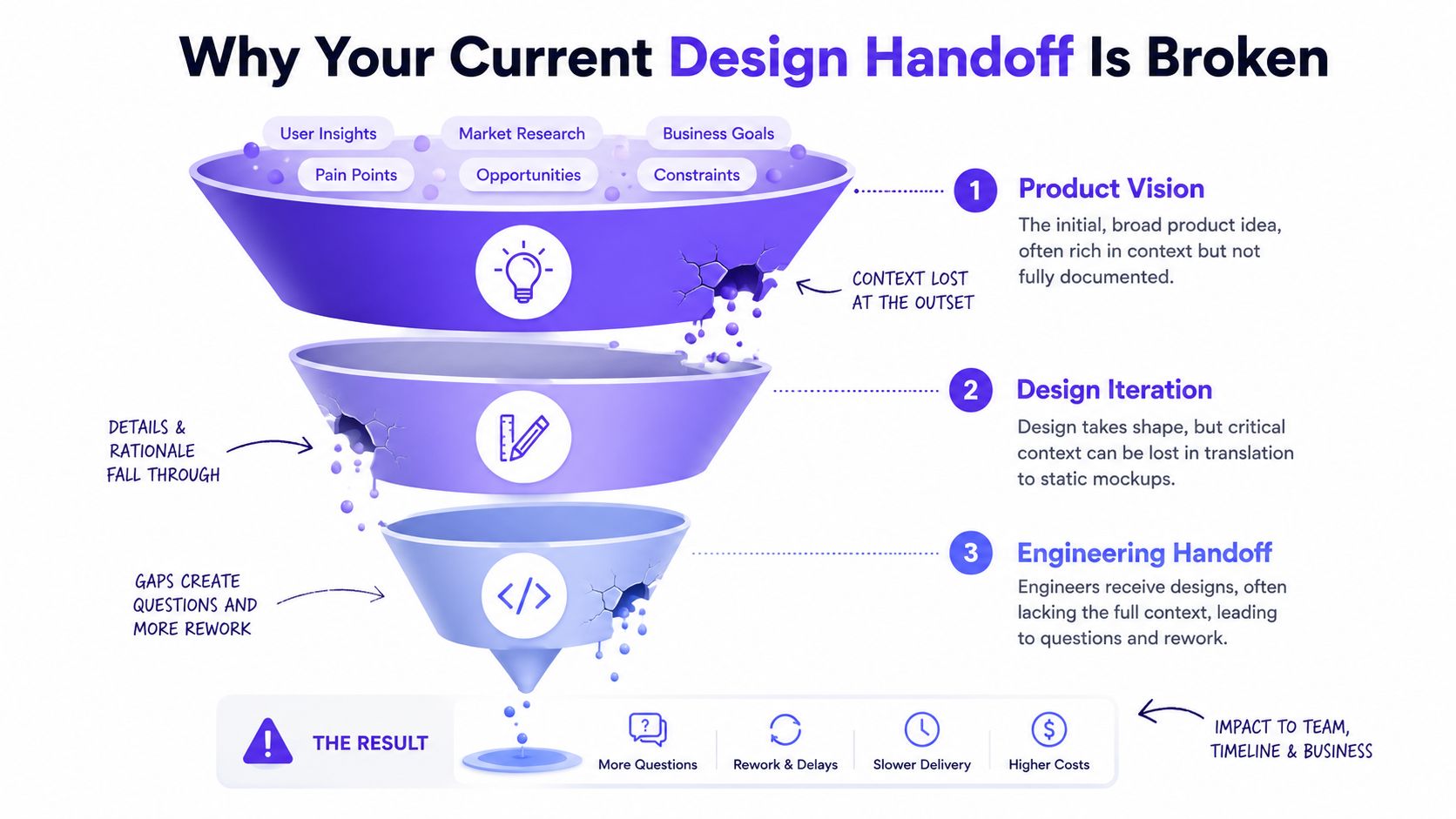
Most design handoffs break because information survives as files, not as connected context.
The real failure point is the context gap
A mockup can show what a screen should look like. It usually won't explain why a state exists, which user path triggers it, how it relates to prior decisions, or what should happen when the flow bends under real-world conditions.
That gap gets worse in B2B SaaS because flows are dense. Permissions, approvals, billing logic, seat limits, empty states, partial failures, and admin overrides all pile onto one experience. A static handoff handles the happy path. The product in production rarely stays there.
Practical rule: If engineering has to ask what happens in the second or third branch of a flow, the handoff was visual, not contextual.
The basic gist is this: Product Managers tend to own intent, Designers own interface decisions, and engineers own implementation detail. The connective tissue between those layers often has no true owner. That's why teams with talented people still get trapped in revision loops.
Why this gets worse as the company grows
In an early-stage startup, the missing context sometimes lives in one person's head. That's fragile, but still recoverable because the team is small. In a growth-stage company, the same problem scales into confusion. More squads, more artifacts, more systems, and more decisions create more places for product memory to split.
A useful response is to create a Context Pod, a shared product memory that holds:
Live product evidence: captured screens, recordings, navigation patterns
Design system knowledge: tokens, components, variants, usage rules
Written intent: PRDs, research notes, decision logs
Behavior signals: funnel observations, analytics exports, support patterns
For lean teams, that often starts with whatever exists today. A rough walkthrough, a stale design file, some customer notes, and current product screens are enough to begin. For growth-stage teams, it means centralizing formal artifacts so every project doesn't begin with another week of rediscovery.
How to Establish a Single Source of Product Truth
A single source of product truth is an operating system for product decisions. Without it, every sprint starts with recovery work. Someone has to reconstruct the current flow, explain why a state behaves a certain way, and resolve conflicts between the live product, the design file, and the spec.
I have seen this happen in both small and scaled SaaS teams. Early-stage teams usually lose context because speed beat documentation. Growth-stage teams lose context because too many systems now hold partial versions of the truth.
The fix is not more documents. The fix is one shared reference point that combines what the product does, how the interface is built, and why prior decisions were made.
Build the source of truth around evidence
Start with artifacts that reflect reality, not aspiration.
Step 1. Capture the current product experience.
Use the live product as the baseline. Production screens show actual hierarchy, navigation depth, field density, empty states, validation patterns, and all the small compromises that never made it into Figma.
Early-stage teams: capture what exists, even if the flow is rough
Growth-stage teams: capture production behavior across plans, roles, and permissions, not just the primary happy path
Step 2. Bring in the design system.
Import components, tokens, variants, and usage rules from Figma. That gives the team a defined UI vocabulary and cuts down on invented patterns during iteration.
What usually helps: tying generated or edited screens back to existing component logic
What often breaks handoff: using visual references without the underlying token and variant structure
Step 3. Add written product intent.
Pull in PRDs, research notes, decision logs, support call themes, and implementation notes. Screens show what shipped. Written context explains why it shipped that way.
Early-stage teams: this may be founder notes, Slack decisions, and customer call summaries
Growth-stage teams: this is usually formal specs, team decisions, dependency notes, and historical rationale
Step 4. Add behavior signals.
Include analytics exports, drop-off observations, bug clusters, and support trends. That keeps the team focused on where users struggle, not on which stakeholder argued most recently.
A similar pattern shows up in infrastructure. Teams that care about secure and scalable GitOps deployments create one reliable path for change, reduce side-channel decisions, and make state visible. Product teams need the same discipline if they want consistent delivery.
What this changes in practice
Once this system is in place, Figr stops being just another design tool in the stack. It becomes the place where product evidence, design structure, and implementation context meet before work gets handed to engineering.
That shift matters more than speed alone.
For early-stage teams, it reduces dependence on memory and cuts down on founder bottlenecks. For growth-stage teams, it lowers drift across squads, makes reuse more realistic, and gives product, design, and engineering a shared frame of reference. The result is fewer avoidable debates, fewer preventable revisions, and a product process that starts with context instead of cleanup.
The Practical Workflow from Live Product to Figma-Ready Prototype
A PM opens design review for what looked like a small change to billing or permissions. Twenty minutes later, the room is arguing about a state nobody captured from production. That pattern is common because many teams still start with a blank canvas, then patch missing context later.
The faster path is to begin with the live product, then turn that context into editable design work.
The workflow I'd use
I've seen teams spend days refining prompts for flows that should have started with evidence from the shipped experience. If your product already contains the navigation patterns, labels, density, and state logic users rely on, use that first.
This workflow works because it reduces invention where invention is risky. Early-stage teams usually need speed without losing the logic sitting in the product today. Growth-stage teams need consistency across squads, systems, and legacy decisions that newer contributors do not know yet.
Step 1. Capture the current flow with Chrome.
Start from the production experience. Capture layout, navigation, interaction density, and visible states before anyone proposes a redesign.
Best for: onboarding, settings, billing, approvals, admin flows
Why it matters: it removes the blank-canvas problem and exposes the constraints already shaping user behavior
Helpful next read: use this guide to ground design decisions
Step 2. Import the Figma system.
Bring in frames, components, variants, and token definitions. That keeps the output editable and aligned with the system engineering already recognizes.
For early-stage teams, this is often a cleanup move as much as a design move. For growth-stage teams, it prevents each squad from recreating the same pattern with slight differences that later become maintenance cost.
Step 3. Add intent and constraints.
Load the brief, PRD, research notes, and implementation constraints. Include what changed, which user is affected, and what cannot break.
Good inputs here are specific:
approval rules
seat upgrade logic
retry behavior
permission boundaries
compliance or audit constraints
Step 4. Generate the first prototype direction.
Ask for a concrete flow. Name the user, the task, the decision point, and the business rule that shapes the experience.
Review the first pass for four things: state coverage, flow logic, component fit, and language consistency. If one of those is weak, fix the input or adjust the scope before the team gets attached to a polished but fragile direction.
Where teams usually lose time
The failure point is rarely the first screen. It is the branch hidden behind a role change, a failed request, or a workspace rule that only applies to one account type.
I watched a PM deal with this after a shared-workspace reassignment flow reached review. The design looked clean. The problem was a permission mismatch that only appeared after ownership changed hands. Engineering had to rebuild part of the logic, QA reopened the ticket, and the spec lost credibility.
That is why I treat prototype generation as a validation step, not a decoration step.
This short demo helps make that more concrete.
Sync back into editable design work
Step 5. Review edge cases before handoff.
Check the branches that usually get skipped. Focus on empty, loading, error, success, partial success, role-specific, and recovery states.
Step 6. Sync to Figma as editable output.
Move the result into the team's design workflow as Figma-ready work. Engineering handoff depends on editable structure, named layers, reusable components, and states that can be inspected. Flat images do not help much once implementation starts.
Step 7. Generate support artifacts.
Create drafts for user flows, QA scenarios, and acceptance criteria. Doing so makes the workflow operational, not just visual. Product gets clearer review points, design gets less ambiguity, and engineering gets artifacts that are closer to build-ready.
Used well, Figr helps shift the team out of the familiar design-then-fix cycle. The point is not faster mockups. The point is bringing production context, system constraints, and editable outputs together early enough to prevent avoidable rework.
Are You Mapping All Your States and Edge Cases
Many teams are not mapping enough states, and they usually find out after release.
I once watched a team at a Series C company spend a full sprint fixing a checkout flow because nobody had considered what happens when a promo code expires after it's applied but before payment completes. The original design wasn't bad. It was incomplete.
The hidden cost of partial flow thinking
B2B SaaS flows break at the edges because the business logic is layered. A task approval flow can have role conditions, deadline rules, policy exceptions, partial saves, and cross-team visibility constraints. One polished happy path can hide a dozen risky branches.
That's why I treat edge case work as product risk management, not design polish.
A useful review usually includes states like:
Empty: first use, no records, no eligible items
Loading: delayed fetch, progressive load, retry state
Error: field validation, API failure, timeout, permission denial
Success: full success, background success, delayed confirmation
Partial success: one action completes while another fails
State conflict: stale data, changed permissions, concurrent edits
Missing states don't stay missing. Customers discover them for you.
How context-aware mapping changes the work
The practical advantage of documenting edge cases before development is that it shifts questions upstream. You stop asking engineering to discover design gaps during implementation.
This is what I mean by a better workflow: edge case mapping becomes a systematic exploration tied to the existing product, not a brainstorm driven by whoever has the most energy in the room. It can suggest likely branches and state families, but the team still needs judgment. That's the right trade-off. AI can widen coverage. Humans should still decide what matters most.
Why Figma Sync matters here
When state exploration ends in a static export, the handoff still breaks. The useful bridge is editable output tied to the logic that produced it. That keeps design intent alive as the file moves into review, iteration, and implementation.
The generated artifacts around that flow also matter more than many teams realize:
PRD drafts preserve the decision logic
User flows show path branching clearly
Test scenarios give QA a starting grid
Acceptance criteria reduce interpretation drift
That's how you avoid the familiar complaint that what shipped isn't what was designed. Often, what was designed was never fully specified.
Bridging the Gap Between Design Intent and Engineering Reality
A handoff breaks the moment engineering has to guess.
I have seen this pattern many times in B2B SaaS teams. Design signs off on a flow. Engineering starts implementation. Then key questions show up in Slack, during code review, or after QA gets blocked. What happens when the record is locked by another user? Which fields inherit defaults from account settings? Does the component use the new token set or the old one still sitting in production?
Those are not design polish issues. They are product context issues.
The real gap is operational
A static prototype captures layout well. It rarely carries the implementation logic, system constraints, and decision history that engineers need to build the right behavior on the first pass. That gap gets wider as the company grows.
Early-stage teams usually feel this as speed loss. A PM, designer, and engineer can often patch missing context in a quick conversation, but that only works while the product surface is still small. Growth-stage teams feel it as coordination cost. More squads, more shared components, and more inherited complexity mean each unclear requirement creates rework across several functions instead of one.
Figr matters here because it changes the workflow, not just the artifact. The useful output is not a pretty screen. It is a package of product context that stays attached to the design work as the team moves into build and review.
What engineering actually needs from handoff
Strong handoff gives engineering enough information to implement behavior with fewer assumptions:
Editable Figma-ready output: so design can refine details without recreating the flow
Interaction and state logic: so engineers understand what changes, what stays fixed, and what depends on data or permissions
Acceptance criteria: so the team can tell the difference between a valid interpretation and a defect
Test scenarios: so QA starts with realistic paths instead of rebuilding intent from tickets
Design system alignment: so components, spacing, and tokens map to what is already in the product
That last point becomes expensive fast if it is handled loosely. In one growth-stage product I worked on, token drift looked minor sprint to sprint. Six months later, simple UI updates touched three component variants, two legacy styles, and a QA checklist nobody trusted. The issue was not visual inconsistency by itself. The issue was that every release carried extra interpretation work.
If you want a practical model for a smooth design-dev handoff for product managers, preserve the reasoning behind the screen along with the screen itself.
Field note: Engineering moves faster when the team hands over rules, states, and system constraints together, not as separate follow-ups.
How to Measure Coverage and Report Results
You should measure this workflow by coverage quality and business movement, not by how quickly a prototype appears.
A lot of teams make the same reporting mistake. They say the new process feels faster, but they can't show what improved. That's weak evidence inside a product org, especially when new tooling competes for budget and attention.
Track coverage before you track speed
The first layer is operational. Did the team cover more of the flow before development started?
I'd measure things like:
State coverage: how many meaningful states were reviewed before handoff
Revision patterns: whether the same flow keeps bouncing back from engineering or QA
UX bug themes: whether post-release issues are still caused by missing branch logic
Artifact quality: whether acceptance criteria and test scenarios are clearer
This doesn't require invented precision. The pattern is generally visible quickly. Fewer “what happens if” meetings. Fewer handoff clarifications. Fewer tickets reopened because behavior was underspecified.
Tie UX work to business metrics
For product leadership, the stronger frame is revenue mechanics. Revenue Performance Models track the customer journey from first visit through net new revenue. By using AI to map complex flows and connect them to analytics, teams can directly improve V6, closed deals, by reducing friction points that cause churn.
Flow coverage. Look for more states and branches reviewed pre-build. Lowers ambiguity before engineering starts.
Revision load. Look for fewer back-and-forth cycles on the same feature. Protects roadmap capacity.
QA clarity. Look for better test scenario readiness. Finds issues earlier.
Funnel friction. Look for reduced drop-offs in targeted steps. Connects UX work to closed deals.
Report in the language executives trust
The zoom-out moment matters here. Leaders don't buy process change because the workflow feels nicer. They support it when it protects engineering capacity, reduces churn risk, and improves revenue outcomes.
If you're rolling out Figr for B2B SaaS teams, start with one high-friction flow. Measure coverage quality before and after. Then show what changed in revision cycles, QA confidence, and funnel behavior. That's a business case.
What Is the Visual Context Graph
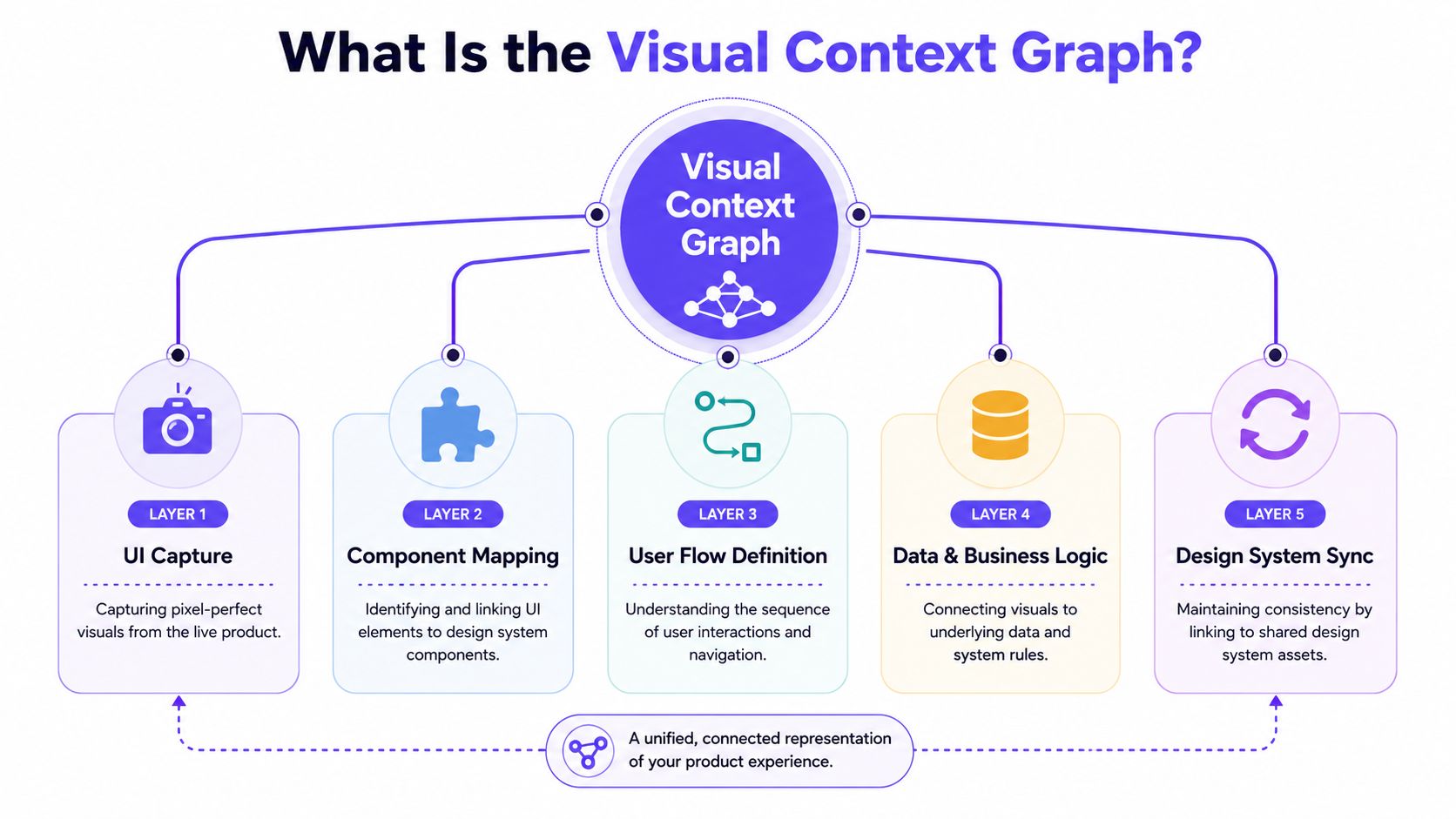
The Visual Context Graph is the reason a context-aware design workflow can produce usable output instead of plausible noise.
The five layers that matter
If you're skeptical of AI design output, that skepticism is healthy. High-quality output depends on structured input. The differentiator here is the Visual Context Graph, a connected model with five layers:
Visual context: screens, frames, and UI evidence from the live product
Behavioral context: recordings, flows, and how people move through the product
Design System context: tokens, components, variants, and usage rules
Product Knowledge context: PRDs, research, decisions, and written rationale
Implementation context: code constraints and delivery realities
That structure is what supports leveraging context-aware AI for better UX. It gives the system a way to reason across appearance, behavior, intent, and constraints at once.
Why this works better for B2B SaaS
B2B SaaS products are hard because the complexity is compositional. A single admin setting can affect permissions, notifications, billing visibility, and downstream reporting. If the system only sees a screen, it misses the flow. If it only sees a brief, it misses the interface. If it only sees a design file, it misses product behavior.
The Visual Context Graph closes that gap by connecting the layers instead of treating them as separate references.
I'd also be selective about when to trust generated output. This model helps with state coverage, flow generation, and artifact creation. It doesn't remove the need for product judgment. It gives that judgment better raw material.
A practical lens for evaluation
When I evaluate any workflow like this, I ask one question: does it preserve the product's memory across sessions and across roles? If the answer is no, the team will end up recreating context by hand.
That's why named examples like Cal, Linear, Razorpay, Gmail, and Perplexity are interesting as public customer references. They suggest the product is being used in environments where context fidelity matters. The more revealing proof, though, is whether your own team can carry a flow from capture to prototype to handoff without context falling out along the way.
Conclusion
A lot of B2B SaaS teams recognize the pattern too late. Design signs off, engineering builds what the file shows, QA finds the missing states, and the team spends the next sprint fixing behavior that should have been clarified before build started.
The better model is operational, not cosmetic. Keep one working source of product context, carry it from the live product into design artifacts, and make state coverage part of the handoff instead of a cleanup task after release. That is the core value in Figr for B2B SaaS teams. It shifts the team from design-then-fix to context-first delivery.
The trade-off is real. You spend more time upfront capturing product behavior, dependencies, and exceptions. In return, you cut the expensive rework that usually shows up later in implementation and QA. In my experience, that trade is almost always worth it for B2B products, where one missed permission rule or billing edge case can ripple across the whole workflow.
Early-stage teams usually need speed and shared memory. Growth-stage teams usually need consistency across roles, surfaces, and releases. Both benefit from the same discipline. Start from what the product does, not what each function thinks it does.
If I were rolling this out tomorrow, I would start with one painful flow. Onboarding, approvals, billing, or admin settings are good candidates. Capture the current experience, pull in the design system, map the states that usually get missed, and give engineering a package that includes behavior and constraints, not just screens. Then compare rework, clarification loops, and QA churn against your usual process.
That is the test. If the feature ships with fewer surprises, the workflow is doing its job.
Frequently Asked Questions
Can a small startup use this workflow without a dedicated Designer
Yes. I'd start with the live product, rough notes, and whatever Figma file exists. Early-stage teams usually need product memory more than polish.
How would I introduce this without changing the whole team process at once
I'd pilot it on one risky flow, usually onboarding, billing, or approvals. That keeps the test small and gives you a clean before-and-after comparison.
Does this replace Designer or Product Manager judgment
No. I'd use it to widen context, expose likely gaps, and draft artifacts faster. The final trade-offs still need human judgment.
What should I import first into the Context Pod
I'd import current screens, the design system from Figma, the latest PRD, and any analytics notes on that flow. That gives you enough context to produce useful first output.
How do I know the workflow is working
I'd look for fewer clarification loops, clearer QA scenarios, and less rework after handoff. If the same feature stops bouncing between design and engineering, that's a strong sign.
If your team is tired of fixing what should have been obvious earlier, start with one real flow and build from context instead of memory. Figr is worth trying when you want prototypes, edge case maps, and handoff artifacts grounded in the product you already ship.