

Design context across product pods breaks first in memory, not in tooling. A team ships a clean flow in one pod, another pod extends the same journey a quarter later, and suddenly nobody can answer the simple question that matters most: why was it designed this way in the first place?
When that memory goes missing, enterprise product work slows down in very specific ways. Designers recreate patterns that already exist. Product Managers reopen settled debates because the rationale is buried in old comments. QA teams test the obvious path and miss the state that only made sense when the original tradeoff was fresh in someone's head. The product starts to feel uneven, even when every pod is staffed with smart people acting in good faith.
A better system starts with shared product memory, then connects that memory to screens, flows, decisions, and implementation constraints. Figr approaches this through its Visual Context Graph, which links live product screens, design systems, PRDs, research, analytics, and prior decisions so teams can work from the same context instead of reconstructing it from fragments.
Why Design Context Evaporates at Scale
Design context across product pods decays because pod autonomy creates local clarity and cross-pod blindness.
Last week I watched a Product Manager walk a new designer through a mature onboarding flow. The file was clean. The components were named. The requirements doc existed. Still, the actual explanation lived in side comments, remembered objections, and one sentence someone said in a review months earlier: “we kept this step visible because support needed a recovery path.” That sentence never made it into the system of record.
I call this Context Decay. It's what happens when the product keeps moving but the reasoning behind it doesn't move with it.
The pod model creates the problem and the advantage
A widely cited operating norm for product pods is 5 to 9 members, small enough to preserve fast communication while staying cross-functional, and the model organizes work around goals or product areas rather than functional silos, which is exactly why it moves quickly according to LaunchNotes. Small teams can hold a lot of nuance in active conversation.
But that same boundary is where design context across product pods starts to leak.
When one pod owns acquisition, another owns activation, and a third owns account health, each team becomes highly fluent in its local terrain. Shared product understanding then depends on handoffs, docs, rituals, and memory. Some of that works for a while. Then the org grows. The product surface grows faster. New hires join. Ownership shifts. The “why” becomes folklore.
What Context Decay looks like in practice
You can usually spot it before anyone names it:
Recurring design debates: Teams revisit the same tradeoff because nobody can find the prior reasoning.
Inconsistent UX across adjacent flows: The product looks aligned at the component level but diverges in logic, prioritization, or error handling.
Slow onboarding into existing areas: New Product Managers and designers need shadow guidance to understand hidden decisions.
Cross-pod friction in reviews: Feedback becomes abstract because participants don't share enough product-area context to judge the tradeoff properly.
Practical rule: If a decision can only be defended by the people who were in the room, the context is already at risk.
Often, teams overcorrect by creating more documents. Better versioning helps, and disciplined change tracking matters, especially if your specs and decision logs live across multiple tools. If your organization still treats documents as the primary memory layer, these essential document version control practices are worth adopting.
Still, version control alone won't solve fragmented product memory. The deeper issue is system design. Context has to travel with the work.
That's also why Figr's insights on AI tool fragmentation ring true for large product orgs. When context is spread across screenshots, wikis, Figma files, research clips, analytics exports, and chat threads, every pod reconstructs a different version of reality.
The scale problem is economic, not just cultural
At small scale, people compensate with effort. They ask around. They sit in more reviews. They ping the person who used to own the area.
At enterprise scale, that retrieval tax gets expensive fast. Every missing rationale forces a senior person to re-explain history. Every unclear state creates rework downstream. Every ambiguous handoff pushes interpretation into design, engineering, or QA.
That's why context sharing has to be operational, not aspirational.
What Does a Context Pod Actually Hold
A team inherits a mature area, gets a reasonable brief, opens the files, and still cannot answer basic questions. Which states are live? Why does this permission rule exist? Was that awkward step intentional, or did it survive a rushed launch? That gap is Context Decay. A Context Pod exists to stop it.
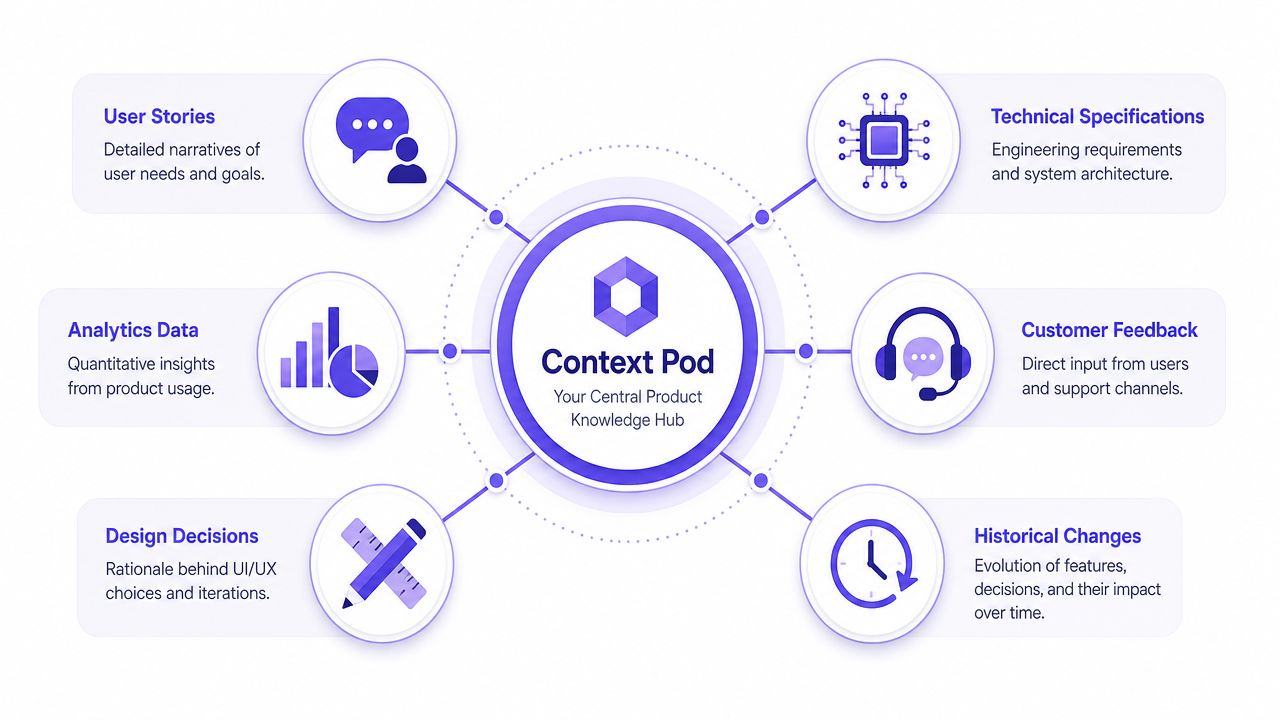
A Context Pod holds the working memory a pod needs to make sound product decisions without reconstructing history from Slack threads and hallway conversations.
The minimum viable memory layer
The point is not to store more artifacts. The point is to connect the ones that explain how the product behaves and why the team made those choices.
A useful Context Pod usually includes:
Current screens and states: The UI as users experience it today, including permission variants, partial rollouts, error paths, and temporary fixes that never made it back into polished design files.
Flow logic: The path between states, plus entry points, exits, dependencies, and places where users stall or branch.
User evidence: Research clips, support patterns, usability findings, and synthesis notes that explain what problem the team was trying to solve.
Product logic: PRDs, briefs, acceptance criteria, policy rules, and unresolved questions.
Behavioral signals: Analytics notes, funnel observations, and experiment context that influenced prioritization.
Decision history: The changes that mattered, who made them, what constraints were in play, and why one trade-off beat another.
The connective tissue matters more than the inventory. A screen without rationale is hard to trust. A decision log without the affected flow is hard to use.
What makes it a pod instead of a folder
Shared context breaks when each artifact answers only one slice of the question.
A designer asks where a pattern already exists. An engineer asks whether the current implementation blocks a cleaner interaction. A PM asks why an edge case was deferred. QA asks which states are intentional and which are defects. Those are not documentation questions. They are retrieval questions.
That distinction matters in practice. Teams rarely fail because no one wrote anything down. They fail because the answer sits in five places, with no durable link between the screen, the rule, the user signal, and the decision that tied them together.
That is why I use the term Context Pod. It is shared, queryable memory for a product area.
What good coverage looks like
I would not judge a Context Pod by volume. I would judge it by whether a new pod can answer the questions that normally trigger three meetings and a risky guess.
For one workflow, that usually means:
A canonical flow map
Screens for the states that ship
The latest spec or requirement set
A short rationale log for major decisions
Known constraints in implementation or policy
Edge cases that were accepted, deferred, or intentionally excluded
That last category gets missed constantly. Yet edge cases are where pods diverge fastest, especially when multiple teams touch adjacent surfaces.
One side effect is better writing. Specs improve when the author can pull from connected source material instead of memory and interpretation. That is one reason Figr helps write better product specifications.
Preserve rationale, not just artifacts
In pod organizations, ownership changes often. Scope moves. Teams split. New leaders reset priorities. If the only thing preserved is the artifact, the next team inherits output without judgment.
I have seen this firsthand. The screen exists. The rule exists. The team that understood the trade-off is gone. Within a quarter, another pod removes a guardrail that looked arbitrary and reintroduces the exact failure the original team designed around.
A strong Context Pod keeps that from happening by recording rationale close to the work itself. Not an essay. Just enough to answer, "Why is it this way?" and "What breaks if we change it?"
What I'd include first
If you are building this system from scratch, start narrow. Pick one journey with meaningful traffic, risk, or cross-team dependencies and build a Context Pod around it.
Collect:
Current screens
One canonical flow map
Recent research signals
The latest written spec
A short decision log with rationale
Known edge cases and implementation constraints
That is enough to turn scattered product memory into an asset a pod can use.
How to Source Context from Your Live Product
The fastest way to improve design context across product pods is to start from the product as it exists today.
Too many teams begin with the nicest artifact they have. That's usually a polished Figma file or a tidy strategy doc. Neither is guaranteed to reflect the current product. The live product is the ground truth. If your memory system starts anywhere else, you're already introducing drift.
Why the live product should come first
Enterprise products accumulate quiet divergence. The shipping UI carries small fixes, hidden states, interim labels, and guardrails that never make it back into source files cleanly. Product teams know this. They just don't usually operationalize around it.
So start with a context audit of the live experience.
Step 1. Capture the current surface area.
Open the product and document the primary paths users take today.
Focus on the high-traffic or high-risk journeys first.
Step 2. Record the states that matter.
Look for empty, loading, error, success, locked, permissioned, and interrupted states.
These are often where cross-pod assumptions break.
Step 3. Note navigation and hierarchy.
Capture how users move, what actions are prominent, and which information is suppressed until later.
That structure carries product intent.
Step 4. Tie screens back to ownership.
Mark which pod owns each segment of the journey.
The handoff points are where context usually needs reinforcement.
What teams often miss in a manual audit
Manual screenshots help, but they're thin. They preserve appearance, not structure. You want to know more than what the screen looked like. You want layout patterns, component density, interaction hierarchy, and possible states.
That's why live capture tools are useful when they ingest the product directly instead of asking the team to recreate it afterward. Some teams still rely on hand-collected screenshots and annotation boards. That can work for narrow audits. Once the product surface expands, it becomes hard to maintain.
If your workflow still begins in design files even when the product has already shipped, you'll benefit from methods that capture live apps in Figma and preserve the as-built interface before new work starts.
A grounded workflow for Product Managers
I'd run the audit in this order:
Start with the user journey that spans multiple pods
Capture the live screens in sequence
Mark where ownership changes
List visible states and implied states
Collect the current spec and compare it against reality
Log every mismatch as either intentional, outdated, or unknown
The moment you find three “unknowns” in one flow, you're not dealing with a documentation problem. You're dealing with context loss.
That distinction matters. Unknowns create hidden delivery risk. They also create design drift, because the next pod often fills the gap with a locally reasonable decision.
What changes after the audit
Once you've sourced context from the live product, design conversations become more concrete. Reviewers stop arguing from memory. Product Managers stop writing speculative specs. Designers stop inheriting stale assumptions.
And maybe most important, you create a baseline that future changes can attach to. Without that baseline, every pod treats itself as the beginning of the story.
Written Docs Are Where Context Goes to Die
Static docs fail when teams treat them as memory instead of pointers.
I've inherited plenty of respectable documentation systems. Clean wiki trees. Detailed PRDs. Decision logs with dates. They help, until the core question crosses formats. A designer wants to know why a recovery step stayed visible. The answer sits halfway in a research note, partly in an implementation constraint, and partly in a screen change that happened later. The doc system can store all of it. It usually can't connect all of it.
That's where teams start to confuse documentation volume with usable context.
Static docs preserve text, not operating memory
Harrison Wheeler described a move from informal knowledge sharing to explicit structures like experience tracks that connect designers across pods, which reflects a broader shift away from ad hoc memory and static docs toward models that deliberately encode context-sharing in his case study on scaling through pods. That shift matters because enterprise design problems aren't solved by a bigger wiki alone.
A static doc has three predictable failure modes:
It drifts away from the product
It loses retrieval value as the corpus grows
It strips visual and behavioral context out of the decision
The retrieval problem gets underestimated. People don't need more information. They need lower-cost access to the right information in the moment a decision is being made. That's a product economics problem hiding inside a documentation problem.
The real tax is interpretation
Every time someone opens five tabs to reconstruct a decision, the organization pays twice. First in time, then in inconsistency.
A Product Manager reads the spec one way. A designer reads the prototype another way. Engineering reads the acceptance criteria through implementation constraints. QA tests what was written, not what was intended. Nobody is careless. The system asks each function to infer too much.
This is one reason research-backed design thinking from sources like Nielsen Norman Group tends to age well. Their work repeatedly emphasizes that usability problems often begin with gaps between user intent, system behavior, and what teams assume they've communicated. The same logic applies internally. If context isn't easy to retrieve and interpret, people substitute memory.
A wiki can store the past. It rarely helps a pod reason through the present.
What works better
Docs still matter. They just work better as one layer in a connected system.
The practical move is to stop asking a written artifact to do every job. Let docs capture explicit decisions. Let screens show the current reality. Let flow maps expose transitions. Let analytics and research explain why the tradeoff existed. Then link them.
That's how teams move from document storage to working memory.
How to Map Workflows and Edge Cases Systematically
Workflow mapping gets better when teams start from existing product memory instead of a blank canvas.
Most enterprise flows don't break on the happy path. They break at the branch nobody owned clearly, the permission rule that changed unannounced, or the error state that never got reviewed with the same care as the primary journey. That's why design context across product pods matters most when the flow gets messy.
Here's a simple visual anchor for that work:
Start with the outcome, then branch
A good workflow map begins with one question: what outcome is the user trying to achieve?
Once that's clear, map the main path first. Then expand the branches that change the experience or create delivery risk.
Step 1. Define the user goal.
Write the job in plain language.
If the goal is vague, the flow will sprawl.
Step 2. Draw the happy path.
Map the shortest successful route from entry to completion.
Use current product behavior, not aspirational design.
Step 3. Add state-based branches.
Include empty, loading, validation, partial-success, error, and recovery paths.
These states often sit across pod boundaries.
Step 4. Attach rationale to the branches.
Note why a state exists, not just that it exists.
That rationale is what future pods need.
Edge cases are where context proves its value
I've seen teams build beautiful flow maps that still fail because the annotations were shallow. A box that says “show error” is not context. What error? Seen by whom? Recoverable how? Why does it block here but not elsewhere?
That's where stored product memory helps. If you can pull prior decisions, adjacent patterns, research observations, and implementation constraints into the map, edge-case work becomes less speculative.
A useful reference point is the discipline behind mastering workflow visualization. The map isn't just a diagram. It's a coordination artifact.
Below is a short demo that captures the spirit of this work in motion:
A practical review format
When I review a cross-pod flow, I ask teams to bring these four views together:
The visible journey: What the user sees
The hidden logic: Conditions, permissions, timing, dependencies
The decision history: Why this branch exists
The unresolved ambiguity: What still needs a choice
That last one is essential. Teams often pretend certainty because they're already in build mode. You get better outcomes when unresolved questions are explicit.
One gallery-style example that makes this tangible is a task approval card with 11 product states. You don't need that exact artifact to learn from it. The lesson is simpler: once a product area has many states, hand-wavy mapping stops being enough.
What systematic mapping changes
Systematic mapping reduces duplicate reasoning. It also gives QA and engineering something much closer to an executable understanding of intent.
And it does one more thing that matters in enterprise settings. It exposes where pods are pretending a shared flow is separable when the user experiences it as one journey.
Can You Automate Context-Aware QA and Testing
Context-aware QA works when test cases inherit design intent instead of reverse-engineering it later.
Teams commonly still treat QA as a downstream translation step. Design finishes. Product writes acceptance criteria. Engineering interprets. QA tries to infer what matters from whatever survived the handoff. That pipeline is fragile even in one pod. Across many pods, it's where context loss becomes production risk.
Why QA suffers first when context breaks
Industry guidance for cross-functional pod design recommends clear delivery metrics such as velocity, defect rates, and cycle time, and notes that these measures suffer when design context is lost before QA in Dreamix's guidance on agile pod teams. That lines up with what most product teams feel operationally. Defects aren't always coding failures. They're often missing-context failures.
A QA engineer can verify behavior. They can't reliably test unwritten intent.
What context-aware testing looks like
A connected memory system creates compounding value. If a flow already includes states, rationale, dependencies, and edge cases, you can generate much stronger test scenarios from the same source material.
The process should work like this:
Step 1. Convert flow states into testable scenarios.
Every state in the mapped workflow becomes a candidate test case.
Include recovery and interruption paths, not just completion.
Step 2. Pull acceptance criteria from actual decision context.
Use the recorded rationale and constraints.
That keeps tests aligned with what the team meant to ship.
Step 3. Validate cross-pod boundaries.
Test what happens when a user crosses surfaces owned by different teams.
That's where assumptions usually conflict.
Step 4. Keep the tests attached to the evolving design context.
When the flow changes, the scenarios should update with it.
Otherwise your QA suite becomes another stale artifact.
Why this is the highest-leverage connection
If you ask me where enterprise teams get the most immediate payoff from better design context across product pods, it's here. QA is where ambiguity stops being philosophical.
A context-rich system can produce artifacts that are directly useful to engineering and QA, including test scenarios and acceptance criteria grounded in the same product memory used upstream. That's the operational promise behind tools built for connected design and delivery. For teams trying to accelerate product delivery confidently, this link between context and testing is usually more valuable than another review checklist.
Good QA doesn't begin with a ticket. It begins with preserved intent.
What doesn't work
What fails is the familiar pattern of manually rewriting the same logic in three places: the design review, the ticket, and the test plan. Every rewrite introduces drift. Every drift point creates one more place for a pod to lose the thread.
The better model is shared context, different outputs.
Design Systems Alone Are Not Enough
A team ships a clean redesign across three pods. The buttons match. The spacing is right. The token usage is disciplined. Then customers hit a handoff between surfaces and the experience starts to wobble. One screen pushes speed. The next adds caution. A third asks for confirmation in a tone that suggests higher risk than the rest of the flow.
That gap is usually not a design system problem. It is Context Decay.
Design systems standardize UI building blocks. They do not preserve the decision logic that gave those blocks meaning in a specific workflow. At scale, that missing layer becomes expensive. Pods inherit patterns without the original trade-offs, then apply them to new constraints with partial information.
The system preserves components, not product memory
A mature design system can answer important questions fast. Which component should we use? Which variant is approved? Which states are supported? That matters, and it reduces a lot of waste.
It does not answer the questions that usually create cross-pod drift:
Why this action is prominent in one moment and muted in another
Which failure state needs reassurance versus urgency
Why a destructive step must stay reversible for one user segment
What business or compliance constraint shaped the flow in the first place
That material sits outside the component library. If it is not attached to the work, pods recreate the rationale from memory, and memory is unreliable.
I have seen this happen in large organizations that were convinced their design system maturity would solve inconsistency by itself. What they solved was visual variance. Behavioral variance remained.
Shared parts can still produce conflicting experiences
This is the trap. Teams see consistent components and assume they have consistent product thinking.
They do not.
Adjacent pods often use the same component under different local incentives. One team is measured on completion. Another is measured on support deflection. A third is protecting trust, risk, or compliance. The component stays the same, but the intent changes. Without a shared, queryable record of that intent, each pod makes a reasonable local choice that weakens the journey as a whole.
That is why I treat the design system as one layer in the Context Pod, not the center of it. The design system defines reusable interface rules. The Context Pod preserves the reasoning, constraints, and workflow history around those rules so future teams can query what happened, where, and why.
The practical pairing that holds up under scale
The teams that avoid context decay connect the design system to the surrounding product memory. In practice, that means keeping these elements linked:
Tokens, components, and variants
Usage guidance tied to specific workflows
Current screens and state changes
Research findings and known user friction
Product, legal, operational, or technical constraints
Decision history, including reversals and exceptions
This takes more discipline than maintaining a library, but it prevents a common failure mode. A pod copies a pattern because it is approved, not because it is appropriate.
The difference matters. A design system gives teams repeatability. A Context Pod gives them repeatability with judgment. That is how you keep consistency from becoming cargo-cult reuse, and how you turn a pattern library into a durable, living asset instead of a polished snapshot.
How to Build Your Visual Context Graph
A redesign stalls in review because one pod optimized the happy path, another added a compliance step, and QA finds a branch nobody mapped. The screens exist. The specs exist. The rationale exists somewhere. What is missing is the structure that keeps those pieces connected after the original team moves on.
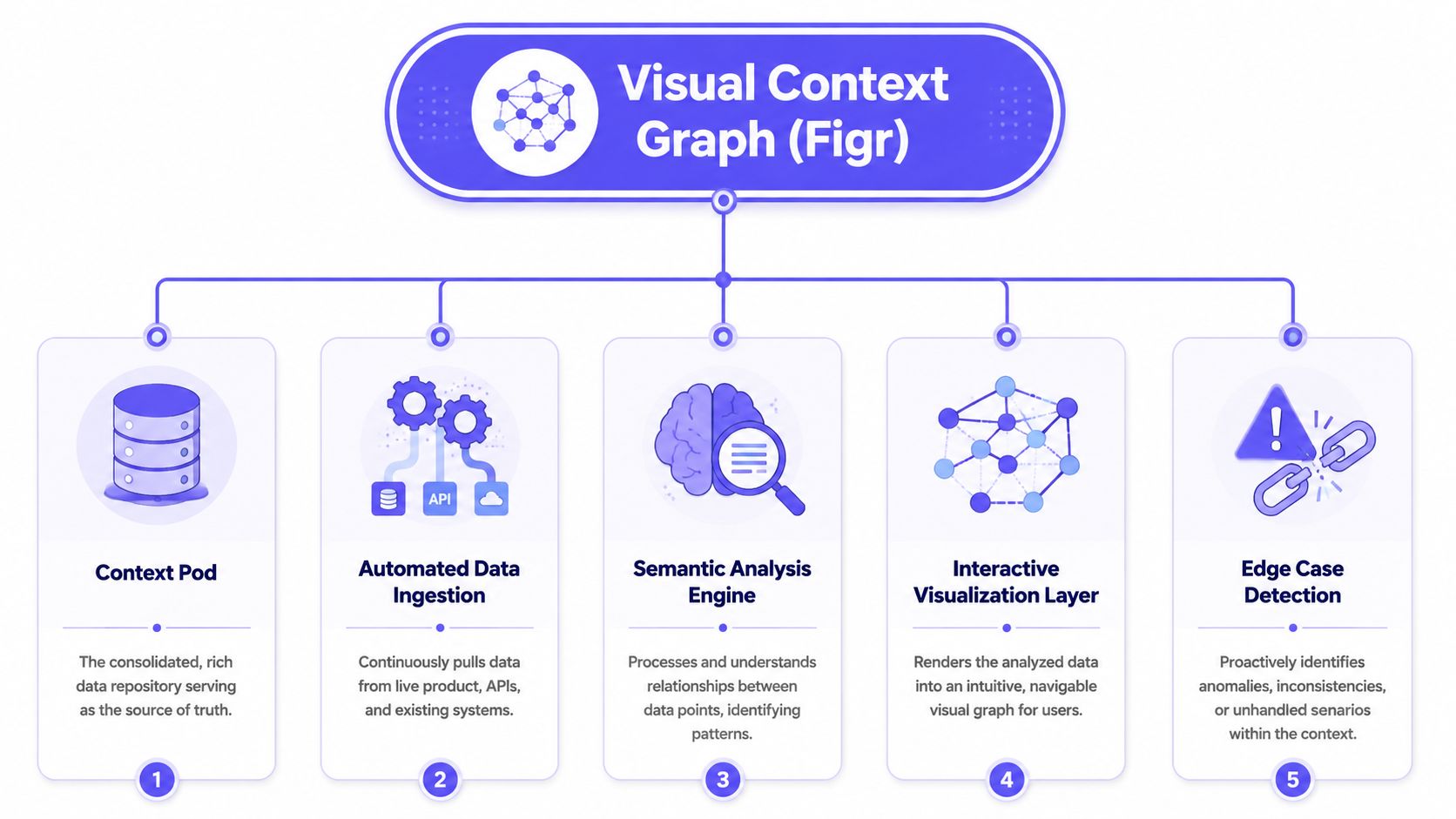
That is the job of a Visual Context Graph. It is the part of the Context Pod that turns scattered product artifacts into shared, queryable memory. Instead of storing context as isolated files, it preserves the relationships between screens, flows, decisions, research, and implementation constraints. That is how teams reduce context decay without slowing pod autonomy.
The five layers that matter
In a large product organization, the graph needs five connected layers:
Visual context
Screens, frames, patterns, states, and UI structure.Behavioral context
Recordings, user flows, navigation paths, and interaction intent.Design System context
Tokens, components, variants, states, and usage rules.Product Knowledge context
PRDs, research, analytics notes, decision logs, and briefs.Implementation context
Code constraints, technical dependencies, and delivery realities.
The value is in the links between layers. A PM should be able to start at a broken screen, trace it to the workflow, see the decision that shaped it, review the research behind that decision, and understand what engineering constraint still applies. If any of those hops depends on asking the right person in Slack, the graph is incomplete.
How I'd build it in practice
Sequence matters because teams rarely have the capacity to model everything at once.
Step 1. Capture the product as it exists.
Start with current screens and the paths users take through them. Include alternate states, error handling, permission differences, and handoffs to other systems. If the graph starts from idealized mocks, it becomes stale on day one.
Step 2. Add decision-bearing documents.
Attach PRDs, research, analytics notes, tickets, and decision logs to the exact screens or flow steps they influenced. Keep the link granular. A flow-level attachment is useful, but a state-level attachment is what prevents repeat debates.
Step 3. Connect the design system at the point of use.
Map components and variants to the screens where they appear, then add the local reason for any deviation. Through this process, teams usually learn whether a one-off pattern is a justified exception or just drift that nobody challenged.
Step 4. Record implementation constraints that change design choices.
Call out service dependencies, legacy architecture, policy requirements, instrumentation gaps, and release constraints. Designers need this to avoid proposing work that is clean on paper and expensive in delivery. Engineers need it so old constraints do not survive longer than they should.
Step 5. Put ownership into the workflow.
The graph should be updated during planning, design review, QA, and post-launch follow-up. If upkeep depends on a separate documentation sprint, it will slip. The teams that keep context fresh assign updates to the same moments when decisions are already being made.
What makes the graph hold up under scale
The hard part is not drawing the map. The hard part is choosing the node and link types that survive real product complexity.
I prefer a small, stable schema. Screen. State. Flow step. Component. Decision. Constraint. Research finding. Metric note. Exception. Owner. Last verified date. That is usually enough to answer the questions pods ask in practice without turning the graph into taxonomy work.
Two trade-offs show up fast. If the model is too loose, teams dump files into it and call that connected memory. If the model is too rigid, nobody updates it because every new case needs a naming debate. Good graphs balance precision with speed. They make the common queries easy: where this pattern appears, why this step exists, which edge cases are known, what changed last, and who signed off on the exception.
That is also how the Context Pod becomes more than documentation. It becomes an operating system for product memory.
What to build first
Start with one cross-pod journey that already causes rework. Onboarding, checkout, account recovery, identity verification, permissions, or any flow with policy and edge-case weight usually works well. Map the main path first, then add the branches that generate support tickets, review churn, or last-minute defects.
A brief factual note on tooling. Figr is one option teams use to connect live screens, Figma files, design systems, research, product docs, and implementation context into a shared memory model. The tool matters less than the operating rule behind it. Context has to stay queryable, linked, and current.
If one team can answer “what changed, where, and why?” without pulling three people into a meeting, the graph is doing its job.
Conclusion
A reorg happens. A senior designer moves to another area. Two PMs who knew why the exception existed are now on different teams. Three months later, a pod changes a flow that looked inconsistent, and support tickets spike because the old constraint was real. That is Context Decay.
At scale, design quality does not break because teams stop caring. It breaks because product memory stays trapped in people, scattered files, and old decisions nobody can reliably retrieve. Pods then make reasonable local choices with partial context, and the product starts contradicting itself.
The fix is to build a shared memory system, not just write better docs. A Context Pod gives each cross-functional team a durable unit for storing and retrieving the why behind the work. It holds decisions in a form other pods can query, inherit, and update without starting from rumor or recollection. That is the shift that keeps context from evaporating every time ownership changes.
I have seen this work best when teams stay narrow at the start. Pick one journey with repeated handoff failure, policy complexity, or edge-case churn. Build the Context Pod for that slice. Use it in real reviews, real implementation, and real QA. If people can answer "what changed, why did it change, and what else does it affect?" without scheduling another alignment meeting, the system is doing its job.
The goal is simple. Make product memory durable enough that each pod can move fast without relearning the same lessons.
FAQ
How is a Context Pod different from a wiki
I think of a wiki as storage and a Context Pod as working memory. A wiki can hold documents, but a Context Pod connects screens, flows, rationale, and constraints so teams can retrieve context in the moment of decision.
Do I need to build this for the whole product at once
No, and I wouldn't. I'd start with one cross-pod journey that causes repeated confusion, then prove the system on that slice before expanding.
Will this replace design reviews and product reviews
No. In my experience, it makes those reviews more useful because people enter the conversation with shared context instead of partial memory.
Can smaller teams use this approach too
Yes. Smaller teams feel less pain at first because people can ask each other directly, but context loss still shows up as the product grows or ownership shifts.
What role should AI play in this process
I'd use AI to ingest, connect, and generate artifacts from existing context. I wouldn't use it as a substitute for product judgment.
If your team keeps revisiting the same design decisions because the reasoning never survives the handoff, it's worth building a better memory layer. Figr helps product teams ground UX work in live product context, connected artifacts, and reusable product memory so each pod doesn't have to rediscover the same logic again.