
Most business process documents fail at the moment someone needs them. The manual describes the happy path, work has already left that path, and the person holding the document has no way to know what to do next.
A new operations hire is handed a binder of procedures nobody has opened in months. They follow step four exactly, send a request to a team that no longer owns it, and lose half a day before anyone notices. The delay is the mild cost. The expensive version surfaces in audits, refunds, missed approvals, and test cases built on rules that were never true.
Treat each document as an operating contract. It names an owner, a trigger, a decision rule, an exception route, and a record that proves the work happened. Someone who did not write it can run the process, see where it waits, and revise it when reality changes. That test, not page count, separates a document a team uses from one it archives.
The Four Documents Teams Actually Use
Start with the question that failed
An SOP answers one narrow question: how do we do this task correctly? It belongs where the same task repeats and a small error creates rework, a compliance gap, or an unhappy customer. Give it numbered steps, controls, and records.
What document do you need when nobody can agree on sequence or ownership? The table below separates the four artifacts in common use. Match the document to the question that caused work to stall this month.
| Document | Question it answers | Use it when | Core contents |
|---|---|---|---|
| SOP, standard operating procedure | How do we do this task correctly? | The same task repeats and errors are costly | Purpose, scope, roles, numbered steps, controls and records |
| Process map, flowchart or BPMN | What happens, in what order, and where do handoffs occur? | The team needs to see the whole flow or locate a bottleneck | Trigger, activities, decision gateways, handoffs and end states |
| RACI matrix | Who is responsible, accountable, consulted and informed? | Ownership is unclear across teams or departments | Activities listed against roles, with exactly one accountable role per row |
| Workflow specification | Which rules and states govern the work inside a system? | The work is automated or handled in a software tool | Triggers, states, decision rules, thresholds and exception routes |
One manual rarely does four jobs
Teams often write one long manual and hope it works as procedure, map, ownership chart, and system spec. Readers then hunt through forty pages for one threshold. Four small linked artifacts beat one large file because each reader gets the view they need.
Say a company documents invoice approval. The map shows request, review, approval, payment, and return paths, while the SOP tells the approver what to check before signing. The RACI names finance as accountable and legal as consulted on disputes. The workflow specification states the amount thresholds and status rules the approval tool must enforce.
Which one should a team with nothing written create first? I would start with the process map. It exposes handoffs and missing decisions before you polish instructions for steps that may not belong in the process at all. Product teams can apply the same linking habit with design spec templates for product teams, keeping procedures separate from requirements while letting each point to the other.
Selection rule: Write the document that answers the question behind the latest failure, then link the others when a new question appears.
Why Process Documents Exist Beyond Compliance
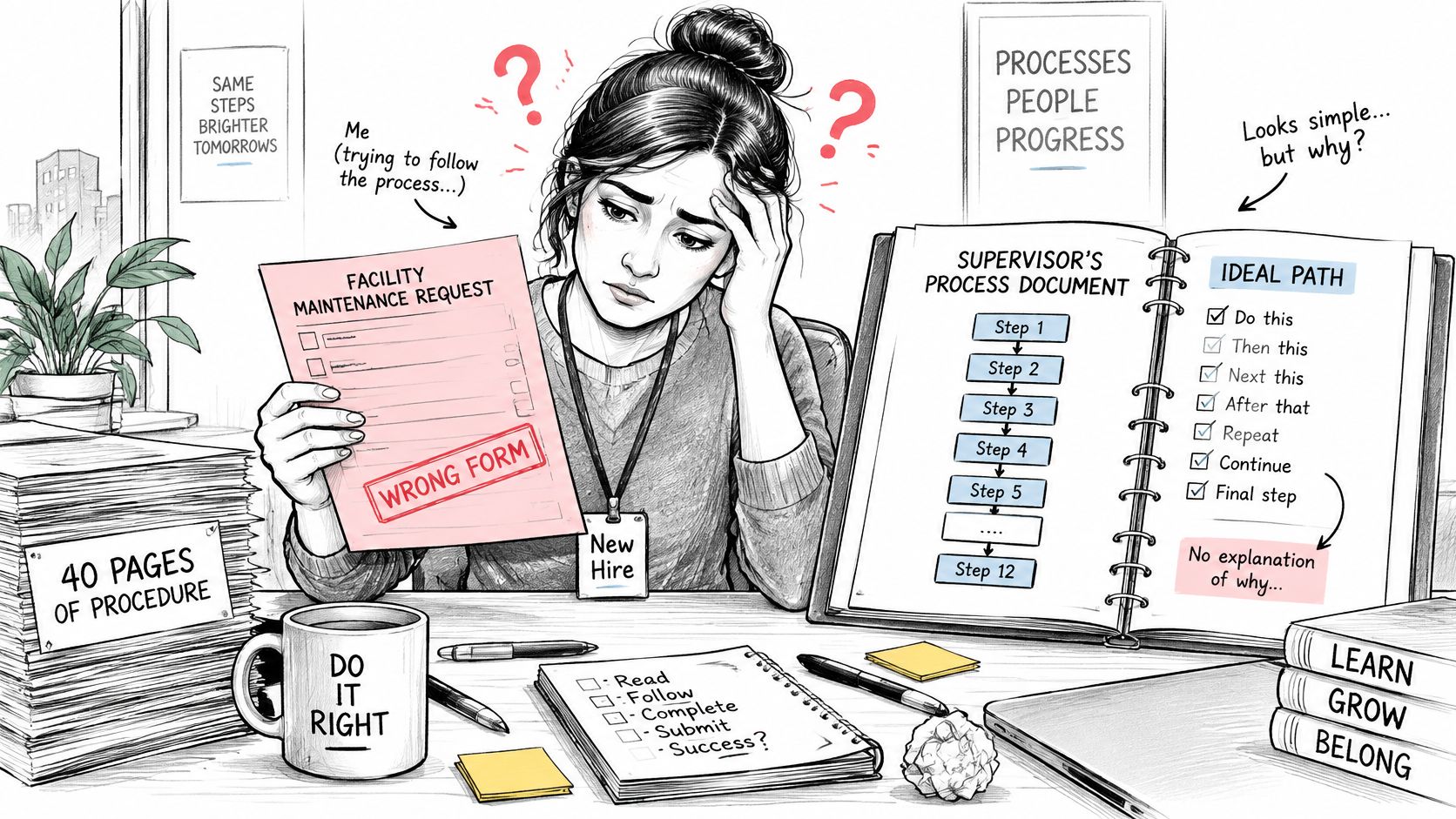
A new hire follows a forty page procedure exactly and still files the wrong form. The steps were accurate once, but the document never said why the form existed or what changed when a case looked unusual. She did what the page said. The page didn't know enough.
Two jobs in one artifact
A good document carries operational knowledge that lets someone act. It also carries controlled evidence that the work ran as planned. Drop the first job and you get compliance theater. Drop the second and you get confident work nobody can verify.
That dual role has a history. The ISO 9001 guidance on documented information notes that ISO 9001 was first published in 1987, emphasizing documented procedures and conformity oriented controls particularly for manufacturing. The 2015 edition replaced "quality manual," "documented procedures," and "records" with the broader concept of "documented information." It asks organizations to maintain information needed to support process operation and retain enough to show processes run as planned, without prescribing one universal format.
Why does that freedom matter? It means a workflow, decision rule, review record, or test artifact can count when it controls or verifies a process. You choose the form that fits the work.
Zoom out and the incentive problem appears. Documents are cheap to write and expensive to keep current, so organizations fund creation and neglect maintenance. The person who signed the procedure rarely watches the work it governs.
Could someone unfamiliar with your process act on your document without calling you? If the answer is no, you own a record of intent. You don't yet own operational knowledge.
What a Document Needs to Hold Up Under Pressure
"Review the request" sounds clear until two reviewers interpret it two different ways. One checks the amount, another checks the vendor, and neither records what they verified. When an auditor or new hire asks what review means, the document has nothing to say.
The anatomy of one defensible step
For each major step, record the trigger, responsible role, inputs, action, decision criteria, output, exception route, and evidence record. Guidance in a guide to internal control documentation specifies fields including the control objective, risk, owner, frequency, steps, evidence, system of record, reviewer, exception path, and retention rule. Those fields turn a procedure into an operational contract.
| Element | Weak version | Strong version |
|---|---|---|
| Owner | Marketing team | Demand generation manager, named by role, with a named backup |
| Trigger | When a lead comes in | Lead status changes to MQL in the CRM |
| Expected output | Request is handled | Approved request or returned request with a reason code logged |
| Decision rule | Review the request | Approver checks amount, cost center and vendor against the approved list, then approves or returns |
| Exception path | Escalate if needed | Return to requester after two business days with a reason code |
| Evidence record | Notes in a shared doc | Approval timestamp and approver ID logged in the ticket |
Why insist on the exception route for every step? Real workflows contain rejected requests, late approvals, missing inputs, overrides, and remediation work. A happy path description hides exactly where people improvise, wait, and make inconsistent calls.
A step without an exception route is a hope, not a procedure.
A skeleton you can copy
Apply this rule when you write your next step: name an expected output and an exception route, even if the route is escalate to the process owner within two business days. Then add the control fields, system of record, and reviewer so completion can be checked later.
Use this fill in structure for any new document:
- Purpose and scope: Why the process exists and where it stops.
- Named owner and backup: Roles, not a department name.
- Trigger and numbered steps: Each step carries an output and exception route.
- Decision rules: Thresholds, checks, and who can override.
- Evidence and system of record: Where proof lives.
- Reviewer, review date, and retention rule: Who checks it, when, and how long records stay.
The skeleton asks the questions an auditor or new hire will ask anyway. Better to answer them while the author is still in the room.
How to Map a Process Step by Step
You can map a real process this week with paper, a whiteboard, or a diagramming tool. The tool matters less than the order of decisions. Are you mapping the official story or the work people do?
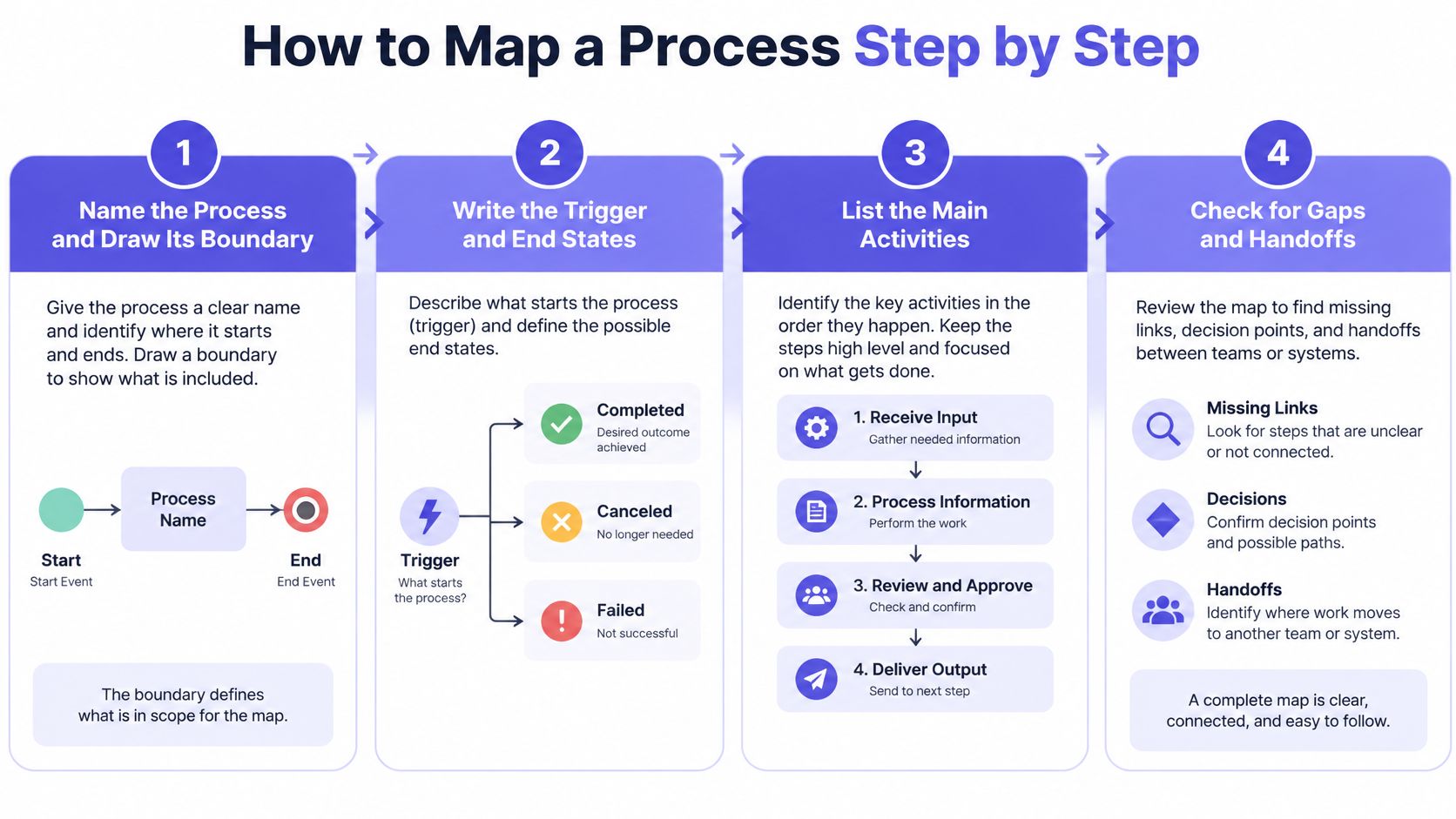
Step 1. Name the process and draw its boundary.
State the start event and end event in plain words.
Keep neighboring processes outside unless they change a decision inside.Step 2. Write the trigger and end states.
Name the event that starts work.
List three end states that count as done, such as approved, returned, or cancelled.Step 3. Walk the work with the people who do it.
Record what they do, including workarounds.
Ask what arrives late, what arrives incomplete, and where they wait.Step 4. Add each decision as a gateway.
Label both branches so no path is implied.
Write the condition on the branch, not inside a meeting note.Step 5. Assign each activity to a swimlane.
Use one lane per role that owns work.
Mark every handoff between lanes, because that's where cases often sit unseen.Step 6. Check labels and model quality.
Use verb object labels with one action per box.
Confirm subprocess boundaries and message flow direction.
Why be strict at step six? An empirical study of BPMN models from industry examined 585 BPMN 2.0 models from six companies and found recurring defects in split and join representations, message flows, model decomposition, and activity labeling. Ambiguous gateways invite different readings of routing logic, while vague labels weaken downstream requirements and test cases. State whether the map serves training, compliance, improvement, or automation, because each use demands a different level of precision.
- Step 7. Test the map with three scenarios.
Run one normal case, one missing input case, and one exception.
Fix every point where the walkthrough stalls or two readers disagree.
A finished map fits on one readable page. Every decision has two exits, every handoff has an owner, and every box describes one action. Product teams doing similar work for journeys will recognize the discipline in mapping user journeys for QA. Does your current map pass the exception scenario, or does it only describe the easy case?
Measuring Whether the Process Still Works
One workflow makes the measurement problem impossible to ignore. A quantitative study of an operational administration system at PT Widya Herbal Indonesia collected data from February through April 2025 and reported an average document processing time of 25 minutes, alongside an average waiting time of 100 minutes. The queue consumed four times as much time as the processing activity itself.
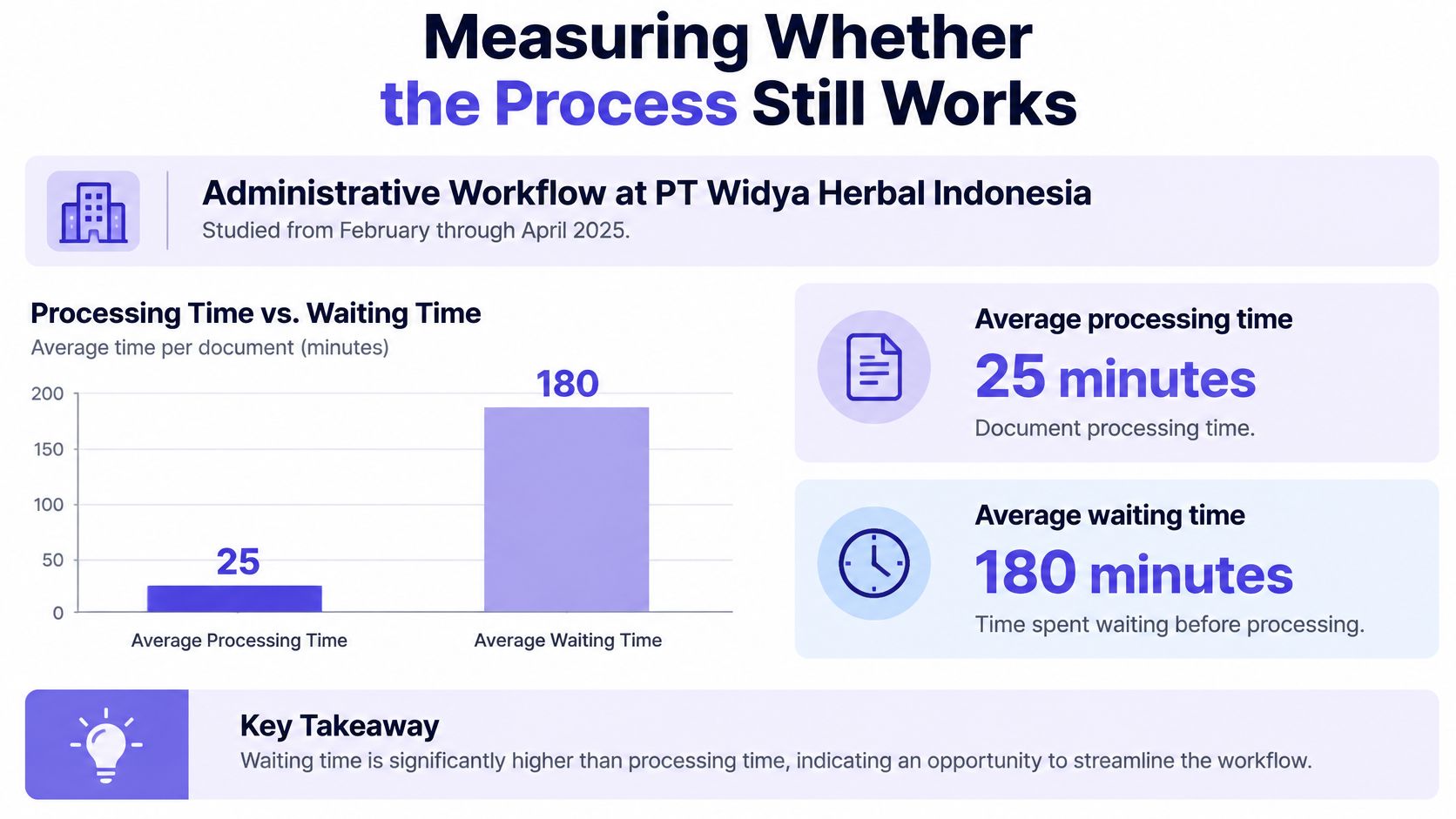
What would a task only document show you there? Twenty five minutes of work and no explanation for the missing hundred. The basic gist is this: if you don't timestamp waiting, you will optimize the workbench while the bottleneck sits in the queue.
Choose measures with a known source
| Metric | Where the data comes from | What it signals |
|---|---|---|
| Cycle time | Start and end timestamps for each case | Total elapsed time and the step where it grows |
| Wait time | Timestamps at each handoff and queue | Bottlenecks, unclear ownership and approval dependencies |
| Rework rate | Returned or revised items in the tool | Missing inputs or unclear instructions |
| Exception rate | Cases that take the documented exception route | Steps the document never described |
| Completion rate | Cases closed on the happy path without intervention | Whether the documented path still matches reality |
Add timestamps at every trigger, handoff, queue point, approval, and rework loop. That lets you separate touch time from elapsed time and trace delay to workload, unclear ownership, missing information, or approval dependencies. Which of those causes dominates your slowest process right now?
Speed is only half the signal
The same records reveal returned documents, revision frequency, and input errors. A rising rework rate often points to a vague input requirement, while a rising exception rate suggests reality has outgrown the documented path. Treat either movement as a revision trigger, not as a people problem by default.
Map the waiting room as carefully as the workbench. Pick two metrics from the table for your next revision and write down where their timestamps come from. SaaS teams building that feedback habit can pair it with a quality improvement guide for SaaS leaders to turn measures into recurring review work.
Keeping Documents Current and Controlled
A documented process can still be unmanaged. A 2016 survey summarized by Process Street covered 236 Polish companies and found that 69% had documented, repeatable processes, yet only 4% measured and managed those processes. What is the value of a documented workflow if nobody checks whether it still works?
Review by trigger, not by hope
Give every document a named owner, a review date, and at least one performance measure such as cycle time, error rate, completion rate, or customer outcome. Then define events that force an earlier review. Ownership decides whether a document lives because someone specific feels the cost when it drifts.
Review the document when you see:
- Changed funnel behavior: Cases arrive in a new pattern or volume.
- New system fields: The tool now collects data the steps don't mention.
- A policy change: A threshold, approver, or retention rule has moved.
- A rising exception rate: More cases leave the documented path.
- An audit finding: Evidence is missing, late, or inconsistent.
Keep one authoritative location and a visible version history. Old copies in email and chat create parallel processes that look official. When files scatter, teams can automatically sort scattered product docs before deciding which version deserves to survive.
Access, redaction, and the handover package
Who should see every detail of a sensitive process? Use layered permissions so people see the steps they perform, redact customer data and security sensitive implementation details, and keep localized versions where regional rules differ. Use examples with synthetic data so the procedure teaches without exposing records.
For each process, keep a handover package with purpose, scope, decision rules, exception list, evidence sources, accountable owner, review date, and escalation path. Add ownership metadata, provenance, and retention rules so readers know where knowledge came from and how long to keep it. In short, when an expert leaves, that package is what the organization keeps.
Governance test: If the owner left tomorrow, could the backup find the current version, the evidence, and the next review date in ten minutes?
Turning Process Documents into Requirements and Test Cases
A rule that says large orders go to finance can't become an acceptance criterion yet. How large is large, who in finance receives it, and what happens when that person is unavailable? State the threshold, actor, and fallback, and QA can test the rule instead of guessing.
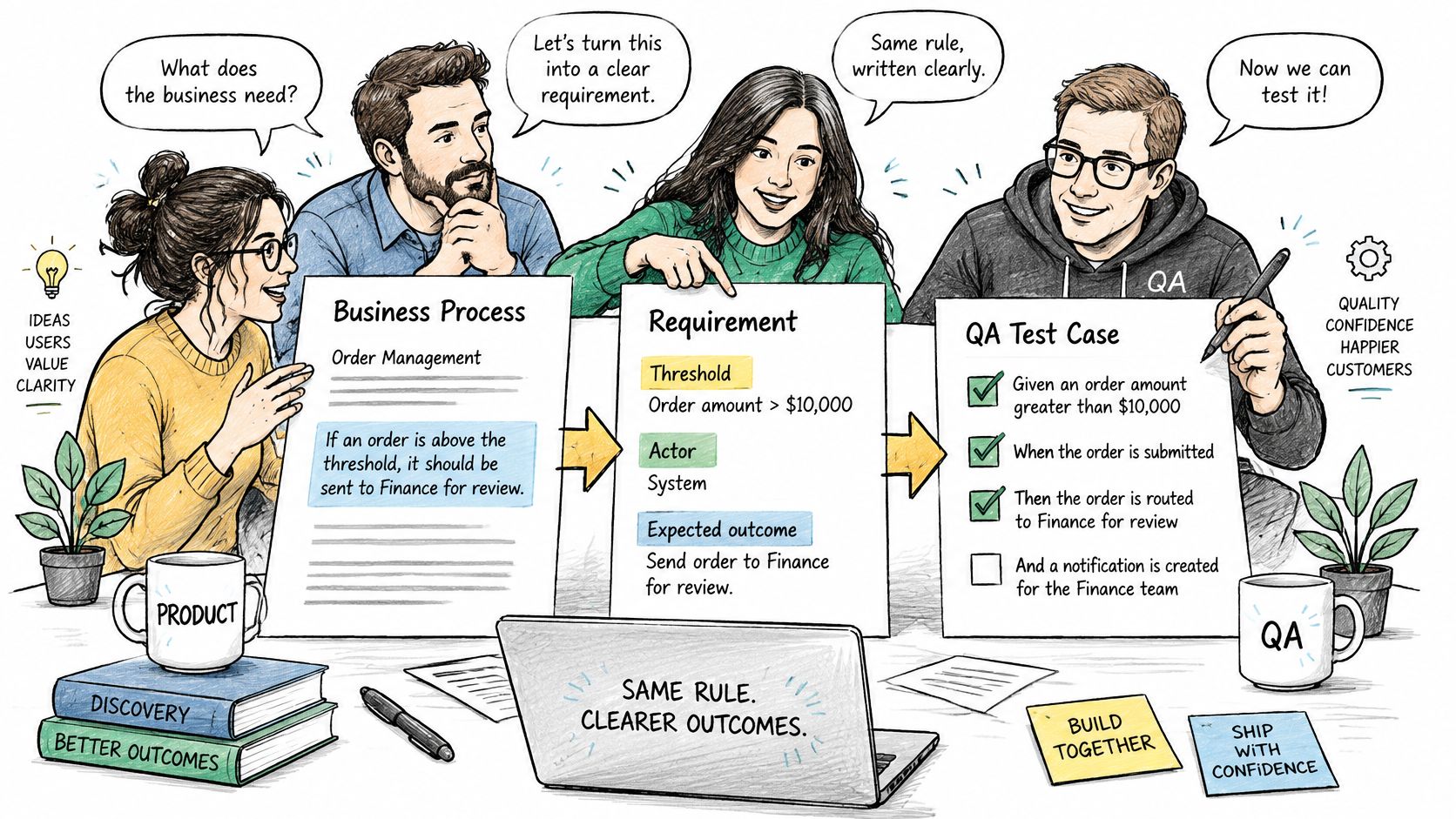
Four conversions that do most of the work
- Each decision gateway becomes an acceptance criterion. Write the condition, threshold, and both outcomes.
- Each exception route becomes an edge case. Cover missing inputs, rejection, timeout, and override.
- Each handoff becomes a notification or integration requirement. Name sender, receiver, timing, and payload.
- Each record becomes a test assertion. Check the timestamp, actor ID, status, and reason code.
Ambiguous labels and unresolved gateways propagate into incomplete edge cases, incorrect acceptance criteria, and implementation rework. That's why the mapping review pays off here. Can your QA lead derive a failing test from each gateway without asking the author?
Say a team documents refund approval. Refunds under a stated threshold close automatically, larger refunds route to a named finance role, and a missing receipt returns to support with a reason code. Each branch yields a criterion, each return yields an edge case, and the approval log yields assertions. Teams practicing that conversion will get more from writing effective test cases when the source process already names its exceptions.
Figr can take a PRD or screen recording and create user flows, state diagrams, edge case maps, and acceptance criteria before producing screens, so the team reviews logic before committing to design. Before handoff, confirm every gateway has a criterion, every exception has a case, every handoff has an owner, and every record has an assertion.
Pick One Process and Document It This Week
Pick the process with the most rework, escalations, or a recent incident. A messy process will teach you more than a clean one. Which process made someone ask for help this week?
Step 1. Write purpose, scope, and owner.
Name a backup by role before you write any steps.Step 2. Map the happy path and three exceptions.
Cover the places where work usually stalls, returns, or gets overridden.Step 3. Add one metric and its source.
Choose wait time or exception rate and record where timestamps come from.Step 4. Schedule the review before you close the file.
Put thirty minutes on the calendar in ninety days.
You can start the workflow by bringing a PRD, screen, recording, live product capture, or design file to Figr. Figr asks clarifying questions, maps the current flow, identifies friction, lists missing states, explains tradeoffs, and gives the team a way to review UX logic before committing to screens.
A process document is finished when someone who didn't write it can run the process from it.
Bring the process you picked to Figr as a PRD, recording, screen, or design file, and turn it into user flows, edge case maps, and acceptance criteria your team can review before design begins. You'll spot missing states and unclear handoffs while changing them is still cheap.