

It's Friday afternoon, the queue is still full, and the only path through those tickets is one row at a time.
Say a support lead clears a few hundred tickets before the weekend. Each click looks harmless, until one late mis-click archives a live escalation and the queue keeps moving. The miss can go unnoticed until Monday, when a customer asks why the thread vanished.
Bulk actions earn trust when selection is handled as state: what is in scope, what is eligible, what happened, and how to recover all stay visible.
Why Bulk Actions Turn Repetition Into a State Problem
Say a support lead has 300 tickets to archive and the table offers no shared command. The work is repetitive, so the cost looks like time. A simple model from the Expert Pathway Law notes on bulk efficiency makes the math plain: at 10 seconds per record, 100 records take 1,000 seconds, about 16.7 minutes, while one batch command can finish the same logical operation in seconds.
That gap shows up in email, customer records, inventory, moderation queues, tickets, and permissions. The historical principle is to replace repeated item-level commands with one operation over an explicitly selected set.
What has to be on the table
Four parts make the pattern hold.
- Row-level selection: a checkbox on each record, large enough to hit without hunting.
- Header Select All: a control for the visible page, never a silent grab of the whole database.
- Selected count: a number that stays on screen while the set exists.
- Contextual actions: commands that appear only after something is selected.
The basic gist is this: speed is the easy win, and the dangerous part is a valid command aimed at the wrong population.
Selecting 25 visible records is a different act from selecting all 4,000 records that match a filter. Clear scope communication is the difference between a tidy archive and a wiped queue.
Practical rule: If the interface cannot say which records will change, the command is not ready to run.
Bulk actions UX is a productivity feature and a state-management problem at the same time. Selection persistence, filtering, pagination, partial failures, progress feedback, and undo are core requirements, not polish you add after launch.
At scale, the incentive is ugly. Teams ship the checkbox because it demos well, then leave persistence and filter changes for a later sprint. Users learn to select less, or they select boldly and pay for it.
How many people in your product would notice if the selection changed scope without any warning?
The Five-Step Sequence Every Bulk Flow Needs
Every bulk flow I would ship follows the same five stages. Each stage removes one kind of uncertainty. Skip the review, and wrong-population errors become the default.
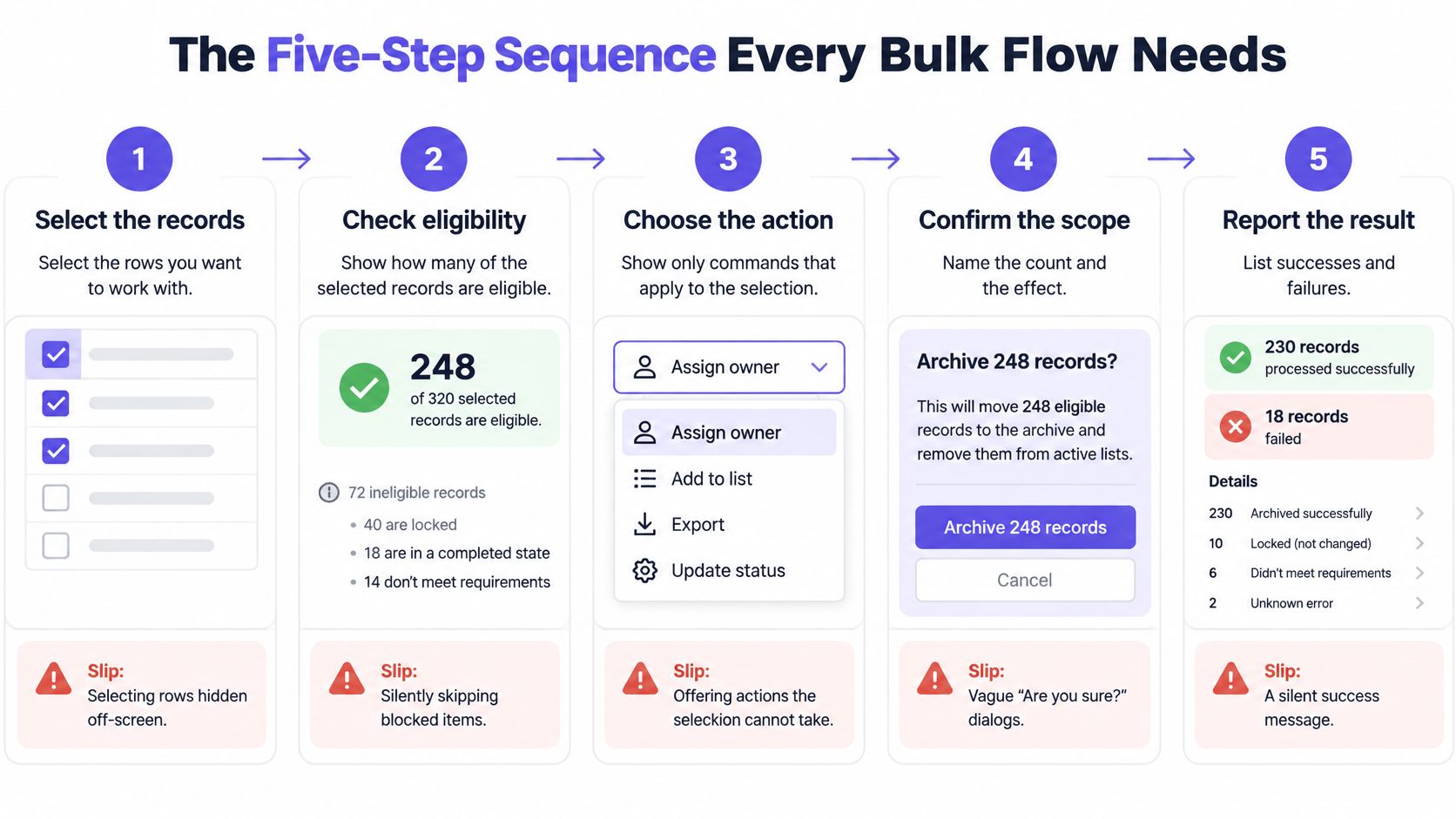
Map the stages the way you would map process flowchart examples, with the slip written next to the step.
Step 1. Select the records.
Give every row its own checkbox and a master checkbox that turns indeterminate when only some visible rows are checked. Keep the count visible.
The slip is selecting rows that have scrolled off screen and assuming they stayed in the set.
Step 2. Review the scope.
Say whether the selection is this page or every match, and show how many of those records are eligible.
The slip is a header box that looks global and only covers the page on screen.
Step 3. Act from the bar.
Run the command from an action bar that lists only what this selection can take. Confirm when the action destroys data.
The slip is offering Archive, Delete, and Assign as if every row could accept all three.
Step 4. Receive the outcome.
Show a per-record result that separates succeeded, skipped, and failed items.
The slip is a green toast that says the job finished while a slice of rows never moved.
Step 5. Recover.
Undo a reversible action, or retry only the failed items.
The slip is a Retry control that runs the command again on rows that already succeeded.
Why the order is the design
Selection without a count leaves people guessing. A count without a scope label still hides pages they cannot see. An action without an outcome report trains them to assume the server agreed. Recovery without a selective retry turns a partial miss into a second blast.
If any step is missing, the flow is incomplete. I would block the ticket until the missing stage has an owner, a label, and a test.
Would you let a release through if step 2 existed only in a tooltip?
Selection States and the Labels That Name Them
Treat selection as an explicit state model. One ambiguous Select All control cannot carry row, page, and full-result meanings at once. The Phoenix Studio model for bulk selection scope separates row-level selection, current-page selection, and all-results selection across a filter or query.
Selection state: No rows selected
Header checkbox: Unchecked
Label shown: No count, bulk bar hidden
Records the action touches: Nothing
Selection state: Some visible rows selected
Header checkbox: Indeterminate (dash)
Label shown: 3 of 25 selected
Records the action touches: Only the selected rows
Selection state: All rows on current page
Header checkbox: Checked
Label shown: 25 selected on this page
Records the action touches: The 25 visible rows
Selection state: All matching results
Header checkbox: Checked, with offer
Label shown: Select all 2,415 results
Records the action touches: Every record matching the filter, including unseen pages
Selection state: Filter or search changed
Header checkbox: Cleared
Label shown: Selection reset, notice shown
Records the action touches: Nothing until the user selects again
The dash, the offer, and the pages
When only some visible rows are selected, the header checkbox should show an indeterminate dash or filled square. Checked would lie. Unchecked would hide the work already done.
Keep the quantified offer off that checkbox. A separate line, "Select all 2,415 results," is the only honest way to widen scope. Do the arithmetic with your team: 2,415 matches at 25 rows a page is 97 pages. A user who selects the visible page has touched 25 of 2,415 records. The label has to say so.
Under-selection and over-selection
Under-selection is the quiet failure. Someone filters to overdue invoices, checks the header, archives what they see, and leaves 96 pages still open. They believe the queue is clean.
Over-selection is the loud one. The same checkbox silently means every match, and a delete meant for a page hits the full filter. Both failures come from a control whose label does not match its reach.
Scope honesty is the name for the fix. The interface states what the selection contains, when that set changes, and what the action will apply to. Keep the count visible. Preserve the selection across sorting and scrolling. Clear it, or revalidate it, when a filter or search changes the result set, because the population just changed underneath the checks.
Would you trust a checked box that never names the page?
For destructive work, the confirm step should restate the action and the exact count. For reversible work, a prominent undo path beats an extra modal. Test this table on a filtered view before the next release, with the filter changed after the checks are on.
Action Bars, Eligibility and Confirmation Rules
The action bar appears only after a selection exists, sits near the table, and lists commands that apply to that selection. Hidden until needed, it keeps the default table quiet. Once it shows, it should feel tied to the rows, not parked in a distant toolbar.
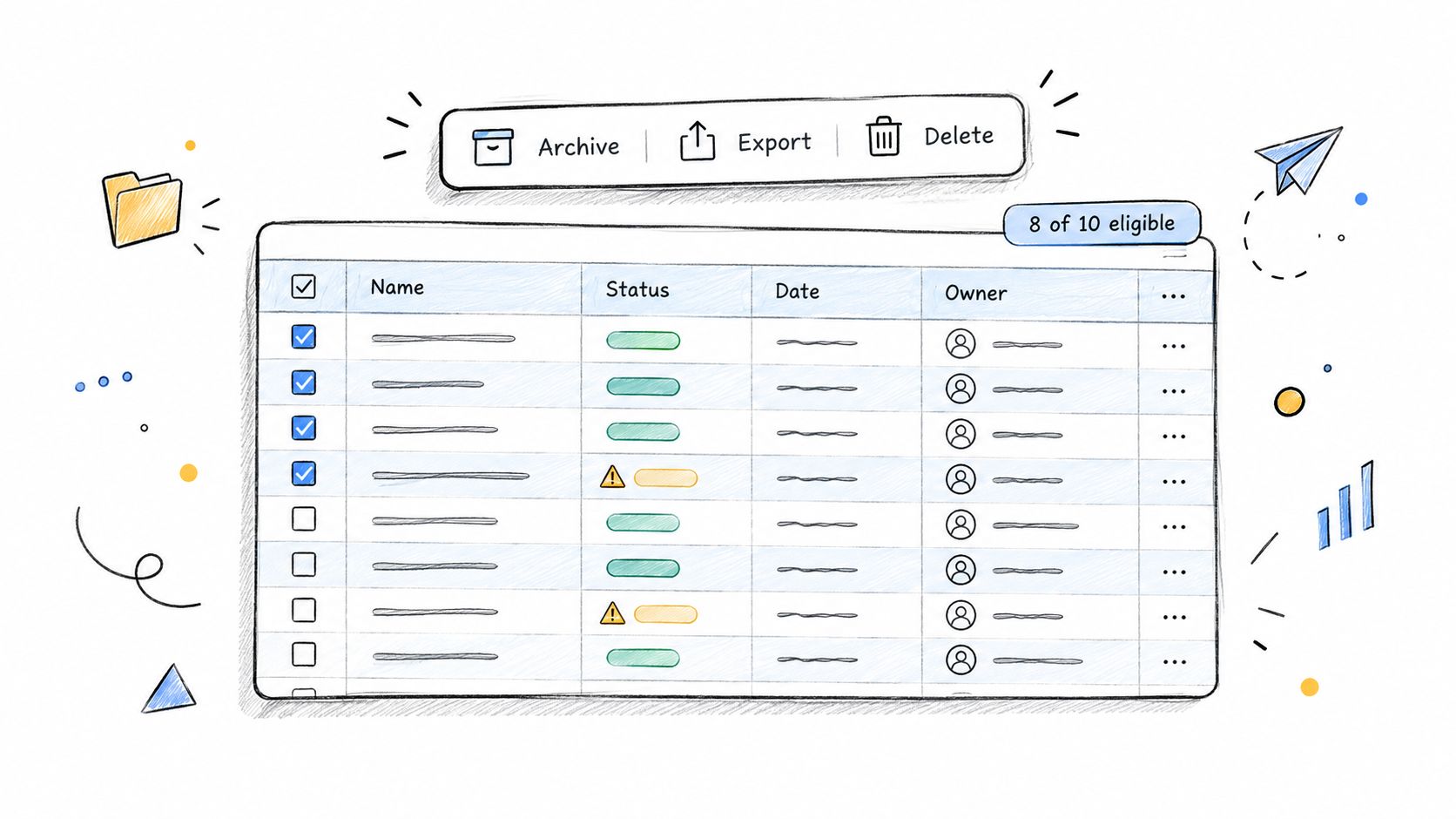
If some selected records cannot take the command, show the eligible count before submit and explain the exclusion. A lock icon, a short reason, or a line like "12 lack edit access" beats a button that dies with no story. Disabling the whole bar because three rows are locked punishes the rows that were fine.
Commands that do not fit the bar belong in a menu. Past four commands, group the rest under a More menu whose label names the scope, such as "Actions for 25 selected." Order by how often people use them. Put destructive commands last and visually separated. A disabled item keeps its label and states the reason, such as "Locked by admin policy." Arrow keys must reach that menu from the bar, so pointer users and keyboard users get the same commands.
The same honesty matters when the bulk job is an export. Teams that export your links for review before a redirect change can see the exact set, instead of trusting a checkbox count they cannot reopen later.
Two axes, not one ritual
Confirmation should scale with reversibility and blast radius. The defensive design guidance on bulk safeguards is direct: a modal on a low-stakes reversible action adds interruption without proportional protection.
Action case: Reversible, small set
Example: Apply a tag to 5 contacts
Pattern: Run immediately, show undo toast
Friction added: None beyond the toast
Action case: Reversible, large set
Example: Mark 4,000 tickets as read
Pattern: Run immediately, show exact count and undo path
Friction added: Toast with count
Action case: Irreversible, small set
Example: Delete 3 draft files
Pattern: Confirm with names and count
Friction added: One modal
Action case: Irreversible, large set
Example: Delete 200 contacts
Pattern: Confirm with exact count, add a stronger confirm above a threshold your team sets
Friction added: Modal plus explicit confirm
Action case: Mixed eligibility
Example: Archive 40 eligible of 60 selected
Pattern: Show eligible count before submit, exclude ineligible records
Friction added: Warning before commit
Applying a tag to five contacts should run now, with an undo toast. "Delete 200 contacts?" needs a dialog that names the operation and the exact count. The count is how someone confirms the actual scope at the last moment. Safeguards should show how many items will be affected, require explicit confirmation for destructive operations, and offer immediate undo where recovery is possible.
A modal on every bulk action is a ritual. People learn to click through, and the one dialog that matters gets the same glance as the tag toast.
Add interruption when consequences are permanent or wide. Recover fast when they are not.
That is risk-calibrated friction. List every action in your product and place it on this grid before anyone writes dialog copy. Why protect a tag with the same wall you use for a delete?
Reporting Partial Failure Without Hiding Anything
A bulk action is a set of distributed jobs, not one transaction that either commits or rolls back. A mixed selection can hold rows that are editable, permission-restricted, locked by another process, already in the target state, or invalid because data changed during the run. The Mockitt guide to bulk outcome reporting treats those as separate classes, with counts, reasons, links to the rows, or an exportable error list.
Outcome class: Succeeded
Typical cause: Record editable and unchanged
Banner wording: 37 updated
Next action: None
Outcome class: Excluded
Typical cause: Missing permission
Banner wording: 12 excluded: no edit access
Next action: Open list, request access
Outcome class: Rejected
Typical cause: Validation failed
Banner wording: 8 rejected: missing owner field
Next action: Fix field, retry these only
Outcome class: Locked
Typical cause: Another process holds the record
Banner wording: 5 locked by an import
Next action: Retry later
Outcome class: Already in target state
Typical cause: Status already set
Banner wording: 3 skipped: already archived
Next action: None
Outcome class: Unresolved
Typical cause: Data changed during the run
Banner wording: 4 need review: changed since selection
Next action: Show current state, confirm retry
What a single banner hides
A green "Success" banner hides a partial failure. A red "Failed" banner falsely implies that the successful changes were rolled back. Someone then retries the whole set, and the rows that already moved get the command twice.
While the job runs, show progress, say whether it is queued or happening now, and show when status was last checked. If the user leaves the page, keep the job status. Eligibility warnings belong before submit when the system can already see them. A stale-record conflict should show the current state before it asks for another attempt.
Retry is selective. Retry unresolved and failed records. Leave the succeeded rows alone.
Result transparency
Result transparency means the system explains the actual blast radius instead of claiming completion. Link each failure class to the affected records, and offer an exportable error list, so nobody has to scan the table by eye. Pair that list with design patterns for graceful error handling so the failure state tells people what to do next, not only that something broke.
Keyboard operability has to cover selection, action invocation, dialogs, and recovery flows. WCAG 2.1.1 requires all functionality to be operable through a keyboard interface, which includes the retry path, not only the first checkbox.
Which outcome class does your product still collapse into a generic message?
Undo, Recovery and Long-Running Jobs
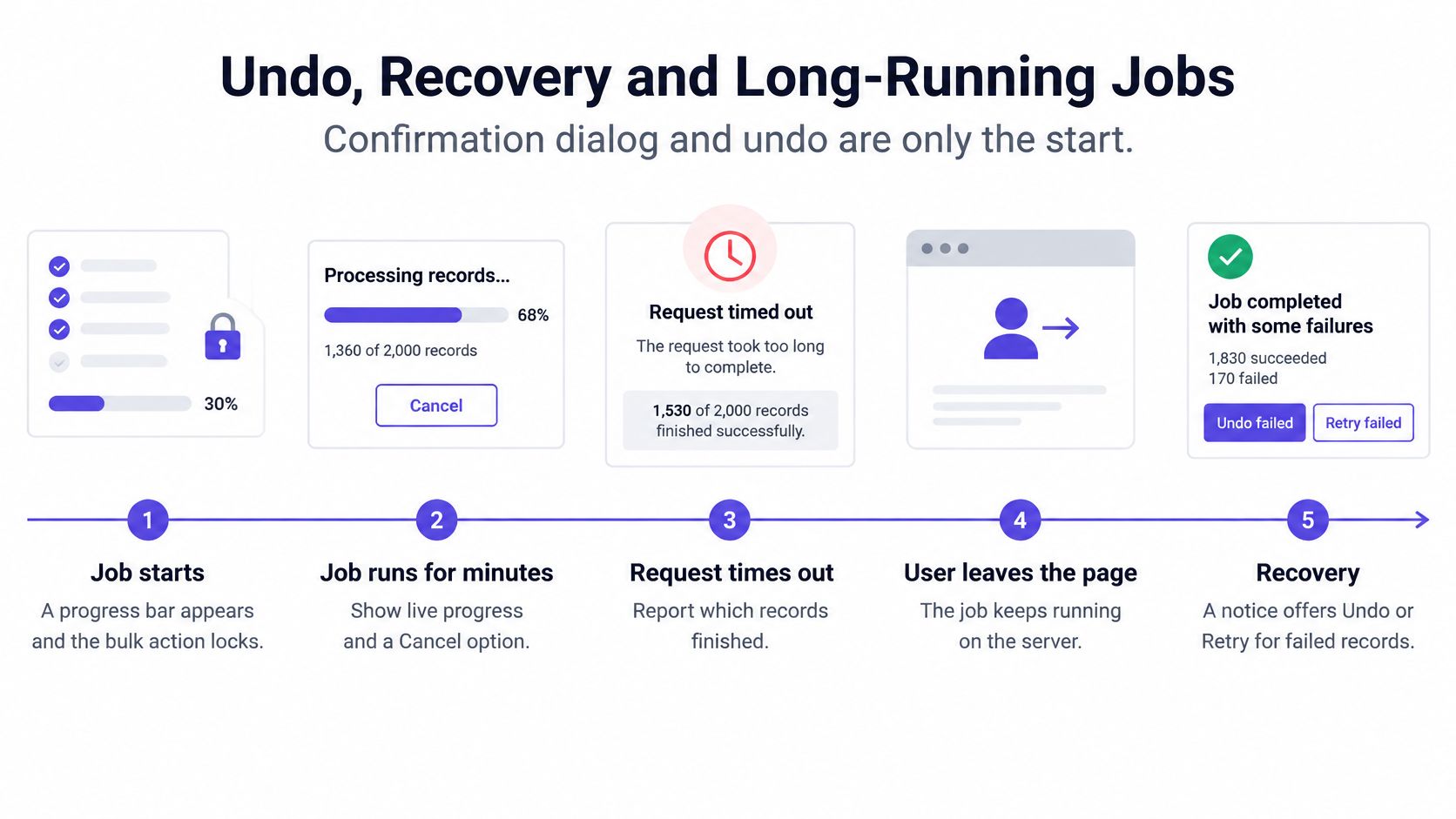
The usual debate, confirmation dialog versus undo, stops too early. Real jobs run for minutes, time out, or keep going after someone leaves the page. What they need is recovery orchestration: job state, cancel, idempotent retry, an audit line, and a failure report they can download.
The UX Tigers roundup on governed bulk workflows puts a number on the speed temptation. A 200-message archive at roughly 3 seconds per message takes about 10 minutes one item at a time. A scoped Select All and Archive can shrink that interaction to a few seconds, a theoretical improvement of roughly 120 times. Speed still does not cover a destructive or high-volume run. The interface has to say whether selection is the current page or all filtered results, report successes and failures separately, show progress, and offer undo where reversal is possible. The same baseline sets a minimum pointer target of 24 by 24 CSS pixels under WCAG 2.2 Success Criterion 2.5.8.
Along the job timeline
- Queued: tell them the work is waiting, and let them cancel before the first write.
- Running: show live progress and a Cancel control. A spinner with no count invites a second click.
- Completed with partial results: list what finished and what did not, then offer retry only for the misses.
- Cancelled: report the records that already changed. Cancel is not a time machine.
- Undo window closed: say so. "Undo for 30 seconds" is a contract. After that, the toast should expire in words, not vanish.
Undo sits near the affected surface, the way file upload progress and recovery patterns keep status next to the files, not on a distant error page. Some actions cannot be undone. An email already sent needs a review step before it goes, because the toast cannot pull it back.
Idempotency is the quiet requirement. Retrying a bulk send must skip recipients who already got the message. Otherwise the retry duplicates the side effect you were trying to repair.
Keep an audit of who ran what, against which scope, and with which result. Teams that monitor catalog updates with audit alerts already know a change log is how you answer "who touched this set" a week later.
In short, a recovery path people trust is what makes them willing to select a larger set. Recovery is an adoption driver, not a courtesy.
What happens to that job when the user closes the tab?
Keyboard and Screen Reader Access for Bulk Flows
Most bulk guidance describes checkboxes, counts, dialogs, and undo. It says little about whether a non-visual user can understand the same state. The MDN guide to keyboard accessibility is blunt about the gap: web functionality has to be operable by keyboard alone, and status messages such as selection changes and job results must be programmatically determinable.

Visible checks are not the contract. If Tab never lands on the row box, the count never enters a live region, and the confirm dialog traps focus without a way out, the flow is pointer-only. That fails the people who run these tables all day from a keyboard.
What the ear should hear
Put the bulk toolbar in a logical focus order, after the table controls and before a random floating layer. Expose the count and the scope with semantic labels and a live region. The announcement to design for is "all 247 results selected," not a silent change of a checkbox state.
When a filter clears the selection, announce that too. Something like "Filter changed. Selection cleared. 0 selected." leaves no one acting on a set that no longer exists. Partial failures need the same voice: succeeded, excluded, and rejected counts, without forcing a visual scan of rows.
A floating action bar is invisible to a screen reader unless its count and controls are in the accessibility tree. Paint and position do not count as exposure. Dense tables also shrink hit areas until row checkboxes fail anyone with a tremor or a thumb. Pair this with how you test mobile app accessibility with Figr when the same table shows up on a phone, where the target problem gets worse.
Select all is a high-risk state transition. It needs an accessible explanation of scope, not only a productivity shortcut.
The test matrix
Run the flow with keyboard-only users and with screen reader users. Include filtered datasets, pagination, virtualized rows, and mixed-permission records. Existing write-ups rarely hand you the interaction contract for that mix, so write the cases yourself.
- Keyboard only, filtered set: Tab reaches every box, the bar, the dialog, and the retry link.
- Screen reader, full results: the live region states the scope in words, including unseen pages.
- Virtualized rows: selection survives scroll, and off-screen rows stay announced as selected.
- Mixed permissions: excluded rows are named, not only grayed.
If the bar is only a visual overlay, who hears the count? Pick the archive flow and run it with a screen reader this week.
Test These Edge Cases Before You Ship
Run one bulk flow through this list before handoff. Each line is a case and the result you should see.
- Selection, then a filter change: the checks clear, and a notice says the selection was reset.
- Select all across pagination: the label names every match, not only the visible page.
- A record changes during the run: the row lands in review, with its current state shown before any retry.
- Mixed edit rights: eligible rows proceed, and excluded rows list the permission reason.
- Zero eligible records: the command does not submit, and the reason is on screen.
- Exactly one record: the same labels and the same outcome report still apply.
- Double submission: the second click does not start a second job.
- Session expires mid-job: the job status remains, and resume does not duplicate writes.
- Leaving the page during processing: progress stays available when they return.
- Virtualized rows scroll away: selected rows stay selected, and the count does not drop.
Tools can draft these cases from the design and the product context before a bug report arrives. Figr is one option for generating edge cases and QA cases from captured screens and design context, alongside the cases your QA lead already writes by hand. Use that list with a pass to find overlooked UX edge cases so the weird paths are named before handoff.
Pick one bulk flow in the product you have now. Run the checklist against it this week. Fix the first case that still ends in a generic message.
Figr helps product teams turn a live table into flows, edge cases, and QA cases that match the product you already ship, including the selection and failure states bulk work depends on. If your next release still hides scope behind a single checkbox, start by capturing that screen and generating the cases before handoff. Visit Figr and run one bulk flow through that pass this week.