

A permissions screen can look ready for engineering until someone asks what happens when an administrator removes a role halfway through editing. Does the user's access update immediately? Which fields disappear? What happens if saving fails?
That is the practical question behind Axure vs Figma. Both tools can prototype interactions, including variables and conditional behavior. Axure RP is especially useful when a team needs to model and inspect complex, stateful behavior. Figma is usually the stronger home for collaborative UI design, reusable components, and ongoing design-system work. Neither choice removes the need to define edge cases and handoff decisions.
Quick verdict: Choose Axure for a demanding behavioral prototype, Figma for the product interface your team will maintain, or both when the behavior needs separate validation before implementation. If the bottleneck is turning existing product context into realistic flows, states, and editable designs, Figr can help upstream without replacing either tool.
Axure vs Figma at a Glance
The best comparison is not a count of screens or features. Ask what reviewers must verify and what engineering will need afterward.
Decision point: Best fit
Axure RP: Detailed interaction models and behavioral review
Figma: Collaborative UI design and design-system work
Decision point: Prototyping
Axure RP: Triggers, actions, dynamic panels, repeaters, adaptive views
Figma: Prototype actions, components, variants, variables, expressions, conditional actions
Decision point: Conditional logic
Axure RP: Conditions, expressions, global and local variables
Figma: Variables, expressions, and if/else prototype actions on eligible paid plans
Decision point: Design-system work
Axure RP: Reusable widgets and libraries
Figma: Shared components, variants, variables, and libraries
Decision point: Collaboration
Axure RP: Published prototypes, comments, and shared project workflows
Figma: Shared design files, simultaneous editing, comments, and version history
Decision point: Developer handoff
Axure RP: Published behavior and specifications; Axure Cloud inspection
Figma: Design inspection, components, assets, and Dev Mode on eligible seats
Decision point: Published starting prices
Axure RP: RP Pro: $29 per user/month; RP Team: $49 per user/month
Figma: Starter: free; Professional: $16 per Full seat/month in USD; other seat types and plans differ
Axure documents more than 20 triggers and 30 actions for prototype behavior. Figma documents variables in prototypes, including changes to values that affect content or appearance. The question is not whether Figma has logic. It is which representation makes the required behavior easiest to build, review, change, and hand off.
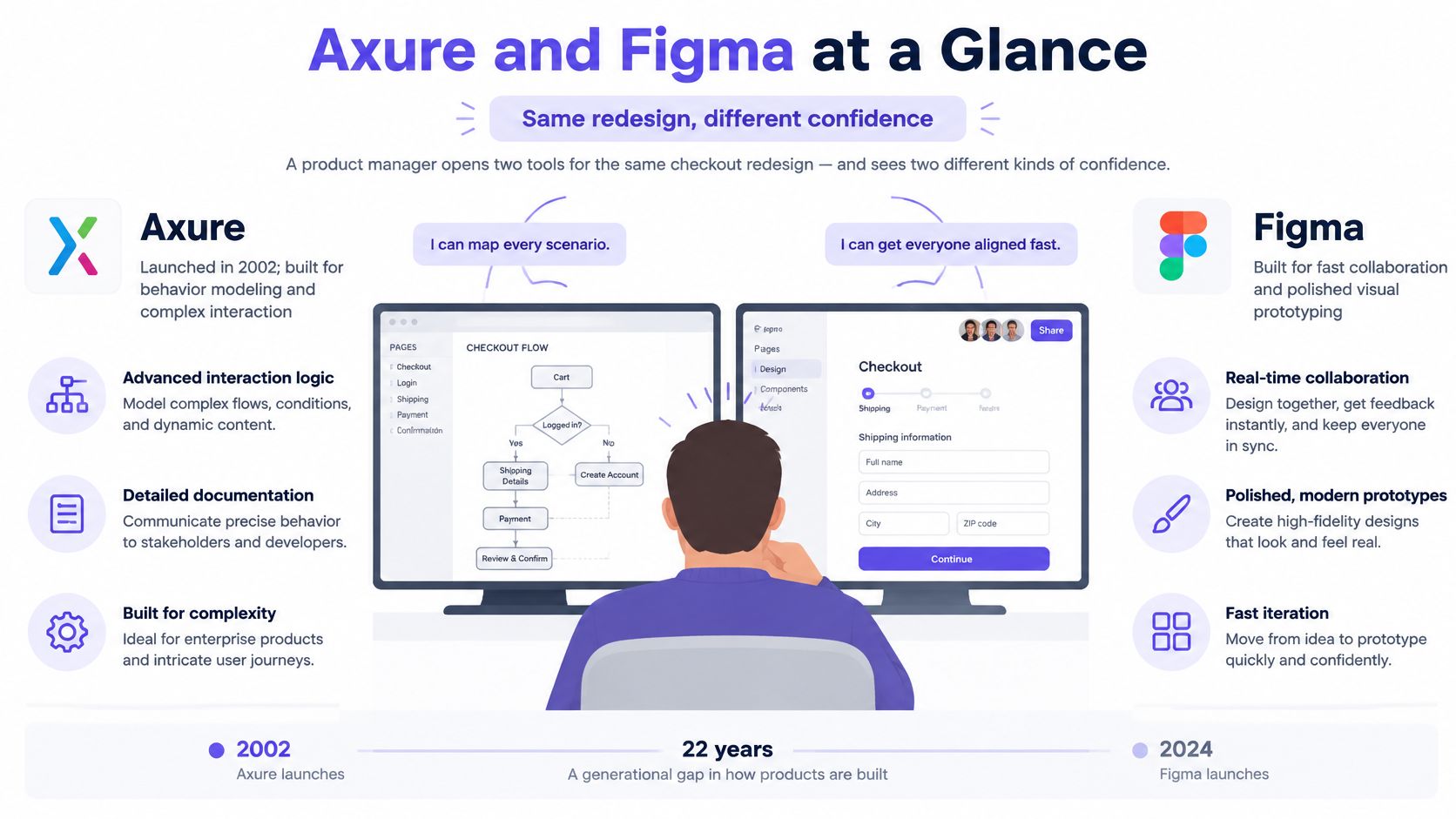
For rapid prototyping for product teams, begin with one unresolved decision: visual hierarchy, a business rule, or a failure state. Make the tool prove that decision rather than building the easiest demo.
Figma Prototyping vs Axure: What Can Each Actually Model?
Both products support more than clickable screens. A meaningful Figma prototyping vs Axure comparison starts with the shape of the underlying state.
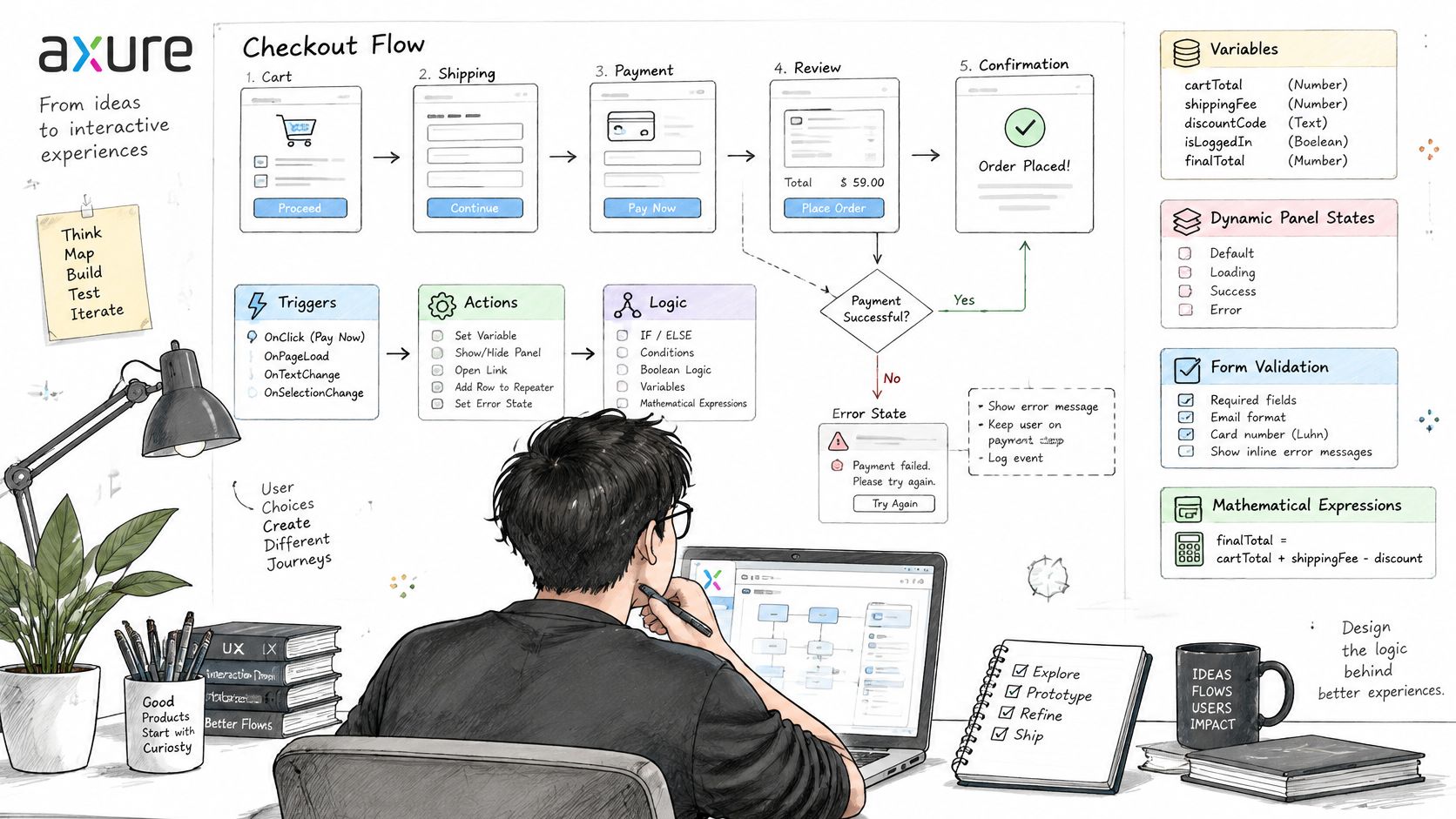
Axure can store choices in global variables that work across pages, use local variables within actions or conditions, and evaluate IF, ELSE IF, and ELSE rules. Dynamic panels can switch visible states. Repeaters use datasets to populate repeated items, which is useful for a changing table, filtered results, or a role list. This gives an interaction designer a way to model a system instead of drawing every possible outcome separately.
Figma has a different but real logic model. Its Conditional action evaluates a Boolean expression and follows an if or else path. Prototype actions can set variables; expressions can calculate values and combine strings. Variables also work with interactive components and variants. Figma lists advanced prototype variables, expressions, and conditional logic on Professional, Organization, and Enterprise in its plan comparison.
That does not make the two models identical. A form that changes a few labels, toggles a state, and branches at submission may be straightforward in Figma. A prototype that must add and filter records, retain choices across pages, and expose several interacting rules may be clearer in Axure. These are workflow judgments, not a claim that every Figma condition needs a new frame or that Axure always uses fewer artifacts.
Model the behavior reviewers need to challenge
Before choosing either tool, write down the states that matter:
- Starting state: What information or permissions already exist?
- Trigger: What does the user change, and when does that change take effect?
- Condition: Which rule determines the next state?
- Feedback: What loading, validation, success, or error message appears?
- Recovery: What survives a failed submission or return to an earlier step?
These flowchart process examples can help separate conditions from outcomes. Then assess whether the prototype exposes each rule without forcing reviewers to guess what happened off-screen. For a permissions or checkout flow, that matters more than an impressive transition animation.
UI Design, Design Systems, and Responsive Layouts
A product team rarely builds one prototype and walks away. The interface must fit existing patterns, survive revisions, and remain consistent across features. That is where Figma's shared components, variants, libraries, and variable modes become central. Modes can hold different values for contexts such as themes or breakpoints. The published plan limits are 10 modes per collection on Professional, 20 on Organization, and unlimited with extended collections on Enterprise.
Figma is a practical primary workspace when a design-system owner needs to update a component and other designers need to apply the same pattern. Designers can explore hierarchy and layouts in adjacent frames while product and engineering review the same files. Reuse matters particularly for teams adding features to an established product: a new permissions dialog should not invent a second set of button, form, and alert patterns.
Axure also supports reusable widgets and styling, but its distinctive advantage here is connecting an interface to simulated behavior. Its adaptive views let a prototype show alternate page arrangements for defined viewports. A reviewer can resize and inspect the resulting interaction, rather than merely compare desktop and mobile compositions.
Choose the responsive workflow by the question being asked. Figma is well suited to comparing layout and visual consistency across frames. Axure is worth considering when the team must demonstrate what happens to controls and state as the viewport changes. Neither a polished screenshot nor a working resize substitutes for checking the implemented product.
Collaboration and Developer Handoff
Design review is not one meeting. Product managers may approve scope, support may challenge recovery copy, and engineers may need to identify the component and rule behind a state. The best tool is the one that keeps those decisions inspectable after the meeting.
Figma supports shared editing, comments, and file history as part of its everyday design workflow. Starter has 30 days of version history; paid plans offer unlimited history. Branching and merging are available on Organization and Enterprise, not every plan. For handoff, Dev Mode's Inspect panel exposes details including spacing, colors, component metadata, variants, and prototype interactions. Dev Mode requires an eligible Full or Dev seat.
Axure centers review on the published behavioral proposal. Reviewers can follow a path through the prototype and challenge the rule they observe. Axure's Figma integration can copy selected Figma frames into Axure RP as editable widgets or publish Figma work to Axure Cloud. Axure Cloud can expose design information for inspection. Importing a frame, however, does not mean future Figma edits automatically resolve changes in an Axure behavior model.
If you use both, specify which source wins when they disagree:
Question: What should the interface look like?
Suggested authoritative artifact: Approved Figma components and screens
Question: What happens after a conditional action?
Suggested authoritative artifact: Reviewed Axure model and state inventory
Question: What must engineering deliver?
Suggested authoritative artifact: Acceptance criteria linked to both artifacts
Question: Why did the team choose this behavior?
Suggested authoritative artifact: Decision record owned by product and design
These are suggested responsibilities, not tool requirements. Use developer handoff best practices to make the rule, state, and owner explicit. If an engineer must reconcile contradictory screens and prototype behavior alone, the handoff is not complete.
Pricing and Learning Curve: Compare the Workflow, Not Just Seats
Pricing changes, and a free viewer is not the same as a free editor. These published figures were checked against official pages in October 2026; confirm your region, billing term, and required seat type before buying.
Plan or cost: Axure RP Pro
Published detail: $29 per user/month
What to check: Number of prototype authors
Plan or cost: Axure RP Team
Published detail: $49 per user/month
What to check: Whether shared-file collaboration is needed
Plan or cost: Axure Enterprise
Published detail: Custom pricing
What to check: Hosting, administration, and procurement needs
Plan or cost: Figma Starter
Published detail: Free plan
What to check: Whether its feature and history limits fit the work
Plan or cost: Figma Professional
Published detail: $16 per Full seat/month, USD
What to check: Full, Dev, and Collab seat mix; billing terms
Plan or cost: Figma Organization
Published detail: $55 per Full seat/month, USD, billed annually
What to check: Branching, library governance, and seat mix
Plan or cost: Figma Enterprise
Published detail: See current official pricing
What to check: Enterprise terms and seat allocation
Figma's seat guidance distinguishes paid Full, Dev, and Collab seats from free View seats. Axure's listed RP prices concern prototype authors; its cloud and enterprise options have separate considerations. Comparing one Full seat to one Axure author without checking who edits, inspects, and reviews will distort the budget.
Learning curve is similarly task-dependent. A team already using a Figma library can prototype an existing component pattern without moving to a new design environment, though conditional interactions still require careful setup. Axure asks authors to learn its interaction model, conditions, panels, and datasets; the investment may pay off when rules would otherwise be hard to demonstrate. These are planning considerations, not measured training times.
Estimate total workflow cost: authoring, review, revisions, syncing two artifacts, and answering handoff questions. The lowest subscription price does not always produce the least expensive decision.
Practical Example: A B2B SaaS Permissions Flow
Suppose an administrator invites a colleague to a reporting product. They select a role, choose workspace access, and save. The workflow has conditional access, validation, loading, and error states. This is a hypothetical evaluation, not a report of product testing.
Define the expected behavior first. Selecting Viewer hides edit permissions; selecting Admin reveals organization-level controls. A user cannot save without at least one permitted workspace. During submission, the button reflects a loading state. If saving fails, the selected role and workspaces remain visible so the administrator can retry. Changing a role after an earlier selection must not silently retain an invalid permission.
In Axure, try modeling the selected role with a variable, conditionally displaying controls through panel states, and representing a changing workspace list with a repeater if the test needs one. Ask a reviewer to change the role, trigger the validation error, retry, and inspect whether the remaining permissions are correct. The value is the ability to challenge the rule in a working model, not the number of interactions you created.
In Figma, start with existing components and variants for the dialog, form, alerts, and loading button. Use supported variables and conditional prototype actions for the role-dependent path. Ask whether another designer can understand the connections and maintain the design when the component library changes. Figma may cover the required behavior perfectly well; assess the actual prototype, not a presumed limitation.
For engineering, document each transition as a testable expectation: initial state, action, permitted result, failure response, and recovery. A guide to writing effective test cases helps turn the prototype into acceptance criteria. Neither prototype alone establishes security behavior in the implemented system.
Which Tool Should Your Team Choose?
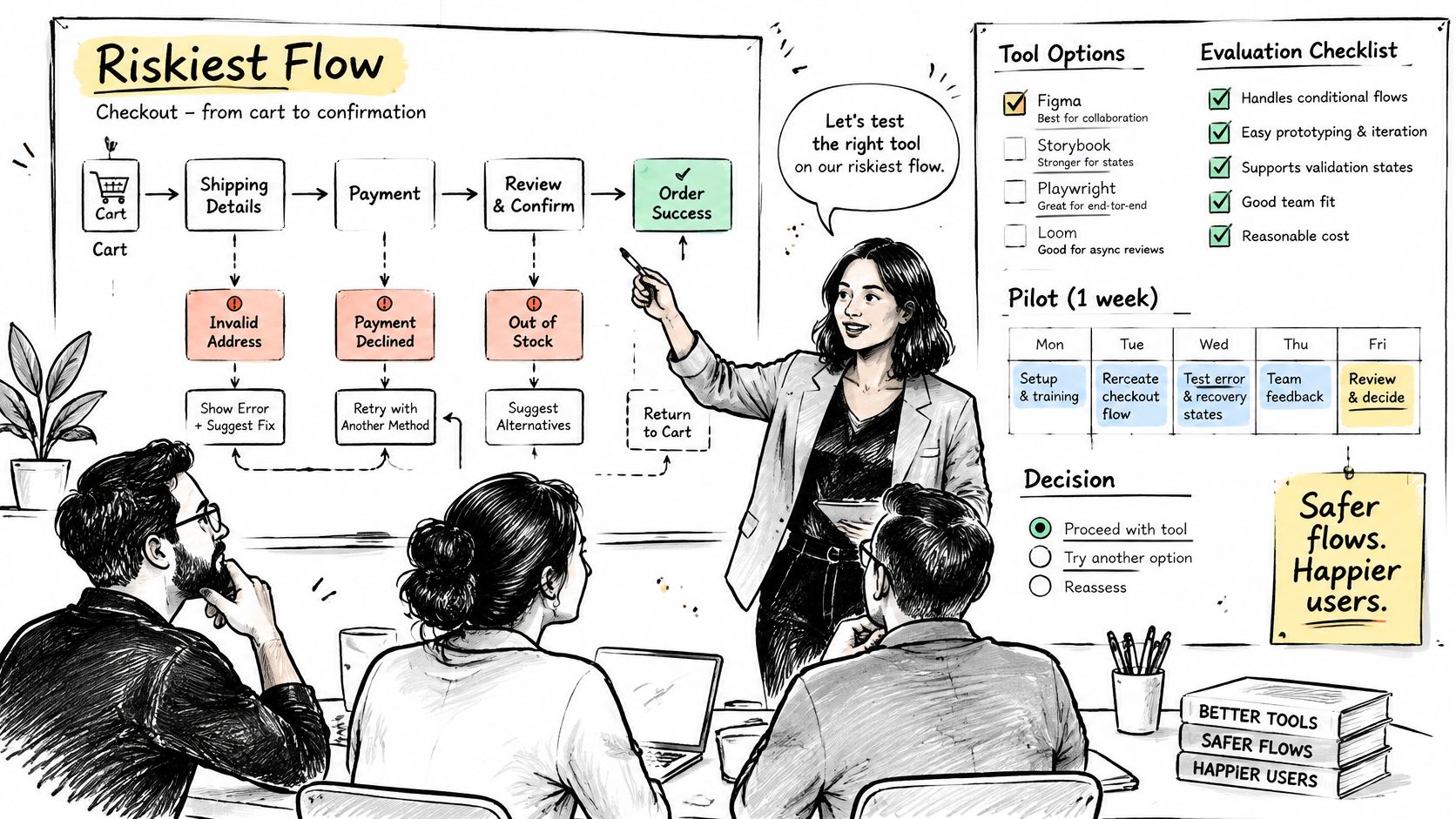
Use the decision that best fits the work you repeatedly ship, then make exceptions for unusually risky flows.
- Choose Axure RP when reviewers need to probe a detailed, stateful model with many interdependent conditions, changing data, or recovery paths. It is especially useful before engineering commits to a complex workflow.
- Choose Figma when shared UI design, components, visual iteration, and collaboration are the ongoing priority. It can also prototype conditional behavior; check the plan and whether the resulting model stays understandable.
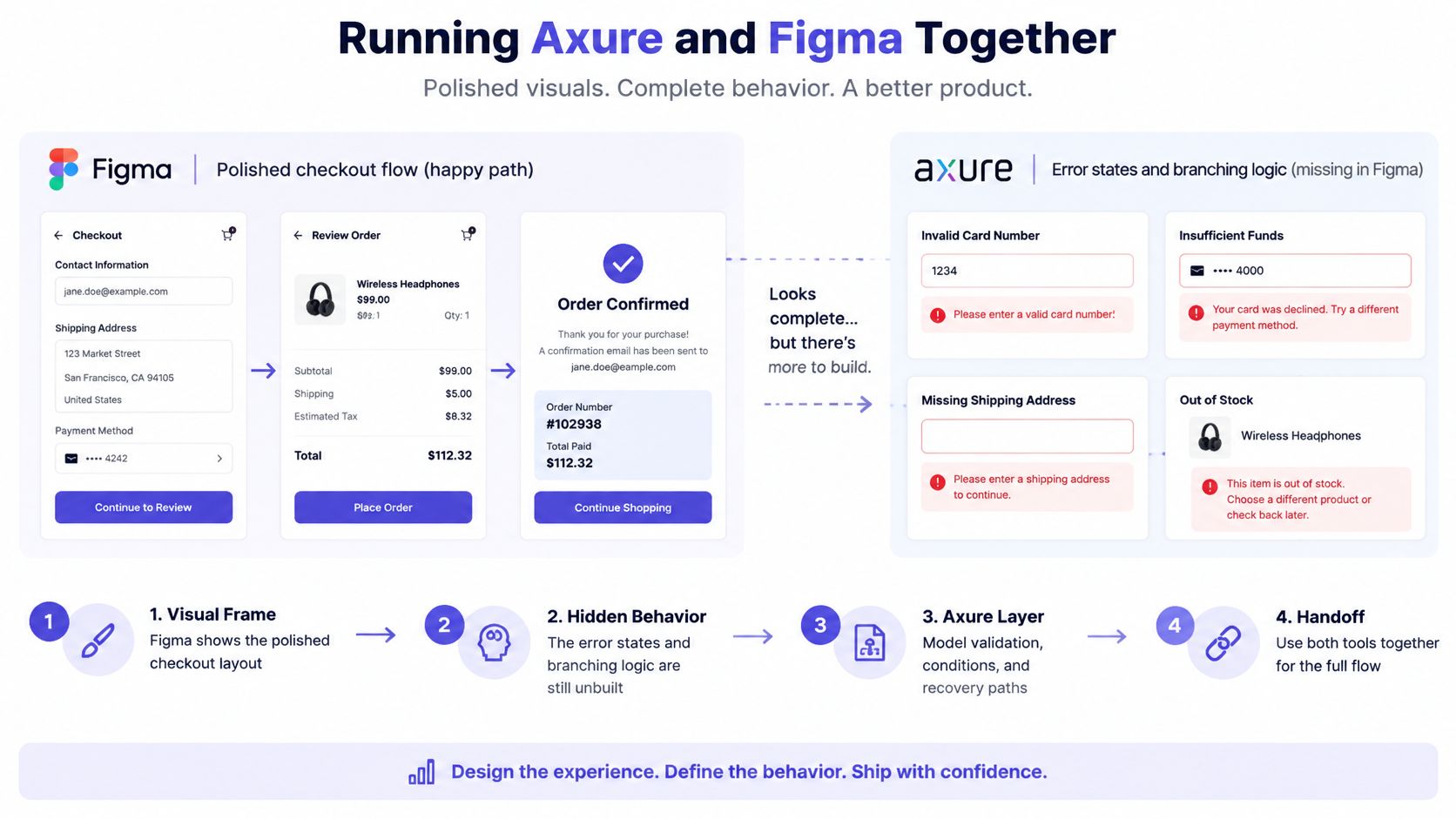
- Use both when a high-risk behavior needs a dedicated model but the production design system remains in Figma. Set a source of truth for appearance, behavior, and acceptance criteria before duplicating work.
- For a small team, keep the workflow narrow. Adding a second authoring tool has a coordination cost even when its prototype is stronger.
- For a larger product organization, consider who maintains shared libraries, who approves behavior, and whether reviewers can recover earlier decisions.
The figma vs axure answer can differ within the same backlog. A marketing layout and a permissions migration need different evidence. If you are also assessing Axure alternatives or other prototyping tools, apply the same test: can the setup expose the failure that would most harm your product decision?
Avoid four common selection mistakes
- Confusing screen fidelity with interaction fidelity. A convincing screen does not prove that invalid input, reversal, or recovery works.
- Ignoring design-system reuse. A behavioral prototype that cannot be reconciled with the production component library may create extra handoff work.
- Missing edge cases. List loading, empty, permission-denied, and failed-save states before declaring a flow complete.
- Overlooking the handoff. Agree who updates a rule when research, design, and engineering interpretations diverge.
Run a bounded pilot on a risky flow if the answer is unclear. Build equivalent expected states, have the same reviewers inspect both versions, and log missing conditions and reconciliation work. Do not infer a winner from screen count or a successful happy path alone.
Where Figr Fits Alongside Axure and Figma
Axure and Figma mainly answer how a team models behavior or designs and reviews an interface. A team with an existing product often faces an earlier problem: how to turn requirements, research, current screens, and component constraints into a feature proposal worth prototyping.
Figr is a third option for that product-design work, not a full replacement for Axure's advanced interaction engine or Figma's complete design environment. It uses product context such as screens, Figma files, PRDs, research, analytics, and design-system information to help teams explore flows, map edge cases, create high-fidelity prototypes, and prepare Figma-ready designs. Its Design System Intelligence helps it understand the product's visual rules and their rationale. Context Pod retains product inputs for reuse, while UX Reasoning helps teams consider intent, constraints, alternatives, and failure paths before refining screens.
Figr describes its Visual Context Graph as connecting five kinds of context:
Layer: Visual
What it contributes to feature work: Existing screens and layouts that a new feature must fit
Layer: Behavioral
What it contributes to feature work: Flows, recordings, and interaction patterns that show how the product works
Layer: Design system
What it contributes to feature work: Components, tokens, variants, and usage rules
Layer: Product knowledge
What it contributes to feature work: PRDs, research, requirements, and past decisions
Layer: Implementation
What it contributes to feature work: Code context, constraints, and technical boundaries
These layers help frame a permissions change as part of an existing product, not an isolated mockup. Figr can produce edge-case maps, test scenarios, multi-state designs, and prototypes for review. Its documented Figma Sync workflow can bring in design context and export editable work back to Figma. The Figr changelog also documents Direct Editing of prototype elements, including text and styling. Review generated output against the real product and engineering requirements rather than treating it as automatically approved.
A sensible division of labor is to use Figr to explore the requirement and states, Figma to refine and maintain production UI, and Axure when a particularly complex rule needs deeper behavioral simulation. Many teams will need only some of those steps. For ideas about who participates in that review, see these team design tool recommendations from Figr.
FAQ: Axure RP vs Figma
Is Axure better than Figma for prototyping?
For complex, data-driven or stateful simulations, Axure may be the better fit. Figma also supports variables and conditional prototype actions, and may be better when the prototype must stay close to a shared design system. Choose by the behavior reviewers need to inspect.
Can Figma use variables and conditional logic?
Yes. On eligible paid plans, Figma prototypes support variables, expressions, and Conditional actions with if/else paths. Check Figma's current plan comparison before relying on a specific feature.
Is Axure or Figma better for developer handoff?
Figma is a strong fit for inspecting production UI, components, and design details through its shared workflow and eligible Dev Mode seats. Axure helps communicate reviewed interaction behavior. Either way, pair the artifact with acceptance criteria and an owner for disputed states.
Can you use Axure and Figma together?
Yes. Axure supports bringing Figma frames into Axure RP for behavioral modeling. Keep the visual source of truth and behavioral source of truth explicit, and budget for manual reconciliation when designs change.
Where does Figr fit if we already use Figma?
Figr helps turn existing product context into flows, edge cases, prototypes, and Figma-ready screens. It can support early exploration and handoff preparation while Figma remains the workspace for design review, refinement, and production UI.
The clearest next step is to choose one risky feature and list the states that must survive review and implementation. If the unknown is behavioral, try it in Axure. If it is shared UI and component consistency, start in Figma. If the team first needs to connect requirements and product context to realistic design options, explore Figr, then bring the resulting work into the review workflow your team already owns.