
You're staring at a PRD that reads complete, and nobody can agree whether the feature is done. That disagreement is the core problem with most product requirements. The document names screens and features, but never states a condition two people could judge the same way.
When that gap reaches QA, the tester invents the missing standard. The designer invents the empty state. The engineer invents the permission rule, and the customer finds the version nobody meant to ship. Invite flows often look finished until a workspace hits its seat limit, and then the missing rule surfaces in production.
A testable requirement closes that gap before design starts. It names the actor, the observable behavior, the limit, and the evidence that proves completion. Apply that discipline across every requirement type, and your PRD becomes a set of decisions your team can verify rather than opinions it can debate.
Product Requirement Types Compared Side by Side
A product requirement states what the product must do or be, for whom, and how the team will know it is done. That sentence sounds simple. Why do so many documents fail it?
The stakes are old and well documented. In the 1994 Standish Group CHAOS report, only 16.2% of projects were successful, meaning completed on time, within budget, and with the originally specified features. Another 52.7% were challenged and 31.1% were cancelled before completion. The report placed a clear statement of requirements among the three leading conditions associated with success, alongside user involvement and executive management support.
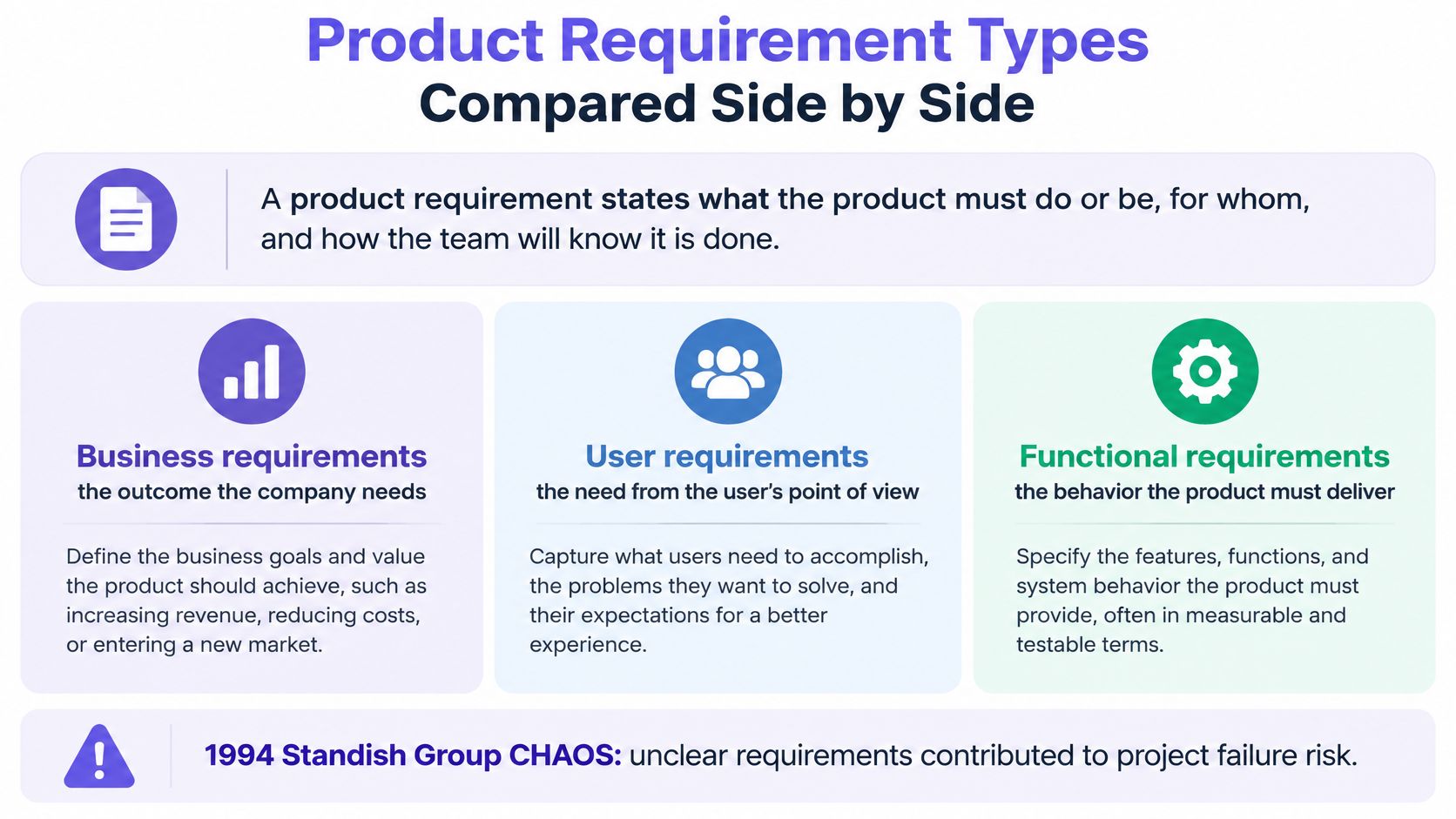
Think of the types as layers, not rivals. The PRD sits above the rest and holds the problem, scope, and outcome together. Business requirements state the outcome the company needs, user requirements state the need from the user's point of view, and functional requirements describe behavior. Non-functional requirements add measurable quality thresholds, while acceptance criteria supply the pass or fail condition for each claim. For the document boundary itself, see understanding requirements documents with Figr.
| Type | Question it answers | Usually written by | How it is verified |
|---|---|---|---|
| Product requirements document (PRD) | What to build, for whom and why | Product manager | Stakeholder review and launch criteria |
| Functional requirement | What the system must do | Product manager with engineers | One test case per behavior |
| Non-functional requirement | How well it must perform or protect data | Product manager with engineering and security | Measured thresholds, audits and load tests |
| User story | Who needs what and why | Product manager and designer | Acceptance criteria attached to the story |
| Acceptance criteria | What must be true to call the work done | Product manager and QA | Pass or fail checks |
Practical rule: Start from the question your team is stuck on, then pick the type that answers it.
Most weak PRDs contain features but no thresholds and no acceptance layer. That omission leaves the hardest judgments to whoever encounters them last.
What a PRD Must Contain, Section by Section
A PRD exists so a team can agree on the problem, the intended outcome, and the boundaries before design or code hardens them. It's a decision record, not a feature inventory. Every section should remove one future argument.
| PRD section | Must answer | Common gap |
|---|---|---|
| Problem and evidence | Which user problem exists, and what proves it? | Opinion stated as fact |
| Goals and success metrics | Which number should move after launch? | Metric named with no baseline |
| Users and jobs | Which user, in what situation, doing what job? | One persona for every role |
| Scope and non-goals | What is deliberately excluded? | Non-goals missing, so scope grows |
| Functional requirements | What observable behavior is required? | Features listed, behaviors missing |
| Non-functional requirements | Which thresholds for speed, access and security? | Left to QA or engineering later |
| Edge and failure states | What happens when data is empty, slow or denied? | Only the happy path |
| Dependencies and open questions | What must other teams deliver, and what is unknown? | Assumptions buried in prose |
| Release and rollback | How is it rolled out and reversed? | No rollback path |
| Review date | When will the assumptions be checked against real use? | Document never revisited after launch |
The two rows that decide the rest
Problem and evidence carries the document. Name the customer observation or data point behind the problem, in the writer's own words and with a link to the source material. If the evidence is three support tickets and a funnel drop, say so. A thin evidence base isn't a failure, but hiding it is, because the team can't judge how much certainty the requirement deserves.
Goals and success metrics needs a number and its baseline. Say a SaaS team adds a seat limit to its team plan. A goal like fewer failed invitations means little until the PRD records how many invites fail today and what count would justify the work.
This is what I mean by an evidence chain: observation, problem, hypothesis, requirement, instrumentation, decision threshold. Can your team later determine whether the requirement solved the intended problem? If it can't, the requirement passed a writing test and failed a product test.
Don't skip non-goals. A missing non-goals row is the most common reason scope grows without anyone deciding it should, because every reasonable adjacent idea looks in bounds. Write the exclusions while saying no is still cheap.
Non-Functional Requirements Teams Push Downstream
A requirement that says only secure or accessible gives nobody a condition to mark true or false. The standard then gets invented during QA, when changing a component, a color token, or an export path costs far more design and engineering time. Why pay redesign prices for a sentence you could have written in the first draft?
| Category | Requirement example | Measurable threshold | Verified by |
|---|---|---|---|
| Accessibility, text contrast | Body text meets WCAG 2.2 AA | At least 4.5:1 contrast ratio | Automated contrast scan plus manual review |
| Accessibility, color | Error messages do not rely on color alone | Text or icon cue on every error | Manual review of error states |
| Accessibility, gestures | Multipoint or path gestures have an alternative | Single-pointer control for every gesture | Manual test with one pointer |
| Accessibility, images | Informative images have text alternatives | Alt text on every informative image | Accessibility audit |
| Security, access | Role permissions enforced on exports | Viewer role denied on every export path | Authorization test cases |
| Privacy, retention | Stored personal data follows a retention rule | Retention period set by legal or policy owner before sign-off | Legal or policy owner sign-off |
| Performance | Dashboard responds to filter changes | Response target set with engineering before sign-off | Load test against the agreed target |
| Auditability | Administrator changes are logged | One log entry per admin change | Log review during QA |
Copy the threshold, then name the surface
The W3C WCAG overview sets normal text at a contrast ratio of at least 4.5:1 and states that color cannot be the sole visual means of communicating information. It also requires a text alternative for non-text content, outside defined exceptions, and a single-pointer alternative for multipoint or path-based gestures unless the gesture is essential. Those sentences drop straight into design tokens, error-state specs, and QA cases.
Conformance is cumulative. The WCAG 2.2 implementation report describes a model where a page claims a level only when every applicable success criterion at that level passes. So your PRD should name WCAG 2.2 AA, the covered flow such as account creation or billing, and whether each criterion gets automated checks, manual review, or both. A clean audit on one screen doesn't establish conformance for the journey around it.
Version matters too, because W3C guidance on what's new in WCAG 2.2 records nine success criteria added beyond WCAG 2.1. Writing accessible invites drift every time the standard moves. Writing the version, level, and flow gives the team a baseline it can retest, including when you validate mobile apps with assistive technology.
Security rows work the same way when they stay binary. The viewer role is denied on every export path. Each administrator change writes one log entry. For retention and dashboard response time, don't invent a number in the PRD. Assign the legal or engineering owner who must set it before sign-off, and keep the requirement open until they do.
How to Write a Requirement Someone Can Test
Requirements quality is an engineering control, not a writing style. ISO/IEC/IEEE 29148 defines requirements engineering as a lifecycle process covering elicitation, analysis, verification, validation, communication, documentation, and management. It expects each requirement to be atomic, unambiguous, feasible, necessary, verifiable, and traceable to a stakeholder need and an acceptance method.
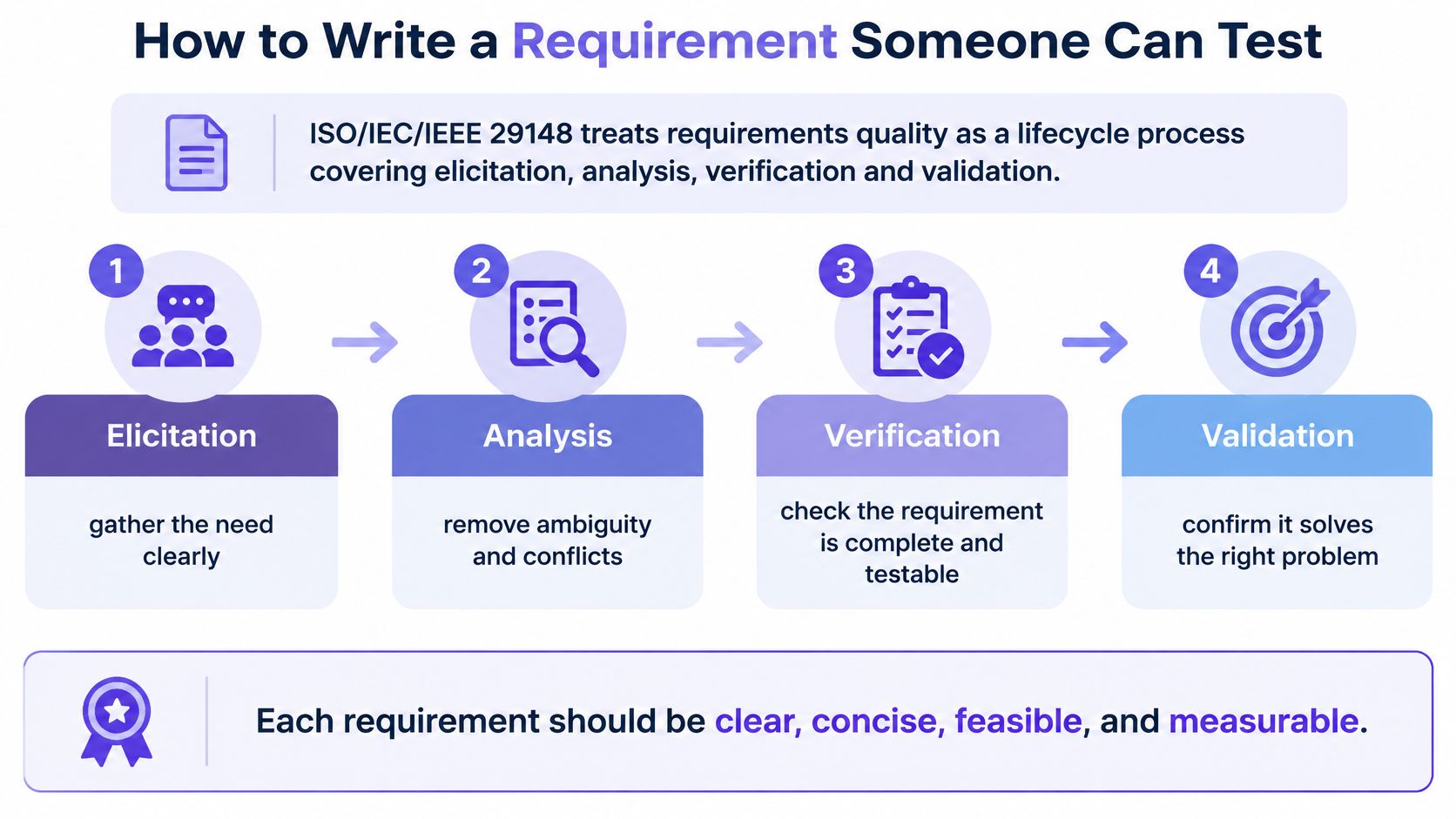
The basic gist is this: structure each requirement around actor, observable behavior, constraints, measurable quality attributes, priority, dependencies, and verification method. That chain runs from product intent to UX flows, engineering tasks, and QA cases without anyone translating intent along the way.
Six steps from need to test
Step 1. Name the user problem and the evidence behind it.
- This keeps the requirement tied to a real need.
- Common slip: writing the solution first, then inventing the problem to match.
Step 2. Write the actor and the observable behavior.
- State who acts and what result a reviewer can see.
- Common slip: words like intuitive or fast, which two reviewers judge differently.
Step 3. State the constraints and boundaries.
- Name roles, limits, integrations, and plan rules explicitly.
- Common slip: leaving the permission model implicit for engineering to guess.
Step 4. Attach measurable quality attributes.
- Give speed, access, and security a threshold or a named owner.
- Common slip: shipping the behavior with no standard for how well it must work.
Step 5. Mark priority and dependencies.
- Say what it waits on and what happens if that slips.
- Common slip: marking every item must-have, which prioritizes nothing.
Step 6. Define the verification method and link a test case.
- Every requirement gets a check before design begins, including the practice covered in writing acceptance criteria for AI features.
- Common slip: testing only the happy path and calling that coverage.
A requirement is strong when two independent reviewers would always agree on whether it's met.
Would yours survive that test today? If reviewers would split, you're looking at intent, not behavior, and the fix is specificity rather than more paragraphs. Requirements also change as evidence, architecture, and user needs change, so version them and revalidate them instead of treating the first draft as a contract. In short, clarity for execution plus a mechanism for revision beats a long document frozen at kickoff.
Pull back and the economics are plain. Ambiguity doesn't disappear when a PRD omits a decision, it moves to the most expensive person at the latest moment. Teams keep paying that transfer fee because writing the precise sentence feels slower than writing the vague one. Measured across a release, it never is.
Edge States Your First Draft Probably Misses
The feature passes review because the happy path works on a seeded account with perfect data. Then the first real user opens an empty workspace, waits through a timeout, and files the bug your PRD never described. Sound familiar?
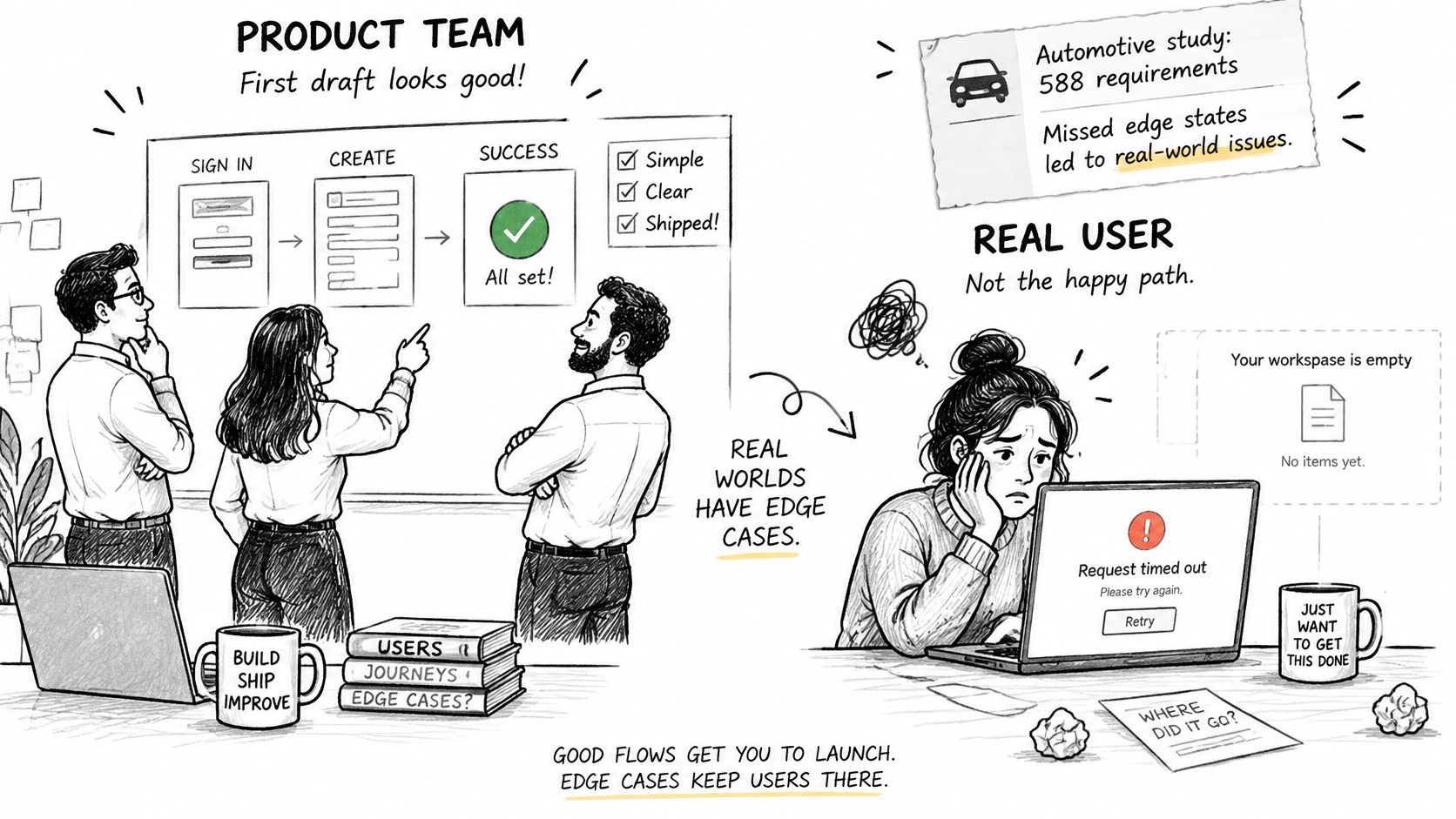
The cost of those omissions is measurable. A five-year analysis of 588 requirements defects in an automotive project, published as Requirements Defects over a Project Lifetime, found that 61% were caused by incorrectness or incompleteness. Inconsistent defects averaged 29 person-hours to fix, incomplete defects 17 hours, and incorrect defects 12 hours. Different industry, same mechanism: the missing sentence becomes rework across UX, APIs, analytics, and QA.
States a reviewer should challenge
- Empty: What does the screen show with no data, and what's the first action offered?
- Loading and timeout: What does the user see after a set wait, and can the action be retried safely?
- Permission denied: Which message appears, and what's the next step for a user without the role?
- Offline: Does the action queue for later, or fail with a visible explanation?
- Duplicate submit: What happens on a double click or a repeated request?
- Recovery: How does the user return to the last valid state after an error?
- Migration: What happens to existing data when the new behavior ships?
SaaS products with layered permissions, integrations, and funnel-dependent flows feel this hardest, because one missing condition propagates into design rework and test expansion. Teams that document product edge cases with Figr surface those branches before build, which is where they're cheap.
End the review with one rule: every requirement carries a measurable acceptance criterion and a traceable test case before design begins. If a state has no test, treat it as undecided.
A Worked SaaS Example From Draft to Test Case
A workspace on a seat-capped plan is adding teammate invitations. The first draft reads: admins can invite teammates easily and the invite should work. It fails a pass-or-fail review on contact. No actor is named precisely, no limit is stated, and no failure result exists. A tester cannot mark "easily" true or false.
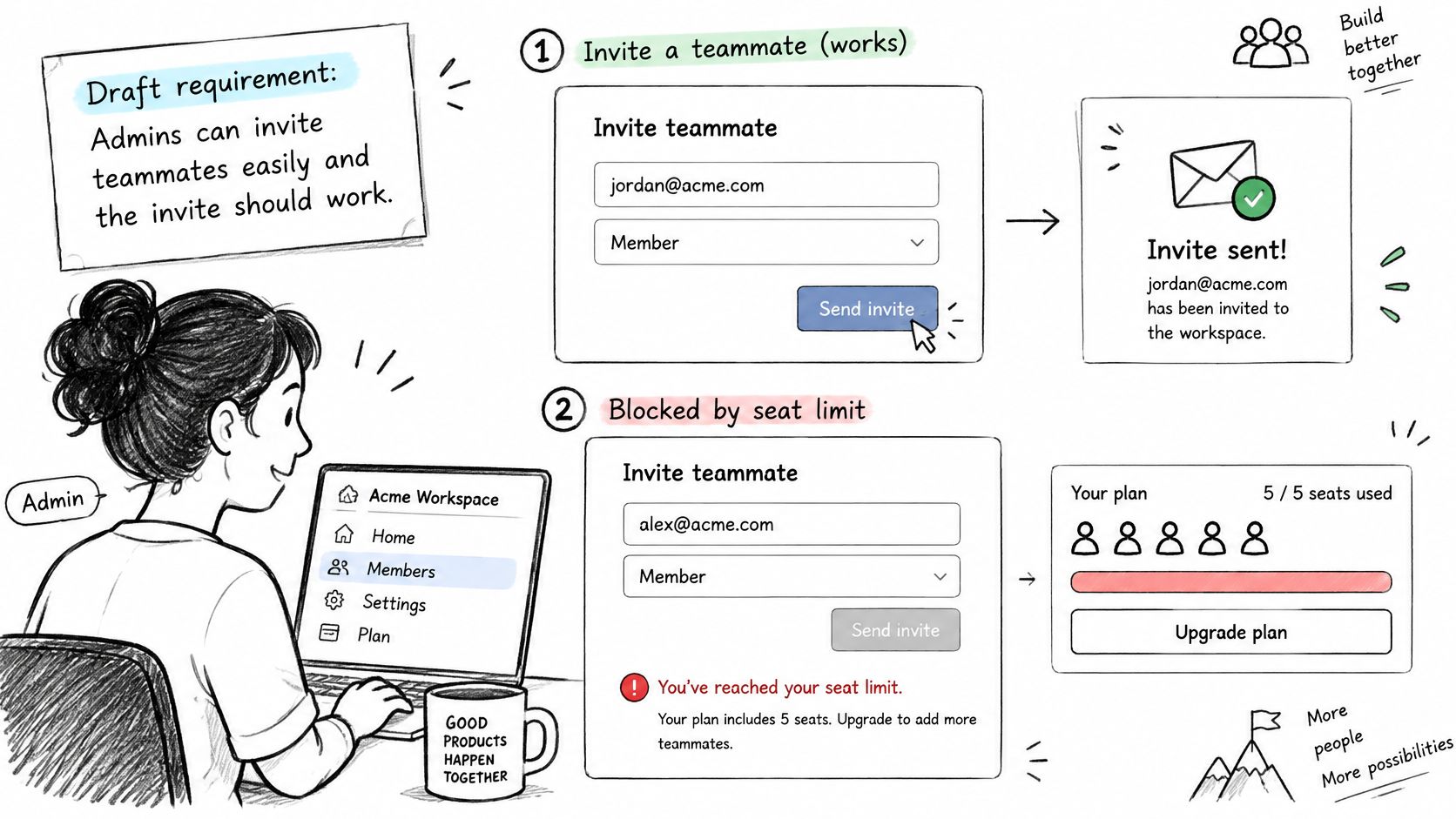
The rewrite starts from a test, not a slogan. The W3C WCAG 2.2 requirements document defines each success criterion as a specific condition that stays testable through automated or manual evaluation and produces consistent results across evaluators, with an indicative threshold of 8 out of 10 testers agreeing. Call this the binary requirement: a statement a reviewer can mark true or false for a given state. Accessibility and the identity path belong in that statement. Leave them out of the PRD and the team pushes both downstream, after screens and APIs are already in motion.
Here is the invite flow written so someone can pass or fail it. When a workspace admin invites a new member and an unused seat remains, the system sends the invitation and reserves the seat. When no seat remains, the system blocks the invitation, shows the seat limit and the upgrade path, and writes one audit entry for the blocked attempt. The admin role, the seat limit, the observable result, and the audit entry are all named. Nobody has to interpret "works correctly."
The three cases the draft missed
These are the states a short PRD usually hands to QA later. Each one is still a test.
- Already a member: The invitee's email matches an existing member, so the system sends nothing and tells the admin the person already has access.
- Expired invitation: The invitee opens the link after expiry, so the system shows an expired message and offers a way to request a new invitation.
- Single sign-on only: The workspace requires single sign-on, so the invitation routes the invitee through the identity provider instead of a password signup.
Each case becomes a QA test with a setup, an action, and an expected result. Each failure case also gets an analytics event that counts failed invitations by reason. That event closes the loop with the PRD metric, because the team can compare post-launch failures against the baseline it recorded before building.
Decide the PRD in One Handoff Meeting
A tidy document and a usable decision are different things. Bring four people: the product manager who owns the problem, the designer who owns the flow, the engineer who owns feasibility, and the person who will test it. Bring three artifacts only: the filled PRD section table, the non-functional rows with a number or a named owner, and the edge-state notes for the one feature under review. The developer handoff guide covers the broader handoff mechanics around that meeting.
Don't reread the document aloud. For each requirement, ask whether two people can mark it true or false from the text alone. Where they can't, write the missing actor, limit, or failure result on one shared list. Spend the last ten minutes on a single call: build now, cut the scope, or gather one more piece of evidence.
Your next step is timed. Pick your live invite or billing flow, block 45 minutes, and put current screens, analytics, and the failed-invitation baseline beside the PRD. Leave with that call written at the top of the document. Figr can use the PRD as input and turn requirements into flows, questions, UX decisions, edge cases, and screen directions, and it works best paired with product context. It explains its decisions and detects edge cases, giving you a stronger starting point. Prioritization and the final product judgment stay with your team.
Bring your next PRD to Figr and turn those testable requirements into flows, edge case maps, acceptance criteria, and screen directions grounded in your live product and design system. You'll see the missing states and open questions before handoff instead of during QA. Start with the invite flow you just rewrote, and leave the meeting with something your team can verify.