

A VP says the project is approved. Design starts wireframes from a Slack thread. Engineering asks for edge cases on Thursday. By Friday, the team realizes they were discussing three different things under one label: business case, product behavior, and a pile of unstructured prompts pretending to be requirements.
That failure mode shows up so often it deserves a name. Prompt-shaped requirements. They look fast because they arrive as messages, comments, and AI chats. They cost time because nobody can tell what is decided, what is assumed, and what still needs an owner.
The problem in prd vs brd debates is not terminology alone. Teams get into trouble when they skip the distinction between business intent and product definition, then replace both with scattered prompts. The result is familiar. Designers solve the wrong problem. Engineers fill in missing acceptance criteria on their own. Stakeholders believe approval happened, while product still lacks a shared scope and success criteria.
Clear documents fix the sequence of thinking. A BRD establishes why the initiative should exist and what business outcome it needs to create. A PRD translates that intent into product behavior, constraints, flows, and decisions that a delivery team can build against. If your team needs a concrete reference point, this requirements document example with stronger structure shows what "clear enough to act on" looks like in practice.
Structured documentation does not mean slow documentation. It means fewer silent assumptions. It also gives AI something usable to work from. Tools such as Figr can turn organized inputs like product docs and product context into usable artifacts. The gain is not automation for its own sake. The gain is traceability, cleaner handoffs, and less rework from vague prompts. For a broader view on why teams still need defined requirements even in agile environments, see these agile software requirements insights.
What Is a Business Requirements Document (BRD)
A team leaves a kickoff believing the hard part is done. Leadership approved the idea. Budget looks likely. A few feature requests are already flying around in Slack. Then delivery starts, and the same basic questions keep resurfacing: what business problem are we solving, who signed off on the trade-off, and how will anyone judge whether this was worth building? That gap is where a BRD earns its keep.
A Business Requirements Document, or BRD, defines the business case for an initiative before the team gets pulled into product detail. ClickHelp's breakdown of requirements artifacts describes it well: the BRD captures the organizational "why" and high-level "what" so stakeholders can align on goals, investment, constraints, and expected outcomes. The primary audience is leadership, sponsors, and cross-functional stakeholders who need to decide whether the initiative should proceed.
That distinction matters because many teams now skip the document and treat scattered prompts as if they were requirements. A Slack thread can capture urgency. It cannot reliably capture business intent, approval logic, scope boundaries, or success measures. The cost shows up later as rework that nobody budgets for.
What a BRD needs to settle
A useful BRD gives clear answers to questions such as:
Business problem: What is going wrong, or what opportunity is the company trying to capture?
Desired outcome: What business result should change if this initiative succeeds?
Stakeholders and approvals: Who is sponsoring the work, funding it, and approving the trade-offs?
Scope boundaries: What is included at a high level, and what is explicitly out of scope?
Constraints: What legal, operational, financial, or timing limits shape the decision?
Success measures: What evidence will leadership use to decide the initiative delivered value?
Good BRDs reduce a specific kind of confusion I see often: solution-first momentum. A team rushes into discussing features because the idea sounds promising, while the underlying business case is still fuzzy. The BRD slows that down in the right way. It forces agreement on intent before execution fragments into opinions.
What does not belong in a BRD
A BRD should not drift into screen behavior, API contracts, acceptance criteria, or edge-case handling. Those details matter later, but they answer a different question. Once a BRD starts mixing strategic intent with implementation logic, stakeholders approve for different reasons and the handoff gets messy.
Agile teams still need this level of clarity. They may package requirements in smaller increments, but they still need a shared statement of business need and decision context. Bridge Global's agile software requirements insights make that point well.
If you want to compare this with a more structured artifact, review this example of a requirements document with stronger structure.
Practical rule: If a document helps leadership decide whether the initiative deserves funding and support, it is functioning as a BRD. If a delivery team could build directly from it, the document has moved past BRD territory.
And What Is a Product Requirements Document (PRD)
A team leaves roadmap review with a green light. By the next morning, design has one interpretation, engineering has another, and QA is already asking what "done" means. Someone pastes a Slack thread into the ticket and calls it requirements. That is usually the moment rework gets scheduled without anyone naming it.
A Product Requirements Document, or PRD, closes that gap. It converts approved direction into clear product behavior, so the team is not building from fragments, memory, or message history.
The PRD answers a different set of questions than the BRD. What user problem are we solving in this release? What should the product do? What should happen in edge cases? What are the acceptance conditions? A good PRD gives product, design, engineering, and QA one reference point instead of four partial versions.
What a PRD usually contains
A useful PRD typically includes:
Product overview: The feature, change, or initiative being defined
User context: The user segment, need, and situation that shape the requirement
Flows and scenarios: Primary journeys, alternate paths, and failure states
Functional requirements: System behavior, rules, and constraints
Acceptance criteria: The conditions that define whether the work is complete
Those details matter because delivery risk rarely hides in the happy path. It shows up in missing states, undefined rules, and assumptions passed between teams as if they were decisions.
Why Product Managers rely on PRDs
I have seen teams skip the PRD and rely on unstructured prompts instead. A Slack message says "make onboarding simpler." A ticket says "match the new pricing model." Everyone starts quickly. Everyone also fills in the blanks differently. The cost shows up later as design revisions, engineering churn, QA defects, and stakeholder reviews that reopen decisions the team thought were settled.
A strong PRD prevents that drift. It is not paperwork for its own sake. It is the operating document that records the decisions a delivery team needs before work fans out across functions.
If you want a sharper template and examples, these PRD insights for product teams are a practical next read. It also helps to compare product and project manager responsibilities, because unclear ownership is one of the fastest ways requirements turn back into scattered prompts.
How the BRD and PRD Fundamentally Differ
A leadership team approves a growth initiative because the revenue case looks strong. Two weeks later, design is debating user flows, engineering is asking what happens in failure states, and QA still does not know what counts as done. Nothing is technically "wrong" yet. The team is just working from two different kinds of incomplete truth.
That gap is the actual difference between a BRD and a PRD.
A BRD defines the business case. It names the problem, the expected outcome, the constraints, and the reason the company should spend time and money on the work. A PRD defines the product response. It turns that business direction into behavior, flows, rules, and decisions that a delivery team can build against.
As noted earlier from Plane's explanation of BRD and PRD in the product lifecycle, the distinction is simple in theory and expensive to ignore in practice.
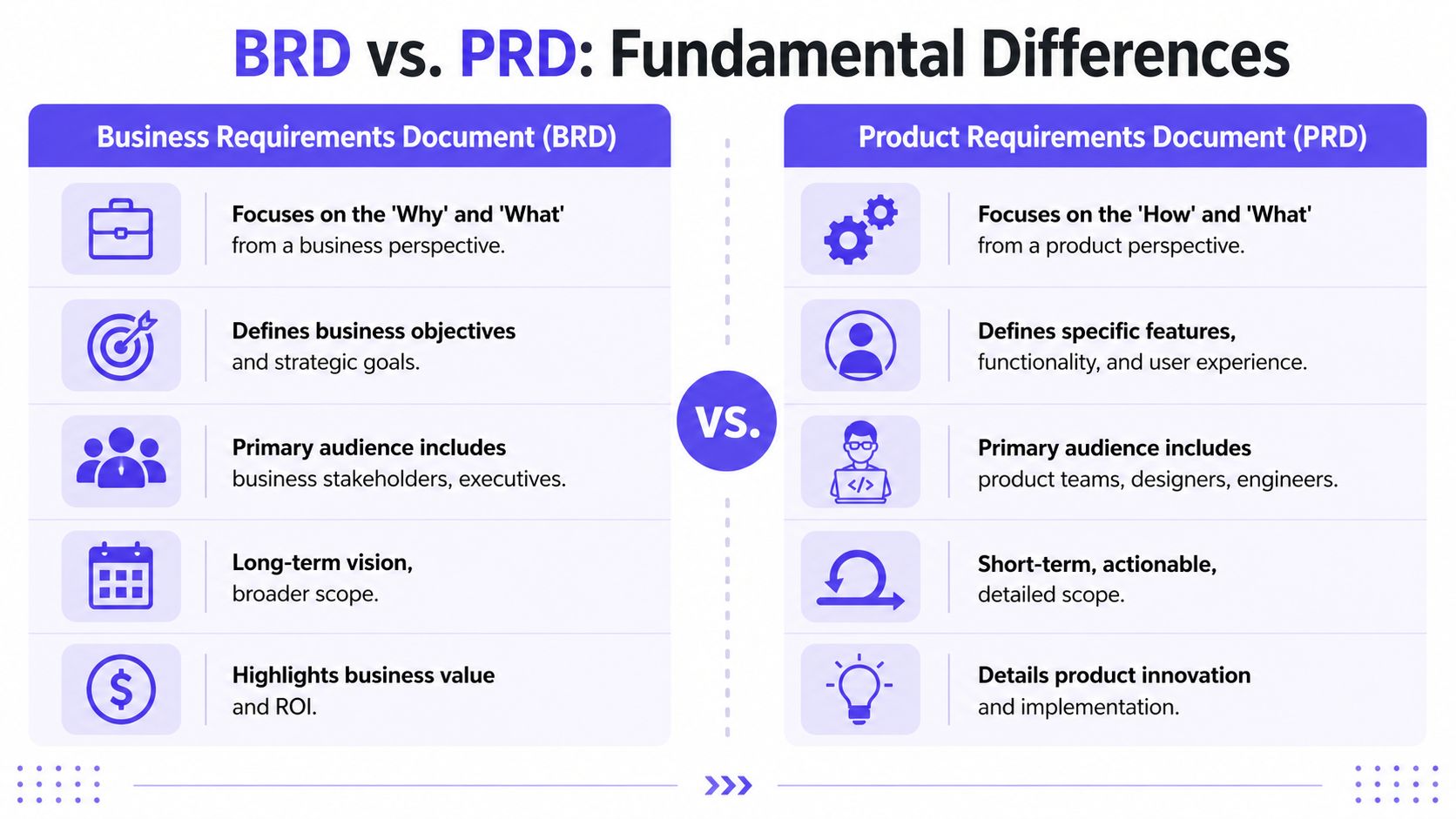
BRD vs PRD at a glance
Purpose: BRD justifies the business investment. PRD guides what gets built.
Audience: BRD for executives, stakeholders, sponsors. PRD for product, design, engineering, QA.
Scope: BRD is high-level, strategic, organizational. PRD is detailed, feature-level, execution-focused.
Content: BRD covers business goals, stakeholders, constraints, expected outcomes. PRD covers user flows, feature requirements, edge cases, acceptance criteria.
Timing: BRD before feature planning. PRD after business direction is approved.
Primary question: BRD asks why are we doing this? PRD asks what are we building and how should it work?
The difference is not just altitude. It is decision type.
A BRD is used to align on whether the initiative makes sense for the business. A PRD is used to align on what the team will ship and how that experience should behave. One frames the investment. The other reduces delivery ambiguity.
That distinction matters because teams often replace both documents with scattered prompts. A Slack thread can carry urgency, but it rarely carries decision quality. "Improve onboarding" might be enough to start a conversation. It is not enough to preserve the chain from business intent to shipped behavior.
I have seen this failure pattern repeatedly. Leadership states an outcome. Product infers the use case. Design fills in missing flows. Engineering fills in missing rules. QA discovers the contradictions late. What looks like speed at the start becomes rework passed from function to function.
Where teams actually get into trouble
The clean version looks like this:
The BRD answers whether the opportunity is worth pursuing
The PRD answers how the approved direction should work in product terms
The handoff between them carries the context that prevents private interpretation
When that handoff is weak, the team starts writing the spec in conversations instead of documents. That is where unstructured prompts become a costly substitute for real requirements.
Teams trying to use AI in that environment run into the same problem. AI can help draft flows, summarize context, and improve requirement quality, but only if the inputs are structured. This guide to improving product design with AI context is useful if your team wants AI assistance without turning product decisions into loosely phrased requests.
Ownership confusion makes the problem worse. If delivery leads are being asked to define product intent, or product managers are being pulled into pure execution tracking, the document boundary gets blurry fast. This guide to compare product and project manager responsibilities helps clarify why that confusion shows up so often in requirements work.
A quick visual explainer can help if you're sorting this out with a broader team:
Teams do not struggle because they used the wrong acronym. They struggle because business intent, product behavior, and delivery assumptions were never tied together in one clear chain.
Why Unstructured Prompts Are a Costly Substitute for Real Specs
A familiar pattern plays out in a lot of product teams. A stakeholder drops a Slack message that says, "We need AI summaries in the dashboard." Design starts sketching. Engineering starts estimating. Product starts translating. Three days later, everyone is discussing a different feature.
That failure mode has a name. Unstructured prompts as specs.
A significant problem is not only that teams mix up BRDs and PRDs. Many teams skip both and treat chat messages, scattered tickets, and half-formed requests as if they were requirements. It feels fast in the moment because nobody has to stop and define the business goal, user behavior, constraints, or success criteria. The cost shows up later, after each function has filled in the blanks differently.
Prompts are useful for starting a conversation. They are weak containers for decisions.
A Slack message can signal intent. It cannot hold the chain from business rationale to product behavior to delivery detail. Once that chain is missing, teams start paying what I call interpretation tax. Product managers rewrite stakeholder intent in meetings. Designers infer flows that were never agreed. Engineers make boundary decisions during implementation. QA finds missing logic after the feature is expensive to change.
The waste rarely gets labeled as bad documentation. It shows up as operational noise:
Clarification churn: the same question gets reopened in planning, design review, grooming, and QA
Design drift: polished screens solve a different problem than the one leadership thought they funded
Scope creep by assumption: extra cases and edge behavior slip in because no boundary was written down
Late defect discovery: testers uncover unanswered requirements after code and design have already hardened
Outcome mismatch: stakeholders asked for a business result, but the team shipped a loose interpretation of a sentence
I have seen the same pattern in startups and larger orgs. The "fast" request usually creates a slow project. Teams borrow speed from the first day and repay it with interest in rework, meetings, and frustrated handoffs.
AI can either amplify this problem or reduce it.
If a team feeds an AI assistant a vague prompt, it often gets polished ambiguity back. The output may look organized, but it still reflects missing context. If the team starts with structured inputs, AI becomes useful for drafting flows, tightening acceptance criteria, summarizing constraints, and turning scattered context into a real artifact. This article on improving product design with AI context explains that shift well from the design side.
Good specs do not slow teams down. They reduce interpretation tax. A BRD gives business context. A PRD defines product behavior. Both create a shared reference point that a Slack thread never can.
How to Decide Which Document Your Team Needs Now
A product request lands in Slack at 9:12 a.m. By noon, leadership thinks they approved a business direction, design thinks they are exploring concepts, and engineering thinks they have enough to start sizing. That is the handoff trap. The team is not choosing between a BRD and a PRD at all. They are letting an unstructured prompt pretend to be both.
The right document depends on the next decision that needs to be made.
Use a BRD when the open question is commercial: Why does this matter, what outcome are we trying to change, and why should the business invest now? Use a PRD when the open question is operational: What exactly are we building, how should it behave, and what constraints does the team need to respect? If the change is small, local, and already understood by everyone involved, a short brief or user story can work. The key test is spread. Once ambiguity can travel across teams, a chat message stops being fast and starts becoming expensive.
I use a simple triage:
1. Name the decision in one sentence.
Approval decision. Start with a BRD.
Delivery decision. Start with a PRD.
Minor implementation decision inside an agreed direction. A lightweight artifact may be enough.
2. Match the document to the failure mode.
Choose a BRD if the main risk is funding or prioritizing the wrong initiative
Choose a PRD if the main risk is building the initiative incorrectly
Choose a brief or story if the business goal, user, and expected behavior are already clear
3. Check the audience before you write.
Executives and sponsors need the business case, trade-offs, and success measures
Product, design, engineering, and QA need flows, rules, edge cases, and acceptance criteria
4. Pressure-test the input format.
If the request currently lives in Slack, email, meeting notes, or a loose AI prompt, ask one more question: can two functions read it and reach the same conclusion? If the answer is no, the team needs a document, not another thread.
That last step matters more than many teams admit. I have seen approved initiatives enter delivery with no BRD and no PRD, only a pile of messages and a prompt pasted into an AI tool. The output looks polished, but it still inherits the missing context. Teams evaluating tooling often compare AI PRD solutions, but the larger question comes first: are you giving the tool a real artifact to work from, or asking it to formalize a guess?
Here is the threshold I use. If any team has to infer intent, the document is too thin.
That does not mean every effort needs a long PRD. It means each meaningful effort needs a written artifact that matches the decision at hand. For teams pulling details from transcripts or customer calls, tools built on Whisper AI technology can help capture raw inputs. Raw inputs still need structure before they become product direction. As noted earlier, Lenny's Newsletter makes the same point in practice: clarity compounds.
From Manual Docs to AI-Generated Artifacts The New PRD Workflow
Monday morning, a team agrees on a feature in a Slack thread. By Wednesday, design has one interpretation, engineering has another, and QA is already asking which edge cases count. By Friday, someone asks an AI tool to "turn this into a PRD," and the draft looks polished while implicitly preserving every missing assumption from the thread.
That is the primary workflow problem. Teams are not only mixing up BRDs and PRDs. They are replacing both with unstructured prompts, then acting surprised when delivery drifts.
The stronger workflow starts with evidence and context, then uses AI to turn that material into a usable artifact. The point is not to automate product thinking. The point is to stop rewriting the same intent across meetings, messages, and handoffs.
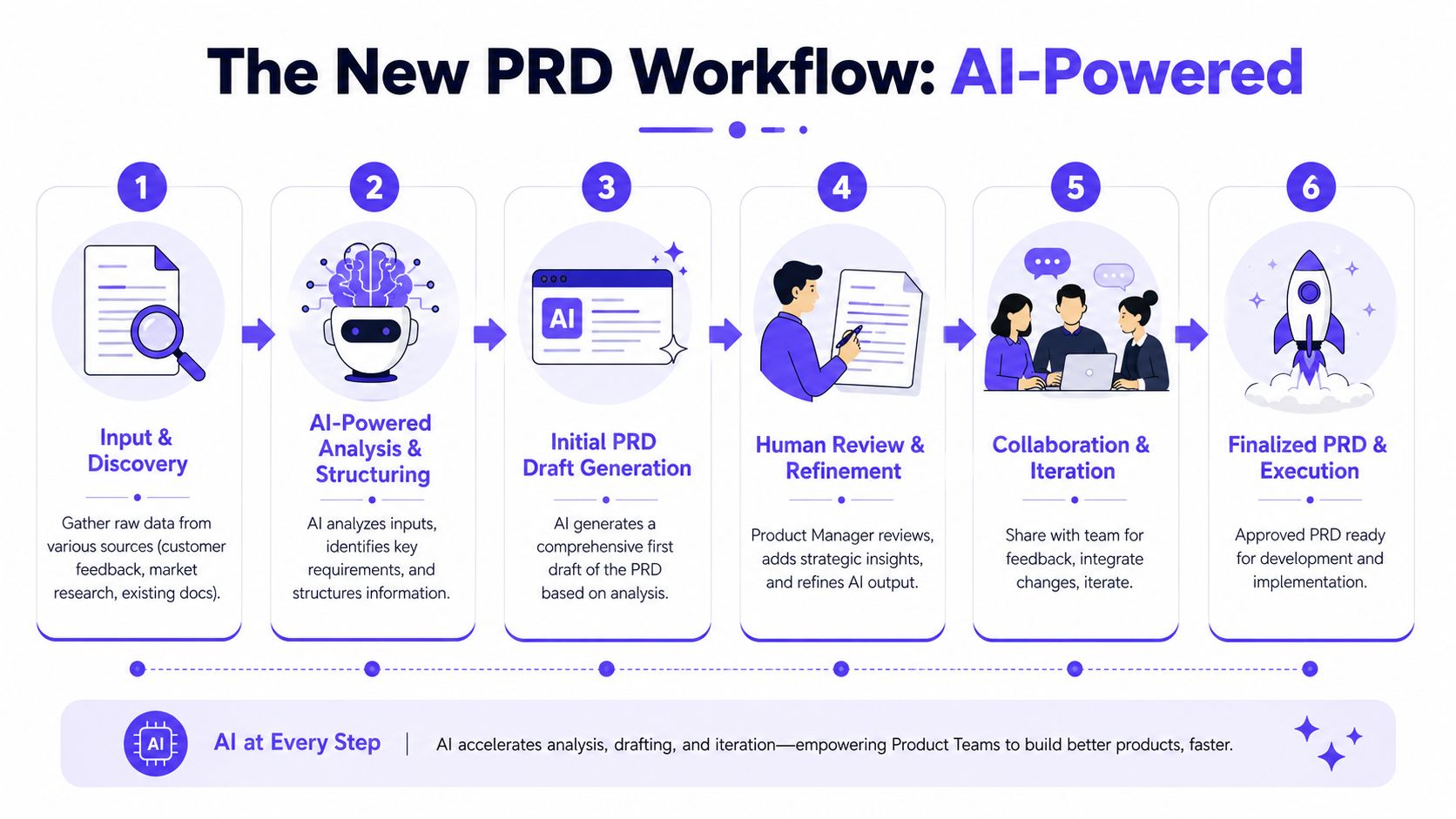
What modern artifact generation changes
A good AI-assisted PRD gives the team a structured draft built from actual inputs. That usually means existing product flows, prior decisions, customer evidence, constraints, and known patterns in the interface.
The practical benefit is simple. Fewer details stay trapped in one person's head. Flows, edge cases, and testable expectations can show up earlier, when they are still cheap to fix.
I have seen this shift reduce a common failure mode I call prompt-shaped delivery. The request starts as a sentence fragment, grows through comments, and reaches engineering as a document that sounds complete but still forces everyone to infer intent. AI helps when it formalizes context. It hurts when it gives loose requests a false sense of precision.
What the new workflow looks like
Teams using AI well usually follow a sequence like this:
Collect the source material: Pull in the BRD, initiative brief, existing screens, support themes, and prior decisions
Capture product reality: Use current flows and interface behavior as constraints for the draft
Generate the first artifact: Create a PRD draft with requirements, user flows, assumptions, and edge cases
Review the weak spots: Product, design, and engineering resolve ambiguities, scope cuts, and missing rules
Prepare downstream outputs: Turn the approved PRD into tickets, test scenarios, and implementation references
This approach works because the AI is drafting from something the team can inspect. It is no longer guessing from a meeting summary or a Slack paste.
Inputs still matter. Voice notes, call recordings, and narrated walkthroughs can help capture context early, and tools based on Whisper AI technology can turn that raw material into text the team can review. Raw capture is only step one. Someone still has to shape it into product logic.
If you want to compare AI PRD solutions, use one test first: can the system build from your actual product context, or is it just expanding a prompt into fluent filler?
A first draft has value when it preserves decisions, constraints, and real product behavior. Without that, it is only formatted ambiguity.
How to Generate a Context-Aware PRD with Figr
A PM gets a feature request on Monday. By Tuesday, design has mocked a happy path, engineering has spotted three missing dependencies, and someone has pasted a Slack thread into an AI tool asking for a PRD. The output looks polished. It also misses the current flow, ignores existing components, and invents behavior the product does not support.
That is the expensive failure mode.
A context-aware PRD starts from the product as it exists today, plus the business intent behind the change. Figr's walkthrough of AI-generated PRDs shows a more grounded approach: capture live app context through a Chrome extension, then draft from the actual product instead of a loose prompt or meeting summary. The difference shows up fast in review. Fewer invented states. Fewer “that's not how it works” comments. Less rework disguised as clarification.
A practical workflow Product Managers can use
Step 1. Start with the business case.
Bring in the BRD, feature brief, or initiative note. Keep the objective visible while drafting. If the problem statement is fuzzy at this stage, the PRD will read clearly and still send the team in the wrong direction.
Step 2. Pull in the current product flow.
Capture the screens, states, and adjacent paths that shape the user journey. Do not stop at the target screen. Many requirement gaps come from ignoring what happens right before or right after the feature.
Step 3. Add the supporting context.
Include prior decisions, relevant docs, and design files. Add enough history to explain why the product works this way today. AI can draft around constraints only if those constraints are present.
Step 4. Ground the draft in system reality.
Map components, variants, and tokens already in use. This keeps the PRD tied to patterns the team can ship, rather than generic UI language that sounds plausible but breaks the existing product.
Step 5. Generate the draft and review for failure points.
Ask for user flows, rules, edge cases, and acceptance criteria. Then review the draft like a PM, not like an editor. Look for missing dependencies, policy gaps, state changes, and places where the tool guessed.
Step 6. Turn the draft into a working spec.
Product tightens scope. Design checks interaction logic. Engineering validates feasibility and sequencing. The document becomes useful when each function can point to a decision, not when the prose sounds finished.
An AI design tool for product teams helps when it builds from the existing product context your team already has to manage. That is the line between assisted documentation and polished fiction.
What good output actually depends on
The teams that get value from AI-generated PRDs do one thing consistently. They treat the model like a fast drafter with poor judgment unless proven otherwise.
Unstructured prompts hide costs because they defer the hard thinking until review. The missing rule shows up in grooming. The invented state appears in design QA. The forgotten dependency lands in sprint spillover. A context-aware PRD pulls those issues forward, where they are cheaper to fix and easier to assign.
Prompt quality matters. Context quality matters more.
Mapping the Full Product Story with a Visual Context Graph
A PM drops a Slack message that says, "Add admin approval before publish, keep the current flow, and make it work like permissions." Design reads that as a modal. Engineering hears a new workflow state. QA assumes role-based rules already exist. Everyone starts with the same prompt and builds a different product in their head.
That is the gap a visual context graph closes.
The difference between a grounded PRD and polished guesswork usually comes down to one thing. Whether the system can see the product as an interconnected set of screens, flows, rules, components, and constraints. A prompt gives fragments. A context graph gives structure.
Figr calls this structure the Visual Context Graph, but the underlying idea applies beyond one product. AI can draft useful requirements only when it has access to the product's actual memory, not just the latest request.
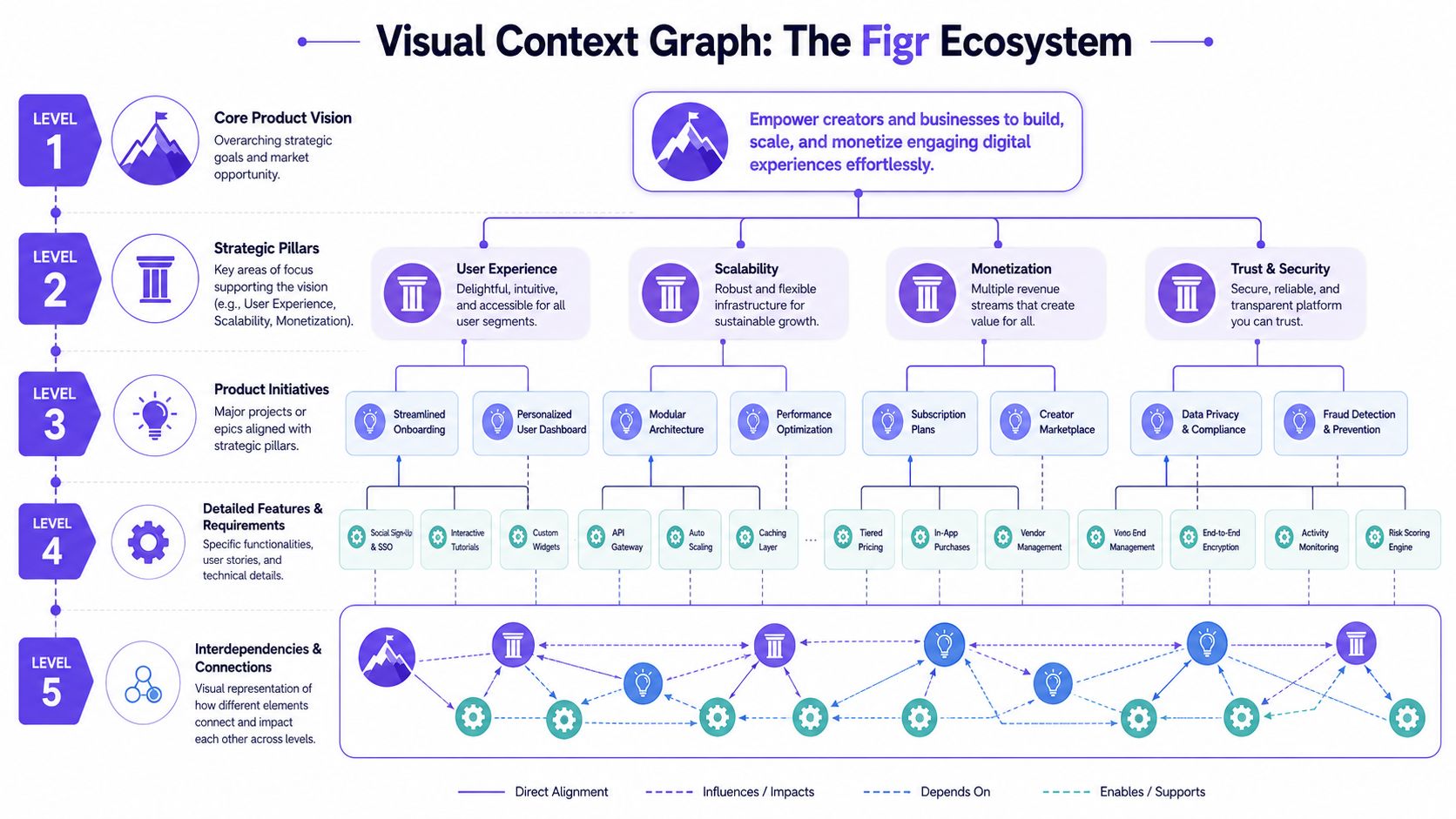
The five layers that matter
A practical context graph usually needs five layers:
Visual context: What the product currently looks like across screens, variants, and states
Behavioral context: How users move through the product, including branching paths and state transitions
Design system context: The components, tokens, variants, and usage rules already in place
Product knowledge context: The PRDs, research, decisions, trade-offs, and open questions behind the experience
Implementation context: The constraints created by the existing code architecture, APIs, permissions, and system setup
Miss one layer and the cost shows up somewhere else.
If visual context is missing, the draft invents UI that does not match the product. If behavioral context is thin, it skips edge cases and fallback paths. If implementation context is absent, the spec reads cleanly and still fails in delivery. This is why unstructured prompts feel fast at the start and expensive by the end. They hide missing context until design review, estimation, or QA forces the team to surface it.
Why component mapping matters
One of the highest-value parts of this model is component mapping. The system needs to know which components already exist, how they behave, and where they are allowed to be used. Figr's explanation of component mapping in AI design agents shows why this matters. It ties generated output back to the existing design system instead of letting the model improvise plausible but unusable interface patterns.
I have seen this failure mode often. The draft sounds smart, the flow reads clearly, and then the team realizes the spec assumes a table pattern that does not exist, a permission model the backend cannot support, or a state change no one accounted for. The issue is not writing quality. The issue is broken context.
A visual context graph reduces that kind of rework because it gives the spec a memory of the product. It keeps business intent, user behavior, interface patterns, and technical constraints connected in one system. That matters even more when teams are replacing docs with prompts. A prompt can start the conversation. It cannot hold the full product story together once trade-offs appear.
Structured documentation still matters for the same reason architecture diagrams matter. Teams need a shared map of what is true, what is decided, and what must stay consistent. AI helps most when it drafts against that map instead of guessing around it.
FAQ
Do I always need both a BRD and a PRD
No.
A team shipping a small, low-risk change with clear stakeholder alignment usually does not need both. A short brief, a ticket with acceptance criteria, or a lightweight spec can be enough.
The trouble starts when teams skip structure before alignment exists. A Slack thread can look fast because everyone is responding in one place, but it hides the actual gap. One person is talking about the business outcome, another is talking about interface behavior, and engineering is guessing at edge cases. That is how a simple request turns into rework.
Use a BRD when the business decision is still being shaped. Use a PRD when the business goal is agreed and the team needs clear product behavior, scope, and constraints.
Who usually writes the BRD and the PRD
The BRD usually comes from business stakeholders, strategy leads, or a business analyst. The PRD is typically owned by the Product Manager, with design and engineering shaping the details.
Ownership matters less than decision quality, though. I have seen well-written documents fail because no one knew who had authority to resolve trade-offs. If sales wants flexibility, compliance wants control, and engineering needs a simpler rule set, the document needs a clear owner who can turn competing input into one decision.
A prompt cannot do that on its own. It can summarize opinions. It cannot assign accountability.
Can a PRD replace a BRD
Sometimes, but only when the business context is already stable and the scope is narrow.
In early-stage teams, one document often carries both layers because the same few people are making company, product, and delivery decisions together. In a larger organization, combining them too early creates confusion. The business case gets buried inside feature detail, or the product spec inherits assumptions that were never approved.
That is the core distinction. A BRD aligns people on why the change should happen and what outcome the business needs. A PRD aligns the team on what should be built, how it should behave, and what trade-offs were chosen.
Why do teams skip structured docs and use prompts instead
Because prompts feel cheaper at the start.
A founder sends a message. A PM turns it into a ticket. Design drafts a flow from that ticket. Engineering fills in the blanks during grooming. Nobody meant to replace documentation. It happened one shortcut at a time.
The cost shows up later. Teams revisit decisions they thought were made. Stakeholders disagree on what was promised. Engineers build for the literal wording of a message while the requester expected the intent behind it. The work moves, but alignment does not.
That is why a core problem in the PRD vs BRD debate is not just document confusion. It is the habit of replacing both with scattered prompts and hoping the team will reconstruct the missing context from memory.
What should I fix first if my team is confused
Start with the next unresolved decision.
If the team is debating business priority, funding, stakeholder alignment, or expected outcome, write the business requirement first. If the team agrees on the goal but keeps tripping over behavior, scope, edge cases, or release expectations, write the product requirement first.
If neither document exists and work has already started, do not try to rebuild everything at once. Capture the decisions people are actively making now. Name the owner, the user impact, the constraints, and what is out of scope. Then turn the recurring Slack questions into structured fields so the same ambiguity does not come back next sprint.
Good teams do not document more. They document the decisions that would otherwise be argued three times.