

A Tuesday standup, and someone drops a chat window into the room with three jobs in one sentence: file the bugs from yesterday's session, rewrite next quarter's roadmap, and send the customer an apology. That scene is hypothetical, written to illustrate a pattern rather than recalled from a specific meeting. By Thursday the assistant has invented a release status that never existed, and two people have quoted it in a planning doc.
The cost isn't the wrong sentence. It's the credibility that sentence borrowed. An assistant with no stated job, no stop condition, and no boundary on what it can change doesn't fail once. It spreads a wrong fact into three documents, then leaves the team arguing about whether the tool is useful instead of which step broke. Every extra action it can take multiplies the review work a person has to do later.
The fix starts before the prompt. This guide covers how to create an AI agent by first deciding whether the task needs one at all, then giving it one measurable job, a short tool list, hard action limits, and a scorecard that judges finished tasks rather than fluent replies. You'll come away with a build sequence, a rollout ladder, and the checks I'd run before an agent touches anything it can't undo.
When the Task Needs an Agent
An AI agent is a language model plus tools, a plan, feedback from its environment, and a way to judge whether the work is finished. The standup failure wasn't a model problem. Call it the Loop Without a Fence: one general assistant, no defined job, no stop condition, and no limit on what it can change.
Anthropic's guidance on building effective agents draws the distinction that matters. A workflow is predefined code paths that orchestrate models and tools. An agent lets the model dynamically direct its own process and choose which tools to use. That freedom buys messy, unpredictable multi-step work. It also costs more, runs longer, and lets small mistakes stack before anyone notices.
The Tradeoff Teams Skip
Autonomous behavior is priced in compounding errors. A workflow that misfires at step three stops at step three. An agent that misreads a ticket on step one can carry that misreading through retrieval, drafting, and a tool call before a human sees anything. Accept that risk only when the path can't be mapped in advance.
Most product teams don't start there. They start with a model call that answers a question, add fixed steps where the process is known, and only then hand planning to the model. Reaching for autonomy on day one because the model can call tools is how a two-week prototype becomes a six-month reliability project. The cost shows up as review time: every extra action an agent can take creates another place for a person to check the output and reconstruct what happened.
Working rule: start with a plain model call, add deterministic steps where the order is known, and hand planning to the model only when the path can't be mapped.
Chatbot, Workflow, or Agent by Task Shape
| Task shape | Setup | Why it fits | First control |
|---|---|---|---|
| One factual question | Chatbot with retrieval | The path is a single answer | Cite an approved source |
| Known sequence of steps | Workflow | Code should own the order | Fixed steps and schemas |
| Branching, but the rules are known | Workflow with a model at decision points | The model classifies and code routes | Enum or validated output |
| Open multi-step work with tools | Agent | The next step isn't fully known | Step cap, tool allowlist, eval set |
| Irreversible write, send, or spend | Workflow or agent plus a person | Errors compound and can't be undone | Human approval before the action |
The bottom two rows are where teams get hurt. An agent drafting a reply is recoverable. An agent that sends it, refunds money, or changes a customer record is not. The control that makes those cases safe is a person standing between the proposal and the action.
The Rule I Use Before Writing Any Code
Build an agent only when three conditions hold: the path isn't fully known in advance, the work takes several steps, and a finished task can be scored. Miss any one and a workflow with a model at the decision points will be cheaper to run and easier to debug. If you're still separating these categories in your head, agentic AI explained for product teams is a useful next read before you commit a sprint to one.
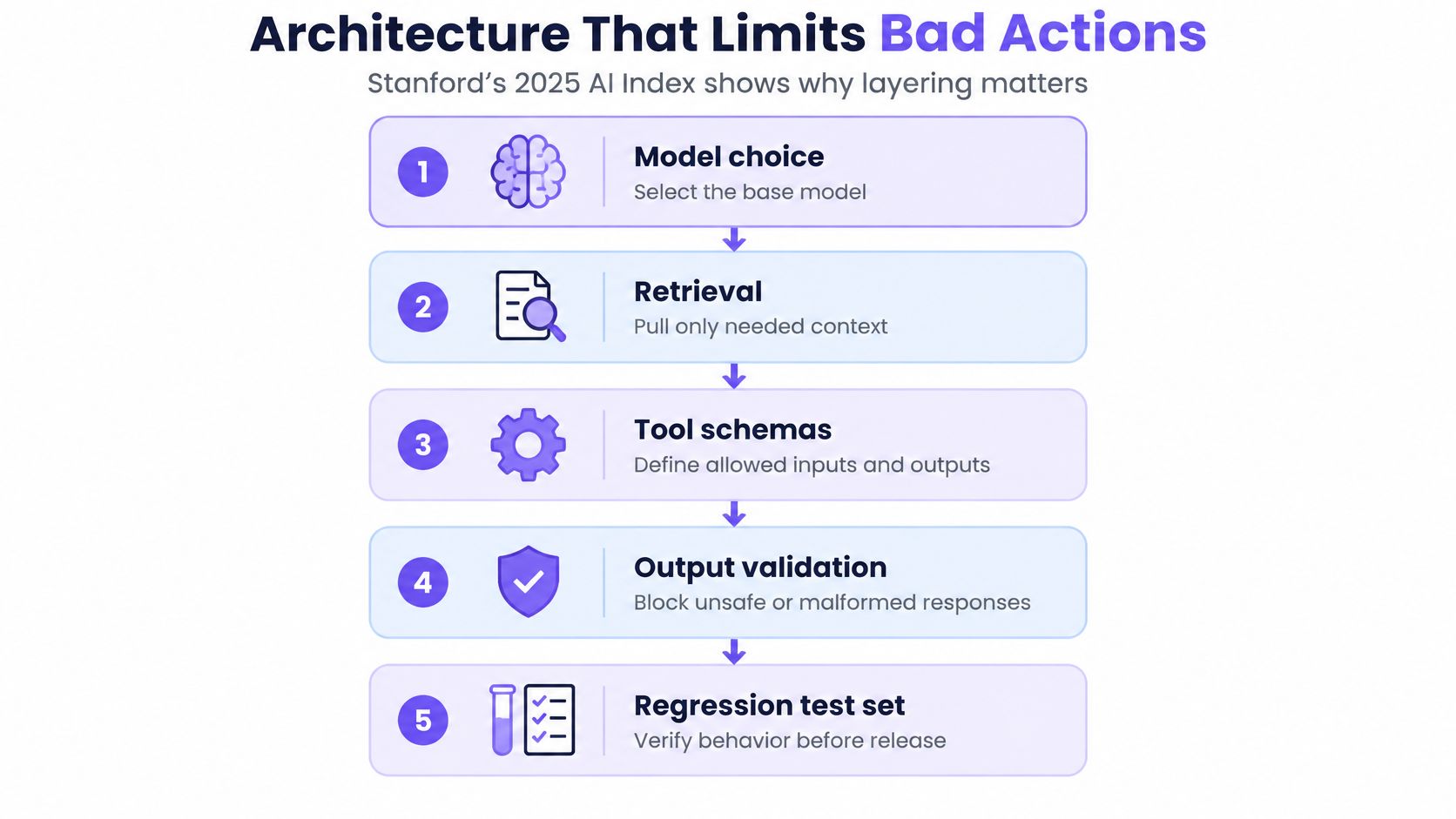
Architecture That Limits Bad Actions
Model choice is the layer everyone argues about and the least interesting one. The 2025 AI Index from Stanford HAI shows that a newer foundation model can lift reasoning, multimodal understanding, or software-engineering performance without any change to the surrounding workflow. MMMU, GPQA, and SWE-bench, all introduced in 2023, improved by 18.8, 48.9, and 67.3 percentage points within a year.
The same summary keeps the ceiling in view, which is why the architecture has to carry weight the model can't.
Top systems reached 8.80% on Humanity's Last Exam, 2% on FrontierMath, and 35.5% on BigCodeBench, against a 97% human standard on that coding benchmark. Capability is climbing fast. Reliability doesn't arrive on the same schedule, and the gap is exactly what the layers around the model exist to cover.
| Benchmark | Reported figure | Context |
|---|---|---|
| MMMU | +18.8 percentage points in one year | Introduced 2023, Stanford AI Index |
| GPQA | +48.9 percentage points in one year | Introduced 2023, Stanford AI Index |
| SWE-bench | +67.3 percentage points in one year | Introduced 2023, Stanford AI Index |
| Humanity's Last Exam | 8.80% top system score | Stanford 2025 technical-performance summary |
| FrontierMath | 2% top system score | Stanford 2025 technical-performance summary |
| BigCodeBench | 35.5% top system score | Human standard 97%, Stanford 2025 summary |
Retrieval and Schemas Do the Guarding
Pull context only from sources your team owns and trusts, and pass typed objects between steps instead of free text. OpenAI's agent safety guidance recommends fixed schemas, required field names, enums, or validated JSON for data moving between agent nodes, because unrestricted channels let an attacker smuggle instructions into a later step. A classification node should return an approved category and a message identifier, not the entire email forwarded as instructions to the action node.
That single design choice removes a large share of prompt-injection surface. It also makes failures readable, since every hop has a shape you can validate.
Validate Numbers and States Deterministically
If the output is a number, a date, a status, or a permission, check it in code. Let the model extract the intent and hand the arithmetic, the state transition, and the database write to something that returns the same answer every time. A model asked to compute a refund total will eventually produce a plausible wrong number, and no prompt wording fixes that.
Practical rule: the model decides what to do. Your code decides what actually happens.
Keep a Regression Set After Every Swap
An upgrade can improve the prose while leaving the failure that hurt you untouched. Picture a team shipping a newer model into a subscription agent. The drafts read better, reviewers approve faster, and the agent still calls the cancellation tool when the customer asked about pausing. The fault sits in an ambiguous tool name and a missing precondition, and a longer prompt won't find it.
Keep a small set of real cases, rerun it on every model or tool change, and treat a clean run as a release condition rather than a nice-to-have. When the agent surfaces in a product surface, Figr's breakdown of AI UX patterns covers how those states get communicated to users.
How to Create an AI Agent Step by Step
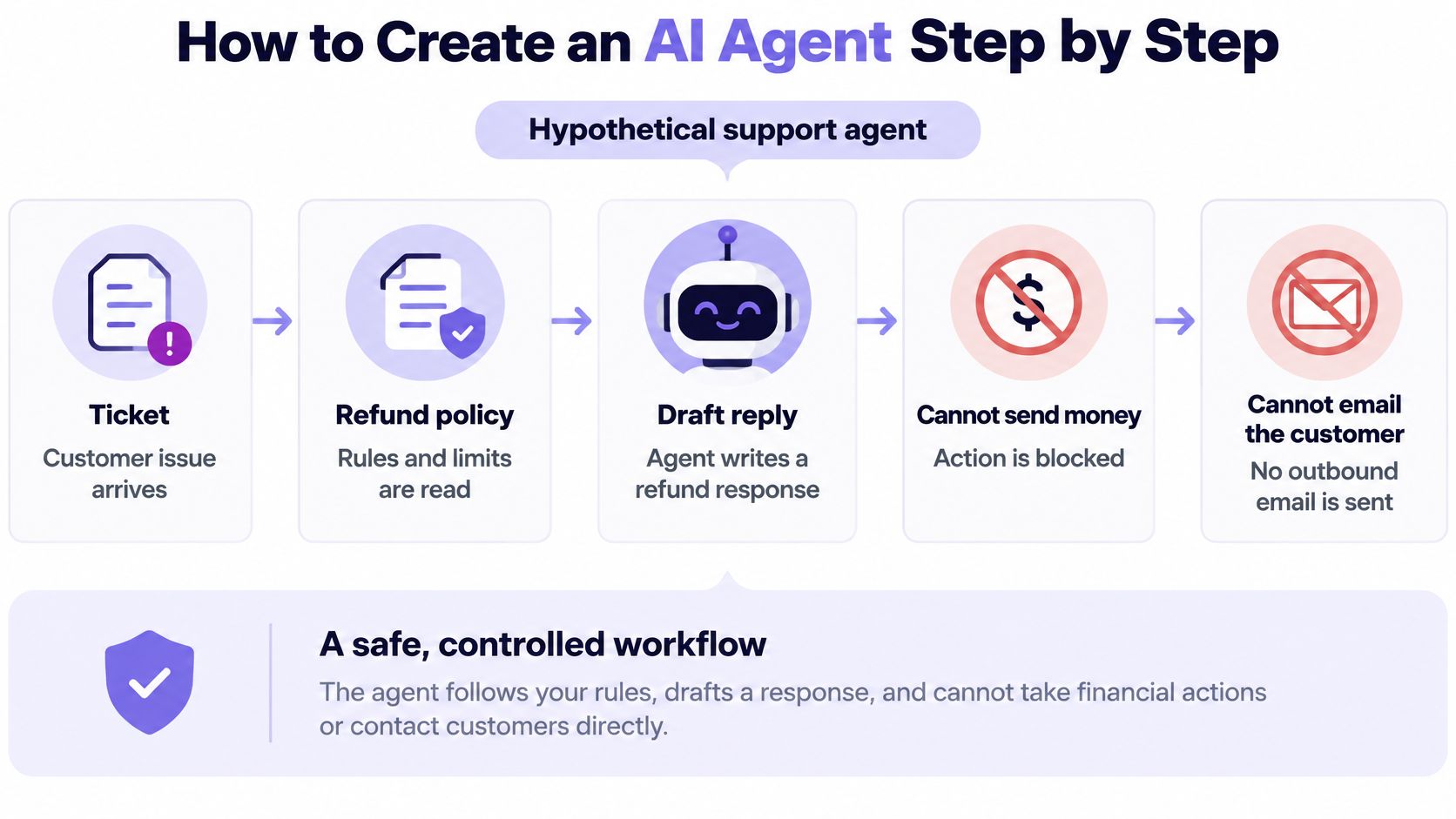
Take one job and one job only. Say a support team wants an agent that drafts refund replies from the ticket and the current policy. It reads the ticket thread and the policy, it writes a draft, it cannot move money, and it cannot email the customer. That example is hypothetical, and the constraints are the whole point.
The build is a loop around a single controlled job, which is what the workflow below holds together.
Step 1. Define the decision.
Name the user, the one job, the success metric, and the actions the agent must never take.
Usual slip: a vague job that nobody can score.Step 2. Capture context.
Gather the refund policy, ten real tickets, the owner of each source, and how fresh each source must be.
Context is where most builds break, and this GTM template for product managers covers what to collect before a prompt exists.
Usual slip: pulling a policy page that changed last quarter.Step 3. Choose the lightest setup.
Start with a prompted model. Move to fixed steps once the order is clear. Use free planning only while the path stays unknown.
Usual slip: starting with an autonomous agent because it demos better.Step 4. Attach only the tools this job needs.
Give each tool a schema, a permission level, and a read or write label.
Usual slip: granting a write tool because it might be useful later.Step 5. Write the prompt as operating rules.
State the goal, the allowed tools, the stop conditions, and when to ask a person.
Usual slip: a long persona with no stop rule anywhere in it.Step 6. Score twenty past tickets before anyone relies on the draft.
Run the historical cases and record completion, tool errors, and policy mistakes.
Usual slip: judging by how fluent the replies sound.Step 7. Ship read-only to five people.
Log every model and tool call, and widen scope only after the error rate holds on the autonomy ladder.
Usual slip: launching to the full queue on day one.
What Done Looks Like
For the refund draft, done means three things hold on every case in the set. The correct clause of the policy is cited in the draft, the dollar amount is left blank for a person to fill in, and no email leaves the system. Anything short of that is a draft you can't route to a queue.
The reason to insist on all three is that partial success hides the failure that matters. A reply that cites the right policy and suggests a figure is worse than a reply that says nothing, because it looks reviewable.
How to Score an Agent That Acts
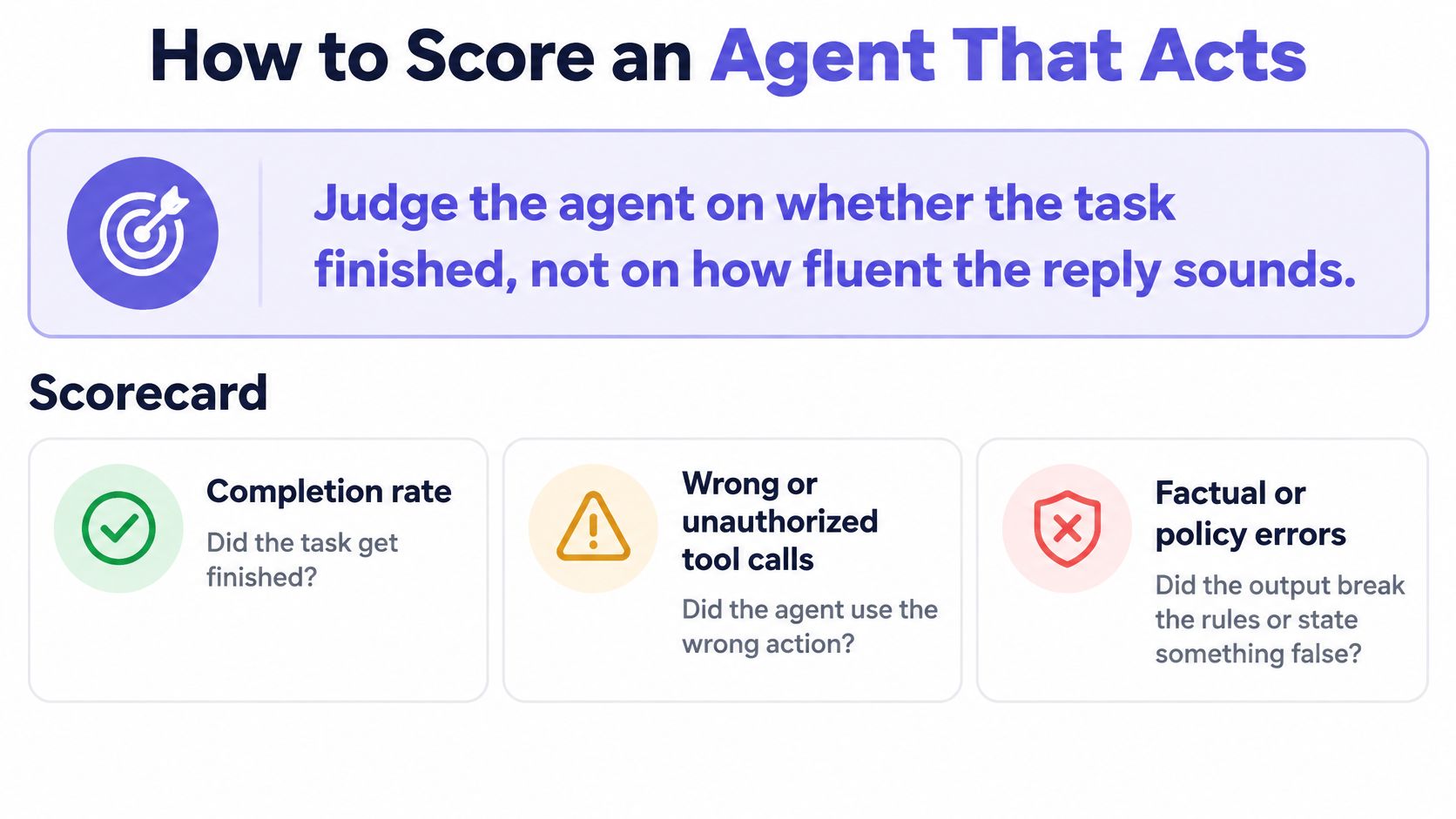
Judge the agent on whether the task finished, not on how fluent the reply sounds. That's the scorecard in one line, and it's the part demos skip because a polished paragraph photographs better than a completion rate.
Build the scorecard from seven measures, all of which cost something real:
- Completion rate: the share of cases where the task finished.
- Wrong or unauthorized tool calls: the count of actions a policy would have blocked.
- Factual and execution errors: wrong policy, wrong record, failed write.
- Latency: how long the finished task took, end to end.
- Cost per successful task: spend divided by completed tasks, not by attempts.
- Escalation rate: how often a person had to finish the job.
- Approval requests: how often the agent asked before acting.
The Result That Justifies Time and Step Caps
Stanford's AI Index technical performance summary identifies RE-Bench, introduced in 2024, as a rigorous test of agents performing complex, multi-step tasks. With a two-hour budget, leading AI systems scored four times higher than human experts. Raise the budget to 32 hours and human experts outperformed AI by a 2-to-1 margin.
That reversal is the most useful thing in the report for anyone building. Apparent capability depends on task duration, planning persistence, tool use, and error recovery. Cap the steps and the clock, then measure what the agent does inside the cap.
The Autonomy Ladder Most Build Guides Skip
- Rung 1. Read-only recommendations.
The agent proposes, a person acts. Promote when the right source gets cited on most cases and the proposals stop needing heavy edits. - Rung 2. Supervised execution.
The agent acts and a person approves each consequential step. Promote when approval requests fall without a rise in reversals. - Rung 3. Narrow autonomy.
The agent acts inside one job and one tool set. Promotion requires a stable error rate across a full week of real cases.
Test tool selection separately from final text, and replay the trace after every miss to see which step diverged. Airbyte's guide to running AI agents in production makes the same point from the operations side: failures often start in integrations, stale data, authentication, or missing observability rather than in the model's prose.
Here's a boundary case worth writing into your test set. Say the agent reviews a checkout flow and proposes a cleaner button hierarchy while ignoring live drop-off counts that show the leak is upstream. The screen looks finished. The task failed. As more teams wire tools into these systems, every unchecked action multiplies review work downstream, which is why cost per successful task beats demo quality as a decision metric. Track that number with the guardrail metrics for product teams you already report on.
Permissions Data and Failure Modes
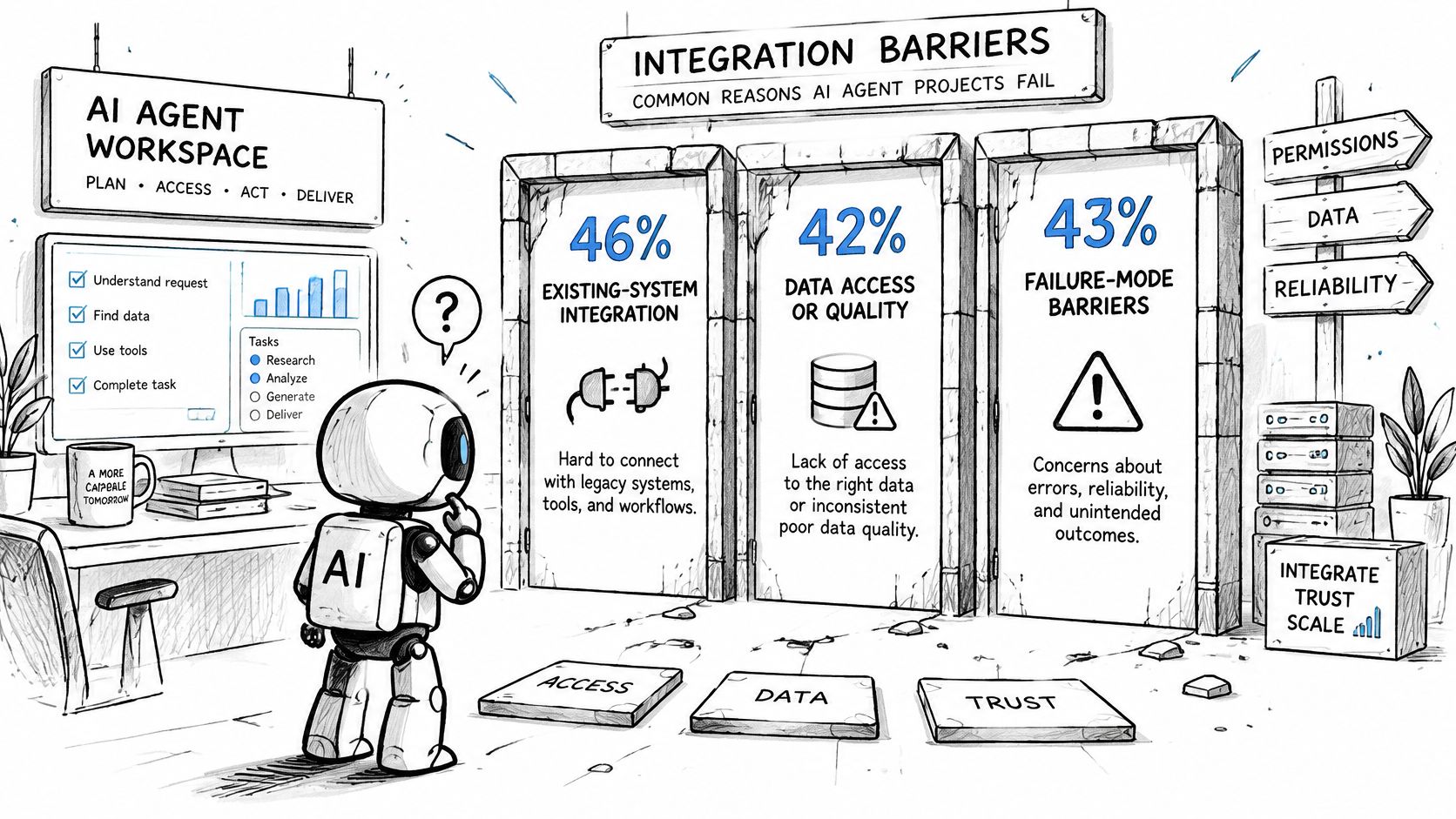
Projects stall on plumbing more often than on model quality. The State of AI Agents report from Anthropic finds that 46% of organizations name existing-system integration as a primary obstacle, 42% cite data access or quality, and 43% cite implementation cost. Those figures describe where projects stall, not proof that agents can't work.
| Obstacle | Share of organizations |
|---|---|
| Existing-system integration | 46% named as a primary obstacle |
| Data access or quality | 42% |
| Implementation cost | 43% |
The report also flags the failure modes that show up after launch: stale data, broken pipelines, missing observability, and authentication complexity. None of those are prompt problems, and none of them get fixed by a better model.
Name Four Owners Before You Build
- System owner: the person accountable for the agent itself and its uptime.
- Data owner: whoever owns each source the agent reads and its refresh rules.
- Action owner: whoever signs off on each write, send, or spend the agent can perform.
- Incident path: the named route for paging someone when the agent does the wrong thing at scale.
Treat retrieved pages, tickets, and emails as untrusted text. Enforce least-privilege authorization in the target system rather than in the prompt, sandbox execution, cap steps and spend, and log every tool call with enough context to reconstruct what the agent saw. Permission changes deserve their own product surface with safeguards against accidental access changes sitting in the admin view.
Practical rule: if the agent can't prove which source it read and when, it isn't ready to write.
The Revoked-Access Failure
Consider a hypothetical case worth testing explicitly. The agent emails a customer using a ticket whose access was revoked yesterday. The reply is accurate, the policy is current, and the send still shouldn't have happened. The fix is a freshness check on the source plus a hard deny when permission is missing, not a longer prompt.
Conflicting sources and tenant isolation should be included in the same test pass. Two systems will eventually disagree about the same customer, and an agent that automatically picks one is a data incident waiting for a date.
Map the Launch Check to the Lifecycle
NIST's AI Risk Management Framework says developers, users, and evaluators should address trustworthiness across pre-design, design and development, deployment, use, and test and evaluation. Its characteristics are validity and reliability, safety, security and resilience, accountability and transparency, explainability and interpretability, privacy enhancement, and fairness with harmful bias managed.
In practice that means a launch checklist with documented intended use, data and permission boundaries, adversarial and failure testing, post-deployment monitoring, incident response, and reassessment whenever a tool or model changes. For a first release, narrow and read-only beats broad and autonomous every time.
Run One Job Before You Add Autonomy
Pick one job this week that already has a paper trail. Refund replies or a recurring ticket type both work, because the historical cases already exist and someone in the room can recognize a good outcome.
Write a one-page spec. It names the user, the success metric, the forbidden actions, the tool list, the step and spend caps, and ten historical cases. Then run it read-only and score it with the same measures you'd use in production.
Track three numbers: completion, escalations, and cost per successful task. Hold the second job until those three stay stable across a full week of cases. The basic gist is this: scope is granted by evidence, not by confidence.
If the job touches a product flow, write the user flow, the state diagram, the edge case map, and the acceptance criteria before anything visual. That's the order we build in at Figr, where the agent produces those artifacts before it produces screens.
In short, ship the fence before the autonomy. The first measured result decides the next rung, and that's what I'd show a skeptical stakeholder instead of a demo.
Frequently Asked Questions
Do I need an AI agent, or is a workflow enough?
A workflow is usually enough when the steps are known. An agent fits when the path isn't fully known, the work takes several steps, and a finished task can be scored. If you can't write down what a completed task looks like, you're not ready to hand over planning.
How many test cases should I use before launch?
Start with ten to twenty real past cases for one narrow job, then widen the set when new failure types appear. That's a practical starting point from this guide, not a published standard. The point is coverage of failure types rather than volume, so add a case every time something goes wrong.
How do I know when an agent can act without approval?
Keep approval on for writes and any irreversible action, and widen autonomy one rung at a time only after completion and error rates hold steady across a full week of real cases. Approval requests falling while reversals stay flat is the signal. Falling approvals with rising reversals means the test set is too kind.
What should a first release include?
Read-only access, one narrow job, a forbidden-action list, step and spend caps, full logging, and a small user group. Each item maps to a control worth building anyway. The first release is a measurement instrument, and its job is to tell you whether the second release deserves more scope.
The hardest part of an agent project isn't the prompt or the model, it's the context the agent reasons over, and that's where Figr earns its place. It reads your live product, design system, docs, and analytics, then produces user flows, state diagrams, edge case maps, and acceptance criteria you can hand to a build team and to the people who'll review the agent's output. Start with a one-page spec and let the context do the rest at Figr.