
Google Stitch has changed quickly. It is no longer just a prompt-to-screen experiment. Google's 2026 design-canvas update describes project context, DESIGN.md, interactive prototypes and developer-tool exports; its real-time design update adds ways to steer the work as it is generated.
That makes the search for a Google Stitch alternative more interesting. The right alternative depends on what happens after the first screen: do you need to stay inside an existing product, move into Figma, generate working code, explore several directions, or ship a full app?
This guide compares the strongest options for those different jobs. If you want a broader market view first, see our guide to AI design tools and our comparison of AI prototyping tools.
Quick take: choose Figma Make if Figma continuity is the main requirement, v0/Replit/Bolt/Lovable when working code matters most, and Figr when new screens need to fit an existing product and design system. You can try Figr free.
Google Stitch alternatives at a glance
| Tool | Best for | Main difference from Stitch | What to check |
|---|---|---|---|
| Figr | Existing SaaS products | Product context, flow reasoning and Figma-ready design | Review component fit and missing states |
| Figma Make | Figma-native teams | Functional prototypes inside the Figma ecosystem | Test the artifact you need in Figma Design |
| v0 | React-oriented product teams | Code-first UI and app generation | Check code quality and stack fit |
| Replit Agent | Full-stack product building | Design, code, infrastructure, and deployment together | Check app behavior and running costs |
| Bolt | Fast app prototypes | Prompt-to-working app with code and deployment | Check integrations and generated code |
| Lovable | Founders and PMs validating ideas | Working full-stack prototypes rather than design-only output | Validate logic, permissions and data handling |
| Visily | Non-designers | Editable product mockups and flows with a lower learning curve | Confirm export access on your plan |
| Framer | Marketing and web experiences | AI-generated websites that stay editable through publishing | Choose for a website publishing workflow |
Comparing free options? Jump to free plans and limits. Need a closer look at Figr? Read the Figr vs. Google Stitch comparison.
1. Figr: best for designing inside an existing product
Stitch supports rapid UI exploration with project context. Figr focuses on PMs and designers working together on a product that already has screens, a design system and established behavior.
Figr can use product screens, flows, documentation, design-system components and other context before generating new work. That matters for teams where the expensive part is not making a plausible screen. It is making a screen that feels like it belongs in the product, covers the right states, and can continue into the team’s normal Figma workflow.
For PMs and designers working on established SaaS products, this is the main reason to consider Figr as a Stitch alternative. The tool can help move from a feature idea to flows, states and high-fidelity screens while staying grounded in existing product patterns. Designers still review and refine the work; the value is reducing how much context has to be rebuilt from a blank prompt.
See examples in the Figr gallery or explore how Figr fits into Figma workflows.
Choose Figr when: your team already has a product, a design system, and established UX patterns that generated work needs to respect.
If that is your situation, try Figr on one real feature flow and compare the correction work required afterward.
Inspect a Figr example before you choose
The Linear-style catch-up workflow example starts from web capture and screenshots and adds a “Since you left” digest inside an issue list. Open the gallery to inspect its canvas, prototype and different digest states. It is a Figr-created concept, not a shipped Linear feature or a comparison test.
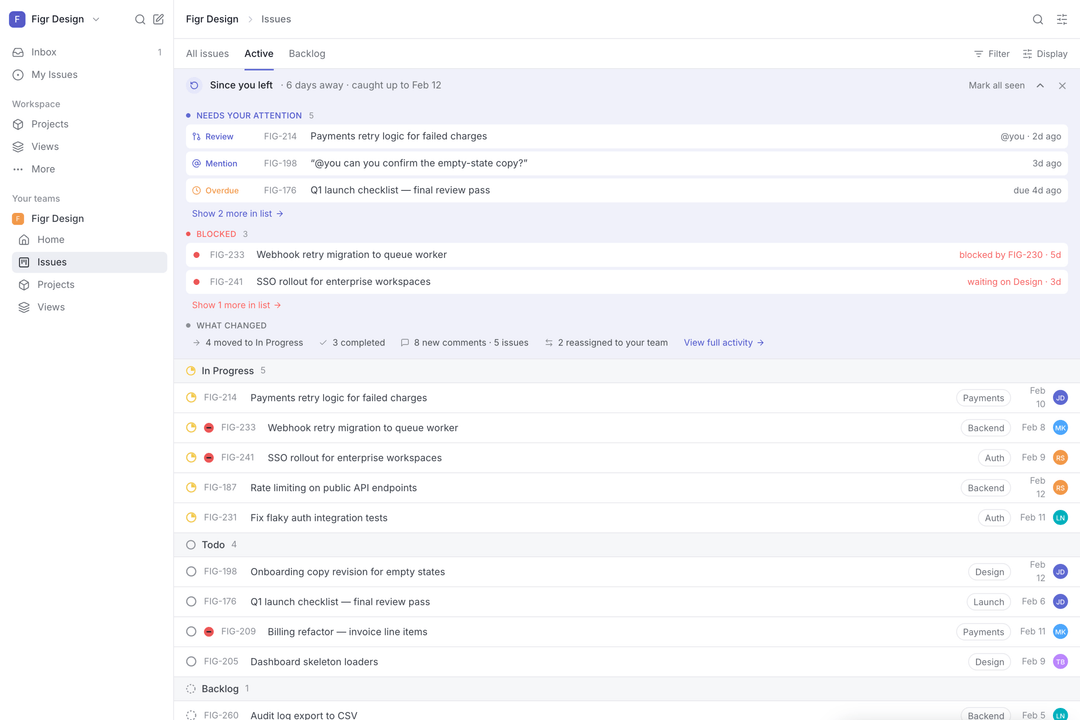
Bring one screen and one feature requirement. Ask Figr to explore the flow and missing states using your product context, then review the result with your designer. Try Figr on your existing product. The free plan includes 10 credits that refresh monthly and Figma export; see current limits.
2. Figma Make: best for teams already centered on Figma
Figma Make turns prompts and existing Figma context into functional prototypes and web apps. Teams can attach designs, components, files and other context, refine the result visually, and keep the work inside the same ecosystem where design review already happens.
That makes Figma Make the most natural alternative when the main requirement is workflow continuity. It is especially useful for teams that want to explore a concept, test behavior and then bring the result back into Figma Design without introducing another design workspace.
Choose Figma Make when: Figma is already the system of record and you want prompt-to-prototype generation close to your existing files and libraries.
3. v0: best for code-first UI exploration
v0 is a strong option when the desired output is not primarily a design artifact. Its strength is generating interfaces and application code that developers can continue working with immediately.
For a technical PM or frontend team, this can shorten the jump from “what should this look like?” to “let’s run it.” The trade-off is that a code-first workflow does not automatically mean the generated experience understands every rule, component or state in an established product.
Choose v0 when: React-oriented implementation speed matters more than staying inside a visual design tool.
4. Replit Agent: best for going from idea to deployed product
Replit Agent goes well beyond UI generation. Its current workflow combines app building, visual design controls, source code, services and deployment in the same environment.
That makes it less of a direct design-tool replacement and more of a product-building environment. If the goal is to prototype a real application with auth, data and backend behavior, Replit can be a better fit than a design-first canvas.
Choose Replit when: you want to build and run the actual application, not only design the interface.
5. Bolt: best for fast working app prototypes
Bolt lets product builders describe an app or website, watch the code generate, preview it, iterate, and deploy. It is useful when a concept needs enough real behavior to be tested rather than simply reviewed as static UI.
The key distinction from Stitch is the center of gravity. Stitch is design-first. Bolt is closer to build-first.
Choose Bolt when: the fastest useful artifact is a working web prototype rather than a design file.
6. Lovable: best for founder and PM validation
Lovable turns natural-language requirements into working applications that can be iterated and published. It is particularly useful when a PM or founder wants to validate a workflow with real states and interactions without waiting for a full engineering cycle.
This is also where Lovable differs from a pure UI generator: the output can include application logic and backend-connected behavior, so the conversation can move from visual preference to product behavior.
Choose Lovable when: you want to validate a complete product idea rather than only compare interface directions.
7. Visily: best for non-designers creating editable product concepts
Visily is designed to make UI exploration approachable for PMs and other non-designers. It can start from prompts, screenshots, diagrams and templates, then keep the output editable on a visual canvas.
It is a good fit for teams that want more structure than a raw generative canvas but do not need a code-first environment.
Choose Visily when: the primary users are PMs, founders or business teams who need to communicate product ideas visually.
8. Framer: best for AI-generated websites
Framer is the strongest fit on this list when the final artifact is a website. Its AI agent can generate page structure, copy and visual sections directly in an editable site project, then the team can refine and publish from the same environment.
Choose Framer when: the job is a marketing site, landing page or web experience rather than a complex application flow.
How to choose the right Google Stitch alternative
Use the downstream workflow as the deciding factor:
- Existing product + design system: Figr.
- Figma-native prototyping: Figma Make.
- React and frontend implementation: v0.
- Full-stack build and deployment: Replit Agent, Bolt or Lovable.
- PM-friendly visual concepting: Visily.
- AI website creation: Framer.
The mistake is comparing these tools only on first-generation quality. A polished first screen can still create a lot of work if the next person has to rebuild it in the team’s real system.
Make the evaluation specific: use the same current screen, feature requirement and design-system references in each tool. Check component fit, loading and error states, permission handling, and whether a teammate can edit the exported result. Record the correction work required before choosing.
Free Google Stitch alternatives: plans and limits
Several tools let you start free, but the useful comparison is whether the allowance covers the workflow you need to test. Check export access and recurring usage limits as well as generation credits. The details below were checked against the linked vendor pages on October 12, 2026.
| Tool | Free entry or evaluation allowance | Important limit to check |
|---|---|---|
| Figr | 10 credits that refresh monthly; three canvases; Figma export | Credit usage depends on the task; design-system access is limited |
| Figma Make / Starter | Limited access through Figma Starter; 150 AI credits/day, up to 500/month | Check seat, library and Make feature access |
| v0 | Free plan with a seven-message daily limit | Check generation allowance and deployment requirements |
| Replit Agent | See current entry-plan allowances | Check Agent usage and the cost of running the app |
| Bolt | Free plan: 300,000 tokens/day, up to one million/month | Free websites retain Bolt branding |
| Lovable | Five build credits/day, up to 30/month | Building, Cloud and in-app AI have different allowances |
| Visily | Starter plan with 300 AI credits/month | Figma import/export and code export are paid-plan features |
| Framer | Free plan; 500 AI credits to try in a workspace without a subscription | A custom domain requires a paid site plan |
Credits, messages and tokens are different units; their counts are not directly comparable. Test one representative task and review the current vendor plan before choosing.
FAQ
Is Google Stitch still just an experimental UI generator?
No. Stitch has expanded into a broader AI-native design canvas with real-time iteration, project context, design-system workflows, prototypes and export paths into developer tools.
What is the best Google Stitch alternative for Figma teams?
Figma Make is the most direct fit if the team wants to stay inside Figma. Figr is worth evaluating when the bigger requirement is grounding new screens in an existing product and design system before carrying them into Figma.
What is the best Google Stitch alternative for code?
v0, Replit Agent, Bolt and Lovable are stronger choices when working code or a deployable application matters more than a pure design artifact.
Is there a free version of Figr?
Yes. Figr has a $0 plan with 10 credits that refresh monthly, three canvases and Figma export. The free plan has usage and design-system limits; see current pricing before planning a larger evaluation.
If your team is comparing AI design tools for an established product, test them on one real flow, not a generic dashboard prompt. Give each tool the same product context and compare how much correction is still required before design and engineering can continue.
Want to test that workflow? Try Figr free.