
FIGR / UI TEMPLATE
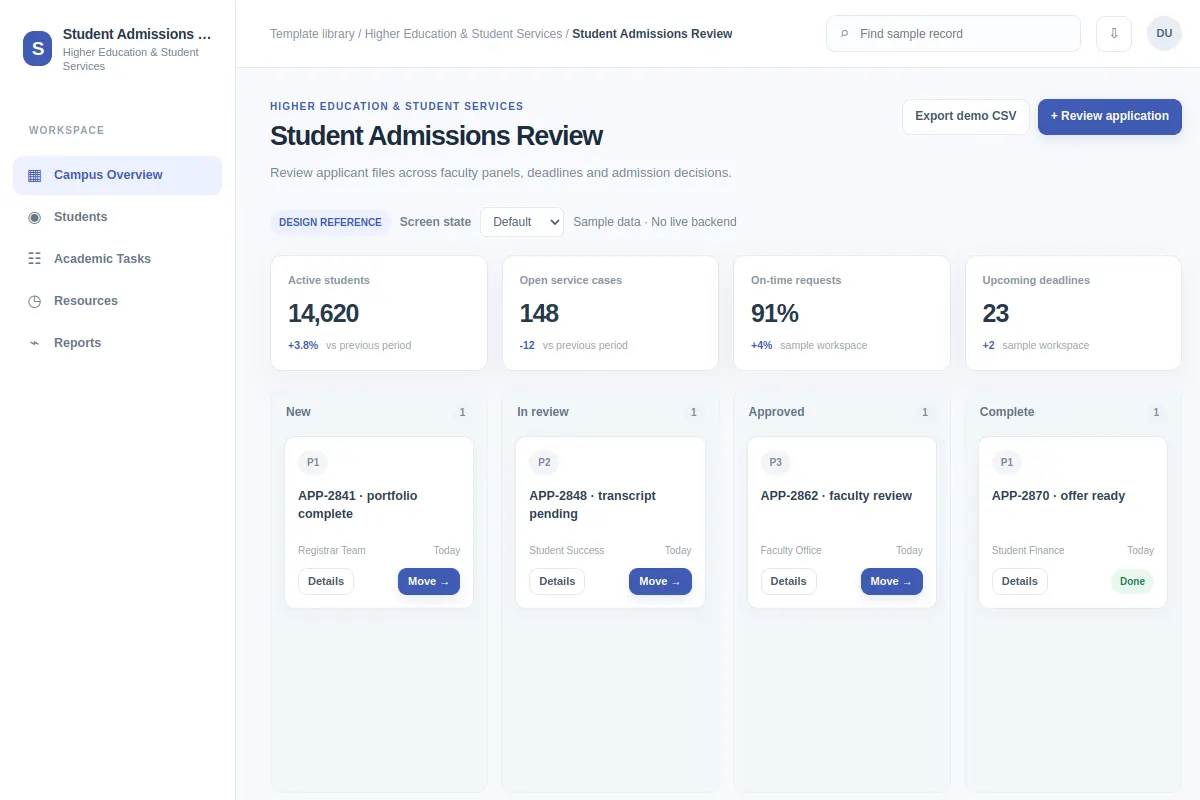
Review applicant files across faculty panels, deadlines and admission decisions.
Use this board screen as a starting point for Higher Education & Student Services software. Adapt it to your existing product and design system. Sample records are fictional.
BUILD ON THIS
Explore this screen, then bring in your own product and design system to shape the next version.
Board
Review application
board product workflow
Default, Selected, Filtered, Empty, Warning, Success
Independent UI reference; no 1mg design system
Review applicant files across faculty panels, deadlines and admission decisions.
Sections: Campus Overview, Students, Academic Tasks, Resources. Main action: Review application. Example: APP-2841 · portfolio complete.
Plan for Default, Selected, Filtered, Empty, Warning, Success and explain what people should do when an action fails.
Campus Overview → Student Admissions Review → Review application
board, status indicators, filters, detail drill-down
Make status, ownership and next action easy to scan.
Test the flow with cases such as APP-2841 · portfolio complete. Plan clear empty, loading, error and permission states.
Adapt this Student Admissions Review workflow to my existing product and design system. Review the default, selected, filtered, empty, warning, success states, explore improved user paths, and produce editable Figma-ready screens.
KEEP EXPLORING
Browse other product UI examples, compare patterns, and pick the direction that suits your product.