
FIGR / UI TEMPLATE
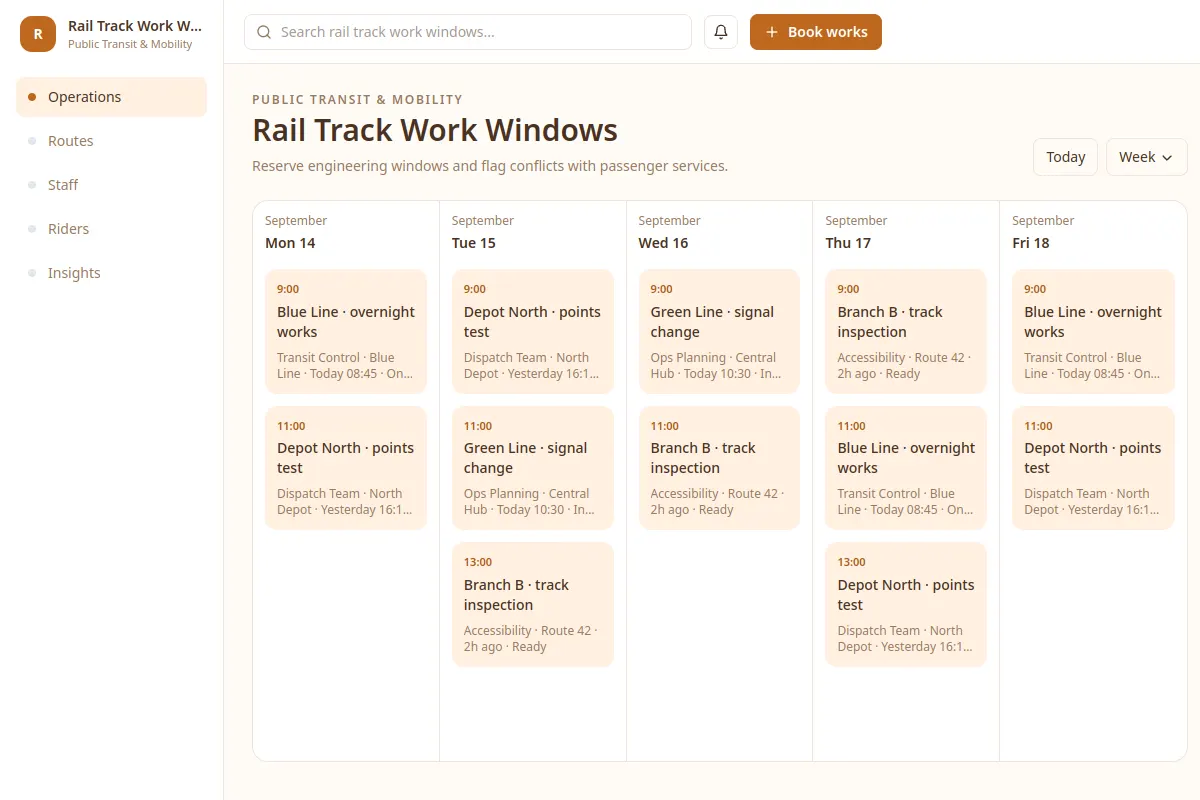
Reserve engineering windows and flag conflicts with passenger services.
Explore this calendar as a reference for Public Transit & Mobility software. Review a real workflow and its UX states, then adapt the design to your product. All sample records are fictional.
BUILD ON THIS
Explore this screen, then bring in your own product and design system to shape the next version.
Calendar
Book works
calendar product workflow
Default, selected, filtered, empty, warning, error and success
Independent product UI reference; no 1mg design system
Reserve engineering windows and flag conflicts with passenger services.
Core sections: Operations, Routes, Staff, Riders, Insights. Key action: Book works. Example records: Blue Line · overnight works; Depot North · points test.
Default, selected, filtered, empty, warning, error and success. Where relevant, cover restricted access, stale data, save failures and conflicting changes.
Operations → Rail Track Work Windows → Book works
calendar, status labels, filtering, record details
Show timezone, capacity and conflicts before confirming a schedule.
Check how the book works task works with example cases like Blue Line · overnight works. Include clear recovery actions when a record is missing or a change fails.
Adapt the Rail Track Work Windows workflow to my existing product and design system. Keep our current screens, components, roles and business rules. Review missing states and edge cases before generating editable screens.
KEEP EXPLORING
Browse other product UI examples, compare patterns, and pick the direction that suits your product.