
FIGR / UI TEMPLATE
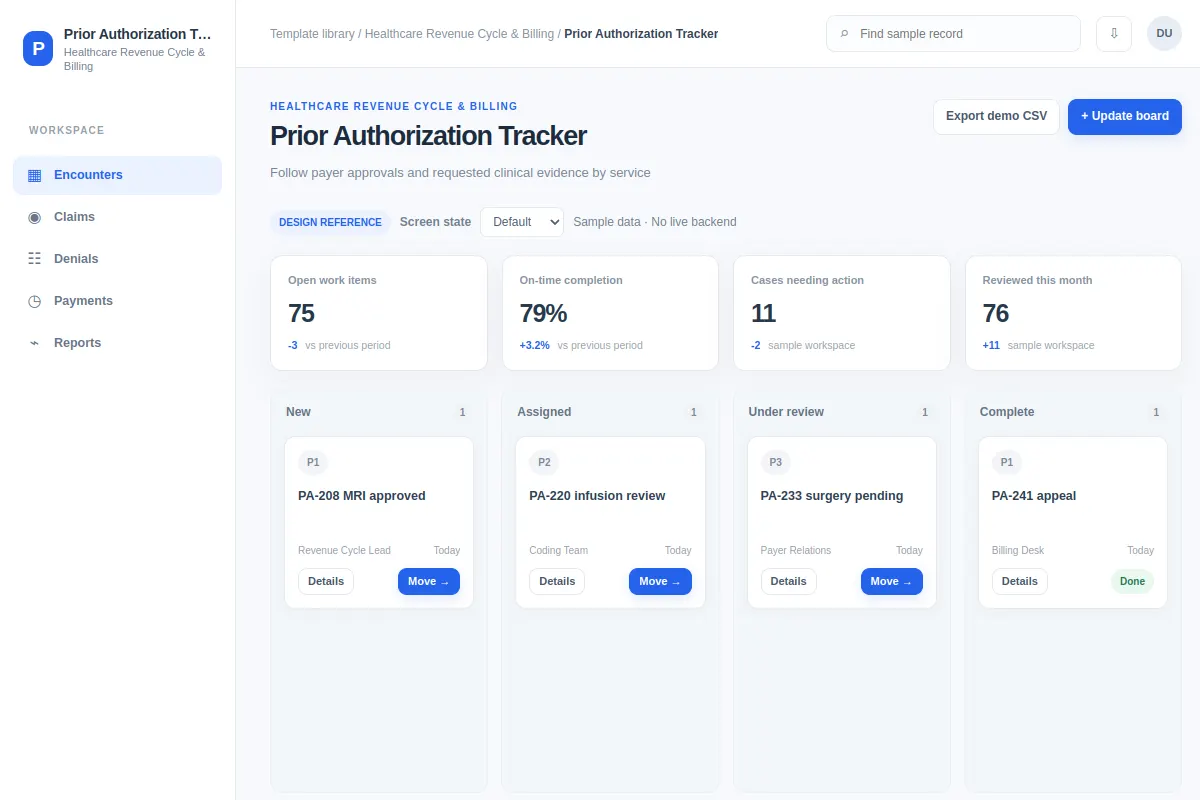
Follow payer approvals and requested clinical evidence by service.
This board offers a reference for teams working in Healthcare Revenue Cycle & Billing products. Review fictional records such as PA-208 MRI approved and PA-220 infusion review, then adapt the flow, components and rules to your existing product.
BUILD ON THIS
Explore this screen, then bring in your own product and design system to shape the next version.
Board
Update board
board with relevant records, filters, selections and task feedback
Default, Selected, Filtered, Empty, Loading, Warning, Error, Success
Independent product UI reference; no 1mg design-system assets
Find and review PA-208 MRI approved and PA-220 infusion review, identify what needs attention, and update board with the right context.
Encounters → Claims → Update board
board, selected-record details, search, filters, status, task feedback
Show the stage, assigned owner and blocker on each card.
Design Prior Authorization Tracker for our current product. Read our existing UI, component library, flows and permissions first. Help users update board for cases like PA-208 MRI approved and PA-220 infusion review. Explore two layouts, compare trade-offs and build a version our designers can edit. Cover selected, filtered, empty, loading, warning, error, success and permission edge cases. The examples here are fictional.
KEEP EXPLORING
Browse other product UI examples, compare patterns, and pick the direction that suits your product.